Browser Permission Fingerprinting: Privacy and Consistency
Learn how permission states become browser identity signals and how profile-backed consistency protects privacy while preserving normal access controls.
BotBrowser Team

Prefer the maintained product doc?
This article has a matching page in the docs center. Use the docs for the canonical setup flow, current flags, and long-term reference.
This authorized BotBrowser guide explains permission signals, profile consistency, and the limits of what a browser permission result can show about privacy.
TL;DR
Permission states can contribute to a browser fingerprint when they diverge from the selected browser profile or from the expected lifecycle of a site and context. BotBrowser can keep documented permission behavior aligned with a loaded, version-matched profile, but it cannot grant access, replace consent, or prove how a site classifies a session. Validate owned journeys with normal browser controls and record the access decision separately from profile consistency.
Contents
- Permission results are part of browser identity
- Why permission state can become a tracking signal
- What BotBrowser keeps consistent
- Launch a profile before navigation
- Per-context permission consistency
- Build evidence around real journeys
- Practical conclusion
Permission Results Are Part of Browser Identity
This authorized privacy and compatibility review explains how permission observations can contribute to a browser fingerprint. BotBrowser can keep documented permission behavior aligned with a loaded, version-matched profile, but it cannot grant access, override consent, or guarantee how any site classifies a session.
Camera, microphone, notifications, location, clipboard, and other browser permissions are usually discussed as access controls. They are also observable browser state. A page can ask the browser about permission status before it requests access, and the answer can vary with the browser family, platform profile, browsing context, user choices, and enterprise policy. Camera and microphone permissions also interact with device enumeration, which MediaDevices Identity and Virtual Camera Privacy in Browser Workflows covers.
That makes permission behavior relevant to privacy. A single answer rarely identifies a person. A pattern that differs from the rest of the active profile can still reveal that the environment does not behave like the browser identity it presents. The same concern applies when a page and its workers receive different answers, or when two isolated BrowserContexts accidentally share identity-bearing behavior. For a related look at a proposed token-based approach to verification, see Private Verification Tokens: Chrome's Proposal and BotBrowser Today.
Permission protection must preserve normal browser safety. A privacy profile should not grant camera, microphone, location, or notification access on behalf of a site. It should keep browser-family behavior coherent while explicit user, automation, and site decisions continue to control actual access.
BotBrowser treats permission state as part of the active profile. Profile-backed permission mapping stays aligned across the browser paths that expose permission decisions, including per-context runs. No separate permission consistency flag is required.
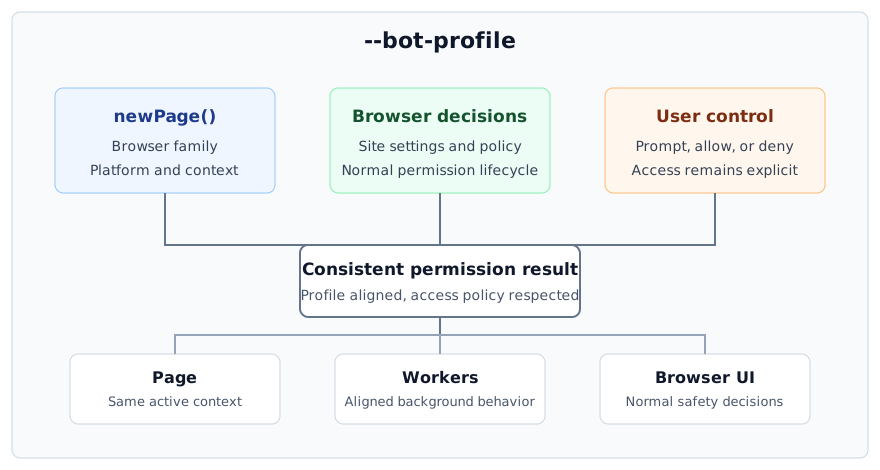
The diagram separates three inputs that are often confused. The active profile supplies browser identity. Browser settings and policy supply the current site decision. The user or authorized automation controls whether access is granted. A coherent result needs all three, but profile consistency never replaces consent.
Why Permission State Can Become a Tracking Signal
Modern permission systems need to answer many routine questions. A map wants to know whether location access has already been denied before showing a location button. A meeting application needs to present the right camera and microphone setup. A notification service avoids asking again when the browser has blocked prompts. These are legitimate product needs.
The same observable state can contribute to browser fingerprinting. Permission behavior is influenced by more than the current website. Browser family defaults, platform integration, installed policy, profile age, browsing mode, and context lifecycle can all shape what a page observes. Trackers can combine broad permission behavior with other browser traits to narrow the environment or correlate visits. Another signal of this kind is covered in JavaScript Stack Depth: A Browser Privacy Signal.
The privacy problem is not limited to a simple list of allowed and denied items. Four broader properties matter:
- Availability: whether the browser exposes a permission-related capability in the expected way for its family and version.
- State behavior: whether an untouched site, a previously denied site, and a user-approved site follow normal browser behavior.
- Execution scope: whether pages and workers associated with one context remain aligned.
- Lifecycle: whether the state changes only after a legitimate user, site, framework, or policy decision.
The practical privacy requirement is straightforward: permission results should match the selected browser profile, remain coherent inside the active context, and continue to obey real access decisions.
A Cookie Reset Does Not Reset Every Permission Decision
Clearing cookies removes one class of stored state. Permission decisions can live in browser profile data and may follow a different lifecycle. A team that rotates cookies while reusing one persistent data directory should not assume that every origin has returned to a first-visit state. For how cookies carry session and consent state and how to load a separate cookie set per identity at launch, see Browser Cookie Management for Multi-Identity Workflows.
That difference matters in testing. A clean acceptance test, a returning-user test, and a persistent-session test represent different permission histories. They should use intentional user-data-directory policies instead of relying on cookie deletion as a universal reset.
Private Browsing Is Not a Complete Permission Strategy
Private browsing changes storage and lifecycle behavior, but it does not make every browser surface uniform. It may also introduce behavior that differs from a normal profile. For authorized privacy validation, the better question is whether the chosen browsing mode matches the intended workflow and remains internally consistent.
Network Privacy Does Not Control Local Permission State
A proxy or VPN changes network routing. It does not define whether a site has camera access, whether prompts are managed by policy, or how the active BrowserContext presents a prior decision. Network privacy and permission consistency solve different problems. Production profiles usually need both layers to be configured deliberately.
What BotBrowser Keeps Consistent
BotBrowser uses the loaded profile to keep permission behavior aligned with the selected browser and platform family. The mapping applies to launch profiles and to profiles assigned to individual BrowserContexts. Page-level and browser-side decisions follow the active context rather than an unrelated host default.
This has three practical benefits.
First, a profile can move between supported host environments without inheriting accidental permission traits from the machine that runs it. The website-facing behavior remains tied to the selected profile family.
Second, headed and headless deployments can use the same profile policy. Headless execution should not create an unrelated permission identity simply because no visible browser window is present. Actual prompts and access decisions still need an appropriate automation policy, but the profile-facing behavior stays coherent. For how to compare headless and headed sessions of the same profile, see Headless and Headed Browser Profile Consistency, which walks through the supported pair, a complete journey, and storage policy.
Third, per-context workflows can keep identity boundaries intact. When each BrowserContext receives its profile before the first page or worker starts, permission behavior follows that context. One context should not become the identity source for another.
Consent and Site Policy Remain Authoritative
Permission consistency does not silently approve sensitive access. If the user, browser settings, automation framework, operating policy, or site setting denies access, the denial remains effective. A profile describes browser-family behavior. It is not a universal grant.
It also does not replace application testing. A video meeting still needs camera and microphone tests. A map still needs location tests. A notification workflow still needs user experience checks. BotBrowser provides a consistent browser identity foundation so those tests run against the intended profile instead of accidental host traits.
This distinction matters in production planning. Access automation and fingerprint protection solve different problems. Profile-backed consistency is useful when permission behavior must remain predictable without weakening the normal safety model.
Launch a Profile Before Navigation
Permission consistency is automatic when a matching profile is loaded before navigation. Use a separate user data directory when the workflow requires a clean state.
botbrowser \
  --bot-profile="/path/to/profile.enc" \
  --user-data-dir="/path/to/profile-data"
The profile package should match the BotBrowser major version. Version matching matters because browser behavior evolves. A profile prepared for another major release may not represent the active browser family accurately.
For one profile per browser process, the launch command is usually enough. Keep the same user-data-dir when permission history should persist. Use a fresh directory when the test requires a new site relationship. Do not reuse one persistent directory for unrelated identities.
Playwright Launch
Load the profile at startup, then use Playwright's normal context and permission controls for the authorized application test.
const { chromium } = require('playwright-core');

const browser = await chromium.launch({
  executablePath: '/path/to/botbrowser',
  headless: true,
  args: ['--bot-profile=/path/to/profile.enc', '--user-data-dir=/path/to/profile-data'],
});

const context = await browser.newContext({ viewport: null });
const page = await context.newPage();
await page.goto('https://your-authorized-test.example');
Application permissions remain under Playwright and browser policy. Keep those decisions explicit in test fixtures. That makes failures easier to explain and prevents a fingerprint profile from becoming an undocumented access policy.
Puppeteer Launch
Puppeteer follows the same rule: load the profile before the first navigation and keep state ownership clear.
const puppeteer = require('puppeteer-core');

const browser = await puppeteer.launch({
  executablePath: '/path/to/botbrowser',
  headless: true,
  args: ['--bot-profile=/path/to/profile.enc', '--user-data-dir=/path/to/profile-data'],
});

const page = await browser.newPage();
await page.goto('https://your-authorized-test.example');
Use these launch examples only with applications the team owns or is authorized to assess. Validate the customer-visible access flow and normal browser controls.
Per-Context Permission Consistency
Multi-context automation changes the ownership model. Each BrowserContext can represent a separate profile, session, and permission history. The profile must be assigned before that context creates its first page, worker, or other target.
The public Per-Context Fingerprint documentation contains the current integration sequence. Follow that sequence instead of changing identity-bearing settings after a context has started. Late changes can produce a mixture of old and new state, which is unsuitable for privacy validation and difficult to diagnose.
A reliable context lifecycle looks like this:
- Create the BrowserContext.
- Assign its matching profile immediately.
- Apply the test's explicit site permission policy.
- Create the first page.
- Keep identity-bearing settings unchanged until the context closes.
This sequence gives each context one clear identity owner and one clear access policy.
Persistent and Disposable Contexts
Disposable contexts are useful for tests that need a clean site relationship on every run. Persistent contexts are useful when the workflow needs remembered choices, authenticated state, and a returning-user lifecycle. Neither model is always better.
Choose based on the expected user journey:
- Use a disposable context for first-visit consent, onboarding, and clean regression tests.
- Use a persistent context for workflows that intentionally retain prior permission choices.
- Use separate storage for separate identities, even when they target the same browser family.
- Record whether a test begins from an untouched, allowed, denied, or policy-managed state.
That record is more useful than a screenshot alone. It explains why a prompt appeared, why access was unavailable, and whether a later run was supposed to remember the decision.
Build Evidence Around Real Journeys
Validate permission behavior with owned test pages and normal browser UI. Record the site origin, BrowserContext, requested capability, user decision, browser release, and profile package so later reviews can reproduce the same policy path.
Choose a few flows that represent the actual deployment. Cover the profile families, execution modes, context model, site history, and host environments the team will use. A conferencing flow can cover camera and microphone decisions. A location-aware internal application can cover location. A notification test page can cover prompt lifecycle. Representative journeys provide more useful evidence than a broad inventory of browser surfaces.
Capture four pieces of evidence:
- BotBrowser version and matching profile package version.
- Profile family and host environment.
- Initial site permission state and intended test decision.
- Observed application outcome in page content and browser UI.
Keep expected results at the capability level. For example, "the denied state remains denied after restart" is an appropriate customer-visible result.
Release Regression Checks
Permission behavior can be affected by browser upgrades, framework upgrades, policy changes, and profile updates. Add representative permission flows to release qualification when they matter to the product. For how to validate a browser and profile as one release unit with staged promotion and rollback, see Browser Release Validation: Profiles, Versions, and Rollback.
Run the same owned workflow against the previous approved release and the candidate release. Investigate only customer-visible changes. A changed prompt, a lost remembered decision, a mismatch between headed and headless runs, or behavior crossing a BrowserContext boundary deserves review.
Do not normalize every difference automatically. Browser families legitimately evolve. The right result is the one that matches the current profile package and preserves normal access semantics.
Common Configuration Problems
The Profile Was Loaded Too Late
If the first page or worker starts before the profile is active, early browser state may already belong to the default environment. Close the context and create a new one with the profile applied before any target starts. Do not attempt to repair an active identity by changing settings in place.
The Profile Package Does Not Match the Browser Version
Use a profile package prepared for the installed BotBrowser major version. When versions differ, several browser-family behaviors may no longer line up, including permissions. Upgrade the browser and profile package together, then repeat the owned workflow.
A Site Remains Denied
Check the browser's site settings, the automation framework's context settings, persistent user-data-directory history, and managed policy. Permission consistency does not override an explicit denial. Remove or change the denial only when the authorized test requires it.
A Prompt Appears in Headed Mode but Not Headless Mode
Headless systems do not provide a visible interaction surface. Configure the authorized test's permission decisions through the framework or managed policy. Then verify that the application outcome and profile behavior remain consistent. Do not assume a missing visible prompt means access was granted.
Contexts Appear to Share Behavior
Confirm that each BrowserContext has separate identity configuration and that its profile was assigned before its first target. Also check whether the framework intentionally reused storage or permission settings. Shared test fixtures can look like a browser leak when the real cause is shared setup.
The Host Machine Seems to Influence Results
Repeat the same profile and owned workflow on another supported host. Keep the profile package, browser version, site history, and test policy constant. If the customer-visible outcome changes, collect the deployment details and contact support. Avoid adding JavaScript overrides, because they can create a second source of state and make the result harder to interpret.
Production Ownership
Permission state needs one clear owner in every deployment. BotBrowser ties browser-family behavior to a versioned profile instead of an accidental host default. The same model applies to headed and headless runs, and separate BrowserContexts receive their profiles before the first target. Site denials, user choices, and managed policies remain effective throughout that lifecycle.
Operators maintain the browser and profile package as one release pair. They do not need a separate script for every permission, but they still define actual access decisions in the application test or managed policy. This separation prevents hardcoded answers from conflicting with site settings and keeps consent distinct from identity consistency.
BotBrowser is a good fit when the team already uses versioned profiles, runs across mixed host infrastructure, needs headed and headless parity, or isolates multiple identities by BrowserContext. Teams that only need to click a permission prompt in one local browser may not need profile-backed permission consistency on its own. The value appears when permission behavior must remain predictable across deployments, releases, and context boundaries.
BotBrowser can keep permission results aligned with the loaded, version-matched profile for both launch profiles and per-context profiles, so you can validate an owned permission journey against the intended browser identity instead of accidental host traits. It cannot grant camera, microphone, location, or notification access, override an explicit user, framework, site, or managed-policy denial, or replace your own application permission testing.
Privacy and Operational Practices
Use permission consistency as one part of a wider profile policy.
- Keep one persistent data directory per long-lived identity.
- Load the profile before navigation and before background workers start.
- Keep browser and profile package versions matched.
- Define site access decisions separately from fingerprint identity.
- Revalidate representative flows after browser, profile, framework, or policy updates.
- Retain only the test evidence needed for QA and support.
- Restrict tests to applications and environments the team owns or is authorized to assess.
Permission state can include sensitive history. Logs that record site decisions should be access-controlled and retained according to the same policy as other browser profile data. Avoid placing profile packages, user data directories, or permission reports in public CI artifacts.
State, Storage, and Network Boundaries
Permission behavior can contribute to a fingerprint because it reflects browser family, profile history, policy, and context lifecycle. The goal is coherent profile behavior, not one fixed answer for every site. A fresh profile may still follow family, policy, and application expectations, so operators should validate the intended journey instead of hardcoding a universal neutral state.
Cookie storage, permission history, and network routing have separate lifecycles. Clearing cookies does not necessarily reset permission choices. A proxy protects network routing but does not define local browser decisions. Clean and returning-user tests therefore need an intentional data-directory plan as well as an intentional network plan.
Headless and Multi-Context Operation
BotBrowser does not automatically grant camera, microphone, or location access. User choices, browser settings, framework settings, site state, and managed policy remain in control. No separate permission consistency flag is required because the behavior follows the loaded, version-matched profile.
The same profile model applies in headed and headless runs. Headless mode has no visible prompt surface, so authorized tests set access decisions through the automation framework or managed policy. In multi-context runs, each BrowserContext can follow its assigned profile when that profile is applied before the first target. Site history and framework settings must remain isolated as well.
Escalate a Reproducible Difference
Use an owned application or internal test page, normal browser controls, and framework-managed access decisions. Compare representative journeys across supported hosts and execution modes. Record the profile version, initial state, intended decision, and application outcome.
Contact support when a matching profile, applied before navigation, produces different customer-visible behavior across supported hosts or BrowserContexts under the same site history and access policy. Include versions and workflow steps, but do not send production credentials or unrestricted profile data.
Carry the Policy Into Deployment
Use the permission consistency documentation for the supported setup, then align it with profile management and per-context profiles. The broader fingerprinting overview explains how permission state fits with other privacy signals.
BotBrowser is intended for authorized privacy protection, compatibility testing, and research. Permission consistency keeps the selected browser identity coherent while normal browser access controls remain in force.
Practical conclusion
Load the intended, version-matched profile before navigation, keep each BrowserContext's state isolated, and test representative permission journeys with explicit user or policy decisions. Treat profile consistency as a privacy and compatibility input, not as permission to access a device. Record the browser version, profile, initial state, visible result, and limitation so a later review can distinguish a profile mismatch from a real access decision.
Sources
Public references: MDN Permissions API, W3C Permissions, and the BotBrowser permission documentation. For related context, see browser fingerprinting and per-context profiles.
This article is part of the guide: What Is a Browser Fingerprint?
Related Articles
What Is a Browser Fingerprint?
FingerprintScreen and Window Fingerprinting: Display Tracking
FingerprintWhat Is Font Fingerprinting? Cross-Platform Text Consistency
FingerprintMemory and Storage Signals in Browser Profiles
PlatformHeadless and Headed Browser Profile Consistency
FingerprintWhat Private Browsing Does and Does Not Do
Take BotBrowser from research to production
The guides cover the model first, then move into cross-platform validation, isolated contexts, and scale-ready browser deployment.