Playwright Popup vs Dialog: Page, Prompt or DOM
Distinguish a Playwright popup, a native dialog and an in-document modal by event type, page count and blocking behavior, then assert the right surface.
BotBrowser Team
Want the structured docs for Getting Started?
This article lives in the editorial library. For step-by-step setup, reference material, and ongoing updates, jump into the docs section.
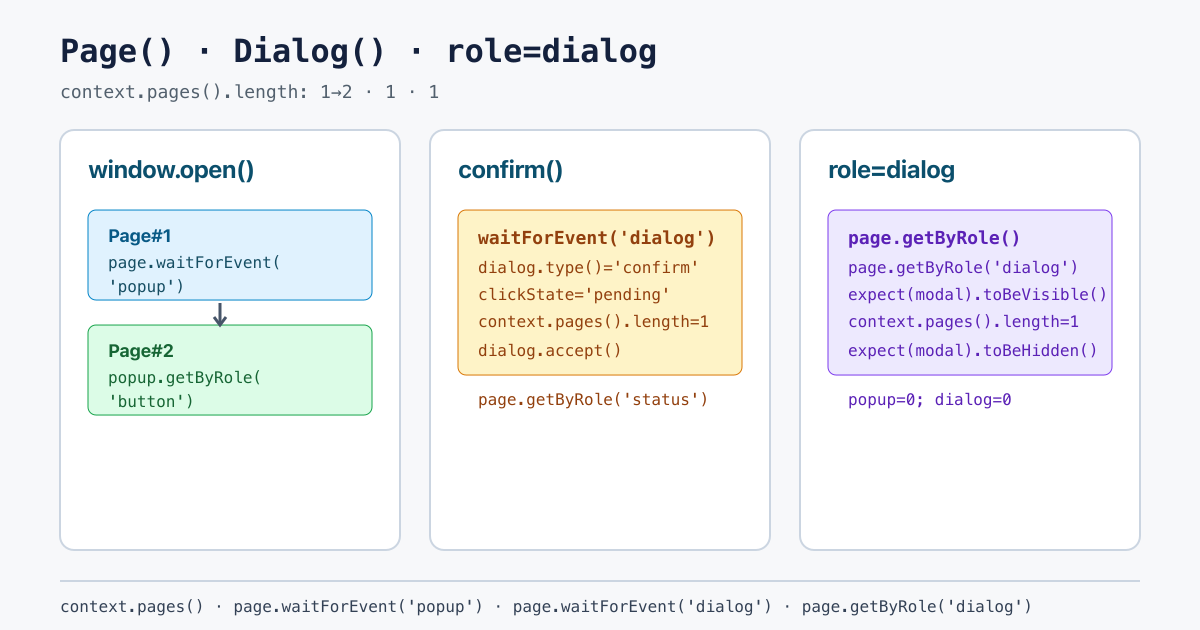
A Playwright popup is not the same surface as a native dialog, and neither is necessarily the page's own modal markup. window.open() creates another Page; confirm() raises a browser Dialog that can block the renderer; an HTML role="dialog" remains a DOM element in the current page. Identify which object opened before choosing a helper. BotBrowser supports Playwright control of its executable and profiles; it does not change these three browser-level surface types.
TL;DR
- Subscribe to
popupbefore the action that callswindow.open(), then interact through the returnedPage. - Subscribe to
dialogbefore a native confirmation can appear. Accept or dismiss it; otherwise the triggering click can remain pending. - Find an in-document modal through the page's locator API. It does not emit a Page-level
popupordialogevent. - All three owned fixtures passed; only the popup increased the page count from one to two.
- Assert the result in the page or pages where the workflow requires it. A status message in one document does not automatically prove the other.
Contents
- Identify the surface before selecting an API
- Case one: window.open creates a new Page
- Case two: a native confirm blocks the click
- Case three: an in-document dialog is DOM
- Choose assertions from the confirmation contract
- Record the event and page-count evidence
- Practical conclusion
Identify the surface before selecting an API
The same visible word, "confirm," can describe three different browser surfaces. A new-window confirmation is another browsing context. A native confirmation is a user agent prompt outside the document's DOM. An application modal is ordinary page content that the application shows, hides and styles.
The Playwright Pages documentation describes a Popup as a new Page. A Page owns its URL, locators and navigation lifecycle. The Playwright dialogs documentation describes native alert, confirm, prompt and beforeunload dialogs, their default dismissal behavior and the requirement to register a dialog handler before the triggering action when the prompt is expected.
For broader browser-context setup, Playwright browser context lifecycle and storage explains how contexts own pages and their storage. A popup can share browser-process resources with its opener while remaining a distinct Page object. The confirmation helpers below operate at the Page and Dialog level, not by treating every navigation as another context.
An HTML element with role="dialog" is not automatically a native browser dialog. It is a semantic, accessible grouping in the document. Its visibility, focus behavior and modal restrictions come from the application and its implementation, including attributes and styles the application applies.
| Observed confirmation | Playwright object | Expected page count | Event to observe | Ordinary locator target |
|---|---|---|---|---|
window.open() result | New Page | Rises from one to two | page.on('popup') or page.waitForEvent('popup') | The popup Page's own controls |
Native confirm() | Browser Dialog | Remains one | page.on('dialog') or page.waitForEvent('dialog') | No DOM query while it is open |
In-document role="dialog" | DOM element | Remains one | No Page-level popup or dialog event | Locator in the main Page |
The page count is diagnostic. It is not a universal assertion for every application: an app can open several windows, reuse an existing one, or present an in-page overlay after window.open() is disabled. The question is which object the current flow actually creates.
Those definitions matter in incident notes as much as in code. A log entry saying "confirmation popup" can mean a second browsing context, a browser prompt, or an HTML overlay. Record the object type alongside the observation so the next reader does not infer a new Page from the word "popup" alone. Record whether a click settled as well. A pending action beside a captured native prompt has a different cause from an unresolved DOM locator beside no visible modal.
The operation also determines the result assertion. A new-window checkout may commit when the user acts in the popup, while the opener merely informs its own page through messaging. A native confirm may return a boolean to the same synchronous handler that invoked it. A custom in-page dialog often owns an application-defined button and a hide rule. Tests become understandable when each step names the confirmation surface and the state transition it expects.
The browser-level distinction also matters when an iframe opens its own dialog. Playwright iframe loading and wrong-frame diagnosis explains which document owns a control before an event or locator is chosen. Likewise, Playwright networkidle timeouts and UI readiness separates page readiness from the confirmation surface itself. Another native surface sits above the page entirely: the browser's own credential prompt for an HTTP 401 challenge, which basic auth popups and HTTP credentials walks through alongside the context option that answers it.
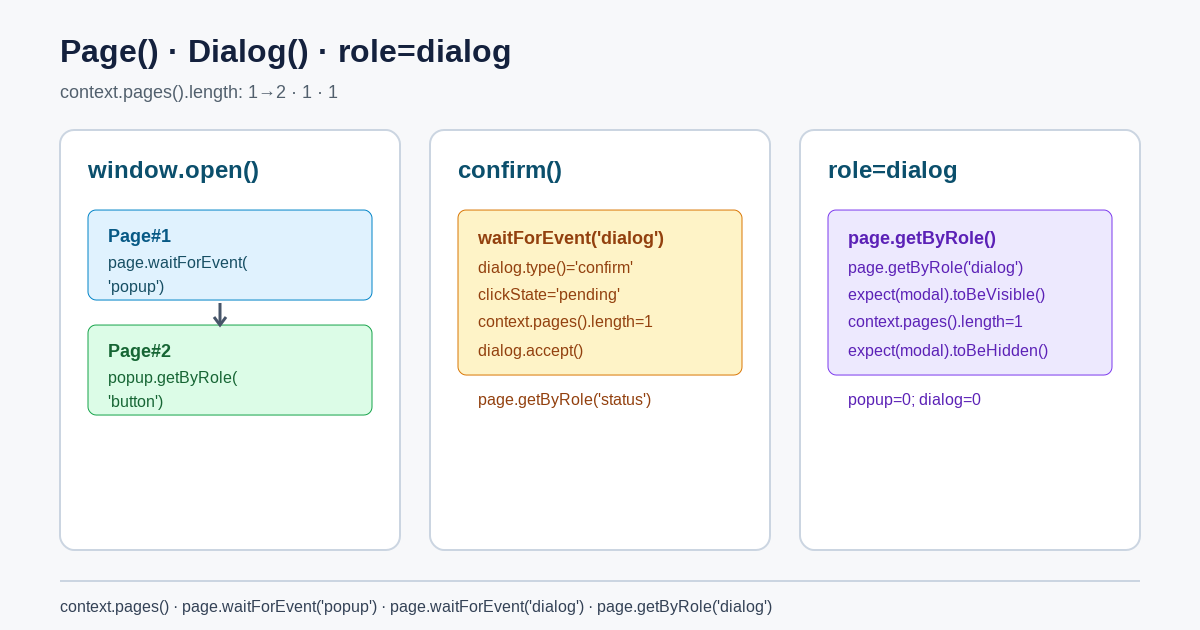
On 2026-11-18, three owned localhost cases ran with Playwright 1.58.0, stock Chrome 157.0.8103.79, and macOS arm64. Three headless browsers ran concurrently at a 1180 × 750 viewport. The runner completed in 3778 milliseconds with pass: 3 and fail: 0.
The run used ordinary Chrome, not BotBrowser, and exercised only same-origin pages under a local HTTP server. It measured the selected API and UI state, not a BotBrowser profile's timing or a production checkout.
Case one: window.open creates a new Page
The main page has a button that calls window.open('/popup', 'order-confirmation', ...). The popup document contains its own button and status element. The opener registers a message listener that updates its own status only after the popup reports confirmation through a same-origin postMessage call.
The runner registered the popup waiter before clicking:
const popupPromise = page.waitForEvent('popup', { timeout: 3000 });
await page.getByRole('button', { name: 'Open new window' }).click();
const popup = await popupPromise;
await popup.waitForLoadState('domcontentloaded');
Registering the waiter first prevents a fast same-origin window from being missed. After the event, context.pages() contained two pages and popup.opener() resolved to the original page. The main page's copy of the popup's Confirm popup order button had a count of 0; the popup's copy had a count of 1.
await expect(
  page.getByRole('button', {
    name: 'Confirm popup order',
  })
).toHaveCount(0);
await expect(
  popup.getByRole('button', {
    name: 'Confirm popup order',
  })
).toHaveCount(1);
The new Page first appeared with an empty URL in the event callback. That startup value is not a reliable assertion target. The runner waited for the popup's document to reach domcontentloaded, then recorded its URL as /popup. Use the page's ready state and the control or content the test needs, rather than assuming url() is populated at the instant the popup event fires.
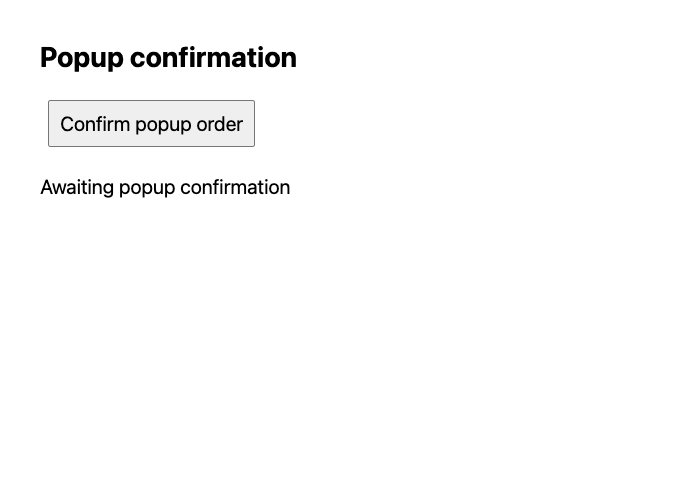
Clicking the popup button updated the popup's status to Popup order confirmed. The fixture then sent a same-origin message to its opener, which updated the main page's status to the same text. Both assertions matter when the application promises confirmation in both surfaces:
await popup
  .getByRole('button', {
    name: 'Confirm popup order',
  })
  .click();
await expect(popup.getByRole('status')).toHaveText('Popup order confirmed');
await expect(page.getByRole('status')).toHaveText('Popup order confirmed');
The message relay is part of this fixture's application contract. In another app, the popup may be an independent page, the opener may close, or cross-origin isolation may prevent using the opener's JavaScript. The Window index documents window handles and cross-origin restrictions. A Playwright Page lets the test control a page; it does not remove the browser's origin boundary from application code.
Do not use page locators for a control that exists only in the popup, and do not assume that clicking the opener's nonexistent copy will enter the new page. A popup event gives the test the new Page object; choose its locator scope from the control's actual document.
Case two: a native confirm blocks the click
The native case has one page with a button whose handler calls confirm('Confirm native order?'). The handler assigns Native order confirmed to the status element only if confirm() returns true.
The runner again registered the event wait before the action. It then started the click without awaiting it immediately, because a native dialog can prevent the click from completing until the prompt is handled:
const dialogPromise = page.waitForEvent('dialog', { timeout: 3000 });
const clickResult = page
  .getByRole('button', {
    name: 'Open native confirm',
  })
  .click({ timeout: 4000 });
const dialog = await dialogPromise;
expect(dialog.type()).toBe('confirm');
expect(dialog.message()).toBe('Confirm native order?');
The dialog was registered on the same Page. While the event was deliberately left unhandled for 181 milliseconds, the click remained pending and context.pages() remained at one. The native prompt did not add a Page, and its dialog event was not a DOM modal.
The native prompt blocks interaction with that page. While it is open, do not attempt to query the document or take an ordinary page screenshot: those calls can remain blocked in turn. Read the dialog through the Dialog API, accept or dismiss it, then resume assertions against the page.
This behavior changes how a test should be structured. Put the dialog handler in place before the user action, retain the action's promise, and resolve the prompt from the handler. Do not add a generic wait after starting the click in the hope that the page will become responsive by itself. If the test needs a rejected confirmation path, call dismiss() and assert the application's cancelled state instead of assuming that the same handler produces both outcomes.
The native prompt also does not expose a DOM locator with the prompt text or its buttons. Browser chrome is outside the page document that Playwright's ordinary locators traverse. For that reason, a visible button named "OK" in the browser's own confirmation UI cannot be found through page.getByRole('button'). The Dialog API is the control surface; the page's resulting status is the application state to verify afterward.
Keep the distinction between the event and the application result. The event says that a native prompt opened. It does not establish that the user accepted it, that the application received the expected value, or that an order was persisted. The fixture's post-accept status assertion checks that handler path in this run. A production workflow may need a request assertion, saved record or follow-up UI check depending on its actual contract.
await dialog.accept();
const outcome = await clickResult;
expect(outcome).toBeUndefined();
await expect(page.getByRole('status')).toHaveText('Native order confirmed');
After accept(), the click completed and the document's status showed Native order confirmed. There was still one Page, zero popup events, one native dialog event, and zero visible DOM dialogs. The fixture added a confirm event at page time 157.7 milliseconds and returned true at 341.4 milliseconds.
If the application expects a prompt, attach the handler before the action that opens it. Playwright's default behavior dismisses an unhandled dialog, which would make a confirm return false. A test that relies on a previous accidental handler, or attaches after the action, can change the application result.
An alert or prompt has a different return contract from confirm. Check the dialog's type() and message, then call accept() with an argument only when the API supports it and the application expects a value. Handle beforeunload deliberately; it is not a business confirmation button.
Case three: an in-document dialog is DOM
The third case starts with a hidden <section role="dialog" aria-label="Document confirmation">. It contains a second button and no native prompt. The main button only changes the section's hidden property to false.
The runner prepared a locator and checked the initial page count before opening it:
const modal = page.getByRole('dialog', {
  name: 'Document confirmation',
});
await expect(modal).toBeHidden();
await page
  .getByRole('button', {
    name: 'Open document dialog',
  })
  .click();
await expect(modal).toBeVisible();
Opening this modal kept context.pages() at one. The popup event count and native dialog event count both remained zero, while the visible DOM dialog count became one. The confirmation button's ownerDocument.URL was the main page's local URL.
This third surface is tested through the same Page and ordinary locator actions. Its accessible name, visibility and focus behavior depend on application markup. A role="dialog" declaration alone does not create a native browser modal or make its contents inaccessible to the rest of the document. If focus must be trapped or background controls disabled, the application must implement and test that behavior separately.
await modal
  .getByRole('button', {
    name: 'Confirm document order',
  })
  .click();
await expect(modal).toBeHidden();
await expect(page.getByRole('status')).toHaveText('Document order confirmed');
The document surface recorded dom-dialog-trigger at page time 159.4 milliseconds and dom-confirm-click at 303.8 milliseconds. The click changed page content: the modal became hidden and the status changed. It did not create a new browsing context or a browser-level dialog.
Use ARIA snapshot reviews when the accessible structure of this modal changes. For an action that still stalls, Playwright tracing for test debugging preserves the action timeline and page snapshots. A visible screenshot can show a box and button while the accessibility tree has lost the dialog's name or reading order. Conversely, an ARIA tree does not prove the click handler changed the business state. Both observations describe different parts of the contract.
Choose assertions from the confirmation contract
All three fixtures reached a confirmation status, but the API that creates and controls the surface differed. That distinction should be explicit in the test helper or Page Object method:
| Contract question | Popup | Native dialog | In-document modal |
|---|---|---|---|
| Which object owns the control? | New Page | Dialog, with the click pending | DOM locator in the current Page |
| What must be prepared before the trigger? | popup waiter | dialog handler or waiter | Modal locator and initial state |
| Does the page count change? | Yes, in this fixture | No | No |
| How is confirmation accepted? | Click the popup control | dialog.accept() | Click the modal control |
| Where is the result asserted? | Popup and/or opener as promised | Main Page after handling the dialog | Main Page DOM status and modal state |
A single test helper named confirmOrder() can hide this distinction. At minimum, its implementation should make visible whether it awaits a Page event, handles a Dialog, or clicks a DOM button. Otherwise a timeout says only that the helper's model of the confirmation failed, not which API surface the application used.
The issue is not merely choosing getByRole() versus locator(). The test must first attach the event or locate the object that the application actually creates. Page-level event handlers do not turn an in-page modal into a popup. A native dialog cannot be trusted to getByRole() while it is blocking the page. An ordinary DOM locator cannot search the controls inside another Page.
BotBrowser's Playwright integration documentation documents launching its executable under Playwright and applying profile configuration, but it does not choose whether the application opens a new Page, raises a native Dialog or shows an in-document modal. That setup establishes the browser control path while the application owns the confirmation surface. The owned fixture cannot generalize a timing result to BotBrowser, and it does not claim cross-origin popup behavior.
Record the event and page-count evidence
Use a minimal diagnostic probe on an owned page already authorized for inspection. It records the event and page count before the application action, then closes the browser. It does not attempt to query the DOM while a native dialog is open.
import { chromium } from 'playwright';

const targetURL = process.argv[2];
if (!targetURL) throw new Error('Pass an authorized page URL');

const browser = await chromium.launch();
try {
  const context = await browser.newContext();
  const page = await context.newPage();
  const events = [];
  page.on('popup', popup =>
    events.push({
      event: 'popup',
      url: popup.url(),
      pages: context.pages().length,
    })
  );
  page.on('dialog', dialog =>
    events.push({
      event: 'dialog',
      type: dialog.type(),
      message: dialog.message(),
      pages: context.pages().length,
    })
  );
  await page.goto(targetURL, { waitUntil: 'domcontentloaded' });
  console.table(await page.getByRole('button').allTextContents());
  console.log(events);
} finally {
  await browser.close();
}
This listener reports events but does not handle a native dialog. For a real native interaction, use page.once('dialog', ...) or waitForEvent() that accepts or dismisses the prompt, and await the app-specific assertion after it. A separate diagnostic must not leave a prompt open.
In a failure report, record the page's current URL, the number of pages in its context, the events observed, the dialog type and the relevant button counts. Those facts separate "the new window did not appear" from "the browser modal is waiting for a handler" and from "the modal markup is missing or still hidden." The Playwright Page API documents popup and dialog events; the Dialog API documents accept and dismiss.
FAQ
Is a native dialog a new Page?
No. It is a browser Dialog associated with a Page. In the native fixture the page count stayed at one. A popup from window.open() creates a new Page and therefore changes the context's page collection.
Can I query DOM elements while confirm() is open?
The native prompt blocks interaction with its Page. Handle the dialog first, then assert the DOM. Do not depend on a screenshot, locator count or button action completing while the prompt is still unhandled.
Does role=dialog mean Playwright's Dialog API?
No. A role="dialog" element is DOM content. Playwright's Dialog type represents a browser-level modal event. The fixture's document modal remained ordinary page content with a zero native-dialog event count.
Should I check both popup and opener results?
Only when both are part of the application contract. The fixture asserted both because its popup sent a message to the opener. A popup that independently confirms an order may require a receipt assertion in that page and, if promised, a separate check in the original page.
Sources
- Playwright: Pages and popups
- Playwright: Native dialogs
- Playwright: Page class
- Playwright: Dialog class
- MDN: Window
- MDN: Window.open
- MDN: Window.confirm
- WAI-ARIA: dialog role
- BotBrowser: Playwright integration
Practical conclusion
For a Playwright popup that opens another page, retain and interact with the resulting Page. For a native confirmation that blocks the action, handle its Dialog before asserting page content. For an application modal, use the current Page's locators and test the markup's visibility and accessible behavior. Determine the surface from the browser event and page count, then assert the confirmation where its result is promised.
This article is part of the guide: Browser Automation Getting Started: A First Run Map
Related Articles
Playwright Strict Mode Violation: Fix Duplicate Matches
Getting StartedPlaywright networkidle Timeout: Wait for the UI
Getting StartedPlaywright Basic Auth: 401 Loop, Popup and Credentials
PlatformPopover API: Focus, Light-Dismiss, and Accessible Fallbacks
Getting StartedPlaywright Iframe Not Loading? Check the Frame
Getting StartedPlaywright Wait for Response After Click: Fix the Race
Run the same check in BotBrowser
Load a profile, keep the signals you just read about consistent inside the browser, and confirm the result on your own machine before a rollout.