Popover API: Focus, Light-Dismiss, and Accessible Fallbacks
Use popover=auto or manual with a clear top-layer, Escape, focus, event, and fallback contract for accessible web interfaces.
BotBrowser Team
Want the structured docs for Platform?
This article lives in the editorial library. For step-by-step setup, reference material, and ongoing updates, jump into the docs section.
The Popover API can make non-modal menus, teaching bubbles, and command panels easier to coordinate, but its defaults are part of the interaction contract. BotBrowser supports replaying an authorized fixture and recording visible open, close, and focus outcomes; it cannot guarantee a browser's assistive-technology behavior or turn a proposed fallback into shipped support. Pair this guide with pointer-event accessibility checks and browser automation accessibility testing when a journey mixes pointer and keyboard input.
TL;DR
- Choose
popover="auto"for a light-dismissable, non-modal surface; choosemanualwhen another control owns every close decision. - A popover is placed in the top layer, but top-layer placement does not create a dialog focus trap or an accessible name.
- Test
Escape, outside clicks, focus return, and theinertbackground as separate outcomes. beforetoggleis the cancellation point;togglereports the committed transition, including a fallback when the API is unavailable.
Contents
- Choose the state model
- Top layer and light-dismiss
- Focus and inert are separate contracts
- Observe beforetoggle and toggle
- Build a useful fallback
- Run a bounded interaction matrix
- Practical conclusion
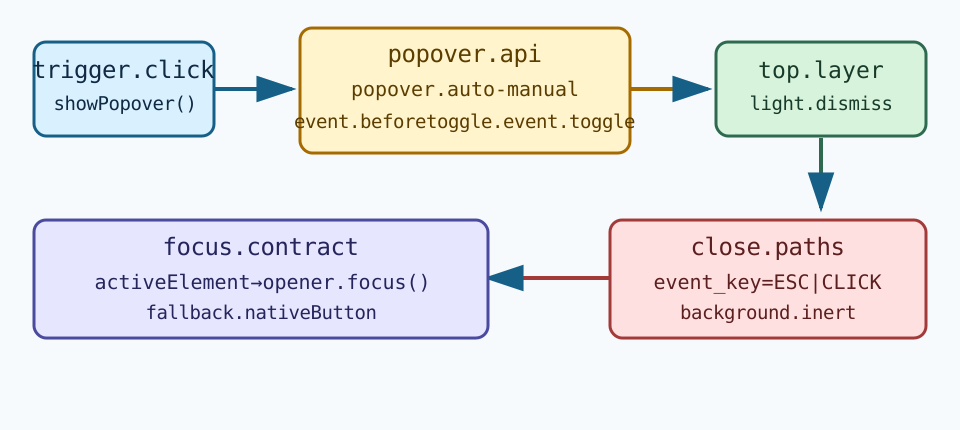
Choose the state model
The WHATWG HTML specification defines the popover content attribute and the algorithms that show and hide a popover. popover="auto" is the default choice for a non-modal surface that can be dismissed by the user. An auto popover participates in the popover stack, so opening another auto popover can close the previous one. popover="manual" leaves those close decisions to application code; it is useful when several related surfaces must stay open or when a workflow has an explicit “done” action.
Do not use the attribute as a synonym for <dialog>. A popover is not automatically modal, does not automatically trap focus, and does not automatically supply a name. Use a real button as the invoker, connect it with popovertarget, and give the surface an accessible name when its contents need one. A menu still needs menu semantics only when its behavior really is a menu; adding roles to make a visual box look sophisticated does not define keyboard behavior.
The MDN Popover API guide documents the declarative and JavaScript entry points, including showPopover(), hidePopover(), and togglePopover(). Feature detection should check the method or HTMLElement.prototype.popover before selecting an imperative path. Keep the product decision visible: the surface should explain what it contains, how to close it, and what remains available behind it.
Top layer and light-dismiss
When shown, a popover is promoted to the browser's top layer. This avoids ordinary stacking-context problems and gives the browser a defined light-dismiss behavior for auto popovers. Top-layer placement does not mean that the surface is centered, immune to clipping, or positioned correctly for every visual viewport. A narrow window, zoom, virtual keyboard, or embedded frame can still make a close control hard to reach.
For auto, press Escape and click outside the popover as two distinct test paths. The browser may close the popover before application code handles a later event, so cleanup must be idempotent. For manual, neither light-dismiss nor the auto stack supplies the same close behavior; provide a close button and an explicit event path. Never rely on a transparent overlay that swallows clicks while leaving the underlying page semantically available.
The Chrome introduction to Popover API describes the platform's top-layer and light-dismiss goals. Treat that announcement as an explanation of the feature, not proof that every browser, embedded web view, or assistive technology exposes identical behavior. Record the browser version and viewport in a compatibility note, then assert the visible outcome rather than a particular paint order.
Focus and inert are separate contracts
Showing a popover does not guarantee that focus moves into it. If a user activates a button with the keyboard, decide whether focus should stay on the invoker, move to the first meaningful control, or remain on a field outside the surface. The choice depends on whether the popover is a suggestion, a menu, a filter editor, or an informational hint. Make the decision deterministic and preserve a reference to the opener for focus return.
Closing should return focus to a still-visible, still-enabled control. If the opener was removed, use a documented fallback such as the nearest heading or the next workflow control. Do not call focus() on a detached node, and do not move focus merely because toggle fired for an unrelated popover. A screen reader announcement should describe a meaningful state, not every internal event.
An auto popover can make the rest of the page inert while it is open according to the HTML popover model, but that is not a replacement for checking the actual interaction. Test whether keyboard traversal, pointer clicks, and assistive-technology navigation can reach the intended controls. A manual popover may leave the background available by design. If the product needs a modal task, <dialog> with showModal() expresses that intent more directly; a popover can still be used for a non-modal companion surface.
The WCAG keyboard guidance and focus-visible guidance provide the acceptance boundary. Do not infer accessibility from a screenshot or from document.activeElement alone. Check the name, role, state, focus indicator, and the next available action.
Observe beforetoggle and toggle
beforetoggle fires before a popover changes between open and closed. It is the place to reject a transition that conflicts with application state or to prepare a focus decision. A handler should be short and should not assume the transition will complete. The event's newState and oldState identify the requested direction; application code still owns the result shown to the user.
toggle fires after the state transition is committed. Use it to update a local status, reconcile a focus reference, or record a bounded outcome such as opened or closed-by-escape. Rapid changes may be coalesced, so do not treat one event per click as a durable audit log. Keep raw page text and user identifiers out of telemetry; a state label and a fixture id are usually enough.
const trigger = document.querySelector('#filters-button');
const panel = document.querySelector('#filters-panel');
let opener = null;

trigger.addEventListener('click', () => {
  opener = document.activeElement;
  panel.togglePopover();
});
panel.addEventListener('beforetoggle', event => {
  if (event.newState === 'open' && !trigger.isConnected) event.preventDefault();
});
panel.addEventListener('toggle', event => {
  if (event.newState === 'closed' && opener?.isConnected) opener.focus();
});
The example is a coordination pattern, not a promise that every browser delivers identical event timing. A cancelled beforetoggle should leave the surface and focus in a usable state. A fallback implementation must emit its own equivalent application state so tests do not silently pass because the event API is missing.
Build a useful fallback
A fallback should preserve the task, not merely show a static paragraph. Feature-detect the API, then use an ordinary button, an initially hidden region, and a close button with a stable aria-controls relationship. Keep the same content and focus order. If the preferred surface was an auto popover, the fallback can use a positioned region with an explicit outside-click listener; if it was meant to be modal, use a supported dialog pattern rather than pretending that popover="manual" is modal.
Fallback code must handle a missing showPopover() method, a rejected focus operation, a removed opener, and a viewport that changes while the panel is open. Avoid loading a second accessibility library solely to imitate top-layer painting. The product should explain “Filters opened” or “Filters closed” through its normal status mechanism, and a close button should remain reachable with keyboard and touch.
BotBrowser can run this declared fixture in an authorized browser context and compare the visible open, closed, focus, and fallback states. It cannot certify a screen reader's speech, guarantee a native top layer on every browser build, or claim that a profile setting changes the web platform's implementation. Keep those limits in the test record and in support copy.
Run a bounded interaction matrix
Use a small matrix that names the user action and expected result:
| Path | Expected result | Failure to investigate |
|---|---|---|
Keyboard invoke, auto | Surface opens, focus decision is visible, Escape closes | Focus vanishes or background remains unexpectedly active |
Pointer outside click, auto | Surface closes once and returns focus | Duplicate cleanup or a click reaches the wrong control |
Close button, manual | Application hides the surface and restores the opener | Manual surface stays open because no code owns close |
| API unavailable | Equivalent content and keyboard route remain available | Static or unreachable fallback |
| Viewport shrinks | Close action stays visible and content remains readable | Visual viewport clips the only exit |
Repeat the rows with zoom, reduced motion, touch, and a narrow viewport. Check document.activeElement, the visible focus indicator, the accessible name, and the next action after every close path. Keep the fixture synthetic and log only the state labels needed to explain a failure.
The matrix becomes more useful when each row has an owner and a stop condition. The component owner can own the beforetoggle decision, while the journey owner owns the expected focus destination and the support owner owns the browser compatibility note. A row is complete when the surface is either closed with a usable next control or remains open with a reachable close action. “The click handler ran” is not a sufficient stop condition because it says nothing about the top layer, accessible name, or focus ring.
When a row fails, compare the first changed field rather than collecting a larger trace. If apiAvailable changes, check the feature-detection branch and the fallback content. If closeReason changes, inspect the close owner and whether an outside click crossed an iframe boundary. If focusAfterClose changes, check whether the opener was replaced during rendering. If viewport changes, inspect the visual viewport and the position of the close control. This order keeps a browser compatibility investigation bounded and prevents a fallback bug from being described as a user or device property.
The same record can support a release review. Pin the fixture revision, browser version, viewport, zoom, input mode, and reduced-motion preference. Keep the expected result in plain language next to the technical fields, for example: “After Escape, the filter button is visible, focused, and ready to activate again.” Do not infer a screen reader's announcement from that sentence. A qualified accessibility review may add a separate observation, but it should reference the same state transition and preserve the same privacy boundary.
For a manual popover, test ownership during teardown explicitly. Navigate away while the panel is open, remove the trigger, and replace the component in a framework update. The close routine should run once, remove listeners, clear the opener reference, and leave the next route usable. For an auto popover, open a second surface and verify the intended stack behavior instead of assuming that both surfaces remain visible. These cases catch lifecycle defects that a single click-and-screenshot check misses.
Finally, review translated labels and long content at the same states. A focus ring, close button, or error message can move when the locale grows, even though the Popover API state is correct. The fallback must preserve the same heading, close name, and next action in every supported locale. This is an application layout and content contract, not evidence that the browser identifies a language or device.
Keep the support note close to the fixture. State which browsers are in scope, which behavior is optional, and what a person can do when the preferred API is absent. That short note prevents a compatibility table from becoming a promise about all embedded views. It also gives support staff a concrete next step: ask for the visible state, the close path, the focus target, and the fallback result, rather than requesting private page content.
Keep the preferred and fallback paths in one review record. Name the trigger, surface, close owner, focus destination, and state a reviewer can see. A useful entry might contain fixtureId, mode, openerSelector, closeReason, focusAfterClose, apiAvailable, and viewport. It should not contain a page dump, a screen-reader transcript, an account identifier, or every pointer coordinate. This narrow shape lets a team compare a browser upgrade without turning an interaction test into a user profile.
The choice between auto and manual belongs in that record. With auto, expected close reasons are browser light-dismiss paths plus an explicit close control. With manual, the application must state which handler owns outside clicks, Escape, route changes, and teardown. If more than one component can call hidePopover(), make the owner visible and make repeated calls harmless. Distinguish closed-by-escape, closed-by-outside-click, closed-by-action, and closed-by-route; these labels explain a failure without claiming universal event order.
Focus recovery deserves explicit before-and-after fields. Capture the semantic control that had focus before opening and the control that receives focus after closing. If the opener is removed, record the selected fallback and why it remains reachable. A successful focus() call does not prove that a screen reader announced the right context. Pair the DOM assertion with a manual assistive-technology review when that outcome matters, and keep the evidence types separate.
An embedded document can own its popover while the top-level page owns the viewport and navigation. A click outside an iframe is not necessarily an outside click inside it, and a route change can remove the opener before the child receives a toggle event. Define ownership before adding a postMessage bridge. Send a short state such as filters-open or filters-closed, not panel contents. The parent should not infer child focus from a message unless the child explicitly exposes that contract.
The same boundary applies to workers and portals. A worker cannot move document focus, and a framework transition can replace the opener while a popover remains visible. Teardown must call the same idempotent close routine as Escape and outside click. In a component library, expose one close command and one focus-return policy rather than competing document listeners. This keeps the fallback reviewable and prevents a hidden panel from retaining stale listeners.
When the popover also needs to stay beside a moving trigger, use the CSS anchor positioning boundary guide to test anchor-name, fallback candidates, and clipping separately from focus ownership.
Practical conclusion
Choose auto or manual from the desired close ownership, then test top-layer placement, light-dismiss, Escape, focus return, inert behavior, and fallback as separate contracts. The WHATWG algorithms, MDN guidance, and Chrome announcement describe the platform; BotBrowser can help repeat an authorized visible fixture, while the application remains responsible for semantics, focus, and accessible recovery.
Sources
- WHATWG HTML: the popover attribute
- MDN Popover API
- Chrome: Introducing the Popover API
- WCAG 2.2 keyboard guidance
FAQ
Is popover="auto" a modal dialog?
No. It provides a non-modal popover model with browser-managed dismissal. Use <dialog> and showModal() when the task genuinely requires modal semantics.
Does top layer move focus automatically?
No. Decide where focus goes and how it returns, then test the opener, close control, and removed-opener fallback.
Should every popover close on outside click?
No. auto is designed for light-dismiss; manual gives application code ownership of the close path. Choose from the task and make the close action discoverable.
This article is part of the guide: Web Platform Surfaces: A Consistency Review Map
Related Articles
Pointer Events and Accessible Input Across Mouse, Touch, and Pen
Getting StartedBrowser Automation Accessibility Testing Guide
PlatformCSS Anchor Positioning: Layout and Overlay Boundaries
PlatformSpeech Synthesis Voices and Accessible Browser Playback
PlatformWeb Share API: Permission Boundaries and Safe Fallbacks
PlatformNavigation API history and privacy boundaries
Take BotBrowser from research to production
The guides cover the model first, then move into cross-platform validation, isolated contexts, and scale-ready browser deployment.