Playwright ARIA Snapshot: Review the Diff Before Updating
Review a Playwright ARIA snapshot diff by separating captured names, partial-match templates and visual changes before updating an expected snapshot.
BotBrowser Team
Want the structured docs for Getting Started?
This article lives in the editorial library. For step-by-step setup, reference material, and ongoing updates, jump into the docs section.
A Playwright ARIA snapshot diff can reveal a changed button name even when its screenshot looks unchanged. Check the actual captured tree, the expected template and the intended interface contract before updating the expectation. BotBrowser can supply a Playwright-controlled Chromium executable and browser profile; it cannot decide whether a new accessible name is correct or turn a passing snapshot into an accessibility audit.
TL;DR
locator.ariaSnapshot()captures an accessible representation.toMatchAriaSnapshot()checks that representation against a template whose omissions matter.- A template containing only
- buttoncan accept different button names. Its pass does not establish that a name change is harmless. - An exact-name template catches the name difference; a CSS-only change may preserve that template while changing the rendered image.
- Fix an unintended name in the application. Update an intended name in the expectation only after checking the requirement and relevant behavior.
Contents
- Captured trees and matching templates answer different questions
- Scope the capture to the state under test
- A role-only match can hide a name regression
- Compare the name and style variants separately
- Choose a repair before updating the baseline
- Pair semantic checks with the missing observation
- Practical conclusion
Captured trees and matching templates answer different questions
The word snapshot describes two objects that need separate treatment. One is the YAML string returned by locator.ariaSnapshot(): a captured representation of accessible roles, names, states and content within the locator's scope. The other is the template passed to expect(locator).toMatchAriaSnapshot(): the conditions the assertion will enforce. A shorter template need not describe everything the capture contains.
The Playwright ARIA snapshot documentation states the distinction directly: “A template is a constraint, not necessarily a complete serialization of the accessibility tree.” That matters when a test passes after the interface changes. The browser may expose the new name correctly while the expected template never required the old name. Nothing was silently repaired by the matcher; the assertion asked a weaker question.
For a button, three facts can diverge: its visible text, its accessible name and its CSS presentation. The WAI-ARIA naming guidance describes aria-label as a string name that is not visually rendered. Changing that attribute can alter the captured YAML without changing the visible label. Conversely, changing a background color or border can leave the role and name intact. Neither representation contains every property of the other.
Consider an owned settings panel with a single Save control. If its accessible name changes from a specific action to a vague term, the review question is whether that new name still communicates the intended operation. Counting changed YAML lines cannot answer it. A one-line name change may affect how a user identifies the control, whereas many changed lines could result from a deliberate reordering of an otherwise correct panel.
The locator API documents ariaSnapshot() as capture and points separately to the matching assertion. Keep both outputs when diagnosing a mismatch: the actual capture identifies what was exposed, and the template identifies what was required. A report that says only “snapshot passed” leaves the most important test condition unspecified.
An ARIA snapshot is also a particular accessible representation produced by the installed Playwright/browser combination. It is useful for regression assertions, but its YAML is not a transcript of a screen reader session. The wider browser automation accessibility-testing workflow separates structural checks from keyboard, assistive-technology and other accessibility evidence. A matched role/name tree supplies one part of that evidence.
Scope the capture to the state under test
A useful assertion starts with a stable application state and a locator that identifies the relevant component. Capturing the whole page can include a changing navigation count, a notification or unrelated sidebar content. Replacing all of those values with permissive patterns makes the assertion harder to interpret. Select the settings panel first, then express the contract for the controls whose semantics matter.
The following Playwright Test example is an independent, copyable demonstration. page.setContent() creates original owned markup; no remote page, authenticated account or application backend is involved. The first assertion establishes that the particular panel is present before its accessible representation is captured. The example deliberately uses one button so that scope and template behavior are easy to inspect.
import { test, expect } from '@playwright/test';

test('settings action keeps its accessible name', async ({ page }) => {
  await page.setContent(`
    <section aria-label="Settings">
      <h2>Delivery preferences</h2>
      <button aria-label="Save settings">Save</button>
    </section>
  `);

  const settings = page.getByRole('region', {
    name: 'Settings',
    exact: true,
  });
  await expect(settings).toBeVisible();
  console.log(await settings.ariaSnapshot());

  await expect(settings.getByRole('button')).toMatchAriaSnapshot(`
    - button "Save settings"
  `);
});
Here, getByRole('button') stays usable when the name changes, allowing the assertion to report the semantic mismatch. If the locator instead requires name: 'Save settings', changing that name can make the locator stop resolving before the snapshot comparison. That is still a useful failure, but it is a different diagnostic path. Distinguish “the old locator cannot find the control” from “the selected control exposes a different name.”
For an application that loads settings asynchronously, visibility alone does not establish that the final data has arrived. Wait for a component-specific loaded state or expected field value before capturing. Avoid treating an arbitrary waitForTimeout() duration as a definition of readiness. Otherwise a loading skeleton and a completed panel become competing snapshot candidates, even though the regression concerns neither of them.
Keep the scope equal across baseline and changed variants. Capturing the panel in one variant and the entire body in another introduces a structural difference unrelated to the intended experiment. Record the Playwright version, browser version, viewport and owned markup alongside a reproducible comparison. They allow a later failure to be separated from a change in the test environment rather than guessed from the YAML alone.
The capture itself does not assert that Save is enabled, that clicking it works or that a request succeeds. Those requirements need their own checks. Adding a snapshot to a form test should identify a specific semantic contract, such as the action name, instead of replacing the test that verifies the action's result. A panel may expose an excellent name while its click handler is broken.
A role-only match can hide a name regression
Official Partial matching documentation demonstrates a button template with the name omitted. It explicitly says the test can then pass regardless of the button's label. Omitting a name is an assertion choice, not a request for Playwright to infer which labels are equivalent. If names are the subject of the regression, that omission removes the condition the test needs.
Extend the owned example by changing only aria-label. A role-only assertion and a named assertion now ask different questions about the same control. The role-only result is expected to remain successful because the button role survives. The named result should fail because the required literal is absent. The negative assertion below belongs in this controlled demonstration; a normal regression test should retain its positive requirement and fail on the wrong name.
await page.setContent(`
  <button aria-label="Save settings">Save</button>
`);
const button = page.getByRole('button');

await expect(button).toMatchAriaSnapshot('- button');
await expect(button).toMatchAriaSnapshot('- button "Save settings"');

await button.evaluate(element => {
  element.setAttribute('aria-label', 'Apply');
});

await expect(button).toMatchAriaSnapshot('- button');
await expect(button).not.toMatchAriaSnapshot('- button "Save settings"');
An actual capture after the mutation still contains the new accessible name. The role-only template did not cause the browser to discard it. It merely did not constrain it. This distinction prevents a common review error: seeing a successful flexible match and concluding that the actual tree stayed the same. Compare the captured strings when the question is whether the representation changed; inspect the template when the question is why the assertion passed.
Name matching is also not a synonym for byte-for-byte string comparison of an entire capture. The official matching rules normalize whitespace within names and text values, and their structure is order-sensitive. Use the API's documented semantics for the installed version. A direct equality assertion on two captured strings answers whether those serialized strings match, with the stricter consequences that string equality entails.
Regular expressions can deliberately relax a changing value while preserving meaningful content. A count such as an issue total may vary legitimately, whereas an action name may be a stable requirement. Avoid a pattern broad enough to accept both the intended label and the very regression under investigation. Document which variation is irrelevant before weakening the template; a matcher cannot supply that product decision.
Similarly, omitting state attributes means those attributes are outside that template's constraints. The official example describes a checkbox match that omits checked and therefore does not enforce the checked state. A role-only checkbox assertion cannot replace a selection-state assertion. Match the property the requirement names rather than assuming that a successful snapshot covers every accessible attribute.
Child matching deserves the same attention. A small template should not automatically be described as a complete inventory of every descendant. Current documentation describes configurable child-matching behavior, but syntax can differ from older installed versions. The button examples avoid those version-specific child options: one selected button, one role condition and, where required, one literal accessible name make the enforced contract explicit.
Compare the name and style variants separately
On 2026-11-18, the owned local fixture ran with Playwright 1.58.0, stock Chrome 157.0.8103.79 and macOS darwin arm64. Each of the three variants used an independent browser, with their lifetimes overlapping. The viewport was 640 × 320 at device scale factor 1. The run record, docs/evidence/playwright-aria-snapshot-diff-review-run-20261118.json, retains the inputs, actual captures, public matcher results and screenshot hashes.
The baseline's visible text and aria-label were both Save changes, with background #2563eb. The name variant changed only aria-label to Publish changes. The style variant kept the baseline markup and changed the background to #c2410c. The selected button and both matcher templates remained the same across conditions; no hidden-element or display-state mutation was involved.
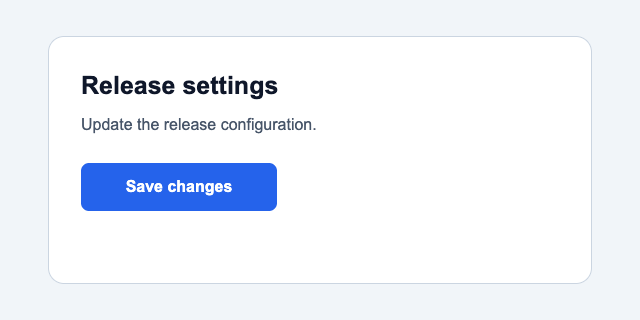
The baseline screenshot establishes the rendered reference. Its button-level capture was exactly - button "Save changes". Both - button and - button "Save changes" passed through the actual toMatchAriaSnapshot() assertion in a Playwright Test context. These are matcher outcomes, not a hand-written check for a substring in YAML.
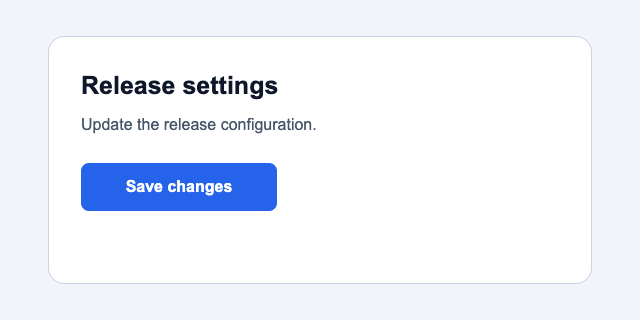
The name variant produced - button "Publish changes": Save changes. The trailing Save changes is content retained in this captured representation; the quoted accessible name is still Publish changes. Its presence after the colon does not make the accessible name contain the visible label. The role-only matcher passed, while the literal Save changes name matcher failed after its configured 400 ms timeout.
-- button "Save changes"
+- button "Publish changes": Save changes
Decoded RGBA comparison found 0 / 204800 changed pixels between the baseline and name variant, and their PNG hashes were identical. This is an actual measured equality for these captures, rather than an inference from their similar appearance. It demonstrates why a screenshot check alone could miss this particular name mutation. The actual button capture and the broader main capture both changed.
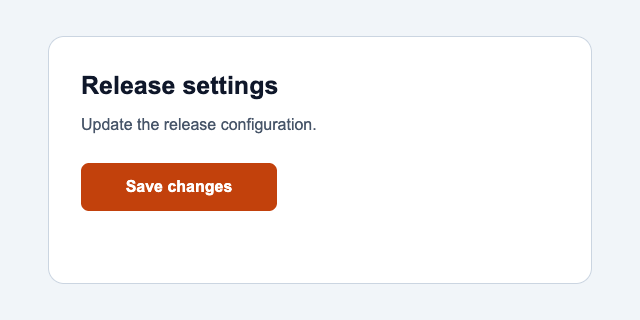
The style variant retained - button "Save changes", with both matcher templates passing. Its screenshot differed at 9043 / 204800 pixels, or 4.415527% of the viewport. The changed-pixel bounding rectangle was 196 × 48 at coordinates 81, 163, corresponding to the button. Pixel counting used exact decoded RGBA equality, with any differing channel counting the pixel once and no tolerance.
The recorded output puts the two different failures of inference beside each other:
name: ariaSnapshotEqual=false changedPixels=0/204800 roleOnlyMatch=true exactNameMatch=false
style: ariaSnapshotEqual=true changedPixels=9043/204800 roleOnlyMatch=true exactNameMatch=true
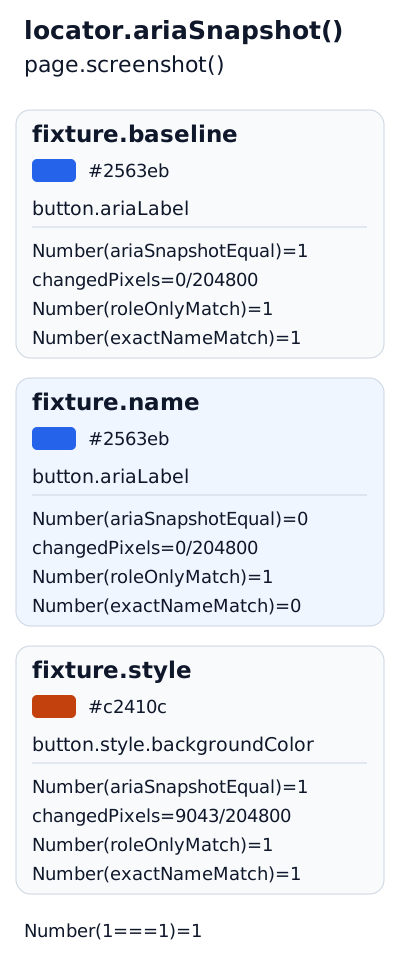
The diagram uses 1 for true and 0 for false. Pixel counts and tree equality use the original button as the reference.
Those pixel counts belong to this run's browser, fonts and viewport. The Playwright visual-comparison documentation warns that rendering depends on the host OS, version, settings and other environmental factors. This exact RGBA measurement is also different from a toHaveScreenshot() assertion with configured comparison thresholds; no claim about that assertion's tolerance follows from these numbers. For rendering changes across environments, diagnose visual baseline drift before accepting a new screenshot.
The fixture did not execute a Save handler, compare screen readers or audit accessibility conformance. It measured representations and matcher behavior for original local markup. Its successful assertions do not measure BotBrowser or establish that a real settings form persists an edit. The name and style outcomes remain useful precisely because the changed input and observed output are both explicit.
Choose a repair before updating the baseline
A failed named snapshot is a request to explain a difference. Start with the requirement: is the control still supposed to expose the original name? If yes, fix the markup or the data that supplied the changed name. Updating the template would make the assertion accept the defect it was intended to catch. A snapshot update is appropriate only when the requirement changed or the old expectation was itself wrong.
The fixture's visible Save changes paired with the accessible name Publish changes must be rejected. The name neither contains the visible label nor preserves the stated Save action. W3C's Label in Name explanation says a control's accessible name contains the text presented visually, supporting interaction through visible-label speech commands. A role-only pass supplies no evidence that this requirement survived.
For a deliberate terminology change, first make the visible label and accessible name agree with the real action. If the new visible label is Save delivery preferences, an appropriate name can use that same phrase, or include it with necessary context. A ticket requesting a rename and an updated exact-name template do not establish this relationship. Inspect the actual control and exercise its action before updating the focused expectation and any name-based locators.
| Observed result | Required decision | Focused next check |
|---|---|---|
Named template fails after an unintended aria-label edit | Repair the application name | Restore the expected label and rerun the named assertion |
| Named template fails after an intended terminology change | Verify visible label, accessible name and real action together | Update the expectation only when those conditions hold |
| Role-only template passes for both names | Decide whether names belong in this assertion | Add the required name if this test protects naming |
| YAML is stable but CSS presentation changed | Evaluate the visual requirement separately | Compare the rendered control in the baseline environment |
| Capture differs only before data loading completes | Repair the state precondition | Wait for the named loaded state, then capture again |
Playwright documents updating ARIA expectations through its test tooling, including --update-snapshots. That mechanism writes new expected data; it does not classify a change as correct. Inspect the proposed update before accepting it. A large update that also includes unrelated page regions makes it harder to tell whether the intended semantic requirement survived.
Avoid removing the name simply to make a failing test green. A role-only assertion can be entirely appropriate for a structural smoke test whose requirement is the presence of a button. It is inadequate as evidence for approving that button's renamed action. Both statements can hold at once because the tests have different contracts. Name the contract explicitly so a later maintainer does not overinterpret the successful result.
Where the name is already protected by a dedicated toHaveAccessibleName() assertion, a broader snapshot can focus on a different relationship, such as component hierarchy. This is an intentional division of assertions, with a visible name requirement elsewhere. It is different from silently deleting the only assertion that used to reject an unintended label. Keep the failure that matters easy to locate.
Pair semantic checks with the missing observation
Use toHaveScreenshot() when the requirement concerns appearance. Use action and result assertions when it concerns behavior. Use keyboard interaction and appropriate accessibility checks when it concerns whether the interface can actually be operated. An ARIA snapshot can detect a changed name or structure, but those neighboring observations cover properties absent from its YAML.
When the diff appears only intermittently, retain evidence from the failing state. The Playwright tracing workflow helps correlate actions and rendered states from the same run. A trace can explain why the panel was captured during a transition; a new successful capture cannot recover the exact state that produced an earlier mismatch. Save the actual-tree output with the failure rather than relying solely on a rerun.
BotBrowser's Playwright integration documents selecting its executable and passing a browser profile. Those inputs support a declared browser environment for a separately designed regression check. They do not choose a snapshot's matching strength, approve a changed accessible name or replace a visual or assistive-technology assessment. The local stock-browser fixture concerns Playwright observation and assertion semantics.
Keep browser identity separate from assertion identity when comparing environments. If one run uses a different executable and a different template, a changed pass result has two potential explanations. Retain the page variant, locator scope and template across runs before attributing a mismatch to browser behavior. A different viewport can also change responsive content, so record that input instead of treating every tree difference as an API regression.
For a real settings form, the smallest useful regression set might protect the Save name, perform the Save action and verify its visible result. Add a visual assertion only where appearance has an explicit expectation, and preserve broader accessibility checks for their own requirements. The resulting failures identify whether naming, behavior or rendering changed, instead of asking one snapshot to diagnose all three.
FAQ
Does a passing ARIA snapshot mean the page is accessible?
It establishes that the selected representation satisfied the supplied template. It does not establish keyboard usability, sufficient contrast, correct focus transitions or successful use with a particular assistive technology. Those properties need observations suited to them, even when the template includes roles and names.
Is a literal name always better than a partial match?
Use a literal when that name is part of the stable requirement. A partial match can suit a structural check whose labels are intentionally variable, provided a separate assertion protects any required naming behavior. The choice depends on the condition being tested; extra strictness without a requirement can create irrelevant failures.
Can an unchanged tree approve a CSS redesign?
It can show that the compared accessible representation stayed stable for the selected state. It cannot approve spacing, clipping, color or other rendered properties absent from that representation. Evaluate the design against its visual expectations, and inspect whether responsive variants introduce additional content or semantics.
Sources
- Playwright: ARIA snapshots
- Playwright: Partial matching
- Playwright: locator.ariaSnapshot
- Playwright: Visual comparisons
- WAI-ARIA APG: Accessible names and descriptions
- W3C: Understanding Label in Name
- BotBrowser: Playwright integration
Practical conclusion
Before updating a Playwright ARIA snapshot, identify whether the difference is an intended accessible-name change, a missing template constraint or a separate rendering change. Keep a literal name where naming is the requirement, and compare the actual capture alongside the assertion. Start with one owned control and its expected action name; approve a baseline update only after that contract is clear.
This article is part of the guide: Browser Automation Getting Started: A First Run Map
Related Articles
Playwright Strict Mode Violation: Fix Duplicate Matches
ComparisonVisual Regression Testing: Baseline Drift or a Bug?
Getting StartedBrowser Automation Accessibility Testing Guide
Getting StartedBrowser Test Evidence and Reporting Quality
Getting StartedPlaywright Iframe Not Loading? Check the Frame
Getting StartedPlaywright Proxy: Routing, Auth and Unchanged Signals
Run the same check in BotBrowser
Load a profile, keep the signals you just read about consistent inside the browser, and confirm the result on your own machine before a rollout.