Playwright networkidle Timeout: Wait for the UI
Playwright networkidle can time out on a usable page or resolve before initialization. Compare load states with actionability and assert the actual UI result.
BotBrowser Team
Want the structured docs for Getting Started?
This article lives in the editorial library. For step-by-step setup, reference material, and ongoing updates, jump into the docs section.
A Playwright networkidle timeout does not establish that the page is unusable. Network silence and application readiness answer different questions: a background request can remain open while a form works, and an idle page can still have an uninitialized control. Wait for the element and result the task requires. BotBrowser supports Playwright control of its browser executable; it does not turn a network load state into an application readiness guarantee.
TL;DR
networkidlewaits for the documented network-idle condition; Playwright discourages using it to determine test readiness and recommends web assertions.- A locator click waits for its actionability checks. Application initialization and a successful business result still need appropriate application behavior and assertions.
- On an owned fixture, a pending fetch kept
networkidlewaiting while an order completed. A separate fixture reached idle while its button remained disabled. - Pair
toBeVisible()withtoHaveText()when the required result includes visible confirmation. A text assertion alone does not establish visibility.
Contents
- Separate document milestones from application readiness
- A pending fetch can outlive a successful interaction
- An idle network can precede application initialization
- Choose assertions for the action and its result
- Use an explicit readiness signal when the application owns it
- Diagnose the timeout at the condition that failed
- Practical conclusion
Separate document milestones from application readiness
The browser can finish parsing a document before the application finishes populating it. It can load the document's resources before a later task enables a button. It can also keep a connection active after all the controls needed for a particular interaction are usable. Treating any one of these milestones as a universal definition of ready couples the test to activity that may have little connection to its objective.
Playwright's navigation documentation distinguishes navigation from loading and explains that modern pages continue working after the load event. Its waitForLoadState documentation defines the available states and marks networkidle as discouraged for testing. The choice of state controls the wait's completion condition; it does not add a check for application-specific correctness.
| Signal | What it establishes | What still needs a separate check |
|---|---|---|
domcontentloaded | The document's DOMContentLoaded event fired | Required data, control initialization and the interaction result |
load | The document's load event fired | Later application work and whether the required control works |
networkidle | The documented condition of no network connections for at least 500 milliseconds was reached | Whether the application is initialized and the requested result exists |
| Locator actionability | The target satisfies the checks for the requested action | Whether application logic processes that action correctly |
| Application-result assertion | The specified result condition was observed | Any additional server or persistence guarantee absent from that assertion |
The load row is a documentation definition, not a measured result from the experiment below. Both fixture navigations used waitUntil: 'domcontentloaded'; the runner did not independently measure when load fired. Their later observations compare the idle wait with control state and receipt text, so assigning a measured load time would add evidence the runner never collected.
A subsequent page.waitForLoadState() also has document-state semantics. The API requires navigation to have committed, and resolves immediately when the current document has already reached the requested state. Calling it after each application action cannot establish that the action initiated a new document navigation. A client-side update may happen inside the existing document, making an explicit result assertion the relevant wait.
For initial browser setup, scraping with Playwright and browser configuration separates launching and configuring the browser from reading application content. A working browser connection establishes the control path; the waiting condition must still describe the data or UI state needed at that point in the task.
A pending fetch can outlive a successful interaction
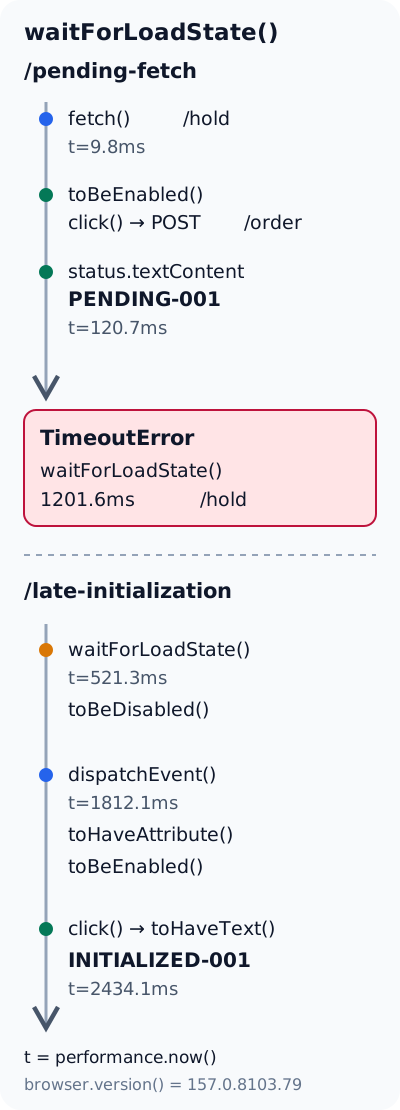
The first owned fixture serves a button, an output element with role="status", and a script that starts fetch('/hold'). Its HTTP server writes response headers and an initial text fragment for /hold, then deliberately leaves the response unfinished. This creates one concrete pending request whose lifetime is controlled by the fixture, without depending on a remote site's traffic or availability.
The button's click handler uses a different endpoint. It sends a real POST /order, parses the local server's JSON response, and replaces the status text with Order confirmed: PENDING-001. The open background response does not prevent that independent request from finishing. A test that waits for global silence before clicking would delay an interaction that is already possible in this controlled case.
On 2026-11-18, the local fixture ran with Playwright 1.58.0 and stock Chrome 157.0.8103.79 on macOS arm64. The run used ordinary Chrome, not BotBrowser, and exercised only owned local HTTP pages. Both fixture cases passed their programmed checks. These observations concern the selected waiting conditions, rather than a BotBrowser profile or a production checkout.
The runner began a page.waitForLoadState('networkidle', { timeout: 1200 }) wait after navigation, kept that promise pending, and proceeded with the button interaction. It checked that the button was enabled, clicked it, and asserted the receipt text. Afterward it collected the idle wait's outcome and verified that one held response remained open.
| Recorded item | Observation | Interpretation |
|---|---|---|
| Background fetch start | Page clock approximately 9.8 milliseconds | The owned request began early in document execution |
| Order click | Page clock approximately 118.9 milliseconds | The handler ran while the background request was pending |
| Receipt text update | Page clock approximately 120.7 milliseconds | The handler assigned the returned receipt to the status element |
| Idle-wait outcome | TimeoutError, approximately 1201.6 milliseconds elapsed | The 1200-millisecond idle-wait budget expired |
| Held responses | openHeldResponses: 1 | The intentionally unfinished response was still present |
The result record identifies the rejected wait with:
"errorName": "TimeoutError"
The page clock and the wait duration have different origins. The event records use browser performance.now() relative to that document's time origin. The elapsed idle duration uses the Node runner's monotonic clock around the waiting call. The 1200 option is an allowed waiting budget, not a page timestamp or a claim that initialization should finish within that interval.
The label receipt-visible in the fixture's event array marks the statement that updates textContent. It is not a browser paint event. Likewise, the runner's receipt assertion calls toHaveText(), which checks text rather than visibility. The captured final screenshot separately shows the receipt rendered beneath the button. Together these artifacts support a text update and an observed visible result in that capture; the event label alone would not.
Leaving /hold unfinished is the deliberately introduced cause of continuing activity in this fixture. A real timeout needs its own request evidence before receiving the same explanation. The example does not establish that every background transport, polling pattern or stalled resource behaves identically, and it does not justify cancelling unrelated requests merely to make networkidle pass.
An idle network can precede application initialization
The second fixture reverses the relationship. Its initial HTML contains a disabled Place order button and an Initializing status. A local timer schedules an app:ready event after 1800 milliseconds. The event handler sets data-ready="true" on the document element, enables the button and changes the status. No delayed network request is required for this transition.
This is simulated delayed initialization, not an experiment on a framework's hydration implementation. The click handler is registered during initial script execution, and the disabled attribute prevents interaction until the timer-driven transition. The fixture therefore isolates the simpler fact that application state can remain incomplete after network activity becomes quiet.
The runner navigated with domcontentloaded, awaited networkidle with the same 1200 budget, then asserted that the button was still disabled and that the status remained Initializing. It captured that state before waiting for the persistent data-ready attribute. Only after readiness and enabled-state checks did it click and inspect the final receipt.
| Recorded item | Observation | Interpretation |
|---|---|---|
| Idle wait completed | Approximately 493.0 milliseconds elapsed in Node | The idle condition completed within its budget |
| Page clock read after idle | Approximately 521.3 milliseconds | A separate browser-time observation after the wait |
| Disabled-state checkpoint | Page clock approximately 532.5 milliseconds | Button disabled and initializing text checked after idle |
app:ready dispatched | Page clock approximately 1812.1 milliseconds | The scheduled application transition began later |
| Order handler ran | Page clock approximately 2434.1 milliseconds | Interaction occurred after the readiness checks and intermediate screenshot |
The roughly 493.0-millisecond duration does not contradict the documented 500-millisecond idle interval. The runner starts its stopwatch after awaiting navigation, while the browser's network observation can already be underway. Its stopwatch measures how much longer that particular call waited, rather than the full period counted by the idle mechanism. Neither clock establishes an exact universal startup delay.
The intermediate screenshot visibly shows the disabled button and Initializing. The final capture visibly shows Order confirmed: INITIALIZED-001. Screenshot capture and later driver operations contribute to the time before the click, so the approximately 2434.1-millisecond event is not a measurement of the application's minimum readiness time or the click's intrinsic latency.
Playwright's navigation documentation separately discusses poor hydration: a control can appear enabled before its event listeners are attached, allowing a click with no application effect. That documented problem is distinct from this disabled-button simulation. A framework-specific diagnosis would require evidence from the actual application, including when its required behavior becomes available.
The same distinction matters for data extraction. A list can exist before it contains the requested records, and additional batches can arrive after the first view becomes usable. JavaScript rendering, pagination and infinite scrolling explains those content-loading boundaries. A locator for a specific record, a defined batch result or an application completion state describes the task more closely than silence across the whole page.
Choose assertions for the action and its result
Playwright's actionability documentation describes the automatic checks associated with locator actions. For a click, the relevant checks include a unique target that is visible, stable, enabled and able to receive events. These checks help avoid clicking a disabled or obstructed control; they cannot establish that the application's handler will save an order or display the correct confirmation.
A small data-driven Playwright Test example can express both parts for each owned page. Configure baseURL for the fixture server before running these tests. The routes and receipts belong to the local demonstration, and the code assumes that server is already serving the fixtures; they are not endpoints on an external checkout.
import { test, expect } from '@playwright/test';

const cases = [
  { route: '/pending-fetch', receipt: 'PENDING-001', needsReady: false },
  { route: '/late-initialization', receipt: 'INITIALIZED-001', needsReady: true },
];

for (const scenario of cases) {
  test(`${scenario.route} produces a visible receipt`, async ({ page }) => {
    await page.goto(scenario.route, { waitUntil: 'domcontentloaded' });

    const orderButton = page.getByRole('button', { name: 'Place order' });
    const status = page.getByRole('status');

    if (scenario.needsReady) {
      await expect(page.locator('html')).toHaveAttribute('data-ready', 'true', {
        timeout: 4000,
      });
    }
    await expect(orderButton).toBeEnabled();
    await orderButton.click();

    await expect(status).toHaveText(`Order confirmed: ${scenario.receipt}`);
    await expect(status).toBeVisible();
  });
}
The 4000 value gives the application-state assertion a finite budget in this example. The observed fixture schedules its transition after 1800 milliseconds, but a timer's scheduling delay is not a guaranteed completion deadline. Select the production assertion budget from the application's supported behavior and the test environment, rather than copying a fixture constant as a performance requirement.
toBeEnabled() makes the intended prerequisite explicit for diagnosis; click() still performs its own checks. Each case checks its specific receipt text before checking that the same status element is visible, rather than first accepting the visibility of the original prompt. Neither test uses networkidle as a prerequisite. These example assertions strengthen the earlier runner's text checks; the historical visible observations come from its captured screenshots. According to Playwright's assertion documentation, locator assertions retry until the condition succeeds or their timeout expires. Awaiting them avoids turning an immediate DOM snapshot into an accidental timing test.
These sequential assertions also have a practical limit. They observe the conditions at their respective checking points; they do not prove that a confirmation remains visible indefinitely. If an application briefly shows a receipt and then removes it incorrectly, test the required persistence or subsequent workflow explicitly. For this fixture, the confirmation remains in the output element and the final screenshot provides another view of that state.
A visible success message alone cannot prove durable server storage. The pending-fetch case at least records a real local POST /order and derives its text from the response, whereas the delayed-initialization case assigns a fixed receipt string locally. Neither fixture implements a database. When durable writes are the requirement, add the application's appropriate server-side or follow-up read assertion instead of treating either demonstration as persistence evidence.
Use an explicit readiness signal when the application owns it
An application-controlled readiness marker is useful when a control's usable behavior depends on more than its DOM appearance. Its meaning must be specified. For the owned fixture, data-ready="true" means that the app:ready handler has enabled the button and updated the status. It does not mean that every future network request is complete or every feature on the page is ready.
Prefer an observable state that survives the transition when a later test step may start observing after initialization. A one-time app:ready event can occur before the test subscribes, leaving that listener waiting for an event that will not repeat. The persistent attribute permits an assertion to succeed whether readiness occurs before or during the wait. This is why the fixture runner checks the attribute rather than adding a late event-only subscription.
The application must keep the marker consistent with its behavior. Setting data-ready before attaching a required handler merely moves the original race to a different name. For an owned application, set the marker only after the required initialization step, and reset it when a route or workflow invalidates that readiness. A stale document-level marker is especially misleading when the next action concerns a newly mounted component.
Scope the contract to the operation. A page with separate editor and payment sections may need different readiness conditions for each. Waiting for a broad app-ready marker can unnecessarily block an independent action, while trusting the editor's marker for payment would establish the wrong prerequisite. Prefer the closest stable state that the application already exposes, and retain the resulting UI assertion after the action.
BotBrowser's Playwright integration documentation covers selecting its executable and profile-based browser configuration. That setup does not specify an application's readiness contract. The fixture comparison adds a decision about where waiting belongs: browser connection and navigation first, operation-specific state when needed, then action and result checks. It supplies no finding about BotBrowser initialization timing.
Diagnose the timeout at the condition that failed
Start with the error's operation. The owned pending-fetch case reports TimeoutError from page.waitForLoadState, with its 1200-millisecond budget exceeded. A timeout from locator.click() instead directs attention to the target's actionability. An assertion timeout names a missing expected state. Increasing one global timeout hides these distinctions and can lengthen every failure without addressing the unmet condition.
For an idle timeout, capture request activity from the same execution and identify which activity is still relevant to the requested operation. In the fixture, the server's held-response set supplies direct evidence for /hold, while the receipt and request log establish the independent /order exchange. In an application, an unfinished request might instead be necessary data; removing the idle wait is useful only if the replacement condition still verifies that data's required result.
For a click that never proceeds, inspect the target and the associated error details. A duplicate accessible name can select multiple elements; an overlay can intercept events; a disabled control can reflect intentional unfinished initialization. Keep normal locator actionability checks enabled. Forcing a click changes what is being checked and does not attach an absent application handler or make a disabled workflow correct.
For a click that completes without the desired receipt, compare application state before and after the action. Preserve page exceptions, relevant responses and the rendered state. The disabled fixture has no page errors in the run, but that absence alone does not establish success: its explicit readiness and receipt checks supply the positive observations. An empty error collection is compatible with application logic that simply did nothing.
Keep timeouts local enough to explain their purpose. A bounded readiness assertion may reasonably wait for initialization, while an unrelated background connection has no useful completion deadline for that action. A fixed waitForTimeout() introduces elapsed time without verifying either condition. A delay that happens to pass today can still run too early under load or waste time when the application is already ready.
FAQ
Does switching to domcontentloaded fix every networkidle timeout?
It changes the navigation completion condition. Required content can still arrive afterward, so keep locator and result assertions. The owned examples deliberately navigate with domcontentloaded to observe later behavior independently; they do not establish that document parsing is sufficient for every operation.
Does an enabled button prove its handler is attached?
No. Enabled state is an element condition. Application code controls when its behavior becomes available. The documented hydration example concerns this gap; the local delayed-initialization simulation avoids it by retaining disabled until its readiness transition.
Should every test wait for an app:ready event?
Only an application that defines that event gives it a useful meaning. An event-only listener also needs correct registration timing. A persistent, operation-specific state can be simpler when observation begins after startup; an ordinary locator action and result assertion may already be sufficient.
Can the recorded milliseconds serve as a performance benchmark?
No. The two owned cases demonstrate ordering under one local run, with separate browser and driver clocks. Their screenshots and driver calls add work between observations, and no repeated latency distribution was collected. They establish the shown state relationships, not expected production startup speed.
Sources
- Playwright: Navigations and hydration
- Playwright: Auto-waiting and actionability
- Playwright: page.waitForLoadState
- Playwright: Assertions and retrying locator checks
- BotBrowser: Playwright integration
Practical conclusion
Replace a generic Playwright networkidle prerequisite with the state required for the next operation and an assertion of its result. Begin with one failing action on an owned page: identify whether navigation, actionability or the expected confirmation timed out, then check that condition directly. Keep visibility and text requirements explicit, and use network activity as diagnostic evidence for that operation.
This article is part of the guide: Browser Automation Getting Started: A First Run Map
Related Articles
Selenium Element Not Interactable: Diagnose the Cause
Getting StartedPlaywright Wait for Response After Click: Fix the Race
Getting StartedSelenium WebDriver Waits for Stable Tests
Getting StartedPlaywright Iframe Not Loading? Check the Frame
Getting StartedChrome DevTools MCP vs Playwright MCP for Debugging
Getting StartedScraping with Playwright: Browser and Profile Setup
Run the same check in BotBrowser
Load a profile, keep the signals you just read about consistent inside the browser, and confirm the result on your own machine before a rollout.