Puppeteer MCP Server Configuration for a Custom Build
Configure a Puppeteer-based MCP server to launch a specific Chromium build with a profile, and see why a Playwright MCP config cannot be copied across.
BotBrowser Team
Want the structured docs for Deployment?
This article lives in the editorial library. For step-by-step setup, reference material, and ongoing updates, jump into the docs section.
A Puppeteer MCP server owns the browser launch, so the configuration you hand it decides which Chromium binary and which profile every agent task runs against. Puppeteer's LaunchOptions is a different shape from Playwright's, and a configuration copied between the two silently loses the parts that do not exist on the other side. The failure is quiet: the server starts, the tools respond, and the browser is whatever the server would have used anyway. Puppeteer documents executablePath as a path used instead of the bundled browser, together with a warning that Puppeteer only guarantees support for its own bundled build, so the setting is deliberate rather than transparent. BotBrowser supports launching from Puppeteer with executablePath plus a profile argument in args, and it does not ship an MCP server of its own, so a server that never forwards those values cannot be corrected from the browser side.
TL;DR
- Puppeteer's launch object puts
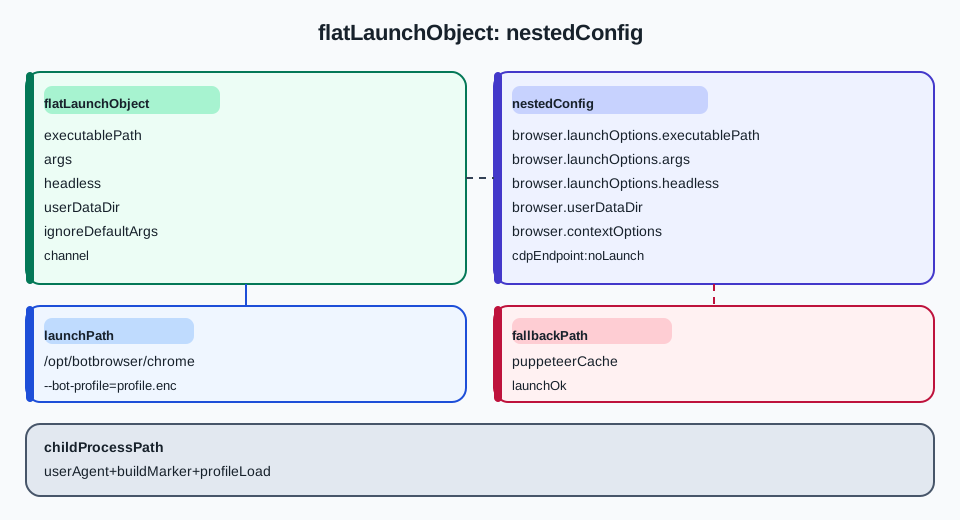
executablePath,args,headless,userDataDir,ignoreDefaultArgs,pipeandbrowserat one level. Playwright nests the same ideas underlaunchOptions, so the two shapes are not interchangeable. headlessin Puppeteer acceptstrue,falseor the string'shell', and'shell'selects the old headless implementation. A Playwright-style boolean written here is valid; a Playwright config copied wholesale is not.executablePathreplaces the bundled browser, and Puppeteer's own documentation warns that only the bundled build is guaranteed. Treat a custom path as a supported-but-unverified configuration and prove it by reading the process back.- The profile travels in
argsas its own element, exactly as it does under Playwright, because it is a browser argument rather than a Puppeteer option. ignoreDefaultArgsandpipechange what the server hands the process. A server that setsignoreDefaultArgs: truedrops the flags Puppeteer would add, so the effective argv is neither yours nor Puppeteer's defaults.
Contents
- Where the Puppeteer launch object lives
- How it differs from the Playwright MCP shape
- Pass the profile and the headless mode
- Verify the binary that actually started
- Practical conclusion
Where the Puppeteer launch object lives
Puppeteer's LaunchOptions is one flat object passed to puppeteer.launch(). executablePath is a top-level member of it, alongside args, headless, userDataDir, ignoreDefaultArgs, pipe, browser, channel and debuggingPort. There is no launchOptions wrapper, because the whole object is the launch options.
{
  "mcpServers": {
    "puppeteer": {
      "command": "npx",
      "args": ["-y", "@modelcontextprotocol/server-puppeteer"],
      "env": {
        "PUPPETEER_EXECUTABLE_PATH": "/opt/botbrowser/chrome",
        "PUPPETEER_LAUNCH_OPTIONS": "{\"headless\":true,\"args\":[\"--bot-profile=/etc/botbrowser/profile.enc\"]}"
      }
    }
  }
}
The example above shows the two ways a server can receive the values: a dedicated environment variable for the executable, and a JSON blob for the rest. Neither name is standardised across Puppeteer-based servers, which is the first thing to check: read the server's own documentation for the exact variable or flag it reads, then confirm the value arrives.
| Puppeteer member | Type | Effect on a custom build |
|---|---|---|
executablePath | string | Replaces the bundled browser; Puppeteer guarantees support only for its own build |
args | string[] | Extra command-line arguments, one array element per argument |
headless | boolean or 'shell' | true uses the new headless mode, 'shell' the old one |
userDataDir | string | Persistent profile directory, separate from a BotBrowser profile argument |
ignoreDefaultArgs | boolean or string[] | Drops Puppeteer's default flags, or filters named ones out |
pipe | boolean | Carries the protocol over stdio instead of a WebSocket |
browser | SupportedBrowser | Selects the browser family Puppeteer should expect |
channel | ChromeReleaseChannel | Looks for an installed Chrome at a known location instead of the bundled binary |
Two of those rows deserve attention in a custom-build deployment. channel and executablePath can both point at a browser, and Puppeteer's documentation describes channel as looking for a regular Chrome installation at a known system location. Setting both leaves two answers to the same question, and the one that wins is an implementation detail worth eliminating rather than testing.
Why the flat shape is easy to misread
A flat object has no structural signal about which keys are launch-level and which belong to a context. Under Playwright, a misplaced key lands in a different object and is ignored; under Puppeteer, a key that does not exist in LaunchOptions is simply not part of the options, and puppeteer.launch() has no reason to complain. The result is the same silent outcome by a different route: the server starts, and one of your settings was never applied.
The practical check is to write the object down and compare its keys with the documented LaunchOptions members. Anything not on that list is not a launch option, whatever it looks like.
What Puppeteer does with a path it cannot use
executablePath points at a file, and Puppeteer starts that file. If the path does not exist, does not resolve in the server's working directory, or exists but is not executable by the account that runs the server, the launcher raises an error instead of substituting another binary; that follows from Puppeteer handing the given path to the process it spawns, and it is an inference from the launcher behaviour rather than a sentence the LaunchOptions page states. That behaviour is worth knowing because it is the opposite of the silent case: a wrong path that does exist produces a working browser that is not the intended one, while a path that does not exist produces an error the operator sees.
The failure that hides is therefore the one where the path is valid and points somewhere else. A server that substitutes a default path when its configuration is absent produces exactly that: a valid executable, a working browser, and no error. The check has to compare the observed path with the intended one rather than check that a path exists.
What the server adds on top
A Puppeteer-based MCP server is a wrapper: it reads its own configuration, builds a LaunchOptions object, and calls puppeteer.launch(). Everything the server adds between its configuration and that call is invisible from the outside. That is why the readback matters more here than in a direct script, where the options object is the one the operator wrote.
The Playwright variant of this wrapper, including its nested shape and the silent fallback to a bundled browser, is covered in Playwright MCP setup for a custom Chromium build, and the division of responsibility between an agent loop and the browser process is in headless browser for AI agents. A server may add a default args array, a headless default, or an ignoreDefaultArgs value. A server that appends its own arguments produces an argv that is the union of yours and its defaults, in an order you did not choose. Reading the running process is the only way to see the union.
Why the effective argv matters more than the config
Two runs can share a configuration file and still start different browsers if the server version changed its defaults between them. A server that begins adding a new default flag, or stops adding one, changes the effective argv without touching the operator's file. Because the browser reads argv rather than the server's configuration, the observable behaviour follows the argv.
That is the argument for recording the effective argv beside the observation rather than only the configuration that produced it. A configuration plus a server version is reproducible; a configuration alone is not, once the server can change what it appends.
How it differs from the Playwright MCP shape
The two ecosystems answer the same question with different structures, and the differences are the ones that break a copied configuration.
| Concern | Playwright MCP | Puppeteer launch object |
|---|---|---|
Where executablePath goes | browser.launchOptions.executablePath | Top-level executablePath |
Where args goes | browser.launchOptions.args | Top-level args |
| Headless value | Boolean headless inside launchOptions | Boolean or the string 'shell' |
| Context-level settings | Separate browser.contextOptions object | Not part of LaunchOptions; the server or the code sets viewport elsewhere |
| Profile persistence | userDataDir under browser | userDataDir at the top level |
| Connecting to a running browser | cdpEndpoint or remoteEndpoint | browserWSEndpoint or connect(), outside LaunchOptions |
The first two rows are why a Playwright MCP JSON block pasted into a Puppeteer server does nothing: the keys exist in neither place the Puppeteer server looks. The third row is subtler, because headless: true is valid in both, so a copy can appear to work while the surrounding structure is wrong.
The context split does not exist here
Playwright separates launch options from context options, which is why viewport, locale and permissions live in a different object. Puppeteer's LaunchOptions has no such split: viewport and page-level settings are applied after launch, through page.setViewport() or a device descriptor. A configuration that expects a contextOptions block to carry a locale will not find one.
That difference matters when a task depends on a locale or a timezone. Under Playwright MCP, those belong to the context and are configured before the page exists. Under Puppeteer, they are either browser arguments in args or script calls after launch, and the server has to expose a way to do one of them.
Emulation calls are a third route
page.emulate() and page.setViewport() change what the page reports after the browser has started, which makes them a third place a locale, a timezone or a viewport can come from. A workload that sets a locale through args, another through an emulation call, and a third through the server's own defaults has three sources and no single answer.
The rule that keeps this tractable is one source per property. Choose args for anything the browser must know before the first request, and an emulation call only for what the page needs after load. Record which route each property used, because a later comparison between a run that set a locale in args and a run that set it through emulation is not comparing the same thing.
Two different notions of a profile
Puppeteer's userDataDir and a BotBrowser profile argument both describe persistent state, and they are not the same thing. userDataDir is a Chromium user data directory that Puppeteer passes through. A BotBrowser profile is an encrypted configuration file the binary loads through its own flag. Setting one does not set the other, and a server that exposes only userDataDir has no slot for the profile flag unless it forwards arbitrary args.
Pass the profile and the headless mode
The profile flag is a browser argument, so it goes in args as one element. The headless mode is a Puppeteer option, so it goes in headless. Mixing the two up is the next configuration error to check after the shape confusion.
{
  "executablePath": "/opt/botbrowser/chrome",
  "headless": true,
  "args": ["--bot-profile=/etc/botbrowser/profile.enc", "--bot-locale=en-US", "--no-first-run"]
}
Each element is one argument with no shell quoting. A single string containing spaces is one malformed argument. The third element in the example is a plain Chromium flag rather than a BotBrowser one, which is worth noting because args mixes both kinds freely: Puppeteer does not distinguish them.
Quoting, escaping, and the JSON layer
When the configuration is JSON, the arguments pass through two layers: JSON string escaping and then the argument vector. A Windows path such as C:\botbrowser\chrome.exe needs its backslashes escaped in JSON, and a value containing a quote needs the JSON escape rather than a shell escape. Getting one layer right and the other wrong produces a path that looks correct in the file and wrong at launch.
Keep the values free of characters that need escaping where possible. A profile path with no spaces and no quotes avoids the whole class of problem, and an absolute path under a short directory is easier to verify character for character than a long one.
Headless, 'shell', and what changes
Puppeteer documents headless as accepting true or the string 'shell', where true selects the new headless mode and 'shell' selects the old one. The distinction is not cosmetic: the two modes differ in how the browser composites and in which APIs report what. A workload that compares rendering or reads a media capability should record which mode a run used, because two runs in different modes are not the same measurement.
When ignoreDefaultArgs changes the answer
ignoreDefaultArgs accepts true or an array of flag names. With true, Puppeteer stops adding its default arguments, so the browser starts with only what args contains. With an array, the named defaults are filtered out and the rest remain. Both change the effective argv, and both are the kind of setting a server may apply on its own.
The operational consequence is that a documented BotBrowser flag can be neutralised by a default Puppeteer adds, and a default Puppeteer expects can be removed by ignoreDefaultArgs. Neither is visible in the configuration file, which is why the verification step reads the process rather than the config.
pipe and how the server talks to the browser
pipe: true carries the automation protocol over standard input and output instead of opening a WebSocket. For a server that runs the browser as a child process, that removes a listening port from the equation, which changes both the failure modes and the security surface. A configuration that assumes a debugging port will exist does not hold when pipe is set, and a tool that connects over a port cannot reach a piped browser.
Record which transport a run used. A result gathered over a pipe and a result gathered over a port come from the same browser only if the rest of the configuration matches, and the transport is part of that configuration rather than an implementation detail.
Verify the binary that actually started
Verification has three readings, and they answer different questions. The process path proves which file was executed. The user agent describes what the page reports, which a custom build may configure independently of the binary. A build marker proves a capability the stock build lacks.
Read the process first. On the host that spawned the server, find the child process and compare its executable with the configured path. A server that failed to forward executablePath shows a path under Puppeteer's cache directory instead, and that single comparison settles the question without any page-level probing.
| Reading | What it proves | What it does not prove |
|---|---|---|
| Child process executable | Which file the server executed | That the profile was loaded |
navigator.userAgent | What the page reports | Which binary produced it |
| Build marker | That a specific capability is present | That the configuration reached it by the intended route |
| Profile load evidence | That the encrypted profile was accepted | That the page content is correct |
When the process tree is not visible
A server running inside a container, a remote host or a sandbox may not expose its child processes to the operator's shell. In that case the path has to come from inside the environment that owns the process, through a log line the server writes, a /proc entry, or a diagnostic tool the platform provides. The requirement is unchanged: compare the observed executable with the configured one, from wherever the observation is available.
Where none of those is available, a build marker inside the page is the fallback evidence, and it should be described as weaker. A marker proves a capability is present; it does not prove the process that serves the page is the one the operator configured.
Recording a verification
Store the configured path, the observed path, the headless mode, the effective args, and the marker result together with a timestamp. A later run can then compare without re-deriving what the baseline was. When a server update changes its default args, that record is what makes the change visible.
What a client cannot see
An MCP client sees the tools the server publishes. It does not see the launch object, the process tree, or the arguments that were passed. From the client side a misconfigured server is indistinguishable from a correct one, which is why the verification has to be requested through the session and recorded outside it.
A symptom table for the Puppeteer path
| Symptom | Cause | Confirmation | Fix |
|---|---|---|---|
| Browser starts, no profile settings | Profile flag missing from args | args has no element beginning with the profile flag | Add one array element per flag |
| Browser starts from the cache directory | executablePath never reached the launch object | Child process path resolves under the Puppeteer cache | Move the key to the top level of the launch object |
| Server exits with a launch error | Path missing or not executable | The path does not resolve for the server's account | Use an absolute path the account can execute |
| Flags behave differently after a server update | The server changed its default args | The effective argv differs from the recorded one | Record argv and pin the server version |
| A tool cannot reach the browser | Transport mismatch between pipe and port | The configuration sets pipe while the tool expects a port | Choose one transport per deployment |
The second row is the one that survives a working session. A server that fell back to its bundled browser answers every tool call correctly, and the only evidence is the process path.
FAQ
Can a Playwright MCP configuration be reused for a Puppeteer server?
No. Playwright MCP nests executablePath and args under browser.launchOptions, and Puppeteer expects both at the top level of its launch object. A pasted block leaves the Puppeteer server with no executable path, so it starts its bundled browser and reports success.
Is headless: 'shell' the same as headless: false?
No. 'shell' selects the old headless implementation, which still runs without a visible window but composites and reports differently from the new headless mode. false runs a headed browser. Recording which of the three a run used keeps two measurements comparable.
Does userDataDir replace a BotBrowser profile?
No. userDataDir is a Chromium user data directory that Puppeteer passes to the browser. A BotBrowser profile is an encrypted configuration file the binary loads through its own flag in args. A server that exposes only userDataDir has no slot for the profile unless it forwards arbitrary arguments.
Practical conclusion
Write the launch object flat, with executablePath, args and headless as siblings, and put the profile flag inside args as its own element. Then read the child process on the host and compare its executable with the configured path before trusting any result from the session.
The next action is one launch: start the server, ask the client to run a single navigation, and read the child process path on the host. If it matches the configured path, the binary is proven. If it points into Puppeteer's cache, the server ignored the option and every result describes a browser you did not choose.
Sources
This article is part of the guide: Browser Deployment and Release: Operations Map
Related Articles
Playwright MCP Setup for a Custom Chromium Build
Getting StartedHeadless Browser for AI Agents: Launch and Tool Boundaries
DeploymentBrowser Automation Signals and Consistency in Playwright
DeploymentStagehand Browser Automation with BotBrowser
Getting StartedPlaywright with Profile-Backed Browser Identity
Getting StartedPuppeteer + BotBrowser: Launch and Profile Pitfalls
Run the same check in BotBrowser
Load a profile, keep the signals you just read about consistent inside the browser, and confirm the result on your own machine before a rollout.