Playwright vs Puppeteer: Four Choices Before You Migrate
Compare Playwright and Puppeteer by protocol, context state, tracing and browser pinning. Use a real local probe without confusing a smoke pass with compatibility.
BotBrowser Team
Want the structured docs for Documentation?
This article lives in the editorial library. For step-by-step setup, reference material, and ongoing updates, jump into the docs section.
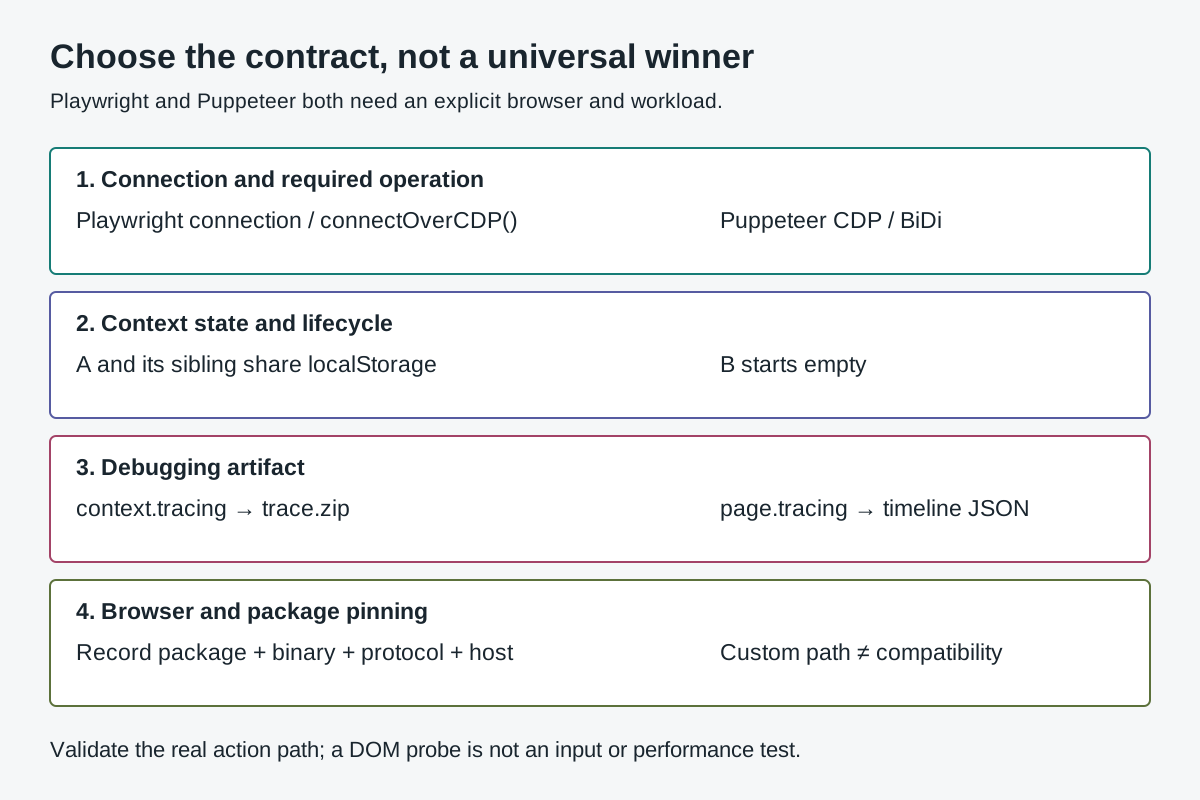
Playwright vs Puppeteer is a choice between automation contracts, not between two browser identities. The useful question is which library, connection, browser build and debugging artifact your workload requires. Both libraries can create isolated browser contexts; neither makes a custom executable automatically compatible. BotBrowser provides documented launch paths for both libraries and profile-backed browser controls, but it does not make their protocols equivalent, implement their test runners or guarantee a site's acceptance.
TL;DR
- Choose the required browser and operation first. Puppeteer supports Chrome and Firefox, with CDP and WebDriver BiDi paths; it is not a Chrome-only CDP wrapper.
- Distinguish Playwright's own connection from
connectOverCDP(). The official contract explicitly describes CDP attachment as lower fidelity. - Both libraries separate context storage, but neither context creates an independent machine or network route by itself.
- A Playwright context trace and a Puppeteer browser timeline are different artifacts. Their filenames and sizes do not establish which library is better.
- Pin the package, browser binary and connection together. Preserve a failed action even when a smaller DOM probe passes.
Contents
- Choose with four requirements
- Match the connection to the required operation
- Compare context state without inventing machine isolation
- Choose the debugging artifact you actually need
- Pin the package and browser as a pair
- Use the local observations to make a bounded decision
- Practical conclusion
Choose with four requirements
A team deciding whether to leave Selenium can first map protocol, lifecycle, waits, and debugging artifacts in Selenium alternatives: what changes in practice.
Start with a required operation rather than a feature count. A team maintaining Chromium-only PDF output has a different acceptance condition from a team running application assertions across Chromium, Firefox and WebKit. A remote browser connection adds another contract. The Playwright browser documentation and Puppeteer browser support map define their supported browser arrangements; the word browser in a service description does not establish which arrangement is available.
| Requirement | Playwright decision | Puppeteer decision | Evidence needed before choosing |
|---|---|---|---|
| Connection and operation | Decide between a normal Playwright launch/connection and Chromium CDP attachment | Select Chrome or Firefox and the applicable CDP/BiDi path | The exact required method works through the actual connection |
| Context state | Assign creation, reuse and closure of each BrowserContext | Assign createBrowserContext() and distinguish the default context | Same-context state sharing and cross-context separation match the job |
| Debugging artifact | Decide whether browser operations or Playwright Test assertions must be retained | Decide whether a Chrome performance timeline answers the failure | The artifact contains the event needed to explain the incident |
| Browser pinning | Record package-specific browser requirements or validate a custom executable | Record the downloaded browser mapping or own the custom-path pairing | Package, binary, protocol and host remain reproducible |
Treat an unknown row as a pending decision, not a reason to count the other library's features. For example, opening a remote page is insufficient when the required operation is context tracing or a particular CDP command. A successful page.goto() establishes navigation in that run; it does not establish the rest of the API surface. Likewise, a screenshot artifact does not establish that a test assertion or server operation was recorded.
The table separates selection from integration. The Puppeteer launch diagnosis covers custom executable and browser-level session mistakes after Puppeteer has been selected. The Playwright init-script ordering discussion covers competing pre-document writers. Neither is a reason to select a framework without first checking the required workload and connection contract.
Write down a condition that could reject the choice. Examples include a required method unavailable on the selected protocol, an unsupported custom binary, or an incident artifact that omits the decisive application assertion. A statement such as “we prefer the larger ecosystem” can influence maintenance, but it is not an executable acceptance condition. Pair that preference with the operation and artifact the team must support.
Match the connection to the required operation
Puppeteer's WebDriver BiDi support reference describes Chrome and Firefox automation. It says Firefox uses BiDi by default, while Chrome defaults to CDP because the BiDi feature surface does not cover every CDP feature. The reference also lists unsupported operations. Therefore, “Puppeteer supports Firefox” and “this Chrome-specific method works on Firefox” are different claims. A project using a low-level Chromium operation must check its actual protocol boundary.
Playwright has its own distinction. Its BrowserType reference describes connect() to a Playwright browser server and connectOverCDP() to an existing Chromium browser. The latter is explicitly lower fidelity than the Playwright protocol connection. A generic WebSocket endpoint is not automatically a Playwright endpoint; identify which protocol the endpoint speaks before trying to attach a client.
The same reference gives a version condition for the Playwright server connection: the connecting and launching Playwright versions need matching major and minor versions. That condition should not be copied into a claim about CDP attachment, which has a different contract. Record whether the browser came from launch(), a Playwright server, or a separately launched Chromium endpoint. Those descriptions matter more than whether the address begins with the same URL scheme.
Do not infer protocol completeness from a library's import name. A maintained application can use Puppeteer with BiDi, Puppeteer with Chrome CDP, or Playwright attached to Chromium CDP, yet have different available operations. If a remote browser supplier owns launch arguments and browser updates, its supported client contract is another dependency. Ask for the documented connection type and compatible client versions instead of assuming every library can use the endpoint interchangeably.
Keep required operations concrete. If the workload needs a page interaction, a trace, a browser-level command and context cleanup, validate all four on the intended connection. A small navigation test can remain useful as a setup probe, but its result belongs beside the untested operations. It cannot promote an incomplete integration into full support. A reported unsupported operation should retain the protocol and exact package version that produced it.
Compare context state without inventing machine isolation
Playwright's browser context documentation describes independent sessions with isolated storage. Puppeteer's BrowserContext reference similarly describes separate cookies and local storage and explains the default context. Both libraries therefore offer a state boundary suitable for independent application scenarios. Neither statement makes a context an independent host, operating system or quota allocation.
The useful comparison is how the job owns that boundary. A page created inside context A shares A's relevant application state; another context B has a separate storage scope. Opening another tab is not equivalent to opening another context. Closing A should not be used as a synonym for closing the entire browser, and leaving the default context in a job can create a different lifetime from explicitly created contexts.
The following page-side checks are suitable for an owned localhost fixture. Run them through each selected library's page.evaluate() after navigation to the same fixture origin. They only inspect synthetic state; they do not copy an account session or measure every browser storage mechanism.
await pageA.evaluate(() => {
  localStorage.setItem('fixtureMarker', 'context-A');
  document.cookie = 'fixtureMarker=context-A; Path=/; SameSite=Lax';
});

const readState = () => ({
  cookie: document.cookie,
  local: localStorage.getItem('fixtureMarker'),
});

const a = await pageA.evaluate(readState);
const sibling = await siblingInA.evaluate(readState);
const b = await pageB.evaluate(readState);
The complete observed fixture created both contexts, opened an A sibling and closed A before reloading B. The shared and separate states are reported below. That check says nothing about IndexedDB, permission persistence, service workers, disk profiles or the process model unless those are separately tested. A localStorage result is not an all-storage certification, and an empty cookie string is not proof that two contexts have different network exits.
Make cleanup part of the decision. A library can expose the expected context API while the harness accidentally reuses a global page or closes the browser underneath another task. Assign one owner to each context and keep the browser's lifetime broader than any task that shares it. The Playwright context lifecycle analysis handles that lifetime question in detail; the framework comparison only establishes that both candidates offer a context model worth validating.
Choose the debugging artifact you actually need
Playwright's Tracing reference distinguishes context tracing from Playwright Test tracing. The context API captures browser operations and network activity, but it does not record test assertions such as expect() calls. Playwright recommends test-runner tracing when those assertions belong in the debugging record. Calling context.tracing.start() does not silently add the surrounding test runner to a standalone script.
Puppeteer's Tracing reference describes a trace file opened with Chrome DevTools or a timeline viewer. It also documents that only one trace can be active per browser. That is a different artifact and concurrency scope from treating each browser context as an independent application-debugging timeline. Workers sharing one browser need a trace owner, not merely unique filenames.
Choose by the question the artifact must answer. For a failed application assertion, the important evidence may be the action, corresponding document snapshot and expected state. For a performance investigation, the relevant evidence may instead be timeline events. A JSON file with many events is not automatically a more complete test failure record than a smaller ZIP, and a ZIP is not automatically a useful performance diagnosis.
The local probe checked that a Playwright ZIP contained trace entries and that Puppeteer outputs parsed as timeline JSON with events. Those assertions establish artifact structure only. They do not show that an operator opened either viewer, found a particular failure or recovered a complete distributed transaction. The Playwright trace workflow covers capture and review; the comparison should not replace that task with a file-extension contest.
Protocol qualifications remain important here. Current Puppeteer documentation lists Tracing among the generic BiDi support gaps. Nevertheless, the older installed Puppeteer package connected to Chrome through its BiDi path produced a Chrome timeline in this probe. That observed Chromium path must not be generalized into tracing support for Firefox or every BiDi connection. Conversely, a generic feature list must not erase an actual artifact that was produced. Preserve package, browser and connection together when investigating such differences.
Pin the package and browser as a pair
Playwright's browser installation contract ties its releases to particular browser binaries and describes channels for branded browsers. Puppeteer's configuration reference says the full package downloads a specific Chrome version by default; its supported browser table maps package releases to browser versions. An automation package lock and an executable path are complementary records, not substitutes.
The distinction between puppeteer and puppeteer-core matters operationally. The configuration reference explicitly says configuration files and environment variables described there are ignored by the core package. A project using core must supply its own browser selection through the applicable API. Copying a full-package configuration file into such a project does not establish that the selected binary changed.
Custom executables move responsibility. The BotBrowser Playwright integration and Puppeteer integration document their launch paths, but a path's existence is not a compatibility result. Record the actual binary version and hash, package version, connection mode, launch options and host. If the required action fails, retain that failure even when another operation on the same page succeeds.
The local run used Playwright 1.58.0, puppeteer-core 24.29.1 and stock Chrome 157.0.8103.79 on macOS arm64. That was an explicitly selected local combination, not the documented default pairing for the older Puppeteer package. The current public Puppeteer pages were separately retrieved and identified version 25.17.0. Current documentation is a source for present contracts, not evidence that every described behavior exists in the older installed package.
Set upgrade triggers around the contract. A browser auto-update, package update, changed remote endpoint or altered launch mode can invalidate the accepted combination. Reuse the same owned fixture, inspect the actual failing operation and preserve the previous result. Do not turn a passing navigation after an update into evidence that the input path, trace capture and cleanup also remained compatible. Each requirement needs an observation at its own boundary.
Use the local observations to make a bounded decision
Three browser jobs ran concurrently on the same machine: Playwright launch, Puppeteer Chrome CDP and Puppeteer Chrome BiDi. The requested pool was 20; the effective pool was 3 because there were three jobs. The recorded resource check found 16 CPUs and approximately 19.8 GB available using macOS free, inactive and speculative pages without double-counting purgeable pages. This was not a throughput benchmark or a test of remote services.
| Observed check | Playwright | Puppeteer Chrome CDP | Puppeteer Chrome BiDi |
|---|---|---|---|
| A and A sibling read the marker | context-A | context-A | context-A |
| B starts without the marker | null, empty cookie | null, empty cookie | null, empty cookie |
| Main-world DOM action returns | applied | applied | applied |
| Trace structure observed | ZIP with .trace entries | Timeline JSON, 7289 events | Timeline JSON, 7063 events |
| B reloads after A closes | Completed, marker absent | Completed, marker absent | Completed, marker absent |
| Browser cleanup in this run | Closed | Closed | Closed |
The DOM action invoked the fixture button from page.evaluate() and read its output in the same call. It was deliberately narrower than a user-input test: it did not validate hit testing, trusted input, actionability or library auto-waiting. A report that calls this row “click support passed” without that qualification would overstate what ran. The actual result is a controlled page-script action and its observable application marker.
The original element-action run remains failed. After the storage assertions passed, the Puppeteer CDP lane reported Runtime.callFunctionOn timed out and the BiDi lane reported script.callFunction timed out with a 15-second protocol timeout. Playwright completed that run. The later main-world probe passed without fixing or revalidating those element-action paths. It narrows the observed difference, but it does not establish the cause, repair the pairing or justify a comparative reliability claim.
An initial preparation run also incorrectly used only immediately free memory to size the pool, yielding one worker. That run was interrupted and retained separately; it is not the concurrent comparison. The subsequent resource calculation included the appropriate macOS available-memory components, and the recorded peak was three with zero residual browsers. Changing the resource accounting corrected the experiment's scheduling, not either automation library.
Use the result to write the next acceptance check, not a winner label. If the real job needs element actions, validate that exact path on an upstream-supported package/browser pairing before migration. If it only needs state-separated page evaluation and a timeline capture, the smaller probe is relevant but still bounded to its declared setup. Required Firefox, WebKit, PDF generation, remote Playwright server connections and Playwright Test assertions were not exercised.
For a decision record, name the workload, required browser family, connection, package/binary pair, context owner and artifact owner. Attach the actual pass, failure and untested cases. Choose the candidate that satisfies those requirements under a maintained contract, or leave the choice unresolved until the missing operation is tested. A conditional decision with a reproducible failure is more useful than a universal recommendation built from incompatible evidence.
FAQ
Is Puppeteer limited to Chrome and CDP?
No. Its official documentation describes Chrome and Firefox with CDP and WebDriver BiDi paths. Availability of individual methods still depends on the selected protocol, browser and package version.
Does Playwright CDP attachment provide the full Playwright contract?
No. The BrowserType reference explicitly calls that connection lower fidelity than a Playwright protocol connection. Validate required operations rather than inferring equivalence from navigation success.
Do separate contexts mean separate browser identities?
Not by themselves. Context storage isolation does not establish different machines, network exits, server quotas or permissions. Both libraries require an explicit workload and lifecycle contract.
Which library is faster for scraping or PDF output?
The reported fixture does not answer that question. It contains no representative scraping workload, PDF comparison or controlled timing benchmark. Match the required operation and browser first, then measure that workload separately.
Sources
- Playwright: browser binaries and channels
- Playwright: BrowserType connection contracts
- Playwright: browser context isolation
- Playwright: tracing and assertion boundary
- Puppeteer: configuration and custom executables
- Puppeteer: WebDriver BiDi support
- Puppeteer: supported package/browser mappings
- Puppeteer: BrowserContext
- Puppeteer: timeline tracing
- BotBrowser: Playwright integration
- BotBrowser: Puppeteer integration
Practical conclusion
Choose Playwright or Puppeteer by the connection and operation the job needs, the context state it must own, the artifact needed for debugging and the browser/package pair the team can maintain. Keep failed input paths separate from successful DOM probes, and keep current documentation separate from older installed packages. BotBrowser supplies a documented browser integration path; the automation contract still needs its own acceptance evidence.
Related Articles
WebDriver vs CDP: What Each Connection Can Do
ComparisonSelenium Alternatives: What Changes in Practice
DeploymentBrowser Automation Signals and Consistency in Playwright
Getting StartedPlaywright Trace Viewer for Authorized Test Debugging
FingerprintRebrowser Patches: What Changes After a Proxy Works?
ComparisonFlaky Tests: Four Causes and Their Artifacts
Run the same check in BotBrowser
Load a profile, keep the signals you just read about consistent inside the browser, and confirm the result on your own machine before a rollout.