Chrome for Testing: Pinning a Build, Not a Fingerprint
The availability endpoint publishes four channels and three artefacts per platform at one version. Pinning that version still leaves fonts, GPU and clock outside the pin.
BotBrowser Team
Want the structured docs for Fingerprint?
This article lives in the editorial library. For step-by-step setup, reference material, and ongoing updates, jump into the docs section.
A pinned build is the cheapest reproducibility win available, and it is smaller than it looks. BotBrowser provides a declared profile that keeps the surfaces a page can read consistent with each other across launches, and it does not decide which binary is installed. This article reads the Chrome for Testing endpoints directly: four channels with their versions, six platforms each publishing a browser, a driver and a headless shell at one version, and then the list of values that keep moving after the version is fixed.
TL;DR
- The availability endpoint publishes four channels, Stable, Beta, Dev and Canary, each with a version and a revision.
- On the read date, Stable was
157.0.8103.50at revision1717349and Canary was159.0.8154.2at revision1739869. - Each platform publishes three artefacts at one version: the browser,
chromedriverandchrome-headless-shell. - Six platforms are covered,
linux-arm64,linux64,mac-arm64,mac-x64,win32andwin64, and all three artefacts exist for each. - Every published URL for a version carries that same version string, which is what makes a pin meaningful.
- The known-good list carried 2626 versions spanning major 113 through 159 at the time of reading.
- Pinning the build fixes the renderer and the driver together, and it does not fix fonts, GPU drivers, system libraries or the clock.
- A profile describes what the environment reports; a pinned build describes what was installed. Both are needed and neither substitutes for the other.
Contents
- What the endpoints publish
- Three artefacts, one version
- What a pin does and does not fix
- Practical conclusion
What the endpoints publish
The first useful fact is that availability is published as data rather than as a download page, which is what makes an automated pin possible at all. Two endpoints carry most of what a pipeline needs: one reports the last known good build per channel, and one reports every known good version.
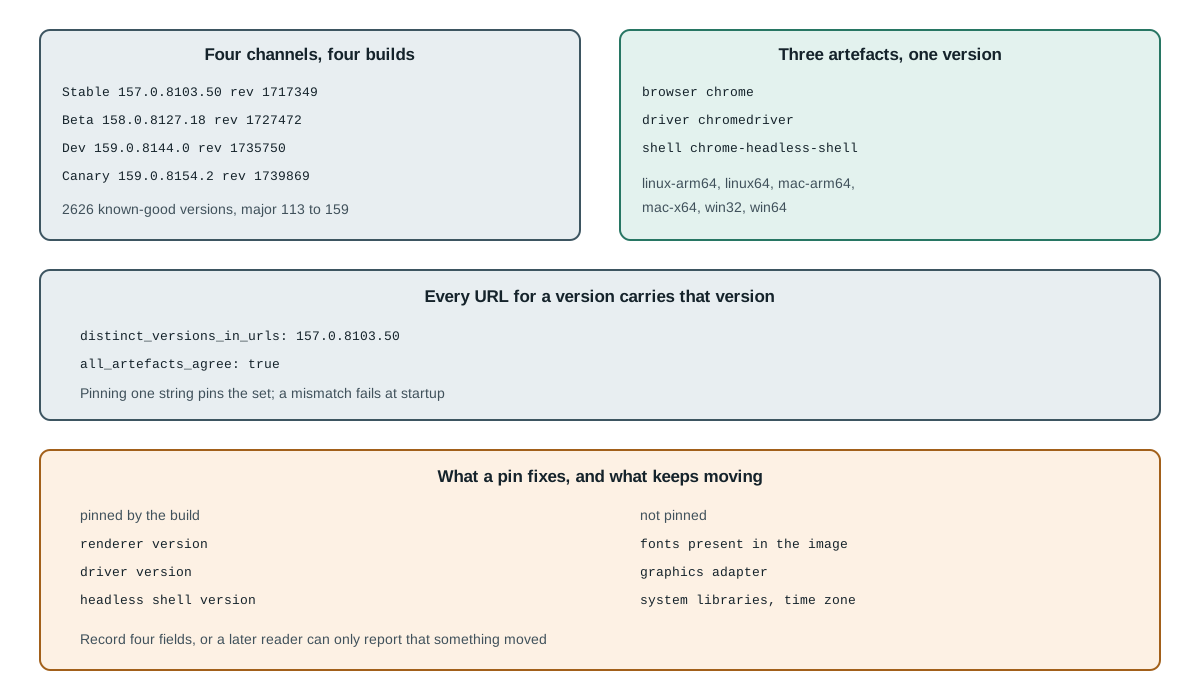
last_known_good_channels: Stable, Beta, Dev, Canary
  Stable: version=157.0.8103.50 revision=1717349
  Beta:   version=158.0.8127.18 revision=1727472
  Dev:    version=159.0.8144.0 revision=1735750
  Canary: version=159.0.8154.2 revision=1739869
Two fields matter and they answer different questions. The version is the string a reader recognises, and the revision is the underlying commit position in the Chromium repository. A pin written against the version is readable; a pin written against the revision is unambiguous even if a channel republishes a build. Recording both is the cheap option, and recording only the version is the common mistake.
The channel structure also matters for a pipeline that wants stability without staleness. Stable moves slowly and is the right default for a release gate. Beta, Dev and Canary move faster and are useful for detecting a change before it reaches Stable, which is the opposite of what a reproducibility requirement asks for. A pipeline that tracks Canary for determinism has chosen the fastest-moving channel for the job that needs the slowest.
known_good_count: 2626
oldest: 113.0.5672.0   newest: 159.0.8154.2
majors_present (last six): 154, 155, 156, 157, 158, 159
The size of that list, 2626 entries at the time of reading, is the practical argument for reading it programmatically. Two thousand six hundred versions is not a number a person scans, and a hand-edited pin drifts the moment someone copies a version from a blog post rather than from the endpoint.
Three artefacts, one version
The second fact is the one that breaks most pipelines that pin only the browser. Each version publishes three separate artefacts, and a working automation setup needs all three to agree.
chrome_platforms: linux-arm64, linux64, mac-arm64, mac-x64, win32, win64
mac-arm64: chrome=true driver=true shell=true
linux64:   chrome=true driver=true shell=true
win64:     chrome=true driver=true shell=true
distinct_versions_in_urls: 157.0.8103.50
all_artefacts_agree: true
That last line is the load-bearing one. Every published URL for the version carries the same version string, so pinning one value pins the set. When the three disagree, the failure is not random: a driver newer than its browser refuses to attach, and a headless shell from a different build renders differently from the browser it is supposed to stand in for.
The headless shell is the artefact teams forget, and it is the one that changes results quietly. A test that runs against chrome-headless-shell is not running against the browser binary, so pinning the browser while letting the shell float produces a pipeline where the renderer changes without the version number moving. Checking that all three report the same version is a one-line assertion, and it catches the case that a browser-only pin cannot.
pin = "157.0.8103.50"
assert browser_version == pin
assert driver_version  == pin
assert shell_version   == pin
The same structure explains a failure that looks like flakiness. A container image that installs the browser from one source and the driver from a package manager can end up with two versions from the same major, which mostly works and fails intermittently on the one capability that changed. The assertion above turns that intermittent failure into a startup error, which is the outcome worth paying for.
What a pin does and does not fix
The third fact is the one that decides whether a pin is enough, and the honest answer is that it fixes less than a reader hopes. A pinned build fixes the renderer and the driver together, because those are the artefacts it names.
pinned by the build:  renderer version, driver version, headless shell version
not pinned:           fonts, GPU driver, system libraries, time zone, clock
Fonts are the most common residue. A container with a pinned browser and no CJK font renders a Chinese page as boxes, and the pixel result differs from a developer machine with the same browser version. Nothing in the artefact set fixes that, because fonts come from the operating system image rather than from the browser package.
The GPU stack is the second, and webgl reports it. A pinned browser on a machine with software rendering produces different canvas and WebGL output than the same browser on a machine with a real adapter, and both are the same version. That difference is measurable and it is not a defect in the pin; it is a variable the pin never covered.
The clock and the time zone are the third, and they are the easiest to overlook because they are not part of the browser at all. A test that reads a formatted date or a locale-dependent string can pass and fail on the same build depending on the host configuration, and a report that records only the browser version cannot explain the difference.
The practical reading is that a pin is a necessary first step and a poor stopping point, which is the same conclusion deterministic mode for browser automation reaches from the scheduling side. It removes the largest source of drift, which is the renderer changing under a fixed test, and it leaves three smaller sources that a record has to name separately. A pipeline that records the build and nothing else can answer "did the browser change" and cannot answer "did the environment change".
A fourth observation belongs here because it is the one that turns a pin into an operational routine. The channels move on their own schedule, so a pin that is never revisited becomes a decision to stop receiving fixes. The routine that keeps a pin honest has three steps and none of them is automatic: read the endpoint, compare the published Stable version with the pinned one, and decide whether the difference is a security fix that has to be taken or a feature change that can wait for the next planned window.
pinned:   157.0.8103.50
published:157.0.8103.50
delta:    none
action:   none
That comparison is cheap, three lines against last-known-good-versions.json, and it is the step teams skip. A pipeline pinned at 157.0.8103.50 that never compares will eventually be running a build with a known defect while the dashboard shows a healthy version number, because the version is pinned and therefore looks intentional. Recording the published value next to the pinned value makes the drift visible without requiring anyone to remember when the pin was written.
The version string itself carries that information and a reader can use it without a changelog. The four components follow the fields Chromium records in chrome/VERSION: MAJOR.MINOR.BUILD.PATCH, so 157.0.8103.50 reads as major 157, minor 0, build 8103 and patch 50. A change in the first component is the one worth a full re-baseline; a change in the last is usually the least disruptive. Reading the string rather than treating it as an opaque token is what makes that judgement possible before anything is downloaded.
None of this requires a new tool. The endpoint is JSON, the comparison is a string equality, and the assertion is three checks at startup. What it requires is the decision to record the build next to the profile, because a report that names one and not the other cannot answer the question a reader will actually ask.
Practical conclusion
Read the availability endpoint rather than a post, record the version and the revision together, and assert that the browser, the driver and the headless shell all report the pinned value at startup. Track Stable for a release gate and reserve the faster channels for change detection, because a determinism requirement and a freshness requirement pull in opposite directions. Then record what the pin does not cover, which is the font set, the GPU stack, the system libraries and the clock. For the release contract that this implements, read browser automation release pinning and updates; for why two machines on one build can still disagree, read Selenium Grid node fingerprint divergence.
A declared profile and a pinned build answer two different questions. The profile says what the environment reports to a page; the build says what was installed. A setup that has one and not the other can be consistent in one dimension and drifting in the other, and a report that names both is the only kind that can be checked later.
A last group of observations concerns what the three artefacts are for, because a reader who treats them as interchangeable will pin the wrong one. The browser binary is the renderer and everything that follows from it: layout, fonts that ship with it, the JavaScript engine, and the surfaces a page can read. The driver is a protocol bridge, and its version has to match because the protocol it speaks is generated from the browser's own protocol definition.
browser   -> renderer, layout, JS engine, page-readable surfaces
driver    -> protocol bridge; must match the browser it drives
shell     -> headless renderer used instead of the browser binary
That middle row is why a driver mismatch fails loudly rather than subtly. A driver compiled against a different protocol generation will refuse a session or fail on the first command that changed shape, and the error names a command rather than a version. A reader who sees a protocol error and a matching-looking version string is usually looking at a driver installed by a package manager rather than from the artefact set.
The third row is the one that produces silent differences, and chrome-headless-shell is the name to grep for in a container image. The headless shell is a separate binary, so a test that runs against it is not running against the browser at all, even when the version strings match. The two render the same page slightly differently in exactly the places a visual comparison notices: subpixel text positions, font fallback order, and the way a lazily loaded image is decoded. A pipeline that pins the browser and lets the shell float has pinned the artefact it does not use and left the one it does use unpinned.
There is a further consequence for a fingerprint report that names navigator.userAgent. A value read from a page depends on the renderer, so a report that names the browser version and not the shell version has named the wrong artefact whenever the run used the shell. That is not a subtle distinction in practice: it is the difference between a report that can be reproduced and one that cannot.
The practical rule that follows is short: pin chrome, chromedriver and chrome-headless-shell together. Pin the three together, assert the three at startup, and record which of the three actually ran. A pipeline that does those three things can answer the question a later reader asks, which is not "which version was pinned" but "which binary produced this result".
A note on the two endpoints themselves, because their names are easy to confuse and the difference decides how a pin is written. One endpoint answers "what is the current build for this channel", and it changes whenever a channel is republished. The other answers "which versions exist", and it only grows. A pin written from the first endpoint is a snapshot of a moving value; a pin written from the second is a reference to an immutable entry, which is what a reproducible build actually needs.
last-known-good-versions.json -> current per channel; changes on republish
known-good-versions.json      -> every published version; only grows
<version>.json                -> the artefact list for one version; immutable
That third line is the one a pipeline should read at install time. It is keyed by the version string, so a pin resolves to one document that names every artefact for every platform, and the resolution does not depend on which channel is currently healthy. A pipeline that reads the first endpoint at install time will install a different build next week without any change to its configuration, which is the opposite of what a pin is for.
The distinction also explains a class of confusing bug report. A test suite that passed yesterday and fails today with no code change is usually reading the moving endpoint somewhere in its setup, and the fix is not to chase the failure but to make the read immutable. That is a one-line change and it removes an entire category of intermittent failure from the record.
One more consequence follows from the artefact split, and it concerns what a record has to contain before it can be audited. A build identifier such as 157.0.8103.50 answers which renderer produced a result, and a record that stops there answers less than it appears to. It does not answer which fonts were available, which graphics adapter was present, or which clock the process read. Those three are the variables that turn an identical build into a different result, and none of them is in the artefact set by design.
record: build, fonts present, graphics adapter, time zone
missing any one -> the result is reproducible only by luck
The cheapest way to keep that record is to write it at startup rather than to reconstruct it later: one line with the build, the font count, the adapter string and the zone. A startup line naming the build, the font list length, the adapter string and the zone costs a few hundred bytes and answers the question a reader will ask after a result changes. Reconstructing it afterwards means guessing at an image that may have been rebuilt since, which is the expensive version of the same work.
A last operational note closes the loop on what a pin is for. The reason to fix a build is not that change is bad; it is that an unannounced change makes a failure unattributable. A test that fails after an update can be explained by the update, and a test that fails with no recorded change forces an investigation that starts from nothing. Pinning buys attribution, and attribution is what turns a failure into a five-minute lookup instead of a day of guessing.
unpinned + failure -> investigate the browser, the fonts, the GPU, the code
pinned   + failure -> compare against the last run on the same build
The second line is the whole return on the work. It does not make failures rarer, and it makes them cheaper to explain, which is the property that matters when a suite runs nightly and nobody is watching it. A pin that is recorded alongside the profile, the font count and the adapter string gives a reader four fields to compare; a pin alone gives one.
Sources
This article is part of the guide: What Is a Browser Fingerprint?
Related Articles
Browser Automation Release Pinning and Updates
PlatformChrome Headless New vs Old: Shell, Mode and What Differs
FingerprintWhat Public Detector Suites Actually Test
Getting StartedHeadless Browser Selenium: Chrome Options and What Differs
Getting StartedUndetected Chromedriver: Browser-Layer Alternatives
FingerprintRebrowser Patches: What Changes After a Proxy Works?
Run the same check in BotBrowser
Load a profile, keep the signals you just read about consistent inside the browser, and confirm the result on your own machine before a rollout.