Cache Storage API for Offline Web Apps
A privacy-aware design for Cache Storage in offline web apps, including request matching, versioned releases, offline decisions, and cleanup.
Want the structured docs for Identity?
This article lives in the editorial library. For step-by-step setup, reference material, and ongoing updates, jump into the docs section.
The Cache Storage API gives an offline web app a named store for Request and Response objects. A service worker can open a cache, match a request, and return a saved response when the network is unavailable. The API does not decide which resources are safe to retain, how long they are fresh, or which account may read them. Those decisions belong to the application.
Offline support is therefore a storage design problem as much as a service-worker problem. A reliable design names each cache, versions resources when a release changes, chooses a fallback for each request class, and provides a predictable way to remove data. The Service Workers specification defines the worker lifecycle, while the MDN Cache reference documents the cache methods and their matching behavior.
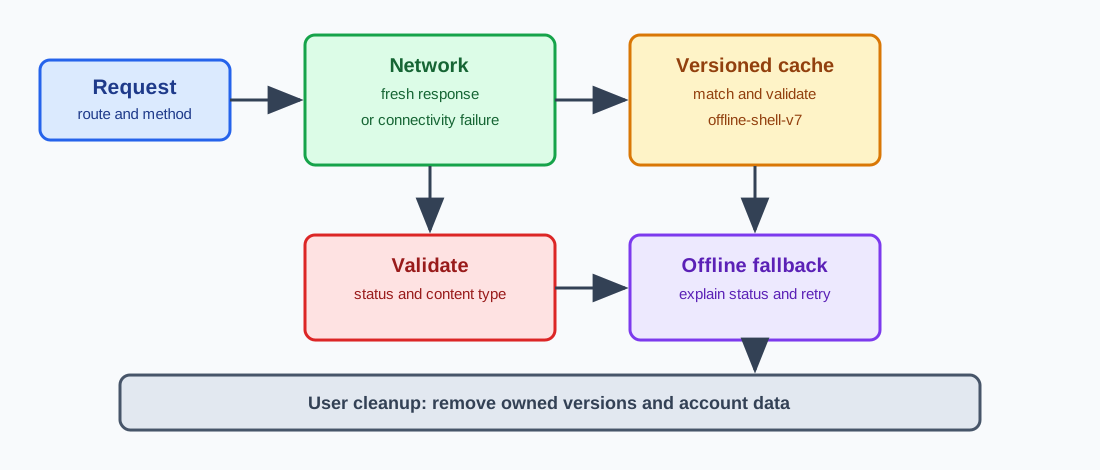
What Cache Storage owns
caches is the global CacheStorage object exposed to a service worker and, where permitted, to a window. caches.open('app-shell-v3') creates or opens a named Cache; cache.put(request, response) stores a response; cache.match(request) looks for a matching entry; and caches.delete('app-shell-v2') removes a whole named cache. The browser associates these stores with the web origin and the relevant browser profile or context. A cache name is an application namespace, not a security boundary between unrelated code running under the same origin.
The API stores web objects, not an abstract “offline mode.” A cached response can contain HTML, JavaScript, CSS, an image, or a JSON representation. It can also contain headers that influence how the application interprets the body. Store only responses whose purpose, lifetime, and owner are understood. If a response contains a session token, private account data, or a short-lived authorization decision, treat it as application state rather than a generic offline asset.
Cache Storage is separate from the HTTP cache, cookies, localStorage, IndexedDB, and service-worker registrations. Clearing one store does not automatically clear the others. A sign-out review should list every store used by the app and test each cleanup path. A successful cache.delete() is evidence that one named cache disappeared; it is not evidence that cookies or an IndexedDB record disappeared too. For a wider map of these stores, see the browser storage model and storage partitioning.
The API also does not guarantee retention. Browsers can evict site data under storage pressure, and users can clear it from browser settings. Eviction is useful as a last-resort space policy, but it is not a release process or a privacy control. An app that needs a response for offline work must be able to fetch it again and must handle the case where the cache is empty.
Origin ownership matters when several features share a site. An application shell, a document editor, and a signed-in dashboard can all call caches.open(). Give their names distinct prefixes and document who may delete each prefix. A cleanup routine that deletes every cache except its current version can erase another feature's data. Restrict deletion to names owned by the worker or feature that is performing the cleanup.
Matching requests without surprises
Cache.match() compares a request with stored entries using the URL and request attributes described by the platform's cache matching rules. The default comparison is not a general database query over response bodies. It is also not an instruction to treat every method as safely replayable. Use explicit request classes so the worker's policy is readable.
Static assets such as a release-pinned JavaScript bundle are good candidates for a cache-first strategy. The worker checks the versioned cache and returns the entry when it exists; if it is missing, the worker fetches the asset and may populate that same cache. A network-first strategy is usually safer for navigation documents or data that should reflect current server state: try the network, update a cache only when the response is suitable, and use a saved response only when the network fails.
Do not silently cache every successful response. A POST that creates an order or changes a profile is not made safe to repeat by putting its response in Cache Storage. A response that is personalized by an authorization header, cookie, or account identifier needs an explicit policy. For many applications, the safest offline behavior is to show a clear unavailable state and ask the user to reconnect rather than persist the response.
Request matching can differ when query parameters, headers, methods, or cache modes differ. If a language or representation varies by request header, make that variation explicit in the cache key or keep the response out of a shared cache. A single URL can legitimately have several representations, and returning the wrong one can be a correctness problem even when the network is offline. Keep a small table in the application design that maps request category to cache name, freshness expectation, and fallback.
Navigation fallback deserves special care. A worker can return a cached application shell for a navigation request, but the shell still needs a route that explains whether data is current. Do not present an old account dashboard as if it were a live server response. Render an offline indicator, preserve unsent work locally only when the user has agreed to it, and provide a retry action. The fallback should be an intentional user experience, not an accidental response from the last request that happened to match.
Opaque responses and cross-origin resources need their own review. A worker may be able to store a response that it cannot inspect fully, but storing it does not make the resource reliable or portable. Record which origins are allowed, what failure looks like, and how the app removes the entry. Never use Cache Storage to collect or inspect another site's private content.
Versioning and release updates
Treat a cache name as a release contract. A name such as offline-shell-v7 tells the activation code which entries belong to the current worker. During install, create and populate the new cache. During activate, list cache names owned by the feature and delete old versions. The Service Workers lifecycle guidance explains why a new worker can remain waiting while an older worker still controls open pages.
Install should be atomic from the user's point of view. If a required asset fails to download, reject the install rather than activating a cache that is missing a critical file. Keep optional resources in a separate cache or add them after activation with a retryable path. A worker that failed installation leaves the previous worker and cache available, which is usually better than a partially populated release.
Activation cleanup must be conservative. Keep the current version and delete only names with the feature's prefix. Do not delete another team's cache because its name does not match your current release. If a site has multiple workers with different scopes, agree on ownership before adding a global cleanup loop. A release record should include the worker script version, the cache names before and after activation, and whether a waiting worker was observed.
skipWaiting() and clients.claim() change when the new worker starts serving pages. They can shorten rollout time, but an old page may then receive responses prepared for a new script. Use them only when the old and new application contracts are compatible, and test an open tab during an update. If compatibility is uncertain, let the worker wait and ask the user to reload at a clear boundary.
Resource URLs can change without a cache name change. A build that keeps offline-shell-v7 but replaces a file in place makes it harder to reason about which bytes a user has. Prefer content-hashed or release-pinned URLs, or rotate the cache name when the resource contract changes. The goal is a state that can be explained from a release identifier, not a cache whose contents depend on an undocumented sequence of fetches.
The install list is part of that contract. Keep a short list of resources that are required for the first offline screen and a separate list for enhancements. A failure in a required item should make the install fail in a way the previous worker can survive. An enhancement can be fetched after activation and retried later. This split avoids a choice between an unusable new shell and an all-or-nothing cache that grows whenever a nonessential image changes.
A cache entry should also have a reason that can be explained without opening its body. Record the route category, the release or account scope, the expected lifetime, and the code path that removes it. This metadata can live in the release record or in a small design table; it does not need to be stored beside every response. If a reviewer cannot say why an entry exists, the safer decision is to remove it or keep it out of Cache Storage until its owner is clear.
Be precise about what a cache hit means. It means the worker or cache layer supplied a response that matched the request under its matching rules. It does not mean that the response is current, that the origin would return the same representation, or that the network route was available. A test that needs network evidence must record a request that actually reached the network. A test that needs offline evidence must make the network failure explicit and then assert the visible fallback. Combining both observations into one “fast load” measurement hides the boundary that the application needs to operate.
When an application changes its cache policy, migrate deliberately. A new worker can leave an old cache for one release while it verifies that the new cache is populated. Once the new worker is active and the migration check passes, the activation path can delete the old name. If a migration is interrupted, retry it on the next activation rather than deleting both versions eagerly. This approach keeps a recoverable shell available while still giving the owner a finite cleanup rule.
Offline fallback and recovery
An offline strategy should define a result for each request class: shell, navigation, image, font, API read, and mutation. For a shell, a cached response may be enough to render a local route. For an API read, a stale record may need an age label and a refresh control. For a mutation, queueing can be appropriate only when the operation is idempotent or has an application-level idempotency key and a visible retry state. Cache Storage alone does not provide a durable mutation queue or conflict resolution.
When the network fails, distinguish a cache miss from a cached error. Do not store a transient 500 or an authentication redirect as if it were a useful offline page. Check the response status and content type before putting a response into a cache. If the fallback is unavailable, return a small offline document or a controlled error response that explains what the user can do next.
Recovery is part of the cache contract. A retry that succeeds should replace the stale entry only after the new response passes the same validation rules as the original. If a user edits a document while offline, keep the draft in a store designed for local application data and show when it was last synchronized. Do not hide a pending write inside a cache entry that the worker might delete during the next release.
Testing should cover cold, warm, and degraded contexts. A cold context has no service-worker registration or cache. A warm context has the current release cached. A degraded context has a previous release, a missing optional asset, or a network that fails after navigation begins. For each context, record the worker state, cache names, request class, response source, visible status, and recovery action. Keep records free of tokens, response bodies, and customer identifiers.
Use browser developer tools or an automated test that owns its origin and test accounts. Verify that a cache hit really came from Cache Storage, rather than assuming that a fast response proves it. A browser HTTP-cache hit can satisfy a request before the worker runs, and a service worker can return a response without contacting the network. Name the layer that supplied the observation.
Cleanup, sign-out, and user control
Deletion is a feature, not housekeeping. Provide a named operation for removing obsolete release caches and a separate operation for removing account or draft data. Keep those operations separate so a routine release does not erase a user's offline work, and a sign-out does not accidentally leave account data in a long-lived shell cache.
On sign-out or account switch, end the server session first, then ask the worker to delete account-scoped caches, then clear in-memory state and notify other tabs. Test two open tabs: one tab can keep rendering a cached response after another tab has signed out unless the application coordinates the change. A visible control should tell users what will be removed and whether unsent work will be lost.
Clear-Site-Data can ask a browser to clear categories of origin data, but support and exact coverage depend on the browser and directive. It is not a substitute for application cleanup. Likewise, an HTTP Cache-Control header describes HTTP cache behavior; it does not cause a worker to skip cache.put(). The code that writes Cache Storage must apply the application's storage policy before it stores a response.
Keep data minimization in the cache design. Use the smallest response needed for the offline screen, avoid putting access tokens in response bodies, and set an explicit retention rule for drafts and media. Explain whether clearing data affects the current session, queued work, or only static assets. A user should not have to inspect developer tools to understand the consequence of a cleanup button.
Testing with BotBrowser and documented limits
BotBrowser can create repeatable browser contexts with isolated storage and session state, so teams can compare a cold, warm, and signed-out Cache Storage workflow without carrying one context's state into another. Use the multi-account isolation documentation to define the context boundary and record the worker state, cache names, and visible fallback outcome for each controlled test. BotBrowser does not write, version, purge, or interpret an application's Cache Storage entries, and it cannot guarantee browser eviction, offline availability, or the correctness of a service-worker strategy; cache ownership and cleanup remain application responsibilities.
A useful test matrix has one context with no prior cache, one context after a successful install, and one context after an update. Load a known shell, disconnect the test network at the boundary permitted by your test environment, and confirm that the fallback names its data as offline. Then restore connectivity, retry, and check that the response is replaced only when it passes the application's validation. Repeat sign-out and account-switch checks with two contexts and two tabs. Compare cache names and worker state, not private response bodies.
Keep BotBrowser evidence bounded to the behavior it can observe: context isolation, navigation results, worker state exposed by the browser, and the application's own cache-list assertions. A passing context comparison does not prove that every browser family evicts storage the same way, that an origin's service worker is correct in production, or that an offline mutation can be safely replayed. Those claims require the application's tests, browser-specific coverage, and an explicit product decision.
Public sources
Related Articles
Take BotBrowser from research to production
The guides cover the model first, then move into cross-platform validation, isolated contexts, and scale-ready browser deployment.