Azure WAF Bot Protection: What Each Product Declares
Compare Azure Front Door and Application Gateway bot protection declarations, log fields and the limits of page-visible evidence.
BotBrowser Team
Want the structured docs for Fingerprint?
This article lives in the editorial library. For step-by-step setup, reference material, and ongoing updates, jump into the docs section.
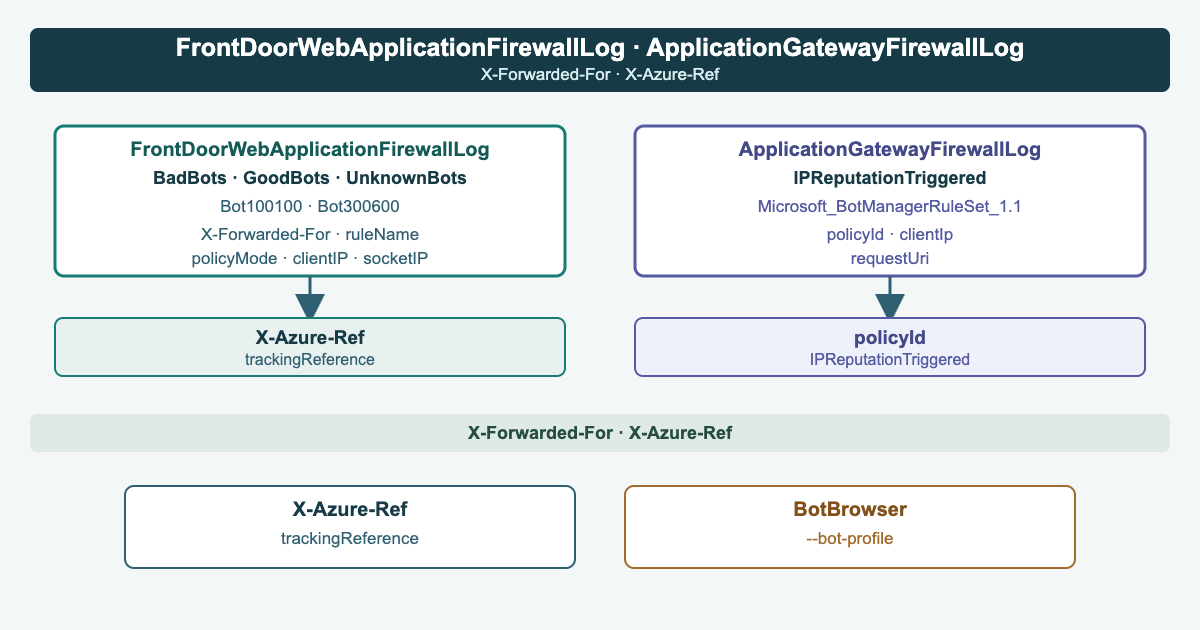
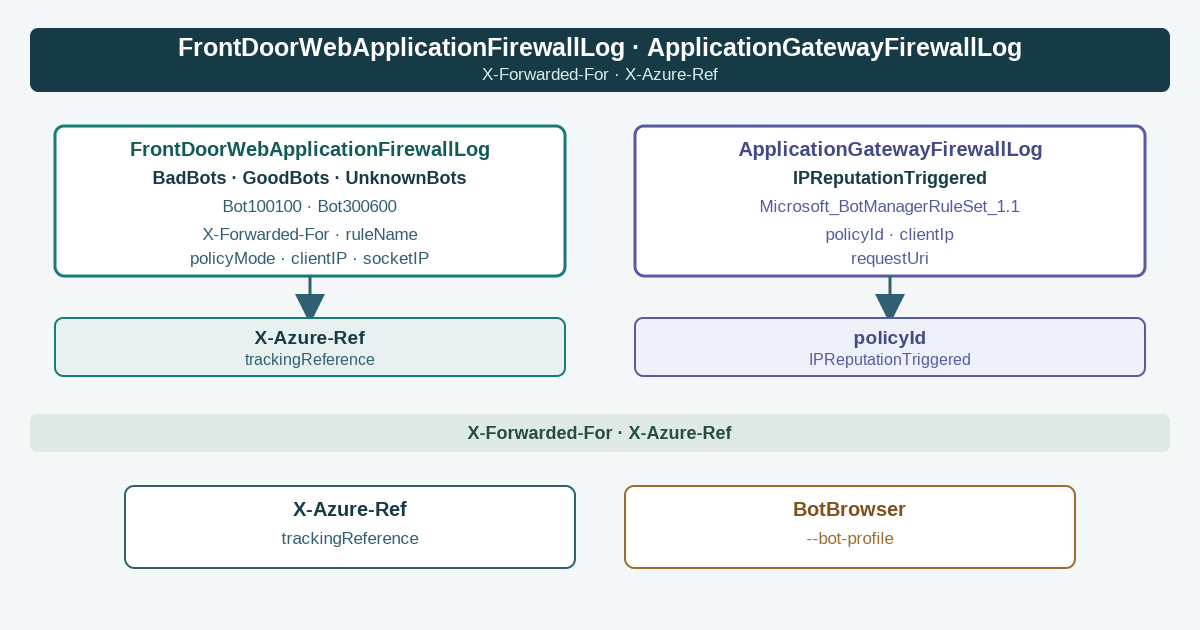
Azure does not expose one universal “bot protection” decision surface. Azure Front Door Premium documents managed BadBots, GoodBots and UnknownBots rule groups, while Application Gateway v2 documents a managed bot rule set aimed at known malicious IP addresses from the Microsoft Threat Intelligence feed. Both sit at the edge, but their published rule vocabulary and log examples differ. BotBrowser can make browser/profile inputs explicit, but it cannot change Azure rule groups, IP reputation, the selected policy mode, log retention or the edge's decision.
The useful map has three columns: what Microsoft publishes, what the customer can inspect in an Azure log, and what a page or response can reveal. Those are different evidence classes. A page-visible field is not the WAF's verdict; an Azure log is not available to a site visitor; and a public rule-group name does not prove which rule fired for a particular request.
TL;DR
- Front Door Premium documents
BadBots,GoodBotsandUnknownBotsgroups in its bot manager rule sets. - Application Gateway v2 documents a managed bot rule set that can block or log requests from known malicious IP addresses.
- Detection logs without blocking; Prevention can block. A page response cannot tell you which mode or rule produced the result.
- Front Door logs expose
ruleName,action,policyMode,requestUri,clientIP,socketIP,detailsandTrackingReference; logs are not enabled by default. - The general Microsoft Privacy Statement does not provide a field-by-field Azure WAF bot-rule collection list.
Contents
- Front Door Premium declarations
- Application Gateway declarations
- Detection, prevention and the visible response
- What the logs expose
- A declaration-versus-observable table
- What BotBrowser changes
- Method, failures and limits
- Practical conclusion
Front Door Premium declarations
Microsoft’s Front Door bot protection setup page says the WAF provides bot rules to identify good bots and protect from bad bots. Its policy example adds Microsoft_BotManagerRuleSet version 1.0. The DRS reference then defines three rule groups:
| Rule group | Published description |
|---|---|
BadBots | Protect against bad bots |
GoodBots | Identify good bots |
UnknownBots | Identify unknown bots |
The group label is a declaration, not a per-request observation. The same DRS page lists concrete rule IDs inside those groups. Bot100100 is described as “Malicious bots detected by threat intelligence”; Bot100200 covers malicious bots that falsified their identity. The page says Bot100100 scans both the client IP address and IPs in the X-Forwarded-For header. That is a concrete input claim for one rule, not a claim that every bot rule uses only those fields.
The UnknownBots group has a different vocabulary. Bot300100 is “Unspecified identity”; Bot300200 covers tools and frameworks for web crawling and attacks; Bot300300 covers general-purpose HTTP clients and SDKs; Bot300600 covers unknown bots detected by threat intelligence and includes IP addresses matched to the Tor network. The same page says Bot300600 scans both the client IP and X-Forwarded-For.
Those descriptions support a useful review question: which declared input is relevant to the rule that matched? A browser-visible user agent, a client IP and an X-Forwarded-For value are not interchangeable. The log may identify a rule and a matched variable, while the page may only receive a block, challenge or ordinary response.
The DRS page also says the bot rule set categorizes traffic as good, bad or unknown. Do not turn that sentence into a verdict about every automated client. The group names describe how the published rules organize matches. They do not establish that a given request was classified correctly or that the site’s policy should have allowed it.
The rule IDs also show why a generic “bot blocked” label is too coarse for an incident. Bot100100 and Bot300600 are published with specific threat-intelligence and IP-header descriptions, while Bot300300 covers general-purpose HTTP clients and SDKs. Those are different review questions: a threat-feed match, an identity mismatch and a client-family match may all be called “bot” traffic by an operator, but the published rule descriptions are not interchangeable.
For a customer reviewing a policy, record the rule-set version before comparing incidents. Microsoft’s DRS page says the version increments as attack signatures are added. It also warns that changing the rule-set version resets rule customizations to the new version’s defaults. A matching rule name from one version is not automatically the same configuration in another policy.
Application Gateway declarations
The Application Gateway v2 bot protection overview describes a managed rule set that can block or log requests from known malicious IP addresses. It states that the addresses are sourced from the Microsoft Threat Intelligence feed, powered by Intelligent Security Graph and used by other Microsoft services including Microsoft Defender for Cloud.
The page also states that the rule-set list updates multiple times per day from that feed. That is a declaration about the source and refresh process, not a promise that a particular IP will be present at a particular time. The published rule-set facts do not require an Azure subscription, but they do not supply a live reputation result.
Application Gateway’s example log entry is visibly different from the Front Door DRS vocabulary. The published sample excerpt uses:
{
  "category": "ApplicationGatewayFirewallLog",
  "properties": {
    "clientIp": "1.2.3.4",
    "requestUri": "/hello.php?arg1=aaaaaaabccc",
    "ruleSetType": "MicrosoftBotProtection",
    "message": "IPReputationTriggered",
    "action": "Blocked",
    "hostname": "example.com",
    "policyId": "waf policy 1",
    "policyScope": "Global",
    "engine": "Azwaf"
  }
}
The sample says IPReputationTriggered and Blocked. It does not show a BadBots or UnknownBots group. A team must not copy the Front Door rule-group table into an Application Gateway runbook and call it the same decision.
The Application Gateway page says the bot protection rule set can be used with any OWASP rule set on WAF v2, with only one OWASP rule set at a time. It also says the bot rule set contains Microsoft_BotManagerRuleSet_1.1. Record the product, SKU, policy and rule-set version rather than writing only “Azure WAF” in an incident note.
The page’s managed rule set is specifically about known malicious IP addresses. That makes it narrower than the three Front Door group names. A customer should not infer that Application Gateway has the same GoodBots verification semantics merely because both products use a Microsoft bot-manager rule name. The published Application Gateway example contains IPReputationTriggered; that is the concrete claim to test against the actual product page and log.
Application Gateway v2 and Front Door Premium also have different operating contexts. The Application Gateway overview is written for WAF on Application Gateway; the Front Door setup page is written for a Front Door WAF policy and its global profile. Record the resource type, region or global scope, policy name and rule-set version. A log category from one resource does not prove the other product made the same decision.
Detection, prevention and the visible response
A standalone bot service states its processing list more directly than a cloud WAF rule group does: the F5 Bot Defense declaration map quotes F5's four named categories and the processor/controller split behind them.
The Front Door configuration example defines two policy modes. In Prevention, the WAF blocks requests it detects as malicious. In Detection, it does not block and simply logs the request. That is a configuration-level statement. It does not tell a page which rule matched or whether the request would have been blocked in another mode.
The DRS page adds another distinction. It says DRS is enabled by default in Detection mode. It also says actions can be Allow, Block, Log, Redirect and Anomaly score. For DRS 2.0 and above, a rule can contribute to an anomaly score; the request may be blocked only after the configured score action and action are considered. A single matched rule is not always a final block.
The Front Door log documentation lists actions including Allow, Block, Log, AnomalyScoring and JavaScript challenge outcomes. The log action is the place to look for the final customer-side record. A page might receive a normal page, a block response or a challenge page, but the page cannot read the rule name, policy mode or anomaly score from that response alone.
Detection is therefore a useful observation mode for a site owner, not a hidden browser API. If a team wants to test its own policy, it can compare the documented Detection result with the documented Prevention result in a controlled Azure environment. This article did not create that environment, so it does not claim a measured transition.
What the logs expose
The Front Door WAF monitor page describes the FrontDoorWebApplicationFirewallLog and says it includes requests that match a WAF rule. It lists these fields:
| Field | Published meaning |
|---|---|
Action | Allow, Block, Log, AnomalyScoring or a JS challenge outcome |
ClientIP | Client IP, using X-Forwarded-For when that header is present |
ClientPort | Client port |
Details | Matched variable name and value, including header names and values |
Host | Request Host header |
Policy | WAF policy name |
PolicyMode | Prevention or Detection |
RequestUri | Full request URI |
RuleName | WAF rule that matched |
SocketIP | Source IP seen by WAF from the TCP session, ignoring request headers |
TrackingReference | Unique reference sent to the client in X-Azure-Ref |
The ClientIP and SocketIP rows are especially easy to conflate. The published description says ClientIP may use X-Forwarded-For, while SocketIP is based on the TCP session and does not consider request headers. A team investigating an edge decision should record which field it used and why.
The log page also says logs are not enabled by default. The owner must enable diagnostic logging. It warns that matching patterns are written in plain text when logging is enabled and that exclusions can remove data from the logs. Those are operational privacy and retention choices, not browser-controlled values.
The plain-text warning matters for a review. A customer log can contain the request URI, matched parameter value, Host and IP fields. Before sharing a log outside the team, remove query values, credentials, account identifiers and any other customer data that is not needed to prove the rule behavior. The public article quotes only Microsoft’s placeholder example, not a customer record.
The log page lists WAF logs, access logs and health-probe logs as separate types. WAF logs answer whether a request matched a rule; access logs describe request handling; activity logs describe resource configuration. A missing WAF entry can mean the request did not match a rule, logging was disabled or the record was routed elsewhere. It does not by itself prove that no edge protection exists.
The example entry includes TrackingReference and says the value is sent to the client in X-Azure-Ref. That response header can help correlate a client-visible request with a customer log, but it does not reveal the rule name or policy mode to the page by itself. Correlation still requires access to the owner’s log.
The tracking reference should be treated as an identifier, not a proof of causality. It lets an owner search for the request that produced a response. The owner still has to inspect RuleName, Action, PolicyMode, Details, ClientIP and SocketIP and decide whether the records describe the same event. A response header alone does not show whether the request was allowed, blocked or merely logged.
A declaration-versus-observable table
Use this table to keep evidence classes separate:
| Evidence layer | What it can establish | What it cannot establish |
|---|---|---|
| Microsoft declaration | The documented product, rule groups, rule IDs, modes and fields | Which rule fired for one request |
| Customer Azure log | The matched rule, action, policy mode, IP fields and tracking reference | What a page should have looked like without WAF |
| Page or response observation | The status, headers, body or challenge a client actually received | The internal rule, reputation or anomaly score |
| Browser/profile observation | Values exposed by the owned page under a declared browser/profile input | Azure policy, IP reputation, retention or access |
The table is a diagnostic order, not a ranking. Start with the deployment shape: Front Door Premium and Application Gateway v2 have different published rule vocabularies. Then identify the policy and mode. Then inspect the customer log if it exists. Only after that should a page-visible result be treated as corroboration.
If a page is blocked and no log is available, the honest result is “an edge response was observed, owner-side cause unknown.” If a log says Detection and the page receives a normal response, the log supports a non-blocking mode but does not show what a Prevention policy would have done. If the log says Block and the page receives a block response, the correlation is stronger because the X-Azure-Ref tracking reference can join the two records.
The page’s response body may carry a product-specific block page, a challenge, a redirect or a normal application response. None of those labels necessarily identifies the rule. Keep the HTTP status, final URL, response headers and a redacted body hash in the browser evidence record; keep the Azure fields in the owner record. The two records can then be joined without pretending one proves the other.
What BotBrowser changes
BotBrowser documents browser fingerprint surfaces and profile-backed browser inputs, and those controls can change what a page script observes about a browser. It does not change Azure’s managed rule groups, Microsoft Threat Intelligence IP reputation, X-Forwarded-For handling at the edge, WAF logging, policy mode or retention.
The boundary is concrete:
| Controlled by the browser/profile | Controlled by Azure or the site owner |
|---|---|
| Page-visible browser values | Rule groups, rule IDs and policy version |
| Browser launch and profile inputs | IP reputation and X-Forwarded-For evaluation |
| Owned fixture observations | Detection/Prevention choice and anomaly score action |
| Local evidence record | WAF logs, X-Azure-Ref, retention and access |
BotBrowser cannot turn a page observation into a WAF verdict. It also cannot make an Azure log appear. Keep the product declaration, the customer-side log and the browser observation in separate evidence fields so a later reviewer can tell which one failed.
Method, failures and limits
This article is a source review of public Microsoft Learn pages, the Microsoft Privacy Statement and BotBrowser’s fingerprint documentation. It did not create an Azure resource, configure a WAF policy, send a request to a protected endpoint or read a customer log. The source hashes and the list of non-claims are in docs/evidence/azure-waf-bot-protection-declaration-map-sources-20261122.json.
The Microsoft Privacy Statement describes broad data categories such as device, connectivity, IP address and diagnostic data. It does not state that every Azure WAF bot rule evaluates every category, nor does it provide a field-level schema for this product. Treat it as a general privacy declaration and use the product-specific log documentation for fields.
The Front Door and Application Gateway pages describe different products. The presence of the word “bot” in both does not make their rule groups, log schemas or policy modes interchangeable. A review that copies the Front Door table into an Application Gateway incident will misidentify the evidence.
The Microsoft Privacy Statement is also a source with a different scope from the product pages. It describes broad categories of personal data that Microsoft may collect across products and services. It is useful for understanding why IP addresses and diagnostic data can be sensitive. It is not a substitute for the Front Door log schema, the Application Gateway example or the customer’s diagnostic settings.
The BotBrowser fingerprint page describes browser-observable surfaces and profile-backed inputs. It does not contain Azure WAF rule IDs or log fields. Using it to explain a WAF decision would cross from browser evidence into a vendor-side record that the browser cannot see.
No result establishes that a particular bot was good, bad or unknown; that an IP was on a threat feed; that a challenge passed or failed; or that a destination site should permit a request. Those questions require an owner-controlled Azure environment and the relevant logs.
The source review also does not measure whether the Front Door and Application Gateway pages are deployed in the same subscription, region or tenant. It records the published product distinctions only. A later controlled test should create the smallest owner-approved policy, capture the deployment resource IDs and compare the actual log categories before generalizing.
FAQ
Does Azure Front Door and Application Gateway use the same bot rule groups?
No. The Front Door DRS documentation names BadBots, GoodBots and UnknownBots. The Application Gateway overview describes a managed bot protection rule set for known malicious IP addresses from Microsoft Threat Intelligence. Record the product and policy rather than a generic “Azure WAF” label.
What is the difference between Detection and Prevention?
The Front Door configuration example says Detection logs a detected malicious request without blocking it, while Prevention can block it. The DRS anomaly behavior can add a score action before a final action. A page response alone does not identify the policy mode.
Can a page read the WAF rule that blocked it?
The published Front Door log includes RuleName and TrackingReference; the tracking reference is sent in X-Azure-Ref. The page or response alone does not expose the rule name or policy mode. Correlation requires the owner’s log.
Does ClientIP always equal SocketIP?
No. The Front Door monitor page says ClientIP can come from X-Forwarded-For, while SocketIP is based on the TCP session and ignores request headers. Record which field the investigation used.
Are Azure WAF logs enabled by default?
The Front Door monitor page says logs are not enabled by default and must be configured through diagnostic settings. An absent log is not evidence that no rule matched; it may mean logging was never enabled.
For neighboring edge-evidence comparisons, read AWS WAF Bot Control evidence and Imperva Bot Protection declarations.
Sources
- Azure Application Gateway bot protection overview
- Configure Front Door bot protection
- Front Door WAF DRS rule groups and rules
- Front Door WAF monitoring and logs
- Microsoft Privacy Statement
- BotBrowser fingerprint documentation
Practical conclusion
Start with the Azure deployment shape. Front Door Premium publishes bot rule groups and log fields that differ from Application Gateway v2’s IP-reputation bot rule set. Keep Microsoft’s declarations, the owner’s WAF log and the page response in separate evidence layers; use X-Azure-Ref only as a correlation handle when the owner has the matching log. BotBrowser can make browser/profile inputs explicit, but it cannot change the rule, reputation, policy mode, logging or edge decision.
This article is part of the guide: What Is a Browser Fingerprint? Signals and Layers
Related Articles
Imperva Bot Protection: What It Declares
FingerprintAWS WAF Bot Control: What a Client Actually Sees
FingerprintF5 Bot Defense: What It Declares and What a Page Sees
FingerprintAkamai Bot Manager: Sensor Data and Privacy
FingerprintAWS WAF CAPTCHA: Tokens, Signals and Privacy
FingerprintKasada Challenge Signals and Privacy Explained
Run the same check in BotBrowser
Load a profile, keep the signals you just read about consistent inside the browser, and confirm the result on your own machine before a rollout.