navigator.hardwareConcurrency and Web Worker Planning
How to interpret navigator.hardwareConcurrency, choose a Web Worker pool size, and test concurrency without treating a browser hint as a core count.
Want the structured docs for Platform?
This article lives in the editorial library. For step-by-step setup, reference material, and ongoing updates, jump into the docs section.
navigator.hardwareConcurrency is a browser-provided concurrency hint, not a promise that a page can run that many tasks at once. Use it as one input to a bounded worker-pool policy, then measure queue delay, completion time, memory pressure, and responsiveness. A useful plan keeps work below the point where additional workers only add contention.
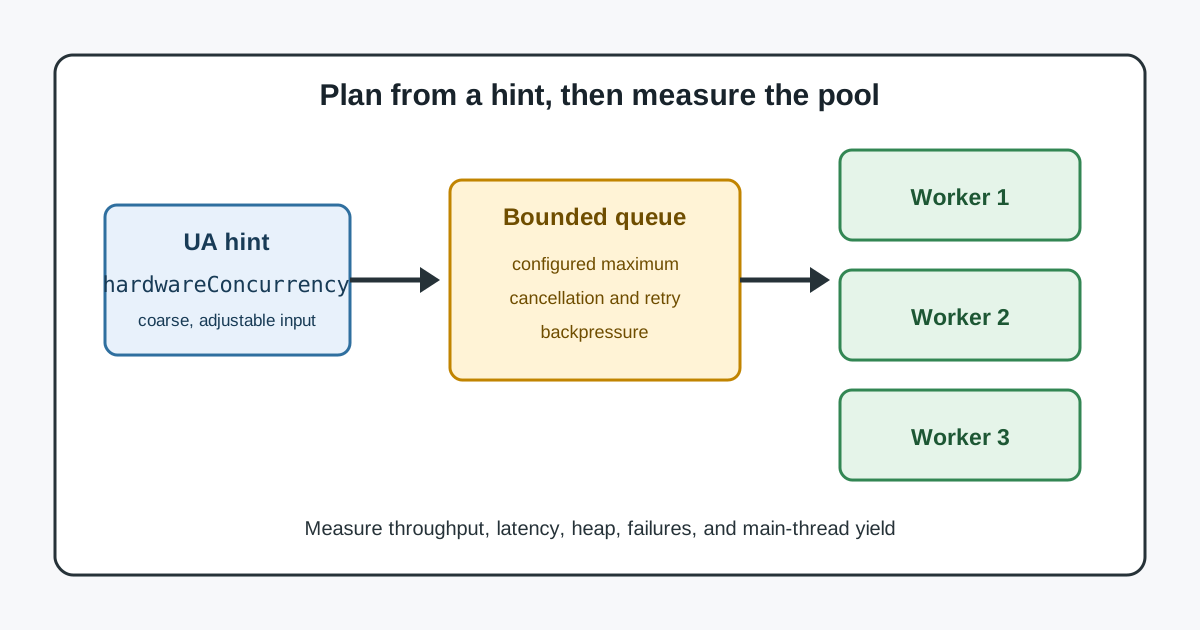
The value describes a logical processor count exposed to the page, and a browser may reduce it when it wants to limit available concurrency. The device and viewport guide covers another example of why a browser-exposed value is a compatibility input rather than a complete device description.
What the value means
The MDN Navigator.hardwareConcurrency reference defines the read-only number of logical processors available to run threads on the user's computer. It also notes that the browser may report fewer processors than the machine has. The value is therefore suitable for a starting estimate, but it cannot establish physical cores, current CPU load, or the amount of memory available to the page.
The property is available on navigator in a window and can be read by worker code through its worker global scope. It does not create threads, reserve CPU time, or make a task parallel. A worker still communicates by messages, and the page still pays for serialization, scheduling, allocation, and synchronization.
Treat changes as normal compatibility events. A different browser release, operating-system policy, power mode, privacy setting, or execution context can expose a different hint. Do not use the number as an identity signal, an authorization decision, or a reason to collect a more detailed hardware profile.
Turn the hint into a worker policy
Start with a small pool and a queue. For CPU-heavy independent jobs, a practical initial ceiling is no higher than the reported hint and often lower. Reserve capacity for the page, input handling, networking, rendering, and the operating system. For I/O-heavy jobs, fewer workers may be enough because waiting does not require another CPU-bound thread.
The WHATWG worker model defines workers as separate execution contexts that communicate with their creator through messages. That boundary makes a queue important: send only bounded batches, transfer large buffers when appropriate, and define what happens when a job is cancelled or a worker fails. A pool should be able to stop accepting work instead of growing without limit.
Use a policy such as min(availableHint, configuredMaximum) rather than copying the hint directly into a pool size. Set a separate maximum for mobile or memory-constrained contexts, and let an application-specific limit win when the workload is known to be expensive. The configured maximum is a product decision; the browser hint is only an input.
Measure saturation and responsiveness
Benchmark the real job, not an empty loop. Record queue wait, execution time, end-to-end completion, failed or cancelled jobs, memory usage, and the responsiveness of the main thread. Compare one worker, a small pool, and larger pools on representative data. Stop increasing concurrency when throughput flattens or when latency, memory, or interaction quality worsens.
Run cold and warm trials separately. Worker startup and script loading can dominate a short job, while a long stream may be limited by computation or message transfer. Keep the browser release, input size, device class, and power state visible in the test record so a later result is comparable. Do not infer a machine's physical topology from timing alone.
Test failure paths as part of the plan. A terminated worker, rejected message, out-of-memory failure, or page visibility change should return work to a bounded queue or a clear error state. Cancellation must release buffers and remove the job from accounting. A retry policy should have a limit so a failed task cannot keep the pool saturated.
Keep privacy and compatibility boundaries
The hint is coarse by design and may be reduced. A page should continue to function when it is missing, small, or inconsistent with an earlier observation. Feature-detect Worker support and provide a main-thread or sequential fallback for short jobs. Do not combine hardwareConcurrency with timing, graphics, fonts, or storage observations to identify a person or device.
Explain the resource choice in user-facing terms when it affects battery, data usage, or an upload. A local worker pool does not grant permission to send data elsewhere. If a workflow changes from local processing to a remote service, ask for an explicit user choice and state what leaves the device. Keep logs to the measurements needed to operate the queue, without raw content or unnecessary hardware details.
Classify the work before choosing a pool
Worker count is easier to reason about when the job has a clear shape. A CPU-bound conversion, such as decoding or compressing independent records, can use several workers until the processor is busy. A network-bound task may spend most of its time waiting for a response, so adding workers can increase pressure on the service without improving the page. A job that touches shared state may need fewer workers because coordination, not computation, is the limiting factor.
Separate independent work from ordered work. Independent items can be placed in a queue and completed in any order, with a sequence number used to restore presentation order. Ordered stages should keep their dependencies explicit instead of launching a worker for every step. This distinction prevents a large hint value from turning a serial algorithm into a pool full of idle or blocked workers.
Define the unit of work before measuring it. Include input preparation, message transfer, worker execution, result handling, and cleanup in the end-to-end operation. If preparation happens on the main thread, record that time separately so a faster worker stage does not hide a slower page interaction. The same definition should be used for every pool size you compare.
Design the queue lifecycle
A bounded queue needs an admission rule, an execution rule, and a completion rule. Admission can reject new work, replace an older refresh, or show progress when the queue reaches its limit. Execution should mark a job as running before sending it to a worker and should attach a timeout or cancellation path. Completion should release the worker, settle the job exactly once, and update the measurements used by the next decision.
Backpressure is part of the user experience. When a user selects more files than the page can process, keep the visible selection and explain whether extra work waits, is discarded, or is processed after earlier work. Do not silently grow an unbounded array of pending input items. A clear limit protects memory and gives the user a predictable way to cancel or resume.
Use one owner for queue state. The page can own admission and ordering while each worker owns only its current task. Messages should carry a small job identifier and the data needed for that task; results should carry success, failure, and cancellation status. This structure makes a late result harmless when the user has already replaced or cancelled the job.
Account for transfer and memory costs
Worker parallelism does not remove data movement. Structured cloning can copy objects, while transferable buffers can move ownership when the API and data layout allow it. Measure both choices with representative input records. A pool that computes quickly but spends most of its time copying input or results is not faster for the user.
Keep input sizes bounded and release references after completion. Large arrays retained by the page, the queue, and a worker can multiply memory use even when only a few tasks are active. When a task is cancelled, clear its queued input and tell the worker to stop if the operation supports cancellation. Treat an allocation failure as a normal error path, not as a reason to increase the pool.
Results also need a retention policy. Render only the results needed for the current view, paginate large result sets, and avoid keeping duplicate copies for logging and display. If a result must be cached, define its lifetime and invalidation condition. These choices often improve responsiveness more than adding another worker.
Adapt to visibility and power
A page that is hidden may have different scheduling and power constraints than a visible page. Pause admission for nonessential work when the document is hidden, or lower its priority and let the queue drain. On return, re-check whether queued jobs are still relevant; a search result or preview may have been replaced while the page was away.
On mobile devices, a sustained pool can consume battery and produce heat even when throughput improves. Offer a setting or automatic mode that favors responsiveness and battery life for background or interactive work. The setting should change the configured maximum, not reinterpret the browser hint as a measurement of battery capacity.
Avoid using visibility or power state as an identity signal. They are operational inputs for scheduling and can change during one session. Keep the decision local to the task, explain noticeable pauses, and do not send these observations to a service unless the user has chosen that data flow.
Make fallback behavior observable
Feature detection should happen at the point where the feature is used. Check that the Worker constructor and required messaging behavior are available, then fall back to a small sequential path when they are not. A fallback can process one item at a time, yield between chunks, or ask the user to retry; it should preserve the same result format and cancellation affordance where possible.
Expose useful status without exposing implementation details. “Preparing,” “processing,” “paused,” and “could not complete” help a user understand a delay. Include a retry action only when retrying can change the outcome, and make a permanent failure readable. Do not present a worker count as a guarantee of speed.
Test a worker crash, a malformed result, a timeout, a cancellation during transfer, and a page navigation. Each case should settle the affected promise, release its resources, and leave unrelated jobs usable. A single bad job must not strand the queue or leave the interface waiting forever.
Read benchmarks as decisions, not promises
Benchmark results answer a scoped question: for this workload, input size, browser, and device class, which configured policy gives an acceptable balance? They do not establish a universal best pool size. Keep the test matrix small but representative, and repeat enough trials to distinguish a stable change from startup noise.
Compare distributions, not only averages. The slowest useful percentile, cancellation rate, memory peak, and main-thread long tasks can reveal a regression hidden by a higher mean throughput. Record the configuration beside each result, including the hint value, configured maximum, worker script version, and whether the trial was cold or warm.
Turn the result into a reversible policy. Start with a conservative default, cap it for constrained contexts, and allow a later release to adjust the cap when new measurements support it. If the workload changes materially, measure again. A browser hint remains a coarse input even when one benchmark happens to match the machine's physical processor count.
Sources
For related browser capability decisions, see the WebAssembly consistency guide and the browser context capacity planning guide. Keep those operational measurements separate from the browser's coarse concurrency hint. A useful review also checks the page while a worker is unavailable, while the document is hidden, and while a user cancels an operation. Required content should remain readable, each queue item should settle once, and the interface should explain whether work is paused, reduced, or complete. Compare those visible outcomes across supported browsers and keep the policy conservative when measurements disagree. This makes a concurrency hint a small scheduling input rather than a promise about hardware, speed, or identity. The review should also record the assumptions behind each limit: the largest input accepted, the maximum queue length, the memory budget, and the amount of main-thread time reserved for interaction. Those assumptions make a later change explainable. If a product adds image decoding, compression, parsing, or encryption, measure each task family separately because their transfer and allocation patterns differ. A single cap can still be used for simplicity, but it should be chosen after observing the most demanding family rather than the easiest sample. Keep a small set of fixtures that represent common and worst-case inputs, and run them through the same admission, cancellation, and rendering paths used by the page. Synthetic loops can identify a gross regression, but they cannot reveal the cost of copying application objects or updating a large view. For long-running work, record progress in a way that does not make every completed item trigger a full render. Batch visible updates, yield periodically, and let the user cancel without waiting for the current batch to finish. For short jobs, the sequential fallback may be faster because it avoids startup and messaging overhead. The decision should therefore include a measured size boundary for choosing the fallback, with tests around that boundary. When the browser reports one logical processor, keep the page usable and avoid starting a large pool. When it reports a high value, keep the application cap in control and verify that the main thread remains responsive. Neither case justifies a claim about the user's physical machine. A final check should exercise a slow device, a backgrounded tab, a rejected message, and a navigation during work. The expected result is a settled task, released memory, and a clear status, not a particular throughput number. These checks turn the API value into an operational input with a documented limit and a reversible choice. Keep the cap and fallback rule next to the measured workload description so a later change can be reviewed quickly. Record queue delay, cancellation rate, memory peak, and main-thread long tasks with the same fixtures after each release. This makes a modest pool easier to maintain than a larger pool that wins one narrow benchmark but causes visible pauses. Recheck the policy when input formats, browser versions, or device classes change, and remove measurements that no longer guide an operational decision. A useful record names the input size, configured maximum, browser release, and whether the run was cold or warm. It should also state what happens when the queue is full, when a worker exits, and when the user leaves the page. These details turn a benchmark into a supportable rule rather than a claim about every device. Keep user-visible status text concise, and make cancellation complete without requiring a reload.
Related Articles
Take BotBrowser from research to production
The guides cover the model first, then move into cross-platform validation, isolated contexts, and scale-ready browser deployment.