Device Memory API and Web Performance: Use Memory Hints Safely
Learn what navigator.deviceMemory can and cannot tell a web app, how to adapt resources progressively, and where privacy limits apply.
Want the structured docs for Fingerprint?
This article lives in the editorial library. For step-by-step setup, reference material, and ongoing updates, jump into the docs section.
navigator.deviceMemory is a coarse hint that can help a web application choose a conservative resource plan. It is not a RAM inventory, a performance benchmark, or a reason to identify a person. Treat it as optional input, combine it with real runtime signals, and keep a usable default for browsers that do not expose it.
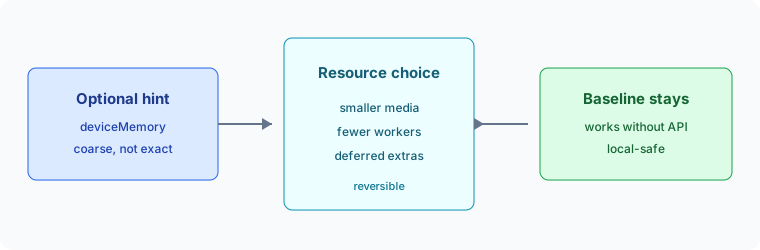
What the Device Memory API represents
The Device Memory API exposes navigator.deviceMemory, an approximate device-memory value in gigabytes. The W3C specification describes a deliberately reduced, bucketed value rather than an exact measurement. A browser may round or cap the value before returning it, so code should interpret it as a broad capability hint.
The property is useful for choosing between already-designed resource variants: defer a large image, reduce an initial cache, or select a lighter client-side workload. It does not describe currently available free memory and cannot predict whether a particular page will finish successfully. A memory hint also says nothing about storage quota, CPU speed, network quality, or user preference.
Availability and limitations
Support is not universal. MDN documents Navigator.deviceMemory as an experimental, limited-availability feature, and browsers may omit it or expose it only in secure contexts. Code must feature-detect the property and handle an absent value without treating absence as low memory.
The value is intentionally imprecise and can vary with browser policy. It should not be used as a compatibility gate, an entitlement check, or a cutoff that labels a device or its owner. Do not infer a model, income, location, or identity from a bucket. The API is one privacy-sensitive surface among many, not a trustworthy device profile.
Progressive adaptation for real workloads
Start with a baseline that works without the API. If a memory hint is available, use it to select a bounded variant, then observe the outcome with ordinary application metrics such as load completion, decode failures, long tasks, and user cancellation. These signals describe the current task better than a static hardware estimate.
Adapt one cost at a time and make the decision reversible. Examples include lazy-loading below-the-fold media, choosing a smaller preview, reducing simultaneous workers, or postponing an optional index. Keep the same semantic content and accessible controls. Never remove a required action solely because the hint is missing or small.
The BrowserContext capacity planning guide covers measured budgets for long-running browser workloads. For browser-facing capability decisions, the WebGL capabilities and privacy guide shows the same fallback-first pattern, while storage and memory signals in profiles explains why separate resource values should not be conflated.
Privacy-respecting fallbacks
Keep the hint local to the decision that needs it. Do not send the raw value to a server, add it to an account identifier, or retain it as a stable profile attribute unless a clearly explained product feature requires that choice. A coarse value can still contribute to fingerprinting when combined with other signals.
Prefer a small set of resource policies with an explicit default, and document that the choice is heuristic. Respect user controls such as data-saving preferences and allow the user to request the full experience when practical. If an adaptation changes data transfer, explain the change before it happens and preserve an accessible way to continue.
Keep the hint in the right layer
The API belongs in a presentation or scheduling decision, not in identity, authorization, or billing logic. A page can use a broad hint to decide whether an optional preview should wait, while the server still enforces the same permissions and returns the same required records. This separation prevents a missing browser feature from becoming an accidental access failure.
Do not make the server depend on a JavaScript value that may be unavailable, rounded differently, or changed by browser policy. If a service needs a resource preference, send a short-lived, user-visible choice such as “data saver enabled” rather than the raw memory bucket. The service can then apply a documented response policy without storing a hardware characteristic.
Combine capability and outcome signals
Memory is only one part of a workload. A low-memory hint does not prove that a page is slow, and a high hint does not guarantee that a large bundle is safe. Network latency, decoding cost, CPU scheduling, storage pressure, screen size, and user settings can dominate the result. Keep those concerns separate and measure the outcome that matters to the user.
For media, useful outcomes include whether the first meaningful image decoded, whether playback started, and whether the user had to retry. For an editor, useful outcomes include input latency, save completion, and recovery after a tab is backgrounded. These measurements can guide a future resource policy without turning the browser hint into a permanent label.
Design the baseline first
The baseline should include the required content, keyboard access, readable text, and a way to retry optional work. A lighter variant may defer enhancement, but it should not hide the only way to complete a task. Make loading states honest: say that an optional preview is still loading, rather than implying that it is unavailable because a memory hint was missing.
Test the baseline with the property absent, with a delayed property read, and with a browser that reports a broad bucket. Also test a user who changes data-saving preferences during the session. The goal is graceful behavior at every branch, not a perfect prediction of hardware.
Resource choices that age well
Prefer choices that remain valid as browser engines change. Responsive image sizing, lazy loading, stream backpressure, bounded caches, and cancellation are useful even when the API is unavailable. They also reduce pressure for users whose devices have plenty of memory but whose connection or battery is constrained.
Keep variants easy to remove. A small number of named policies such as baseline, reduced, and enhanced is easier to audit than many device-specific branches. Each policy should state its maximum media size, concurrency, cache behavior, and recovery action. Review those values with the workload owner when the page or browser release changes.
Logging and retention
Application logs should record the selected policy and the outcome, not an unnecessary hardware value. A log entry such as resource_policy=reduced is usually enough to explain why a preview was deferred. If debugging requires the raw property temporarily, restrict access, shorten retention, and remove the field when the incident is closed.
The same minimization applies to analytics. Aggregate completion and failure rates by the policy that the application chose. Avoid building a dashboard that lets operators sort people by memory class. Product teams can improve the experience from outcomes without creating a new cross-session identifier.
Review questions before shipping
Ask whether the experience remains complete when navigator.deviceMemory is undefined. Check that no required request, permission, or account path depends on the value. Confirm that a user can understand and override an optional reduction where that is appropriate. Verify that server logs, analytics events, and support exports do not retain the raw hint by default.
Then repeat the check after a browser update or a major page change. The API contract may stay stable while a workload's memory behavior changes. A small regression test that runs with the property removed is often more valuable than a large matrix of guessed device classes.
The browser privacy basics guide provides a broader data-minimization context. It is useful when a client workload has substantial memory and CPU costs.
Test availability without assuming a browser family
Feature detection should be an ordinary branch in the application, not a browser-name test. Read the property only when the relevant API exists, and keep the same baseline when the value is undefined. A secure-context requirement, a private browsing mode, an embedded frame policy, or a browser preference can change availability independently of the operating system.
Test that branch in the environments your service supports. The test should assert that required content and controls remain available, not that a particular bucket is returned. A browser update can change exposure or rounding without changing the application contract, so compatibility tests should focus on behavior rather than a fixed number.
Separate memory hints from performance budgets
A memory hint can select a starting policy, but a performance budget is an operational promise measured against a workload. Keep the two records separate. The hint belongs to the page decision; the budget belongs to the release, host class, workload revision, and observation window. This prevents a remembered device bucket from silently replacing fresh capacity evidence.
When a page exceeds its budget, investigate the page lifecycle, media, workers, cache, and network before changing the memory policy. A leak or an oversized response can affect every device class. Conversely, a page may meet its memory budget while input latency is poor because CPU or scheduling is the limiting factor.
Use user intent as the final authority
Resource adaptation should not override a clear user choice. If a person asks to open a full-resolution document, the application can explain the expected cost and offer a progressive loading path, but it should not silently downgrade the requested content. A data-saving preference is a useful signal, yet it remains different from a memory estimate and should be handled explicitly.
Provide a visible way to retry an optional enhancement and a clear explanation when a feature is deferred. Do not ask for permission to collect a hardware value merely to choose a smaller image. If a transfer is expensive, present the size or mode choice in product language that a person can understand.
Avoid cross-session correlation
The most privacy-preserving use of the API is ephemeral. Read it while deciding how to render the current task, keep only the selected resource policy in local state, and discard the raw value. Do not combine it with a user ID, IP history, canvas output, font list, or timing record to create a richer profile.
If support staff need context for a failure, record the policy, browser version, and reproducible workload rather than a memory bucket. Aggregated reports can compare completion rates for baseline and reduced policies without allowing a person to be followed across sessions. This keeps troubleshooting useful while limiting the value of the data to a single product decision.
Plan for change and recovery
Resource policies should have an owner, a rollback condition, and a review date. When a browser release, page bundle, media set, or host class changes, rerun the representative workload. Do not assume that a policy called “reduced” has the same cost forever. Keep the baseline available until the new policy has evidence across supported environments.
Recovery is part of performance. Cancel optional work when the user navigates away, release temporary buffers after a preview closes, and avoid retry loops that create more work during pressure. These controls help devices with every memory class and are more durable than a device-specific branch.
Document the public boundary
Product documentation should say that the API is an approximate, optional hint and that the application keeps a baseline path. It should also state what the service does not do: it does not measure free memory, guarantee performance, identify a device, or authorize an account. Clear wording prevents a compatibility feature from becoming a hidden profiling practice.
Record the two public sources with the decision. The W3C specification supports the reduced-value and privacy rationale; MDN supports the availability warning. When browser support or secure-context behavior changes, update the compatibility statement and rerun the same fallback test rather than adding a stronger claim.
An implementation review should also check the failure path for every optional resource. If an image request is cancelled, the text alternative and layout should remain usable. If a worker cannot start, the main-thread path should report progress or offer a simpler operation. If a cache cannot be allocated, the application should continue with bounded network requests instead of repeatedly allocating until the browser becomes unresponsive. These are ordinary resilience practices, but they matter here because a coarse hint cannot see transient pressure, competing tabs, or the cost of the current document. Document the expected behavior for each policy and use a small set of synthetic journeys to verify it after release changes. A journey should cover first load, a return visit, a background and foreground transition, an interrupted transfer, and a clean close. Record completion, cancellation, input delay, and recovery, without capturing page contents or account identifiers. This evidence lets a team improve resource choices while keeping the Device Memory API in its proper role: a limited, optional signal for a reversible presentation decision. It also gives support staff a concrete explanation when a person sees a lighter variant, without exposing a private hardware classification or promising that a particular device will always receive one variant.
For teams operating several products, keep the policy names and their meaning consistent, but tune the actual limits per workload. A document viewer may reduce preview dimensions while a collaboration editor reduces background indexing; both can still report the same reduced policy to application support. Publish the user-facing behavior, not the memory bucket that selected it. This makes the control understandable, lets accessibility reviews cover every variant, and gives operations a stable signal when a browser update changes the raw hint. A rollout can begin with a small percentage of sessions, compare completion and recovery, and expand only when the baseline remains available. The experiment should measure product outcomes and avoid retaining the property itself. When the evidence is inconclusive, keep the simpler policy: uncertainty is a reason to preserve the fallback, not to collect more identifying data.
Keep review artifacts small and reproducible: the policy definition, workload name, browser release, and outcome fields are enough for most decisions. A reviewer should be able to rerun the journey without access to private customer pages. This boundary protects both the user and the engineering team while preserving useful evidence for a later release comparison.
For a production review, also record which fallback was visible when the hint was unavailable and whether the user could continue without changing a setting. That observation connects the API decision to the actual experience: a smaller image, delayed preview, or reduced worker count should remain understandable and reversible. It is more useful than preserving a raw hardware bucket, and it gives the next reviewer a concrete behavior to verify after a browser or workload update.
A practical decision checklist
- Feature-detect
navigator.deviceMemory; never assume support. - Define a baseline experience that does not depend on the hint.
- Use broad, reversible resource variants rather than device labels.
- Measure task outcomes and adjust budgets from observed failures.
- Keep the value out of identifiers, logs, and remote requests unless the user understands the purpose.
Sources
Related Articles
Take BotBrowser from research to production
The guides cover the model first, then move into cross-platform validation, isolated contexts, and scale-ready browser deployment.