Web Font Loading and Layout Stability: Prevent Unexpected Shifts
Understand how web fonts affect layout stability, choose a resilient loading policy, and preserve readable content while fonts load or fail.
Want the structured docs for Fingerprint?
This article lives in the editorial library. For step-by-step setup, reference material, and ongoing updates, jump into the docs section.
Web fonts can improve brand expression and reading comfort, but a late font swap can move text, controls, and images while a person is trying to use a page. Layout stability comes from treating typography as part of the loading plan: render a useful fallback, reserve the space that text needs, and make the final font metrics close enough that the change is small. The CSS Fonts and Font Loading standards define the browser primitives; they do not require one universal loading strategy.
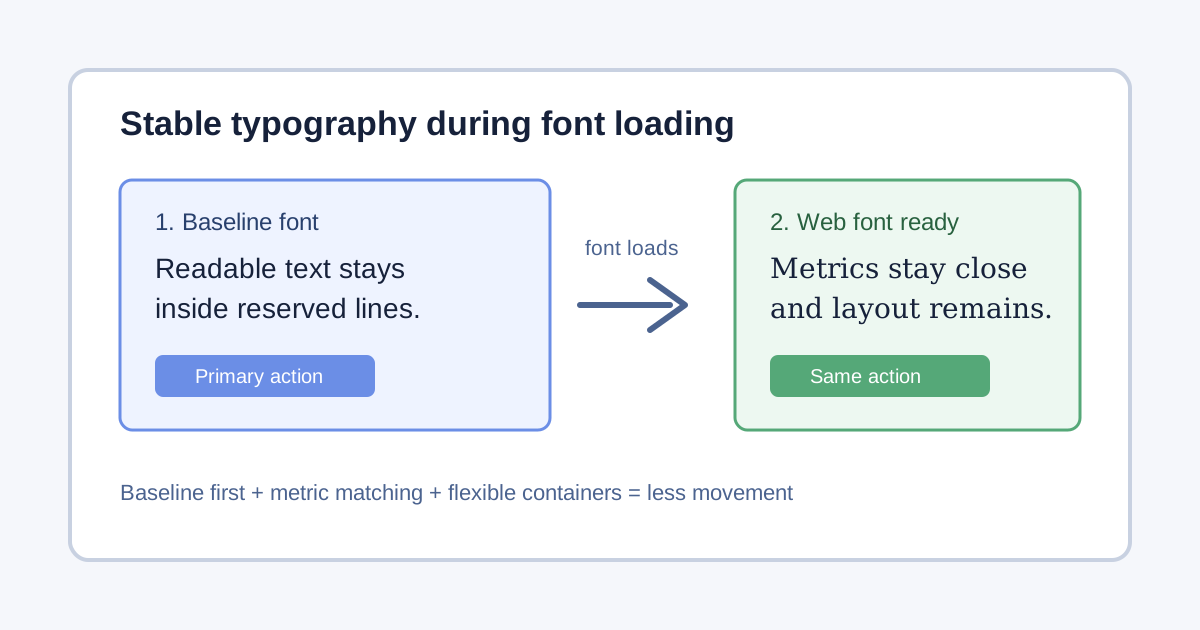
The CSS Fonts Module describes font faces, descriptors, and the font-display behavior that controls how a face is used while it loads. The CSS Font Loading API exposes promises and font sets for applications that need to coordinate a deliberate UI transition. MDN's font-display reference documents browser behavior and compatibility notes. These sources support a resilient presentation decision, not a device-identification or font-enumeration recipe.
For broader performance context, see the performance timing guide and the browser privacy basics guide. This article focuses on loading and visual stability, not collecting installed-font signals.
Why a font can move a page
Text occupies space according to glyph widths, ascent, descent, line gap, and the chosen size. A fallback system font may be wider or narrower than the eventual web font. When the browser replaces one with the other, a heading can wrap to a new line, a button can grow, or content below a paragraph can move. A font that appears visually similar can still have different metrics.
The browser may also delay text, show fallback text briefly, or keep fallback text until the web font is ready, depending on font-display and the face's loading state. Network latency, cache state, connection policy, and whether the font is used above the fold all affect what a person sees. A layout that looks stable on a warm cache can shift on a first visit or after a cache eviction.
Treat the shift as a product problem. The important question is not whether the custom font eventually arrives, but whether a reader can understand and operate the page while it does. Reserve predictable space, keep controls reachable, and make the fallback legible.
Choose font-display for the reading task
font-display expresses a preference for the face's block, swap, and failure periods. swap usually lets fallback text appear quickly and replaces it when the font arrives. optional gives the browser more freedom to keep the fallback when waiting would cost too much. fallback allows a short block period followed by a limited swap period. The exact timing is browser-defined, so documentation should describe the intent rather than promise a fixed number of milliseconds.
Use a policy per role rather than one rule for every face. A body font should prioritize readable text and a stable paragraph width. A decorative display face can be optional if the message remains clear in the fallback. An icon font should not be the only source of an accessible label; use text or an accessible SVG fallback. If a font is required for a logo, include a text alternative and a bounded failure state.
Do not hide essential content while waiting for a font promise. If a loading screen is needed for a canvas or a specialized editor, explain the state and retain a keyboard-accessible route to the underlying task. A rejected request, offline session, or content blocker is a normal condition, not evidence that a person has an unusual device.
Match fallback metrics deliberately
CSS Fonts descriptors such as size-adjust, ascent-override, descent-override, and line-gap-override can make a fallback's metrics closer to the target face. They are a calibration tool, not a guarantee that every script or weight will match. Measure representative headings, body text, numbers, and labels in the languages your product serves.
Keep the calibration understandable. A fallback family should be available on the same route as the page, and the adjusted values should be documented beside the @font-face rule. Avoid a long chain of obscure overrides that only one browser happens to honor. When a descriptor is unsupported, the ordinary fallback must still be readable and the layout must remain usable.
Use a bounded set of fallback stacks. For example, a sans-serif body stack can name a local system family followed by a generic family. Do not list a large catalogue of installed names to discover which fonts a person has. That creates a privacy-sensitive signal without improving layout quality. Pick a small stack that covers the script and weight needs of the product.
Reserve space for text and controls
Stable typography starts with stable containers. Give media an intrinsic size, keep button labels from depending on a font arriving at a particular moment, and let long text wrap rather than forcing a fixed width. A heading region can reserve a sensible block size when its copy is known, but do not clip user-generated text to preserve a screenshot.
Use layout primitives that absorb small metric differences: flexible grid tracks, minmax(), wrapping rows, and content-driven heights. Avoid absolute positioning for text that can change line count. When a font swap changes a line break, the surrounding layout should reflow rather than overlap.
Controls need extra care. A button that grows after loading can push a neighboring action off screen or change the tap target. Use a row that can wrap, keep a visible focus indicator, and test the longest localized label. If the action is icon-only, provide an accessible name and a tooltip that does not depend on the custom face.
Load only the faces a page needs
A font file is a resource with bandwidth, decode, and memory costs. Declare the actual weights and styles used by the route, and remove unused subsets. font-weight ranges and variable fonts can reduce duplicate files, but verify the browser behavior and the license before shipping. Preload a face only when it is critical to the first view and the response is reliably cacheable; an indiscriminate preload can compete with HTML, CSS, or an important image.
Use unicode-range when separate subsets are a real product requirement, especially for large writing systems. The browser can then request the ranges needed by the document. Test mixed-script content because a subset boundary can expose a second fallback and a second layout change. Keep the fallback stack complete for every supported language.
Avoid fetching a font solely to ask whether it exists. The application should use the font for visible content or a documented component need. A network log of many candidate faces can become an unintended inventory of a person's environment.
Coordinate with the CSS Font Loading API
The Font Loading API can expose the document font set and readiness events. Use it when an application truly needs to know whether a named face is ready before measuring a component, exporting a document, or starting a canvas operation. A promise is not a reason to block ordinary text; the fallback remains the safe default.
When measuring after a load, wait for the specific face and then perform one bounded layout update. Coalesce repeated updates, and cancel work if the user navigates away. If the promise rejects, keep the fallback and show a useful error only when the missing face prevents the requested task.
The API's availability and timing can differ across browsers and contexts. Feature-detect the methods you use, catch rejected promises, and test the path where document.fonts is absent or a font is blocked. Do not infer a browser family from the event sequence. A behavior-focused fallback is more portable and more respectful of privacy.
Keep accessibility during a swap
Readable fallback text is an accessibility requirement, not merely a performance optimization. Preserve contrast, text zoom, line spacing, and focus visibility while the custom face is pending. Check large text and long words; a metric adjustment that helps Latin headings may make another script cramped.
Do not announce every font transition to a screen reader. The change is usually presentational. Announce a status only if the application has a meaningful user-facing consequence, such as an editor that cannot export until a required font is available. Provide the same operation through a keyboard path and a text label.
Respect user preferences including increased text size, forced colors, and reduced motion. A font swap should not animate text or remove a focus ring. If a design requires a fade, keep it short, optional, and separate from the actual availability of the face. The WCAG 2.2 guidance helps evaluate these outcomes; the font specifications do not replace an accessibility review.
Test cold, warm, slow, and failed paths
Build a test matrix around outcomes rather than device categories. Include an empty cache, a warm cache, a delayed response, an offline visit, a blocked request, and a browser that lacks the Font Loading API. Test first paint, first meaningful text, final line wrapping, focus order, and the primary action at each stage.
Capture layout-shift evidence with a real page flow: open a route, scroll, focus a control, and submit a harmless form. A single screenshot can miss a shift that happens before the capture. Record the route, browser version, viewport, font policy, and network condition as test configuration. Do not send raw font availability or detailed timing history to an analytics service.
Check every supported locale with its longest headings and labels. Latin-only fixtures cannot reveal a fallback problem in CJK, Cyrillic, Arabic, or mixed-script text. Confirm that a missing subset does not collapse a button, hide an error, or move a dialog below the visual viewport. Keep fixtures synthetic and reproducible.
Treat metrics as evidence, not identity
The browser can expose whether a declared face loaded, and performance tools can report layout shifts. Those observations describe the current page run. They should not become a list of installed fonts, a stable account attribute, or a classifier for a device or person. A font name or timing value can contribute to fingerprinting when combined with other signals.
Keep telemetry at the decision level. font_policy=fallback and layout_shift_budget=met can explain a rollout without retaining the raw face list, response timing, or character-level measurements. If an incident temporarily requires more detail, restrict access, shorten retention, and remove the fields when the incident closes.
Do not send a raw document.fonts inventory to a server merely to choose a stylesheet. If the product needs a user preference, ask for a visible preference such as “use system fonts” and store that choice with a documented retention period. An explicit choice is different from an inferred capability.
Plan for caching, updates, and failure
Fonts are long-lived assets, but a new version can change widths and line breaks. Use content-addressed URLs and a cache policy that matches the release process. Keep old files available for the period needed by an already-cached stylesheet, or publish the stylesheet and assets atomically. A missing font should fall back cleanly rather than leave a page with invisible text.
When a typeface changes, review high-risk components: navigation, forms, tables, prices, dates, and error messages. Compare the fallback and final line lengths in every locale. If a release causes unexpected shifts, rollback the face or its descriptor calibration independently of application logic.
Offline and intermittent connections deserve the same design. Service workers may serve a cached face, but they can also serve an older stylesheet. Version the pair consistently and test an interrupted update. A person should still be able to read saved content and complete a local task with system fonts.
Decide when a custom font is worth it
Ask what the face changes for the user. It may improve a brand wordmark, make a dense data table easier to scan, or support a script that a generic family renders poorly. If the benefit is decorative, an optional policy is often appropriate. If the face is necessary for a legal document or a language-specific glyph set, make the requirement explicit and provide a readable failure message.
Compare the benefit with bytes, decode work, licensing, and the risk of movement. A smaller subset, a static image for a non-text mark, or a system stack may be a better choice. Do not add a font to distinguish visitors, normalize an environment, or make a browser appear to have a particular configuration.
Review the public contract
Product documentation should say that a web font may load after fallback text, that the page remains usable during the transition, and that availability depends on browser, network, cache, and policy. It should not promise identical metrics, fixed timing, or universal support. The CSS Fonts and Font Loading specifications define capabilities and conditions; the product chooses a fallback and recovery experience.
Recover when a component was measured too early
Some components measure text to size a virtual list, a code editor, a chart label, or a generated document. If that measurement happened with the fallback face, keep the result provisional. After the required face becomes ready, compare the measured width or line count and schedule one bounded recalculation. Do not repeatedly rebuild the whole page for every face notification. A stale measurement should degrade to wrapping or scrolling, not clip text or make the primary control unreachable.
The recovery path should be visible in the component's behavior. A table can expose a horizontal scroll region with a clear label; a virtual list can render a little extra buffer; an export dialog can explain that it is waiting for a required font and offer a readable text export if the request fails. These choices preserve the task while the font state changes. They also make automated tests more meaningful because the test can assert an outcome instead of a particular event order.
Audit the boundaries between CSS and script
Keep ordinary presentation in CSS. A media query, flexible track, or font-display rule is easier to evaluate than a script that reads several font properties and applies a device-specific branch. Use JavaScript only when the product outcome cannot be expressed declaratively, such as measuring a canvas export or restoring a virtualized row range. This boundary reduces race conditions and keeps the raw font state local to the decision that needs it.
Review any server interaction separately. A server may deliver a stylesheet or a selected user preference, but it does not need a raw FontFaceSet inventory to render the same required content. If an application offers a “system fonts” setting, make it an explicit, reversible choice and explain its effect. Do not silently convert a missing font into a remote upload, a new account attribute, or an eligibility decision.
Keep translated layouts equivalent
Translation changes word length, punctuation, line breaking, and sometimes writing direction. The stability contract therefore belongs to every locale, not only the English page. Use the same fallback principle and the same failure behavior in each translation, while allowing each language to choose an appropriate system fallback. Check right-to-left text where the product supports it, and ensure that a longer localized action does not push a secondary action outside the viewport.
Source links and limitations should remain equivalent as well. A translated page may explain a browser condition in different words, but it must not turn “may be unavailable” into “is always available” or turn an optional swap into a guaranteed replacement. A small locale-specific visual adjustment is acceptable when it preserves the same task, source boundary, and accessibility outcome.
Make the regression fixture reusable
Keep one synthetic route that exercises a heading, paragraph, long label, numeric value, icon with a text alternative, and a modal or table. Run it with a cold cache, a delayed font response, an explicit block, and the font API removed. Record the policy and the visible outcome: readable first paint, stable focus, final wrapping, and a working fallback. The fixture should not contain customer content or depend on an installed font catalogue.
When a browser release changes font timing or descriptor support, rerun this route before changing product guarantees. A regression result can justify adjusting a fallback metric or removing a preload; it cannot justify collecting more environment data by default. Keep the fixture's acceptance notes next to the component owner so a future change can be reviewed without reconstructing the original network conditions.
Before release, verify that every locale has the same sources, policy, limitations, and user actions. Check the rendered SVG and its alternative text. Confirm that internal links retain their locale prefix and that no paragraph addresses an author, reviewer, or future draft. A reader should receive a direct explanation of what to expect, not instructions about how the article was assembled.
A practical stability checklist
- Choose
font-displayby reading task and keep essential text available. - Calibrate a small, documented fallback stack with representative scripts.
- Reserve flexible space for headings, labels, controls, and media.
- Use the Font Loading API only for measured tasks, with rejection fallbacks.
- Test cold, warm, slow, offline, blocked, and multilingual paths.
- Record policy outcomes, not installed-font inventories or raw timing traces.
Sources
Related Articles
Take BotBrowser from research to production
The guides cover the model first, then move into cross-platform validation, isolated contexts, and scale-ready browser deployment.