Worker and OffscreenCanvas Consistency and Privacy
Design and review Worker and OffscreenCanvas workflows with clear lifecycle, rendering, accessibility, and privacy boundaries.
BotBrowser Team
Want the structured docs for Platform?
This article lives in the editorial library. For step-by-step setup, reference material, and ongoing updates, jump into the docs section.
BotBrowser provides profile-backed protection for documented Canvas readback surfaces in an approved workflow. It does not replace origin-clean security or accessibility responsibilities, and it cannot guarantee identical Worker scheduling or pixels on every host. Workers let a page move JavaScript away from the main thread. OffscreenCanvas lets supported drawing work run without a visible canvas element on that thread. Together they can improve responsiveness, but they also create another lifecycle and rendering boundary to review.
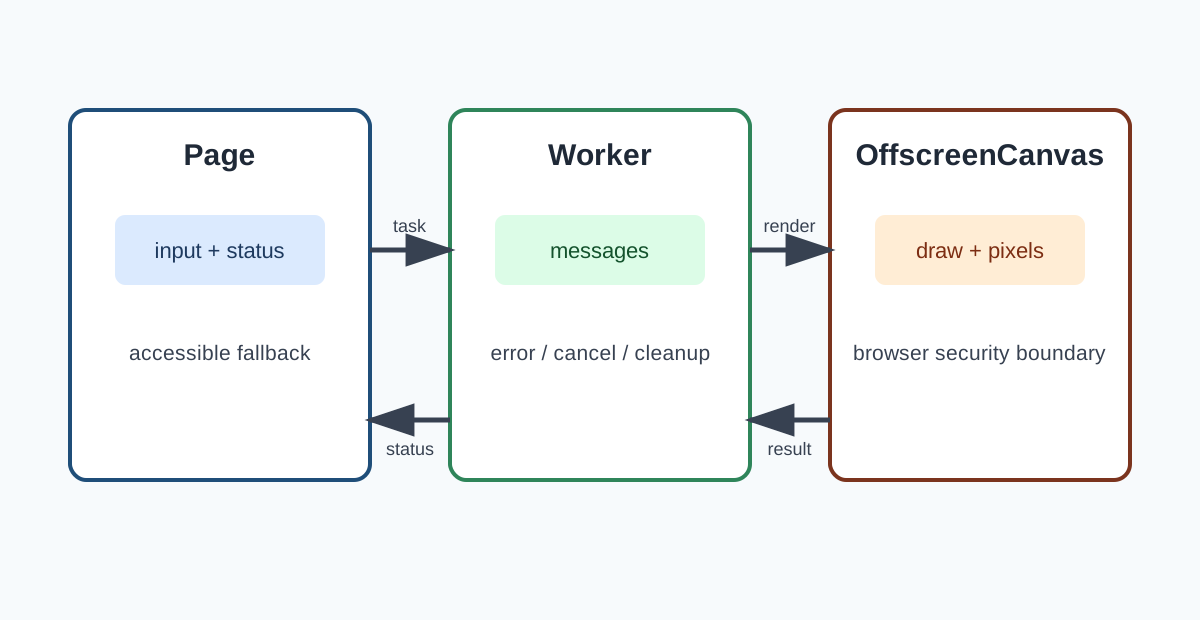
Separate the responsibilities
The page owns user interaction, visible status, fallback content, and cancellation. A dedicated Worker owns the computation assigned to it. An OffscreenCanvas is a drawing surface that can be transferred to a Worker where the browser supports that operation. The transfer changes ownership; it does not promise identical pixels across every browser, operating system, graphics backend, or installed font set. Keep the contract explicit: input data, message types, expected result, error state, cancellation, and cleanup. Do not treat a Worker as a security boundary. Code in the same origin still follows that origin's permissions, and data sent to a Worker should be limited to what the task needs.
Use a complete, visible journey
An empty page only proves that a script started. Test the supported journey: create the Worker, transfer or create the drawing surface, send representative synthetic input, wait for a ready or error message, show the result, and terminate the Worker through the normal lifecycle. Keep a text status or other accessible alternative aligned with the visual output. Use the same application revision, browser release, profile family, viewport, device scale, route, and storage policy when comparing environments. Record visible completion in ordinary language, such as “the chart is readable and its summary is available.”
Understand transfer, lifecycle, and accessible rendering
HTMLCanvasElement.transferControlToOffscreen() transfers control of a canvas to an OffscreenCanvas. A transferred canvas cannot continue to be controlled by the original element. The Worker can receive the transferred object through a message whose transfer list includes it. Treat that handoff as one-way and make repeated initialization an explicit error or no-op. Workers can fail before a frame is drawn, while a message is in flight, or during shutdown. Handle error, messageerror, application-level error messages, and cancellation. Release references and terminate the Worker when the workflow ends. A page that keeps sending messages after termination should report a useful failure instead of silently losing work.
Canvas pixels are not a substitute for text, table data, keyboard interaction, or an announced state. Provide a nearby accessible name, summary, or data view, and update it when the Worker reports a new state. When OffscreenCanvas is unavailable, use a documented fallback such as a normal canvas on the main thread, an image, or a data table. Rendering can vary with browser implementation, device scale, fonts, color management, and graphics backend. Define acceptance in terms of supported capabilities and user-visible outcomes. Do not promise bit-for-bit identity between hosts unless the product explicitly supports and verifies that constraint.
Privacy, origin boundaries, and support review
Workers do not remove origin rules. Cross-origin images or media can make a canvas non-origin-clean, and browser security rules then restrict pixel readback. Explain that boundary to users instead of trying to work around it. Avoid sending raw pixels, account data, or stable identifiers to a Worker unless the application purpose requires them.
BotBrowser provides profile-backed, deterministic protection for documented Canvas readback surfaces. This can help a supported profile produce a repeatable result across an approved workflow, but it does not replace the browser's origin-clean security model, provide an accessibility solution, or guarantee identical Worker scheduling and rendering on every host. A BotBrowser profile is also not a promise of anonymity or site acceptance.
Keep separate rows for browser release, target platform, headless or headed mode, graphics path, Worker support, OffscreenCanvas support, fallback path, storage policy, and visible completion. Recheck the accepted row after a browser update, profile refresh, host image change, graphics change, or application revision.
If a row differs, first classify the visible result: missing capability, application error, rendering variation inside the support boundary, or an incomplete fallback. Keep the accepted package available while the owner repeats the same journey and records the decision.
Plan the journey and its evidence
Start with the product outcome rather than the API name. A report, chart, editor, map, or animation has a user goal that should remain understandable if a Worker is delayed or OffscreenCanvas is unavailable. Write the expected state before running the workflow. For a chart, the expected state might include a readable title, a current data summary, keyboard access to the same values, and a clear loading or failure message.
Use synthetic data that exercises the supported path without carrying customer content into a test record. Keep the input schema versioned and make the Worker message contract explicit. Include a request identifier when several jobs can be in flight, and define whether a late result is ignored, replaced, or shown as an error. This is an application choice, not a promise made by the browser API.
The main thread should remain able to report progress and cancellation. A long calculation that blocks the page can be moved to a Worker, but message traffic can still be too large or too frequent. Batch updates to the level the interface needs, and release transferred objects when the workflow ends. Do not assume that a transferred canvas can be transferred again, or that closing a page immediately describes when every underlying task has stopped.
Measure the visible workflow at the boundaries that matter to the user: first useful status, first usable frame, completed result, fallback, cancellation, and retry. These observations should be tied to the declared browser release, profile, host, graphics path, and application revision. They are support evidence, not a device classification and not proof that another host will produce the same schedule.
When a browser supports OffscreenCanvas only for some contexts or drawing modes, expose that as a capability decision. Keep the normal canvas path healthy and test it with the same data and expected outcome. A fallback that displays a static image may be acceptable for a report but not for an editor that requires pointer or keyboard input; state that difference in the product contract.
Privacy review should follow the data, not the novelty of the API. A Worker can process data locally, but sending data to it still creates a copy or transferable ownership decision. Do not pass credentials, unnecessary account fields, or raw media when a reduced representation meets the task. Delete temporary buffers when the result is committed, and document retention for logs, screenshots, and error details.
The browser's origin-clean rule remains in force when drawing uses a Worker. A cross-origin image may be displayable while still preventing pixel readback. A failed readback is therefore a security-preserving result, not an invitation to search for an alternate extraction path. Provide a user-facing message and a safe display or data fallback.
BotBrowser can make a documented Canvas readback surface deterministic for a selected profile in an approved workflow. That product capability is useful when a team needs repeatable application tests or a consistent supported profile. It does not control the page's message design, its accessible alternative, the origin of an image, the operating system's graphics stack, or every scheduling decision in a Worker. Keep those ownership boundaries visible in a release note.
For production readiness, review one representative desktop row and each materially different mobile or browser-family row. Repeat after a major browser update, profile refresh, host-image change, display-service change, graphics-library change, or application revision. If the accepted row fails, restore it before drawing conclusions about a candidate row.
Keep the record short enough to reread: workflow revision, browser and profile pair, target and host class, display or graphics path, Worker and OffscreenCanvas capability result, accessible fallback result, storage rule, owner, and next review date. Do not include private page captures, credentials, raw account data, or stable identifiers.
Feature support is only one part of a usable implementation. A browser may expose a constructor while a particular operation is unavailable in the current context, or the operation may fail after startup because of a resource limit. Ask what the application needs from the feature, then define a small capability decision with a usable alternate path. The user should not need to know which API branch ran in order to understand the result.
For a visualization, the decision might be: use OffscreenCanvas when the supported operation succeeds; otherwise draw on a normal canvas; if drawing itself fails, preserve the underlying values in an accessible table and show a concise status. For a collaborative editor, a static image is not equivalent to an editable surface, so the fallback may need to keep editing available while reducing animation or update frequency. The fallback is a product behavior and should be designed before a failure occurs.
Keep the capability check close to the operation it protects. Avoid assuming that a browser version or user-agent string alone predicts the result. Browser support data is useful for planning, while a runtime check and a representative application journey show what the current page can do. The two forms of evidence answer different questions and should not be collapsed into a broad claim that a browser “supports everything.”
When the implementation chooses between worker rendering and main-thread rendering, use the same logical input and verify the same user outcome. Exact timing or pixel equality may not be necessary. A chart can be accepted when labels remain legible, values match the source data, and the page remains usable. An animation can be accepted when its essential information and controls remain available even if frame pacing differs. State these conditions in advance to avoid turning an incidental rendering difference into an unbounded compatibility requirement. Treat each Worker job as a small operation with a start, a result, and a terminal state. The page should be able to distinguish pending, completed, failed, and cancelled work. A timeout is useful only when it leads to a user-visible state and an application decision; repeatedly starting new workers without retiring old ones can make an intermittent problem worse.
On failure, stop accepting results for a job that has already been cancelled or replaced. Keep the fallback usable while a retry is offered, and avoid retrying automatically when the input may cause an expensive or irreversible application action. A drawing task is usually repeatable, but the application should still define what a retry means, especially when the worker also prepares data for a save or export action. During shutdown, remove event listeners owned by the workflow, stop timers, release references to transferred buffers, and terminate the worker if the page owns it. If the worker is shared or managed by a longer-lived application service, the owner should expose a clear job-level cancellation rather than shutting down a resource other screens still use. Ownership makes cleanup predictable and prevents one component from cancelling work belonging to another.
Keep errors useful but minimal. A public message can say that the visualization could not be prepared and that a table remains available. A bounded error category and browser release can support troubleshooting, but raw content, credentials, and full page captures should not be stored by default. Set a retention period and an owner for diagnostic records before they are collected. A compact record should let another engineer repeat the supported journey without needing private customer state: include the application revision, browser release, profile family, host class, display and graphics path, route, storage rule, input fixture revision, capability result, fallback result, visible completion, headed or headless mode, and the owner who can pause a rollout or restore the accepted release.
Separate facts from interpretation. “The fallback table appeared after the worker returned an error” is an observation. “The browser is inconsistent” is an interpretation that needs more evidence. If the result changes after a host-image update, repeat the same fixture before changing the profile, browser, and application together. Changing one relevant input at a time helps keep the review understandable. Do not preserve more evidence than the decision needs: a public support note can record the tested combination and user-visible outcome without private destinations, account names, raw drawings, or session identifiers; a debugging artifact that could contain sensitive material needs an access-controlled location, short retention, and a clear deletion owner.
The record should also say what remains untested. A desktop headed run does not establish support for a mobile device, a server display path, another graphics backend, or an embedded cross-origin frame. Marking a row as untested is more useful than allowing readers to infer that a nearby row was covered. Add the next row only when it represents a real supported deployment, and keep its expected fallback and owner explicit. The HTML and browser documentation describe API behavior and platform boundaries. They do not decide whether a particular chart is understandable, whether a user can recover from an error, or whether a company should retain a diagnostic record. Those are application and product responsibilities. A correct implementation can use the API and still need a clearer empty state, keyboard support, reduced-motion handling, or a privacy review.
Likewise, an accessible fallback is not merely a second rendering backend. It must expose the same important information and a practical way to continue. For a chart, a text summary and a data table may be sufficient. For an editor, controls and values may need to remain editable. For a map, a list of locations and directions may be a more useful alternative than a still image. Choose the alternative from the user task, not from the implementation convenience. BotBrowser can protect documented Canvas readback surfaces for a selected profile, which is separate from how an application transfers a surface to a Worker or exposes a result to assistive technology. Teams should validate those responsibilities independently: check the product's supported Canvas behavior, check the application's fallback and data handling, and check the complete journey on the declared host. A pass in one area does not imply a pass in the others.
Revisit the support boundary when the application adds a new drawing mode, changes how it imports media, begins retaining output, or changes its minimum browser version. Review the user's task, the necessary data, the fallback, and the supported release set together. This keeps Worker and OffscreenCanvas use focused on responsiveness and rendering rather than turning an implementation detail into a broad privacy or compatibility promise.
Checklist
- Define Worker messages, cancellation, errors, and cleanup.
- Test transfer ownership and the unsupported fallback.
- Keep visual output and accessible status synchronized.
- Treat origin-clean restrictions as a browser security boundary.
- Review BotBrowser capability and limitation separately from application responsibility.
- Record the supported browser, profile, host, graphics path, and visible result.
Public sources: WHATWG HTML Canvas, MDN Web Workers API, MDN OffscreenCanvas, and BotBrowser Canvas protection.
Related reading: Browser cross-realm consistency and privacy and Canvas API purpose and privacy.
Sources
WHATWG HTML Canvas, MDN Web Workers API, MDN OffscreenCanvas, and BotBrowser Canvas protection.
WHATWG HTML Canvas: https://html.spec.whatwg.org/multipage/canvas.html
MDN Web Workers API: https://developer.mozilla.org/en-US/docs/Web/API/Web_Workers_API
MDN OffscreenCanvas: https://developer.mozilla.org/en-US/docs/Web/API/OffscreenCanvas
BotBrowser Canvas protection: https://botbrowser.io/docs/fingerprint/canvas/
Related Articles
Take BotBrowser from research to production
The guides cover the model first, then move into cross-platform validation, isolated contexts, and scale-ready browser deployment.