Scrapy browser fingerprint: What Scrapy Cannot Set
Distinguish Scrapy request fingerprints from browser signals, HTTP responses from executed pages, and default downloads from browser-backed integrations.
BotBrowser Team
Want the structured docs for Getting Started?
This article lives in the editorial library. For step-by-step setup, reference material, and ongoing updates, jump into the docs section.
Scrapy’s default HTTP downloader has no page JavaScript runtime. Its request fingerprint, used for duplicate filtering and response caching, is different from a browser fingerprint assembled from browser observations. BotBrowser supports profile-backed browser engine surfaces, as its documentation describes, but cannot add a renderer to the default HTTP downloader, alter Scrapy’s scheduler identity, configure arbitrary remote engines or guarantee access. Resolving a “Scrapy browser fingerprint” question starts by identifying whether the problem belongs to local request identity, network delivery, response parsing or an explicitly selected browser runtime.
TL;DR
- A request fingerprint is a local identifier. Its default inputs concern the request method, URL and body, with version-dependent handling of additional metadata.
- Headers are omitted from default request identity. Including selected headers changes local comparison, not browser API behavior.
- Downloaded HTML and a browser’s executed DOM can contain different data. Parsing embedded JavaScript data does not execute the page.
- A browser-backed download handler changes the execution path. Direct browser work inside a callback can omit Scrapy components.
- Diagnose an authorized fixture at the responsible boundary before changing another component. Neither a hash nor a header proves browser execution.
Contents
- Request fingerprints define local equivalence
- The downloader belongs to a larger workflow
- HTTP headers do not instantiate browser APIs
- Response source and executed DOM are different artifacts
- Browser integration changes execution ownership
- Classify four fixture failures by their evidence
- Practical conclusion
Request fingerprints define local equivalence
Scrapy’s request fingerprint documentation introduces the identifier for duplicate filtering and response caching. Components need a compact way to compare requests according to the project’s intended equivalence rules. This is an internal bookkeeping decision. The fingerprint is not automatically a header, a browser-generated identifier or an observation reported by the server. Two requests receiving the same local identifier does not establish that their network exchanges or returned documents are identical.
The reviewed upstream implementation takes the request method, a canonicalized URL and request body into account. Canonicalization can make URLs with differently ordered query parameters equivalent for this purpose. Request headers are ignored by default, and URL fragments are normally omitted. The include_headers argument opts selected headers into the calculation; keep_fragments changes fragment handling. Neither option creates a renderer. Including a fragment in a local key does not execute application code that interprets that fragment.
The body input is the raw request body, represented as hexadecimal bytes in the implementation’s fingerprint data. It is not parsed and normalized as JSON. Two JSON documents that describe the same object but differ in whitespace or property ordering can therefore produce different request fingerprints. Conversely, URL canonicalization may collapse differences the application owner considers meaningful. Request identity needs to match the workload’s requirements rather than an assumption that every representation of equivalent business data receives one identifier.
The supplied review uses upstream snapshot e63a574c767d7a9438c21db158f605f1c44c6e6a, not an installed or runtime-tested release. In that implementation, verbatim_url preserves the request URL instead of canonicalizing it, making keep_fragments irrelevant. A download_handler value that differs from the URL scheme also enters the identity; one matching the scheme is omitted. The source marks handler participation as a change in 2.20.0. These are version-dependent and configuration-dependent details, not a claim that every deployed Scrapy installation behaves this way.
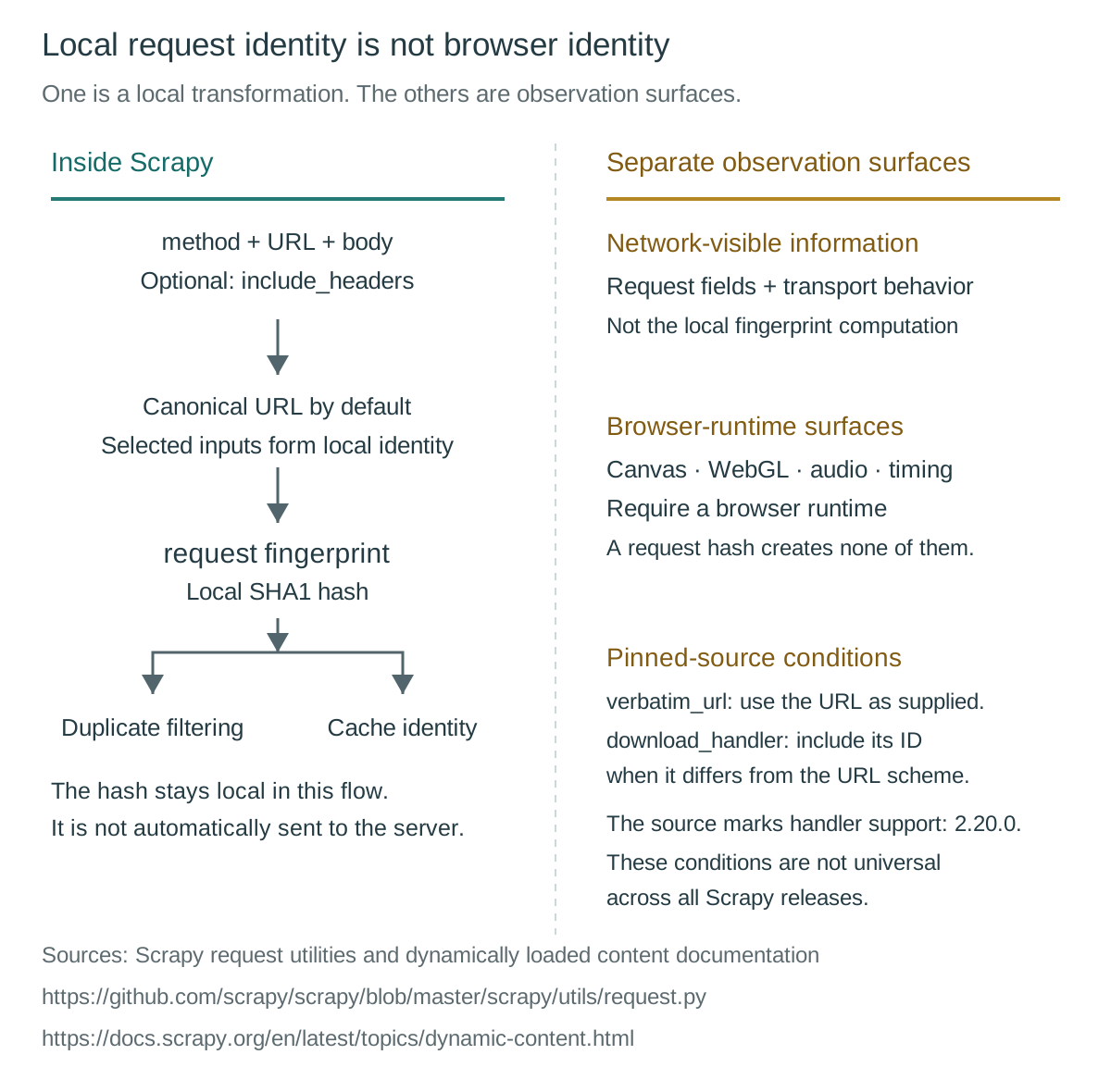
Equality also does not guarantee semantic response identity. An owned catalogue may vary its response by language or authorized application state even when method, URL and body match. Ignoring headers can be appropriate for one crawl and wrong for another. Scrapy exposes REQUEST_FINGERPRINTER_CLASS because there is no universal comparison rule. The decision is which requests the project intends to distinguish, not which hash looks most browser-like. Authentication-sensitive responses also require a cache policy appropriate to their scope; a shared request key alone cannot establish safe reuse.
The downloader belongs to a larger workflow
Scrapy’s architecture overview assigns different responsibilities to the scheduler, downloader, spider and item pipeline. The engine obtains requests from the spider and passes them through scheduling. The downloader obtains responses, with downloader middleware participating around that boundary. Spider callbacks process responses and return items or further requests. Item pipelines then handle tasks such as cleansing, validation and persistence. An empty output can originate at several stages before or after a network request.
This ordering explains why changing a request header may have no effect on a duplicate-filter decision. A request excluded during scheduling might never reach the downloader whose outgoing fields the developer intended to adjust. Similarly, a downloaded response can reach a callback successfully but yield an item that validation rejects. “Nothing was saved” does not identify either a download failure or a browser problem. The useful evidence names the last completed stage and the next stage’s expected input.
The default HTTP path retrieves response content without executing the page’s scripts. Scrapy’s dynamic-content guide explicitly distinguishes inspecting downloaded source from accessing a live browser DOM. That boundary does not prohibit browser execution through another handler or integration. Scrapy is a framework with configurable components; “the default downloader has no renderer” is more precise than “Scrapy can never run JavaScript.” The selected execution path determines which process can produce a rendered document.
Transport attribution also requires the effective configuration. The architecture documentation describes Scrapy’s event-driven networking and its relationship to Twisted, but custom handlers and version changes matter. It is unsafe to attribute every possible request made from a Scrapy project to one transport implementation. Record the installed version and selected handler before discussing connection behavior. TLS behavior belongs to that handler’s networking implementation and configuration, not to a browser name written in an HTTP header.
The pipeline boundary remains useful even when a browser supplies the response. Browser execution may make a field available, but it does not establish that the callback selected the right record or that the pipeline accepted it. Keep the expected artifact explicit at each transition: scheduled request, received response, parsed item and persisted output. That creates an actionable failure location without collecting every document or confusing successful browser startup with successful data validation.
HTTP headers do not instantiate browser APIs
Scrapy’s DEFAULT_REQUEST_HEADERS setting supplies HTTP fields through DefaultHeadersMiddleware. Those fields describe an outgoing request. An Accept-Language value can influence an owned server’s response, and a user-agent field can carry a selected string, but neither creates window.navigator. MDN’s Navigator reference describes an object exposed by a browser environment, including userAgent and hardwareConcurrency. Their existence and values belong to that runtime, not a Python request dictionary.
The same boundary applies to graphics. MDN describes HTMLCanvasElement.toDataURL() as returning an encoded representation of a canvas image. It is not a built-in device-identity hash. A caller may subsequently process that output, but that is another operation. The result depends on the bitmap and requested encoding, and an image whose bitmap is not origin-clean can cause SecurityError. A header neither draws that bitmap nor supplies the browser security conditions needed to read it.
WebGLRenderingContext.getParameter() returns the value associated with the requested parameter name. Its return type and meaning depend on that parameter. Calling it “the WebGL fingerprint” hides which observation was actually requested and whether the relevant context existed. A useful browser fixture names the API and parameter under review. It does not assume every runtime exposes the same capabilities or that one returned value uniquely identifies a physical device.
Audio needs an equally precise description. MDN’s OfflineAudioContext represents an audio-processing graph that renders into an AudioBuffer, rather than directly to device audio hardware. Offline processing therefore does not require the claim that a speaker emitted sound. The graph, scheduled changes and runtime produce the output. No HTTP field substitutes for that computation, and absence of a page runtime means the default downloader has no such page-generated observation to return.
Timing is another separate surface. performance.now() reports elapsed milliseconds relative to performance.timeOrigin using a monotonic clock. MDN also documents coarsening, including different resolution conditions for cross-origin-isolated contexts. A downloader’s request duration measures a different interval under a different clock and scope. Matching a download duration to a page timestamp does not establish equivalent browser timing behavior, and a slow response does not by itself establish a JavaScript timer issue.
These APIs are examples of browser observations, not a promise of universal availability or unique identification. Browser support, document conditions and runtime policy can constrain them. Meanwhile, a server can still observe HTTP and connection activity without running page JavaScript. The browser fingerprint protection discussion explains browser privacy surfaces; its scope does not turn Scrapy’s local request key into those surfaces. Neither absence of JavaScript execution nor changing a request field establishes anonymity or permission to collect data.
Response source and executed DOM are different artifacts
Scrapy’s dynamic-content documentation describes a common mismatch: data appears in a browser but is absent from selectors operating on the downloaded response. The browser may have executed scripts, performed additional requests and updated its document. Scrapy’s response selectors operate on the content supplied to them. Before changing selectors, establish whether the required field exists in that input. A selector cannot recover a node that the selected response never contained.
An owned page can also include the desired data inside a script element without placing it in visible HTML. Extracting a serialized object or parsing JavaScript source as data is not the same as running the page. Scrapy documents embedded-value parsing separately from headless browsing. This distinction matters for provenance: a value obtained from source text does not demonstrate that browser initialization, event handling or rendering occurred. It establishes only that the selected text contained a value the parser understood.
An external JSON response is another possible artifact. If an owned application exposes the required record through an authorized endpoint, that representation may satisfy the task without browser execution. It may also omit presentation state that the task genuinely requires. The rendered-page versus JSON-endpoint comparison explains that choice in terms of the required output. A record endpoint and a screenshot answer different questions, even when both originate from the same application.
Conversely, an HTTP API can return a document rendered by a browser elsewhere. Receiving HTML over HTTP does not prove the producer avoided JavaScript execution. The consumer must distinguish transport from production: what crossed the connection, and which system generated it? A rendering service’s response contract may supply an executed artifact, while an ordinary origin response may supply source HTML. Neither the media type nor the use of an HTTP client alone resolves that distinction.
For acceptance, name the required representation before selecting an execution path. “Contains the fixture’s item identifier in returned source,” “contains an item node after page execution” and “returns a valid JSON record” are different conditions. Each needs its own producer and validation point. Replacing one with another can silently change the task, especially when presentation depends on interaction or application state. A successful download establishes delivery of an artifact, not satisfaction of every possible rendering requirement.
Browser integration changes execution ownership
The scrapy-playwright README describes a Scrapy download handler that performs requests through Playwright for Python while preserving the regular Scrapy workflow, including request scheduling and item processing. This is an explicit browser-backed arrangement. It differs from adding browser-looking headers to the default HTTP downloader because another runtime now performs browser work. The framework still has responsibilities around scheduling and output; the integration changes who produces the response rather than replacing every component.
Scrapy’s headless-browsing guidance also distinguishes integration from directly using Playwright inside a callback. It warns that direct use in that form circumvents most Scrapy components, including middleware and duplicate filtering, and recommends scrapy-playwright for better integration. This is a control-flow distinction. A network action initiated directly by browser code should not be assumed to inherit the scheduler decisions or middleware behavior of a yielded Scrapy request.
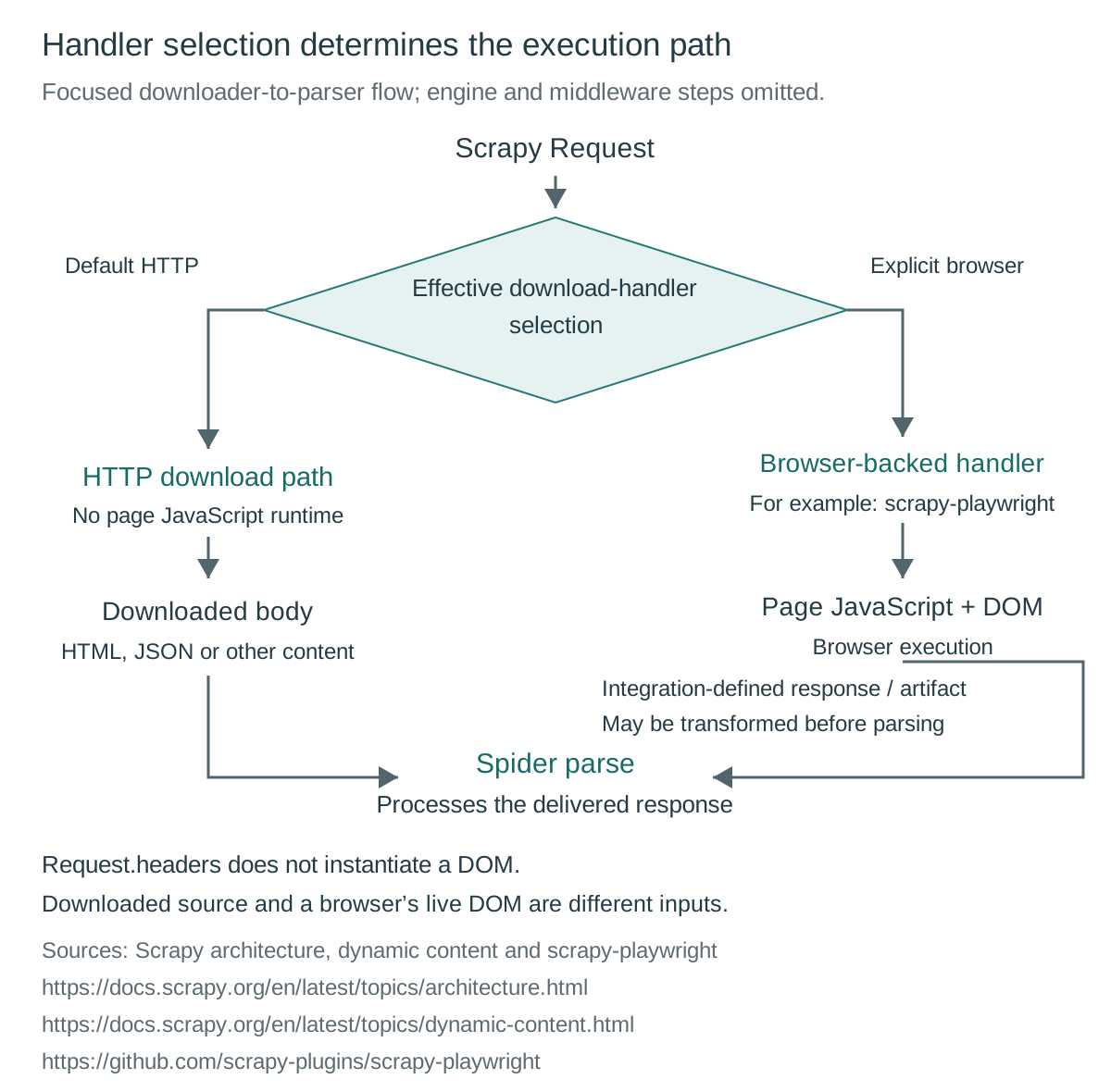
That provenance affects what settings can reasonably control. A Scrapy request setting, a handler option and a browser-engine setting have different consumers. Some browser actions may originate within the page or through direct automation rather than as independently scheduled Scrapy requests. Identify the action’s owner before expecting a framework hook to observe or modify it. The same caution applies to a remote browser: its executable and provider policy remain under the runtime’s actual configuration contract.
BotBrowser’s browser overview documents profile-backed control of browser engine surfaces, including Navigator, graphics, audio and timing. That capability belongs to a compatibly selected BotBrowser runtime; it cannot automatically configure every integration, replace an arbitrary remote engine or change Scrapy’s request-fingerprint policy. No plugin compatibility test is reported here. Runtime selection requires the integration’s supported executable or connection arrangement, rather than an inference that all tools using browser automation accept interchangeable engines.
The headless-mode comparison concerns execution modes after a browser path exists. It does not establish that an HTTP downloader has acquired a browser simply because no window is visible. First establish browser ownership and the required artifact; then consider the selected runtime’s documented mode and configuration. Application authorization and output validation remain independent requirements throughout that choice.
Classify four fixture failures by their evidence
Consider a hypothetical owned catalogue fixture with two language variants, a source document and a page that adds one harmless display field after execution. The following matrix describes expected classifications, not observed runtime results. Its purpose is to assign each question to a component capable of answering it. Scrapy’s request identity, architecture and dynamic-content references establish those boundaries.
| Hypothetical case | Expected classification | Responsible component | Minimum useful evidence |
|---|---|---|---|
| Equivalent query URLs produce only one scheduled download | Local request equivalence and duplicate filtering | Effective fingerprinter and scheduler duplicate filter | Method, sanitized URL comparison, fingerprint policy and scheduling outcome |
| Two requests differ only in a locale header but need separate records | Header-sensitive request identity versus server response variation | Fingerprinter policy, downloader headers and record validation | Selected header name, harmless locale value and expected language |
| Raw response lacks a node present after browser execution | Artifact provenance and rendering requirement | Response parser or explicitly selected browser handler | Whether the field exists in source, executed DOM or an authorized data response |
| Request latency is mistaken for a browser timer measurement | Measurement scope mismatch | Downloader instrumentation versus browser Performance API | Clock source, measured interval and execution path |
For the duplicate-URL case, the acceptance question is whether the project intentionally treats the two requests as one unit. For the locale case, it is whether both language records remain distinguishable under the effective identity and validation policy. These are different questions even if both appear as a missing item. Merely seeing two request objects in application code does not prove both survived scheduling or that the server received two distinct requests.
For the missing-node case, acceptance requires the field in the declared artifact. A source-only task should not silently become an interactive-browser task, and a task requiring executed state should not be judged by source alone. For latency, acceptance requires a correctly named interval. A downloader measurement can be useful without representing performance.now() precision, page execution time or any browser API result. Correct classification avoids introducing a runtime that cannot answer the original question.
Retain only the evidence needed for the decision: effective Scrapy version, handler identity, relevant fingerprint options, sanitized request characteristics, artifact type and validation outcome. Do not collect secrets, raw cookies or unrelated page contents to demonstrate these boundaries. A future passing fixture would establish behavior for that configuration and owned application. It would not establish a handshake fingerprint, compatibility with every browser integration or authorization to repeat the work against unrelated sites.
FAQ
Is Scrapy’s request fingerprint sent as a browser identity?
Not by the default fingerprint calculation. It supplies local request identity for components such as duplicate filtering and caching. Network and browser observations have separate producers.
Does setting a user-agent header create Navigator properties?
No. A request field does not instantiate window.navigator, Canvas, WebGL or an audio graph. Those require an actual supporting runtime and applicable document conditions.
Does parsing data inside a script element execute JavaScript?
No. Reading source text and extracting embedded values is data parsing. Browser execution can perform additional computation and document updates that source parsing does not perform.
Can Scrapy use a browser while keeping its normal workflow?
The scrapy-playwright README describes that download-handler arrangement. Direct Playwright work inside a callback has different integration boundaries, so component participation must be established for the selected path.
Sources
- Scrapy: Architecture overview
- Scrapy: Request fingerprints
- Scrapy: Selecting dynamically loaded content
- Scrapy: Settings
- Scrapy: Request utilities at the reviewed upstream snapshot
- scrapy-playwright: Project README
- MDN: Navigator
- MDN: HTMLCanvasElement.toDataURL()
- MDN: WebGLRenderingContext.getParameter()
- MDN: OfflineAudioContext
- MDN: Performance.now()
- BotBrowser: Browser fingerprinting overview
Practical conclusion
Classify one authorized fixture failure by local request identity, download delivery, response parsing or browser execution. Then choose the component that produces the missing evidence. Verify its effective version and configuration before changing another layer: a request hash, HTTP header and browser runtime each control a different part of the work.
This article is part of the guide: Browser Automation Getting Started: A First Run Map
Related Articles
Web Scraping Browser: Which Kind Do You Need?
Getting StartedBrowserbase Web Scraping: Who Owns What?
Getting StartedHeadless Browser Scraping: What Actually Changes
FingerprintWeb Scraping API: What the Response Leaves Out
Getting StartedWhat Is a Web Crawler? Five Stages of a Crawl
FingerprintClient Hints Fingerprinting: HTTP Headers as Identity
Run the same check in BotBrowser
Load a profile, keep the signals you just read about consistent inside the browser, and confirm the result on your own machine before a rollout.