Browserbase Web Scraping: Who Owns What?
Separate Browserbase session status, saved Contexts, network routing and retained artifacts from your scraping application’s results and responsibilities.
BotBrowser Team
Want the structured docs for Getting Started?
This article lives in the editorial library. For step-by-step setup, reference material, and ongoing updates, jump into the docs section.
Browserbase web scraping moves browser execution to a provider, but your application can still own navigation, extraction and record validation. The consequential changes concern session termination, saved state, network placement and retained artifacts. BotBrowser documents engine and profile-backed browser controls and proxy configuration for a chosen execution layer; it cannot configure Browserbase’s provider storage or remote runtime, or guarantee that a site authorizes collection. The useful boundary is which party controls each setting and which evidence establishes that the requested work finished. Validating a returned artifact is separate from choosing a hosted lifecycle; see what a scraping API response establishes.
TL;DR
- A
COMPLETEDBrowserbase session is not proof of a completed scraping job. A client crash followed by disconnection can produce that status. - Sessions start with fresh user data by default. A saved Context, its write policy and an application’s authentication validity are separate decisions.
- Connection inactivity, session timeout and your job deadline are different clocks.
keepAlivepermits reconnection within the remaining session lifetime. - Browser region and proxy exit are separate network properties. Proxy geography is best effort, not a guaranteed country boundary.
- Logging and recording controls do not erase every artifact. Contexts, transfers, operational metadata and third-party processing need their own treatment.
Contents
- Session status is not the application result
- Saved Contexts have a separate lifecycle
- Connection inactivity is not the job deadline
- Browser region does not determine proxy exit
- Recording controls do not cover every artifact
- An owned fixture separates the responsibilities
- Practical conclusion
Session status is not the application result
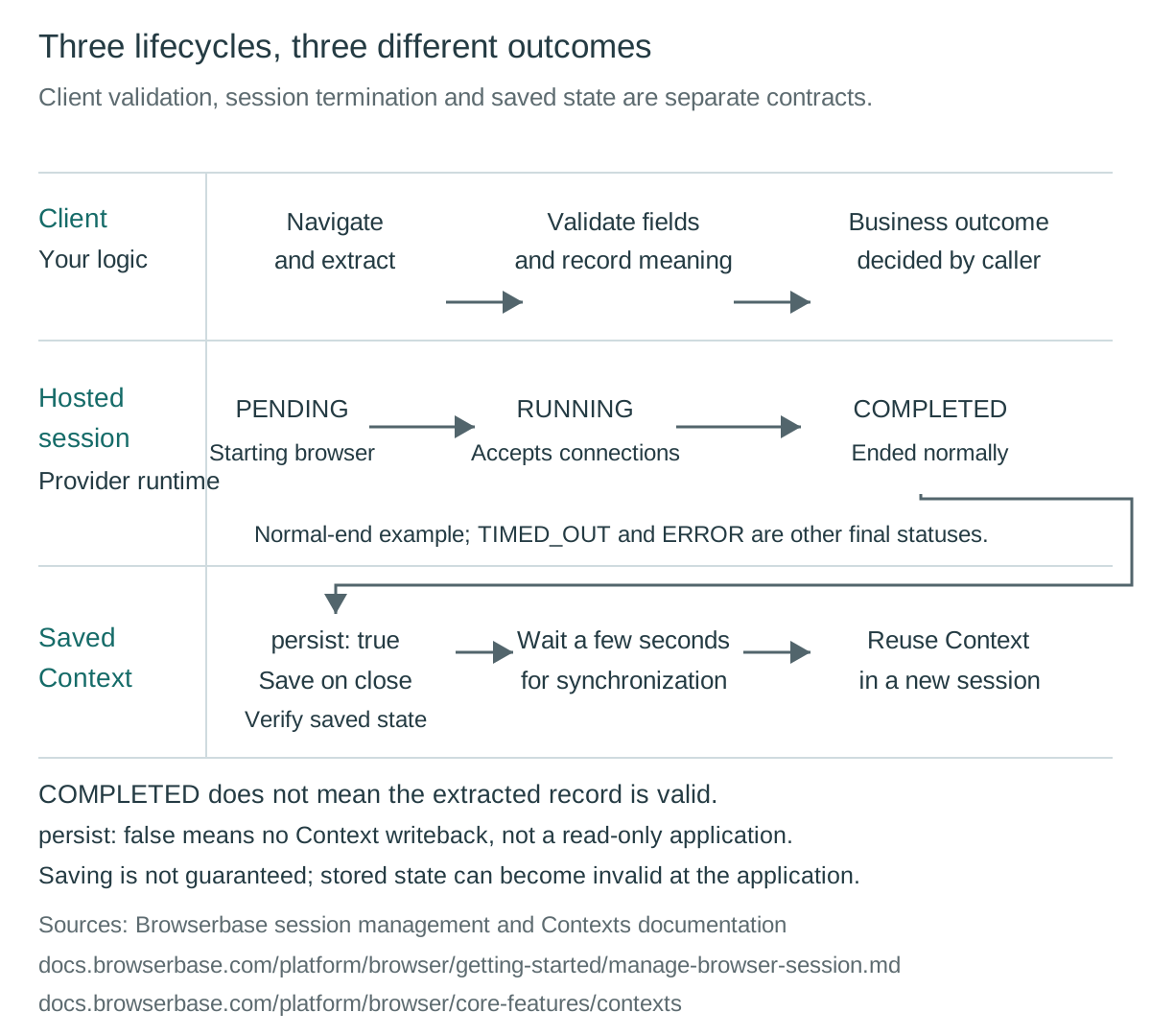
Browserbase’s session management documentation describes a session moving from PENDING to RUNNING, then reaching COMPLETED, TIMED_OUT or ERROR. Final statuses cannot change. These describe the provider session, not whether your parser produced the required business record. A client may retrieve the wrong document, reject an incomplete record or fail before writing output while the browser itself ends normally. Your application therefore needs its own result state alongside the provider status, rather than deriving success from the dashboard label.
The distinction is particularly important for COMPLETED. Browserbase says a client disconnecting without keep alive ends the session normally, including when its script crashes and disconnects. Releasing a session, finishing a Function or ending a session before it starts can also produce COMPLETED. Even a keep-alive session reaching its timeout receives that status under the documented rules. The label identifies a termination path; it does not certify that extraction finished, that cleanup ran in your program or that the requested document existed.
ERROR has a narrower attribution: Browserbase could not start the session or an internal failure ended it. Your automation exception does not produce that provider-side status. An incident record should therefore retain the client exception and last validated application stage separately. Without that distinction, a team can misclassify a failed client run as healthy infrastructure and accidentally count it as useful output. Conversely, an application validation failure does not, by itself, establish an internal Browserbase failure.
The browser-interface comparison distinguishes continued browser control from receiving a finished result. Once a hosted control interface is selected, the caller still needs to identify its final document, validate required fields and record whether output was committed. Browserbase operates the remote session; that does not silently transfer those application duties. A useful completion record associates the session identifier with a client outcome and validation reason, without copying sensitive page content into general operational logs.
Saved Contexts have a separate lifecycle
Browserbase’s Contexts documentation says each session starts with a fresh user data directory by default. Reusing application state is an explicit Context arrangement, not a consequence of reconnecting to the same provider account. A Context has a separate resource identity. A missing preference in a fresh session is therefore different from a failed restoration of a selected Context. Before diagnosing state loss, establish whether the intended session was fresh, consuming saved state or expected to update it.
A Context can persist cookies, localStorage, IndexedDB, Session Storage, Service Workers, saved form data and browser preferences from the Chromium user data directory. Browserbase distinguishes that collection from the browser’s HTTP cache: ordinary page assets are fetched afresh, although persisted Service Workers and their caches can affect later loading. These differences matter when an owner expects both a remembered preference and identical resource behavior. “Saved browser state” is not a promise that every storage mechanism has the same lifecycle or that every subsequent response comes from the network.
The write condition is persist: true. Browserbase says changes are saved when the session closes and instructs customers to wait a few seconds before reusing the Context so synchronization can finish. A record extracted before closure and a Context ready for another session are consequently separate milestones. The application should not interpret a successful extraction as evidence that its latest preference change has already become durable provider state. The waiting guidance supplies an ordering constraint, not a precise synchronization latency guarantee.
persist: false prevents changes from being saved back to the Context. It does not make the target application read-only. A session could still submit an authorized application action whose server-side effect survives, even though its local browser changes are discarded. That distinction is important for test design and review: the provider’s Context write policy controls one storage destination, not every consequence of browser activity. A genuinely non-mutating fixture needs application-level restrictions as well as an appropriate persistence choice.
Contexts live indefinitely according to the documentation, but stored authentication can become invalid. Application cookies may expire, passwords may change, tokens may be revoked or the site may invalidate sessions remotely. Browserbase gives 30 days as an example of application cookie expiry, not a universal Context lifetime. Explicit Context deletion, project deletion and account changes also affect usability. A stale login therefore needs an application-state diagnosis, not an assumption that durable provider storage guarantees durable authorization.
Connection inactivity is not the job deadline
The management reference identifies a CDP WebSocket idle timeout after 10 minutes without data in either direction. Commands sent by the client count, but so do CDP events delivered to it. A client issuing no commands can therefore remain connected beyond 10 minutes while events continue arriving. “My code was idle” and “the connection carried no data” are different observations. Neither alone tells an operator whether the application was making useful progress or merely receiving unrelated page activity.
Session timeout is another boundary. Browserbase describes a project default and a session-specific override chosen at creation. Without keep alive, reaching the session timeout produces TIMED_OUT. The documented keep-alive timeout path instead produces COMPLETED. Comparing those labels without the session configuration can obscure the same underlying deadline event. The integration record needs the effective timeout and keep-alive setting if the team intends to distinguish early disconnection, natural completion and exhaustion of the allowed session lifetime.
keepAlive: true means a disconnected session remains available for reconnection until its timeout or release. It does not independently extend that timeout, renew an application login or establish that the caller can resume its business transaction safely. A reconnecting program may encounter a different page state from the one it last recorded. The application must decide whether its last operation is known to have completed before repeating it. Remote browser availability is not a transaction acknowledgment from the owned application.
Your job deadline belongs to the client or scheduler. It may expire while the browser remains available, or the provider session may end before the client’s allotted job time. Record those events independently and define which owner releases remaining resources. The browser-context capacity discussion concerns workload units and resource ownership; hosted sessions still consume capacity while they remain alive. A disconnected controller is not evidence that the remote resource has been released, especially when keep alive was intentionally enabled.
This separation also improves retry classification. A connection interruption, an exhausted session timeout and an application deadline can require different recovery decisions. A scheduler should not label all three as an empty extraction and start identical replacement work. The session management documentation establishes the provider clock, while the application defines what progress and completion mean. Reconnection should preserve that distinction instead of treating continued browser access as proof that the original task remains valid.
Browser region does not determine proxy exit
Browserbase’s region documentation lists us-west-2, us-east-1, eu-central-1 and ap-southeast-1, with us-west-2 as the default. The region setting selects where the browser runs. It can matter for the connection between the controller and remote browser, but it is not a declaration of the IP address seen by an application. A region label is also insufficient evidence for the location of every stored artifact or subsequent processing activity.
Proxy configuration is separate. The proxy reference says proxies defaults to false. Enabling the built-in option makes a best-effort attempt to use a US-based proxy; nearby countries such as Canada may be used if appropriate US proxies are unavailable. Specified proxy geography is also best effort, with the closest proxy used when the requested location is unavailable. An owner cannot turn these conditions into a guaranteed country-specific exit merely by recording the requested setting.
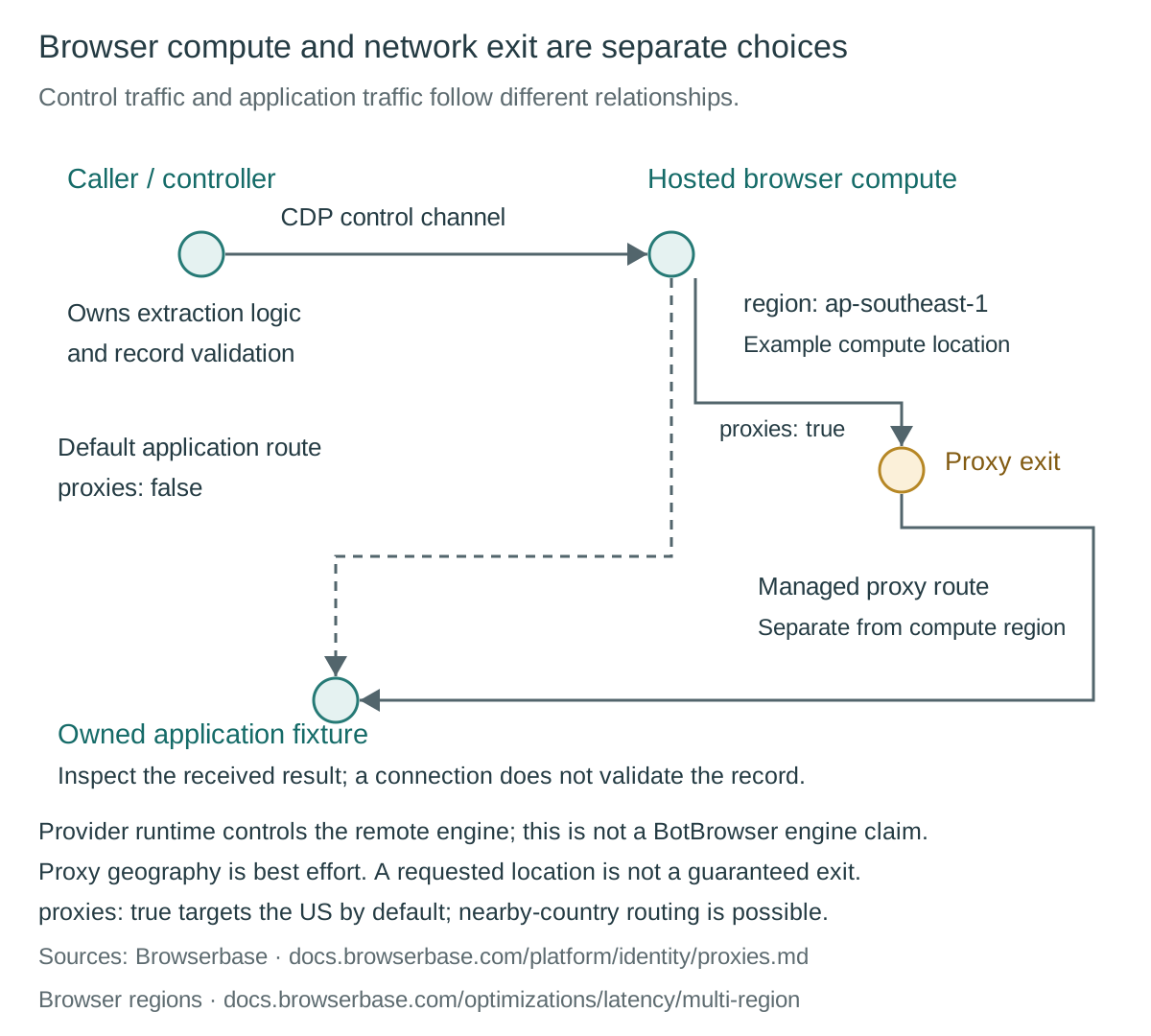
For an owned location-sensitive fixture, retain the requested region, requested route and application-observed connection information as separate fields. The observation can establish what that fixture received during that run, not the geography of all requests or storage. Browserbase also documents domain-specific routing rules, so one request’s route need not describe every destination. Where residency or onward processing is a contractual requirement, a browser region and a geolocation observation cannot substitute for the applicable provider agreement.
BotBrowser’s proxy configuration documentation describes routing controls and exit-based geographic configuration for its own browser execution layer. Its browser overview describes profile-backed controls over browser-exposed properties. Those are product capabilities, not settings that configure Browserbase’s remote runtime. The hosted-versus-self-operated comparison addresses the operating choice; neither that comparison nor a shared automation library establishes that BotBrowser can replace the executable inside a Browserbase session.
Recording controls do not cover every artifact
Browserbase’s observability documentation says sessions are logged and recorded by default. It describes CDP events, browser console output, network information and video replay as diagnostic resources. Those artifacts can expose more than the final extracted record. The documented replay retention is up to 30 days after termination for non-BYOS projects and 24 hours for BYOS projects. These periods describe recordings, not a universal expiry for Contexts, application records or every provider artifact.
At session creation, logSession: false and recordSession: false opt that session out of logging and recording. Both default to true, and the documentation says these choices work on every plan. Disabling either is permanent for that session: it cannot be re-enabled after the session starts. This makes observability a creation-time data decision rather than a cleanup switch to apply after sensitive content has already been recorded. It also means a missing replay may reflect intended configuration rather than a failed browser.
The Enterprise account offering named Zero Data Retention is distinct from the availability of those individual flags. The ZDR documentation limits that offering to Enterprise plans while separately describing per-session opt-out on every plan. It says logs and replay are not persisted to Browserbase storage under the covered configuration. An organization needing written confirmation of account-level ZDR should obtain that confirmation through its agreement, rather than equating two creation flags with every contractual feature of the Enterprise arrangement.
ZDR is not full deletion of all related data. Downloads, uploads, Contexts and extensions are separate artifact types. The documentation describes pairing ZDR with BYOS to place those artifacts in customer-controlled S3 storage. Operational metadata, including session identity, timing, project and region information, remains. Live View continues while the browser runs because it streams the session rather than storing a replay. Data sent to a third-party LLM is governed by that provider’s arrangements, not covered by Browserbase’s storage control alone.
Choosing reduced observability also changes incident handling. Browserbase says its support team will lack logs and replay for those sessions, while recording endpoints can return 404 Not Found and the logs API provides no entries. Application-owned diagnostics need a deliberately limited substitute, such as a validation outcome and stage marker, not indiscriminate duplication of sensitive content. The provider setting reduces specified retention; the customer still owns its exports, local telemetry and any downstream processing it initiates.
An owned fixture separates the responsibilities
Consider a hypothetical owned catalogue fixture with a harmless display preference and a record containing an item identifier, price and currency. This is an acceptance scenario, not a reported Browserbase test. The application’s success condition is a validated record from that fixture. A separate state condition checks whether the preference begins fresh or returns from an intended Context. A separate network condition records the route observed by the owned server. None depends on interpreting COMPLETED as a business result.
| Hypothetical symptom | First distinction | Responsible evidence |
|---|---|---|
Session is COMPLETED, but no valid record exists | Provider termination versus client outcome | Client exception, validation stage and output commit |
| A changed preference is absent next time | Context selection, write policy and synchronization | Intended Context, persist value and closure ordering |
| Saved state opens a logged-out page | Durable Context versus valid application authentication | Application session validity and revocation rules |
| Remote connection disappears | CDP inactivity versus session or job deadline | Connection activity, effective timeout and scheduler event |
| Observed country differs from requested region | Browser placement versus proxy exit | Requested route and owned-server observation |
| Replay is unavailable | Deliberate retention configuration versus capture failure | Creation settings and applicable observability contract |
The acceptance condition for persistence should name closure and the documented synchronization wait. A run using persist: true should not be considered ready for reuse merely because the client emitted its final record. A comparison using persist: false concerns whether changes were saved back, not whether the fixture server could have been modified. Keeping the preference harmless allows the owner to inspect these distinctions without importing unrelated browsing state or treating production authentication as disposable test material.
Record only what the decision requires: the client’s validation outcome, provider status, intended Context policy, effective time limits and the fixture’s route observation. Add the chosen recording policy so an absent replay has an explanation. The session management and ZDR contracts assign different meanings to these records. A future passing fixture would establish compatibility for that setup; it would not establish site authorization, anonymous operation or a promise about unrelated websites.
FAQ
Does COMPLETED mean the scraping task succeeded?
No. Browserbase documents normal termination paths that include a client crash followed by disconnection. The application needs independent record validation and output-completion evidence.
Does persist: false make a session read-only?
It prevents changes from being saved to the selected Context. It does not prevent browser actions from changing the target application’s server-side state.
Does keep alive preserve an application login?
It preserves reconnection availability within the remaining session lifetime. Authentication can still expire or be revoked by the application, independently of browser availability.
Does selecting a browser region select the proxy country?
No. Browser region and proxy routing are separate settings. Browserbase documents best-effort proxy geography, including possible nearby-country routing, rather than a guaranteed exit country.
Does disabling recording remove all provider-held data?
No. Logging, replay, Contexts, uploads, downloads, extensions and operational metadata have distinct scopes. Third-party LLM processing also remains outside Browserbase’s storage controls.
Sources
- Browserbase: Manage a browser session
- Browserbase: Contexts
- Browserbase: Browser regions
- Browserbase: Proxies
- Browserbase: Observability
- Browserbase: Zero data retention
- BotBrowser: Browser overview
- BotBrowser: Proxy configuration
Practical conclusion
Assign separate owners to the client result, provider session, Context lifecycle, network route and retained artifacts. Before adopting a hosted workflow, verify those boundaries with an authorized owned fixture and the applicable provider terms. Browser configuration can govern its documented surfaces; it cannot replace application validation, provider storage decisions or permission to collect data.
This article is part of the guide: Browser Automation Getting Started: A First Run Map
Related Articles
Web Scraping Browser: Which Kind Do You Need?
FingerprintWeb Scraping API: What the Response Leaves Out
Getting StartedScraping with Playwright: Browser and Profile Setup
Getting StartedSelenium Browser Profile Integration and Session Ownership
FingerprintRebrowser Proxy: Routing, Profiles and Privacy
Getting StartedSelenium Scraping: Capabilities and Records
Run the same check in BotBrowser
Load a profile, keep the signals you just read about consistent inside the browser, and confirm the result on your own machine before a rollout.