What Is a Web Crawler? Five Stages of a Crawl
Follow a web crawler from seed URLs to its next request, with a concrete trace of scope checks, fetching, parsing, link discovery and queue decisions.
BotBrowser Team
Want the structured docs for Getting Started?
This article lives in the editorial library. For step-by-step setup, reference material, and ongoing updates, jump into the docs section.
A web crawler is a program that discovers web addresses and retrieves pages according to a policy. It starts with known URLs, fetches eligible pages, reads their content, finds further links and decides which address to visit next. The loop is simple; deciding which URLs belong in it is where most of the engineering happens.
BotBrowser can provide a Chromium browser for authorized automation when a page needs browser rendering. It does not supply the crawler's seed list, URL frontier, deduplication rules or permission to collect a site. A crawler may use an ordinary HTTP client, a browser, or both. The browser is one retrieval component inside a larger process.
TL;DR
- A seed URL starts discovery; it does not describe every page that belongs to a site or a project.
- Fetching requires an eligible URL, a site policy decision and an available request slot. Discovery alone does not authorize a request.
- Parsing a response and extracting links are separate operations: usable HTML can contain no eligible next URL.
- Resolve each reference against the document's base before applying scope and duplicate checks. Record the resolved URL and the reason for accepting or rejecting it.
- The frontier holds pending work. An empty frontier proves only that no eligible work remains under the recorded rules, not that every possible page was found.
Contents
- The five-stage loop
- Choose seeds and define the boundary
- Fetch one eligible URL
- Parse the representation you received
- Resolve links and reject duplicates
- Choose the next request and explain the stop
- Practical conclusion
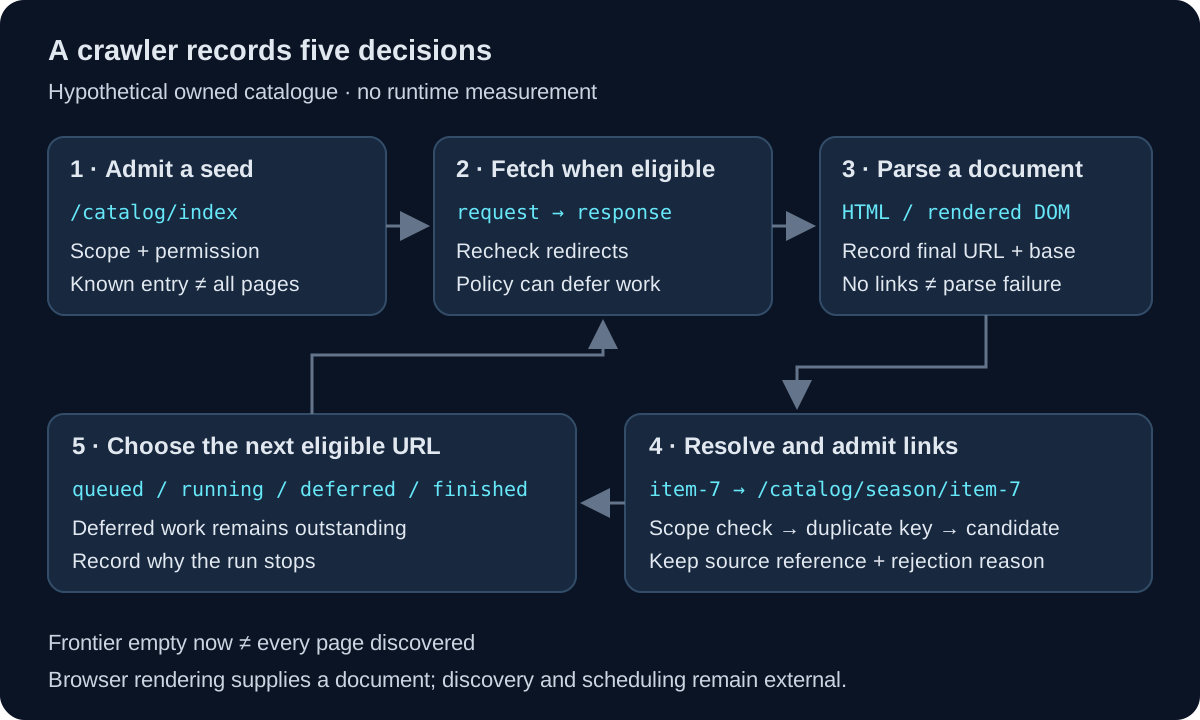
The five-stage loop
Consider an explicitly hypothetical catalogue on https://catalog.example/. Its owner wants a crawler to inspect public HTML pages under /catalog/, starting at /catalog/index. The run excludes login pages, other origins and downloadable files. These are chosen project rules, not a definition that every crawler must follow. The examples below are a proposed trace, not output from an executed crawl.
| Stage | Input | Decision | Recorded result |
|---|---|---|---|
| Seed | /catalog/index | Does this starting point belong to the declared scope? | Eligible initial URL |
| Fetch | Eligible absolute URL | May a request run now, and may its redirect destination be followed? | Response or deferred/failed attempt |
| Parse | Response body and metadata | Which document representation and parser apply? | Parsed document or named parse failure |
| Discover | Links in that document | What absolute URLs do the references mean, and which are new and eligible? | Accepted candidates plus rejection reasons |
| Schedule | Candidates and outstanding work | Which eligible item runs next, and what work remains? | Next request, deferred item or recorded stop |
This is a teaching model for a crawler, not a required software architecture. A framework can combine operations or execute several requests concurrently. Scrapy's architecture documentation separates a scheduler, downloader and spiders: a response reaches the spider, and newly yielded requests return to the scheduler. That separation makes it possible to ask which component lost or rejected a URL.
Google Search Central's description of how Search works likewise distinguishes discovery, crawling and indexing. Those are Google's documented search stages, not a promise that every discovered URL is fetched or indexed. A project crawler that inventories its own catalogue need not build a search index at all.
The crawler-versus-scraper comparison separates retrieval coverage from field extraction. Here the reader artifact is a sequence of URL decisions. A page may be fetched and parsed successfully even when a separate product-record extractor rejects its missing price. Conversely, a crawler cannot report a record-extraction failure for a page it never retrieved.
Choose seeds and define the boundary
A seed is an initial address handed to the crawler. It might come from a configuration file, an owner-supplied URL list or a sitemap. The hypothetical run begins with https://catalog.example/catalog/index. That choice says where discovery starts. It does not prove that every permitted catalogue page is reachable from that address.
Keep the starting list separate from the scope rule. A second seed such as /catalog/archive can expose a disconnected part of the same authorized catalogue. A seed at /account/ fails this run's /catalog/ restriction even though it shares the host. The crawler should reject that input before it becomes a network operation, with a reason such as outside_path_scope.
Write a boundary that can be evaluated, rather than relying on “stay on the website.” For this example, eligible URLs use https:, have the exact origin https://catalog.example and a pathname under /catalog/. The owner also excludes /catalog/private/. An origin includes scheme, host and port; sharing a brand name or a suffix does not make another origin part of the approved target.
| Candidate | Scope decision for this example | Why |
|---|---|---|
https://catalog.example/catalog/index | Accept | Initial catalogue page |
https://catalog.example/catalog/archive | Accept | Additional owner-approved entry point |
https://catalog.example/account/ | Reject | Path is outside the declared catalogue |
https://cdn.example/catalog/index | Reject | Origin differs |
https://catalog.example/catalog/private/item | Reject | Explicit private-path exclusion |
Apply path tests to a parsed URL, not to a raw substring. A text check for catalog.example can also match a path, a query parameter or a different hostname. Define how encoded path forms and redirects are handled with the target owner; decoding or rewriting URL components indiscriminately can change their meaning. A scope matcher is not an authorization system for arbitrary input.
The failure prevented at this stage is an invalid coverage claim. Suppose the owner supplies a separate finite list of expected catalogue URLs. Comparing fetched results with that list can expose missing pages. Without such an independent denominator, “all pages found” only means all pages found by this discovery method. Neither a broad seed nor a large request count supplies the missing denominator.
Record the seed set, scope version and run identifier together. If /catalog/archive is added halfway through a run, the later discovery results belong to a changed input set. Keeping that change visible lets a reviewer explain a newly found URL without attributing it to a parser fix or a browser change.
Fetch one eligible URL
Fetching turns an accepted URL into a request attempt. Before sending it, check the site's rules and the project's permission, then check whether the request may run at the current time. These are different decisions. A URL can be inside the catalogue boundary yet be disallowed by the applicable robots policy, outside the owner's permission or deferred by a per-origin scheduler.
The robots.txt policy explanation covers the named user-agent group and rule interpretation. RFC 9309 states that these rules are not a form of access authorization. A robots allowance does not replace terms, consent or an access-control decision; absence of a file does not turn a private resource into a permitted target.
Use a request policy that records why the operation ran. For the hypothetical /catalog/index page, the attempt record can contain request_url, requested_at, policy_version, attempt_number and a fetch outcome. These are proposed application fields. They are not browser-provided proof that the project has permission, and no sample values here claim an actual network measurement.
Redirects need a fresh boundary check. A request for /catalog/old may lead to /account/login or a different origin. A crawler that validates only the initial URL and then follows redirects automatically can leave the declared scope. Inspect the redirect target before following it, preserve the chain for diagnosis and stop when the next destination is ineligible. Apply a finite redirect limit as well.
A fetched response still needs classification. An HTML catalogue page, a login page returned with HTTP 200, a 404 response and a temporary service error mean different things. Store the status, final URL and relevant media type beside the body decision. Do not label every HTTP 200 as a successful catalogue page; the application may have received the wrong representation.
The scheduler also needs an origin-level request policy. Concurrency controls simultaneous work; spacing limits when a new request begins. Neither is equivalent to the other. If the origin signals overload, preserve a deferred outcome and the applicable retry policy rather than opening an immediate retry loop. Detailed throughput sizing belongs to capacity planning, while this stage needs the narrower rule: a discovered page is not necessarily eligible to fetch now. The crawl-capacity worksheet calculates how pauses and retry allocations reduce a finite request-start budget.
Keep attempt outcomes separate from URL outcomes. /catalog/item-7 can have one timed-out attempt followed by a successful response. The ledger should retain that history while giving the URL one current scheduling state. Counting both attempts as two covered pages inflates coverage; deleting the first attempt removes the evidence needed to understand a retry.
Parse the representation you received
Parsing interprets the response as a document. The crawler first needs to know what it is processing. An HTML parser, a JSON parser and a PDF processor do different jobs. If this run accepts public HTML catalogue pages, an unexpected media type should produce a named outcome instead of being fed blindly into the HTML link extractor.
The response URL matters because later references need a base. If /catalog/index redirects to /catalog/season/, the fetched document belongs to that final location. A relative reference such as item-7 resolves differently from the two locations. Preserve the final URL from the fetch stage rather than reconstructing it from the original seed.
Parsing received HTML and rendering a page are also different operations. An HTTP client can parse links already present in the response. A browser can execute scripts that create further DOM nodes and links. Google documents these distinct paths in its JavaScript SEO basics. That documentation describes Google's pipeline; it does not establish that an arbitrary crawler executes JavaScript.
Choose the representation deliberately. For a reader-owned test page, compare the links in the response with the links the application creates after its documented ready state. If the required catalogue links are already in the HTML response, rendering is unnecessary for this particular discovery step. If the relevant links appear only after application initialization, the crawler needs a corresponding browser-stage design or another owner-approved source of those URLs.
BotBrowser can serve that browser stage within authorized automation, as its getting-started documentation describes. It does not choose the readiness condition or decide that the returned DOM is complete. The application contract must name the event, state or element that makes link collection meaningful. An arbitrary sleep can finish before data arrives or wait indefinitely for a page that keeps background activity open.
Preserve parse failures as their own branch. If the response was retrieved but the selected parser rejected its content, the URL was fetched; it was not successfully interpreted. If a parsed page has no qualifying anchors, parsing may still have succeeded. Those cases need different records such as parse_failed and parsed_no_candidates, with their meanings defined by the application.
This distinction prevents an expensive wrong fix. Increasing browser resources cannot make a login response become an authorized catalogue page. Repeating an HTTP download cannot expose script-created links unless something in the representation changes. Diagnose the response class and parsing target before changing the retrieval component.
Resolve links and reject duplicates
Link discovery starts with references, not necessarily absolute URLs. A catalogue anchor might contain item-7, ../archive/ or #details. The URL constructor reference explains how relative references resolve against a base. For a parsed HTML document, the document base URI can also be affected by an applicable base element.
The following table assumes a recorded document base of https://catalog.example/catalog/season/. It shows proposed decisions for this example's policy, not results from a running crawler. An external base would change resolution; the resolved destination still requires the same origin check.
| Reference | Resolved URL | Decision |
|---|---|---|
item-7 | https://catalog.example/catalog/season/item-7 | New eligible candidate |
./item-7 | https://catalog.example/catalog/season/item-7 | Duplicate candidate |
item-7#details | https://catalog.example/catalog/season/item-7#details | Same fetch key under this run's fragment policy |
../archive/ | https://catalog.example/catalog/archive/ | Eligible candidate |
/account/login | https://catalog.example/account/login | Outside path scope |
https://other.example/catalog/item-7 | https://other.example/catalog/item-7 | Outside origin scope |
Run eligibility checks after resolution. A relative link that looks harmless can resolve to an excluded destination when the document base changes. Accept only schemes appropriate to the crawler; a mailto: or javascript: reference is not an HTTP catalogue request. For a general collection service that accepts arbitrary target URLs, network destination validation requires additional security controls beyond this example's scope rules.
Deduplication needs an explicit key. This run removes the fragment when identifying a network fetch, so the three item references share one key. That is a policy for this catalogue, not proof that fragments never affect an application. A client-rendered route can use fragment state to select a different view. If that view belongs in the task, the browser navigation key and the underlying HTTP fetch key may differ.
Do not discard query parameters just because they look repetitive. /catalog/search?page=1 and /catalog/search?page=2 may expose different items. Conversely, an owner-confirmed tracking parameter may be removable from the scheduling key. Record which transformation is allowed and why. Sorting, lowercasing or decoding an entire URL can merge addresses the server treats differently.
Keep the original reference and source page beside the resolved candidate. A rejection record with source_url, raw_reference, resolved_url, candidate_key and decision_reason explains how the crawler reached its choice. It also exposes a broken extractor that truncates a URL or ignores the base. Storing only the final visited list loses that discovery evidence.
URL duplicates and document duplicates are separate questions. Two distinct addresses can return identical bodies; one address can return different content at different times. A content hash may support a storage or change-detection decision, but it does not prove that the two URL identities can be merged for every purpose. The frontier should use the project's declared URL identity rule, with content comparison recorded separately if needed.
Choose the next request and explain the stop
The frontier is the collection of pending URLs plus the state needed to schedule them. It is not necessarily a single in-memory queue. A small script can use a queue and a set; a larger service may persist work across workers. Either implementation needs a way to avoid losing the difference between discovered, queued, running, deferred and finished work.
For the hypothetical catalogue, /catalog/archive/ can be queued while /catalog/season/item-7 waits for an allowed request time. The next request is chosen from eligible pending work. Breadth-first ordering tends to visit links nearer the seeds first; a priority policy can favor an owner-defined section. Neither ordering guarantees complete coverage when the site has unreachable pages or an expanding URL space.
| Item state | What the run knows | What remains to do |
|---|---|---|
queued | Candidate passed current admission checks | Acquire it for an eligible fetch |
running | A worker owns an attempt | Complete or recover that attempt |
deferred | Work remains but cannot run yet | Reevaluate at the recorded time or condition |
finished | The URL reached a declared terminal outcome | Preserve its response and processing outcome |
rejected | A recorded policy excluded the candidate | Retain the reason; do not count it as fetched |
These are suggested ledger states, not a framework standard. A worker failure must not silently turn running into finished. A persistent scheduler can use a lease or another explicit ownership mechanism to make interrupted work recoverable. Recovery also needs duplicate protection: retrying an abandoned attempt should not create two concurrent owners for the same fetch key.
Avoid a broad “seen means done” set. If a URL is marked seen when first discovered and then its queue write fails, it can disappear from future discovery without ever being fetched. Admission should leave a durable pending or rejected result. Likewise, a failed request is not complete merely because its URL was observed earlier. The ledger must distinguish duplicate discovery from the current work state.
Stopping requires more than checking whether the immediate queue is empty. Deferred items, running attempts and unprocessed responses can still generate work. A bounded run should record whether it stopped because all admitted work became terminal, a time or page limit was reached, an operator requested a stop, or a policy failure prevented continuation. These outcomes support different coverage statements.
For example, if /catalog/archive/ is finished but item-7 remains deferred, the defensible statement is “no request is eligible now; one admitted URL remains.” It is not “the catalogue is complete.” When every admitted URL is terminal, report the scope, seeds and terminal-outcome counts. An independently supplied owner URL list can then support a separate coverage comparison; the frontier alone cannot reveal pages it never discovered.
FAQ
Does every web crawler use a browser?
No. Links present in received HTML can be discovered by an HTTP client and parser. A browser is useful when the selected task depends on rendered document state; it still needs an external discovery and scheduling policy.
Is a crawler finished when it has visited the homepage?
Only if that single URL is the declared task. For a catalogue discovery job, the seed response normally creates further candidates, and those candidates need recorded admission and terminal outcomes.
Does a canonical link tell the crawler to delete another URL?
A canonical declaration is not a replacement for the project's fetch identity rule. Preserve the observed declaration and decide how it affects the intended task. Do not automatically treat it as permission, an HTTP redirect or proof that two responses are identical.
Sources
- Google Search Central: How Search works
- Scrapy project: Architecture overview
- RFC 9309: Robots Exclusion Protocol
- Google Search Central: JavaScript SEO basics
- MDN: URL() constructor
- MDN: Node.baseURI
- BotBrowser: Getting started
- BotBrowser: Responsible use
Practical conclusion
Give one authorized catalogue run a seed list, a scope rule and a finite stop condition. For each discovered reference, preserve its source, resolved URL and admission reason; for each admitted URL, preserve the fetch, parse and scheduling outcomes. Those records turn the crawler's five stages into an explainable loop, including the URLs it declined or deferred. A browser can supply the rendered document when required, while permission, discovery policy and completion remain the crawler operator's responsibility.
This article is part of the guide: Browser Automation Getting Started: A First Run Map
Related Articles
Web Crawler vs Web Scraper: Outputs and Failure Boundaries
Getting StartedWeb Crawling: Crawl Budget and Politeness Basics
Deploymentrobots.txt Scraping: Rules, Blocks, and Fetch Failures
Getting StartedInstagram Scraping: API Eligibility Before Browsers
Getting StartedScrapy browser fingerprint: What Scrapy Cannot Set
Getting StartedBrowser-Use Setup with a Controlled Browser
Run the same check in BotBrowser
Load a profile, keep the signals you just read about consistent inside the browser, and confirm the result on your own machine before a rollout.