Web Scraping Browser: Which Kind Do You Need?
Choose between a browser you drive, a hosted result API, and a browser extension by page control, state ownership, permissions, and failure responsibility.
BotBrowser Team
Want the structured docs for Getting Started?
This article lives in the editorial library. For step-by-step setup, reference material, and ongoing updates, jump into the docs section.
A web scraping browser can mean a browser your code drives, a service that returns a requested result, or an extension extracting from a document in your browser. Those are different interfaces, even when all three use Chromium somewhere. BotBrowser documents an executable controlled through Playwright with profile-first configuration; that does not make it a hosted extraction endpoint, an extension, or a guarantee that a site permits collection. The first useful choice is the control your task needs, not the browser name on a comparison list. Validating a returned artifact is separate from choosing the browser interface; see what a scraping API response establishes.
TL;DR
- Choose browser control when your application must keep interacting with a page and decide the next action from its state.
- Choose a result endpoint when its documented response is sufficient; an HTTP API can still run a browser and return rendered HTML.
- Choose an extension when extraction belongs inside a permitted browsing workflow and its document access, permissions and output fit the task.
- A hosted browser can remain under your automation code's control. Hosting the process does not automatically transfer extraction logic to the provider.
- Keep browser access, application authorization and permission to use collected data separate. None follows from a successful connection or export.
Contents
- Three meanings, four operating arrangements
- Browser control means owning the next action
- A result API is a different contract
- An extension works inside a permission boundary
- Route an empty result to its first failed boundary
- Choose the smallest sufficient interface
- Practical conclusion
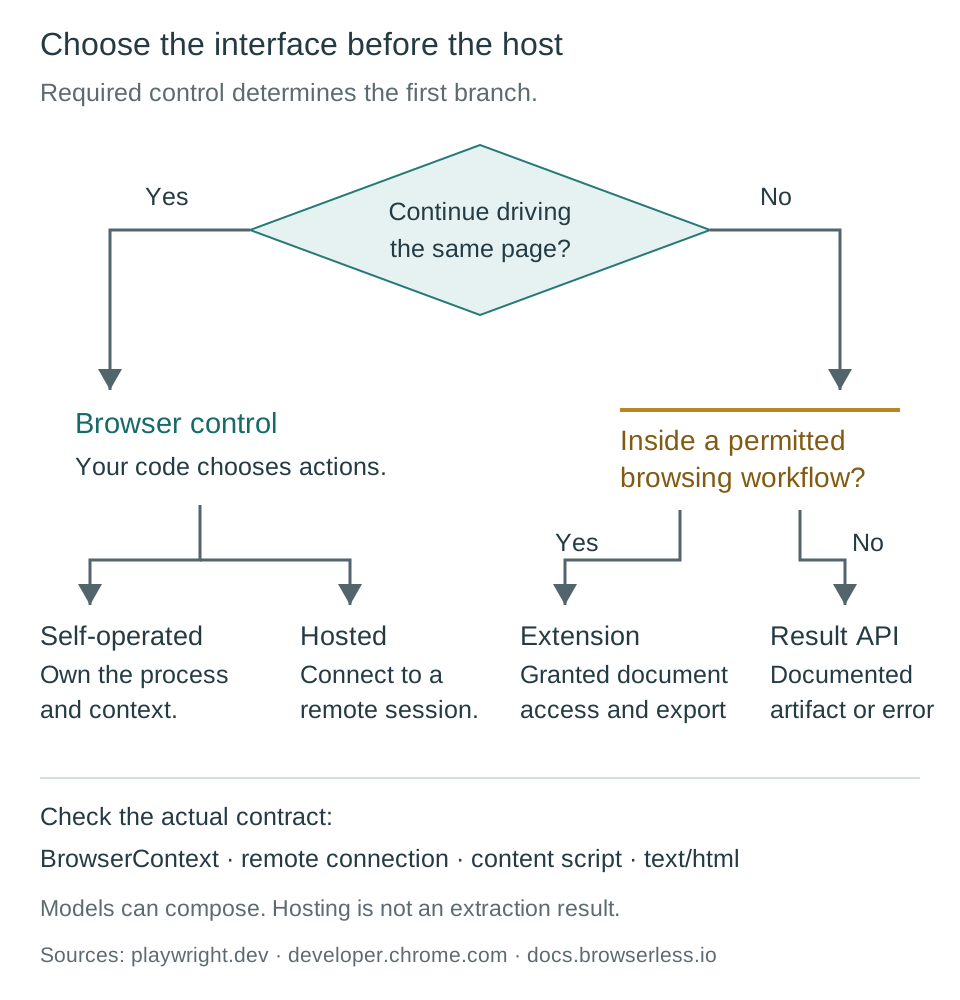
Three meanings, four operating arrangements
The phrase mixes a capability with its packaging. A browser executes a document and exposes interaction with that document. An automation library controls a browser. A service can expose browser control or a completed result. An extension can read a permitted document and provide an export. The same vendor may offer more than one arrangement, so the product homepage is not enough to identify the contract. Inspect the actual interface the integration will call. Playwright's browser connection reference describes control over an existing browser; an endpoint returning text/html has a different output boundary.
The practical distinction is what happens after the first response. Can your code inspect a page and continue clicking or navigating in the same controlled session? Does it receive a finished HTML document or records and then make another request for more work? Or does a feature operate on the document already open in a permitted browser profile? These questions separate interaction, result delivery and document access without assigning a quality rank. A task may compose them, but each transition needs an explicit owner.
| Arrangement | What your application receives | Who runs the browser or task | First ownership question |
|---|---|---|---|
| Self-operated browser control | A controllable browser, context and page | Your runtime team | Who maintains the executable, context and shutdown? |
| Hosted browser control | A remote connection to a browser session | Service provider; your code still directs the page | Which connection and session contract does the client use? |
| Hosted result API | The endpoint's documented result or error | Service provider behind that endpoint | Is the returned artifact sufficient, and who validates its fields? |
| Browser extension | The extension's supported document access and export | Browser/profile operator plus extension implementation | Which documents and actions have granted access? |
This matrix precedes the six browser-selection criteria. That scorecard compares candidate configurations once browser control is the chosen interface. It does not replace deciding whether a browser session is required. Likewise, the headless-mode comparison concerns the executable and launch mode after choosing a browser path. A browser running without a visible window is not, by that fact, a hosted service or an extraction API.
The rows are not exclusive product categories. An extension can call a remote service, and a hosted browser can support a separate result endpoint. A self-operated program can wrap its own browser in an internal HTTP service. Describe the boundary your application consumes rather than assuming the entire system belongs to one row. That also keeps responsibility visible when one successful component passes an incomplete artifact to the next.
Browser control means owning the next action
Browser control is useful when the extraction depends on successive page states. An owned application might reveal a detail panel only after a user action, navigate through a workflow, or update a table after a setting changes. With a browser-control interface, your code chooses the action, observes the resulting document and decides whether another action is needed. The Playwright library exposes browser contexts and pages for such workflows. It does not choose the required business record or decide which missing field is acceptable.
For a self-operated process, the runtime team owns browser availability. The executable must exist, have the required runtime dependencies and start under the intended account. Its lifecycle also needs a deliberate end: closing a tab is not a substitute for defining how the process, contexts and temporary state are managed. BotBrowser's Playwright setup describes selecting its executable and profile inputs. Those configuration steps leave application navigation, extraction, record validation and job scheduling with the caller.
State needs its own decision. Playwright distinguishes clean browser contexts from a persistent context launched with a userDataDir. Its documentation says the persistent launch returns the only context and closing that context closes the browser. It also warns against automating the regular Chrome user profile and recommends a separate automation directory. An operator should therefore not expect a newly launched scraping process to inherit a person's everyday sign-in state. Use the documented persistent-context contract rather than treating every folder called a profile as interchangeable.
A clean context is equally deliberate. Playwright's isolation guide describes separate cookies and storage for its test contexts. Playwright Test creates those contexts automatically, while library users can create them explicitly. This storage boundary improves reproducibility, but it does not make contexts separate physical machines or establish anonymity. If an owned application needs a selected language or a permitted test-account state, record whether the context is supposed to begin empty or retain that state. A missing preference in an intentionally clean context is not necessarily a launch defect.
Hosting changes the runtime operator without necessarily changing the control interface. Playwright can connect to a remotely running browser, and its connectOverCDP method attaches through Chrome DevTools Protocol. The documentation limits that CDP connection to Chromium-based browsers and notes lower fidelity than the Playwright protocol connection. This matters when a remote attachment succeeds but a particular automation feature behaves differently. Check the supported connection method and versions before attributing an extraction problem to the page. A remote endpoint is still a control channel, not a completed data record.
The caller's logic remains important after connection. If your program chooses the selectors, waits for document state and constructs the record, the provider has not taken over those responsibilities simply by running the process. Conversely, a provider may offer additional managed tasks under another contract. Keep those products separate in the integration design. For this initial choice, ask whether your code needs continued page control and whether your team wants to operate the runtime. Detailed provider state, regional networking and adoption questions belong to the next deployment decision, not a claim that all hosted environments are outside customer control.
A result API is a different contract
A result endpoint accepts a documented request and returns a documented artifact. That artifact might be source HTML, rendered HTML, an image or structured fields; these are not interchangeable. Browserless's Content API documentation gives a concrete example: its /content endpoint describes rendering a URL or supplied HTML in a browser and returning text/html, including JavaScript-rendered content. The fact that a caller uses an HTTP request therefore does not establish that the service skipped browser execution.
The useful question is whether that response contains everything the next stage needs. If a downstream parser only requires the rendered document at a defined state, a result interface may be sufficient. If the caller must inspect an intermediate dialog and decide the next action, a simple HTML response does not by itself supply continued page control. Some services expose configurable waits or additional tasks, but those must be established from the selected endpoint's current contract. Do not infer them from the provider's use of the word browser.
Rendering and extraction are also different services. Returning HTML does not mean the service selected the correct item identifiers, interpreted a currency or checked that every required record exists. A structured extraction endpoint may accept some of those duties, but only as specified. The integration owner still needs to validate its output against the application's schema. For a hypothetical catalogue record, a delivered document and a valid price value are separate outcomes. Missing currency information cannot be repaired by labelling the HTTP request successful.
An endpoint error is not the only incomplete result. A response can arrive with the expected media type while containing a sign-in document, a not-found message, an application error or a page whose required content has not appeared. Treat the returned artifact according to its meaning before parsing it as the requested business data. The rendering and pagination diagnosis addresses content readiness; changing the packaging from a browser library to an API does not remove the need to define what a completed document means.
State and retention are contract questions here too. An HTTP interface is not proof of stateless execution, automatic persistence or deletion after a response. Ask which session facilities the endpoint actually offers and which data its processing terms cover. The same caution applies to retries: a second request may repeat the task rather than resume an earlier page. Do not rely on either behavior without documentation. This is an interface distinction, not a statement that result APIs provide less control or privacy in every implementation.
Result APIs can reduce the amount of browser-lifecycle code in the consuming application, but they do not remove responsibility for input scope, allowed data handling or downstream failure classification. A team choosing this path should be able to name the required response type, the point at which the task is considered finished and the owner who handles malformed or incomplete output. Those requirements form the acceptance boundary; vendor names and endpoint convenience do not determine them.
An extension works inside a permission boundary
A scraping extension is software operating through browser-extension capabilities. It may read an open document, expose a selection interface, organize records or export data, depending on its implementation. Chrome's content-script documentation describes scripts that can read and modify a page's DOM and communicate with the extension. That makes an extension relevant when the task belongs inside an existing, permitted browsing workflow rather than in a separately launched automation process.
Document access is bounded. Chrome requires appropriate host permissions for programmatic content-script injection; temporary access through activeTab is one documented option. Matching rules, frames and injection timing also determine where scripts run. Browser permission grants an extension a capability within the browser. It does not establish permission from the website to automate collection or a lawful purpose for reusing the data. A user clicking an extension action cannot collapse these separate decisions into one approval.
An extension is not necessarily manual-only. Chrome supports content scripts that run automatically on matching pages, as well as dynamic and programmatic injection. Whether a particular extension supports scheduled work, navigation or unattended operation depends on its implementation and operating environment. Do not select or reject the whole category based on the assumption that every record needs a separate click. Instead, inspect the feature's supported trigger, document scope and output lifecycle.
The execution environment is not identical to the page's JavaScript environment. Content scripts normally run in an isolated world: they share access to the document but do not automatically share the page's variables. A visible table may be available through DOM access while an application-internal object is not directly accessible from that isolated context. This distinction helps explain why an extension's supported extraction contract matters. It is not a recipe for reaching into private page state or broadening access beyond granted permissions.
Background work has another lifecycle. Chrome's extension service-worker guide describes normal worker termination after inactivity and revival by later events. It warns that global variables are lost when a worker shuts down and recommends persistent storage for durable values. This does not mean an extension stops functioning whenever its worker becomes dormant. It means a multi-step job must not assume one in-memory background process will stay alive throughout the workflow. A restart and an uninstalled extension are different diagnoses.
The browser profile is also part of the privacy boundary. An extension can operate alongside a person's permitted browsing state, but its requested access and data destinations need review. Determine whether records remain local or are sent elsewhere from the actual extension's documentation and policy; neither the extension label nor a local export button answers that question. Limit the document and data scope to the task. If a workflow requires a separately isolated unattended environment, compare that requirement with browser control instead of expanding permissions until an extension resembles another operating model.
Route an empty result to its first failed boundary
An empty export is a symptom shared by all arrangements. The missing records do not distinguish a startup problem from denied document access. A browser process might never start; a remote connection might use an unsupported protocol combination; an API might return the wrong document; an extension might lack access to the relevant frame. Only after those boundaries are established does a selector or schema investigation become meaningful. Playwright's connection reference and Chrome's permission rules describe different contracts, so they require different first checks.
| Arrangement and hypothetical symptom | First boundary to establish | Responsible next check |
|---|---|---|
| Self-operated job has no page | Executable startup and context creation | Runtime owner checks the configured binary and startup result |
| Hosted browser connects, then an action fails | Supported protocol, session and actual page | Integration owner distinguishes connection capability from document readiness |
| Result endpoint returns HTML but no records | Requested artifact, received document and required fields | API owner checks the response contract; data owner validates its meaning |
| Extension export is empty on one document | Granted access, match/frame and script timing | Browser or extension owner checks access before changing extraction rules |
| Extension loses an unfinished job after dormancy | Durable job state versus worker globals | Extension owner checks storage and event-resumption behavior |
These are diagnostic examples, not observed incidents or statements about specific vendors. The table assigns the first check rather than the final cause. A successful browser launch can still lead to an application-level failure, and a valid extension permission does not guarantee that a page contains the expected fields. Keep stage outcomes separate enough that one success does not silently certify the next stage.
The same applies to resource cost. A completed navigation, a returned API response and an exported valid record have different denominators. Compare costs only after defining the unit your application accepts. The existing browser-selection scorecard provides workload measures once the interface is chosen. Reusing that scorecard as a universal ranking across unlike outputs would obscure who performed the work and what the result actually contained.
Choose the smallest sufficient interface
Start with the required artifact and the next decision. For a hypothetical owned catalogue that requires only a completed document for a separate parser, a documented result endpoint may suffice. For an owned workflow where code must choose among page states and continue interacting, browser control is the relevant contract. For an authorized user reviewing a small document set in an existing browser workflow, an extension may fit if its granted access and export support the needed data. These examples choose interfaces, not products or access strategies.
Then choose where state belongs. A clean context, an explicitly persistent automation directory, a provider-managed context and extension storage have different lifecycles. Record which state must survive and which must be isolated. Avoid importing unrelated everyday profile data to make a job appear complete. In the BotBrowser Playwright integration, executable and profile configuration remain distinct from application records; the automation program still determines how its job begins and ends.
Finally, verify a small authorized fixture at the boundary you selected. Check that the required document or record arrives, that intended state behaves as declared and that an incomplete result reaches the responsible owner. No benchmark or service test is reported here. The outcome of that future fixture would establish compatibility for the tested setup, not anonymity, permission or a general promise that a remote site will accept automated traffic.
FAQ
Is a web scraping browser the same as a browser extension?
No. An extension provides its implemented features within browser permissions and document scope. Browser-control software directs a browser session. Both may inspect a document, but the available interaction, lifecycle and state responsibilities differ.
Does an HTTP scraping API mean JavaScript is not executed?
No. A documented result endpoint can run a browser and return rendered HTML. Check the particular endpoint's response and readiness contract rather than inferring its execution model from HTTP transport.
Does hosting a browser transfer extraction logic to the provider?
Not automatically. When your client drives pages through a remote connection, it still owns its navigation and extraction logic unless a separate managed-task contract assigns that work to the service.
Can an extension run without clicking for every page?
Some can. Chrome supports automatically matched content scripts, but a particular extension's unattended behavior depends on its implementation, permissions, background lifecycle and browser environment.
Does BotBrowser replace a scraping API or scheduler?
Its cited documentation describes browser execution and Playwright integration. That does not supply an extraction schema, queue or hosted-service contract. The application remains responsible for those components and for authorized use.
After selecting hosted browser control, the Browserbase session and state boundaries distinguish provider termination from a valid record, saved Context writeback from application state, and browser region from proxy exit. Those provider-specific contracts determine which evidence an integration owner needs next.
Sources
- Playwright: Browser contexts and isolation
- Playwright: BrowserType and connection contracts
- Chrome: Content scripts
- Chrome: Extension service-worker lifecycle
- Browserless: Content API
- BotBrowser: Playwright integration
Practical conclusion
Choose the required interface before the browser brand: continued page control, a documented result or permitted extension access. If browser control is needed, decide separately who operates the runtime. Keep state, validation and failure ownership explicit so that a successful component does not stand in for a valid record or permission to collect it.
This article is part of the guide: Browser Automation Getting Started: A First Run Map
Related Articles
Web Scraping API: What the Response Leaves Out
Getting StartedBrowserbase Web Scraping: Who Owns What?
Getting StartedScraping with Playwright: Browser and Profile Setup
Getting StartedWeb Scraping JavaScript: Rendering, Pagination, Scroll
Getting StartedScrapy browser fingerprint: What Scrapy Cannot Set
Getting StartedTwitter Scraping: X API Windows and Browser Limits
Run the same check in BotBrowser
Load a profile, keep the signals you just read about consistent inside the browser, and confirm the result on your own machine before a rollout.