Playwright HAR Replay: What It Cannot Reproduce
Separate archived responses from live-origin work in Playwright HAR replay, with four labelled outcomes and a reviewable request fixture.
BotBrowser Team
Want the structured docs for Getting Started?
This article lives in the editorial library. For step-by-step setup, reference material, and ongoing updates, jump into the docs section.
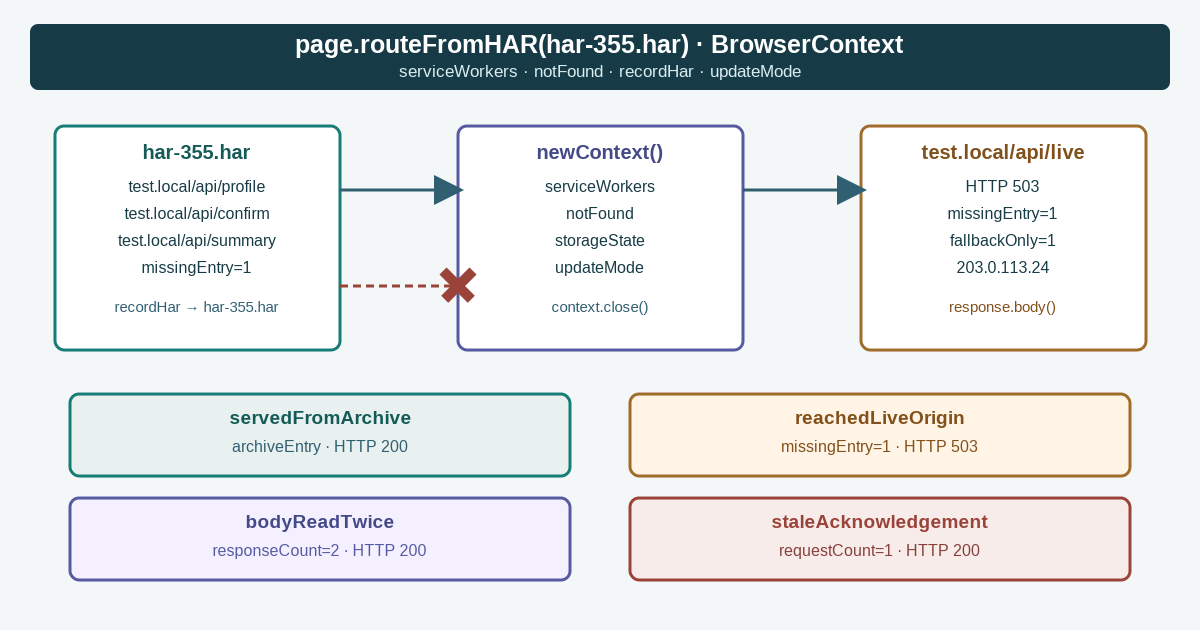
Playwright HAR replay answers a narrow question: can the browser request be matched to a response stored in a HAR file? It does not answer whether the live service would accept the same POST again, whether a database changed, or whether browser storage still matches the archived session. BotBrowser can make the Chromium executable and profile inputs explicit for a Playwright launch, but it does not supply or alter HAR replay behavior, restore server state, or make an archived response authoritative.
That distinction matters when a replay passes. A green assertion can mean the page received a recorded response exactly as intended. It can also mean an unrecorded request failed in the same way as a real outage, or that a POST displayed an old acknowledgement without reaching any service. The test output needs to say which of those events occurred before anyone treats the pass as evidence for a broader claim.
This boundary belongs to the owned test fixture, not to a third-party site. Record a synthetic application response, keep credentials and customer data out of the archive, and classify every request that leaves the browser. Use owned network mocking when the test should synthesize a response from a handler. Use HAR replay when the test must consume a transcript of requests and responses. When the question is what a different automation client exposes, the Playwright versus Puppeteer boundary provides the client comparison; HAR replay holds the client fixed and changes the network source.
TL;DR
- A HAR replay serves a recorded response only when the request matches the archive; a matching URL with the wrong method or POST request body remains a different request.
- Playwright's default HAR behavior aborts a request that is not in the archive.
notFound: 'fallback'sends that missing request to the network, which creates a live-origin path inside the same test. - A replayed POST returns the recorded acknowledgement. It confirms what the archive contains, not whether the current service would accept the submission or commit a side effect.
- Service workers can intercept before HAR replay sees the request. Block them in a dedicated replay context unless the service-worker path is explicitly under test.
- Label the outcome
served-from-archive,reached-live-origin,body-read-twiceorstale-acknowledgement, then record the archive match separately from browser state and server state.
Table of contents
- What a HAR actually preserves
- How Playwright selects an archived response
- Four outcomes from one owned archive
- Service workers and browser state change the path
- A replay fixture with a decision rule
- BotBrowser capability and limitation
- Practical conclusion
What a HAR actually preserves
The same discipline of separating what the client sends from what the server decides applies to a mutual-TLS refusal: the Playwright client certificate errors page walks the exact-origin rule and the three client-side causes.
A HAR is a transcript of HTTP transactions. It can hold a request URL, method, headers, request body, response status, response headers, response body, timing and other fields. The useful part for replay is the request-to-response pairing: a request shape is stored beside the response bytes that followed it. The archive is not a current API contract, a deployment snapshot, or a full browser profile.
Playwright records through page.routeFromHAR() or browserContext.routeFromHAR() with update: true, and can record a whole context through browser.newContext({ recordHar }). When update is omitted during a replay, a request that matches an archive entry is served from the archive instead of reaching the origin. The recording is written when the browser context closes, so a test that inspects a newly written file before closing the context may be reading an incomplete artifact.
Archive scope changes how much evidence exists. A context-level recording can capture several pages and workers. A page-level recording follows one page. Neither becomes a universal recorder of browser state. Cookies, local storage, IndexedDB, permissions, open sockets, in-memory JavaScript objects and a service worker's own cache are different storage and runtime surfaces. If the page needs one of them, initialize it deliberately in the replay context rather than assuming the HAR carries it.
The archive can also retain sensitive material. Request headers, cookies, submitted form bodies and response bodies may appear in a raw HAR. An owned fixture should contain only synthetic records, a synthetic origin and the minimum response fields needed by the page. Do not publish an unredacted archive, copy a customer response into a fixture, or treat the archive as safe because it is a test file. The review question is not only whether replay works; it is whether the bytes in the artifact are allowed to exist in the repository.
The recording mode also decides what can be reviewed later. Playwright records a HAR with the default updateMode: 'minimal', which omits details that Playwright does not need to route a request, such as sizes, timings, page metadata, cookies and security details. That smaller archive can be read in a patch, but it cannot be used to answer a timing or cookie question. Opting into updateMode: 'full' may retain more detail while exposing more sensitive fields. Choose the mode from the questions the artifact must support, not from the fact that the file opens in a HAR viewer.
The practical consequence is simple: a replay archive restores bytes that crossed the network during an earlier recording. It does not restore the whole world that produced those bytes.
How Playwright selects an archived response
HAR replay performs request matching before it serves a response. The Playwright documentation says the match is strict on URL and HTTP method. For POST requests, the POST request body is also matched strictly. If several recordings match one request, the recording with the most matching headers is selected. These rules prevent a broad replay from silently substituting a response for a different request, but they also make small fixture differences visible.
Consider an archive containing GET https://app.test/api/profile and POST https://app.test/api/confirm. The following requests are not interchangeable:
GET  https://app.test/api/profile
POST https://app.test/api/profile
GET  https://app.test/api/confirm
POST https://app.test/api/confirm
A URL-only mental model would collapse those four lines into one route. A HAR replay keeps method and POST request body as part of the request identity. That is useful for failure analysis: an unexpected method is a missing archive entry, not permission to reuse the GET body. A changed confirmation body is also a different request even when the endpoint path is unchanged.
Headers affect selection when multiple entries already match the same request. They do not override a URL or method mismatch. This distinction matters when several recordings exist for the same endpoint, such as a request made with a synthetic locale header and another made with a synthetic feature flag. Instead of assuming the first row wins, inspect the candidates and the matching headers. If changing a header selects an old response, the test is revealing archive ambiguity rather than an application change.
An unmatched request follows the route policy. With the default notFound: 'abort', Playwright aborts it. With notFound: 'fallback', page.routeFromHAR() can send the missing request to the network. The distinction is observable:
| Request state | Default missing-entry policy | Fallback policy | What the test has established |
|---|---|---|---|
| URL and method match an entry | Response is served from the archive | Response is served from the archive | The page handled archived bytes |
| URL differs from every entry | Request is aborted | Request reaches the live origin | The archive omitted that request |
| Method differs | Request is aborted | Request reaches the live origin | URL alone was not a match |
| POST request body differs | Request is aborted | Request reaches the live origin | The archive contains a different submission |
The fallback row is where a replay can become a hybrid run. A page can receive half its data from a file and half from a live origin. That may be useful for a deliberate integration boundary, but it cannot be summarised as “the entire run came from the archive.” Log the request-to-response path, not only the final page state.
A HAR only describes HTTP traffic. When the same owned page also receives a live streaming channel, the archive cannot answer what that channel delivered; the HTTP and WebSocket route boundaries explain how to decide which channel needs its own handling.
Strict matching protects the replay from a common false pass. If the app changes POST /api/confirm from a synthetic itemId: 101 body to itemId: 202, an old acknowledgement for 101 must not satisfy the request. If the test still passes, inspect whether a route handler was too broad, whether a browser cache supplied the response, or whether the application assertion accepted a generic success screen that cannot distinguish the two submissions.
URL and method also need a stable origin policy. A recorded https://app.test/... request does not automatically match http://localhost:4173/.... Use an owned test origin embedded in the archive, or perform an explicit URL adaptation in test code and document it. Silently rewriting origins can make a replay appear to work while changing the request contract under review.
Four outcomes from one owned archive
The four cases below form one review fixture. They share an archive and a page, but each case changes one request or one browser state decision. The expected results come from the documented replay rules. The fixture is constructed from the owned page; it does not contain captured third-party traffic, and the table records the expected classification rather than pretending a browser run occurred.
| Label | Owned request | Archive condition | Expected observation | Claim boundary |
|---|---|---|---|---|
served-from-archive | GET https://test.local/api/profile | Entry exists | Profile body renders while the API origin is unavailable | Proves the recorded response was served, not that the service is healthy |
reached-live-origin | GET https://test.local/api/live?run=355 | No entry | With fallback, the request leaves the browser; with default abort, it fails locally | Proves the archive omitted the request, not that the live result is acceptable |
body-read-twice | Two calls to GET https://test.local/api/summary | One matching entry | Both page reads receive the archived body bytes | Proves supplied response data, not one server-side object or current revision |
stale-acknowledgement | POST https://test.local/api/confirm with synthetic itemId=101 | One matching entry | The page receives the retained confirmation response | Proves the recorded acknowledgement, not acceptance by the current service |
Served from the archive
Start the page from an owned local document, then make the API origin unreachable. The app requests /api/profile, and the archive contains a synthetic response with {"displayName":"Archive User","revision":7}. A page that displays the name and revision has observed archived bytes. That result is valid for the UI condition under test: the component can render a documented profile shape without contacting the API service.
The result does not show that an API deployment is healthy or that the recorded profile is current. The page can pass while the origin is down because the archive supplied the response. Label the result served-from-archive and retain the archive revision. If the test description says “the profile API works,” replace it with “the page renders this archived profile response.”
Reached the live origin
Now request /api/live?run=355 while the archive contains no matching entry. Under the default missing-entry policy, the request is aborted and the page should expose the documented failure state. Add a second run with notFound: 'fallback' only when the test is meant to cross into a live origin. Capture a short outcome such as requestStatus=200 or requestStatus=503; do not capture the response body or an authorization header.
This case is the one most often mistaken for a mystery failure. The archived requests continue to succeed while the unrecorded request fails. Without a request log, the page result looks inconsistent. With the request log, the cause is visible: one request was in the transcript and another was not. Label it reached-live-origin when fallback actually contacted the network. Under default abort, label the observed failure archive-miss-aborted rather than claiming a live response.
Read the body twice
A page may render a summary card, then open a detail panel that reads the same endpoint again. If one archive entry matches both requests, both reads can receive the archived response bytes. The UI can therefore show the same revision=7, but that does not establish that the server returned one shared object. Each request is a new request whose response can come from the archive.
Inspect the number of matched requests and the visible revision field. A test that counts only one panel render can miss the second read. A test that expects the revision to increment needs a second recorded response or a deliberate route handler; one HAR entry cannot invent a server-side update. Label the result body-read-twice and state whether both responses came from the same archived entry or from distinct entries.
Replay a POST acknowledgement
The archive contains POST /api/confirm for synthetic itemId=101 and a response that says accepted=true. During replay, the page may show the success state and the request count may be one, but the service never received that submission. The recorded response is still useful for checking the page's confirmation rendering. It is not evidence that a new purchase, booking, account change or other side effect happened.
Test a changed request body as a separate case. itemId=202 does not match the archived 101 request body, so the default policy aborts it and the fallback policy sends it live. If the application continues to show the old acknowledgement, inspect the assertion and route. A broad success selector can accept the wrong response and hide a stale-acknowledgement defect.
Label the replayed unchanged request stale-acknowledgement. “Stale” describes its evidentiary status, not necessarily an expired network cache. The archive may be one second old and still cannot show what the current server would accept. A test that needs acceptance must use an approved live integration with a synthetic record and verify the service-side outcome separately.
Service workers and browser state change the path
Service workers sit between a page request and the network. Playwright documents that a request intercepted by a service worker will not be served from the HAR and recommends blocking service workers for request interception. A replay context should therefore make that boundary deliberate. browser.newContext({ serviceWorkers: 'block' }) removes the service-worker path from the replay test. If the worker itself is the subject, run a separate test that records the worker's behavior and does not pretend the HAR replay owns responses the worker handled.
Browser storage has the same problem in a different layer. An archive can contain a Set-Cookie response header, but a clean context may not have the same cookie jar, and a server-assigned session may not exist for a replay. Local storage and IndexedDB are not restored by the network transcript. If the application reads a synthetic preference from local storage before it requests the archived endpoint, initialize that preference explicitly in the replay context and record the initialization as part of the fixture.
This produces three state sources that must remain distinct:
| State source | Controlled by | What it can prove |
|---|---|---|
| HAR request/response entries | The archive and route matching | Which recorded network bytes can be supplied |
| Browser context storage | Fixture setup, cookies, local storage and permissions | Which browser-side conditions the page started with |
| Live origin and server state | The service owner and an approved integration check | Whether a current server accepted or persisted an action |
An application can also cache the response after receiving it. A second page action may then read Cache Storage rather than issue another network request. The absence of a second HAR match is not automatically a failure; it may indicate that the browser reused a stored response. Record whether a request event occurred before blaming the archive. The browser path and the server path are different observations even when the final pixels look identical.
The replay context should clear or seed caches according to one explicit policy. A completely fresh context makes the archived route easier to reason about. A reused context can test restoration behavior, but then the prior test and the current test are no longer independent. Either way, log the context lifetime and the service-worker mode. A “fresh browser” that shares the same persistent profile has not given the test the isolation its description claims.
A replay fixture with a decision rule
The following playbook records a separate result for each of the four cases. It blocks service workers, starts with a fresh context, records the request method, URL, POST body and response status in memory, attaches the matching HAR, changes only the policy for the live-origin case, and closes the context in finally:
async function runCase({ caseName, har, notFound = 'abort' }) {
  const context = await browser.newContext({ serviceWorkers: 'block' });
  const page = await context.newPage();
  const trace = [];

  page.on('request', request => {
    trace.push({
      method: request.method(),
      url: request.url(),
      postData: request.postData(),
    });
  });
  page.on('response', response => {
    trace.push({
      status: response.status(),
      url: response.url(),
    });
  });
  page.on('requestfailed', request => {
    trace.push({
      failed: true,
      url: request.url(),
      error: request.failure()?.errorText,
    });
  });

  await page.routeFromHAR(har, {
    url: '**/api/**',
    notFound,
  });

  try {
    await page.goto(`http://test.local/replay-fixture.html?case=${caseName}`);
    return { caseName, trace };
  } finally {
    await context.close();
  }
}

const results = [];
results.push(
  await runCase({
    caseName: 'served-from-archive',
    har: 'fixtures/har-355-profile.har',
  })
);
results.push(
  await runCase({
    caseName: 'reached-live-origin',
    har: 'fixtures/har-355-profile.har',
    notFound: 'fallback',
  })
);
results.push(
  await runCase({
    caseName: 'body-read-twice',
    har: 'fixtures/har-355-summary.har',
  })
);
results.push(
  await runCase({
    caseName: 'stale-acknowledgement',
    har: 'fixtures/har-355-confirm.har',
  })
);

console.table(results);
The fixture establishes which requests the browser emitted and which response or failure events followed. The diagram writes the four result IDs without hyphens so they remain machine-shaped in a language-neutral image: servedFromArchive maps to served-from-archive, and the other three follow the same pattern. The archive policy remains a test input, not a fact the trace can discover on its own. The rule is therefore to classify from both inputs before interpreting:
- Inspect the archive entry. Does the exact URL, method and, for POST, request body exist?
- Inspect the browser event. Did the page issue a request, did a service worker intercept it, was the response read from a cache, or did the request fail?
- Inspect the route policy. Was an archive miss aborted, served by a deliberate fallback, or handled by another route?
- Assign one primary label. Use
served-from-archive,reached-live-origin,body-read-twiceorstale-acknowledgement. Keep secondary observations short. - Name the unproven state. If the result does not establish current server acceptance, database change, session validity or service health, write that limitation beside the label.
Waiting for a replayed response uses the same event surface as waiting for a live one, so an assertion that never resolves usually points to an unmatched request rather than slow playback; waiting for a response after a click covers the ordering rules behind that wait.
The same archive can support several labels, but each test case should identify its main evidence path. A profile test that also submits a confirmation is no longer one fixture with one decision; split it into a replay case and an approved integration case. A readable receipt might contain:
{
  "scenario": "archive profile render",
  "request": "GET https://test.local/api/profile",
  "route": "archive-match",
  "serviceWorkers": "blocked",
  "visibleResult": "revision=7",
  "label": "served-from-archive",
  "notProven": "profile API health or current profile revision"
}
This receipt contains no credentials, cookies, full response body or private page text. Keep the HAR itself in the test fixture directory with the same synthetic origin and do not attach a raw archive to a bug report when a small labelled result is enough. If the archive must be reviewed, retain a redacted copy under the repository's asset policy and record its source, capture condition and non-claims.
For a whole-page replay, the initial document must also exist in the archive or be served by a controlled document fixture. A test that archives API calls but not the page document may navigate to a live page and then replay only part of the journey. That is a valid hybrid test only when the hybrid is named. A test that claims “the entire owned page is offline” needs every document, script, style and API request required by that page in the archive or in an explicitly local fixture.
The archive needs a version too. Name the fixture with the app schema or contract revision it represents, such as har-replay-owned-v3.har. When the client changes fields, add a new fixture or update the old one through a real owned capture; do not edit a response body by hand and call it a recorded behavior. Record the fixture hash in the review evidence so a later result can be tied to the exact bytes.
Use the replay result for page behavior, not for service acceptance. The archive is strongest when the reader question is deterministic rendering. It is weakest when the question is “did the current server commit this operation?” Those questions need separate evidence even if the browser page shows a success icon.
BotBrowser capability and limitation
BotBrowser documents how to launch Playwright with an explicit Chromium executable and profile. That setup can keep the browser executable and profile inputs visible while the test changes the network source. It does not replace Playwright's routeFromHAR() implementation, create a HAR, verify that a live origin accepted a request, or restore a service's database, session state or side effects.
The product boundary should appear in the test report as a capability followed by a limitation: the replay can run in a configured BotBrowser launch, while the HAR remains the owner's synthetic fixture and the live service remains outside the browser boundary. The BotBrowser Playwright setup documents launch and profile inputs; the Playwright mock API documents HAR recording and replay. Neither source turns an archived response into current server truth.
This is also why a clean browser context is not a clean server. A fresh profile can isolate cookies and storage for a replay. It cannot roll back a queued job, delete a server-side record, restore an identity decision, or prove that a prior request never reached a live origin. When a test needs those facts, ask the service owner for an approved integration check and retain that evidence separately.
FAQ
Does a HAR archive make a Playwright test reproducible?
It can make the recorded network portion of an owned test less dependent on one origin, provided the request matches and the page's other state is initialized. It does not reproduce server state, a live service's current decision, browser storage, time, external queues or a changed application contract.
What happens when a request is missing from the archive?
With Playwright's default notFound: 'abort', the request is aborted. With notFound: 'fallback', the missing request can go to the network. Log which path occurred; an archived-response pass beside a failed unrecorded request is not contradictory once the two paths are labelled.
Can a replayed POST prove that a form submission works?
No. A matching POST can prove that the recorded acknowledgement was supplied to the page. It cannot prove that the current server would accept the request body, create a record, charge an account or return the same status under current policy.
Why does the replay still fail when the API is in the archive?
Check the URL, method and POST request body first. Then check whether a service worker, cache, redirect, missing document or a different context state handled the request before the HAR replay. The replay only covers requests it can match.
Is a full HAR or a minimal HAR better?
Choose from the evidence question. A full HAR can contain more timing, cookie and security detail but also more sensitive data. A minimal archive can be easier to review for routing behavior, but it cannot answer the omitted fields. Keep the smallest archive that supports the named test question.
For neighboring work, use Browser context memory in Chromium 151 when the replay context's memory footprint matters, and Service Worker cache lifecycle and privacy when a cache is serving the response instead of the archive. Browser automation network mocking for owned tests remains the closer choice when a handler can construct the response directly.
Sources
Practical conclusion
HAR replay restores a recorded response only when Playwright can match the request to the archive. It does not restore the live origin, the server's side effects, or every piece of browser state. Use served-from-archive for the recorded bytes, reached-live-origin when a missing request actually crosses the network, body-read-twice when two page reads receive archived data, and stale-acknowledgement when a POST shows a recorded response without proving current acceptance. Keep BotBrowser's launch/profile capability separate from that network evidence, and use an approved service-side check whenever the question is what the server did.
This article is part of the guide: Browser Automation Getting Started: A First Run Map
Related Articles
Playwright Wait for Response After Click: Fix the Race
Getting StartedTwitter Scraping: X API Windows and Browser Limits
Getting StartedBrowser Automation Network Mocking for Owned Tests
Getting StartedPlaywright BrowserContext Lifecycle and Storage State
Getting StartedPlaywright WebSocket vs HTTP Route
Getting StartedPlaywright executablePath: Which Browser Actually Runs
Run the same check in BotBrowser
Load a profile, keep the signals you just read about consistent inside the browser, and confirm the result on your own machine before a rollout.