Playwright Client Certificate Errors: Three Causes
A server asks for a client certificate and the run fails. Check the origin binding, then separate what Playwright sends from what the server rejects.
BotBrowser Team
Want the structured docs for Getting Started?
This article lives in the editorial library. For step-by-step setup, reference material, and ongoing updates, jump into the docs section.
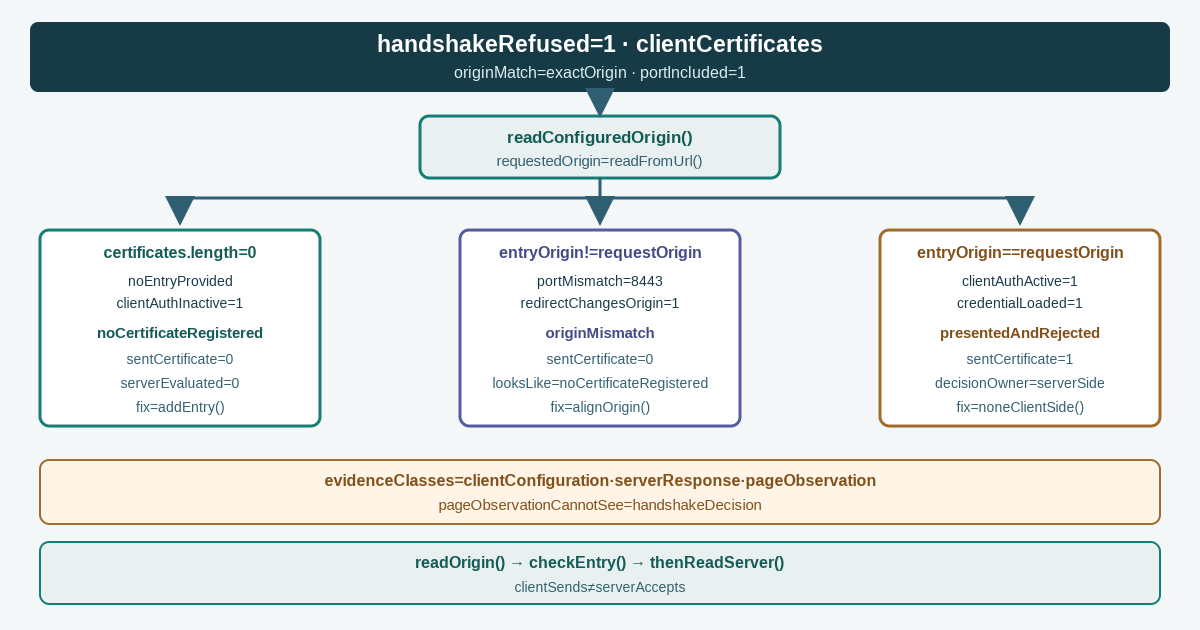
A server that asks for a client certificate fails the handshake in more than one way, and the failure surfaces without saying which way. In Playwright the client side is configured through clientCertificates, whose origin must match the request origin exactly. That single rule explains most of the cases where a certificate is clearly present in the project and still never reaches the server. BotBrowser can keep profile-backed browser inputs consistent while a test repeats such a check, but it does not issue client certificates, does not satisfy a mutual-TLS requirement and cannot change what a server accepts.
This is the opposite direction from a server-certificate error. There the client decides whether to trust the chain. Here the server decides whether to accept the credential the client presents, and the client only chooses what to send. The Playwright self signed certificate diagnosis covers the first direction; this page covers the second.
Only public documentation is quoted, and no certificate, private key or customer endpoint appears anywhere in this article.
TL;DR
clientCertificatestakes an array of entries, each requiringoriginplus a certificate and key pair in PEM or a single PFX/PKCS12 bundle.originmust match the request origin exactly, protocol, host and optional port included. A certificate registered for one origin is not presented to another.- Client authentication is only active once at least one certificate is provided, so an empty or filtered-out array behaves like no configuration at all.
- Three causes share one failure surface: nothing registered, registered for another origin, and presented but rejected by the server.
- Registering a certificate changes what the client sends. It does not make the server accept it.
- A profile keeps browser-side inputs consistent for the check; it does not satisfy mutual TLS.
Table of contents
- What Playwright actually sends
- The exact-origin rule
- Three causes behind one refusal
- A decision table for the client side
- What the page cannot tell you
- BotBrowser capability and limitation
- Practical conclusion
What Playwright actually sends
Inside an MCP session the certificate settings arrive through the config file instead of a direct call: the MCP ignoreHTTPSErrors placement shows which config object carries the option and why placement decides whether it has any effect.
The Browser reference (the browser.newContext options) and the TestOptions reference both document clientCertificates, added in version 1.46. The option is an array. Each entry carries an origin string plus credential material in one of two shapes: certPath and keyPath for PEM files, or a single pfxPath for a PFX or PKCS12 bundle. Direct cert, key and pfx values are accepted as equivalents, and passphrase is optional for the private key in a PEM file or a PFX bundle.
const context = await browser.newContext({
  clientCertificates: [
    {
      origin: 'https://app.test:8443',
      certPath: './fixtures/client.pem',
      keyPath: './fixtures/client-key.pem',
    },
  ],
});
Two details in that shape matter more than the rest. The first is that origin includes the port when one is present, so https://app.test and https://app.test:8443 are different origins. The second is that the documentation describes TLS client authentication as active only once at least one certificate is provided. An array that ends up empty, or whose entries never match, leaves the client in the no-certificate state without an error of its own.
The documentation also records the documented way to refuse every client certificate: provide a certificate whose origin matches none of the hosts you intend to visit. That is a deliberate opt-out, not an accident, and it is worth recognizing because it produces the same observable outcome as having no certificate at all.
The exact-origin rule
The documentation states the origin requirement plainly: it must be an exact match for the request origin that the certificate is valid for, and it includes the https protocol, a hostname and optionally a port.
That single sentence explains the most common confusing case. A project has a valid certificate, the path is right, the key decrypts, and the server still refuses. The cause is often that the test navigates to a slightly different origin than the one the entry declares: a different port, a www prefix, or a redirect from an apex domain. Nothing in the configuration is wrong; the binding simply does not apply to that request.
Two review habits follow from the rule. First, read the origin from the URL the test actually requests rather than from the hostname a developer remembers. A port that appears only in the test server configuration is part of the origin. Second, treat any redirect as a new origin decision: a request that starts on one host and lands on another needs the certificate bound to the host that terminates the connection.
The rule also sets a boundary for this article. Origin matching is a client-side decision made from configuration. Whether the server then accepts the presented certificate is a separate question with its own evidence.
Three causes behind one refusal
The failures below look the same in a test log, because each ends with the connection not being established. They differ in what the client did.
| Cause | What the configuration says | What the client sends | What the log shows |
|---|---|---|---|
| Nothing registered | No entry, or an entry filtered out | No certificate | The same refusal as an empty configuration |
| Bound to another origin | An entry whose origin is not the requested one | No certificate for this request | Identical to the first case |
| Presented and rejected | An entry whose origin matches | The certificate | A refusal after the credential was sent |
The first two rows are indistinguishable from the client side alone, which is why the review step has to read the configured origin against the requested URL before concluding anything about the server. The third row is the only one where the server had something to evaluate, and it is the only one where a certificate problem could be on the server's side.
For a review, record the requested URL with its port, the configured origin, and whether a certificate was sent. Those three facts separate the rows without needing to guess at server policy.
A decision table for the client side
Use this order before changing any credential file.
| Question | Where to look | What an answer rules out |
|---|---|---|
Does the context receive a non-empty clientCertificates array? | The context or config that launches the run | The nothing-registered case |
| Does the entry origin equal the requested origin, port included? | The test's navigation URL against the configured string | The wrong-origin case |
| Do the certificate and key load, and does an encrypted key get its passphrase? | The documented paths and values | A credential that never becomes usable |
| Did the server reject after presentation? | The server's own response, not the browser | Any remaining client-side cause |
The fourth row is deliberate: once the first three are answered, the remaining cause lives on the server, and no client option fixes it. Recording that boundary keeps a test failure from being attributed to the wrong component.
What the page cannot tell you
It is tempting to assert on the document after the handshake. The document cannot answer this question, and for a structural reason: client authentication happens during connection setup, before any document exists. By the time a script runs, either the connection was established or it was not.
That leaves three distinct evidence classes, and mixing them is the recurring error in mutual-TLS diagnosis:
| Evidence class | Who produces it | What it establishes |
|---|---|---|
| Client configuration | The launcher or test config | Which origin and credential the client could send |
| Server response | The server | Whether the presented credential was accepted |
| Page observation | A script in the document | What the page reports after the connection exists |
The middle row is the only one that can speak to acceptance, and it is the row people skip when they suspect a certificate problem. The third row cannot speak to it at all.
Reading the configuration without leaking a credential
A mutual-TLS review touches files that must never enter a repository: the keyPath file, and often a passphrase. The safe habit is to record the shape of the configuration and never its secrets. Write down the origin string, which credential format is in use (certPath plus keyPath, or a single pfxPath), whether a passphrase is provided, and where the files live relative to the fixture directory. Do not paste the key, the passphrase or a full certificate body into a log, a test report or a review comment.
That split also makes a diff reviewable. A reviewer can confirm that an origin changed from one port to another, or that a PFX was swapped for a PEM pair, without ever handling the material itself. When a test needs to prove that the credential loads, the assertion should be about the load succeeding, not about the bytes.
Fixtures for this kind of work are throwaway. Generate a certificate for the test origin, keep it beside the test, and treat anything that was ever used against a real service as unusable for testing. A shared, long-lived client certificate is the pattern that turns a test fixture into a production credential by accident.
Sequencing the check so the answer is usable
The order in which a reviewer collects facts decides whether the conclusion holds. Collect the requested URL first, with the scheme, host and port exactly as the browser used them. Then collect the configured origin, as a string, and compare the two before opening any credential file. Only after they match is it worth asking whether the key loads and whether the server answered.
The reverse order produces confident but ungrounded conclusions. A reviewer who starts by opening the certificate file, finds it valid, and then reports that the certificate is fine and the server must be at fault has skipped the rule that decides whether that certificate was ever in play. The file being valid is necessary and, in the wrong-origin case, completely irrelevant.
Record the comparison as one short line with both origins side by side. That line carrying the requested origin beside the configured origin holds the whole finding, shows why no certificate was sent, and stays useful months later when someone re-runs the same check on a different port or a different host.
Where this differs from a server-certificate review
Both reviews involve a handshake that did not complete, and both produce a test failure with little detail, so they are easy to conflate. The difference is which side holds the decision. In a server-certificate review the client is the judge: it evaluates the chain it received and decides whether to proceed, and ignoreHTTPSErrors changes that decision without changing the certificate. In a client-certificate review the server is the judge: the client presents a credential and the server decides whether to accept it, and no client option changes that verdict.
That asymmetry has a practical consequence for tooling. A setting that suppresses a server-certificate complaint has no equivalent here, because there is nothing for the client to suppress: the refusal arrives as the server declining the connection. When someone reaches for an ignore-certificate-errors option to fix a mutual-TLS problem, the mismatch in direction is the first thing to check.
Keeping the two reviews separate also keeps their evidence separate. A chain observation says nothing about whether a server accepted a client credential, and a client configuration says nothing about whether a server chain was valid. Each review needs the evidence class that matches its judge.
Engine differences worth knowing
The documentation records a caveat for WebKit on macOS when accessing localhost. A local fixture result from that combination is not evidence about Chromium, about another operating system, or about a remote host. When a result matters, record the engine and the platform beside it rather than generalizing from one combination.
That is the same discipline the certificate articles use elsewhere: state the environment, and keep a single observation from becoming a claim about every browser.
BotBrowser capability and limitation
BotBrowser documents profile-backed browser surfaces and explicit launch inputs, and that capability has a narrow role here: it keeps the browser side constant while a reviewer repeats the origin-binding check, so a difference between runs comes from the configuration rather than from a drifting browser state.
The limitation sits in the same paragraph. BotBrowser does not issue client certificates, does not satisfy a mutual-TLS requirement, does not alter what a server accepts, and cannot turn a refused handshake into an accepted one. The Playwright TestOptions reference documents clientCertificates as a client-side option; the BotBrowser network documentation documents the network surfaces a profile controls. Neither makes a server trust a credential.
FAQ
Why is no certificate sent even though one is configured?
Check the origin first. The configured origin must equal the requested origin exactly, including the port when the request uses one. A certificate bound to a different origin is never presented for this request, which looks the same as having no configuration.
Does clientCertificates accept a PFX file?
Yes. An entry can carry pfxPath for a PFX or PKCS12 bundle instead of certPath plus keyPath, and direct pfx values are accepted too. passphrase is optional for an encrypted key.
What happens if the array is empty?
Client authentication is only active once at least one certificate is provided, so an empty array behaves like no configuration. An entry whose origin matches nothing is the documented way to refuse all client certificates deliberately.
Can a page confirm that the client certificate was accepted?
No. Client authentication completes before a document exists, so a page script cannot observe the decision. Acceptance is a server-side fact and needs the server's own evidence.
Does this fix a server-certificate error?
No. This is the opposite direction. A server-certificate error concerns whether the client trusts the server; a client certificate error concerns whether the server accepts the client. The self signed certificate diagnosis covers the first case.
For neighboring work, TLS certificates and browser connection trust explains how a chain is built and validated, and Playwright self signed certificate errors separates three causes of a server-certificate refusal.
Sources
Practical conclusion
One mutual-TLS refusal covers three client-side situations: nothing registered, an entry bound to a different origin, and a certificate presented and then rejected. The exact-origin rule and the requirement for at least one entry explain the first two without any server involvement, and the documentation states both plainly. Confirm the requested origin with its port, confirm that the credential loads, and only then treat the refusal as a server decision. A page cannot answer this question, and no BotBrowser profile changes what the server accepts.
This article is part of the guide: Browser Automation Getting Started: A First Run Map
Related Articles
Playwright Self Signed Certificate Errors: Three Causes
Getting StartedPlaywright MCP: Where ignoreHTTPSErrors Belongs
NetworkTLS Certificates and Browser Connection Trust
NetworkScraper Blocked? Diagnose DNS, TLS, HTTP and Page Errors
Getting StartedPlaywright Basic Auth: 401 Loop, Popup and Credentials
NetworkDNS over TLS: Resolver Privacy, Deployment, and Failure Boundaries
Run the same check in BotBrowser
Load a profile, keep the signals you just read about consistent inside the browser, and confirm the result on your own machine before a rollout.