Payment Request API: Consent and Safe Fallbacks
Use PaymentRequest with explicit user activation, secure-context checks, cancellation handling, and a usable fallback without collecting payment credentials.
BotBrowser Team
Want the structured docs for Platform?
This article lives in the editorial library. For step-by-step setup, reference material, and ongoing updates, jump into the docs section.
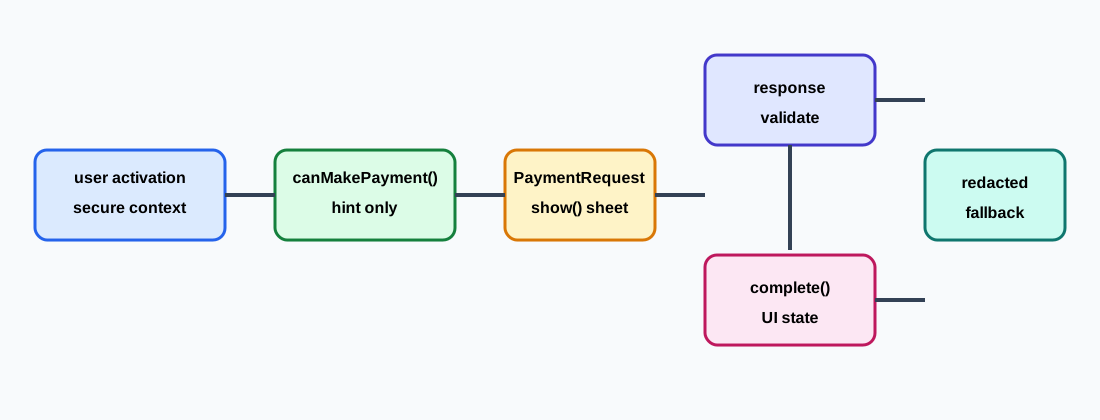
BotBrowser can replay an owned synthetic PaymentRequest fixture and inspect visible consent, cancellation, timeout, and fallback states. It cannot provide a real payment instrument, approve a bank or wallet transaction, or prove settlement. The browser sheet is a user-mediated interface; it is not the processor and it is not an order ledger. A reliable implementation therefore starts in a secure context, requires a fresh trusted action, treats canMakePayment() as a short-lived capability hint, validates every response on the server, and keeps an ordinary checkout path available.
TL;DR
new PaymentRequest(methodData, details, options)describes methods and display details. It does not request credentials and does not promise that a method is installed.canMakePayment()is a capability hint.truedoes not mean consent, authorization, available funds, wallet ownership, or a successfulshow()call.- Call
show()from a visible click or keyboard action in a secure context. TreatAbortError,NotAllowedError, timeout, and unavailable-method branches as normal product states. - Validate the response with the server, then use
complete('success'),complete('fail'), orcomplete('unknown')only to close the browser sheet.complete()reports sheet UI, not settlement. - Never retain payment credentials, full response data, card fragments, or complete exceptions. Keep a manual form, invoice request, payment link, or another non-PaymentRequest route.
Contents
Consent and capability
Payment Request gives a page a browser-mediated way to present a checkout choice. The merchant supplies method descriptors and display details; the browser decides whether a sheet can be offered; the person decides whether to continue. A processor still performs authorization, and the merchant server still owns amount checks, inventory, fraud controls, order revisions, and reconciliation. A resolved promise from show() is therefore a handoff in a UI flow, not evidence that money moved.
canMakePayment() helps a page decide whether to show an optional fast-checkout control. Its answer can vary with browser policy, registered handlers, privacy protections, user settings, and implementation details. It may return true, false, or reject. The answer is not a wallet identity, a durable user property, or consent. Keep it short-lived, request it only when the person has chosen the payment path, and leave the primary checkout visible even when the hint is negative or unavailable.
Capability detection should be explicit and boring:
const paymentSupported = window.isSecureContext && 'PaymentRequest' in window;

if (!paymentSupported) showCheckoutFallback('unsupported');
An available constructor does not mean that the requested method is available. A document can lose focus, run under a restrictive frame policy, or lose transient activation while unrelated asynchronous work runs. Browser updates can change method availability without a page-code change. Treat each attempt as a new observation rather than building a stable profile from it.
The consent boundary resembles both Web Share user-initiated sharing and Web Share permission boundaries: a browser handoff does not prove that a receiving service accepted every field, and a valid call still depends on context and recent activation. Payment Request is narrower because a response can expose method-specific data to the merchant, yet authorization remains a server and processor decision. The browser API compatibility and fallback guide gives a related pattern for keeping an optional capability from hiding the core workflow.
Build a narrow PaymentRequest
Keep methodData, details, and options minimal. A method identifier tells the browser which class of payment the merchant can process. details supplies a displayed total and optional line items, but it is not a trusted price. Once a response arrives, the server must recompute amount, currency, tax, shipping, inventory, and order revision from its own record.
const methodData = [
  {
    supportedMethods: 'https://example.test/pay',
    data: { version: 1 },
  },
];

const details = {
  id: 'order-2026-1042',
  total: { label: 'Example order', amount: { currency: 'USD', value: '19.00' } },
  displayItems: [{ label: 'Item', amount: { currency: 'USD', value: '19.00' } }],
};

const options = { requestPayerName: false, requestPayerEmail: false };
const request = new PaymentRequest(methodData, details, options);
Do not place card numbers, wallet secrets, personal identifiers, or long-lived account references in methodData or a page URL. requestPayerEmail and similar flags are requests for fields, not proof that a returned value is correct. Ask only for information needed by the order, tell the person why it is needed, and stop retaining it when the processor has accepted an approved token.
Create a request for one checkout attempt. If the cart changes, construct a new request with a new details.id and server order revision. Do not reuse an object after navigation or a timeout. A short-lived attempt identifier lets the interface reject a late response belonging to an older cart without exposing customer data.
Start show from user activation
request.show() opens the browser sheet and resolves with a PaymentResponse when the browser permits the operation and the person completes the sheet. Start it directly from a visible button or keyboard activation. Do not start it on page load, from a timer, from an analytics callback, or after unrelated asynchronous work that might consume transient activation. Secure context, focus, frame policy, browser settings, and platform rules can each prevent the sheet.
let activeAttempt = 0;

async function beginPayment() {
  const attempt = ++activeAttempt;
  if (!window.isSecureContext || !('PaymentRequest' in window)) {
    showCheckoutFallback('unsupported');
    return;
  }
  const request = buildRequest();
  showPaymentState('opening');
  try {
    const response = await request.show();
    if (attempt !== activeAttempt) return;
    await handlePaymentResponse(response, request, attempt);
  } catch (error) {
    if (attempt !== activeAttempt) return;
    showPaymentState(error?.name === 'AbortError' ? 'cancelled' : 'rejected');
    showCheckoutFallback(error?.name === 'AbortError' ? 'cancelled' : 'rejected');
  }
}

payButton.addEventListener('click', beginPayment);
Disable a duplicate activation while the sheet is open, but keep a visible alternative. After cancellation or refusal, return focus to the initiating control and announce opening, cancelled, and fallback through a live region. The message should tell the person what to do next without showing a browser exception or requesting credentials again.
An embedded checkout needs an explicit ownership and permission design. A top-level policy or iframe attribute can affect whether payment is allowed, but delegation does not grant consent to the child and does not make an unavailable method appear. Test same-origin and cross-origin fixtures separately. Record only coarse origin and policy outcomes; do not copy a response into postMessage unless the receiving origin is exact and the schema excludes sensitive fields.
Validate the response and complete the sheet
PaymentResponse contains a method name, method-specific details, requested payer fields, and complete(). Validate its shape and allow-list the method before sending any approved processor fields to an authenticated server endpoint. A response is not a receipt. A processor can reject, delay, reverse, or reconcile an authorization after the browser sheet closes.
async function handlePaymentResponse(response, request, attempt) {
  showPaymentState('validating');
  let outcome = 'unknown';
  try {
    const result = await postPaymentToken({
      methodName: response.methodName,
      details: response.details,
      orderId: request.id,
      attempt,
    });
    outcome = result.authorized === true ? 'success' : 'fail';
  } catch {
    outcome = 'unknown';
  }
  try {
    await response.complete(outcome);
  } catch {
    // The payment sheet may already have closed; keep the server outcome.
  }
  showPaymentState(outcome);
}
Call complete() at most once for a response. success asks the browser to present a successful completion state, fail represents a failed attempt, and unknown is appropriate when the server decision is not available. None of these tokens prove capture, refund, delivery, or funds movement. The authoritative status is the processor response recorded by the server together with an idempotent order revision.
response.complete() can reject if the sheet has already closed, the document navigated, or the browser no longer owns the response. Do not turn that rejection into a second submission. Keep the server result, show a retry that creates a new order attempt, and prevent the same method data from being sent twice.
Classify cancellation, refusal, and timeout
Cancellation is not the same as a card decline. A person can close the sheet, change their mind, or choose not to continue. AbortError commonly represents that action, but the name does not reveal why it happened. Keep cancelled, rejected, unsupported, and processor-failed as separate product states. Preserve the cart and offer a manual form without asking for credentials in a diagnostic message.
Timeout ownership must also be clear. The page can set an application deadline for its server request, but a timer cannot prove what happened inside the browser sheet. If the server call times out after a response arrived, mark the result unknown, stop duplicate submission, and consult the order record or processor before offering another attempt. A late callback must not overwrite a newer attempt.
Browser errors and method errors belong to different stages. A missing or malformed method can make show() reject before a sheet appears. A policy or activation failure may produce NotAllowedError. An invalid response belongs to validation; a processor refusal belongs to the server. Preserve the stage in support records so a person is not told to re-enter card data when the real issue is frame policy.
Use a bounded state sequence such as idle, opening, shown, response-received, authorizing, success, fail, unknown, cancelled, rejected, unsupported, and fallback. Record the first failed stage for each attempt. Do not automatically call show() again after the sheet closes, and do not call abort() from background cleanup unless the product owns that cancellation action. abort() is useful when a cart changes or navigation begins; it cannot undo a processor authorization that already occurred.
Data boundaries and fallback
A payment response may contain a method token, payer data, billing references, or an opaque value that becomes a credential when replayed. Keep response.details, payer email, card fragments, full exceptions, and screenshots out of logs, URLs, session replay, crash reports, and analytics dimensions. Redaction must cover adapters and support tooling outside the direct PaymentRequest call.
{
  "api": "PaymentRequest",
  "attempt": "pay-7f31",
  "capability": "available",
  "outcome": "cancelled",
  "methodNamePresent": true,
  "paymentDetailsRetained": false,
  "settlement": "not-asserted"
}
This record answers whether the sheet was offered and which coarse state the page displayed. It cannot answer whether a person owns an account or whether a processor moved money. Use random, short-lived correlation identifiers. Expire diagnostic exports, restrict them to support roles, and document every export. A transformed token can still link sessions, so transformation is not a deletion policy.
Keep a fallback and distinguish settlement.
Keep the fallback visible on the first screen. If PaymentRequest is missing, canMakePayment() rejects, show() is cancelled, a method is unavailable, or the server result is unknown, retain the ordinary checkout form, invoice request, payment link, or contact path. Preserve the cart, labels, keyboard access, validation, and a clear next step.
Never hide the fallback merely because canMakePayment() returned true. Do not show “payment complete” after complete('success') unless the server has supplied the authoritative order status. Payment Request is a browser-mediated checkout surface; it is not credential storage and it does not replace a processor. Web Share hands data to a receiving target, while Credential Management stores sign-in choices; neither API supplies a settlement decision.
Use a synthetic method identifier and fictional amount in a controlled fixture. Assert that no credential field is retained, focus returns after cancellation, an unknown server result leads to complete('unknown'), and the manual route remains usable. Real payment instruments and provider endpoints do not belong in browser automation fixtures.
Decision table.
| Observation stage | What it establishes | Safe next step |
|---|---|---|
| API missing or context insecure | This document cannot start Payment Request | Keep manual checkout or an invoice route |
canMakePayment() returns false or rejects | No useful capability hint for this attempt | Keep primary checkout; do not infer wallet identity |
show() rejects with AbortError | The sheet was cancelled or closed | Preserve the cart, record cancelled, wait for a new action |
| Policy or activation blocks the call | The browser refused this attempt | Check secure context, focus, frame policy, and gesture ownership |
| A response arrives | The browser returned method data to the page | Validate strictly and send only approved fields to the server |
| Server authorization is refused | The processor did not authorize this attempt | Call complete('fail'), explain the fallback, avoid duplicate retry |
| Server request times out | Settlement state is unknown | Use complete('unknown') when appropriate and reconcile before retry |
complete('success') resolves | The sheet accepted the UI completion request | Display only the server's order status |
BotBrowser capability and limitation.
BotBrowser controlled contexts can replay an authorized same-origin fixture with a synthetic method, exercise capability and activation branches, simulate cancellation or timeout, and assert redacted visible outcomes and a usable fallback. The advanced browser capability documentation describes the broader page boundary. A test context has no access to a real payment instrument, bank approval, wallet approval, settlement proof, or payment credentials.
Keep a deterministic fixture record:
{
  "api": "PaymentRequest",
  "secureContext": true,
  "userActivation": true,
  "canMakePayment": "hint-only",
  "show": "cancelled",
  "complete": "unknown",
  "paymentDetailsRetained": false,
  "fallback": "manual-checkout"
}
Change one variable per run: browser version, top-level origin class, iframe policy, activation timing, synthetic method, server deadline, or cancellation branch. Compare the first visible outcome that changes. A fixture proves that the page handles a branch; it cannot prove authorization or funds movement.
State machine and server boundary.
Treat the browser sheet as a short-lived state machine. An attempt begins at idle. Secure-context and activation checks can move it to eligible; canMakePayment() may add a method-hint, but it must never move the attempt to authorized. A permitted show() moves the attempt to sheet-open. Cancellation becomes cancelled, a merchant deadline becomes timed-out, and an unavailable method becomes refused. Only a returned PaymentResponse moves the attempt to response-received. complete('success') settles browser UI; it does not prove processor authorization, capture, settlement, or movement of funds.
This separation prevents a telemetry mistake in which canMakePayment: true is counted as a conversion or a resolved show() promise is counted as revenue. The server still needs an idempotency key, amount and currency checks, method allow-listing, response validation, and replay protection. Join browser and server records with a short random correlation identifier. Never join them with a card number, payer name, account reference, raw method token, or complete response object.
Retries should follow the state instead of guessing. A cancelled attempt can expose an accessible fallback button without invoking show() again. A timed-out attempt can offer retry only after the server confirms that the previous idempotency key is closed. A refused attempt should explain that the selected method is unavailable and preserve ordinary checkout. If the cart changes, call abort() where supported, invalidate the old key, and render the revised total before another attempt. A tab close leaves reconciliation to the server.
Activation, frame, and origin checks.
Run the smallest preflight before constructing a request. Confirm window.isSecureContext, confirm that the document is the intended origin, and require a trusted click or keyboard activation. A page-load event, timer, pointer movement, or synthetic focus event is not an implied gesture. The browser may reject a valid request object, and that rejection should lead to the same usable fallback as any other normal branch.
An embedded checkout adds a distinct boundary. The top-level page and child frame need an explicit ownership and permission decision. Record frame origin and policy result as coarse values. A same-origin fixture can exercise the state machine; a cross-origin fixture should verify that a policy or activation refusal leaves the fallback visible. Do not assume that a top-level tab's result transfers to an embedded frame.
Idempotency, timeout, and order revision.
Generate one idempotency key per checkout attempt and bind it to a server-side order revision. A cancelled attempt can close its key because no response was accepted. A response that reaches the server but remains pending keeps the key open until reconciliation. An authorization stores the order state and returns a coarse server result. A processor timeout returns pending and offers status refresh instead of a second show() call. A refusal returns declined and leaves the non-payment route available.
The browser's complete() call is never the transaction commit. A successful completion can be followed by a network failure, and a failed completion can occur after the server recorded authorization. Support tooling reconciles by idempotency key and processor reference. It does not use a screenshot or a promise state as a financial record.
Accessible fallback and support handoff.
The fallback is part of the payment design, not a hidden error branch. Give it a stable button name, preserve keyboard focus after cancellation, and explain why the alternative is shown. “Use standard checkout” is clearer than “Payment Request failed.” A timeout message should say that order status is being checked; it should not ask the person to submit the same order repeatedly. A refusal message can say that the selected method is unavailable without revealing whether a wallet is enrolled.
The same wording should work when JavaScript is disabled or when a browser does not expose PaymentRequest. Server-rendered fields, an invoice request, or support contact can be valid alternatives. A handoff needs only a random caseId, fixture version, release identifier, browser major version, locale, origin class, method class, secureContext, userActivation, capability, show, complete, outcome, and fallback. Exclude response fields, account identifiers, full URLs, cart data, and stable identifiers derived from credentials. Expire the handoff automatically.
Review negative paths as carefully as the happy path. The acceptance record should include one cancellation, one activation failure, one unavailable method, one pending server response, and one ordinary checkout submission. Each row needs an expected visible message and an expected retention decision. If a branch cannot be observed in the selected browser, record not-observable and keep the fallback; do not replace missing evidence with an assumed success.
Sources
- W3C Payment Request API
- MDN: Payment Request API
- MDN: PaymentRequest.show()
- MDN: PaymentRequest.canMakePayment()
- MDN: PaymentResponse.complete()
- MDN: Secure contexts
- BotBrowser advanced capabilities
Practical conclusion
Use PaymentRequest as a browser-mediated consent surface, not as a processor result. Construct the smallest request, call show() from a fresh user action in a secure context, send only approved response data to the server, and let complete() describe sheet UI. Keep cancelled, rejected, timeout, unknown, and unavailable-method states distinct; retain only redacted outcomes; bind retries to idempotent order revisions; and keep a complete non-PaymentRequest checkout path. A controlled BotBrowser fixture can prove that visible branches remain usable, but it cannot prove a real charge or settlement.
This article is part of the guide: Web Platform Surfaces: A Consistency Review Map
Related Articles
Web Share API: Permission Boundaries and Safe Fallbacks
PlatformWeb Share API and User-Initiated Sharing
PlatformPresentation API: Display and Session Boundaries
PlatformWeb MIDI API: Permission and Device Privacy
PlatformEyeDropper API: User Activation and Color Privacy
PlatformIdle Detection API: User Control, Permissions, and Privacy Boundaries
Take BotBrowser from research to production
The guides cover the model first, then move into cross-platform validation, isolated contexts, and scale-ready browser deployment.