EyeDropper API: User Activation and Color Privacy
Use EyeDropper with explicit user activation, visible cancellation, secure-context checks, and privacy-safe sRGB handling.
BotBrowser Team
Want the structured docs for Platform?
This article lives in the editorial library. For step-by-step setup, reference material, and ongoing updates, jump into the docs section.
The EyeDropper API lets a person choose a color from the browser viewport after an explicit action. That interaction is deliberately narrow: it does not grant a page a background pixel feed, a display calibration profile, or a way to identify a screen. The application receives an sRGB hex value when the person completes the picker, and it must keep cancellation, rejection, and unavailable support visible. BotBrowser controlled contexts can run an authorized page that invokes EyeDropper from a declared user action and records visible selection or cancellation outcomes when the runtime exposes the API; BotBrowser cannot manufacture transient user activation, read pixels without the interaction, calibrate a display, or guarantee identical chooser behavior across hosts. For nearby boundaries, compare CSS color management and display accessibility and pointer events and input modality accessibility.
TL;DR
- Invoke
EyeDropper.open()directly from a user action while the transient activation is still valid. - Check the secure context and constructor, then keep a normal color input available when the API is missing.
- Treat the returned
sRGBHexas a selected application value, not a measurement of a physical display. - Use an
AbortControllerfor an explicit cancel path and keep Escape or picker dismissal distinct from a selection. - Do not retain screenshots, pointer coordinates, viewport history, or color samples longer than the product decision needs.
Contents
- Gate the picker with user activation
- Model selection, cancellation, and fallback
- Keep sampled color inside a privacy boundary
- Verify the lifecycle with a bounded fixture
- Practical conclusion
Gate the picker with user activation
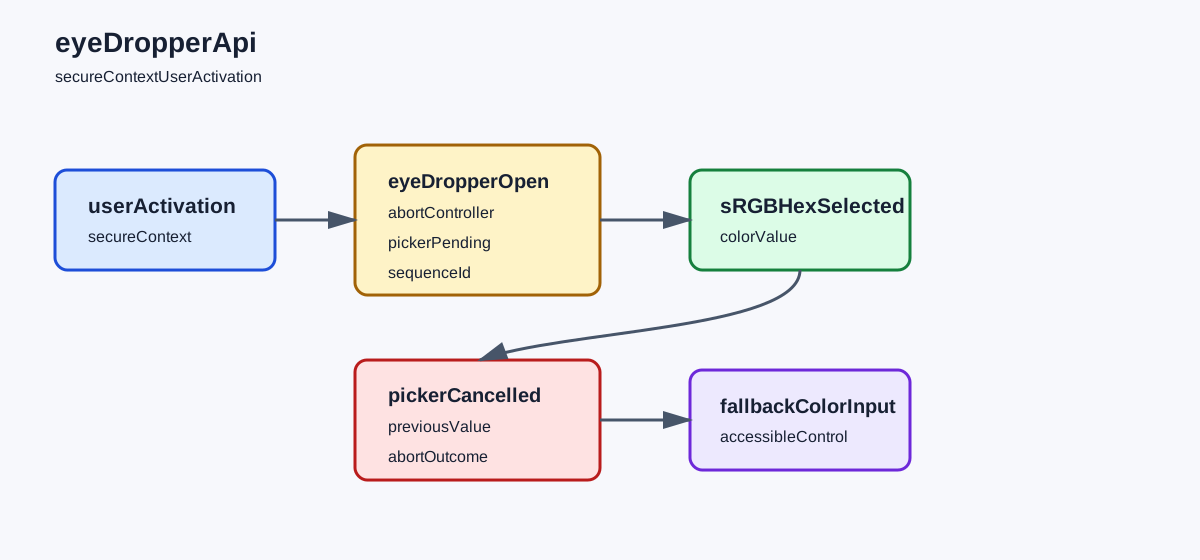
The EyeDropper API proposal describes a chooser that lets the user sample a color from the screen after an intentional invocation. The MDN EyeDropper API reference documents the EyeDropper constructor and its open() method. The API is exposed only in a secure context, and opening the chooser requires transient user activation. A page should therefore treat the click or keyboard command as the ownership boundary for the entire request.
Do not wait for an unrelated promise between the user action and open(). A network request, a rendering turn, or a queued callback can consume the activation window before the picker starts. Put the invocation in the event handler, validate only cheap local conditions first, and move slower work after the returned promise settles. If the component needs to prepare a palette, prepare it before the action or keep the preparation independent of the picker.
The Chrome guidance for EyeDropper presents a common color-selection workflow, but it is not a promise that every browser or embedded webview exposes the same API. Feature-detect both the constructor and the secure-context condition. A missing constructor, an insecure page, or a policy that prevents the interaction is an unavailable capability. None of those states justifies silently sampling another surface or asking for a broader permission.
The activation belongs to the person, not to a background task. A timer that calls open() after a button click may be rejected even when the timer was scheduled by the same component. A worker cannot inherit a page's transient activation by message. If a worker owns palette processing, let the page invoke the picker, then send only the selected value or an explicit cancellation outcome to the worker. This keeps the security-sensitive action at the boundary where the user can see it.
Use a small state record to make that boundary testable:
const pickerState = {
  phase: 'idle',
  outcome: 'unavailable',
  sequence: 0,
};
phase describes the component lifecycle, while outcome describes what the person or runtime made visible. sequence prevents a late promise from replacing a newer palette. Do not put a full URL, account identifier, or screenshot in this record. The state should be sufficient to explain whether the picker was offered, selected, cancelled, rejected, or unavailable.
Activation is also an accessibility contract. The control that opens the picker needs an accessible name, keyboard activation, focus retention, and a visible alternative. Do not hide the native color input because the EyeDropper path is present. A person using a keyboard, assistive technology, remote desktop, or a browser without the API should still be able to choose or enter a color. Announce a successful change in the same way as a native color control, and do not make a color swatch the only indication of the selected value.
Make the control state honest during the short pending interval. Disable a second invocation or give it a separate cancel action; two concurrent pickers create ambiguous ownership even if the browser rejects one of them. Keep the previous value rendered while the chooser is active, and restore focus to the opening control after a terminal outcome. A spinner alone is not enough: a screen-reader user needs a status such as “Choose a color” followed by “Color selection cancelled” or “Color selected.” The status text should not include a pointer coordinate or a copied screen label.
Color validation belongs after the chooser returns. Check that the value matches the format your form accepts, preserve a prior valid value when parsing fails, and show a local error instead of reopening the picker automatically. If the application stores themes, validate contrast and required semantic roles before commit. A valid hex string can still produce inaccessible foreground and background pairs. That review is about the rendered interface, not about the screen pixel that was sampled.
Model selection, cancellation, and fallback
The promise returned by open() resolves with an object containing sRGBHex when the person selects a color. Keep that value in the application model and immediately return the interface to an idle state. A selection is not proof that the page may continue sampling. The chooser ends at the selection, and a later sample requires a new visible user action.
Cancellation is a normal outcome. The person can dismiss the chooser, press Escape, navigate away, or activate an application cancel control connected to an AbortController. Keep cancelled separate from rejected: cancellation means the person or lifecycle ended the request, while rejection means the runtime declined the operation or the call violated a precondition. Both should preserve the previous color and leave the control usable.
The fallback has to be a product path, not an error string. Use the native <input type="color"> control, a keyboard-editable hex field, or a palette of documented choices. The fallback must preserve the same output contract and validation rules. If the application accepts six-digit sRGB hex values, normalize both the EyeDropper result and the fallback to that format. Do not create a second meaning for an empty value simply because the picker is unavailable.
Keep the state machine explicit:
| Outcome | State record | User-visible action | Safe next step |
|---|---|---|---|
| API missing or insecure context | unavailable, fallback | Show the native or typed color control | Continue with the fallback value |
| User action opens picker | open, pending | Show picker status and a cancel affordance | Wait for selection or cancellation |
| Color selected | selected, sRGBHex | Update the swatch and text value | Validate and commit once |
| User dismisses or aborts | cancelled, previous value retained | Say that no color changed | Return to idle without retrying silently |
| Runtime rejects the call | rejected, reason class | Explain that the picker is unavailable now | Offer the fallback and record no pixel data |
The table separates an application decision from a browser capability. A rejection is not evidence that a display or user input is invalid. Conversely, a successful selection does not certify that a color-management pipeline will render the same physical color on another screen. Keep those claims in different records and route each to the owner who can act.
The fallback should also preserve user intent across navigation and form errors. Keep a draft value in the component or form state, mark whether it came from the picker or the native control only if that distinction changes the product action, and restore it after a validation message. Do not turn the source of a color into an analytics category. A person may use the palette, type a value, paste a value, or pick from the screen; all four are valid ways to reach the same application contract.
Use AbortController for lifecycle cancellation, but do not use abort as a hidden retry loop:
async function chooseColor(button, fallback, signal) {
  if (!window.isSecureContext || !('EyeDropper' in window)) return fallback('unavailable');
  const picker = new EyeDropper();
  try {
    const result = await picker.open({ signal });
    return { outcome: 'selected', value: result.sRGBHex.toLowerCase() };
  } catch (error) {
    if (error?.name === 'AbortError') return fallback('cancelled');
    return fallback('rejected');
  }
}
Call chooseColor() from the button's activation handler. Do not call it from setTimeout, a Promise continuation created before the click, or a page-load hook. The fallback callback should update the same form control and should not inspect pixels to compensate. If a route is replaced while open() is pending, abort the request and ignore any late result.
Validate the returned string as application data. Lowercasing is presentation normalization, not color conversion. If a product accepts alpha, wide-gamut values, or named colors, define a separate conversion contract rather than pretending that sRGBHex preserves those channels. The EyeDropper result is a six-digit sRGB choice; it does not carry a display profile, alpha component, ICC metadata, or the coordinates where the person clicked.
Keep sampled color inside a privacy boundary
A color can be sensitive even when it is only six hex digits. A person may sample a private document, a one-time code rendered in a chart, or a brand color that identifies an unreleased project. Retain the value only for the feature that needs it. Do not store a screenshot, pointer path, viewport dimensions, or the sampled pixel's screen coordinates when the product only needs the hex value.
The API does not expose a screenshot to the page. That is a privacy boundary, not a missing convenience. Do not ask users to grant screen capture, use a canvas as a substitute for an arbitrary screen pixel, or infer a screen layout from a color sequence. A canvas can sample its own origin-clean pixels, but that is a different ownership contract from the EyeDropper chooser.
Separate display appearance from selected data. CSS color management, monitor profiles, HDR settings, zoom, and operating-system rendering can affect how a color looks before and after selection. The returned sRGB value is useful for an application token, theme field, or annotation; it is not a calibrated measurement of luminance or a guarantee that another display will match it. If visual matching matters, ask the user to confirm the rendered result and keep that confirmation separate from the sampled value.
Do not join a color value with identity fields to build a persistent preference without a clear product purpose. A short-lived draft can keep sRGBHex in memory and commit it with the user's save action. A design tool may need a project record, but it should document who can access the project and how the value is deleted. Analytics usually needs only outcome=selected or outcome=cancelled, not the color itself.
Workers and iframes add ownership questions. The page with the visible control should own the activation and picker lifecycle. A worker can receive { outcome: 'selected', value: '#aabbcc' } after selection, but it should not receive an implicit request to open the chooser. An embedded frame should receive a color only when its message contract names the purpose and validates the sender. Never broadcast a sampled value to every frame because several widgets happen to share a page.
BotBrowser can exercise an authorized page and compare visible selected, cancelled, rejected, and fallback states in a controlled context when the runtime exposes EyeDropper. It cannot manufacture the user's transient activation, read arbitrary screen pixels without the chooser, calibrate a display, or guarantee identical native chooser behavior across hosts. Keep this limitation adjacent to any test record so a controlled result is not mistaken for a physical-screen or user-behavior claim.
Verify the lifecycle with a bounded fixture
Use a synthetic page with one button, one native color fallback, one text value, and one result record. The fixture should run in a secure context, trigger the picker only from the button event, and clean up the abort controller when the route ends. It must not retain screenshots, pointer coordinates, account data, or a sequence of sampled colors.
The fixture makes the activation and cleanup boundaries explicit:
const record = { phase: 'idle', outcome: 'unavailable', value: null, sequence: 0 };
const controller = new AbortController();
const button = document.querySelector('[data-pick-color]');

button.addEventListener('click', async () => {
  record.sequence += 1;
  record.phase = 'pending';
  try {
    if (!window.isSecureContext || !('EyeDropper' in window)) {
      record.outcome = 'unavailable';
      return showNativeColorControl();
    }
    const { sRGBHex } = await new EyeDropper().open({ signal: controller.signal });
    record.value = sRGBHex.toLowerCase();
    record.outcome = 'selected';
  } catch (error) {
    record.outcome = error?.name === 'AbortError' ? 'cancelled' : 'rejected';
  } finally {
    record.phase = 'idle';
  }
});

function disposePicker() {
  controller.abort();
  button.replaceWith(button.cloneNode(true));
}
The fixture does not force a pixel or pretend to control the native chooser. A harness may provide a declared user-action seam, but it must label that seam as harness behavior. The meaningful assertions are that the picker is invoked only from the event, that one outcome is recorded, that the previous value remains after cancellation, and that disposal prevents a late result from committing.
Capture a compact matrix for each run:
| Fixture case | Expected outcome | What it proves | What it does not prove |
|---|---|---|---|
| Constructor or secure context missing | unavailable, native fallback visible | Capability detection preserves the task | That the display or browser is defective |
| Button activation opens picker | pending until a terminal result | User activation owns invocation | That a timer or worker can open it later |
| User selects a color | selected, six-digit sRGBHex | Application validation and one commit | Display calibration or physical color accuracy |
| User dismisses or signal aborts | cancelled, previous value retained | Cancellation is visible and reversible | That cancellation should be retried silently |
| Runtime rejects the call | rejected, fallback remains usable | Rejection is distinct from cancellation | A cause beyond the documented runtime boundary |
Record only browserVersion, runtimePath, secureContext, outcome, valuePresent, fixtureId, and sequence with synthetic, bounded values. Set valuePresent=true without exporting the color when analytics needs only completion. If a support case needs the selected value, make retention and deletion part of that case rather than the default telemetry path.
Repeat the matrix after a browser release, display or color-management change, permission-policy change, route rewrite, or fallback update. Compare the first visible difference: secure-context detection, constructor presence, activation, terminal outcome, normalization, or cleanup. A changed first field narrows the investigation without claiming that the picker caused a rendering regression.
Do not use the fixture to rank browsers, reconstruct screen layouts, test another user's display, or infer intent from cancellation. The useful question is narrower: can this authorized page offer a clear, reversible color choice under the declared context, and does it preserve the same task when the optional picker is unavailable? Keep that question visible in the review record.
Public sources
- EyeDropper API proposal (WICG)
- MDN: EyeDropper API
- Chrome for Developers: EyeDropper API
- BotBrowser: Advanced features
Practical conclusion
Open EyeDropper only from a visible user action, keep a native or typed fallback, and treat selection, cancellation, rejection, and unavailable support as separate outcomes. Retain the sRGB value only for the product decision, never as a display or identity claim. Re-run the bounded fixture after browser, color-management, policy, or fallback changes and investigate from the first visible state that moved.
This article is part of the guide: Web Platform Surfaces: A Consistency Review Map
Related Articles
CSS Color Management and Display Accessibility
PlatformWindow Management API: Multi-Screen Boundaries
PlatformWeb Share API: Permission Boundaries and Safe Fallbacks
PlatformWeb Share API and User-Initiated Sharing
PlatformMedia Query Preferences: Respect User Choices in Web Interfaces
PlatformPresentation API: Display and Session Boundaries
Take BotBrowser from research to production
The guides cover the model first, then move into cross-platform validation, isolated contexts, and scale-ready browser deployment.