Presentation API: Display and Session Boundaries
Build Presentation API flows around display availability, user activation, reconnect and close states, bounded messages, and an in-page fallback.
BotBrowser Team
Want the structured docs for Platform?
This article lives in the editorial library. For step-by-step setup, reference material, and ongoing updates, jump into the docs section.
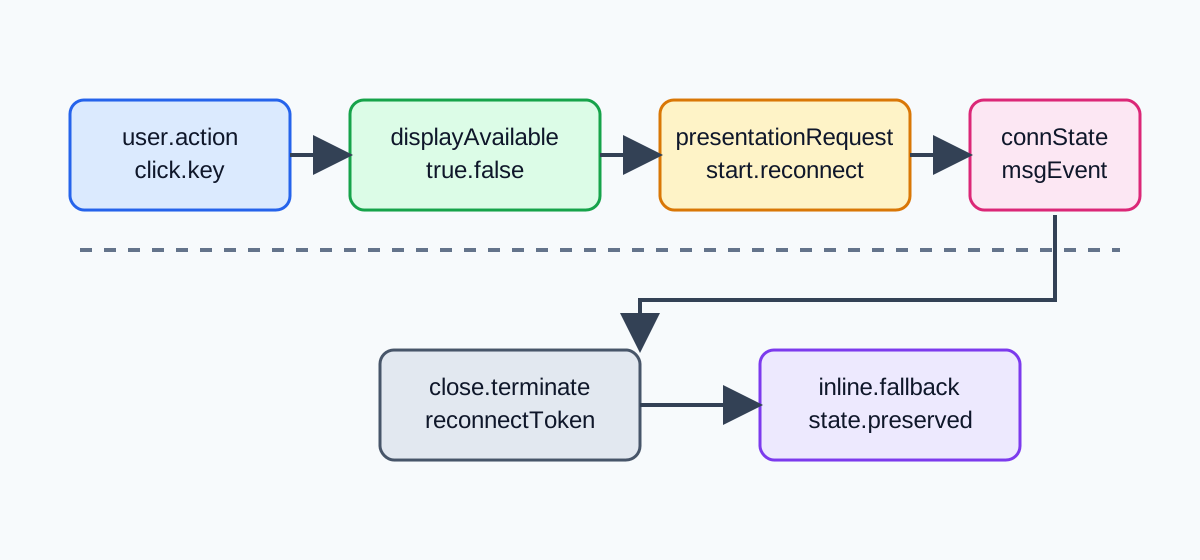
BotBrowser can validate an authorized Presentation API flow when a controlled browser exposes the relevant methods and a declared user action starts the request. It cannot manufacture a receiver or physical presentation display, choose a recipient, prove delivery, or turn display availability into identity. The useful contract is therefore a visible session state: the page asks, the browser mediates, the presentation may connect, and the same task remains available in the page when any boundary rejects it.
TL;DR
The Presentation API connects a controlling browsing context with a presentation display, but it does not make the display an addressable device owned by the page. Feature-detect PresentationRequest, observe PresentationAvailability only as a coarse runtime signal, and call start() from a deliberate click or keyboard activation. Treat connected, closed, terminated, rejected promises, and unavailable displays as ordinary states. Keep an in-page preview, transcript, or control surface usable throughout the attempt.
The W3C specification describes starting and reconnecting presentations, availability monitoring, connection events, and message exchange. MDN's Presentation API reference marks the feature as limited availability and lists the interfaces that a browser may expose. A controlled BotBrowser run can record those visible states, but it cannot establish that a physical second screen exists or that a person received a message.
Contents
- Availability is not a display inventory
- Start only across a user-activation boundary
- Model the complete session lifecycle
- Exchange bounded messages and preserve a fallback
- Use a decision table instead of optimistic delivery
- Test the browser-visible boundary with BotBrowser
- Conclusion
Availability is not a display inventory
The Presentation API has two related ideas that are easy to conflate. A PresentationRequest identifies one or more presentation URLs that a controlling page would like a receiver to load. A PresentationAvailability object reports whether the user agent currently believes a compatible presentation display is available for that request. Neither object is a list of monitors, televisions, receivers, or nearby people. Availability is a boolean signal with browser and platform policy behind it.
The W3C Presentation API specification gives the user agent responsibility for selecting a presentation display. The page can request a presentation and react to a connection, but it does not silently enumerate candidate receivers or select one by a private hardware identifier. This boundary matters for privacy and for test design: availability.value === true is a reason to enable an affordance, not a claim that a named display is reachable.
Create the request once, keep its URLs explicit, and attach an availability listener only when the page has a useful response to a change. A listener that merely logs every boolean transition creates noisy telemetry and encourages a false inventory model. A listener that changes a visible button label and preserves the current task gives the user an honest next action.
const presentation =
  'PresentationRequest' in window ? new PresentationRequest(['/present/board', '/present/fallback']) : null;

let displayAvailable = false;
if (presentation) {
  try {
    const availability = await presentation.getAvailability();
    displayAvailable = availability.value;
    availability.onchange = () => {
      displayAvailable = availability.value;
      renderPresentationControl({ displayAvailable });
    };
  } catch {
    renderPresentationControl({ displayAvailable: false });
  }
}
The two URLs in this example are application routes, not receiver addresses. They let the receiving browsing context load a known presentation document when the browser chooses a display. They do not reveal whether the chosen device is a television, a projector, or another browser window. Do not persist a URL together with a supposed display name and call that a device profile.
The feature can also be absent even when the page is otherwise healthy. A missing constructor, an unavailable secure context, a browser policy, or a platform with no compatible display should all produce the same product result: the task remains in the page. This is different from pretending that a second screen was used. The fallback should say what it can do, such as “show the board here,” without claiming a remote presentation.
Start only across a user-activation boundary
Starting a new presentation is a browser-mediated operation. The controlling page should call presentation.start() from a visible click or keyboard handler, not from page load, a timer, a WebSocket callback, or an automatic retry. The API may reject the request if support, activation, policy, or display selection is unavailable. A rejected promise is useful evidence about the current attempt, not permission to loop until something works.
The activation chain should remain short. Prepare the presentation URL, current board revision, and bounded message data before the user acts. Inside the handler, check the request, check the last known availability value, call start(), and immediately render a pending state. Do not wait for unrelated network work in the handler because transient activation can expire while that work runs. This is the same ergonomic boundary that makes Document Picture-in-Picture permission handling predictable: a visible control starts an optional browser surface while the primary task stays available.
async function startPresentation() {
  if (!presentation) return showInline('unsupported');
  if (!displayAvailable) return showInline('unavailable');

  setPresentationState('starting');
  try {
    const connection = await presentation.start();
    attachConnection(connection);
    setPresentationState(connection.state);
  } catch (error) {
    setPresentationState(classifyPresentationError(error));
    showInline('fallback');
  }
}

startButton.addEventListener('click', startPresentation);
displayAvailable is only a hint collected before the click. The display can disappear between the availability event and start(), so the promise result remains authoritative for this attempt. The starting state prevents double clicks from creating ambiguous concurrent requests. Disable the button only long enough to make the attempt bounded, and offer a clear retry after the browser has returned a result.
The Web Share API permission-boundaries guide covers a related user-mediated handoff. Presentation differs because it can create a continuing connection with a receiving browsing context. The shared lesson is that capability detection is not activation, activation is not delivery, and delivery is not identity.
Model the complete session lifecycle
A presentation session is more than a successful start() call. The specification defines a connection object with a state that can move through connecting, connected, closed, and terminated outcomes. The controlling page can receive a connectionavailable event on a default presentation request, reconnect using a presentation identifier when the user agent exposes one, send messages, and react to close or terminate events. Each transition should update the visible application state and release listeners that no longer apply.
Use a small state machine rather than scattered booleans. The state machine below deliberately keeps fallback as a first-class state. That makes a close event recoverable without implying that the remote surface is still present.
const allowedStates = new Set([
  'unsupported',
  'unavailable',
  'starting',
  'connecting',
  'connected',
  'reconnecting',
  'closed',
  'terminated',
  'fallback',
]);

function setPresentationState(next) {
  if (!allowedStates.has(next)) next = 'fallback';
  state = next;
  renderPresentationStatus({ state, displayAvailable });
}

function attachConnection(connection) {
  connection.onconnect = () => setPresentationState('connected');
  connection.onclose = () => {
    setPresentationState('closed');
    showInline('fallback');
  };
  connection.onterminate = () => {
    setPresentationState('terminated');
    showInline('fallback');
  };
  connection.onmessage = event => acceptBoundedMessage(event.data);
}
The exact event and property surface can vary with implementation maturity, so feature-detect each operation you use and keep unsupported behavior visible. Do not assume that a connection object means the receiver finished loading the intended document. A connected state says what the user agent exposed to the controlling page. It does not certify pixels, audio, network reachability, or a human viewer.
Reconnect is a separate user-visible action. If the application stores a presentation identifier, treat it as an opaque session token with an expiry and a privacy policy. A reconnect attempt can fail because the receiver closed, the browser restarted, the display is no longer available, or the identifier is no longer valid. Clear stale identifiers after a bounded number of failures and return to the inline task. Never try identifiers from another account or infer a receiver from timing.
When the availability signal changes to false, do not forcibly discard a currently connected session before the connection reports its own state. A display may temporarily disappear while the user agent reconciles topology. Conversely, do not keep showing “connected” forever after close or terminate. State ownership belongs to the current connection event, while availability controls whether a new attempt is worth offering.
Exchange bounded messages and preserve a fallback
Presentation connections can exchange strings or structured data serialized by the application. A message is an application protocol event, not a delivery receipt. Define a small envelope with a version, a monotonically increasing revision, a type allowlist, and a size limit. Reject unknown types, stale revisions, and message data that exceeds the limit. Keep the last accepted revision in the controlling page so the inline fallback can show the same content if the connection closes.
const MAX_MESSAGE_BYTES = 16_384;
let revision = 0;

function makeMessage(type, content) {
  const message = { version: 1, revision: ++revision, type, content };
  const encoded = JSON.stringify(message);
  if (new TextEncoder().encode(encoded).length > MAX_MESSAGE_BYTES) {
    revision -= 1;
    throw new Error('message-too-large');
  }
  return encoded;
}

function acceptBoundedMessage(raw) {
  if (typeof raw !== 'string' || raw.length > MAX_MESSAGE_BYTES) return;
  let message;
  try {
    message = JSON.parse(raw);
  } catch {
    return;
  }
  if (message.version !== 1 || !['board', 'heartbeat'].includes(message.type)) return;
  if (!Number.isSafeInteger(message.revision) || message.revision < revision) return;
  revision = message.revision;
  renderInline(message.content);
}
Send only the minimum data required for the presentation. Avoid logging the full message when it contains customer content, access tokens, or internal URLs. A heartbeat can prove that the page sent a message and that a receiver surfaced a callback, but it cannot prove that a physical display rendered the frame. Keep delivery language precise in UI copy and test receipts.
There is also a lifecycle boundary between the controller and the receiving document. The receiving document should render a loading state until it validates the route and the first revision. It should not treat a URL query string as an authorization token, and it should not echo arbitrary message fields into HTML without escaping. A receiver that cannot validate the version should close its connection and show a local error rather than accepting an unknown protocol. The controller then records a close or rejected state and keeps the inline representation current.
For long-running presentations, send changes by revision instead of repeatedly sending the entire document. A controller can coalesce edits while a connection is connecting, then send the newest revision after connected. If the receiver reports an older revision, resend one bounded snapshot and stop if the mismatch persists. This avoids an unbounded retry loop and makes a reconnect result comparable with the original attempt. It also gives support staff a concrete record: route version, last revision sent, last revision acknowledged by the browser event surface, and the state in which the session ended.
Presentation state should not own business data. Keep the board or slide model in the page's normal application store, then derive a small presentation view from it. When the connection closes, the store remains intact and the inline view can continue editing. When a reconnect succeeds, send the current revision rather than replaying every historical edit. This separation prevents a remote surface from becoming an accidental source of truth and keeps recovery understandable when the browser or network changes.
The receiving context should validate its own URL parameters, refuse unexpected origins, and expose a close control. Closing the receiver should eventually produce a close or termination signal in the controller, but the controller must also time out a silent session. A five-second application timeout is a policy choice, not a claim about the browser's normative timing; record the chosen value next to the result.
Use a decision table instead of optimistic delivery
Write the expected outcome before running a fixture. The table below separates browser-visible facts from claims that the page cannot make.
| Observed state | Safe application action | Do not claim |
|---|---|---|
PresentationRequest missing | Keep inline preview and explain that presentation is unavailable | Universal browser support is expected |
Availability is false | Leave the start control disabled or offer inline mode | No physical display exists anywhere |
start() rejects | Record the bounded error class and keep the task in-page | The user denied a named device |
Connection becomes connected | Send the initial bounded revision and show session controls | A receiver rendered every pixel |
| Connection sends a message | Accept only the validated envelope and update the local revision | A person viewed or acknowledged it |
close or terminate fires | Release listeners, show the last local revision, and offer retry | The display remains available |
| Reconnect rejects | Clear stale session data after the retry budget and use inline mode | The same physical display was recovered |
This table is also a privacy boundary. Availability, connection state, error class, and timing can be useful for troubleshooting, but they are not a display inventory or a person identifier. Retain only the fields needed for the task: route version, state transition, revision number, bounded error category, and test timestamp. Do not join them with IP addresses, screen geometry, or unrelated profile attributes to manufacture a “presentation device” fingerprint.
Test the browser-visible boundary with BotBrowser
BotBrowser controlled contexts can run a page that declares the start button, feature-detects PresentationRequest, and records the visible state sequence. A useful fixture has one deterministic board revision, one bounded message schema, a five-second timeout, and an always-visible inline fallback. The output should answer: was the constructor present, what availability value was exposed, which state transitions occurred, and why did the attempt end?
The BotBrowser advanced features documentation describes controlled browser capabilities and their boundaries. It does not turn the test runner into a receiver. Therefore a run that reports unsupported, unavailable, or start-rejected is still a valid result when the fixture records the fallback and does not claim a remote display.
{
  "request": "PresentationRequest",
  "availability": "unknown",
  "states": ["starting", "fallback"],
  "messagesAccepted": 0,
  "fallbackVisible": true,
  "delivery": "not-observed",
  "physicalDisplay": "not-asserted"
}
Do not label this JSON as a successful presentation unless a connected state and an accepted, bounded message were both exposed by the browser. Even then, the honest result is “browser-visible connection observed.” A physical display, receiver identity, and human viewing remain outside the page's evidence. When a controlled environment does expose a receiver, preserve the same fields so results remain comparable across profiles and dates.
Repeat the fixture after changing only one variable: browser version, user activation path, display availability, network route, or session identifier. Compare the first divergent state and the fallback behavior. This isolates a browser contract from an environmental assumption and creates a useful artifact without pretending that a local run represents every operating system.
An operator-facing status panel should expose the same distinctions. “Ready to try” can mean that the constructor exists and the last availability signal was true; it must not mean that a receiver has been selected. “Starting” means that the browser is mediating a request. “Connected” means that a connection event reached the page. “Closed” means that the connection ended and the inline state is authoritative again. These labels make support conversations shorter because they map directly to observable events. They also prevent a dashboard from turning a transient browser result into a durable hardware claim. Keep timestamps, route version, and state transitions, but omit receiver names, unneeded message content, and unrelated profile fields.
Conclusion
Presentation API work is reliable when the page owns a clear state machine and the browser owns display mediation. Check support and coarse availability, start from a real user activation, bound every message, and treat connect, close, terminate, and reconnect failure as expected states. Keep the same preview or control task in the page so a receiver is an enhancement rather than a dependency.
The practical boundary is simple: record what the browser exposed, not what a physical display or person supposedly did. BotBrowser can replay and compare that browser-visible contract in authorized controlled contexts. It cannot create a second screen, select a recipient, guarantee delivery, or infer identity from presentation metadata.
Public sources
Next reading
For a same-origin auxiliary window with a different lifecycle, compare Document Picture-in-Picture: Permission and Window Boundaries. For another browser-mediated handoff with cancellation and fallback requirements, read Web Share API: Permission Boundaries and Safe Fallbacks.
This article is part of the guide: Web Platform Surfaces: A Consistency Review Map
Related Articles
Web MIDI API: Permission and Device Privacy
PlatformWindow Management API: Multi-Screen Boundaries
PlatformWeb Share API: Permission Boundaries and Safe Fallbacks
PlatformDocument Picture-in-Picture: Permission and Window Boundaries
PlatformEyeDropper API: User Activation and Color Privacy
PlatformCSS Color Management and Display Accessibility
Take BotBrowser from research to production
The guides cover the model first, then move into cross-platform validation, isolated contexts, and scale-ready browser deployment.