Web MIDI API: Permission and Device Privacy
Build Web MIDI flows around user activation, permission, port changes, bounded messages, metadata minimization, and a reliable non-MIDI fallback.
BotBrowser Team
Want the structured docs for Platform?
This article lives in the editorial library. For step-by-step setup, reference material, and ongoing updates, jump into the docs section.
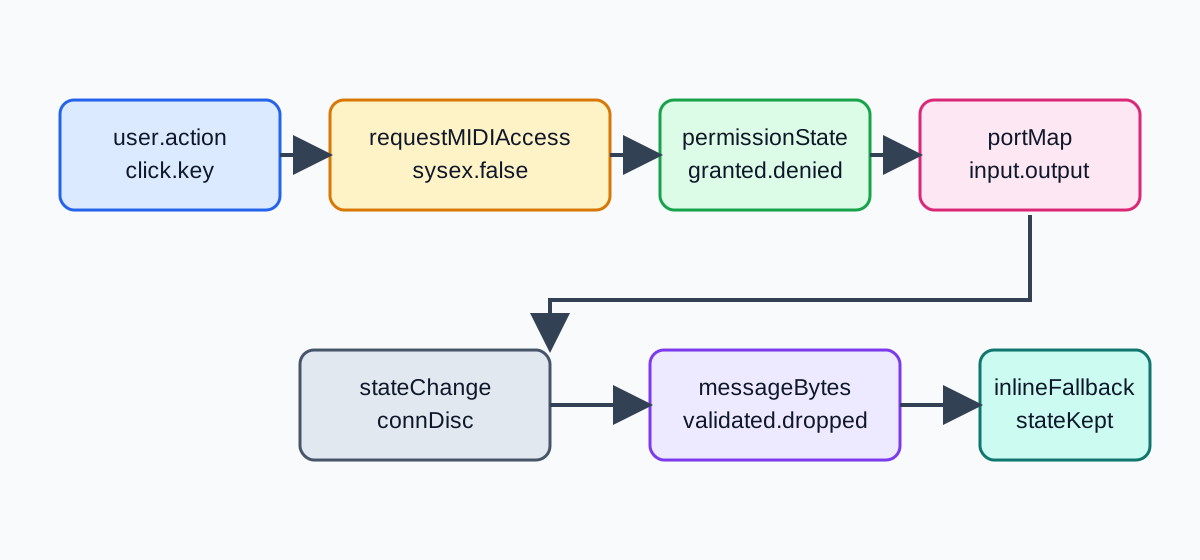
BotBrowser can validate an authorized Web MIDI flow when a controlled browser exposes navigator.requestMIDIAccess() and a declared user action starts the request. It cannot manufacture a physical instrument, choose a port for a user, grant permission outside browser mediation, or turn a port name into ownership. The useful contract is therefore a visible workflow: ask, show the result, validate each message, reconcile port changes, and keep a non-MIDI path usable when the browser or hardware is unavailable.
TL;DR
The Web MIDI API gives a page access to MIDI input and output ports after browser permission. It does not provide an unrestricted hardware inventory or a stable instrument identity. Feature-detect navigator.requestMIDIAccess, call it from an intentional control, request only the capability you need, and treat the resulting MIDIAccess object as a live view that can change. Listen for statechange, validate MIDIMessageEvent.data, and release listeners when a port disappears.
The W3C Web MIDI specification defines MIDIAccess, input and output ports, state changes, message events, and optional System Exclusive access. MDN's Web MIDI API reference notes that browser and platform support is limited. BotBrowser can record browser-visible permission and port outcomes in an authorized context, but it cannot prove that a named instrument is physically present, owned by a person, or producing sound.
Contents
- Permission is a capability boundary
- Request access from a user action
- Treat ports as a changing session
- Bound MIDI messages before they reach application state
- Minimize metadata and preserve a fallback
- Use a decision table for visible outcomes
- Test browser-visible behavior with BotBrowser
- Conclusion
Permission is a capability boundary
navigator.requestMIDIAccess() is a request for a browser-managed capability, not a JavaScript equivalent of opening every USB device. The user agent may require a secure context, user activation, permission, and platform support. A resolved MIDIAccess object means that the page received the capability surface exposed by that browser. It does not mean that any input or output port is connected, usable, or authorized for a particular person. This distinction is useful during onboarding: the page can describe the next visible step without promising that a chooser will appear or that a selected port will remain present. A person may grant access and still have no compatible port, a driver may report a port briefly and then remove it, or an operating-system policy may prevent a message from reaching hardware. Those outcomes are different from a broken composition and should not erase work already entered.
Request the smallest scope. If the application only needs note and control messages, pass { sysex: false } and keep the protocol inside the ordinary MIDI message range. System Exclusive data can contain vendor-specific commands and larger opaque sequences; it deserves a separate product decision, a clear explanation, and a stricter review. Do not set sysex: true merely because a library accepts the option. The Web USB device-access guide shows the same principle for another chooser-mediated hardware surface: permission is a boundary, not an inventory.
The access object is not a permission receipt that can be copied into analytics. Store only an outcome needed for the task, such as granted, denied, unsupported, or no-port. Avoid combining that outcome with screen, network, profile, and timing fields to create a long-lived browser label. A port's manufacturer, name, and version are useful for a user-facing chooser, but they are not proof of ownership or a unique physical device.
Request access from a user action
Feature detection should happen at the point of use. A page can render a disabled “Connect MIDI” control when the API is absent, then enable it only when the application can explain the action. Call the request in the button's click or keyboard handler. Do not start a chooser at page load, in a timer, after a background fetch, or as an automatic response to a failed attempt.
async function connectMidi() {
  if (!window.isSecureContext || !navigator.requestMIDIAccess) {
    return showMidiState('unsupported');
  }

  setMidiState('requesting');
  try {
    const access = await navigator.requestMIDIAccess({ sysex: false });
    attachMidiAccess(access);
    renderPorts(access);
  } catch (error) {
    setMidiState(classifyMidiError(error));
    showMidiFallback();
  }
}

connectButton.addEventListener('click', connectMidi);
The requesting state prevents duplicate chooser attempts and gives assistive technology a stable status to announce. When the promise rejects, classify only what the page can know: NotAllowedError, unsupported, or an application timeout. Do not tell a user that a named device denied access when the browser did not expose that fact. Restore the control after the result and offer a visible retry that starts a new user-activation chain.
The Web Bluetooth permission and device privacy guide covers a comparable chooser. Bluetooth and MIDI have different device and protocol models, but both require the page to distinguish “the API exists,” “the browser granted access,” and “a usable device is currently connected.” Those three facts should remain separate in UI copy and support logs.
If an embedded page requests MIDI, review the embedding policy and origin relationship before writing application code. A frame that cannot use the capability should receive the same accessible fallback as a top-level page. Do not repeatedly navigate or reload the frame to force a chooser. Repetition can create a confusing prompt loop without changing the policy decision.
Treat ports as a changing session
MIDIAccess.inputs and MIDIAccess.outputs are maps of the ports currently exposed by the user agent. A map entry is a live session object, not a permanent record. Ports can move between connected and disconnected, and the access object can deliver a statechange event when a device is plugged in, removed, or reconfigured. Render the current map after every event instead of appending a new row to an old list.
function attachMidiAccess(access) {
  access.onstatechange = event => {
    const port = event.port;
    renderPorts(access);
    if (port.state === 'disconnected') detachInput(port.id);
    if (port.state === 'connected' && port.type === 'input') attachInput(port);
  };

  for (const input of access.inputs.values()) attachInput(input);
  for (const output of access.outputs.values()) renderOutput(output);
}
A port can be present in the map while its connection state is changing. Check port.state and port.connection at the moment of use, and catch a send failure rather than assuming that a previous render is current. When an input disconnects, remove its message listener and clear any pending note or controller state associated with that port. Do not retain a disconnected port object as if it were a reliable route.
The live-map rule is important for applications that save a setup between visits. A saved label can help a person remember a keyboard or pad, but it should resolve against the current port map every time. If the label no longer resolves, show “needs selection” instead of silently choosing the first available output. This avoids sending a stored note sequence to an unexpected instrument after a cable or driver change. It also makes recovery testable: the fixture can remove a port, observe the offline state, reconnect a different port, and verify that no message is sent until the person selects it.
Use port.id as a short-lived application key only when the current session needs it. It is not a user identifier and should not be copied into a profile name or a cross-session fingerprint. If the product lets a person choose “Keyboard A,” generate that label locally from the current map and let the person change it. Do not infer that a manufacturer string identifies one owner, room, or location.
Output selection deserves the same caution. MIDIOutput.send() schedules bytes for the selected port, but a resolved call does not prove that an instrument generated audio or that another application received the message. Show “sent to selected port” only when that is the exact browser-visible result. Keep a local preview or keyboard interaction available if no output can be selected.
Bound MIDI messages before they reach application state
MIDIMessageEvent.data exposes a byte sequence. Treat it as untrusted input even when it came from a device the user selected. Validate length, status byte, channel, and message-specific data before updating application state. Ordinary channel voice messages use the status high nibble and a seven-bit data range; system messages have different lengths. Your product can support a smaller allowlist than the full MIDI protocol.
const MAX_MIDI_BYTES = 3;
const allowedStatus = new Set([0x80, 0x90, 0xb0, 0xe0]);

function acceptMidiMessage(event) {
  const bytes = [...event.data];
  if (bytes.length < 2 || bytes.length > MAX_MIDI_BYTES) return;
  const status = bytes[0] & 0xf0;
  if (!allowedStatus.has(status) || bytes.slice(1).some(byte => byte > 0x7f)) return;
  const channel = bytes[0] & 0x0f;
  updateMusicState({ status, channel, data: bytes.slice(1) });
}
The example intentionally ignores System Exclusive, realtime, and multi-byte system common messages. A synthesizer controller may need those messages, but enabling them should be a deliberate protocol change with size limits, vendor documentation, and a visible permission explanation. Never echo arbitrary bytes into a command interpreter, log every message by default, or treat a byte sequence as a device identity.
Rate-limit high-frequency input before it reaches rendering or network code. A sustain pedal, clock, or controller can generate more events than a UI needs. Coalesce values by revision, drop stale previews, and keep the most recent accepted state. If a message is malformed, record a category such as invalid-length or invalid-data-range without retaining the raw bytes unless the user explicitly enabled a short diagnostic capture.
When sending, validate the same allowlist and size limit. A call such as output.send([0x90, 60, 100]) is a request to the browser; it is not an audio measurement. Preserve the original control in the UI, expose a retry after a disconnected-port error, and never silently switch to another output port because its name looks similar.
Minimize metadata and preserve a fallback
Port metadata can help a user understand a current setup, but it should be displayed and retained in proportion to that purpose. A useful diagnostic record contains the API support result, permission outcome, port type, connection state, a redacted or locally assigned label, the accepted message count, and the test timestamp. It does not need a serial-like manufacturer string, a complete port map, raw musical content, or unrelated browser properties.
The page should remain useful without MIDI. Offer a virtual keyboard, file import, keyboard shortcuts, or a read-only score view. The fallback must not pretend that it is controlling an instrument. It should explain that the browser did not expose a usable port and preserve the work the person already entered. A fallback is part of the feature contract, not a hidden error screen.
Keep session state and business state separate. The application model can contain a composition or automation curve; the MIDI adapter translates that model into bounded bytes when an output is connected. If the port disappears, the model remains editable and the adapter reports disconnected. When another port appears, require an explicit selection before sending. This prevents hot-plug events from changing where sensitive or loud output goes.
Privacy review should also cover logs and support exports. Strip raw input bytes unless a diagnostic mode is active, limit retention, and document who can access a port label. A port name can reveal a product model or studio setup even when it does not identify a person. Treat that as contextual information with a purpose and expiry, not as an analytics dimension.
Use a decision table for visible outcomes
| Observed outcome | Safe application action | Do not claim |
|---|---|---|
| API missing or insecure context | Keep virtual or file fallback | Universal browser support |
| Permission rejected | Explain and preserve the task | A named device denied access |
| Access granted, no ports | Show setup guidance and fallback | No physical instruments exist |
| Input port connected | Attach a validated listener | The port belongs to a person |
| Output port connected | Require explicit selection before send | Audio was produced or heard |
statechange disconnect | Remove listeners and mark offline | The port will return automatically |
| Invalid MIDI bytes | Drop and classify the message | The sender is malicious or identified |
| SysEx requested | Require a separate, explained decision | Vendor data is harmless by default |
This table keeps browser evidence and product interpretation separate. A granted result says the browser exposed access. A connected result says a port was exposed at that moment. A validated message says an input event matched the application protocol. None of those results proves ownership, location, a physical instrument, or a completed musical action. A support screen can show these facts as a short timeline: request started, permission result, port state, accepted message count, and fallback state. Keep the timeline local to the session unless a person explicitly asks for a diagnostic export. A timeline that omits raw bytes is easier to review, safer to retain, and sufficient to reproduce most UI failures. If a device disappears during a rehearsal, the user needs a clear reconnect control and an intact score, not a claim that a particular keyboard caused the disappearance.
Test browser-visible behavior with BotBrowser
BotBrowser controlled contexts can run a page with a deterministic connect button, a synthetic fallback, a bounded message validator, and a visible port-state record. The useful fixture records whether the API constructor was present, whether the request resolved or rejected, how many input and output ports the browser exposed, which statechange values arrived, and whether the fallback remained usable. It does not need a physical instrument to validate the unavailable and denied branches.
The BotBrowser advanced features documentation describes controlled browser capabilities. It does not promise a MIDI device on a runner. A result such as unsupported, permission-denied, or no-port is a valid fixture outcome when it is reported honestly and the page does not claim to have played sound.
{
  "api": "requestMIDIAccess",
  "permission": "unknown",
  "ports": { "inputs": 0, "outputs": 0 },
  "states": ["fallback"],
  "messagesAccepted": 0,
  "rawBytesRetained": false,
  "physicalInstrument": "not-asserted"
}
Repeat the fixture after changing one variable: browser version, secure-context policy, permission outcome, port connection, or message type. Compare the first visible state divergence and keep the same fields in every run. This makes a controlled-browser result useful for regression review without turning it into a claim about every operating system, driver, or instrument.
The same record helps a support team distinguish a product problem from a setup problem. “Permission granted, zero ports” calls for connection guidance. “Input connected, invalid-length messages” calls for protocol review. “Output connected, send rejected” calls for a current-port check. Each explanation can point to the next local action while keeping the composition or automation curve intact. Avoid a generic “MIDI failed” banner that hides these distinct states and encourages a person to repeat a permission request without changing the condition that caused the result.
Conclusion
Web MIDI is a permission-gated, changing browser capability. Request it from a visible user action, choose the smallest scope, render ports as a live map, validate every message, and release listeners when a port disconnects. Keep metadata short-lived and purposeful, and make a virtual or file-based fallback first-class. BotBrowser can replay and compare those browser-visible branches in authorized contexts; it cannot create an instrument, grant access outside browser mediation, guarantee a port, or infer ownership from MIDI metadata.
Public sources
Next reading
Compare Web Bluetooth Permissions, Device Choice, and Privacy for another chooser-mediated hardware capability, and Web USB Device Access and Privacy Boundaries for a different port lifecycle and fallback model.
This article is part of the guide: Web Platform Surfaces: A Consistency Review Map
Related Articles
Web Serial API Port Permission and Lifecycle
PlatformWebHID Device Permission and Privacy Boundaries
PlatformPresentation API: Display and Session Boundaries
PlatformWeb Share API: Permission Boundaries and Safe Fallbacks
PlatformWindow Management API: Multi-Screen Boundaries
PlatformDocument Picture-in-Picture: Permission and Window Boundaries
Take BotBrowser from research to production
The guides cover the model first, then move into cross-platform validation, isolated contexts, and scale-ready browser deployment.