WebHID Device Permission and Privacy Boundaries
Request WebHID access from a user action, validate collections and reports, handle disconnects, and keep device metadata out of identity profiles.
BotBrowser Team
Want the structured docs for Platform?
This article lives in the editorial library. For step-by-step setup, reference material, and ongoing updates, jump into the docs section.
WebHID lets a page request a user-selected human-interface device, but a permission result is not a device inventory or proof of ownership. BotBrowser can exercise the page-owned permission branch and fallback in a controlled context; it cannot manufacture a physical controller, grant permission outside browser mediation, or prove hardware I/O. The safe contract is explicit: ask from a user action, inspect only the collections needed, bound every report, reconcile disconnects, and keep the task usable without HID.
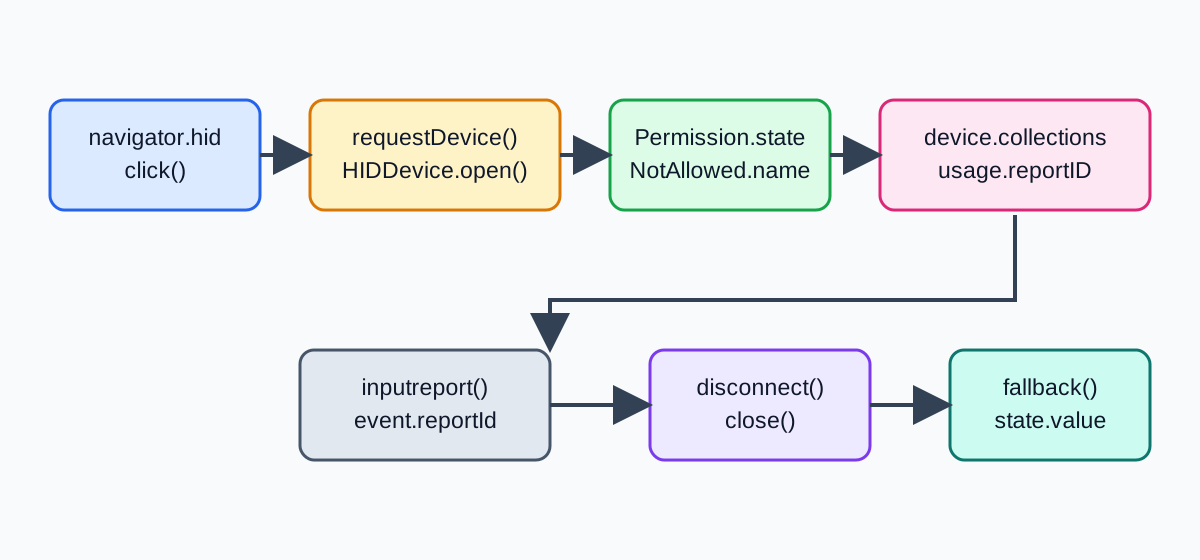
TL;DR
navigator.hid.requestDevice({ filters: [{ usagePage: 0x01 }] })needs a secure context and transient user activation.- A chooser grant exposes a selected
HIDDevice; it does not prove that the device is connected, safe, owned by a person, or usable for every collection. - Inspect
device.collectionsbefore opening, allow only the usages the product supports, and treatinputreportbytes as untrusted data. disconnectends the current relationship; close listeners, preserve the user's work, and require a deliberate retry.- Store coarse outcomes such as
granted,unsupported, ordisconnected, not serial numbers, report history, or inferred identity.
Contents
- Ask at the point of use
- Inspect collections before reports
- Bound reports and reconcile disconnects
- Minimize metadata and preserve a fallback
- Classify outcomes with a decision table
- BotBrowser capability and limitation
- Practical conclusion
Ask at the point of use
WebHID is restricted to secure contexts, and requestDevice() is intended to run during transient user activation. Put the request behind a named control that explains the task. Feature detection only tells the page that a method exists; it does not open a chooser or grant access. A browser policy, embedded-frame rule, operating-system setting, or unsupported platform can still reject the request.
async function connectHid() {
  if (!window.isSecureContext || !navigator.hid) return showHidState('unsupported');
  setHidState('requesting');
  try {
    const devices = await navigator.hid.requestDevice({
      filters: [{ usagePage: 0x01, usage: 0x06 }],
    });
    if (devices.length === 0) return showHidState('no-device');
    await openSelectedHid(devices[0]);
  } catch (error) {
    showHidState(error.name === 'NotAllowedError' ? 'denied' : 'failed');
  }
}

connectButton.addEventListener('click', connectHid);
Do not open a chooser on page load or loop after cancellation. Preserve the draft and offer another request only after a new action. For a related chooser-mediated surface, WebUSB Device Access: Permissions, Interfaces, and Privacy separates permission from opening, claiming, and cleanup. Web Bluetooth Permissions, Device Choice, and Privacy applies the same user-intent boundary to a different device model.
Inspect collections before reports
After a selection, HIDDevice exposes product metadata and collections. A page should call open() only for a supported device and then compare the collection usagePage, usage, and report descriptors with the operation it intends to perform. A matching product name is not an authorization for every report, and a collection is not proof of a person's identity, room, or physical proximity.
Keep an allowlist of supported usages and report sizes. Reject a device that lacks the required collection instead of requesting broader access. Avoid copying productName, vendorId, productId, or serialNumber into URLs, account records, analytics dimensions, or routine support logs. These values can distinguish a model or unit even when the page never learns who owns it.
The collection map is a live capability view. A device can open successfully and still fail a later operation, expose a different report layout after firmware changes, or disappear before the first report. Explain the exact supported operation and keep an ordinary page path available when no suitable collection is exposed.
Bound reports and reconcile disconnects
inputreport delivers bytes from the selected device. Treat them as untrusted application data: check reportId, byte length, field ranges, and freshness before updating state. Set a maximum report size, reject unexpected report IDs, and rate-limit high-frequency input before rendering or sending anything to a service.
const MAX_REPORT_BYTES = 64;

function acceptInputReport(event) {
  const bytes = new Uint8Array(event.data.buffer);
  if (bytes.length === 0 || bytes.length > MAX_REPORT_BYTES) return;
  if (event.reportId !== 1 || bytes[0] > 100) return;
  updateControllerState({ reportId: event.reportId, value: bytes[0] });
}

device.addEventListener('inputreport', acceptInputReport);
Register navigator.hid.addEventListener('disconnect', ...) and make cleanup idempotent. Mark the task disconnected before awaiting close(), remove report listeners, preserve entered data, and show a deliberate reconnect control. A late report must not repaint a disconnected page as ready. Do not automatically reconnect or send the last command after a disconnect; a retry can be unsafe for a controller or actuator.
Minimize metadata and preserve a fallback
Keep the browser permission, the HID session, and any optional upload consent as separate product decisions. Reading a report locally does not authorize sending it to a server. Ask separately before synchronization, describe the fields leaving the browser, and let the local task finish when upload is declined.
An operational record usually needs unsupported, denied, no-device, connected, invalid-report, or disconnected, plus a timestamp and tested environment. It rarely needs raw reports, stable identifiers, a complete collection map, or a long-lived connection history. If support needs a diagnostic capture, make it short-lived, user-visible, access-controlled, and automatically deleted.
Keep a keyboard form, manual value, file import, or static configuration as a first-class fallback. The fallback must preserve the same essential data and remain keyboard and screen-reader accessible. Do not gate sign-in, billing, account recovery, or required content on a physical HID device.
Classify outcomes with a decision table
| Observed stage | What it establishes | Safe next action |
|---|---|---|
| API absent, insecure context, or policy block | WebHID cannot start here | Keep the non-HID task and explain the environment limit |
| Chooser cancelled or permission denied | No usable grant for this attempt | Preserve the draft and wait for a new explicit action |
| Device selected but collection unsupported | The selected device lacks the required capability | Close the session, show supported requirements, and do not broaden filters |
| Report length, ID, or range invalid | Input failed the application protocol | Drop the report, record invalid-report, and keep the task usable |
disconnect event | The current relationship ended | Remove listeners, close best-effort, preserve data, and offer deliberate retry |
| Valid bounded report | The page accepted one application value | Report only that value; do not infer ownership, location, or identity |
Every row should land on an understandable page state. A permission grant is not a connected device, a collection match is not a trusted controller, and one valid report is not proof of a physical action.
BotBrowser capability and limitation
BotBrowser controlled contexts can verify a deterministic connect button, capability detection, collection filtering, bounded-report handling, disconnect cleanup, and the non-HID fallback. The advanced features documentation describes browser capabilities that can be reviewed in such a context. The result remains page-owned evidence: BotBrowser cannot supply a physical HID device, grant operating-system permission, guarantee a report, or prove that a person owns or touched the controller.
Record the narrow result, for example:
{
  "api": "navigator.hid",
  "permission": "denied",
  "collectionsAccepted": 0,
  "reportsAccepted": 0,
  "rawIdentifiersRetained": false,
  "physicalDevice": "not-asserted"
}
Repeat the fixture after changing one variable such as browser version, secure-context policy, permission result, collection filter, or simulated disconnect. Compare the first visible state divergence rather than claiming universal hardware support.
Make the state machine testable
Keep WebHID state separate from the rest of the product model. A useful sequence is idle, requesting, selected, opening, ready, invalid-report, disconnected, and fallback. These labels describe what the page observed; they are not a promise that a physical controller accepted a command. A test can assert the first visible transition without inventing hardware evidence.
Give each asynchronous operation an owner. When a person clicks Connect twice, the second click should not let a late promise from the first attempt overwrite the current status. Disable the duplicate action while the chooser is pending, then restore it after resolution or rejection. If navigation or a new task invalidates the attempt, close any session the page opened and discard the stale result.
Treat cancellation and denial as complete product outcomes. Return focus to the connect control, keep the draft in place, and explain the next action in ordinary language. Do not expose a full exception object in a toast, and do not describe a browser rejection as a device property. A support event such as permission-denied is enough to route the person to a documented alternative.
Collection validation should happen before any operation that can change an external device. Compare the required usage, report direction, and declared size against an allowlist owned by the feature. If a controller exposes several collections, select the one needed for the task rather than retaining a complete descriptor map. If the map changes after a firmware update, return to unsupported and ask the person to review compatibility instead of guessing.
The same rule applies to output. sendReport() or an equivalent write is a request made by the page; its resolution does not prove that a motor moved, a key was pressed, or another application received the bytes. Show the narrow browser-visible result, preserve the local form, and require a new action before retrying an uncertain write. This keeps an electrical or safety decision from being inferred from a JavaScript promise.
Review collection and upload boundaries
WebHID permission is only one part of consent. A person may allow a controller to adjust a local setting while declining analytics or remote synchronization. Keep those choices in separate controls and state the fields that would leave the browser. A report read locally should not be copied into a URL, referrer, screenshot, crash event, or account profile by an SDK default.
Use an allowlist for operational events. connected, disconnected, invalid-report, and fallback can explain reliability without recording serialNumber, vendorId, a product label, or raw bytes. If a support case needs a short diagnostic capture, show the exact fields, use a random task token, restrict access, set an expiry, and delete the capture when the case closes. Hashing a stable identifier does not remove its ability to link visits.
Review the non-HID path with the same care as the connected path. A manual value, keyboard form, file import, or static configuration should preserve the essential task, focus order, validation, and error recovery. A missing API, a rejected chooser, a protected context, and an unplugged controller must all reach that path without losing entered data. Do not make login, billing, recovery, or required content depend on a peripheral.
For automated checks, use a controlled fixture that emits a known collection and bounded reports. Assert visible status, retained draft data, listener removal, and the redacted event fields. Keep hardware acceptance separate: it requires an approved device, an identified browser and operating system, and an operation whose physical result can be observed. A page fixture can prove the fallback and parser; it cannot prove radio range, electrical safety, firmware behavior, or ownership.
Before release, review five boundaries: permission versus session, collection versus identity, report validity versus physical effect, local read versus remote upload, and disconnect versus automatic reconnect. Write each boundary into support copy and test names. When a browser release changes an error name or chooser label, update the narrow assertion and keep the product promise unchanged. The durable promise is a useful page that respects a deliberate choice and limits data, not universal HID availability.
When a product supports several controller families, publish the support row as a narrow tuple: browser version, secure-context result, filter, collection usage, report size, and fallback. A row that says “HID works” cannot tell a reader whether a gamepad, barcode scanner, keyboard, or custom sensor was exercised. Keep unsupported families visible so a support engineer can reproduce the same first failed stage without asking for a serial number.
A useful error message names the stage and the next safe action. “No compatible collection was exposed; continue with manual entry” is more accurate than “controller failed.” “Report 3 was 81 bytes; expected at most 64” helps a developer fix a fixture without printing the full report. Localize that message while leaving reportId, MAX_REPORT_BYTES, and the state token unchanged in logs and test assertions.
Do not infer a person from timing. A report arriving at 09:00, a disconnect after 30 seconds, or a stable product label can reflect drivers, power management, or a shared workstation. If the application needs an audit trail, record the task outcome and policy version, not a behavioral profile. Re-evaluate retention when adding crash reporting, session replay, or a support export because those tools can capture the same fields indirectly.
The browser may remember a grant, but the product should still explain when it will use it. A returning flow can call getDevices() after a deliberate “Reconnect” action and then re-check collections before opening. Do not silently reconnect during page load, and do not treat a remembered HIDDevice as trusted after the browser or operating system changes. A forgotten permission, a disabled feature policy, and an unplugged device are different states with different recovery copy.
Accessibility belongs in the device lifecycle. Announce requesting, connected, invalid-report, and disconnected in a live region, return focus after chooser cancellation, and keep the fallback control in the same tab order. Never make a blinking controller icon the only indication that a report was rejected. The same state labels should be available to keyboard and screen-reader users so support screenshots and automated assertions describe the same outcome.
Troubleshoot the permission stage in order. First confirm window.isSecureContext and the origin that owns the page. Next confirm that the request runs inside the click handler rather than a promise continuation or timer. Then check whether an embedding policy, managed browser setting, or platform support branch prevents navigator.hid. Only after those checks should a support flow discuss a chooser result. This order avoids asking a person to reconnect hardware when the browser never had permission to open a chooser.
Troubleshoot an empty selection separately from a denied request. An empty array from requestDevice() means the chooser returned no selected device for that attempt; it does not mean no HID devices exist nearby. A NotAllowedError can represent cancellation, policy, or denied permission without identifying which one. Keep the UI wording narrow, retain the draft, and give the person a new Connect action rather than a loop that repeatedly opens browser UI.
Troubleshoot a selected-but-unusable device at the collection boundary. Log the allowlisted usagePage, usage, expected direction, and maximum report size, not the full descriptor or serial number. If open() succeeds but no collection matches, mark unsupported and close the session. If the report descriptor changes after a firmware update, treat it as a new support row and ask for compatibility confirmation; do not silently reinterpret offsets from the previous layout.
Troubleshoot reports with a bounded parser. Reject an unexpected reportId, a zero-length or oversized DataView, a value outside the product range, and a report that arrives after the session token has been invalidated. Count rejected reports by category, such as invalid-id, invalid-length, invalid-range, or stale-session. Those counters help a developer reproduce a parser issue without retaining raw input that could reveal a person's interaction pattern.
Troubleshoot disconnects as a race, not only as a hardware event. The disconnect handler should invalidate the current task before awaiting cleanup, remove inputreport listeners, and make close() best effort. A queued report or write promise can resolve after the event; compare its task token before updating the UI. Preserve the form and show disconnected even when cleanup itself rejects. Only a fresh user action may move the state back to requesting.
Troubleshoot privacy regressions at the integration boundary. Search event schemas, URL builders, crash reporters, session replay settings, service-worker caches, and support exports for productName, vendorId, productId, serialNumber, device.collections, and raw report buffers. Replace them with the coarse state and a short-lived task token unless a reviewed support case requires one field. This review catches leaks that are invisible in the WebHID call site.
Troubleshoot fallback failures with the same fixture used for the connected path. Remove navigator.hid, reject the chooser, emit an incompatible collection, send an oversized report, and dispatch disconnect at each asynchronous step. Assert that entered data survives, focus returns to a named control, and no second chooser appears without a click. A fallback that is only tested after a page reload will miss the most damaging race: a late device callback replacing a user's new manual entry.
Document the browser-visible evidence in support notes: browser version, operating system, secure-context result, policy result, state sequence, and the first failed stage. Do not paste a complete device descriptor or a screenshot of the browser chooser when a redacted state line is enough. The note should let another engineer repeat the page-owned branch while making clear whether physical hardware was actually present. This keeps a narrow WebHID result useful without turning the support process into an identity database.
Sources
Practical conclusion
Use one explicit chooser action, inspect only supported collections, validate every report, and close listeners when the device disconnects. Keep the essential task complete without HID and log the failure stage instead of device identifiers. Recheck the fixture after browser, policy, firmware, or permission changes; a page-level pass is not a promise of physical hardware behavior.
This article is part of the guide: Web Platform Surfaces: A Consistency Review Map
Related Articles
Web Serial API Port Permission and Lifecycle
PlatformWeb MIDI API: Permission and Device Privacy
IdentityWebUSB Device Access: Permissions, Interfaces, and Privacy
PlatformWeb Share API: Permission Boundaries and Safe Fallbacks
PlatformIdle Detection API: User Control, Permissions, and Privacy Boundaries
PlatformWindow Management API: Multi-Screen Boundaries
Take BotBrowser from research to production
The guides cover the model first, then move into cross-platform validation, isolated contexts, and scale-ready browser deployment.