Screen Capture API: User Control and Privacy Boundaries
Use getDisplayMedia with explicit user choice, visible indicators, revocation, and privacy limits for screen, window, and tab capture.
BotBrowser Team
Want the structured docs for Platform?
This article lives in the editorial library. For step-by-step setup, reference material, and ongoing updates, jump into the docs section.
BotBrowser can repeat an authorized getDisplayMedia() journey in a declared profile, but it cannot select a user's screen, suppress browser indicators, or make captured pixels private from the page that receives them. This article focuses on user-control and privacy boundaries, distinct from virtual camera privacy and Document Picture-in-Picture permission boundaries.
TL;DR
Screen Capture API access is a user-mediated choice. Request it from a visible action, explain what will be shared, stop every track when the task ends, and treat the stream as sensitive application data. getDisplayMedia() is not a silent screenshot API, a permission grant that lasts forever, or proof that a captured surface is private.
Contents
- The capture contract
- A privacy-aware test matrix
- Revocation and safe teardown
- How this differs from nearby media APIs
- What BotBrowser can control
- Practical conclusion
The capture contract
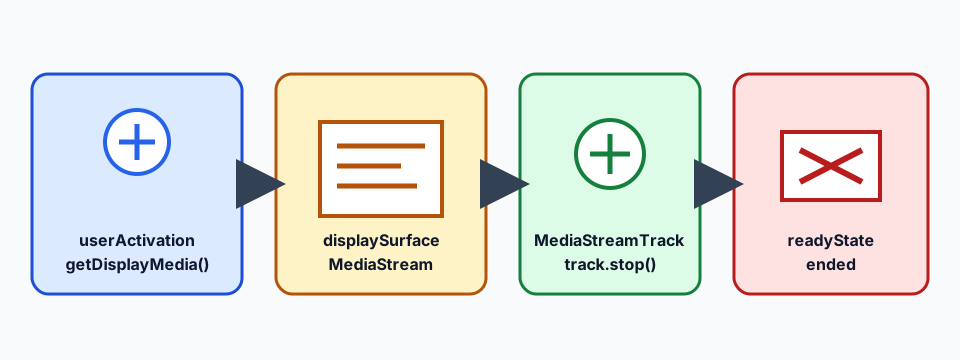
The application should call navigator.mediaDevices.getDisplayMedia() only after a user action such as a button click, while that transient user activation is still current. Calling after a timer or background message can reject with InvalidStateError. The browser presents a picker for a monitor, window, or tab; application code does not get to choose a surface silently. The returned MediaStream contains tracks whose lifecycle must be visible to the user.
The picker is a control boundary, not an identity signal. A result such as NotAllowedError can mean cancellation, policy, or a browser decision. Record the outcome needed for product recovery, not a full capability object, screen name, document text, or a persistent device label.
Captured pixels are still application data. Do not upload a stream merely because capture succeeded. Apply the same access control, retention, redaction, and consent rules used for camera or microphone media. A browser indicator can tell the user that sharing is active; it does not make the destination trustworthy.
A privacy-aware test matrix
Use synthetic content and one fresh profile per row. Keep the user action, origin, requested constraints, and stop action explicit.
| Row | Journey | Expected observation | Privacy meaning |
|---|---|---|---|
| A | Click Share, cancel the picker | Promise rejects with a bounded error | User choice was declined; no surface was granted |
| B | Select a synthetic tab | Stream has a video track and the browser shows sharing UI | The selected tab's pixels are now page data |
| C | Call track.stop() from Stop | Track ends and the UI returns to idle | Application ended capture deliberately |
| D | Close the shared tab or revoke from browser UI | ended fires or the stream becomes inactive | User or browser revoked the grant |
| E | Attempt a request without activation | Request is rejected | A background script cannot silently start capture |
A compact result can be {"browser":"Chrome 155","mode":"headed","surface":"synthetic-tab","result":"started","stopped":true,"capturedBytes":null}. Keep capturedBytes null unless a private, separately governed measurement is required. The public artifact should prove lifecycle handling, not retain the user's screen.
Revocation and safe teardown
Attach ended listeners to every track and expose a visible Stop control. Stopping a track is an application action; browser UI, navigation, tab closure, or policy can also end it. Clear references, remove preview elements, and return focus to the initiating control when capture ends. Do not assume that hiding a preview stops the source.
If a recorder is used, close it before releasing the stream and handle dataavailable as sensitive output. Prefer short-lived chunks, documented retention, and synthetic fixtures in automated tests. Never log raw frames, OCR text, account data, or full screen names as a debugging shortcut.
How this differs from nearby media APIs
Media devices and virtual camera privacy is about enumerateDevices(), camera and microphone permission, and a virtual camera's device-list boundary. Screen Capture does not enumerate a screen as a stable device or silently select one; it presents a fresh user choice and returns a display stream.
Document Picture-in-Picture permission boundaries creates a browser-managed same-origin window for presentation. It does not expose pixels from another surface. Screen Capture instead transfers selected display pixels into a MediaStream, so content minimization and stop/revocation handling are central.
Do not combine these APIs into an “all media access” permission. Each has a separate user gesture, browser mediation path, failure mode, and privacy review. A successful Picture-in-Picture window says nothing about screen capture support, and a virtual camera result says nothing about a user's display choice.
What BotBrowser can control
BotBrowser supports repeating the visible Screen Capture button flow with a synthetic page, declared browser version, and fresh profile; it can verify cancellation, test-tab stream creation, track.stop(), and ended. It cannot choose a real user's display, override the browser picker, suppress sharing indicators, or guarantee identical behavior on every operating system.
Practical conclusion
Treat Screen Capture API as a user-controlled, revocable stream of sensitive data. Start from a visible action, describe the surface before the picker opens, keep the test synthetic, stop every track, and retain only bounded lifecycle outcomes. The privacy boundary is the combination of browser mediation, application teardown, and disciplined handling of captured pixels.
A support-ready lifecycle
The contract has four observable anchors: getDisplayMedia(), MediaStreamTrack.readyState, ended, and track.stop(). Record displaySurface, the embedded frame's Permissions-Policy, and the browser version. A rejected request returns no MediaStream; a started request keeps a video track live until stop() or ended.
An embedded test must separate policy branches. The default display-capture allowlist is self, so a same-origin frame may be eligible; a cross-origin frame needs explicit delegation naming the partner origin, for example display-capture=(self) example.test. Do not assume that missing delegation always rejects: record the origin, declared policy, activation result, and track state as separate rows.
A support-ready lifecycle.
The most useful support record starts before the picker. Name the user-facing control, the page origin, the browser build, the operating-system family, and whether the profile is temporary. Then state the expected result in plain language: the user chooses a synthetic tab, the page receives a video track, a visible indicator remains present, and the Stop control ends the track. This gives a support engineer a narrow question to answer when a report says only “screen sharing failed.”
The first negative path is cancellation. A user may open the picker and decide not to share anything. Treat that action as normal, keep the original task available, and show a short explanation rather than retrying automatically. Automatic retries can turn a deliberate refusal into repeated prompts. A bounded result such as cancelled is enough for aggregate product metrics when those metrics have a documented purpose.
The second negative path is missing activation. A page loaded from a bookmark, a timer, or a background message must not start a picker without a current user gesture. Test this path with a synthetic page and record the rejection category. Do not repair it by dispatching a fake click or by asking the user to grant a broader permission. The right product response is a visible control that explains what will happen.
The positive path still needs an end state. A preview can be visible while the stream is active, but hiding that preview is not equivalent to stopping capture. Keep the stream tracks in one owner object, call stop() for each video and audio track that was intentionally created, and update the control label when the state changes. If a browser ends a track first, let the ended handler perform the same cleanup path so that application state does not claim sharing is active.
Minimize what crosses the boundary.
Screen Capture can include private messages, account pages, notifications, or unrelated windows. The safest fixture uses a plain synthetic page with a large “test surface” label and no account state. In a real product, explain the selected surface immediately before the picker and keep the receiver scoped to the task. Crop, redact, or blur content only when the user understands the effect; a hidden preview does not remove the pixels from the stream.
Avoid sending a serialized MediaStream, a screen title, a complete browser capability object, or raw frames to analytics. A small event vocabulary such as requested, cancelled, started, stopped, and ended is easier to review and sufficient for most reliability questions. If a recorder is necessary, use a separate data path with access control, retention limits, and a deletion owner. Public documentation should use synthetic examples and leave content fields null.
Compare browser changes safely.
When a release changes the result, repeat the same synthetic fixture before changing application code. Keep the origin, activation method, requested display surface, profile lifecycle, and stop action constant. Compare the first changed field: picker exposure, stream creation, track state, indicator state, or teardown. A change in one field is actionable; a single pass or fail label is not enough to identify the boundary.
Headed and automated runs can differ because of display configuration, policy, or user-activation timing. State those variables in the run header and avoid turning one runner observation into a universal operating-system claim. BotBrowser helps teams repeat the declared context, but the browser still owns the picker and the user still owns the choice.
A concise privacy review.
Before release, answer five questions. Is the control visible and keyboard reachable? Does the copy identify whether the target is a tab, window, or monitor? Does cancellation leave the task intact? Does every exit path stop tracks and clear previews? Do logs omit frames, screen names, account identifiers, and unrelated profile fields? These checks are small enough for a pull request and strong enough to prevent accidental capture retention.
The same review applies to customer support. Ask for the browser version, the user-visible result, the first failed lifecycle row, and whether the user cancelled or the browser ended the track. Do not request a recording of a customer's screen when a synthetic reproduction can answer the browser question. If private evidence is unavoidable, collect the minimum needed through a restricted channel and delete it on the documented schedule.
Implementation details that protect users.
Store the support record as a bounded row with displaySurface, browser build, activation source, and the first terminal state. Keep the request outcome separate from the source category; a policy rejection is not evidence that the browser lacks display capture, and a live track is not evidence that retained pixels are safe.
Keep the request close to the control that explains it. A button labelled “Share a test tab” tells a user more than a generic “Start” label, especially when the product also has camera or microphone controls. The explanatory text should identify the possible targets and say that the browser will show a chooser. It should not promise that the application can restrict everything visible inside a selected tab. The user remains responsible for the content that the chosen surface contains, while the application remains responsible for handling the resulting MediaStream.
The preview should have a clear status and a keyboard-accessible Stop action. A status such as “Sharing the selected test tab” is preferable to a color-only badge. When the track ends, announce the change and restore the same task in the page. If the application offers recording, keep recording state separate from sharing state: a stream can be visible without being recorded, and a recorder can stop while a preview remains active. This separation makes both the privacy review and the support diagnosis clearer. The ended event is the concrete lifecycle anchor.
Permissions policy can affect the journey in an embedded page. A frame may be unable to request display capture even when a top-level page can. Test the embedded and top-level cases as separate rows, record the declared policy, and provide an in-page explanation when the request is rejected. Do not ask an operator to loosen a site-wide policy merely to make a fixture pass. A policy change is a product and security decision with its own owner; record the policy value beside the test date.
The receiver also needs a bounded contract. If a stream is sent to a peer connection, document which tracks are sent, when they are removed, and how the remote side is informed that sharing ended. If it is rendered locally, keep the preview element in the same lifecycle owner as the tracks. Never use a remote connection as an excuse to retain frames after the user pressed Stop. The stop event should be the point at which the application releases local references and marks the task complete.
For automated validation, use a page that draws a known pattern and a test label rather than a desktop or customer account. A runner can verify that a video track exists, that dimensions are non-zero when a synthetic tab is selected, and that the track becomes ended after Stop. It does not need to inspect the pixels to answer the lifecycle question. Avoid screenshot comparison when a simple state assertion proves the contract; storing images makes test artifacts harder to govern. Record readyState, track.kind, and the stop timestamp instead.
When the browser rejects the request, preserve the original action and expose a supported alternative. A user might choose an upload, a static export, or an in-page explanation instead of sharing live pixels. The fallback should not silently switch to camera or microphone capture. Each media source has a separate user expectation, and a fallback that changes source without a new explanation is a privacy regression.
Teams should review the article's matrix whenever a browser updates its picker behavior, when a permissions policy changes, or when the application adds a recorder or remote transport. Keep the test date and browser build beside the result. If a result changes, update the support note with the first changed row and the next owner. Do not broaden the article's conclusion from a synthetic tab to every screen, window, account, or operating system.
Reading the result without overclaiming.
The MediaStream contract is the concrete anchor for this support decision.
A started stream proves that the declared browser and user journey produced a stream for that synthetic surface. It does not prove that another surface is available, that a different origin will receive the same result, or that captured content is safe to retain. A stopped track proves application teardown for that track; it does not erase copies already written elsewhere. An ended event proves that the application observed termination, not why the browser or user caused it.
Keep these statements together in release notes and translated pages. The reader needs the action, the observable result, and the limit in one place. That vocabulary also prevents nearby APIs from being conflated: a virtual camera describes a media device, Document Picture-in-Picture describes an auxiliary presentation window, and Screen Capture describes a user-selected display stream. Each has its own control and privacy contract.
Public sources
This article is part of the guide: Web Platform Surfaces: A Consistency Review Map
Related Articles
Document Picture-in-Picture: Permission and Window Boundaries
FingerprintMediaDevices Identity and Virtual Camera Privacy in Browser Workflows
PlatformPermissions Policy, Browser Capabilities, and Privacy
PlatformIdle Detection API: User Control, Permissions, and Privacy Boundaries
PlatformWeb Share API: Permission Boundaries and Safe Fallbacks
PlatformBrowser Feature Support Is Not Feature Quality
Take BotBrowser from research to production
The guides cover the model first, then move into cross-platform validation, isolated contexts, and scale-ready browser deployment.