CSS Anchor Positioning: Layout and Overlay Boundaries
Use anchor-name, position-anchor and position-try to place overlays, then test fallback and scroll-container boundaries without confusing layout with popover behavior.
BotBrowser Team
Want the structured docs for Platform?
This article lives in the editorial library. For step-by-step setup, reference material, and ongoing updates, jump into the docs section.
BotBrowser can repeat an authorized CSS anchor-positioning fixture in a declared profile, but it cannot make an unsupported engine implement anchor-name, position-anchor, or position-try. The useful question is whether an overlay stays attached to its anchor, selects a declared fallback, and remains readable when an ancestor clips or scrolls. That is a layout and overflow contract, separate from the focus and dismissal behavior covered by Popover API focus and accessibility.
TL;DR
- Give the target a stable
anchor-name, then opt the positioned element into it withposition-anchor. - Put alternatives in
position-try; the browser evaluates them when the preferred position would overflow its containing block. - Treat
position-try-orderandposition-try-fallbacksas a bounded list, not as a promise that every viewport can fit the overlay. - Test a scroll container and an overflow clip separately. The nearest relevant containing block can change the available area.
- Record computed styles, the chosen inset fallback, and a screenshot at each edge case; a passing property check alone is not proof of readable placement.
Contents
- The anchor model
- A minimal overlay fixture
- Fallbacks are a selection algorithm
- Overflow and scroll containers
- A reproducible boundary matrix
- BotBrowser capability boundary
- Conclusion
The anchor model
Anchor positioning adds a relationship between two boxes. The anchor establishes a name in the layout tree; the absolutely or fixed positioned subject references that name. anchor() then reads an edge or size from the anchor, while position-area can select a logical area around it. The CSS Working Group specification defines the model and the fallback algorithm; browser support is still an implementation concern, so keep a non-anchor layout fallback in the same rule set.
The three declarations have different jobs:
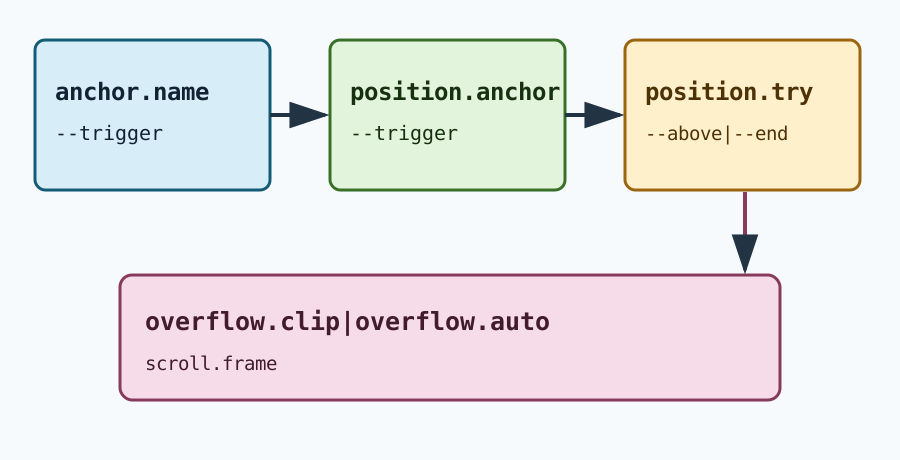
| Declaration | Job | What to inspect |
|---|---|---|
anchor-name: --trigger | Publishes a named anchor | The name is on the element that moves or resizes |
position-anchor: --trigger | Selects the anchor for a positioned subject | The subject resolves the custom identifier |
position-try: --below, --above | Lists named alternatives | The browser can choose a viable alternative |
This distinction matters when a component is reused. A class that only sets position-anchor has no effect if the matching anchor-name is on a sibling outside the subject's containing block. A name also does not create a stacking context or a focus relationship. Keep those concerns explicit, and use the screen and viewport properties guide when the fixture also needs visual viewport measurements.
A minimal overlay fixture
Start with a plain positioned fallback. The button remains usable when the feature is absent, and the overlay has an explicit width so a long label cannot resize the test while it is being inspected.
<div class="toolbar">
  <button id="help" class="trigger">Help</button>
  <div class="tip" role="tooltip">Keyboard shortcuts</div>
</div>
.toolbar {
  position: relative;
}
.trigger {
  anchor-name: --help-trigger;
}
.tip {
  position: absolute;
  inset-block-start: calc(100% + 8px);
  inset-inline-start: 0;
  inline-size: 14rem;
  max-inline-size: min(14rem, 90vw);
  position-anchor: --help-trigger;
  position-try: --above, --inline-end;
}
@position-try --above {
  inset-block-end: anchor(top);
  inset-block-start: auto;
}
@position-try --inline-end {
  inset-block-start: anchor(top);
  inset-inline-start: anchor(right);
  inset-inline-end: auto;
}
The fallback insets are ordinary CSS, so an older engine still places the tooltip below the toolbar. In a supporting engine, position-anchor makes the anchor-relative values meaningful. The @position-try blocks are named declarations, not JavaScript callbacks; they are candidates that the user agent can test in order. The MDN anchor-name reference is useful for checking syntax and the current browser-compatibility table.
Use a local fixture with a fixed inline-size, a visible outline, and a short text label. Do not begin with a full design system: inherited transforms, contain, and overflow make the first failure harder to attribute. Capture getComputedStyle(tip).positionAnchor and the getBoundingClientRect() values for both boxes after fonts have loaded.
Fallbacks are a selection algorithm
The preferred placement is the first rule in the normal declarations. The browser checks whether that rectangle fits the relevant inset-modified containing block. If it does not, it evaluates the alternatives in position-try or the entries supplied by position-try-fallbacks. A fallback can change block and inline insets, alignment, or size; it should not silently change the component's meaning.
Keep each candidate narrow. --above should only move the subject above the anchor. --inline-end should only move it to the side. That makes a captured result explainable: when the screenshot changes, the selected candidate tells the reviewer which boundary was reached. The Chrome explainer describes the same “try this, then that” model and shows how position-try-order can prefer the option with the most available space: Anchor Positioning API.
The order is observable. With position-try-order: most-width, a side placement may win even when --above appears first because the available inline width is larger. If a product requires a particular reading order, encode that choice and test it; do not assume the first candidate always wins. Record the viewport, anchor rectangle, subject rectangle, and selected fallback in a small JSON artifact:
{
  "viewport": "390x844",
  "anchor": { "top": 734, "bottom": 770, "left": 16, "right": 104 },
  "subject": { "top": 610, "bottom": 704, "left": 16, "right": 240 },
  "selected": "--above",
  "overflow": { "blockEnd": 0, "inlineEnd": 0 }
}
The numbers are an example of a safe, reviewable result, not a universal limit. Keep the expected relationship in the fixture: subject.bottom <= anchor.top for --above, and subject.right <= viewport.right for a side candidate. A property being present in computed style is insufficient when the subject is clipped or covers the trigger.
Overflow and scroll containers
Overflow creates two different questions. A scroll container changes which pixels are visible as the user scrolls; an overflow clip limits what can be painted outside the clipping padding box. Test them with separate wrappers:
.scroll-frame {
  block-size: 12rem;
  overflow: auto;
  border: 1px solid currentColor;
}
.clip-frame {
  overflow: clip;
  contain: paint;
}
Place the anchor near the bottom of .scroll-frame, scroll it until the anchor touches the frame edge, and then open the overlay. Record whether the subject follows the anchor and whether the frame clips it. Repeat inside .clip-frame. A fallback that fits the viewport can still be invisible because an ancestor clips painting. This is why a screenshot and a bounding-rectangle log belong together.
Transforms, contain: layout, and nested positioned ancestors add more containing blocks. Change one ancestor at a time and keep the same anchor name. If the subject jumps to the viewport, inspect which element establishes its containing block before changing offsets. Do not “fix” a clipping result by adding a large z-index: stacking order cannot escape a clip.
The boundary is also relevant to scrolling. If the anchor moves from top: 120px to top: 540px after a scroll, the subject should be recomputed from the same anchor rather than retaining a stale pixel offset. A test that opens once and never scrolls does not cover this behavior. For responsive comparisons, pair the rectangle log with visual viewport data from the viewport measurement article instead of treating window.innerHeight as the painted area.
A reproducible boundary matrix
Run the same page with one fresh profile per row. Keep the browser build, zoom, font loading state, and device scale factor constant.
| Row | Change | Expected observation | Interpretation |
|---|---|---|---|
| A | Anchor centered, ample viewport | Preferred placement remains visible | Baseline relationship |
| B | Anchor at block-end edge | --above or another candidate is selected | Fallback evaluation |
| C | Anchor inside a scrolling wrapper | Subject tracks after scroll | Scroll containment |
| D | Ancestor uses overflow: clip | Rectangle exists but pixels may be clipped | Paint boundary, not a missing anchor |
| E | Feature-disabled engine | Ordinary absolute fallback appears | Compatibility path |
For each row, save the browser version, viewport, scale factor, scroll offsets, computed positionAnchor, and the two rectangles. A useful failure report says “row D clipped at .clip-frame” rather than “anchor positioning is broken.” If row E differs, keep the fallback readable and link the issue to the browser support table; do not ship a detector that assumes unsupported syntax means the user is automated.
Make the fixture deterministic.
Use one document origin, one font set, and one device scale factor for every row. A web font that arrives after the first measurement can change the subject height and make a candidate appear to fail. Wait for document.fonts.ready, then request one animation frame before reading rectangles. Keep the fixture text stable across runs; translated production copy belongs in a second language pass because it changes line wrapping. The measured record should include fontStatus: "ready" and the exact inline-size.
Freeze the anchor's dimensions while diagnosing placement. A trigger with an icon that loads asynchronously can move from right: 104px to right: 132px, which is a legitimate input change rather than a fallback regression. Set content-visibility: visible on the small test page and avoid layout transitions. If the real component animates, capture both the settled state and the first frame after opening; do not compare an animation frame in one browser with a settled frame in another.
Read geometry without guessing.
getBoundingClientRect() returns viewport-relative coordinates, so a scroll changes top and bottom even when the anchor has not moved in its own scroll content. Record the scroll container's scrollTop and the viewport's visualViewport.offsetTop beside the rectangle. The difference lets a reviewer tell “the anchor followed its content” from “the subject was pinned to the wrong containing block.” A single screenshot cannot make that distinction.
Check both edges and sizes. An overlay can have top and left inside the viewport while its right extends beyond an inline clip. Long words can also overflow the subject's own box after the fallback is selected. Include scrollWidth, clientWidth, and writingMode in a private diagnostic record when a locale or vertical writing mode is part of the product. Publish only the fields needed to explain the placement; do not retain page text or user-entered values.
Separate CSS selection from application policy.
The user agent chooses among candidates, but the application still owns whether the overlay should open. A tooltip that opens on hover, focus, and touch has three event paths; anchor positioning only describes its geometry. Keep the open state and aria-describedby relationship in the component test, then run the geometry matrix with the state already open. This keeps an accessibility failure from being mislabeled as a placement failure and complements the focus rules in the Popover API guide.
Do not add a JavaScript collision loop just because a candidate was clipped once. First verify that the candidate list includes the direction the component actually needs, that the subject has a bounded size, and that the containing block is the intended one. A script that writes pixel offsets can mask a missing anchor-name and create a second implementation with different scroll behavior. If a product requirement exceeds the CSS candidates, record that as an explicit policy decision and test the script separately.
Scroll ownership and nested frames.
Nested scroll containers need an owner. Put the anchor and subject in the same scrolling subtree when the overlay should move with content. If the subject belongs to a fixed application chrome while the anchor belongs to an inner frame, document that split and test both scroll positions. A subject that stays fixed is not automatically wrong; it is wrong only when the component contract says it should track the content anchor.
An iframe adds another coordinate space. The parent cannot inspect a cross-origin child rectangle, and an anchor name in the child cannot be referenced by a subject in the parent. Keep the fixture same-origin when validating CSS behavior, or record the boundary as an integration constraint. Do not infer cross-origin geometry from a message timestamp. A small message such as overlay-state: open can coordinate ownership, while each document measures its own rectangles.
Fallback review after browser updates.
After a browser update, compare the first changed row rather than diffing screenshots blindly. A change from --above to --inline-end with the same rectangles may reflect an updated position-try-order implementation; a change only inside .clip-frame points to paint containment. Keep the previous build, candidate list, and viewport in the report so a reviewer can reproduce the decision. If an implementation changes the selected candidate while both choices remain readable, decide whether the reading order is a product requirement before filing a compatibility defect.
For a rollout, run the matrix at the smallest supported width, the largest translated label, and one zoomed configuration. Include a case where no candidate fully fits. The expected result is a bounded, readable subject or an explicit close path, not an invisible rectangle. That negative case protects against a future candidate being removed during refactoring. It also keeps support messages precise: “no candidate fit at 200% zoom inside .clip-frame” identifies a layout decision, while “popover failed” does not.
BotBrowser capability boundary
BotBrowser can keep a declared profile, viewport, zoom, and launch policy consistent for an authorized layout fixture. It can repeat the matrix and retain redacted geometry and screenshots. It cannot add an unimplemented CSS feature, override an ancestor's clipping rule, or guarantee that every browser version picks the same fallback. The result describes one engine, build, profile, and viewport.
Do not use anchor placement as an identity score. A user can resize a window, zoom, change fonts, or open an accessibility setting, and all of those can select a different candidate. Keep the diagnostic fields limited to layout facts, and avoid collecting page content or unrelated fingerprint signals. For a broader API compatibility method, see Web platform tests for browser feature confidence.
FAQ
Does position-anchor replace JavaScript positioning?
It can replace the repeated measurement-and-style loop for relationships expressed by CSS. JavaScript may still be needed for application state, focus, or a custom collision policy. Keep the CSS fallback so the component remains usable when the property is unsupported.
Why does a fallback fit the viewport but remain invisible?
An ancestor may establish a clipping padding box with overflow: clip, contain: paint, or a scroll viewport. The subject's rectangle can be valid while its pixels are not paintable outside that ancestor. Inspect the ancestor chain and capture the screenshot before changing z-index.
Can a fallback guarantee that an overlay never covers its anchor?
No. Candidate selection is constrained by the available containing block and the declared alternatives. A very small viewport, large text, or a long translated label can leave no fully fitting candidate. Provide a readable maximum size and an explicit close or dismiss path.
Conclusion
Anchor positioning is a CSS relationship plus a bounded fallback list. Name the moving element, reference it with position-anchor, declare small position-try candidates, and test the same fixture at an edge, inside a scroll container, and behind an overflow clip. Preserve rectangles and screenshots together so a reviewer can distinguish fallback selection from paint clipping. BotBrowser can reproduce that controlled layout observation; it cannot turn a browser limitation into a guarantee.
Public sources
This article is part of the guide: Web Platform Surfaces: A Consistency Review Map
Related Articles
Popover API: Focus, Light-Dismiss, and Accessible Fallbacks
PlatformCSS Color Management and Display Accessibility
PlatformBrowser API Compatibility Data and Feature Fallbacks
PlatformPointer Events and Accessible Input Across Mouse, Touch, and Pen
PlatformOrigin-Agent-Cluster: Predictable JavaScript Memory Isolation
PlatformBrowser Feature Support Is Not Feature Quality
Take BotBrowser from research to production
The guides cover the model first, then move into cross-platform validation, isolated contexts, and scale-ready browser deployment.