Browserless vs Self-Hosted Browsers: What the Service Owns
A managed browser hands you a session over CDP. What it does not hand you is a stable browser identity. Here is the boundary, with the documented limits.
BotBrowser Team
Want the structured docs for Deployment?
This article lives in the editorial library. For step-by-step setup, reference material, and ongoing updates, jump into the docs section.
A managed browser is a service that runs the browser process and gives you a connection to it, and the whole decision turns on which parts of the browser it owns. BotBrowser provides a declared profile that keeps the surfaces a page can read consistent with each other across launches, and it does not supply a hosted fleet, a session broker or a concurrency quota. The service publishes more than a socket, though: session state, OS emulation and hardened routes each cover a different layer, and the layer they do not cover is the one that decides whether a fresh session looks like the last one.
Summary
- A managed browser gives you a running browser over CDP or WebSocket; you still write the automation and you still own the anti-bot outcome.
- Managed scraping services are a different product: they return data, not a session.
- Browserless documents two persistence mechanisms: the session API keeps cookies,
localStorageand cache, and authenticated profiles add IndexedDB plus two stable headers. - Its OS emulation is a per-session query parameter on specific routes, not a stored profile; it leaves timezone and locale to you or the proxy, and it sets a mobile viewport only for the Android persona.
browserless vs puppeteeris a category error: one is a service, the other is the library you connect with.- Billing is concurrency times time, so the crossover against self-hosting is a utilisation question rather than a volume question.
- A self-hosted browser is the right choice when the identity has to survive across sessions, builds and machines; a managed browser is right when the work does not need one.
Contents
- What a managed browser is, and what it is not
- The three architectures side by side
- Session state is not browser identity
- The comparison that is not a comparison
- What the bill actually charges for
- Practical conclusion
What a managed browser is, and what it is not
The service runs a browser process on its own infrastructure and exposes it over a protocol your code already speaks. Browserless documents this as Browser-as-a-Service: connect Puppeteer or Playwright to a WebSocket endpoint and keep the script you already have, with the connection string as the only change. The same account also exposes stateless REST endpoints such as /content, /scrape and /screenshot, where one HTTP request performs one browser task and returns a result.
That split is the first thing to keep straight, because the two halves have different economics and different failure modes. An agent framework that wraps a browser adds a third layer, and how a managed browser and an agent layer divide the work is the same question asked one level up.
BaaS endpoint      -> wss://.../chromium?token=...   session you drive; you own the code
REST endpoint      -> https://.../content?url=...    one request, one result, no session
self-hosted        -> chrome --user-data-dir=...     process on your machine
What the managed half removes is the operational surface: process pools, crash restarts, version installs and capacity. What it does not remove is the decision layer. You still choose the viewport, the headers, the navigation timing and the retry policy, and you still find out whether the target accepted the session. A managed browser is a different place for the browser to run, not a different conclusion about whether it will pass. The same split appears whenever a page is assembled from several runtime sources, which a storefront that mixes API and rendered data shows in a concrete case.
The third product in this space is easy to confuse with both of the above. A web unblocker or scraping API also runs a browser server-side, but it returns the extracted result rather than the session. If the thing you need is a session to drive, that product is the wrong shape no matter how well it works, and the reverse is equally true: automating a page-by-page flow on top of a stateless endpoint means rebuilding the session state on every call.
One practical consequence of the architecture is that your local debugging tools still work. A WebSocket endpoint accepts the same devtools protocol messages a local browser does, so a script that records CDP traffic locally records it against the remote browser too, and a trace captured in one place can be replayed against the other. What does not transfer is the browser itself: a locally installed extension, a local font set or a local GPU path exists only where it is installed, and the remote session has whatever the provider put there.
The three architectures side by side
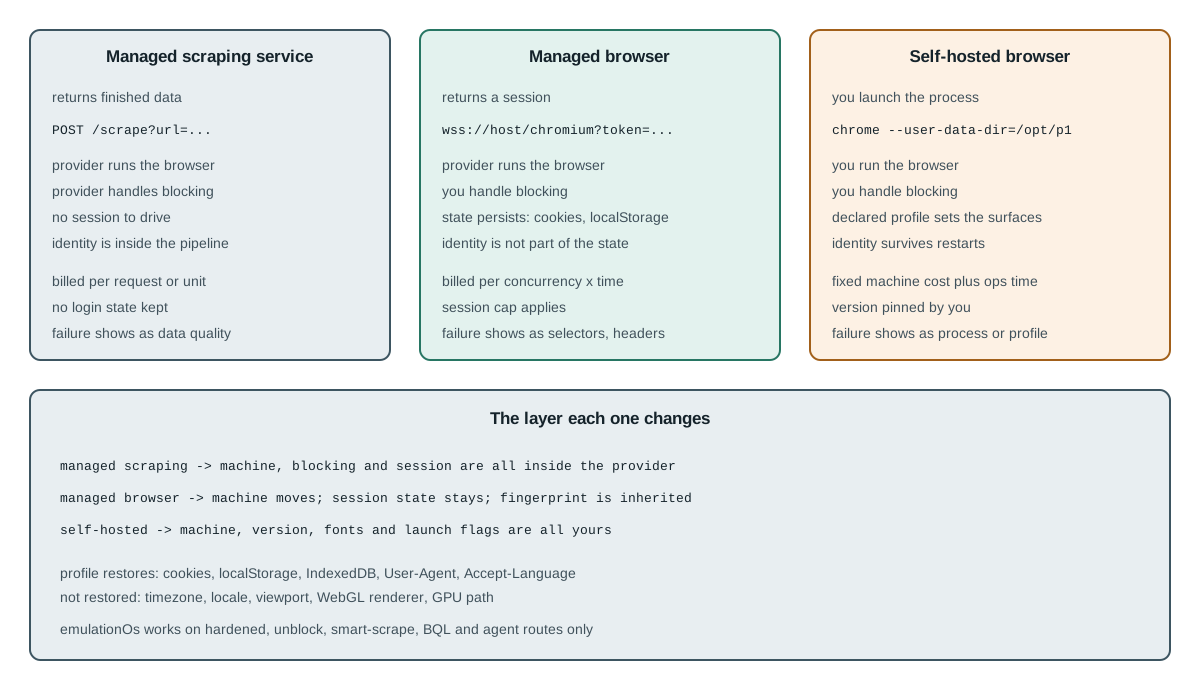
The distinction that matters operationally is who owns the browser process, who owns the anti-bot outcome, and what the calling code receives back.
| Managed scraping service | Managed browser | Self-hosted browser | |
|---|---|---|---|
| What you receive | Finished data | A session over CDP/WebSocket | A process you launched |
| Who runs the browser | Provider | Provider | You |
| Who handles blocking | Provider | You | You |
| Identity across sessions | Not exposed | State, not fingerprint | Whatever the profile declares |
| Browser version control | Provider's choice | Provider's matrix | Pinned by you |
| Failure you debug | Data quality | Selectors, timing, headers | Process, profile, build |
Read the third row carefully, because it is the one that changes the purchasing decision. A managed browser moves the machine, not the problem: the hardened routes in the Browserless documentation are described as modifying browser behaviour and are therefore not the default. If a target rejects your session, the session was still yours to diagnose.
The fourth row is where the two managed products genuinely differ from each other, and where self-hosting differs from both. A scraping service hides identity because identity is inside its pipeline; a managed browser exposes state, which is a narrower thing; a self-hosted browser exposes the whole browser, which is the only one of the three where the fingerprint is a property you set deliberately rather than a property you inherit.
The version row deserves an example, because it is the one teams discover late. A provider that upgrades its fleet on its own schedule changes the renderer under a script that did not change at all, and a layout assertion that passed on Monday can fail on Wednesday for a reason no commit explains. Self-hosting does not make that risk vanish either; it converts the risk into a decision you schedule, which is a different and usually preferable problem. Chrome for Testing version pinning is the mechanism that makes it a decision rather than an accident.
Session state is not browser identity
Browserless documents two ways to keep things across connections, and both are worth reading precisely because of what they list. The first is a CDP command called mid-script, Browserless.reconnect, which flags the running browser as reconnectable so the server holds the process open for a timeout window; the documentation notes it is Puppeteer only because it needs browser.disconnect(), and that Playwright lacks that call. The second is a REST session API that provisions an isolated user data directory per session and keeps data for days across full browser restarts.
standard session   -> process kept alive; window in seconds to minutes; Puppeteer only
persisting state   -> isolated user-data-dir per session; survives process restarts
The session API persists cookies, localStorage and cache, which is what the session-overview page lists. The authenticated-profile feature goes further and names cookies, localStorage and IndexedDB, and it excludes sessionStorage on the documented ground that replaying it injects stale state into OAuth redirects and CSRF flows. That exclusion is a correct engineering decision for its purpose, and the boundary it draws is the useful part: what gets restored is the logged-in state and the headers the vendor chose to keep, not the whole browser that produced it.
The headers are the part that keeps the earlier claim honest. A profile saved from a Browserless session also remembers that browser's User-Agent, and sessions that load it present the same one; profile-creation sessions and Brave sessions loading such a profile send a stable Accept-Language, while other Brave sessions keep Brave's built-in variation. So a profile is not storage-only, and the fair statement is that it carries a stored login plus the two headers the vendor documents, not that it carries no identity at all. What it still does not carry is everything else a fingerprint is computed from.
The OS emulation parameter shows the same layer split from the other direction. emulationOs sets a coherent set of OS-derived signals: user agent, client hints, navigator.platform, the WebGL renderer, hardwareConcurrency and the media device list. The documentation then lists what it does not change, and the list is the useful part: timezone, locale and Accept-Language follow the proxy, and for the desktop personas screen size and viewport stay with the client. The parameter takes effect on the hardened routes, on the unblock and scrape REST APIs including /unblock, /smart-scrape and their vendor-prefixed variants, on BQL routes and on the agent route, and it is ignored on a plain /chromium or /chrome endpoint.
emulationOs=windows  -> changes: UA, client hints, navigator.platform, WebGL renderer
                     -> keeps:   timezone, locale, Accept-Language, viewport, WebRTC
emulationOs=android  -> also sets a high-DPI mobile screen and viewport
The Android value is the exception that makes the desktop rule precise. emulationOs=android does set screen size and pixel ratio as part of a coherent mobile persona, optionally narrowed by emulatedDevice; the desktop personas leave both to defaultViewport or setViewport. Reading the change list without that exception produces the wrong conclusion about mobile testing.
None of that is a defect. A service that has to run thousands of sessions per hour cannot give each one a bespoke binary, and the documented boundary is honest about where its control ends. The practical consequence is narrower and more useful: if your requirement is that the same identity appears tomorrow, one stored login plus two stable headers is less than that, and the remaining surfaces have to come from somewhere else.
There is a second consequence for anyone testing multi-account or multi-region behaviour. A profile that restores a login is exactly right for resuming one account, and it is exactly wrong for proving that two accounts are distinguishable, because the part that distinguishes them is not the storage it restores. Testing that property requires two environments that differ in the declared surfaces and are otherwise identical, which is a comparison a stored cookie cannot express.
The comparison that is not a comparison
Two of the autocomplete phrases around this product are browserless vs puppeteer and browserless vs playwright, and neither is a like-for-like comparison. Puppeteer and Playwright are libraries that drive a browser; Browserless is a place for that browser to run. Asking which wins is like asking whether a car beats a road.
The composition is the answer, and it differs by library in one documented way. With Puppeteer, the standard reconnect flow works because browser.disconnect() exists. With Playwright it does not, which is why the documentation points Playwright users at the REST session API instead. If your stack is Playwright, that is the shape to plan for; if it is Puppeteer, both shapes are available.
That asymmetry has a cost outside the service boundary as well. A reconnect flow that depends on disconnecting a live browser assumes the client can tell a clean disconnect from a dropped socket, and a Playwright script that retries after a socket error is not doing the same thing as a Puppeteer script that disconnects on purpose. Before choosing a persistence mechanism, it is worth writing down which event the script is actually reacting to: an explicit disconnect, a timeout, or a transport error. Only the first is a lifecycle decision; the other two are failures, and treating one as the other produces a session that survives longer than the test intended.
The self-hosted comparison is a real one, and it is also the one where the trade is clearest. Self-hosting means you own the pool, the restarts, the version upgrades and the capacity planning. Launching a browser with an explicit user data directory, and keeping that directory stable across launches, is what makes an identity reproducible; Puppeteer launch and profile pitfalls covers the four launch decisions that keep a profile authoritative. On a server that work does not disappear, it moves: headless server setup is the checklist for the display, the binary and the recovery loop that a managed endpoint otherwise absorbs for you.
What the bill actually charges for
Both sides are computable without quoting anyone's price, because the shapes are different. A managed browser bills concurrency and session time; a self-hosted browser bills machines and the engineering hours that keep them running.
managed monthly   ~= peak_concurrency x hours_used x unit_price
self-hosted cost  ~= machines x amortised_hours + ops_hours_per_month x loaded_rate
The crossover is therefore a utilisation question. If peak concurrency is high but the average is low, a per-unit plan follows the average and wins, because you are not paying for idle machines. If the load is steady and the concurrency is modest, an idle-capable machine is charged once and the second term dominates, which is where self-hosting wins. The published plan ceilings describe the first term directly, from a free tier with two concurrent browsers and a two-minute session cap up to a hundred concurrent browsers with a sixty-minute cap, which is enough to compute the managed side for your own workload without asking anyone for a quote.
Two more terms belong in the same arithmetic. Restarts are not free on either side: a managed endpoint hides them, which means they appear as a latency tail rather than a line item, and a self-hosted pool shows them as capacity you must reserve. Storage is the other one, because a persisted profile consumes an allowance that a stateless request does not, and a workload that stores a large authenticated state per identity pays for that state whether or not it opens a browser that day. Measure both against your own peak_concurrency figure rather than borrowing one: capacity planning for browser contexts is the method that produces the number this section multiplies.
Two costs are easy to leave out of that arithmetic. The first is the identity work: if the workload needs a stable browser across sessions, that requirement is not in either column yet, and satisfying it inside a managed session means carrying the profile yourself anyway. The second is the session ceiling: a task that legitimately runs longer than the plan's maximum session time becomes a different task, split into resumable pieces, and that redesign is work regardless of who hosts the browser.
Neither shape is a default. A single nightly export that needs no login is cheaper and simpler on a managed endpoint; a fleet of long-lived identities that must look the same in March and in April is cheaper and simpler on machines you control.
Practical conclusion
Choose by the layer, not by the logo. If the job is one independent request, a stateless scraping API is the shortest path. If the job needs a real session but not a persistent identity, a managed browser removes the operational surface and its published session limits are the constraints to design around. If the job needs the same browser to be recognisably the same next week, that requirement sits below the state layer, and it has to be owned somewhere you can set the binary, the fonts and the launch flags.
Two checks make the decision concrete. First, write down whether the requirement is state or identity; the Browserless documentation is explicit that its profiles restore cookies, localStorage and IndexedDB along with two stable headers, and explicit that emulationOs leaves timezone and locale alone while setting a mobile viewport only for the Android persona. Second, compute the peak-against-average concurrency, because that ratio, not the monthly volume, is what decides which bill grows faster.
When a session fails on a managed endpoint, the diagnosis still belongs to the client: which selectors, which headers, which navigation timing, which build. For which build is installed and how to pin it, read Chrome for Testing version pinning; for what a page can observe about the session itself, read headless and headed signal comparison.
Sources
This article is part of the guide: Browser Deployment and Release: Operations Map
Related Articles
Web Unblocker and Scraping API: What They Do and When Not To
DeploymentStagehand Browser Automation with BotBrowser
DeploymentBrowser Automation Signals and Consistency in Playwright
DeploymentScraping Shopify: Storefront API, Ajax or Browser?
DeploymentPuppeteer MCP Server Configuration for a Custom Build
DeploymentBrowserContext Capacity Planning for Memory and Long-Running Sessions
Run the same check in BotBrowser
Load a profile, keep the signals you just read about consistent inside the browser, and confirm the result on your own machine before a rollout.