Rebrowser Proxy: Routing, Profiles and Privacy
Rebrowser proxy settings select a cloud run’s network route. Understand inherited settings, persistent profiles, authentication and automation-layer boundaries.
BotBrowser Team
Want the structured docs for Fingerprint?
This article lives in the editorial library. For step-by-step setup, reference material, and ongoing updates, jump into the docs section.
A Rebrowser proxy setting changes the network route assigned to a remote browser run. It does not, by itself, select a new profile, clear existing cookies or install the separate Rebrowser library patches. Those distinctions become practical when a browser connects successfully but a page still carries an existing login, a proxy choice seems to be ignored, or two tabs are assumed to have separate network settings.
BotBrowser documents browser-level proxy configuration and, for supported enterprise contexts, context-specific proxy changes. Its engine and profile controls address browser configuration, while a proxy supplies a network route. BotBrowser does not determine a destination’s response or remove information already stored by an application or service provider.
TL;DR
- Rebrowser’s cloud documentation assigns a proxy to each run. Its Runs API distinguishes an explicit proxy choice from the profile and group settings used when that choice is omitted.
- A remote-control connection and the browser’s destination traffic have different purposes. Connecting the automation client does not establish which route the browser used for an application request.
- Reusing a persistent profile can preserve application state across runs. A different proxy is not a new storage boundary.
- Rebrowser’s cloud documentation says ordinary Puppeteer and Playwright context-creation calls do nothing there. Local-library assumptions about independent contexts must not be transferred to that service.
Contents
- A run has a control connection and a traffic route
- Which proxy setting becomes effective
- A new route can keep an existing profile
- Authentication belongs to several different boundaries
- Cloud tabs are not a promise of separate contexts
- DNS and transport require their own evidence
- What the library patch changes
- Failure ownership and evidence
- Practical conclusion
A run has a control connection and a traffic route
Rebrowser uses run for an instance of a remote browser being started. Its Key Concepts documentation says every run must have a proxy assigned and describes HTTP and SOCKS5 support. The browser is remote: the process that visits a page is not necessarily the process or machine running the automation client. That separation changes what a successful connection establishes.
The Runs API returns a run identifier and WebSocket endpoints when a run starts. The automation client uses a control connection to communicate with the browser. Separately, the browser makes requests for documents and page resources through the route assigned to its run. A working control connection therefore answers one question: can the client communicate with the remote browser? It does not answer whether a specific application request reached its destination through the intended proxy.
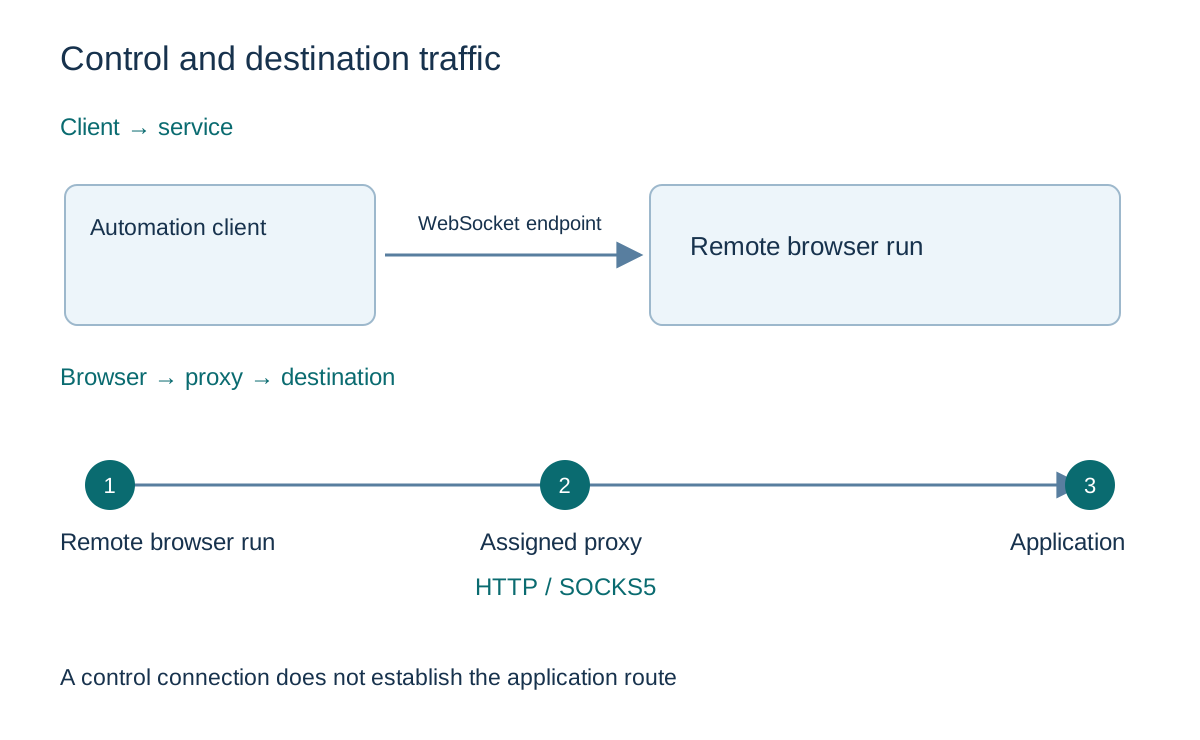
The distinction also applies to the location of the client. Moving the script to another workstation changes where the control connection begins. It does not establish that the remote browser’s assigned proxy changed. Conversely, changing the run’s proxy does not establish that the client’s own network requests, monitoring calls or unrelated software now use that route. Those connections have different configuration owners.
This is a traffic-scope distinction, not a claim that any particular deployment exposes additional information. A privacy assessment starts with the endpoints that actually exchange data. The automation client may handle a service credential and receive page data. The remote browser handles application content and profile state. A proxy participates in the browser’s traffic path. The destination receives the application exchange. Each participant’s visibility depends on the connection and the service configuration, rather than on the presence of the word proxy in a settings panel.
For example, an owned application can receive a request from the intended network exit while the automation client still loses its remote connection. Both observations can be true. The browser’s route and the remote-control session have separate lifetimes and error conditions. Replacing a library package because of that disconnection changes a different component from the proxy choice that produced the application request.
The proxy configuration overview organizes routing, DNS and address-family decisions for browser operations. Rebrowser adds a cloud-service lifecycle: the run is the unit its documentation assigns a proxy to. That declared unit is the useful starting point before making assumptions about a page, tab, connection or local process.
A local wrapper adds another routing boundary: the Botright source analysis separates preliminary Python lookup clients from browser destination traffic. A browser proxy setting alone does not describe those earlier requests.
Which proxy setting becomes effective
A proxy choice can come from more than one place. Rebrowser’s settings description gives an order for effective browser settings: defaults, the first profile group’s settings, and then profile settings. It also says the final settings can be inspected on the run’s page. Editing one layer does not, on its own, establish what a later run used after the other layers were considered.
Groups make a practical difference here. The documentation describes assigning a proxy to a group so several profiles can share it, then changing that group’s proxy in one place. That is a configuration relationship between profiles and a shared settings owner. It should not be interpreted as a claim that all group members share cookies, one browser process or one application identity. The cited description establishes shared settings; those other relationships need their own evidence.
The run-start parameters add another explicit choice. proxyId identifies a configured proxy, while proxyUrl supplies a proxy URL. Rebrowser says to use one or the other, rather than both. When the relevant proxy parameter is omitted, its documentation refers back to the profile and group settings. Omission is therefore meaningful: it leaves selection to an existing configuration instead of necessarily selecting a direct connection.
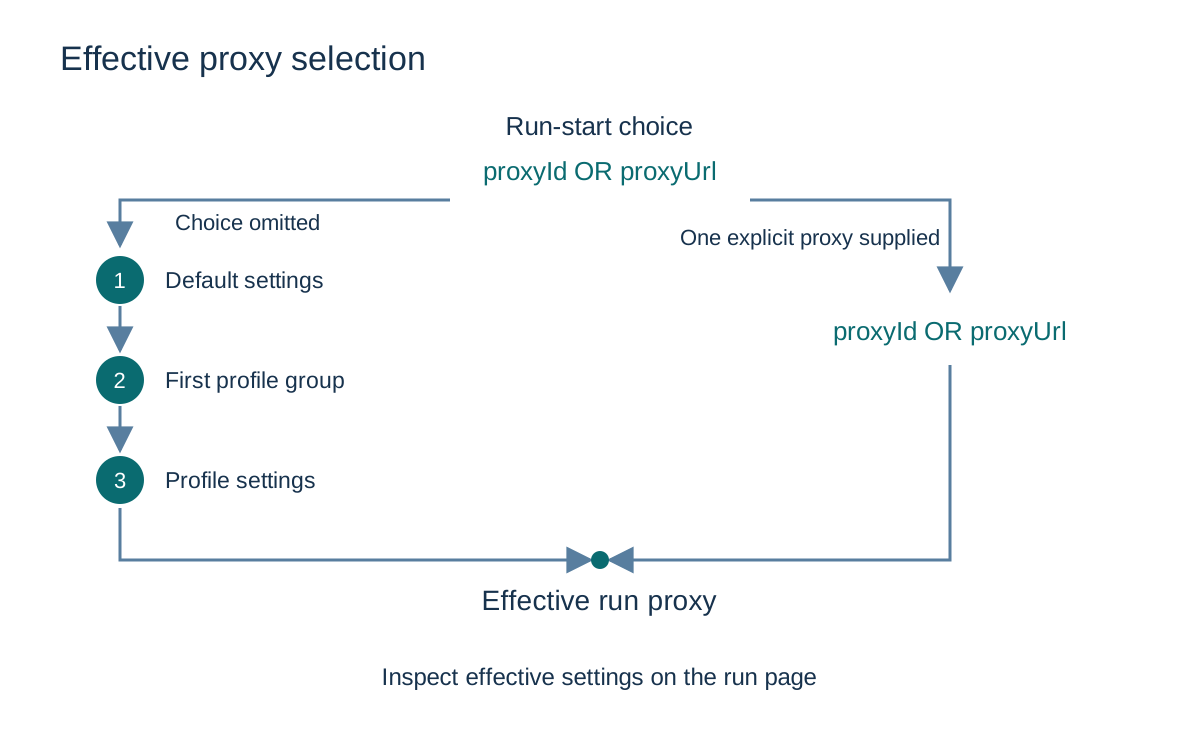
The same API also documents a fallback when profileId is missing: the first available random profile is selected automatically. That is important for continuity. A run created without an explicit profile selection may not have the state or settings a reader expected from the most recently edited profile. An unexpected result is not enough to conclude that a proxy failed; the browser may have been started with a different profile selection.
Consider a shared group configuration that is updated for future work while a particular profile still has its own settings. The relevant evidence is the effective configuration associated with the run under examination, together with whether a run-start proxy choice was supplied. A screenshot of the edited group is evidence of an intended setting at that layer. It is not a record of every run’s final selection.
This source does not establish a universal merge algorithm for multiple group memberships beyond its reference to the first profile group. Nor does the start-run parameter description establish that every profile setting can be changed during a live run. Configuration at run creation and reconfiguration of an already running browser are different operations. Keeping that distinction prevents an undocumented live-switch capability from being inferred from a start parameter.
The corresponding decision is concrete: identify the run, the selected profile and whether a run-level proxy choice was present, then use the service’s effective-settings record to understand the route selection. A changed destination response alone does not identify which settings layer selected the proxy.
A new route can keep an existing profile
Network routing and storage continuity are independent dimensions. Rebrowser’s persistent-profile documentation describes keeping profile data between runs by creating a profile and reusing its identifier. It lists cookies, cache and other browser storage among profile data. A later run can therefore have a different network route while retaining data that an application placed in the profile earlier.
An existing login after a proxy change is compatible with that design. The network path has changed, but a cookie or other application state can still be present. Its continued presence does not establish that the old proxy remains in use. Equally, seeing a login screen does not establish a new profile: an application can expire a session, require authentication again or make its own server-side decision independently of the browser’s stored data.
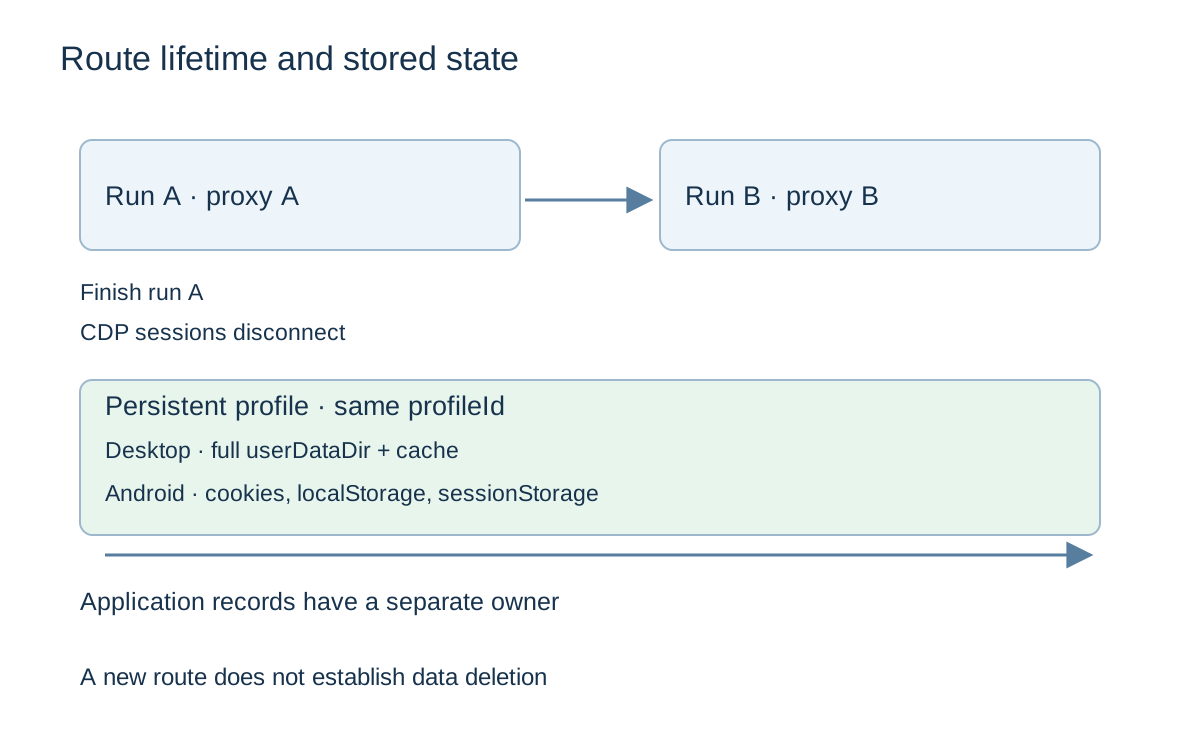
The Runs API’s finish operation says all CDP sessions are immediately disconnected when the run is finished. That describes the end of remote-control connections. It should not be expanded into a promise that finishing a run erases a persistent profile or deletes a destination’s records. A control-session boundary is narrower than a data-deletion boundary.
Rebrowser also describes an option to disable persistence for clean browser starts. That is a separate profile or group setting, not an intrinsic effect of selecting another proxy. Its documentation declares full desktop userDataDir persistence, including cache, cookies and other profile files. For mobile browsers it names only cookies, localStorage and sessionStorage, attributing that limit to Android constraints. These are provider declarations about this service; desktop cache behavior must not be assumed for its Android offering.
For desktop runs with persistence enabled, cache adds a less obvious troubleshooting consequence. The same profile documentation says persistent cache can reduce proxy bandwidth because resources need not be downloaded repeatedly. A resource appearing in the browser therefore does not always imply a new transfer through the proxy at that moment. The relevant questions are whether that resource was requested over the network, which run made the request and which state was already available locally to the remote browser.
For an authorized workflow, separating state from routing makes retention choices clearer. A profile can be retained because continuity is needed, while logs of its proxy selection can be kept for a shorter operational purpose. Or a clean-start policy can be selected because application state should not cross jobs. Those are different data decisions, and the provider’s profile controls must be assessed on their own terms rather than as side effects of an exit-address change.
The browser fingerprinting overview places storage, browser surfaces and network observations in a broader identity context. Here the narrower practical consequence is that changing one dimension does not reset the others. Neither a new route nor a fresh local browser state removes records that the remote application already holds.
Authentication belongs to several different boundaries
The word authentication can refer to the automation service, the proxy or the destination application. A successful credential check at one boundary does not authorize the next. Keeping those roles distinct also prevents secrets from being sent to the wrong party when a team is trying to understand a failure.
Rebrowser’s Runs API describes a service connection and a separate proxy selection. Its proxy URL format includes a username and password component. Those proxy credentials authorize the use of a network intermediary; they are not the login credentials for the destination application, and they are not interchangeable with the credential used to access the remote-browser service.
The practical privacy exposure follows the credential’s role. A remote-browser service needs enough information to establish the configured proxy connection. A proxy provider manages authorization for that proxy. The destination application manages its own account session. Moving a password from one field to another because both involve a browser does not make the recipients equivalent. Operational records should preserve which boundary failed while excluding the secret itself.
The scope of an error matters more than its wording. A remote-control connection that never becomes usable belongs to the client-to-service investigation. A proxy authorization failure belongs to the selected proxy configuration and provider. A destination login rejection belongs to the application exchange. There can be dependencies between these events, but one does not prove the cause of another. A generic connection error can require more evidence before it is assigned to any one boundary.
An error report can remain useful without retaining a complete proxy URL. It can name the run, an approved internal configuration reference, the phase that failed and the time of the event. A URL containing credentials or a connection endpoint containing a service token can turn a support artifact into another copy of sensitive access material. The BotBrowser proxy guide likewise treats credential handling as an operational concern; its documented input format should not become a reason to paste live secrets into reports.
Application session data needs similar care. A profile may preserve a login cookie, while a diagnostic capture may show requests associated with that login. Neither is needed in full merely to establish that the browser used an unexpected run configuration. The required evidence is the smallest record that answers the actual question. Retaining unrelated page content or account data increases exposure without clarifying the proxy assignment.
Rebrowser’s public descriptions establish configuration interfaces, not a complete map of internal credential access or retention. A deployment’s security assessment still needs the relevant service terms, access controls and operational policies. A proxy setting alone cannot establish who can inspect every secret handled by a cloud browser, or how long every provider record survives.
Cloud tabs are not a promise of separate contexts
Local automation libraries often expose APIs for creating browser contexts. Their existence in a client library does not establish that every remote service implements the same behavior. Rebrowser’s Unsupported Features page makes this concrete: it permits multiple tabs but says Puppeteer’s browser.createBrowserContext() and Playwright’s browser.newContext() do nothing in its cloud browsers.
That statement must stay attached to the cloud service and the documentation read. It is not a claim that those library APIs never work, or that the open-source Rebrowser patches remove context support from a local browser. A library package, an executable and a cloud service are different scopes. The same method name can sit in a client whose remote endpoint supports a different set of operations.
For proxy planning, the consequence is that two tabs do not establish two independently configurable proxy scopes. The cited cloud documentation assigns a proxy to a run and does not supply ordinary context creation as a way to divide that run. An architecture that depends on independent context storage or routing needs explicit service support; it cannot obtain that guarantee from creating a second page object.
BotBrowser documents a different supported interface. Its dynamic proxy switching guide describes changing a specified BrowserContext’s proxy through a browser-level CDP session, with ENT Tier3 prerequisites. It requires waiting for the update before a navigation that depends on the new geographic state. Those documented controls belong to BotBrowser and do not establish that a cloud endpoint from another provider implements them.
Even within a supported implementation, the time boundary matters. The BotBrowser guide says subsequent requests use the updated proxy, while requests already in flight can complete on the previous one. That is a specific documented lifecycle, not a universal guarantee that every open connection migrates at once. Likewise, changing a context’s route does not itself create new storage or clear the application’s server records.
The dynamic proxy switching article develops the choice between per-context configuration and separate browser instances for that supported product. Rebrowser’s cloud documentation requires a separate decision: use the service’s declared run and profile model when assigning ownership. A design document that simply says “one context per job” is incomplete until its remote service actually supports the required context behavior.
DNS and transport require their own evidence
HTTP and SOCKS5 name proxy interfaces. They do not, on their own, establish every property of a cloud browser’s DNS handling, encrypted connections or traffic coverage. Rebrowser’s Key Concepts page declares that the remote browser’s network requests go through the assigned proxy and names those supported protocols. The cited description does not specify where every hostname is resolved or provide a DNS trace for an actual run.
A DNS question is narrower than an exit-address question. The service that receives a browser request can observe its apparent network source, while the resolver involved in finding a host address is a different participant. An application seeing an expected exit address does not, by itself, show which resolver was used earlier. Similarly, the fact that a control endpoint uses a secure WebSocket does not establish the transport properties of every browser-to-proxy connection.
BotBrowser’s proxy documentation explicitly distinguishes socks5://, described with local DNS resolution, from socks5h://, described with remote DNS resolution. That is a named product contract. It should not be copied into a Rebrowser configuration claim merely because both products mention SOCKS5. Compatibility, accepted URL forms and resolution behavior must be established for the service under discussion.
Transport confidentiality is also about particular links. A browser can communicate with an application using an encrypted application connection while its proxy provider still handles connection metadata. A cloud browser provider operates the browser that processes the page. The precise content visibility of an intermediary depends on the protocol and whether a connection terminates there. Describing a proxy as private without identifying those links leaves out the question a privacy review needs to answer.
Rebrowser also warns in its proxy description that providers may restrict categories of destinations. That gives a documented alternative explanation for some connectivity problems: a selected route can be subject to the intermediary’s own service policy. It does not prove the explanation for any particular failure, but it means an unreachable application should not automatically be described as a browser-signal problem.
The useful evidence therefore stays specific. A route assignment is a configuration fact. A response from an owned endpoint is an observation of an application exchange. A DNS observation addresses resolution. A provider statement addresses a declared policy. None should silently substitute for all the others. No live Rebrowser proxy or cloud-browser experiment is presented here, so the documented interfaces remain distinct from measured traffic coverage.
What the library patch changes
Rebrowser’s open-source patches are another product scope. Their README describes modifications to Puppeteer and Playwright library source, and explicitly says the drop-in packages patch library code rather than the browser. That supports a software-layer distinction. It does not make the patch package a proxy provider or turn its installation into evidence that a cloud run used a particular route.
The existing Rebrowser patch and browser-layer comparison examines a pinned library implementation and a controlled local comparison. Its observations are tied to those packages, browser versions and test conditions. They cannot be transferred to Rebrowser’s cloud service as though the cloud run had been measured in the same experiment. The cloud documentation read here supplies a different set of facts: run creation, proxy selection, profile persistence and declared unsupported features.
Documented run-ending events
The Runs API event description gives more specific evidence for a terminated cloud session than an application screenshot. Each returned run can have a results.events array whose entries contain type, date and data. The documented values distinguish an explicit finish request from automatic termination. The run identifier binds the event to one browser instance, while the event date separates its lifecycle from a later run using the same profile. These records describe the service lifecycle; they are not a trace of the browser’s network requests.
An apiFinish event means the run was finished through the API’s /finishRun operation. That is evidence of the termination route, not evidence that a destination rejected a request or that a proxy stopped working. A caller investigating an unexpected end can compare the event with its own authorized job-control record. The public description does not identify which human or process made every call, so attribution to a particular operator still requires an appropriately protected service-access record. The event label alone should not be expanded into an account-action history.
A warning whose data contains clientActionTimeout means the run ended automatically because the client sent no CDP commands for the idle interval. Client command activity is a different observation from an application displaying a page or an operator intending a job to continue. A retained browser image does not establish that the control client kept issuing commands. The cited event description does not supply a numeric idle interval, so there is no basis here for inventing a timeout value or prescribing periodic traffic. The useful distinction is automatic idle termination versus an explicit finish call.
A warning containing maxRunDurationReached identifies another automatic end: the documented maximum run duration is 6 hours. A job spanning that boundary needs to distinguish the end of one run from the creation of another, even if it reuses a profile identifier. An event at the maximum duration does not establish a cache reset, a proxy authentication error or a change in destination policy. Those questions require their own records. Keeping the documented duration with the event code also prevents an operational report from classifying every remote disconnect as the same failure.
The API separately describes system-problem codes in errors[].code. Its example connectBrowser-connect means the connection to the browser could not be re-established. The public example supports that narrow connection interpretation. It does not locate a failure in a proxy provider, identify a destination’s internal decision or establish what page requests completed before the connection was lost. The event array and the error-code field therefore answer related but different questions: how the run ended and what system failure was recorded. Neither is a substitute for the run’s effective proxy settings.
A compact incident record can retain the run identifier, event time, event type and applicable non-secret reason, alongside the internal reference for the selected profile and proxy. Comparing those fields with the service’s effective-settings view separates a configuration selection problem from a documented lifecycle end. Missing records should remain missing rather than being filled from a page’s appearance. This interpretation uses only the published API fields; no cloud account, live proxy session or service event history was inspected. It also avoids retaining a full authenticated WebSocket endpoint merely to explain which termination category the documentation defines.
Failure ownership and evidence
A failure can be described accurately before its ultimate cause is known. The Runs API exposes run records and events, including reasons a run ended. Those records concern the service lifecycle. An application response concerns the destination exchange. A profile setting concerns intended browser state. Putting these observations in time order helps distinguish what happened from what is merely a possible explanation.
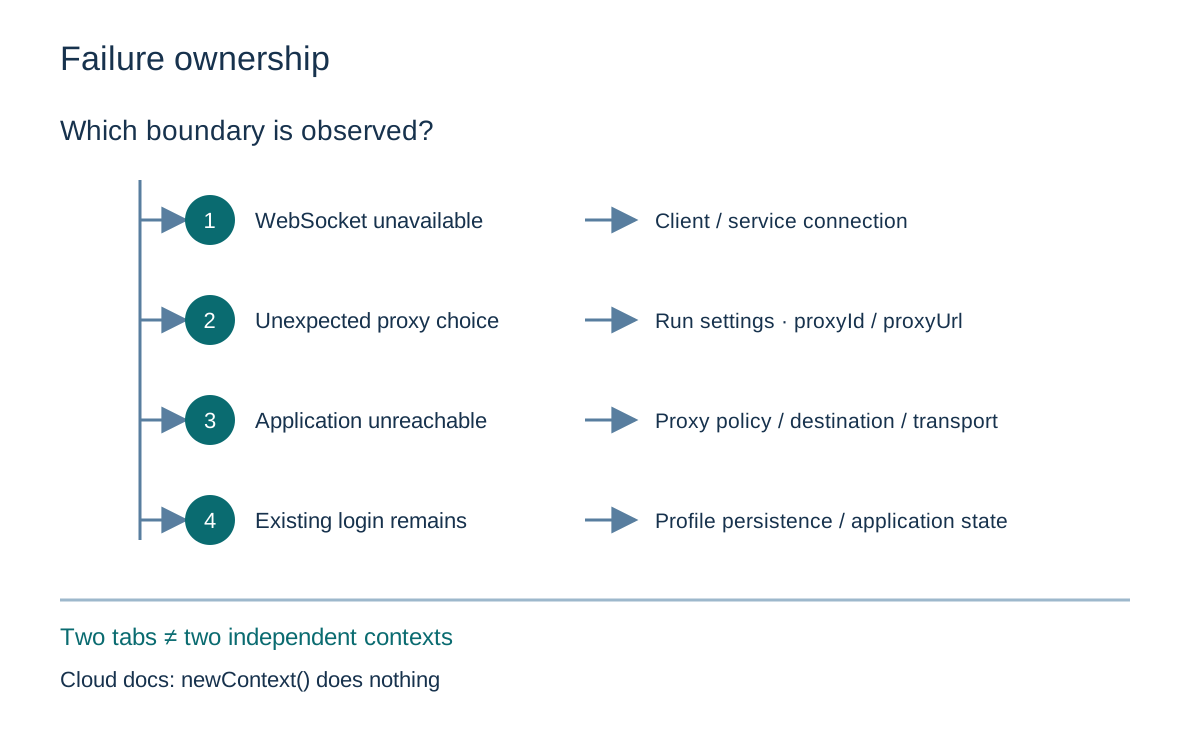
| Observed condition | Relevant boundary | What the observation does not establish |
|---|---|---|
| Client cannot use the remote endpoint | Client-to-service control connection | Which proxy an application request would have used |
| Effective run settings show an unexpected proxy | Run selection and inherited settings | That a browser library patch caused the selection |
| Browser request cannot reach an application | Proxy path, provider policy and destination availability | Which participant caused the failure without additional evidence |
| Existing application login survives a new run | Persistent profile and application session | That the previous proxy route remained active |
| Two tabs exist in one cloud run | Page organization within the documented service | Independent contexts, storage or proxy assignment |
The table is a classification aid, not a sequence of instructions for obtaining access to a protected service. A remote endpoint can be unavailable for reasons unrelated to a page. A proxy can reject a connection according to its own policy. An application can return an authorization response even when transport works correctly. Each condition has a different owner and should be investigated within an authorized environment.
For a useful support record, retain the phase, time, run reference and effective configuration reference. Record whether the observation came from the client, the cloud dashboard or an owned application. An error string without that origin can be ambiguous, while a complete raw session capture can expose far more information than the routing question needs. Preserve the distinction between missing evidence and evidence that a component failed.
Frequently asked questions
Does Rebrowser supply proxies or require an external provider?
Its Key Concepts page says plans include some datacenter proxies, other proxy types are available from the service, and an external proxy can also be added. These are provider-described options, not measured suitability or a promise that a particular destination will accept traffic from them.
Does omitting a proxy parameter mean a direct connection?
The Runs API refers omitted proxy selection back to the profile and group settings. Its Key Concepts page says every run has a proxy assigned. An omitted parameter should therefore not be described as evidence of direct routing.
Will changing a group update every active browser immediately?
The cited settings description explains how effective settings are determined when a run starts. It does not establish an immediate live update of every existing run. A start-time selection rule and a supported runtime update need separate documentation.
Does finishing a run remove application data?
The finish operation disconnects CDP sessions. Profile persistence is documented separately, and neither statement establishes deletion of the destination application’s own records. A data-retention decision needs the specific storage owner and operation.
Sources
- Rebrowser Key Concepts: run definition, proxy assignment, supported protocols and settings order.
- Rebrowser Runs API: profile and proxy selection, remote endpoints, run records and finish behavior.
- Rebrowser Profiles & Persistent Context: continuity, cache and platform-specific persistence declarations.
- Rebrowser Unsupported Features: multiple tabs and the cloud service’s context-creation limitation.
- Rebrowser patches README: scope of the open-source automation-library packages.
- BotBrowser Proxy Configuration and Dynamic Proxy Switching: separately documented product controls and prerequisites.
Practical conclusion
Rebrowser proxy configuration belongs to a cloud run’s traffic route. The effective choice can depend on profile and group settings or an explicit run-start selection. Persistent profile data, remote-control connections and automation-library packages have different owners and lifetimes. The provider’s declared cloud context limitation makes those distinctions especially relevant when an existing local automation design is moved to a remote service.
For an authorized deployment, choose the required storage and routing boundaries from the service’s documented model, then assess the relevant observations at that scope. BotBrowser’s documented browser and context controls provide a separate configuration model; they do not supply evidence about another service’s implementation. A well-defined route and browser environment still leave application permission, provider data handling and server-side history to their respective owners.
This article is part of the guide: What Is a Browser Fingerprint? Canvas Fingerprinting
Related Articles
Rebrowser Patches: What Changes After a Proxy Works?
NetworkDynamic proxy switching for separate browser contexts
FingerprintBotright: Automation Scope and Privacy Boundaries
NetworkProxy Configuration Overview: A Browser Network Decision Map
Getting StartedProxy Launcher in BotBrowser: Profiles, Proxies, and Setup
Getting StartedPlaywright Proxy: Routing, Auth and Unchanged Signals
Run the same check in BotBrowser
Load a profile, keep the signals you just read about consistent inside the browser, and confirm the result on your own machine before a rollout.