Selenium Scraping: Capabilities and Records
Build a bounded Selenium scraping run with an explicit Chromium binary, a capability receipt, a readiness condition, and validated catalogue records.
BotBrowser Team
Want the structured docs for Getting Started?
This article lives in the editorial library. For step-by-step setup, reference material, and ongoing updates, jump into the docs section.
Selenium can control a browser for an authorized collection task, but a successful WebDriver session is only one boundary in that task. A useful run must also identify the binary and negotiated session, wait for the owned page's actual readiness signal, validate each extracted record, and stop when the site's access policy or response says to stop. BotBrowser documents file-based profile inputs and CLI launch settings; it configures browser startup inputs, but it does not guarantee profile loading, Selenium-driver or Grid compatibility, or a third-party site's response. Selenium remains responsible for its WebDriver session and the application-specific collection contract.
TL;DR
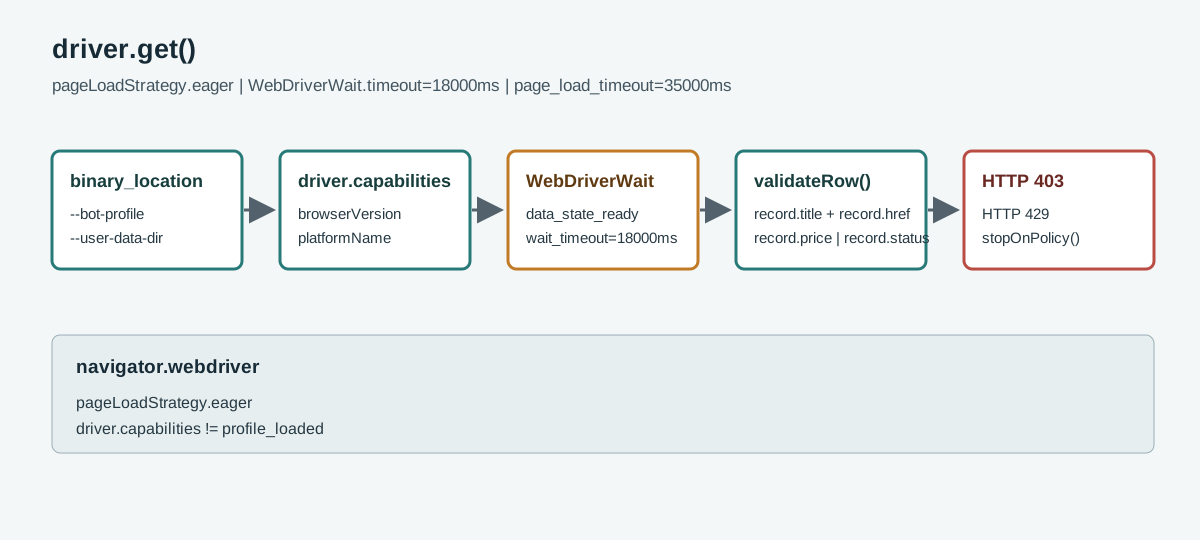
- Select the browser executable deliberately with the browser options API, then record the capabilities returned by the new WebDriver session rather than assuming the requested values were accepted.
- Keep the BotBrowser profile file, Chromium user-data directory, Selenium service, and run output as distinct inputs with explicit owners.
driver.get()reports a document navigation boundary; a catalogue application's client-rendered results need a separate, bounded readiness condition.- Validate a row as data: require its title, same-origin detail URL, and either a price or an explicit availability state before accepting it.
- A
navigator.webdrivervalue and the returned capabilities describe an automation-controlled session; they do not prove identity, authorization, profile loading, or a site's decision.
Contents
- Define the run and its evidence
- Select a browser and configure the session
- Record capabilities without over-reading them
- Wait for catalogue readiness
- Validate records and classify outcomes
- Keep the identity boundary explicit
- Practical conclusion
Define the run and its evidence
Start with one catalogue that you own or are authorized to collect. Write down its permitted entry URL, the fields needed by the downstream job, the maximum number of records, the request cadence allowed by its owner, and the stop conditions. This is not bureaucracy around a browser script: it separates a page that rendered an empty catalogue from a script that silently accepted malformed data. A bounded run could read one catalogue page, collect at most 40 visible cards, and emit one JSON line per accepted card. The value 40 is a task limit chosen by the owner, not a recommended rate for other sites.
Keep the task contract next to the code. For example, define title as trimmed non-empty text, href as an absolute URL on the approved catalogue origin, and price as either a decimal amount plus currency or an explicit availability value such as out-of-stock. Do not turn a missing value into a made-up default such as zero. A zero price, an absent price, and a price hidden behind a consent prompt are three different states. Preserve the distinction in the record so a consumer can decide whether that row is usable.
The run record should describe inputs that can change the result without retaining page contents unnecessarily: application fixture revision, entry URL, selected browser binary identifier, driver version, browser version, selected page-load strategy, locale when relevant, run start time, and a count of accepted and rejected records. Exclude account secrets, cookies, authorization headers, full profile directories, and unrelated page text. If a failure requires a screenshot or DOM excerpt, capture only the owned synthetic fixture or the smallest approved region, redact user data, and follow the application's retention policy.
Use a known fixture before connecting a production-like collection job. An owned fixture can expose a predictable ready marker, a small set of rows, one missing price, and a deliberate access-denied state. This lets the script prove that it accepts valid rows, rejects incomplete rows, and stops on a policy boundary. The fixture is a test of your extraction contract; it does not establish how a different site responds or what a detector infers.
For a list page with links that may lead to detail pages, decide whether detail navigation is in scope before implementation. The example deliberately records catalogue cards only. It does not visit their links, because detail-page navigation introduces a second page contract, additional requests, and a new permission boundary. A separate task can define those rules if the data owner authorizes it. The distinction keeps a list snapshot auditable and prevents a convenient loop from expanding the collection silently.
Select a browser and configure the session
Selenium's Chrome-specific documentation shows how Chrome options can select a browser binary and add browser arguments. That mechanism is where a runner chooses an installed Chromium-compatible executable; it does not certify compatibility for every downstream browser build or every driver version. Pin the browser and driver according to the environment's release process, and include both versions in the run record. If the session cannot start, diagnose binary discovery and driver compatibility before changing page selectors or the data schema.
BotBrowser's CLI recipes show a profile file passed with --bot-profile and an independent --user-data-dir; its profile configuration reference says CLI flags have priority over profile configuration and defaults, public legacy .enc files are read-only, the supplied profile input is file-based, and the profile major must match the binary major. Those are browser launch inputs. They are not Selenium capabilities and are not created by Options.set_capability(). In an environment that explicitly supports the selected binary and driver, an authorized runner may add the documented browser arguments to Chrome options. The runner must use an absolute, permitted profile path and a separate user-data directory, following the applicable product and organization policy.
from selenium import webdriver
from selenium.webdriver.chrome.options import Options
from selenium.webdriver.support.ui import WebDriverWait

options = Options()
options.binary_location = "/opt/approved-browser/chrome"
options.add_argument("--bot-profile=/srv/browser-inputs/profile.enc")
options.add_argument("--user-data-dir=/srv/browser-state/run-2026-11-08-01")
options.page_load_strategy = "eager"

driver = webdriver.Chrome(options=options)
try:
    driver.set_page_load_timeout(35)
    driver.get("https://catalogue.example.test/items")
    WebDriverWait(driver, 18).until(
        lambda browser: browser.find_element(
            "css selector", "[data-testid='catalogue-ready']"
        ).get_attribute("data-state") == "ready"
    )
finally:
    driver.quit()
The paths above are placeholders for paths configured by the authorized runner. Do not place credentials in the profile argument, source file, or logs. Do not reuse a profile or user-data directory concurrently. A managed directory can contain state that persists beyond one script invocation; assign one owner, decide whether it is ephemeral or retained, and close the browser before reuse. The Selenium driver sessions guide describes creating a session by constructing the driver and ending it with quit(). A finally block is important because navigation, readiness, and extraction can all raise before the normal end of the run.
For remote WebDriver or Grid, the browser executable and file paths are interpreted on the node that starts the browser, not necessarily on the process submitting Python commands. A local absolute path on the client machine is not a valid remote-node path merely because it exists locally. Make the node image, browser version, driver provisioning, profile delivery, and temporary storage contract explicit in the deployment. If the runner cannot prove where the profile file is mounted and who owns the user-data directory, do not start the session with ambiguous state.
Choose the page-load strategy for the document boundary, not as a shortcut for dynamic application readiness. Selenium documents normal as waiting for the complete document state, eager as returning when the document is interactive, and none as not waiting for a page-load state. The option applies to the WebDriver session. A slower or faster setting does not determine when a single-page application's catalogue data is usable; the explicit readiness condition still owns that application contract. For most data pages, begin with the default normal unless the application has a reason to return earlier and the script has an explicit page-level predicate.
Record capabilities without over-reading them
After the driver starts, store a small, reviewed projection of the returned driver.capabilities. Selenium's browser options reference documents common session capabilities including browserName, browserVersion, platformName, and pageLoadStrategy; the browser name is set when the corresponding options class is used. These values are a receipt for the negotiated WebDriver session. They let an operator compare what the runner requested with what the driver reports. They do not prove that an encrypted profile was accepted, that every profile-backed surface loaded, or that a website accepted the browser.
capabilities = driver.capabilities
capability_receipt = {
    "browserName": capabilities.get("browserName"),
    "browserVersion": capabilities.get("browserVersion"),
    "platformName": capabilities.get("platformName"),
    "pageLoadStrategy": capabilities.get("pageLoadStrategy"),
}
Validate the receipt before proceeding. If browserName does not identify the expected browser family, or browserVersion is absent from the runner's allowed range, stop and classify the environment as a session-configuration failure. Do not rewrite a result's version field from the requested binary path. If a driver exposes additional vendor-specific fields, keep them only when their meaning is documented and the collection owner needs them. Dumping the entire capabilities object can preserve implementation-specific metadata and make comparisons harder without improving the result.
Keep requested configuration and returned receipt as separate record fields. A configuration could say page_load_strategy="eager", while a driver response reports a different negotiated value; that discrepancy should be visible. Similarly, a profile path in runner configuration is an input, not an assertion that the browser loaded that profile. Confirm profile loading only through the documented product's supported startup evidence and the relevant authorized procedure. No BotBrowser execution or third-party response is claimed.
The receipt should be written before navigation, then updated with the terminal outcome. Useful terminal categories are session-start-failed, navigation-timeout, readiness-timeout, access-boundary, schema-rejected, complete, and cleanup-failed. Keep one category for the first failure that explains why collection stopped; a follow-on cleanup exception can be recorded separately. This avoids converting an access response into a selector error just because the script continued searching the page after the site told it to stop.
Wait for catalogue readiness
A successful driver.get() does not mean every catalogue row has been inserted or hydrated. It reports the selected document navigation boundary. Client-side code may fetch data after that point, render a loading placeholder, and later replace it with cards. Conversely, a page can continue downloading unrelated recommendations after the requested list is ready. Waiting for every network activity to cease is not necessarily a meaningful business condition. The collection should name the specific marker that means the owned catalogue's requested rows are ready.
Use one explicit WebDriverWait around a stable condition exposed by the authorized page. An element with a documented data-state="ready", an accessible status message, or a known result count can make a suitable predicate. Avoid polling for an arbitrary class used only by an animation or waiting a fixed 10 seconds. A fixed pause can waste time when the result is ready quickly and still fail when the service takes longer. A bounded wait returns an actionable outcome when the condition is not reached. Choose its timeout from the owned service budget; the 18 seconds in the code is illustrative, not a universal Selenium value.
The readiness predicate should be read-only. WebDriver may evaluate it repeatedly, so it must not click a control, submit a form, scroll to trigger additional records, or mutate the page as a side effect. If pagination is an authorized part of the collection, model it as separate transitions: verify the current page's ready condition, capture its accepted rows, perform one next-page action, then wait for the next page's distinct state or page identifier. Stop at the agreed maximum and record that the cap was reached. Do not keep clicking because a page number failed to change.
Throttling can produce different observable outcomes. A bounded retry-after response, an application status region asking the user to wait, a challenge page, a sign-in redirect, and a selector that no longer matches are not interchangeable. Respect the site's documented access policy and the owner's permitted request budget. When the page displays an access or policy boundary, stop the run and preserve only the minimal category needed by the owner. Do not automate solving challenges, bypassing controls, or increasing request intensity to force results. A Selenium script can report that the expected application state did not arrive; it cannot decide that continued access is allowed.
Validate records and classify outcomes
Extract each row into a typed record before serialization. Trim whitespace from visible text, resolve links relative to the catalogue URL, require the allowed origin, and reject malformed values. If prices have a locale-specific separator, parse them under the page's declared locale instead of deleting punctuation blindly. If the page can show both price and availability, preserve both. Avoid storing product descriptions or page text when the task only requires a title, URL, and price/status pair.
from urllib.parse import urljoin, urlparse

def normalized_origin(url):
    try:
        parsed = urlparse(url)
        hostname = parsed.hostname
        port = parsed.port
    except ValueError:
        return None
    scheme = parsed.scheme.lower()
    if scheme not in {"http", "https"} or not hostname or parsed.username is not None or parsed.password is not None:
        return None
    effective_port = port if port is not None else (443 if scheme == "https" else 80)
    return scheme, hostname.lower(), effective_port

def parse_card(card, page_url, allowed_origin):
    title = card.find_element("css selector", "[data-testid='title']").text.strip()
    href = card.find_element("css selector", "a[data-testid='detail-link']").get_attribute("href")
    absolute_url = urljoin(page_url, href or "")
    price_nodes = card.find_elements("css selector", "[data-testid='price']")
    status_nodes = card.find_elements("css selector", "[data-testid='availability']")
    price = price_nodes[0].text.strip() if price_nodes else None
    status = status_nodes[0].text.strip() if status_nodes else None

    if not title or normalized_origin(absolute_url) != allowed_origin:
        return None, "schema-rejected"
    if not price and not status:
        return None, "missing-price-or-status"
    return {"title": title, "href": absolute_url, "price": price, "status": status}, None
Build allowed_origin once from an allowlisted entry URL with the same normalized_origin function, not from an extracted link. This example accepts only HTTP and HTTPS and compares normalized scheme, hostname, and effective port, including the 80 and 443 defaults; malformed ports are rejected. Keep URL normalization centralized and test default ports, internationalized hostnames, redirects, and relative links. Never fetch a returned href just because a card contains one. Extraction and navigation are separate permissions.
Avoid treating an empty result set as successful collection. An empty list might be a valid catalogue, but it can also mean the readiness marker appeared before data insertion, a filter removed all rows, or the page contract changed. Require a result count or an explicit empty-state marker. If the page declares zero results, emit an empty-catalogue outcome with the page revision and stop; do not infer that the selector is broken or retry the same request indefinitely. If the expected ready marker itself is absent, classify a readiness timeout rather than returning an empty successful file.
The extraction loop should count outcomes and preserve a reason for every rejection. For instance, 36 accepted rows, two missing prices, and two same-origin violations are different from 40 accepted rows. A summary can report accepted=36, rejected=4, and counts by reason without retaining rejected page bodies. This makes a schema change visible while minimizing stored personal or commercial data. Reject duplicate normalized URLs if the downstream job expects one catalogue record per product, but report the duplicate count instead of silently overwriting an earlier row.
Use a failure table to direct diagnosis to the layer that owns it:
| Outcome | Evidence to retain | Next owner |
|---|---|---|
| Browser or driver cannot create a session | sanitized driver error, requested binary identifier, driver and browser versions | runner image owner |
| Capabilities do not match the allowlist | the four-field capability receipt and requested strategy | WebDriver configuration owner |
| Navigation exceeds its bound | entry URL host, timeout category, last ready state | application or network owner |
| Catalogue readiness is absent | ready-condition name, elapsed wait, result count if present | page contract owner |
| Row fails the schema | field-level reason and aggregate rejected count | extraction contract owner |
| Site reports an access boundary | response category or visible status, without challenge contents | site-policy owner |
quit() raises after another failure | original failure plus cleanup error category | runner lifecycle owner |
This table is not a license to collect more diagnostics than needed. A full HAR, profile copy, browser database, or authenticated screenshot can include credentials and unrelated activity. Start with the smallest useful evidence and expand only when the owner authorizes it and the privacy policy permits it. Keep output paths scoped to the run and expire them according to the project's data-retention rules.
Keep the identity boundary explicit
The profile file, browser binary, WebDriver options, and values exposed to page JavaScript are related but distinct layers. A profile configuration can supply documented browser settings, while command-line overrides take priority over profile configuration and defaults. The selected binary must be compatible with its profile major according to the product documentation. The driver capabilities then describe the negotiated WebDriver session. None of these facts alone proves every page-visible value, the continuity of an identity across runs, or how a server classifies the request.
MDN describes navigator.webdriver as a read-only Boolean indicating whether the user agent is controlled by automation. It is one browser-visible automation signal. It is not an identity token, permission grant, overall fingerprint, or verdict from a site's detection system. If an authorized owned fixture needs to record it for a compatibility test, record the boolean with its page and browser context; do not interpret it as a pass/fail score for unrelated access decisions.
Keep the same distinction in reports. A useful statement is “the WebDriver session started with browser version X and the fixture returned 36 valid catalogue records.” Unsupported statements include “the browser looked human,” “the profile proves the account identity,” or “the site will accept this session.” The first statement follows the returned capabilities and your own schema checks. The others claim external judgments that those observations cannot establish.
BotBrowser's public profile configuration reference and CLI recipes describe browser inputs; they do not establish Selenium-driver compatibility or rewrite WebDriver protocol semantics. A team must validate its particular binary, driver, profile package, operating system, and deployment configuration under its supported environment. Do not present a generic Selenium snippet as a product certification or promise that a third-party application will allow collection.
For an adjacent distinction, Selenium browser profile integration and session ownership covers storage ownership and profile lifecycle, while Selenium WebDriver waits and stable tests covers wait semantics in more depth. The scraping record stays bounded to a capability receipt, one page readiness condition, a row schema, and a stop boundary. Browser implementation details should not replace the data owner's permission or the application contract.
FAQ
Does driver.get() mean the catalogue is ready?
No. The page-load strategy marks a document state; an application can populate its results later. Wait for an owned, bounded readiness signal.
Do capabilities prove that a profile loaded?
No. They describe the negotiated session. Profile loading requires product-supported startup evidence and the authorized procedure.
Should every extracted link be opened?
No. Detail navigation expands the task and its requests. Do it only when the scope and authorization define that second contract.
Sources
- Selenium Chrome-specific functionality
- Selenium driver sessions
- Selenium browser options and capabilities
- BotBrowser CLI recipes
- BotBrowser profile configuration
- MDN: Navigator.webdriver
Practical conclusion
Treat a Selenium scraping job as a chain of independently checkable boundaries: an authorized task and record schema, a selected browser and driver, a returned capability receipt, a bounded readiness condition, validated rows, and a normal session shutdown. Keep the profile input and user-data directory distinct, report the first failure at the layer that owns it, and stop at a site's access boundary. The resulting record can explain what your runner observed in an owned catalogue. It cannot establish profile loading without the product's own evidence or predict a third-party site's decision.
This article is part of the guide: Browser Automation Getting Started: A First Run Map
Related Articles
Selenium Browser Profile Integration and Session Ownership
Getting StartedScraping with Puppeteer: Options and Observable Differences
Getting StartedSelenium WebDriver Waits for Stable Tests
Getting StartedScraping with Playwright: Browser and Profile Setup
Getting StartedBrowser Automation Release Pinning and Updates
Getting StartedWebDriver BiDi Events for Stable Browser Automation
Run the same check in BotBrowser
Load a profile, keep the signals you just read about consistent inside the browser, and confirm the result on your own machine before a rollout.