TLS Fingerprinting: JA3, JA4 and the HTTP/2 Frame
How a ClientHello becomes a JA3 or JA4 value, why one stays stable and the other changes between runs, what a SETTINGS frame states, and how to check your own client.
BotBrowser Team
Want the structured docs for Fingerprint?
This article lives in the editorial library. For step-by-step setup, reference material, and ongoing updates, jump into the docs section.
A fingerprint on the connection layer is computed from bytes that exist before any document does. BotBrowser provides a declared profile that keeps the surfaces a page can read consistent with each other, and it does not expose the TLS ClientHello or the HTTP/2 settings frame, because neither is a page surface. This article works from one captured ClientHello and one decoded settings frame, states how each fingerprint is assembled, and shows why two runs of the same browser can produce a stable value under one construction and a different value under another.
TL;DR
- JA3 joins five ClientHello fields in the order they appear and hashes the result, so the extension order participates in the value.
- A captured Chrome 157 ClientHello produced
t13d1517h2as its JA4 prefix: TLS 1.3, domain name present, 15 ciphers, 17 extensions, andh2from the first protocol name in the list. - Two runs of the same browser produced different JA3 values and an identical JA4 value, because Chrome randomizes extension order and JA4 sorts before hashing.
- The extension order changed completely between runs while the sorted set stayed the same, so an unsorted hash measures an ordering the client does not fix.
- A TLS 1.3 client reports
legacy_version0x0303 and puts the real version in the supported versions extension, so a version read from the legacy field alone says TLS 1.2 for a TLS 1.3 handshake. - The HTTP/2 SETTINGS frame is six-byte entries with a two-byte identifier and a four-byte value; a client and a server send different sets of them.
- Two handshakes that differ only in the offered protocol list reach the same TLS version on the same cipher and negotiate different protocols; a page can read the negotiated name but not the offered list behind it.
- A page script can read none of these values, and no page-side setting changes them.
Contents
- The ClientHello, its fields, and the JA3 order problem
- JA4, what the prefix states, and what TLS 1.3 hides
- The settings frame, run-to-run change, and proxy termination
- Checking your own client, and why a fingerprint is not a verdict
- Practical conclusion
The ClientHello, its fields, and the JA3 order problem
The first message of a TLS connection is the ClientHello. It states the versions the client supports, the cipher suites it accepts, and a list of numbered extensions. Capturing one from a local listener rather than from a library object is what makes the rest of the analysis checkable, because the bytes are the input the peer actually reads.
record_bytes=1949 handshake_bytes=1944
legacy_version=0x0303
offered_versions=0x0304,0x0303
sni=localhost
alpn=h2,http/1.1
cipher_count=15 extension_count=17
groups=11ec,001d,0017,0018
point_formats=0
Two lines in that output cause most of the confusion in this subject. The first is legacy_version=0x0303, which is the TLS 1.2 value even though this is a TLS 1.3 client; the real answer is in the supported versions extension at 0x0304. A tool that reports the legacy field as the version is reading the field correctly and answering a different question than the one the reader asked.
The second is the grease value in the extension list. A client inserts one to check that a server handles unknown numbers properly, and every fingerprint construction described here filters grease out. A parser that keeps those values produces a fingerprint that changes on every connection and matches nothing.
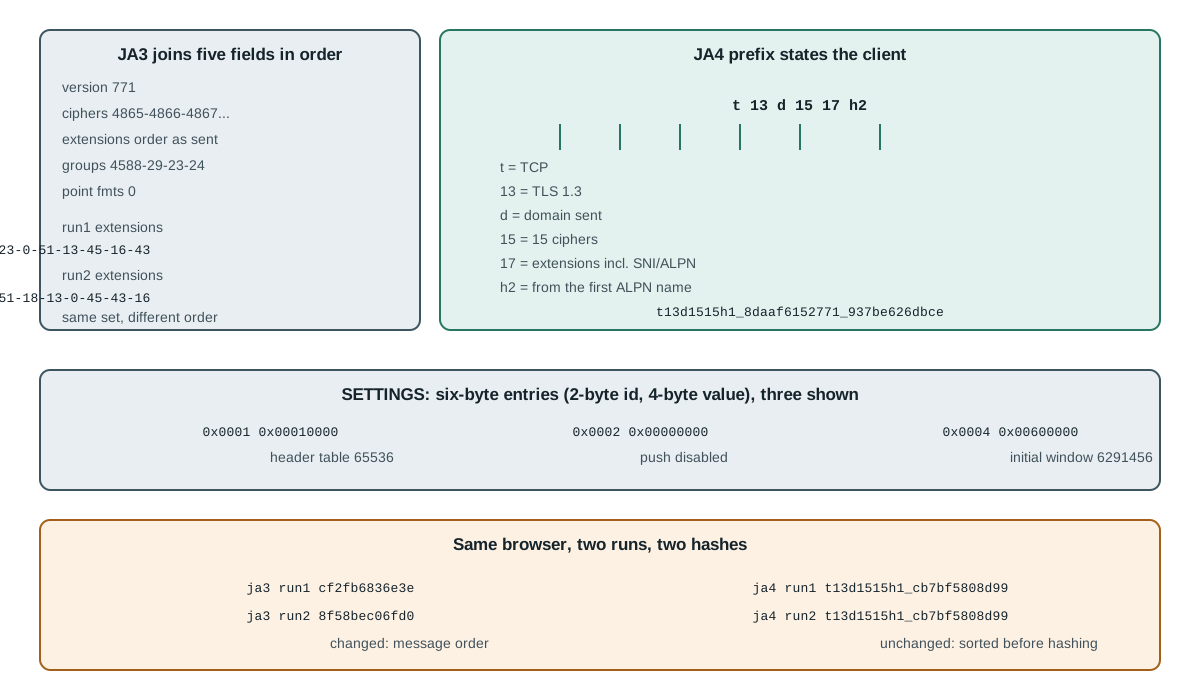
JA3 takes five fields from the ClientHello, writes them in a fixed order, joins them with commas and dashes, and takes an MD5 of the result. The fields are the version, the cipher list, the extension list, the elliptic curve list and the elliptic curve point format list. The construction is simple enough to state completely, and that completeness is why it spread so widely.
ja3_string=771,4865-4866-4867-49195-49199-49196-49200-52393-52392-49171-49172-156-157-47-53,17613-35-51-13-11-43-65281-5-0-65037-10-45-16-23-51764-27-18,4588-29-23-24,0
ja3=33bb5fa9c4be545f39008976c0f67d67
Read the second field of that string and the reason the value is fragile becomes visible. The ciphers are listed in the order the client offered them, and the order is part of the hash. The same set of fifteen ciphers written in a different sequence produces a different MD5 with no change to what the client supports.
The extension field carries the same weakness more strongly. Extensions are a list, and a client that shuffles the list still speaks the same capabilities. JA3 hashes the shuffle. That is not a defect in the definition, because the definition says what it says; it is a limit on what the value can mean, and a reader who treats a changed JA3 as evidence of a changed client is reading order as identity.
JA4, what the prefix states, and what TLS 1.3 hides
JA4 keeps the idea and changes two things: it sorts every list before hashing, and it puts a human-readable prefix in front so a value can be inspected without a lookup table. The prefix is a fixed sequence of characters, and each one states a specific fact.
ja4_prefix=t13d1517h2
ja4=t13d1517h2_8daaf6152771_cb7bf5808d99
The t marks a TCP connection. The 13 is the negotiated TLS version, read from the supported versions extension rather than the legacy field. The d states that a domain name was present, against i when the client connected to an address and sent none. The two-digit 15 after that is the cipher count, and the second pair, 17, is the extension count. The trailing h2 comes from the first protocol name in the offered list, taking its first and last alphanumeric characters, so h2 yields h2 and a list led by http/1.1 yields h1.
The value after the first underscore hashes the ciphers, and the value after the second hashes the extensions together with the signature algorithms. Because both lists are sorted first, reordering them does not move either hash. That single change is what separates a value that describes a client from a value that describes a particular message.
The prefix count and the hash count are not the same number. The prefix counts every non-grease extension, including the domain name extension and the protocol negotiation extension, so a capture with seventeen non-grease extensions states 17 in the prefix and hashes the remaining fifteen. The hashed part drops those two, because the prefix already states them, and hashes the remaining list together with the signature algorithms. A reader recomputing both by hand has to keep the two counts separate, and a prefix that comes out two low is usually the mistake of applying the hash exclusion to the prefix.
An HTTP/2 connection begins with a settings frame, and that frame is a list of six-byte entries: a two-byte identifier and a four-byte value. Six identifiers are defined, and a given client sends only some of them.
settings:chrome_like bytes=24 HEADER_TABLE_SIZE=65536 ENABLE_PUSH=0 INITIAL_WINDOW_SIZE=6291456 MAX_HEADER_LIST_SIZE=262144
settings:node_like bytes=30 HEADER_TABLE_SIZE=4096 ENABLE_PUSH=0 INITIAL_WINDOW_SIZE=65535 MAX_FRAME_SIZE=16384 MAX_CONCURRENT_STREAMS=4294967295
settings_distinct=true
Two clients that both speak HTTP/2 therefore send visibly different frames. The first declares a window of 6291456 and a header list limit of 262144; the second declares a window of 65535 and a frame size of 16384. The frame length itself differs, 24 bytes against 30, because the first sends four entries and the second sends five.
The direction matters as much as the content. A client sends one set and reads a different set from the server:
server_sees_client_settings -> headerTableSize=4096 enablePush=true initialWindowSize=65535 maxFrameSize=16384 maxConcurrentStreams=100
That output is what a server observed from its peer rather than what either side intended to declare. A reader who compares a captured frame with a documented default is comparing a message with a default, and those two disagree whenever the client omits an identifier, because an omitted entry keeps its default value.
The move to TLS 1.3 changed the fingerprinting subject in a way that is easy to state and easy to misread. Almost all of the handshake after the ClientHello is encrypted, including the certificate the server sends. A passive observer on the path therefore sees the ClientHello in the clear and then sees ciphertext. That is a real reduction in what an observer learns, and it has a specific consequence: the ClientHello became the most informative message in the connection, because it is the only one still readable.
The consequence for a fingerprint is narrower than it sounds. JA3 reads only the ClientHello, so TLS 1.3 did not remove its inputs; it made them a larger share of the total. JA4 was built with that in mind and reads the supported versions extension so a TLS 1.3 client is labelled 13 rather than the 12 its legacy field suggests. Both values describe the opening message and neither describes the encrypted exchange that follows.
There is a second, less obvious effect. In TLS 1.3 the client sends its key share in an extension, so a client that guesses the server's preferred group can send data one round trip sooner. The set of groups a client offers, and the order it offers them in, is therefore partly a performance decision rather than purely a compatibility one, and a build that changes its default group may change the cipher-adjacent part of the handshake without changing anything a page can read. A reader comparing two fingerprints across a version upgrade should expect movement in the group list and should not read it as a configuration drift.
A proxied connection raises the question of which client a fingerprint describes, and the answer is decided by where TLS terminates. When the proxy tunnels raw bytes, the client's own ClientHello reaches the target unchanged and the fingerprint belongs to the client. When the proxy terminates TLS and opens a second connection of its own, the target sees the proxy's ClientHello and the fingerprint belongs to the proxy.
tunnel_mode    -> target reads the client's ClientHello; value describes the client
terminate_mode -> target reads the proxy's ClientHello; value describes the proxy
That distinction explains a report that otherwise looks impossible: two machines with different browsers produce the same fingerprint, or one machine produces two different fingerprints on alternating requests. Neither is a measurement error. The first is a terminating proxy with a fixed stack in front of both browsers, and the second is a proxy pool whose members were built with different TLS libraries.
The practical test is the same capture described above, run at both ends. Capture at the client and capture what the target receives; if the two differ, something in the path rebuilt the handshake, and every downstream conclusion about the client now rests on the wrong message. This is also why a fingerprint comparison across two networks has to state the route rather than only the browser, since the route can be the variable that changed.
The settings frame, run-to-run change, and proxy termination
The most useful measurement of the set is the one that surprises people. The same browser, same version, same profile settings, launched twice against the same listener, produced two different JA3 values and one identical JA4 value.
run1: bytes=1949 ja3=b488a1aa72f7622264c0b7ecca9dcbf0 ja4=t13d1517h2_8daaf6152771_cb7bf5808d99
run2: bytes=1917 ja3=c88062ec9c84b56a124df18d005b1d9b ja4=t13d1517h2_8daaf6152771_cb7bf5808d99
same_ja3=false
same_ja4=true
A later pair of runs produced 1917 bytes against 1949 and the same two results, a different JA3 each time and one shared JA4. The byte count moves as well, because the grease values in the extension list vary in width, so an equal length is a coincidence of one pair rather than a property of the client.
The byte count differs between the two runs, which is the first clue that grease values moved: Chrome draws a fresh grease number for the cipher list, the extension list and the signature algorithm list on each connection, and those placeholders vary in width. Filter the grease out and the underlying sets match while the raw order still does not, which is why a sorted comparison holds and an unsorted one does not.
run1 ext order: 65037-11-35-0-23-13-5-65281-10-18-16-43-45-51764-17613-27-51
run2 ext order: 10-27-45-5-43-18-51-0-23-35-65037-16-11-17613-51764-65281-13
same_raw_ext_order=false
same_sorted_set=true
same_ja4=true
Three practical readings follow. A changed JA3 between two runs of the same browser is normal and is not evidence of misconfiguration, which is the first thing to rule out before investigating anything else. A JA4 that stays constant across those runs is describing the client rather than the message. And a tool that reports a JA3 without saying which message it came from has recorded a fact about one connection, not about a browser.
Other changes do move both values, and they are worth separating from reordering. A TLS library upgrade can add or remove a cipher, a build can add an extension, and a proxy that terminates TLS replaces the handshake entirely so the value belongs to the proxy rather than to the browser behind it. Each of those changes the sorted set, so a JA4 that moves is a different kind of event from a JA3 that moves.
Checking your own client, and why a fingerprint is not a verdict
The safe way to learn what your own client sends is to read a handshake you own. A local listener that accepts a connection and prints the first record is enough, and it needs no certificate because the handshake never completes.
import socket
import struct

server = socket.socket()
server.setsockopt(socket.SOL_SOCKET, socket.SO_REUSEADDR, 1)
server.bind(("127.0.0.1", 8443))
server.listen(1)

# Point the client you want to measure at https://localhost:8443 and accept its hello.
connection, _ = server.accept()
record = connection.recv(8192)
connection.close()
server.close()

length = struct.unpack(">H", record[3:5])[0]
print("record_type", record[0], "record_length", length, "captured", len(record))
print("first_bytes", record[5:9].hex())
Expect a record type of 22, which is a handshake record, and a length close to the captured byte count. A record type of 21 would mean the client sent an alert instead, which usually means it rejected something before the handshake began. The four bytes after the record header are the handshake type and a three-byte length. A capture that returns nothing usually means the client tried the address, failed, and moved on, which happens when a name resolves to an address you are not listening on.
Two rules make a capture usable. Point the client at your own listener rather than at a site you do not operate, because a capture of someone else's endpoint is a measurement of their connection and not of your client. And capture more than once, because a single message cannot tell you whether a value is stable; the run-to-run comparison above is the part that turns one number into a claim.
The values described here are descriptive, and the gap between describing a client and judging one is where most misreadings happen: t13d1517h2 states a set of handshake parameters, and it states nothing about who sent them. A JA4 that matches a known browser means the handshake is consistent with that browser's stack. It does not mean the session is legitimate, and a mismatched value does not mean the session is automated. A build compiled from the same source with a different TLS library, a corporate middlebox that rewrites the handshake, and a browser running behind a terminating proxy all produce a mismatch without any automation being present.
That is why a connection-layer value is normally read together with other evidence rather than on its own. A single value carries one fact: these handshake parameters were offered on this connection. Turning that fact into a claim about a session requires a second observation from a different layer, and the claim is only as strong as the agreement between them. A page that reports one environment and a handshake that reports another is the interesting case, and it is interesting precisely because one of the two is measurably wrong.
For anyone operating a browser fleet, the useful habit is to record the value together with the route and the timestamp rather than in isolation. A stored fingerprint with no route cannot answer the question a later reader will ask, which is whether the client changed or the path did. The measured pair in the run-to-run section above is the smallest version of that record: two runs, one route, one value that moved and one that did not.
Practical conclusion
Read a JA3 as a fact about one message and a JA4 as a fact about a client, and the confusing reports stop being confusing. The extension order a JA3 hashes is shuffled by the client between connections, so a changed JA3 with an unchanged JA4 is the expected result rather than a fault. A TLS 1.3 handshake reports legacy_version 0x0303 on purpose, so a version read from that field alone understates the protocol. And a settings frame describes what a client declared to one peer, with omitted identifiers left at their defaults, which is why two HTTP/2 clients can look different while both being correct. Which detection rules need a wire value shows where these facts enter a decision, and network information fingerprinting covers the neighbouring facts a page can reach on its own.
None of this makes a page-side profile responsible for the handshake. A declared profile can keep the readable surfaces consistent with each other The client that consumes this construction without a browser is covered in curl-impersonate and curl_cffi TLS parity, which measures what such a client matches and what it never reaches., and the handshake is produced below them by the TLS stack, so a consistent document and a stable handshake are two separate results obtained in two separate places. Treating the first as evidence of the second is the mistake that turns two separate results into one false conclusion.
Sources
This article is part of the guide: What Is a Browser Fingerprint?
Related Articles
curl-impersonate and curl_cffi: TLS Parity Limits
FingerprintEdge-Layer Rules a Page Script Cannot Evaluate
FingerprintClient Hints Fingerprinting: HTTP Headers as Identity
FingerprintFrame Rate Fingerprinting: Refresh Rate and Video Timing
FingerprintBrowserLeaks Canvas Report: Signals and Limits
FingerprintCreepJS CSS Computed Style Collector: What It Reads
Run the same check in BotBrowser
Load a profile, keep the signals you just read about consistent inside the browser, and confirm the result on your own machine before a rollout.