Web Share Target PWA Ingress and Privacy
Design a Web Share Target PWA that validates GET and POST ingress, limits data retention, and keeps a safe fallback.
BotBrowser Team
Want the structured docs for Platform?
This article lives in the editorial library. For step-by-step setup, reference material, and ongoing updates, jump into the docs section.
A Web Share Target PWA can receive a browser-mediated share request, but it cannot know why a person chose a source or whether every field was meant to leave that source. BotBrowser can replay an owned fixture and inspect the receiving route, validation state, and fallback; it cannot select the operating-system source or certify a person's disclosure decision.
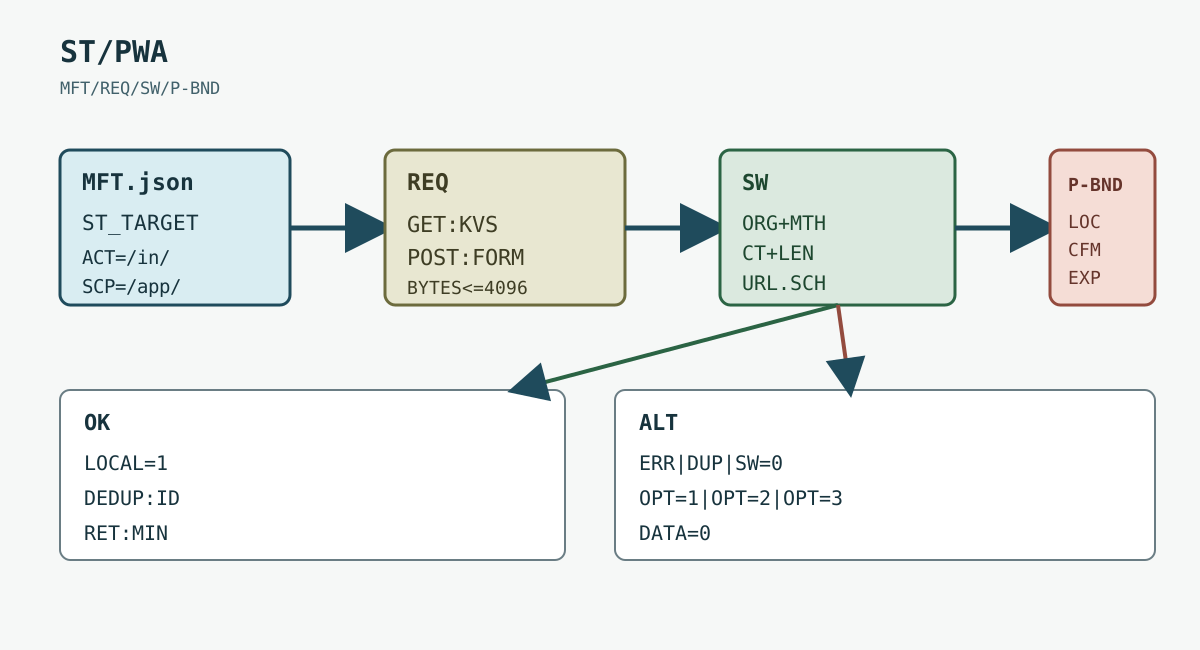
TL;DR
- Treat
share_targetas an untrusted ingress contract, not an identity signal. - Validate
GETquery values andPOSTform data before rendering or storing them. - Keep the manifest
scope, route, and accepted fields deliberately narrow. - Make duplicate deliveries idempotent and retain only the minimum useful data.
- Keep a normal navigation or copy fallback when a browser cannot install or invoke the PWA.
Contents
- Manifest and request parsing
- Validation, privacy, and fallback
- Implementation and acceptance
- Practical conclusion
Manifest and request parsing
The WICG Web Share Target proposal defines a manifest share_target member that maps incoming shares to a URL, method, and parameter names. MDN's Web Share Target API reference describes the browser feature as an installed-PWA handoff. The declaration is not an authentication token, sender identity, or promise that shared data is safe to keep. For the app-level status signal that is separate from ingress, see Badging API PWA notification boundaries.
BotBrowser can replay an authorized same-origin fixture and inspect the visible route, validation state, and fallback. It cannot choose the operating-system share source or certify what a person decided to disclose; keep those limits in the product contract and support language.
Keep the declaration explicit and small. A public URL-only target might look like this:
{
  "share_target": {
    "action": "/inbox/share",
    "method": "GET",
    "params": { "title": "title", "text": "text", "url": "url" }
  },
  "acceptanceMetadata": { "fixtureRevision": 3 }
}
The action must remain inside the manifest's application scope. Do not use a catch-all route when one inbox route is enough. For a broader storage boundary, see Browser storage model: cookies, localStorage, and IndexedDB, which separates origin-owned state instead of treating a PWA profile as one opaque bucket.
GET places mapped values in the action URL. A URL can be copied into history, logs, referrers, screenshots, or analytics, so never put bearer tokens, private document text, or account identifiers in query parameters. Normalize length and encoding before the first template render.
POST keeps the body out of the action URL but still crosses a browser-to-application boundary. The manifest can declare application/x-www-form-urlencoded or multipart/form-data; the receiver must reject an unexpected content type and cap the body before parsing. Files need a separate size, type, and malware policy. A successful parse is not permission to persist the original body.
Use one bounded record for a fixture so reviewers can compare outcomes without retaining content:
{
  "method": "POST",
  "route": "/inbox/share",
  "fields": ["title", "text", "url"],
  "bodyBytes": 4096,
  "outcome": "validated-local-draft",
  "fixtureRevision": 3
}
The MDN share_target manifest member lists the supported shape and parameter mapping. Keep the same mapping in the manifest, parser, and tests; a renamed url field that silently becomes empty is a data-loss bug, not a privacy feature.
Validation, privacy, and fallback
The service worker may receive the navigation and route it to a controlled client, or the page may handle the request after navigation. Either way, validate origin, method, content type, field length, and allowed URL scheme before displaying the data. Reject javascript: and unexpected embedded credentials even when the value looks like a link.
Do not infer a sender from Referer, user-agent, or timing. Those values are incomplete and may be omitted. A service worker registration also does not prove that the current page is controlled: check the visible route and the application's own version marker. For cache ownership and update races, compare this flow with Service worker cache lifecycle and privacy, which explains why an old worker can continue serving an older response.
Treat a stale worker as a bounded failure. Show the incoming values only after validation, preserve the original route when parsing fails, and give the person a retry or copy action. Never loop a failed POST back through the share target without an idempotency key.
A share source may retry after a timeout, and a user may invoke the same target twice. Create an application-owned request identifier, deduplicate within a short window, and record only a status such as accepted, rejected, or expired. Do not log raw text, file bytes, or the complete URL when an opaque fixture identifier is sufficient.
Keep private content local until the user confirms the next action. A “save” button can create a server record with its own authorization and retention rule; merely opening the share target must not do so. Delete temporary parsed data after the visible draft is accepted or cancelled. A service worker cache should not become an accidental archive of incoming shares.
The browser handoff does not establish a new account relationship. If the product invites a collaborator, run a separate confirmed operation and audit it independently. A share target is an ingress convenience, not an access-control decision. For a related permission boundary, see Web Share API permission boundaries and safe fallbacks, which distinguishes a share request from delivery confirmation. The companion guide to Web Share API and user-initiated sharing adds the activation and cancellation constraints that apply before this target receives anything.
For Web Share Target specifically, BotBrowser can replay an authorized fixture and inspect the visible ingress route, validation result, and fallback. It cannot choose a real operating-system source or prove what a person disclosed, so this capability is a bounded UI and request check rather than a privacy certification.
Test the receiver with synthetic GET and POST requests, an oversized body, an unknown field, an invalid URL, a duplicate identifier, and a missing service worker. Assert visible states and the bounded record, not an operating-system chooser. A controlled fixture can verify that 4096 bytes are rejected or accepted according to the declared limit; it cannot prove what a real source application will send.
Keep an ordinary /inbox/share navigation, copy-link action, or paste field available when installation, manifest parsing, or browser support is absent. The fallback should preserve the task without importing the same data through a wider route. MDN's guide to sharing data between apps describes the user-facing relationship between a sharing PWA and a target PWA; it does not replace an application's retention review.
Implementation and acceptance
The manifest is configuration, not a parser. Read its share_target member at build time, reject an action outside the application scope, and generate an allow-list that the runtime can compare against the incoming request. A useful review artifact records action, method, enctype, and every parameter name. It should also record the manifest revision, because a worker and a page can be updated at different times. A request handled by revision 2 must not be silently compared with an expectation written for revision 3.
For a GET target, construct a URL from the request URL and read only the declared keys. URLSearchParams.get() returns the first value, while repeated keys can be inspected with getAll(). Decide whether repeats are rejected or reduced to one value; do not let framework defaults choose. Decode percent escapes once, convert invalid UTF-8 to a rejection, trim only where the field contract permits it, and enforce limits after decoding. For example, a title limit of 120 Unicode scalar values and a text limit of 4,000 values should be checked before rendering, not after a database column truncates them.
The URL itself is sensitive even when the values look harmless. A reverse proxy may log the full path, browser history may sync it, a referrer may expose it to another origin, and a screenshot or analytics event may capture it. Set a Referrer-Policy appropriate to the application, remove the query string with a same-origin redirect after a validated draft is created, and ensure the redirect does not turn a rejected request into an accepted one. The redirect is a cleanup step, not an authorization step.
For POST, first check request.method, the Content-Type header, and the declared enctype. Parse application/x-www-form-urlencoded with a maximum byte count and a maximum number of fields. For multipart/form-data, require a boundary, reject nested multipart parts unless explicitly supported, and cap both total bytes and each part. Check Content-Length when present, but still enforce a streaming limit because chunked requests have no trustworthy declared length. Abort the body reader as soon as the cap is exceeded and return a stable 413 or visible too-large state.
The example only establishes a parser boundary. Production code still needs a streaming implementation, a multipart library with an explicit limit, and an error mapping that never echoes the body. Never display an exception message containing a field value. A form parser that accepts an unknown admin, redirect, or callback field has widened the contract even if the application ignores it later; reject unknown names before business logic.
The url field has its own policy. Parse it as a URL, require https: or an explicitly reviewed http: exception, reject username and password components, and decide whether fragments are discarded. A URL that points to the same share endpoint can create a redirect loop, while a data: URL can contain megabytes of encoded content. If the product accepts only public links, reject private-network hostnames at the server boundary as well as dangerous schemes in the page. This is input validation, not a claim that a link's destination is safe.
Files, replay, and CSRF. multipart/form-data can carry a file even when the visible product only asks for a title and URL. Define a separate file allow-list, maximum size, and count. Check the declared MIME type for routing, then inspect magic bytes in a quarantine step; the header alone is supplied by the sender. For a small image fixture, a policy might allow image/png and image/jpeg up to 2 MiB, one file, with a decoded-pixel limit. Reject archives, scripts, and polyglot files unless a separate review explicitly supports them. Do not put an uploaded temporary path in the acceptance record.
Keep file bytes in a short-lived quarantine owned by the request, not in the service-worker cache or a shared browser database. Scan or process before a user-approved save, detach the temporary name from the original filename, and delete on cancel, timeout, parse failure, and expiry. A successful MIME check is not malware scanning, and a local draft is not consent to upload. If the application cannot inspect a file in the current environment, show file-review-unavailable and retain the fallback rather than silently accepting it.
Web Share Target is a navigation-style ingress, so ordinary CSRF assumptions still matter. A same-origin request can carry ambient cookies, and the target route may be reached outside the OS share sheet. Require an application session, a short-lived CSRF token for state-changing persistence, or an explicit confirmation before server-side save. Do not treat the presence of share_target as proof that the browser invoked the route through sharing. The route must be safe when pasted into the address bar and when opened by a normal link.
An idempotency key prevents retries from creating two drafts, but it does not authenticate the sender. Generate a random request identifier at the application boundary, bind it to the current session and manifest revision, and expire it after a short, documented window. If the same key arrives with different method details or a different session, classify it as key-conflict and do not merge the records. A replay of the identical request can return the original bounded outcome such as accepted-local, duplicate, or expired without returning the original private fields.
Do not use a timestamp alone as a replay key. Clock skew, delayed delivery, and two legitimate shares in the same second make it ambiguous. Do not derive a replay marker from raw text and call the marker anonymous: a short title or URL can be guessed and compared. Prefer an opaque fixture ID in logs, and keep any request comparison record access-controlled and short-lived. The privacy boundary includes telemetry, crash reports, session replay, queue request bodies, and support exports, not only the primary database.
Acceptance records. An acceptance record is useful when it lets a reviewer reproduce a visible branch without retaining the shared material. Include the fixture revision, browser and operating-system label, route, method, declared enctype, body byte count, accepted field names, validation result, duplicate classification, fallback state, and deletion deadline. Exclude title text, URL values, filenames, file bytes, cookies, authorization headers, and the complete query string. A stable record can be compared across browser versions while remaining unsuitable as a content archive.
{
  "fixtureRevision": 3,
  "route": "/inbox/share",
  "method": "POST",
  "enctype": "multipart/form-data",
  "bodyBytes": 4096,
  "fields": ["title", "text", "url"],
  "fileCount": 0,
  "validation": "accepted-local",
  "replay": "new",
  "csrf": "confirmed",
  "retention": "delete-after-cancel"
}
A decision table makes the contract reviewable:
| Boundary | What the result establishes | Safe next action |
|---|---|---|
| Unsupported manifest or no installed target | The browser cannot invoke this ingress here | Keep normal navigation and paste fallback |
GET with an oversized or repeated field | The URL contract is invalid | Remove query data, show a bounded error, and do not persist |
POST with an unexpected MIME type | The declared body contract was not met | Abort parsing and return content-type-rejected |
| File over the per-file limit | The file policy was exceeded | Delete the temporary part and show the size rule |
| Valid fields without confirmation | A local draft can be displayed | Keep it local; do not create a server record |
| Same idempotency key and same request details | A duplicate delivery was observed | Return the previous coarse outcome without request body |
| Same key with different details or session | A replay conflict exists | Reject, alert minimally, and require a new action |
| Missing or stale service worker | The intended worker path is unavailable | Preserve the route and offer copy or retry |
The table separates what a browser observation establishes from what the product might wish it established. A visible accepted-local state proves that this fixture passed the page's checks. It does not prove that the source application sent only those fields, that a user intended every value, or that a later server save obeyed the stated retention period.
BotBrowser capability and limitation. For this Web Share Target topic, BotBrowser can replay an authorized same-origin GET or POST fixture, inspect the manifest route, exercise service-worker validation, and assert visible outcomes for accepted, rejected, duplicate, oversized, missing-worker, and fallback cases. The BotBrowser platform documentation describes the controlled browser boundary. BotBrowser cannot open an operating-system share chooser, select a real source application, observe a person's disclosure decision, scan an external file pipeline, or certify deletion performed by a server outside the fixture.
Keep the result narrow and explicit: record accepted-local, duplicate, rawContentKept=false, osShareSource=not-observed, and serverRetention=not-certified instead of claiming a system chooser or server deletion was observed.
Repeat the same fixture after changing one variable: action, scope, accepted fields, enctype, body limit, service-worker version, idempotency window, or fallback route. Compare the first visible state divergence. A pass in a controlled context is evidence for the page and request contract; it is not a universal compatibility statement for every operating system share surface or a privacy certification.
Sources
- WICG Web Share Target
- MDN: Web Share Target API
- MDN:
share_targetmanifest member - MDN: Share data between apps
Practical conclusion
Declare one narrow share_target, parse GET and POST through the same validation rules, and keep acceptance separate from persistence. An idempotent fixture and a visible fallback make browser variation reviewable without turning a mediated handoff into sender identity or delivery proof. The next safe action is to rerun the owned fixture after every manifest, service-worker, accepted-field, or retention-policy change.
This article is part of the guide: Web Platform Surfaces: A Consistency Review Map
Related Articles
Web Share API: Permission Boundaries and Safe Fallbacks
PlatformWeb Share API and User-Initiated Sharing
PlatformBadging API for PWA notification boundaries
PlatformBrowser Extension Content Scripts and Page Isolation
PlatformRecover a Browser Session After a Network Interruption
PlatformSpeculation Rules: Prefetch and Prerender Boundaries
Take BotBrowser from research to production
The guides cover the model first, then move into cross-platform validation, isolated contexts, and scale-ready browser deployment.