Web Scraping JavaScript: Rendering, Pagination, Scroll
Web scraping a JavaScript site returns no data: decide whether it is a selector bug, an XHR you could call directly, or a page that needs rendering, then page and scroll.
BotBrowser Team
Want the structured docs for Getting Started?
This article lives in the editorial library. For step-by-step setup, reference material, and ongoing updates, jump into the docs section.
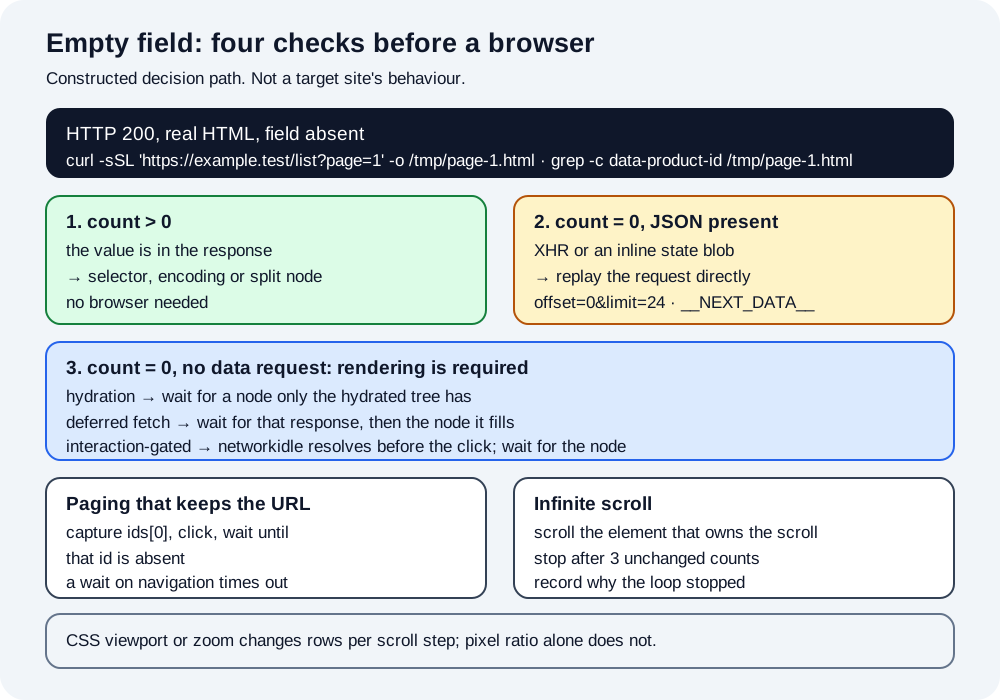
Web scraping a JavaScript-rendered page usually starts with the same three seconds of confusion: the request returned HTTP 200, the HTML is real, and the field is not in it. The useful next step is not to install a headless browser, because a large share of these cases are answered by a request you can send yourself, and a browser turns a fast and stable job into a slow one. The diagnosis has an order, and the order is what this page is about. BotBrowser supplies a declared rendering environment for the cases that genuinely need a browser, so the layout the page computes matches the layout the target expects; it does not decide which of the three causes applies, and it does not make a third-party site return different data.
TL;DR
- Read the raw response before reaching for a browser. If
curlalready contains the value, the problem is your selector, not rendering. - If the value is absent, check the network log for a JSON or HTML request that carries it; calling that request directly is usually faster, cheaper and more stable than rendering.
- Only the third case needs a browser, and it splits three ways: data that appears after hydration, data fetched by a request the page issues post-load, and data that appears only after an interaction. A state object serialized into the initial HTML is not one of them, because it is readable without a browser.
- Pagination and infinite scroll are the same problem in two shapes: the trigger is not a URL change, so a loop that waits for navigation will silently re-read the first page.
- Stop on a signal the page produces, not on a count you assumed. "No next button" and "the container stopped growing" are different signals and each can be wrong.
Contents
- Read the raw response first
- Find the request that carries the data
- When rendering is actually required
- Pagination that does not change the URL
- Infinite scroll and its stopping rule
- Practical conclusion
Read the raw response first
The first measurement costs one command and settles most of the argument. Fetch the page with the same URL and the same headers the browser would send, and search the bytes for the value you expected.
curl -sSL -H 'accept-language: en-US,en;q=0.9' 'https://example.test/list?page=1' -o /tmp/page-1.html
grep -c 'data-product-id' /tmp/page-1.html
Three outcomes, three different jobs. A non-zero count means the value is in the response and the parser is at fault, which is a selector or encoding bug and has nothing to do with rendering. Zero means the server sent a shell, and the next step is to find out what fills it. An HTTP status other than 200 means neither, and the response body usually names the reason.
The same check works in reverse for a field that looks present but parses wrong. A value that arrives escaped, wrapped in a JSON string, or split across two adjacent nodes will pass a naive substring test and fail a strict selector, which is why the count matters more than the eyeball.
Find the request that carries the data
When the shell is empty, the value usually arrives in one of two places: a network request the page makes after load, or a state object serialized into the initial HTML. Both are readable without a browser.
For the network case, open the page once in a normal browser, filter the network panel to XHR or fetch, and look for a response whose body contains the field. Copy that request as curl and compare it with the page request. The differences are usually a header, a cookie, or a query parameter the page computes at runtime, and each difference is testable.
import requests

session = requests.Session()
session.headers.update({"accept": "application/json", "accept-language": "en-US,en;q=0.9"})
listing = session.get("https://example.test/api/list?offset=0&limit=24", timeout=30)
listing.raise_for_status()
rows = listing.json()["items"]
print(len(rows), rows[0]["id"])
For the state case, search the raw HTML for a script tag that carries a JSON blob, often with an identifier such as __NEXT_DATA__, __NUXT__, or an inline window.__STATE__. If the field is inside that blob, the page has already given you the data and a parser can read it directly.
Two tests decide whether the direct request is worth keeping. Replay it twice and compare byte counts, then replay it from a different network location if the workload requires one. A response that changes shape between two identical requests is not a stable source, and a rendered page would not fix that either; it would only hide the instability behind a slower pipeline.
A fourth outcome deserves a sentence because it looks like a missing value and is not one. Some pages answer a request differently depending on who asked: the same URL returns a full document to a browser that presents a plausible client and a stub to a request that presents none. That is not a rendering problem and it is not a selector problem; it is a server decision, and the observable difference is that the response body itself changes shape rather than filling in later. Recording the response size and a short hash of the body across a few requests is enough to tell that case apart from a shell that would have hydrated.
The distinction matters for cost as much as for correctness. A job that replays one JSON request per page can run hundreds of pages per minute on a small machine; the same job through a browser spends most of its time on startup, navigation and paint. Choosing the browser path for a case the direct request could have answered is the most expensive mistake in this whole workflow, and it is invisible because the slow version also works.
When rendering is actually required
The third case is real, and it is the one a browser exists for. It also splits into three shapes that need different waiting strategies, and picking the wrong one produces the classic "works locally, fails in CI" report.
| Shape | Where the data appears | What to wait for |
|---|---|---|
| Hydration | After the framework boots and replaces the shell | A node that only the hydrated tree contains |
| Deferred fetch | After a request the page issues post-load | The response for that request, then the node it fills |
| Interaction-gated | After a click, a tab switch or a filter change | The node the interaction is supposed to produce |
Waiting for networkidle does not distinguish the shapes at all. Playwright defines it as no network connections for at least half a second, so it resolves on any quiet page: an interaction-gated page is quiet until someone interacts, and a deferred fetch scheduled to fire later is also quiet when the wait begins. On a fixture that schedules its fetch after a short delay, the wait resolved before the request existed and the extraction read zero rows. Waiting a fixed delay covers all three on a fast machine and none of them under load, which is why a fixed delay is the most common cause of a scraper that passes review and fails in production.
from playwright.sync_api import sync_playwright

with sync_playwright() as p:
    browser = p.chromium.launch(executable_path="/path/to/botbrowser/chrome")
    context = browser.new_context(locale="en-US", timezone_id="America/New_York")
    page = context.new_page()
    page.goto("https://example.test/list", wait_until="domcontentloaded")
    page.wait_for_selector("[data-product-id]", state="attached", timeout=30_000)
    rows = page.eval_on_selector_all(
        "[data-product-id]",
        "nodes => nodes.map(n => n.getAttribute('data-product-id'))",
    )
    print(len(rows), rows[:3])
    browser.close()
The selector in wait_for_selector should be the same one the extraction uses. A wait on a generic container passes as soon as the shell exists, and the extraction then reads zero rows; a wait on the attribute that carries the value fails loudly instead, which is the outcome you want.
A rendered page also needs a decision about what to keep. The DOM after hydration is larger than the HTML that produced it, and a naive save of page.content() at every step turns a 40-page run into gigabytes of near-duplicate markup. Keeping the extracted rows plus a small provenance record (URL, request that produced the data, timestamp, renderer mode) is enough to re-check a result and cheap enough to keep for every page.
That provenance record is also what makes a regression diagnosable. When a field disappears next month, the question is whether the page changed, the renderer changed, or the request changed, and only a record that names all three can answer it. A run that stores just the extracted rows cannot distinguish the three, and the usual response is to re-render everything and hope.
Pagination that does not change the URL
The URL-parameter case is the easy one: increment the parameter, request again, stop when the response repeats or the item list is empty. The two harder cases are an API cursor and a button that mutates the DOM in place.
For a cursor, the next request needs a value from the previous response, so the loop has to carry state rather than count pages. A loop that increments page=2 against a cursor endpoint will either return the first page again or an error, and either way it looks like a parsing failure rather than a pagination failure.
For a button, the failure is the opposite. The URL does not change, so a loop that waits for a navigation event waits forever or times out, and a loop that clicks and immediately reads gets the previous page. The reliable pattern is to capture a value from the current page, click, then wait until that value is absent.
from playwright.sync_api import TimeoutError as PlaywrightTimeoutError

def read_ids(page):
    return page.eval_on_selector_all(
        "[data-product-id]",
        "n => n.map(x => x.getAttribute('data-product-id'))",
    )

def click_and_classify(page, previous_ids, timeout_ms=15_000, poll_ms=100, end_confirm_ms=3_000):
    """Click next, then return "changed" or "end-marker", or raise.

    "end-marker" is returned only when the page's own control reports the end and
    keeps reporting it for end_confirm_ms. A control that is disabled while the
    next page loads is not an end, and an unchanged list is not proof of an end,
    so anything else raises instead of returning a completion the page never gave.
    """
    button = page.query_selector("[data-testid=next-page]")
    if button is None or button.is_disabled():
        return "end-marker"
    button.click()
    budget = timeout_ms
    marker_for = 0
    while budget > 0:
        page.wait_for_timeout(poll_ms)
        budget -= poll_ms
        if read_ids(page) != previous_ids:
            return "changed"
        button = page.query_selector("[data-testid=next-page]")
        if button is None or button.is_disabled():
            marker_for += poll_ms
            if marker_for >= end_confirm_ms:
                return "end-marker"
        else:
            # Re-enabled without repainting: the next page is still loading.
            marker_for = 0
    raise PlaywrightTimeoutError(
        f"no list change and no end marker for {end_confirm_ms} ms within {timeout_ms} ms"
    )

seen = set()
reason = "loop guard"
for _ in range(200):
    ids = read_ids(page)
    new_ids = [i for i in ids if i not in seen]
    if not new_ids:
        reason = "no new ids"
        break
    seen.update(new_ids)
    if click_and_classify(page, ids) == "end-marker":
        reason = "end marker held"
        break
print(len(seen), reason)
The stopping rule is the part that fails quietly. "No next button" is not the same as "no more results": a disabled button and a missing button both surface as query_selector returning None or is_disabled() returning true, and the two look identical unless the reason is recorded. An infinite-scroll container that keeps a hidden next button will loop forever, which is why the loop needs a hard bound as well as a soft signal.
The classification is the part that is easy to get wrong, and the trap is that inactivity looks the same in three different situations: the list ended, the next page is still loading, and the click did not register at all. A last page commonly disables its own button instead of rendering a new set, which is why a disabled control is treated as an end marker rather than an absence of change; but a page that disables its control while it fetches the next page produces the same state for as long as the fetch takes. The confirm window is what separates them, and it has to be longer than the slowest repaint the job has shown, not longer than the fastest. That window is also the method's limit rather than a detail: a load slower than the window still reads as an end, and the fix is to measure the slowest repaint on the target before choosing the number instead of taking a default from someone else's page. When neither a repaint nor a held marker appears, the call raises, because an unchanged list is not evidence that the list ended and a run that reports completion on that evidence is wrong in the direction nobody notices: it looks finished.
One more paging shape appears often enough to name: a list that paginates through a form submission rather than a link. The URL may change, but the page is repainted from a POST response, so a loop that follows links finds nothing to follow. The fix is the same principle as the button case: submit, then wait for a value from the previous result set to disappear, and record the request that produced the new one.
Sorting interacts with all of these. A list sorted by a field that changes while the job runs, such as price or recency, can reorder between pages, which produces duplicates and skips even when the paging logic is correct. Recording a stable identifier per row and de-duplicating on it is what turns a reordered run into a correct set rather than a plausible-looking one with holes.
Infinite scroll and its stopping rule
Infinite scroll replaces the button with a sentinel. Two mechanisms drive it, and they fail differently: a scroll listener that compares scrollTop with scrollHeight, and an IntersectionObserver that fires when a sentinel enters the viewport. The observer version always delivers an initial callback, so an off-screen sentinel reports a non-intersecting entry with ratio 0 and then stays silent until the sentinel enters the root. That is why a script that scrolls the window by a fixed number of pixels can load nothing on a layout where the container itself scrolls rather than the window: the observer keeps reporting that the sentinel never entered.
The reliable loop scrolls the element that actually owns the scroll, waits for the item count to change, and stops when the count is unchanged for several consecutive attempts.
stable_rounds = 0
last_count = page.eval_on_selector_all("[data-product-id]", "n => n.length")
while stable_rounds < 3:
    count = page.eval_on_selector_all("[data-product-id]", "n => n.length")
    if count == last_count:
        stable_rounds += 1
    else:
        stable_rounds = 0
        last_count = count
    page.eval_on_selector("[data-scroll-root]", "el => el.scrollBy(0, el.clientHeight * 2)")
    page.wait_for_timeout(600)
print("rows:", last_count, "stopped after", stable_rounds, "unchanged rounds")
Three consecutive unchanged rounds is a heuristic, not a proof, and the record should say so. A slow backend can produce three unchanged rounds while a fourth would have loaded more, so the count belongs in the output next to the stopping reason.
Memory is the second limit. A list that grows past a few thousand rows makes every subsequent eval_on_selector_all slower, and the page can begin to discard off-screen nodes, which means a later read returns fewer rows than the page has. Writing each batch to disk as it arrives keeps the run bounded and makes a partial result inspectable.
The rendering environment changes which content is in the viewport, and that matters for exactly one of the shapes above. A lazily loaded list fires its observer when a sentinel enters the viewport, so a viewport that is smaller than the target expects loads less per scroll, and a viewport that is larger loads more. Layout is computed in CSS pixels, so device pixel ratio alone does not change how many rows fit at a fixed viewport; what changes the fit is the CSS viewport size, a zoom level, or a device-emulation scale that alters the layout viewport rather than only the raster density. BotBrowser documents and provides profile-supplied screen dimensions and device pixel ratio among the values a profile carries, which is what makes those inputs declarable rather than incidental, and it does not decide whether a page needs rendering or make a target return data it withholds.
This is the one place where "the scraper is broken" and "the rendering environment differs" look identical from outside. A run that stops early on one machine and completes on another, with the same code and the same target, is usually a difference in the CSS viewport, the zoom level or the layout viewport rather than a detection response, and the way to tell is to record the viewport and the row count together. When the viewport is identical and the counts still differ, the remaining explanation is the target behaving differently for that session, which is a different investigation.
Two operational habits keep a rendered job honest over time. The first is to fail on a zero-row extraction rather than to write an empty file: a run that produces a file with headers and no rows looks successful in a dashboard, while a run that raises looks like a bug. The second is to keep one recorded page per run, saved with its response body and its extracted rows, so a later reader can reproduce the difference between what the server sent and what the extraction produced without re-running the whole job.
Neither habit needs a browser. Both become more valuable when a browser is in the path, because the gap between the response and the DOM is the part that changes without any code change on your side. A team that records the raw response, the renderer mode and the row count for every page can answer "did the page change or did we" with one lookup, and a team that records only the rows cannot answer it at all.
Practical conclusion
Diagnose before rendering: read the raw response, then the network log, and only then open a browser. When rendering is required, wait on the node that carries the value rather than on the shell or on a clock. For pagination and scroll, capture a value from the current page and wait for it to change or disappear, and record the reason the loop stopped so a truncated run is visible as truncated. The browser selection criteria covers how to compare candidates on these workloads, and the SERP throughput planning guide covers what changes when the same loop runs at scale.
A last note on concurrency, because it changes the paging logic more than people expect. Two workers paginating the same list will each see a moving window, and a cursor endpoint will hand them overlapping or skipping slices depending on how it was implemented. Paging is a stateful walk over a sequence that can change underneath the walk, so the safe shapes are one walker per sequence or a partitioned query that makes each worker own a disjoint slice. Recording which worker produced which page turns an overlap into an observation instead of a mystery.
Sources
This article is part of the guide: Browser Automation Getting Started: A First Run Map
Related Articles
Headless Browser Scraping: What Actually Changes
DeploymentJob Board Scraping: Browser Boundaries
Getting StartedScraping with Playwright: Browser and Profile Setup
DeploymentScraping Indeed Jobs: Fields, Pagination and Duplicates
Getting StartedBrowser Automation Getting Started: A First Run Map
Getting StartedBest Browser for Web Scraping: Six Criteria
Run the same check in BotBrowser
Load a profile, keep the signals you just read about consistent inside the browser, and confirm the result on your own machine before a rollout.