Document Picture-in-Picture: Permission and Window Boundaries
Learn how Document Picture-in-Picture creates a same-origin document window, why user activation matters, and how to keep an accessible fallback.
BotBrowser Team
Want the structured docs for Platform?
This article lives in the editorial library. For step-by-step setup, reference material, and ongoing updates, jump into the docs section.
BotBrowser can validate supported Document Picture-in-Picture controls and close fallbacks in controlled profiles. It cannot grant browser support, replace transient user activation, control window placement, or guarantee behavior across engines.
TL;DR
Document Picture-in-Picture opens a separate same-origin document window after a user action. Treat support and activation as runtime conditions, listen for close, and keep the same task available in the page when the request is rejected or unavailable.
Contents
- What the API changes
- Support and activation checks
- Window lifecycle and privacy
- An accessible fallback
- Conclusion
What the API changes
The Document Picture-in-Picture API is different from video Picture-in-Picture. Instead of detaching a video track, an application requests a new browser-managed window and moves a document into it. The proposal describes documentPictureInPicture.requestWindow() and the enter event; MDN documents the API as limited-availability functionality. The new document remains same-origin with the opener when the browser permits it, but that is not cross-origin access and is not a way around browser mediation.
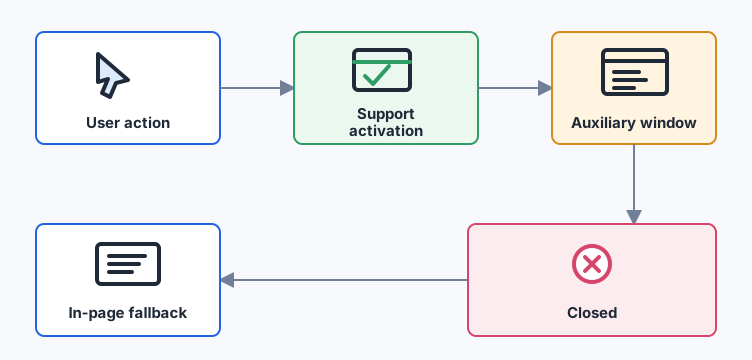
The useful product question is not whether a browser exposes a global object. It is whether the user's current task can continue in a small auxiliary surface. A control panel, transcript, or reference view may benefit from the window; an application should still work when that surface cannot be created.
Support and activation checks
Feature detection should be narrow and paired with a real click or keyboard activation. Do not call the request while loading the page, from a timer, or as a reaction to unrelated network data. The browser may reject the promise if support, activation, policy, or another window constraint is missing.
async function openPanel(panel) {
  if (!('documentPictureInPicture' in window)) return showInline(panel);
  try {
    const pip = await documentPictureInPicture.requestWindow({ width: 360, height: 240 });
    pip.document.body.append(panel);
    pip.addEventListener('pagehide', () => showInline(panel), { once: true });
  } catch {
    showInline(panel);
  }
}
The check is a capability branch, not a browser identity signal. Avoid sending the complete capability object to analytics. If product telemetry is necessary, retain only an outcome such as opened, unsupported, or rejected, with a documented purpose and retention period.
Window lifecycle and privacy
The auxiliary document has its own lifecycle. It can be closed by the user, by navigation, or by the browser. Move the task back to the page when the window disappears, and do not treat an open window as durable storage. Keep sensitive state in the minimum origin-scoped data needed for the task; never assume that a detached view is a private container.
Same-origin access lets an application coordinate its own UI, not inspect unrelated sites. The API does not expose a recipient, a user's window inventory, or a stable device attribute. A test should record the requested size, whether creation resolved, and whether close recovery worked, rather than collecting browsing history or window identifiers.
An accessible fallback
The in-page version must remain keyboard reachable and announce state changes. The button should expose whether the panel is open, focus should move predictably, and closing the auxiliary window should restore focus to the originating control. A fallback can be a dialog, a disclosure region, or a normal page section; it should preserve the same actions and cancellation path.
Test four outcomes with synthetic content: supported and opened, supported but rejected, unsupported, and closed after content is shown. BotBrowser can repeat those controlled checks where the runner exposes the API, but it cannot make an engine expose it. Compare visible task completion and recovery, not a promise that every browser has identical window behavior.
A practical compatibility model.
A useful test matrix separates four questions that are often collapsed into one. First, does the browser expose the API at all? Second, was the request made during a user activation that the browser still considers current? Third, did the promise resolve and create a usable document? Fourth, can the application return the task to the page after the auxiliary window closes? These are different outcomes with different remedies. A missing property needs a fallback. A rejected request may need a user-facing retry from a button. A resolved request with broken styling needs an asset or layout fix. A close event needs state restoration and focus management.
Keep those outcomes in the release record. A compact row can include the browser family and version, operating-system family, application revision, requested dimensions, activation method, result code, and fallback result. It should not include a full browser profile, account identifier, browsing history, or a serialized window object. Synthetic text and a generated panel are enough to reproduce the lifecycle without retaining a user's document.
The dimensions are hints, not a contract. A browser or operating system may clamp the requested width and height, place the window differently, or apply a minimum size. The application should measure the resulting viewport and adapt its layout instead of assuming the request was honored exactly. A narrow panel can use a stacked layout, larger hit targets, and a visible close action. If the result is too small for the task, return to the in-page version rather than hiding controls or forcing a second request.
User activation is a product boundary.
Transient activation is deliberately short-lived. A click handler can begin an asynchronous preparation step, but long work before requestWindow() may consume the activation before the call occurs. Prepare the panel before the user presses the button where practical, or make the button action do the smallest possible synchronous setup before requesting the window. Do not simulate a click, dispatch an unrelated event, or ask for a window after an arbitrary timeout and call that a compatibility test. Such a test measures the test harness rather than the user-facing flow.
Keyboard activation matters too. A focused button triggered by Enter or Space should reach the same request path as a pointer click. The control needs a label that explains the result, and it should remain usable when the feature is unavailable. A disabled button with no explanation turns a capability difference into an unexplained dead end. Prefer an enabled control that opens the in-page panel or explains why the auxiliary view is unavailable.
Keeping state coherent across documents.
Moving a node into the new document changes its owner document and can affect styles, event listeners, focus, and form state. Use a small component with explicit setup and teardown rather than moving an entire application tree without a plan. Copy the styles needed by the panel, register listeners in the new document, and remove them when the window closes. If a framework owns the component, follow its supported portal or reparenting mechanism so that cleanup still runs.
The page and the auxiliary document should share a narrow state model. For example, the page can own the selected item and the panel can render it; a close event then tells the page to render the same item inline. Avoid using the auxiliary window as the only source of truth. If navigation or a crash removes it, the task should be recoverable from the page state. This also makes privacy review easier because the state that crosses the boundary is explicit and can be minimized.
Failure and cancellation handling.
There are several normal failure paths: the browser may reject the request, the user may close the window immediately, a required font or stylesheet may fail, or the page may navigate while the panel is open. Each path should produce a bounded state transition. Show a short explanation, keep the source task intact, restore focus where possible, and offer the same action inline. Do not silently upload data to a remote service merely because the auxiliary window could not be created.
Cancellation is not an error. A user who closes the panel may simply be done with that view. Record a cancellation only if the application needs an aggregate product metric, and prefer an event such as closed without content or identity fields. If a workflow is incomplete, say so and leave a recoverable draft rather than displaying stale auxiliary content as if it were current.
Privacy review questions.
Ask four privacy questions before shipping. What data is copied into the auxiliary document? Can the task work with a short-lived identifier or a redacted summary instead of the original content? What telemetry is collected when support is missing or a request is rejected? What happens to temporary state when either document closes? These questions apply even when both documents share an origin. Same-origin access is an application capability, not a promise that the data is private from every script running in that origin.
Keep feature detection separate from identity. A server does not need to know that a particular person opened a Picture-in-Picture window in order to serve a fallback. If an aggregate metric is useful, strip account identifiers where possible, define a retention period, and explain the purpose. Do not combine a capability result with detailed hardware or network fields to create a long-lived browser label. Document Picture-in-Picture describes a presentation choice, not a stable device property.
BotBrowser validation boundaries.
BotBrowser is useful for repeatable, authorized comparisons when a team needs to check a profile, browser version, or operating-system family. A controlled fixture can click the same button, record whether the request resolved, inspect the resulting document dimensions, close the window, and verify that the page restored the task. Run the fixture with synthetic content and preserve the browser version and test date so a later result can be compared fairly.
That evidence has a limited meaning. It shows what the selected build and runner did for the declared fixture. It does not prove universal support, guarantee that a production site will accept the feature, or reveal how another engine will place a window. It also does not grant a permission that the browser would otherwise deny. Keep the product statement bounded: BotBrowser helps teams test a controlled browser context and observe visible outcomes; it does not turn an optional web capability into a browser-wide guarantee.
Release checklist.
Before release, confirm that the user-facing control works with pointer and keyboard activation, the support check is close to the request, and the rejection path leaves the original task intact. Confirm that the panel has a visible close action, that focus returns to a sensible element, and that the in-page fallback has equivalent actions. Test a constrained viewport and a stylesheet failure. Test navigation and immediate close. Finally, inspect telemetry and logs for accidental content, account, or full capability-object collection.
After release, monitor only aggregate outcomes needed for product maintenance. A sudden increase in unsupported may indicate a browser rollout or a feature-policy change; it is not evidence that users have a different identity. A rise in rejected may indicate an activation regression. Use the small result codes and a reproducible fixture to investigate, then update the compatibility note or fallback. Do not respond by weakening the activation boundary or by collecting more personal data.
Choosing the right fallback surface. The fallback should match the reason the auxiliary window was requested. A reading aid can become an in-page aside with a heading and a skip link. A meeting control can remain in the main document with a compact, keyboard-operable toolbar. A live transcript can use a dialog that is clearly labelled and can be dismissed without losing the source. Reusing the same component logic reduces differences between the auxiliary and inline paths, while keeping the page as the owner of the task state makes recovery predictable.
Do not make the fallback depend on a second optional API. If a panel needs a particular storage feature, permission, or media capability, check that dependency separately and explain its effect. A user should not receive a chain of opaque prompts merely because the first presentation surface was unavailable. The page can state that the auxiliary view is unavailable and still offer the core action. This is especially important on managed devices where feature policy, browser configuration, or accessibility settings can differ from a developer workstation.
Testing across updates. Browser support is not static. Repeat the four outcome matrix after a browser update, a change to the document component, a change to feature policy, or a change to the page's focus and styling code. Keep the fixture and the expected user-visible result stable while changing one input at a time. If a result changes, record whether the difference was API exposure, activation handling, window dimensions, rendering, close recovery, or accessibility. Do not collapse all of those observations into a single compatibility score.
For a cross-platform comparison, use the same synthetic panel, same requested dimensions, same activation method, and same close action. Record only the fields needed to explain a difference. A result that differs between two browser families is a compatibility fact for those builds; it is not a measurement of a person's hardware or a reason to attach a persistent identifier. When a feature is experimental, publish the tested browser range and a date so readers can understand the evidence's shelf life.
The same discipline applies to screenshots and support tickets. Capture the visible state only after the panel has settled, redact names and document text, and label the browser build and date beside the image. A screenshot can show that controls remain reachable after a close, but it cannot prove support on every device. Pair visual evidence with the small outcome code and the fixture revision so another reviewer can reproduce the observation without receiving a user's content.
When documenting a limitation, describe the observed user effect rather than speculating about an implementation detail. “The request was rejected without activation” tells an engineer what to change; “this browser is unsafe” does not. Likewise, “the panel returned to the page after close” is useful evidence, while “the window is permanent” is an unsupported promise. This vocabulary keeps support notes actionable and prevents a presentation feature from becoming an accidental fingerprinting claim. It also gives translated versions a stable semantic unit: the event, the visible result, and the next action remain the same even when headings and examples are localized.
Operational ownership. Assign one owner for the component and one reviewer for the fallback and privacy behavior. The owner maintains the support check, lifecycle listeners, and focus restoration. The reviewer checks that no new telemetry field contains panel content, window identifiers, or unrelated profile data. When a browser update changes behavior, the owner can rerun the fixture and the reviewer can compare the bounded result with the documented claim. This division keeps a small feature from turning into an undocumented exception in the wider browser identity system.
Conclusion
Document Picture-in-Picture is a user-mediated presentation surface, not a permission shortcut or an identity signal. Gate it on support and activation, recover on close, minimize telemetry, and keep an accessible in-page path. That makes the feature useful without turning a browser capability into a privacy claim.
Next reading
Compare this lifecycle with screen wake locks and user control and browser session lifecycle.
Public sources
Related Articles
Take BotBrowser from research to production
The guides cover the model first, then move into cross-platform validation, isolated contexts, and scale-ready browser deployment.