View Transitions API: State and Navigation
Coordinate document.startViewTransition with DOM state, ready and finished promises, history, abort handling, and reduced-motion fallbacks.
BotBrowser Team
Want the structured docs for Platform?
This article lives in the editorial library. For step-by-step setup, reference material, and ongoing updates, jump into the docs section.
The View Transitions API can make a same-document route change feel continuous, but the animation is only one part of the contract. BotBrowser can replay an authorized fixture and record bounded DOM, lifecycle, and preference states; it cannot make an unsupported browser implement view transitions or certify what assistive technology announces. Pair this guide with Navigation API history and privacy and media-query preferences and user control when a transition is also a route or motion-preference decision.
TL;DR
- Call
document.startViewTransition()around one synchronous DOM commit, and make the update callback idempotent. - Treat
transition.readyas the point when the captured pseudo-elements can animate; treattransition.finishedas the settled visual phase. - A rejected update or an aborted transition is a controlled fallback, not proof that the route failed. Keep the new DOM state usable.
- Update application state before measuring the new layout, and never record the same navigation or rectangle in both route and transition telemetry.
- Respect
prefers-reduced-motion: reduceby keeping the state change and history entry while disabling or shortening the animation.
Contents
- Model the lifecycle
- Handle ready, finished, and abort
- Keep navigation history and measurements single-counted
- Build a reduced-motion fallback
- Run a bounded state matrix
- BotBrowser capability boundary
- Practical conclusion
Model the lifecycle
The CSS View Transitions specification describes a transition as a snapshot of the old rendering, an update callback, and a new rendering that can be animated through view-transition pseudo-elements. The JavaScript entry point is document.startViewTransition(updateCallback). It returns a ViewTransition object immediately, even though the callback and captures happen later. The return value is a lifecycle handle, not a promise that the route has completed.
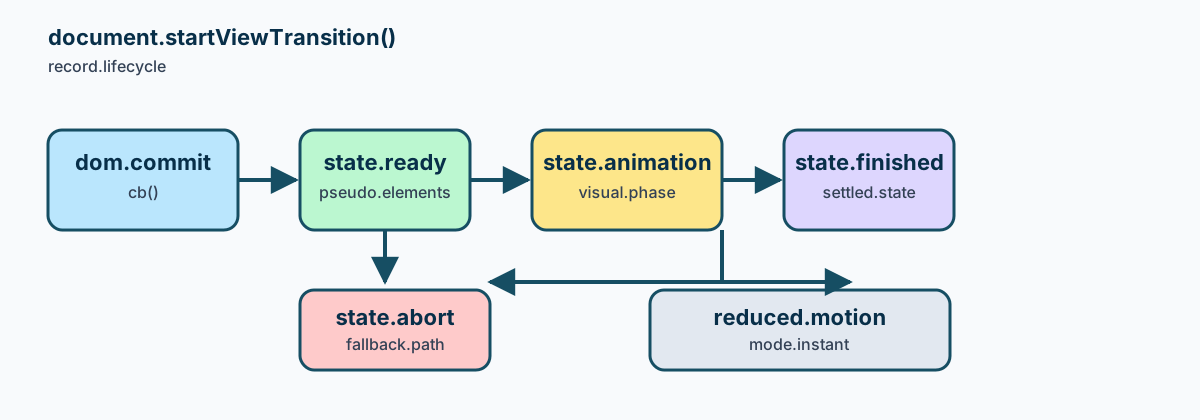
The sequence is easier to reason about when it has explicit states:
| State | Meaning | Safe record |
|---|---|---|
requested | The application accepted one transition request | navigationId, route, motion preference |
updating | The callback is changing the owned DOM | updateStarted: true |
ready | New pseudo-elements are available for animation | ready: true, no claim about paint completion |
animating | CSS animation is running or an instant reduced-motion path is active | animationMode |
finished | The transition settled or was skipped after a valid update | finished: true |
aborted | Capture, update, or animation could not continue | abortReason, fallback state |
This state list prevents a common measurement error: counting requested, ready, and finished as three navigations. They are phases of one application event. Keep a stable navigationId through the sequence and write one terminal outcome. A browser may skip animation while still committing the DOM state, so a finished record does not imply that a non-zero duration was visible.
Feature-detect the method at the boundary. A missing document.startViewTransition should select the same route update without visual capture. Do not wrap the entire router in a feature check that changes history semantics: the route and its accessibility state should be identical whether the enhancement is present or absent.
Commit DOM state once
The update callback is the authority for the new DOM state. Keep it synchronous and small enough to finish before the transition's capture phase. Framework code can still render components, but the callback should not start a second navigation or await a network request that has no bounded result. Fetch data before requesting the transition, or commit a loading state first and let a later action start another transition.
let navigationId = 0;

function showRoute(route, render) {
  const id = ++navigationId;
  const commit = () => {
    render(route);
    document.documentElement.dataset.route = route;
  };

  if (!document.startViewTransition) {
    commit();
    return Promise.resolve({ id, mode: 'fallback', outcome: 'committed' });
  }

  const transition = document.startViewTransition(commit);
  return transition.finished.then(
    () => ({ id, mode: 'view-transition', outcome: 'finished' }),
    error => ({ id, mode: 'view-transition', outcome: 'aborted', error: error.name })
  );
}
The callback must be safe if an event fires twice. Guard the router's admission point, not the CSS animation: a second click should either be ignored or receive a new, deliberate navigationId. Calling history.pushState() in both the click handler and render() creates duplicate entries even when only one transition is visible. Keep route selection, history mutation, and DOM commit owned by one function.
DOM consistency matters because the old and new snapshots are captured around the callback. If a component reads a mutable store halfway through a render, the old snapshot can show one label while the new DOM contains another route's data. Freeze the route record for the callback, render from that record, and update the store only once. Do not mutate a second shared element from an unrelated observer during capture. A mismatch is an application race, not an instruction to retry the transition blindly.
Use stable view-transition-name values only for elements that represent the same semantic object across states. A card that disappears should not reuse a name for an unrelated alert. If a name is duplicated, the user agent can reject the capture and the transition may abort. Keep a plain layout path for unnamed or newly inserted elements so content remains readable when a capture cannot be produced.
Handle ready, finished, and abort
transition.ready resolves after the new pseudo-element tree is ready for animation. It is useful for adding a class or starting an associated effect, but it is not a “the user saw the new page” signal. The promise rejects when the transition cannot run, such as a duplicate named element or a callback failure. Attach a rejection handler even when CSS supplies the visual effect.
transition.finished resolves after the animation reaches its end or the user agent has completed a no-animation path. It is the right place to remove temporary classes and release a transition-specific lock. It is not a second route event. Record the terminal state once, then let the router accept the next request. A timeout around finished can protect a stuck integration, but a timeout must be labelled as an application safeguard rather than a browser result.
const transition = document.startViewTransition(updateRoute);
const record = { navigationId, ready: false, outcome: 'updating' };

transition.ready.then(
  () => {
    record.ready = true;
    record.outcome = 'animating';
  },
  error => {
    record.outcome = 'aborted';
    record.abortReason = error.name;
  }
);

transition.finished.then(
  () => {
    record.outcome = 'finished';
    releaseRouteLock();
  },
  error => {
    record.outcome = 'aborted';
    record.abortReason = error.name;
    releaseRouteLock();
  }
);
If the update callback throws, keep the current document usable and show the existing error or retry affordance. If the transition is skipped because the document is not eligible, the route still needs a normal commit. An aborted animation should not roll back a successful state update unless the application has a separate transaction requirement. The important distinction is domCommitted versus animationOutcome; collapsing them into one boolean hides a usable fallback.
Do not use skipTransition() as a generic error handler without recording why. A reduced-motion preference, a low-power policy, and an exception are different reasons. The first two can deliberately choose an instant path; the last one needs a visible recovery state. Keep abortReason in a bounded allowlist such as unsupported, duplicate-name, update-error, reduced-motion, or superseded.
When a new navigation supersedes an active transition, stop accepting visual callbacks from the old record. The old DOM may already be committed, so the replacement should render from the current route rather than trying to restore an obsolete snapshot. This rule prevents a late finished handler from unlocking the router after a newer request has taken ownership.
Keep navigation history and measurements single-counted
History and transitions have different owners. pushState() or the Navigation API decides whether a route creates a history entry; startViewTransition() decides whether the DOM change gets a visual treatment. Call the history operation once, then pass the resulting route to the transition callback. A popstate or navigation.currentEntry change should use replaceState semantics already chosen by the router, not push a second entry because an animation started.
The Navigation API and history guide covers entry ownership and back/forward behavior. Keep its navigationId in the transition record rather than inventing transitionId as another visit counter. One route event can have one transition attempt and one terminal visual outcome. If the API is unavailable, preserve the same history call and set mode: "fallback".
Geometry is similarly easy to double-count. Measure the committed DOM after ready only when the product question is “what layout did the new state expose?” Measure after finished only when the question is “what settled layout remained after animation?” Do not capture both and add their rectangles to one metric. Store a phase label with a single bounded rectangle, or keep the two samples as explicitly separate observations.
function measureOnce(phase, navigationId, element) {
  const rect = element.getBoundingClientRect();
  return {
    navigationId,
    phase,
    rect: {
      top: Math.round(rect.top),
      left: Math.round(rect.left),
      width: Math.round(rect.width),
      height: Math.round(rect.height),
    },
  };
}
The numbers are viewport-relative and depend on scroll, zoom, fonts, and the active route. Record the viewport and visualViewport offset when geometry is the actual acceptance criterion. Do not turn a rectangle into an identity signal or retain page text beside it. A screenshot can complement the record, but it cannot tell you whether the route was counted twice.
Navigation events can arrive while a transition is pending. Lock the route owner, admit one request, and mark a later request superseded before rendering its replacement. For back/forward, let the history event choose the target entry; the transition is an enhancement of that committed decision. This ordering avoids the “back button plus pushState” loop where every pop creates a new entry and the user never leaves the page.
Build a reduced-motion fallback
The MDN prefers-reduced-motion guide describes a user preference that can be queried in CSS and JavaScript. Honor it before choosing a long movement or opacity effect. The state update, focus destination, route, and history entry must still happen; the preferred change is to remove or shorten motion, not to remove content or navigation.
::view-transition-old(root),
::view-transition-new(root) {
  animation-duration: 0.18s;
  animation-timing-function: ease-out;
}

@media (prefers-reduced-motion: reduce) {
  ::view-transition-group(*),
  ::view-transition-old(*),
  ::view-transition-new(*) {
    animation-duration: 0s;
    animation-iteration-count: 1;
  }
}
If a user changes the preference while a route is open, the next transition should read the current value. Do not persist a copied preference in a profile record or treat it as a browser identity. A JavaScript check can choose to skip the API entirely, but the no-animation branch must still run the same DOM commit and history code. Set animationMode: "instant" and keep motionPreference: "reduce" in the bounded result.
Accessibility also includes focus and reading order. After a route commit, move focus only when the route contract says to do so, and announce a meaningful heading through the existing application mechanism. A visual transition does not create a focus trap, an accessible name, or a screen-reader announcement. Test keyboard and assistive technology separately from the animation lifecycle, and provide a visible close or skip path for any persistent overlay.
Avoid flashing content during reduced motion. A one-millisecond cross-fade can still be uncomfortable if large regions change abruptly. Prefer a stable instant swap, preserve the focus target, and keep the new heading in the DOM before resolving the application-level “route ready” state. If a transition is disabled because the browser lacks the API, use the same fallback; users should not receive a different navigation model merely because enhancement support differs.
Run a bounded state matrix
Use one same-origin fixture with a stable route record and one fresh profile per row. Keep the data, viewport, and font loading state fixed so the row difference identifies a lifecycle decision.
| Row | Condition | Expected result | What it proves |
|---|---|---|---|
| A | API available, normal motion | DOM commits, ready and finished settle once | Preferred lifecycle |
| B | API unavailable | Same DOM and history, mode: fallback | Compatibility path |
| C | Duplicate transition name | DOM recovery remains usable, abort reason recorded | Named-element failure handling |
| D | prefers-reduced-motion: reduce | Same route and focus, instant or skipped animation | User-control fallback |
| E | Back/forward entry | One history event, no extra pushState | Navigation ownership |
| F | New request while pending | Old record becomes superseded | Stale callback protection |
An audit row can stay small:
{
  "fixtureId": "vt-nav-01",
  "navigationId": "route-17",
  "mode": "view-transition",
  "motionPreference": "no-preference",
  "domCommitted": true,
  "ready": true,
  "outcome": "finished",
  "historyAction": "push",
  "measurementPhase": "ready",
  "browserVersion": "155.0"
}
The record separates the route decision from the visual outcome. Keep one historyAction, one navigationId, and at most one named measurement phase. Do not copy URL query values, page text, or focus transcripts into a reusable artifact. If row E creates two entries, fix the router before tuning CSS. If row C loses the DOM update, inspect the callback and named elements before retrying. If row D changes focus, treat it as an accessibility regression even when the screenshot looks correct.
Keep the transition lock close to the route owner. A lock should prevent two commits from competing, but it must not block a normal back action forever when an animation is skipped. Release it from both the finished and rejection paths, and release it during teardown when the component is removed. A bounded owner record can contain navigationId, routeKey, mode, domCommitted, ready, outcome, and abortReason. Those fields explain the handoff without retaining the page body.
The update callback should preserve semantic landmarks. If the new route replaces a main heading, keep one h1 and move focus to it only when the route contract requires that behavior. Do not duplicate a heading in an old and new snapshot to make the animation look continuous. A visual clone is an implementation detail; the accessible tree should expose one coherent current page. Test the DOM after an abort as well as after a successful animation, because a recovery view can otherwise leave two live labels.
When a stylesheet changes during a transition, treat the change as a fixture revision. A new view-transition-name, a different contain rule, or a changed animation duration can alter capture behavior without changing route logic. Record the revision beside the result and compare the first changed lifecycle field. This keeps a CSS regression separate from a history regression and avoids repeating the same navigation measurement under two unrelated revisions.
For a production rollout, make the fallback the default correctness path and the animation an enhancement. Ship the route update, focus policy, history behavior, and error recovery first; then enable the transition for the smallest supported browser set. If a browser update changes the selected pseudo-element or makes ready reject, the route remains usable and the bounded record identifies the reason. A screenshot difference can start an investigation, but it is not enough to claim that navigation semantics changed.
Do not retry a rejected transition by calling startViewTransition() from its own rejection handler. That can create an event loop and duplicate the history action. Instead, mark the attempt aborted, render the already selected route if necessary, and let the next user action request a fresh transition. The same rule applies when a component unmounts: clear listeners, release the owner, and ignore late promise callbacks.
BotBrowser capability boundary
BotBrowser supports replaying a view transition in this authorized fixture, preserving the route and motion preference, and recording the visible lifecycle labels. BotBrowser cannot force a browser build to expose startViewTransition, guarantee compositor timing, or certify an assistive-technology announcement. A replay demonstrates the fixture's behavior under its browser, viewport, profile, and stylesheet; it is not a universal support score.
Sources
- CSS View Transitions Module Level 1 (CSSWG)
- MDN:
Document.startViewTransition() - Chrome for Developers: View Transitions
- MDN:
prefers-reduced-motion - BotBrowser platform capabilities
Practical conclusion
Own one route decision, one DOM commit, and one terminal transition outcome. Use ready for the captured pseudo-element phase, finished for cleanup, and an explicit abort record for unsupported or failed paths. Preserve history and focus semantics when motion is reduced or unavailable, and measure geometry in one named phase rather than counting the same navigation twice. BotBrowser can repeat that bounded state matrix; the application and an accessibility review remain responsible for the user experience.
This article is part of the guide: Web Platform Surfaces: A Consistency Review Map
Related Articles
Navigation API history and privacy boundaries
PlatformMedia Query Preferences: Respect User Choices in Web Interfaces
PlatformBrowser Compatibility Review for Web Components
PlatformBack-Forward Cache: Lifecycle, Privacy, and State Consistency
PlatformCompute Pressure API: Privacy-Safe Adaptive Workloads
PlatformBrowser Extension Content Scripts and Page Isolation
Take BotBrowser from research to production
The guides cover the model first, then move into cross-platform validation, isolated contexts, and scale-ready browser deployment.