Stagehand Browser Automation with BotBrowser
Use Stagehand act, extract, and observe through CDP while the launcher selects Chromium and the BotBrowser profile.
BotBrowser Team
Want the structured docs for Deployment?
This article lives in the editorial library. For step-by-step setup, reference material, and ongoing updates, jump into the docs section.
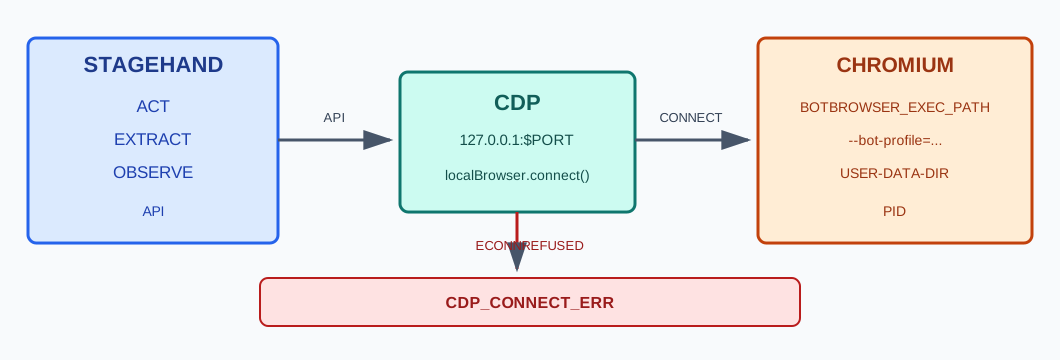
Stagehand browser automation has two separate layers: Stagehand supplies page-level primitives, while a browser launcher chooses the Chromium executable and startup arguments. Stagehand v4 documents act, extract, and observe, and attaches to a running Chromium browser through Chrome DevTools Protocol (CDP). BotBrowser supports starting Chromium with an operator-selected executable and the --bot-profile flag; Stagehand v4 can attach to that running browser over CDP. BotBrowser does not ship a Stagehand adapter, set an agent policy, or guarantee a third-party site's classification. The browser-use setup covers another agent framework, while the direct Playwright guide covers a different browser-control API.
The distinction matters when a run connects successfully but still uses the wrong process. A CDP URL identifies a browser endpoint, not the binary path, profile argument, route, or page state that produced it. Keep those observations separate, and use the BotBrowser CLI reference for the supported profile flag rather than treating a Stagehand method call as launch configuration.
TL;DR
observe()discovers candidate actions,act()performs an action, andextract()returns data shaped by a schema.- Stagehand v4 attaches to Chromium over CDP; its current documentation says it does not depend on Playwright or Puppeteer.
- The launcher, not Stagehand's page primitives, selects the executable and passes
--bot-profilebefore the browser starts. - A CDP response proves that an endpoint answered. It does not prove which executable or profile was used.
- Keep the endpoint on loopback, check the launcher process separately, and stop when the endpoint or process does not match.
Contents
- Primitive ownership
- Launch and attach are different operations
- Start the controlled browser before Stagehand
- Run the three primitives against a fixture
- Verify the process and CDP target
- Failure table and recovery
- What remains outside Stagehand
- Practical conclusion
Primitive ownership
Stagehand's three named primitives answer different questions. observe() discovers actionable elements and returns structured actions; act() executes an instruction or an action returned by observe(); extract() reads page content into a requested shape. The official Stagehand references for observe, act, and extract describe their inputs and results. They are Stagehand operations, not switches for choosing a browser executable.
That distinction gives a useful boundary for an automation trace. An observe() result means that Stagehand identified candidate interactions under the current page and instruction. It is not user consent to perform one. An act() result records an attempted page action; a remote application may still reject it, defer it, or apply a different state transition. An extract() result is the value returned for the requested schema, not a copy of the server's database or an independent verification of the page's truth.
| Primitive | Page-level job | Evidence worth retaining |
|---|---|---|
observe() | Discover candidate elements for a bounded instruction | Page origin, instruction identifier, candidate count, and selected action |
act() | Execute an instruction or a selected action | Action identifier and returned result, without describing it as remote acceptance |
extract() | Read page content into a requested schema | Schema version and the limited fields needed by the workflow |
The three operations can be composed, but their results should not be collapsed into one success flag. A workflow may have a successful browser attachment and a failed extraction; an extraction may return a value while a later submission remains pending. Store these as distinct states so an operator can tell which layer needs attention. This is especially useful when the page changes between discovery and action: a candidate found earlier can become stale after navigation, a modal, or a changed origin.
Stagehand also exposes familiar page methods such as navigation and locators. Those APIs do not turn Stagehand v4 into Playwright: its current introduction says browser control runs over CDP and does not depend on Playwright or Puppeteer. A project that specifically needs Playwright's BrowserType.launch() lifecycle should use the Playwright setup guide and its own launch code. A project that needs Stagehand primitives should follow Stagehand's browser-attachment contract instead.
Launch and attach are different operations
A browser launch creates the operating-system process. The launcher supplies the executable path, profile argument, user-data directory, debugging endpoint, and any network settings that the process receives. A later CDP connection attaches a client to a browser that is already running. Stagehand's browser configuration reference documents localBrowser.launch() for a local process and localBrowser.connect() for an existing Chromium browser. The connection example uses a CDP URL and then passes the returned browser to Stagehand.create().
For BotBrowser, the profile file is selected at process startup with --bot-profile. It is not a Stagehand prompt, a page.evaluate() value, or a setting that observe() can apply after the browser has launched. BotBrowser's Playwright setup documentation shows where the executable and profile argument enter a Playwright launch; the underlying ownership principle is the same for any launcher: the chosen process receives its startup inputs before Stagehand attaches. The separate profile management guide explains profile selection and file handling.
| Decision | Launch path | Attach path |
|---|---|---|
| Who starts Chromium? | Stagehand's local browser factory or an external launcher | An operator-managed launcher starts it first |
| Where is the executable selected? | In the launch configuration supported by the pinned version | In the external process command before Stagehand connects |
Where is --bot-profile supplied? | Only if the supported launch API forwards browser arguments | In the external process arguments before the CDP endpoint is opened |
| What does Stagehand receive? | A browser returned by its local launch call | A browser connected to the declared CDP URL |
| What must be checked separately? | The actual launch process and its arguments | The process identity, endpoint, and profile argument |
The attach path is useful when an environment already has a controlled Chromium process or when a separate supervisor owns process creation. It also creates a strict dependency: Stagehand cannot connect until the endpoint is listening. The launch path can be simpler when the pinned Stagehand version exposes every required launcher option. Do not assume that a local launch helper accepts an arbitrary executable path or profile flag merely because it starts Chrome; check the type reference for the exact release before using it.
Start the controlled browser before Stagehand
An operator-managed launch makes the configuration boundary explicit. The following shell shape uses placeholders; it is not a run record and does not establish that a particular BotBrowser binary accepted these values. Set the variables from deployment configuration, allocate a free loopback port for each run, and pass the same STAGEHAND_CDP_PORT to the launcher and client:
"$BOTBROWSER_EXEC_PATH" \
  --user-data-dir="$STAGEHAND_USER_DATA_DIR" \
  --remote-debugging-port="$STAGEHAND_CDP_PORT" \
  --bot-profile="$BOT_PROFILE_PATH"
--bot-profile selects the BotBrowser profile file. --user-data-dir is a distinct Chromium storage directory; it is not a substitute for the encrypted BotBrowser profile. Use a fresh, dedicated directory where the browser version requires one for remote debugging, and do not reuse a customer directory for a test run. The CDP endpoint exposes privileged browser control, so bind it to loopback, keep it off shared networks, and close the process when the run ends. Chrome's remote debugging documentation covers the debugging interface and its security boundary.
After the process is available, Stagehand's documented attachment shape is concise:
import { localBrowser, Stagehand } from '@browserbasehq/stagehand';
import { z } from 'zod';

const cdpPort = process.env.STAGEHAND_CDP_PORT;
if (!cdpPort || !/^\d+$/.test(cdpPort)) {
  throw new Error('The launcher must assign a numeric CDP port');
}

const browser = await localBrowser.connect({
  cdpUrl: `http://127.0.0.1:${cdpPort}`,
});
const stagehand = await Stagehand.create({ browser });

const { data: actions } = await stagehand.observe('Find the read-only build marker');
if (actions.length !== 1) {
  throw new Error(`Expected one build-marker action; found ${actions.length}`);
}

await stagehand.act(actions[0]);
const { data } = await stagehand.extract({
  instruction: 'Read the build marker from the current page',
  schema: z.object({ build: z.string() }),
});
console.log(data.build);
The connection and primitive calls follow the current Stagehand v4 documentation; the endpoint, fixture and package installation remain environment-specific. Pin the Stagehand package and compare imports and result fields with the documentation shipped for that version. The sample reads an owned fixture and does not submit a form, authenticate, or change a remote record. It is a code shape for a local integration, not evidence that the sample was executed here.
Use an endpoint assigned to one run, not a constant that can collide with another developer's browser. If a port is already occupied, do not silently attach to it: the process at that address could be a different Chromium instance. Have the launcher allocate and record the endpoint, and bind it to localhost. Never put a CDP endpoint on a public interface; anyone who can reach it may gain browser-level control.
Run the three primitives against a fixture
An owned fixture makes each layer observable without relying on a public site. It can expose a fixed build identifier and one harmless control. The first observe() instruction should name that control, the selected action should only reveal the marker, and extract() should return the marker under a small schema. Avoid a fixture that requires credentials or has a real purchase, account, or deletion action: those change the test from a browser integration check into an authorization workflow.
Keep expected and observed values narrow. For example, the fixture can return build: "stagehand-fixture-7"; the receipt can retain that string, the fixture version, the origin, and the schema name. It does not need the complete DOM, a screenshot of unrelated page content, cookies, local storage, or a whole model trace. A small record reduces accidental exposure and makes failures easier to classify.
The fixture should be stable enough to distinguish a connection issue from a page issue. A known build marker can verify that navigation reached the intended local origin. A read-only button can test observe() and act() without changing server state. A small JSON object can test extract() and its schema. Version these fixture elements together: if the marker's attribute changes while the browser remains constant, the failure belongs to the fixture contract rather than the launcher.
Do not use the browser's reported user-agent string as proof that the intended process or profile was selected. A page-visible value can be useful for its own test, but it cannot identify the executable that opened the tab. Conversely, a process path alone cannot prove that the page rendered the right fixture. The launcher process, the CDP endpoint, and the fixture response answer different questions and should remain separate fields in the run result.
The fixture can also distinguish page state from action availability. If the marker appears only after a consent choice, the observe() instruction must not convert a consent decision into a routine setup click. Record that the fixture requires operator approval or create a separate read-only path. A stable test contract is not a reason to automate an action that changes permissions or user data.
Verify the process and CDP target
Three checks establish different facts. First, inspect the launcher process to compare its executable and redacted arguments with the declared values. Second, request the loopback CDP version endpoint to confirm that the expected debugging service responds. Third, navigate to the owned fixture and read its build marker. A pass in one row cannot substitute for the others.
| Check | Passing observation | What it does not establish |
|---|---|---|
| Launcher process | Process executable matches the configured BotBrowser path; required profile flag is present | That the encrypted profile was accepted or yielded an expected page value |
| CDP endpoint | The declared loopback URL returns browser metadata | That the endpoint belongs to the process checked in the first row |
| Fixture page | The expected origin and build marker are visible through Stagehand | That a third-party service will show the same page or make the same decision |
Treat a mismatch as a stop condition. The same check applies when an MCP server rather than a script owns the launch, and the configuration keys that carry the executable there are covered in Playwright MCP setup for a custom Chromium build. If the process path differs, do not proceed merely because the CDP endpoint is healthy. If the process path is correct but the endpoint reports another browser, investigate port selection and process ownership. If both agree but the marker is absent, inspect the fixture route and page lifecycle rather than changing profile inputs. This order prevents a page-level retry from hiding a launcher mistake.
The operator can retain a compact receipt with fields such as runId, pinned Stagehand version, executable basename, redacted profile identifier, loopback endpoint, fixture build, selected primitive, and first failure. Do not record encrypted profile contents, authentication tokens, proxy credentials, or a customer-specific absolute path. A receipt is useful only when it preserves the difference between a configured value and an observed value.
CDP endpoint metadata is not a browser identity certificate. If multiple processes can bind or forward the endpoint, pair the URL with the process ID and inspect the local process arguments. A tunnel, container port map, development proxy, or stale browser can all point a client at a different process than the launcher intended. Use one endpoint per run and terminate stale processes before reusing a port.
The browser lifecycle also matters. Close the Stagehand connection after the read-only check, then close the browser process only if this run owns it. Stagehand's browser documentation distinguishes browsers it launched from an already-running browser that the caller connected to. An attached client should not assume it owns the process or may terminate it; a supervisor may be serving another controlled task.
Failure table and recovery
| Observation | Likely layer | Next check | Stop condition |
|---|---|---|---|
| CDP connection is refused | Browser startup or port allocation | Confirm the launcher exit status and assigned port | Do not start a different browser implicitly |
| CDP connects but process path is unexpected | Endpoint selection or stale process | Match the endpoint to the recorded process ID | Close the run before any page action |
| Process is correct but profile argument is absent | Launcher configuration | Inspect the argument builder before launch | Do not claim the profile was selected |
| Profile flag is present but the fixture disagrees | Profile, fixture, or application behavior | Compare profile package compatibility and fixture version separately | Do not change page values to force a match |
observe() returns no candidate | Page state or instruction mismatch | Inspect the owned fixture and the visible control | Do not broaden the instruction into an unrelated action |
act() returns but the fixture is unchanged | Action result or application state | Read the marker again and inspect the action result | Do not report a remote state change without evidence |
extract() fails schema validation | Page output or schema contract | Compare the visible fixture data with the requested schema | Keep raw data minimal; do not weaken the schema silently |
| Browser disconnects during an action | Process lifecycle or remote outcome | Check the fixture or idempotent status before retrying | Never blindly repeat a potentially consequential action |
Recovery follows the first failing layer. A refused connection is not repaired by changing the extraction schema. A valid endpoint attached to the wrong process is not repaired by changing the page instruction. A missing profile argument is fixed in the launcher configuration, then the process is restarted with a new run identifier. When a remote mutation might have been sent before a disconnect, resolve its state with an idempotent status check or hand it to the responsible operator; do not replay it automatically.
Keep this table tied to the Stagehand boundary. The browser-use guide discusses approval checkpoints for a different agent loop. The automation detection overview covers general signal interpretation. Neither replaces the Stagehand-specific distinction between primitive output, CDP attachment, and the executable/profile chosen before connection.
What remains outside Stagehand
Stagehand provides browser automation APIs; the application still owns task authorization, account selection, proxy routing, secrets, data retention, and approval for consequential actions. A connected browser can be technically ready while the requested task is inappropriate or its destination has changed. Put policy in the application that invokes Stagehand, not in a prompt that the agent can rewrite.
Keep profile selection in reviewed launcher configuration. The agent should not enumerate arbitrary profile files, print their contents, or pick an account based on page text. The launcher can resolve an approved profile identifier and pass its path to the browser. The receipt can record a non-sensitive profile label and configuration version without copying the encrypted file or its contents.
Network routing is another independent input. A profile argument does not prove which egress route a request used, and a CDP endpoint does not report an application-level permission decision. If a workflow needs a particular route, configure it in the external launch layer and validate it using the workflow's permitted diagnostics. Do not attribute a route, locale, or account state to Stagehand unless the surrounding system supplies that value and the record identifies its source.
The same separation applies to third-party classification. A successful act() means that a browser interaction returned; a successful extract() means that the requested data shape was returned. Neither guarantees that a site accepted a session, that a detector assigned a particular category, or that an application completed a business transaction. BotBrowser supplies a controlled browser option, not a promised result from a third party.
When the workflow reaches credentials, consent, payment, deletion, permission changes, publication, or an irreversible submission, pause at the application boundary for an operator decision. The pause should include the destination origin, requested action, and user-visible parameters needed for a decision. It should not pass secrets into the model trace. This is an application policy, not a behavior implied by observe(), act(), or extract().
Frequently asked questions
Does Stagehand v4 use Playwright internally?
The current Stagehand v4 introduction describes browser control over CDP and says Stagehand has no Playwright or Puppeteer dependency. Its page APIs may look familiar to Playwright users, but that similarity is not the same as using Playwright's BrowserType launch lifecycle.
Can Stagehand choose a BotBrowser profile after it connects?
No. A profile is supplied to the browser process at launch. Stagehand's page primitives operate after connection; they do not retroactively change the process arguments. Put the approved --bot-profile value in the launcher configuration before the CDP endpoint is exposed.
Does a successful CDP connection prove the right browser started?
No. It proves that a service answered at the endpoint. Compare the endpoint with the launcher's process ID and executable path, then inspect the redacted arguments. Read the owned fixture separately to establish that the intended page loaded.
Does this integration guarantee a detector or site outcome?
No. Stagehand actions and a controlled browser configuration do not guarantee a third-party site's classification, acceptance, or business result. Keep those outcomes outside the claims made by a launch check.
Sources
- Stagehand v4 introduction
- Stagehand
act() - Stagehand
extract() - Stagehand
observe() - Stagehand browser configuration
- Chrome remote debugging
- Chrome DevTools Protocol
- BotBrowser Playwright setup
- BotBrowser CLI flags
Practical conclusion
Keep Stagehand's primitive layer separate from browser process creation. Select the BotBrowser executable and profile in the launcher, expose only a loopback CDP endpoint, and connect Stagehand to that already-running browser. Verify the process, endpoint, and owned fixture as three different observations; stop on a mismatch instead of relying on an action result. This establishes a bounded integration check, not a claim about profile validity, task authorization, or a third-party site's decision.
This article is part of the guide: Browser Deployment and Release: Operations Map
Related Articles
Headless Browser for AI Agents: Launch and Tool Boundaries
DeploymentPlaywright MCP Setup for a Custom Chromium Build
Getting StartedBrowser-Use Setup with a Controlled Browser
DeploymentBrowser Automation Signals and Consistency in Playwright
Getting StartedBrowser Automation Getting Started: A First Run Map
DeploymentPuppeteer MCP Server Configuration for a Custom Build
Run the same check in BotBrowser
Load a profile, keep the signals you just read about consistent inside the browser, and confirm the result on your own machine before a rollout.