Playwright Console Logs Not Showing? Check the Listener
Missing Playwright console logs? Separate Node stdout, browser console messages and uncaught page errors; attach listeners early and inspect bounded page history.
BotBrowser Team
Want the structured docs for Getting Started?
This article lives in the editorial library. For step-by-step setup, reference material, and ongoing updates, jump into the docs section.
Missing Playwright console logs usually require checking where the message was emitted and when the listener started. A console.log() in the Node test runs in a different environment from one in the page, while an uncaught page exception has its own event. BotBrowser supports Playwright control of its browser executable; it does not merge these output channels or make a late event listener receive earlier messages.
TL;DR
- Subscribe to
page.on('console')before navigation or the action that produces the browser message. Print the received message explicitly if it needs to appear in the terminal. - Subscribe separately to
page.on('pageerror')for uncaught page exceptions. A browserconsole.error()is a console message with typeerror. - Node
console.log()writes to the runner's stdout. Its presence does not establish that a page listener works. - In Playwright v1.56+,
page.consoleMessages()andpage.pageErrors()expose bounded recent history. Reading history does not replay events to a newly attached listener.
Contents
- Identify the output channel before changing the test
- Attach browser listeners before the triggering operation
- Compare early and late listeners on an owned page
- Read recent history without assuming a complete log
- Keep message type, arguments and location distinct
- Diagnose a quiet listener without hiding application failures
- Practical conclusion
Identify the output channel before changing the test
The word console can refer to the Node process executing the test, the browser's developer tools, or a Playwright ConsoleMessage delivered to a callback. The same spelling, console.log(), does not make those destinations interchangeable. Start with the line that produces the missing text: determine whether it executes directly in the test file, inside page.evaluate(), or in an application script loaded by the page.
According to the Node console documentation, the global console sends normal output to stdout and error output to stderr. Therefore, console.log('NODE_DRIVER_ONLY') directly in a CommonJS test script is runner output. A page console listener does not receive it. A CI system can display or capture that stream independently of anything Playwright observes in the browser.
By contrast, await page.evaluate(() => console.log('PAGE_LOG')) executes the logging call in the browser. Playwright's Page console event exposes calls to the page's console API. To forward that event to Node output, add a handler that calls the Node console or writes a selected record to an artifact. Creating a listener that only appends to an array will not automatically print that array in a terminal.
An uncaught script exception is a third signal. The Page pageerror event reports uncaught exceptions within the page. A call such as console.error('PAGE_CONSOLE_ERROR') logs an error-level message without throwing an exception. Conversely, a script can throw without first calling console.error(). Capture both event types when investigating an application that may stop during startup.
This distinction affects test verdicts as well as visibility. A message classified as error can be an intentionally exercised failure path; an empty console does not establish that a form saved correctly. When the required result is an API operation, waiting for the response after a click explains how to identify the write and check its response independently of the page's status text. Logging provides evidence around that operation, while assertions define what the operation must accomplish.
Follow the marker from the line that emitted it. The test script writes to Node stdout. For a line emitted in the page, choose the callback by what the script did: it called the console API or threw an uncaught exception.
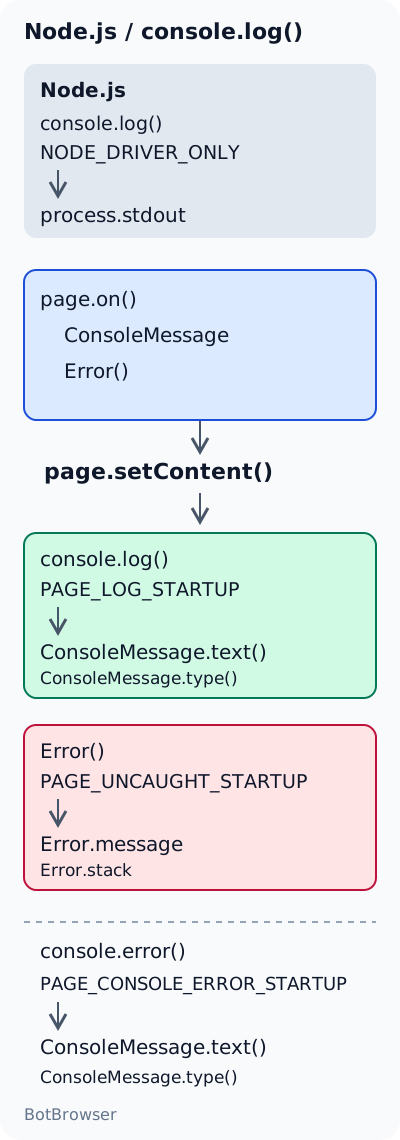
Attach browser listeners before the triggering operation
Register observers before page.goto(), page.setContent() or the click that executes the code under investigation. Registration is synchronous: page.on() installs the callback and returns without waiting for a future message. Navigation can then begin with the observer already present. Putting the listener below await page.goto() leaves startup messages outside its observation window, even if the page remains open afterward.
The following standalone CommonJS example uses an owned inline page and the installed playwright package. It emits synthetic labels without connecting to an external application. The console handler prints both the message type and text; the exception handler uses a different prefix so that one stream cannot be mistaken for the other. The temporary event promises identify the exact messages required by this example rather than relying on a fixed delay.
const { chromium } = require('playwright');

(async () => {
  const browser = await chromium.launch();
  try {
    const page = await browser.newPage();

    page.on('console', message => {
      console.log(`[page console:${message.type()}] ${message.text()}`);
    });
    page.on('pageerror', error => {
      console.error(`[page uncaught] ${error.message}`);
    });

    const logSeen = page.waitForEvent('console', {
      predicate: message => message.text() === 'PAGE_LOG_STARTUP',
      timeout: 5000,
    });
    const errorSeen = page.waitForEvent('pageerror', {
      predicate: error => error.message === 'PAGE_UNCAUGHT_STARTUP',
      timeout: 5000,
    });

    console.log('NODE_DRIVER_ONLY');
    await Promise.all([
      logSeen,
      errorSeen,
      page.setContent(`<script>
        console.log('PAGE_LOG_STARTUP');
        console.error('PAGE_CONSOLE_ERROR_STARTUP');
        throw new Error('PAGE_UNCAUGHT_STARTUP');
      </script>`),
    ]);
  } finally {
    await browser.close();
  }
})().catch(error => {
  console.error(error);
  process.exitCode = 1;
});
The 5000 ms value is a bounded wait for this controlled example, not a recommendation to extend every failing application timeout. The script intentionally throws within the page's script element. Throwing directly inside an awaited page.evaluate() has a different driver-facing consequence: that evaluation rejects, and the test must handle or assert its rejection. Do not replace the script with a rejected evaluation and assume it demonstrates the same uncaught-page event.
The logging callback itself runs in Node. Its console.log() forwards an observed browser message to stdout, and its console.error() forwards a page exception to stderr. A report that combines those streams may show both prefixes together. A system that captures only stdout can omit the exception line even though the pageerror handler ran, so check the output configuration before changing browser code.
Keep the callbacks small and save them as named functions if the collector will be removed later. page.off('console', onConsole) removes that particular collector; removing every console listener could disrupt fixtures installed elsewhere. A collector installed repeatedly on the same page can also print one event more than once. Duplicate terminal lines can reflect duplicate subscriptions rather than duplicate application execution.
Compare early and late listeners on an owned page
The timing experiment uses a fresh browser for each variant, an inline page and synthetic message labels. In both variants, an independent control observer attaches before setContent(). That control establishes that the two startup console calls and the uncaught startup exception were delivered. The candidate observer attaches either before page execution or only after the control has received all three startup signals.
After candidate registration, the same page emits a second pair of console messages and another uncaught exception. These later signals are the positive control: they check that the late candidate can observe new activity on the page whose startup events it missed. Without this step, a quiet candidate could also mean a broken collector, a wrong page reference or an early page closure.
On 2026-11-18, the owned fixture completed with Playwright 1.58.0, stock Chrome 157.0.8103.79 and Node v26.9.0 on macOS arm64. Both variants passed their assertions. The table reports only the exact synthetic markers, not every possible browser diagnostic. The expected destination is determined by where each call executes; the observed column distinguishes the candidate's live callbacks from retained-history reads.
| Message origin | Expected destination or behavior | Observed in the owned fixture |
|---|---|---|
Node driver console.log('NODE_DRIVER_ONLY') | Node stdout, outside the page console | Printed in stdout; absent from browser console events in both variants |
Page startup console.log('PAGE_LOG_STARTUP') | Page console event, type log | Early candidate received it; late candidate missed it live |
Page startup console.error('PAGE_CONSOLE_ERROR_STARTUP') | Page console event, type error, without throwing | Early candidate received it; late candidate missed it live; no corresponding pageerror |
Page startup throw new Error('PAGE_UNCAUGHT_STARTUP') | Page pageerror event | Early candidate received it; late candidate missed it live |
Same page emits PAGE_LOG_AFTER_ATTACH, PAGE_CONSOLE_ERROR_AFTER_ATTACH and PAGE_UNCAUGHT_AFTER_ATTACH | Candidate receives newly emitted signals after registration | Both candidates received two console messages and one uncaught page error |
| Late page history, read before and immediately after candidate attachment | Retained records can exist separately from live delivery | Both reads contained the two startup console markers and one startup page error; candidate callbacks received no replay |
The run's exact stdout summary was:
NODE_DRIVER_ONLY
early: liveConsole=4 livePageErrors=2 retainedConsole=4 retainedPageErrors=2
late: liveConsole=2 livePageErrors=1 retainedConsole=4 retainedPageErrors=2
The early totals include startup and the positive control. The late live totals contain only the after-registration markers. At the final read, both pages retained all four console markers and both uncaught exceptions. The fixture did not forward page messages to stdout, so its NODE_DRIVER_ONLY line demonstrates actual driver output rather than a browser line printed by a forwarding callback.
These results separate two explanations for a missing startup line: the event happened before the candidate observed it, yet a later history read still found its retained record. Merely placing a listener immediately after navigation does not guarantee the same outcome; an application may emit its message later. The deliberately late variant establishes prior delivery through the independent control instead of assuming that navigation completion proves every logging call has finished.
The comparison concerns observer order and event categories. It does not measure application throughput, network latency or BotBrowser behavior, and it does not cover workers, popups or frames. The startup and after-registration labels also avoid an ambiguous count in which an unrelated browser warning happens to resemble the message being sought.
Read recent history without assuming a complete log
Playwright v1.56 introduced page.consoleMessages() and page.pageErrors(). The current API documentation describes each as returning up to the latest 200 records for that page. These methods make a late diagnostic read possible, but that bounded collection is different from a live callback and different from a durable log file.
Read both collections while the relevant Page is still available, and label the resulting output as history. This snippet assumes the application has already reached a state in which the messages of interest should have occurred. It deliberately uses the no-argument forms available in v1.56 rather than newer options shown in the latest documentation.
const recentConsole = await page.consoleMessages();
const recentErrors = await page.pageErrors();

for (const message of recentConsole) {
  console.log(`[history console:${message.type()}] ${message.text()}`);
}
for (const error of recentErrors) {
  console.error(`[history uncaught] ${error.message}`);
}
The two reads are snapshots taken by separate calls, not one atomic record of the entire browser. More activity can occur between them. Reading a collection also supplies no condition that waits for a particular future event. If the test needs to await a known new message, register page.waitForEvent('console', { predicate }) before triggering it, and bound the wait as in the earlier example.
A missing history entry has several possible explanations: the call did not execute, it belongs to another page, or it is outside the retained collection. A noisy page can push an older message beyond the documented bound. The controlled startup fixture uses only a few exact labels; it does not test retention under sustained logging or establish that every historical message can be recovered.
Check the package version used by the process that actually runs the test. Run npm ls playwright playwright-core @playwright/test in that project, then compare the resolved packages with its imports and lockfile. A globally available CLI can have a different version from the locally imported library. An older package can correctly support live events while lacking these newer history methods; changing browser flags does not add a missing Node library method.
For an older Playwright installation that must stay pinned, an early live collector is the practical fallback. Store only the fields needed for the diagnosis and choose an explicit retention limit suitable for the test. Do not call that local array a complete browser history: it covers the collector's subscription window and whichever events its filters accepted. History APIs are useful for inspection, while deliberately early collection gives the test control over its own evidence lifecycle.
Keep message type, arguments and location distinct
The ConsoleMessage API provides text(), type(), args() and location(). Start with type and text because they are simple synchronous values. During the first diagnosis, capture all types instead of filtering for error. A page's ordinary console.log() produces a log message and would disappear from an error-only collector even with perfect listener timing.
Use Playwright's returned type names rather than guessing from the browser method spelling. For example, the documented type for console.warn() is warning. A filter for the literal warn silently excludes it. Prefix forwarded lines with their source and type so that the test's own diagnostics remain distinguishable from the messages it receives from the page.
text() gives a string representation, not a promise that every object is preserved as JSON. If an owned application logs console.log('save', { revision: 7 }), use args() when the individual argument values matter. Those arguments are JSHandle objects, and reading serializable values requires awaiting each handle's jsonValue(). DOM elements, circular structures and objects with special behavior need more care than a plain revision record.
Keep asynchronous argument extraction separate from a synchronous event counter. If an async handler starts reading an object and the page navigates or closes, the extraction can fail after the event was already received. That is an artifact-reading failure, not evidence that no console event occurred. Record the basic type and text immediately, then handle serialization errors explicitly in any richer collector.
location() can help distinguish an application bundle from an injected test script. Its resource URL and zero-based source coordinates identify where Playwright reports the console call, not necessarily the original authored source line before bundling. Avoid adding one to an already human-formatted location elsewhere in the reporting pipeline. Empty or synthetic locations should remain labeled as such rather than being assigned an invented application filename.
Limit persisted data to the diagnostic question. Browser logs and serialized arguments can contain session tokens, personal information or full API responses; source URLs can contain query strings. The fixture's PAGE_LOG_STARTUP labels are safe to share because they are synthetic. For a real failure report, select harmless operation identifiers and redact sensitive values before forwarding stdout or attaching artifacts to a shared issue.
Diagnose a quiet listener without hiding application failures
First, send one harmless message from the exact page object that owns the collector. Create a waitForEvent('console') promise with an exact synthetic predicate before page.evaluate(() => console.log('OWNED_DIAGNOSTIC_MARKER')), then await both operations. If that event arrives, the current page-to-driver path works for that message. It does not prove the application emitted an earlier startup log or that a popup uses the same page object.
Next, check page identity. A popup or a separately created tab is another Page; a listener on the original page cannot be assumed to describe the new tab's execution. Register the needed observer as part of the test's page-creation handling, and label records by page identity. A page listener can receive console calls from its frames, so a child-frame URL in location() is not by itself evidence of a wrong subscription.
Then remove diagnostic filters temporarily and compare console with pageerror. An expected console.error() in the former and a thrown exception in the latter require different assertions. Do not fail a whole suite on every error-level string unless that rule is explicitly part of its application contract. Equally, do not suppress every exception simply to make an output check pass; unexpected startup exceptions may explain why the desired action never ran.
When the failure depends on navigation, a click or a tab transition, correlate the observed messages with evidence from the same failing execution. The Playwright tracing workflow covers inspecting actions and page state together. A successful rerun with extra logging can help reproduce the problem, but cannot reconstruct messages that an earlier run failed to retain.
Finally, preserve application assertions. Receiving a save complete log means that logging call executed; it does not prove the server committed data or that the expected DOM appeared. Keep the API and UI checks that define success, and use console evidence to explain their failures. This avoids replacing a missing-log problem with a test that passes on an optimistic message.
BotBrowser's Playwright integration documentation covers launching its executable through Playwright with profile-based configuration. That browser setup is separate from choosing a console collector's registration point, forwarding destination and assertions. The owned inline-page comparison isolates those event-handling choices; it provides no finding about a profile, remote service or production application's behavior.
FAQ
Will headed mode make browser console.log appear in Node stdout?
Opening a visible browser does not add a forwarding callback to the Node script. DevTools and the runner remain separate destinations. Keep the same page.on('console') observer in headed and headless tests, then compare the exact message and page identity if the application behaves differently between modes.
Does console.error automatically fail a Playwright test?
A page console event is evidence delivered to the test, and console.error() itself does not throw. Define an assertion or a collector-based failure rule if selected error messages should fail the test. A direct Node exception or rejected awaited operation follows the runner's own failure handling and should be diagnosed separately.
Can a catch block prevent pageerror from appearing?
An exception handled by application code is different from an uncaught exception. If the application catches it and logs a message, the console observer may receive that message while the uncaught-exception observer has nothing to report. Inspect the handled result or explicit error state required by the application contract.
Can recent history replace logging artifacts in CI?
The history methods return bounded page records when queried; they do not arrange CI retention or provide unlimited storage. Read the relevant records before teardown and attach selected output through the runner's artifact mechanism. Include the resolved Playwright version so that the history API's availability is reproducible.
Sources
- Playwright: Page console event and recent console messages
- Playwright: Page uncaught errors
- Playwright: page.consoleMessages
- Playwright: page.pageErrors
- Playwright: ConsoleMessage
- Node.js: Console
- BotBrowser: Playwright integration
Practical conclusion
For missing Playwright console logs, identify the emitting environment, attach the appropriate page observer before execution, and explicitly forward or retain what it receives. Use v1.56+ recent-history reads as bounded diagnostic snapshots. Start with one synthetic message on the owned page, then check the application's original trigger without replacing its response and UI assertions.
This article is part of the guide: Browser Automation Getting Started: A First Run Map
Related Articles
Playwright Wait for Response After Click: Fix the Race
Getting StartedPlaywright Trace Viewer for Authorized Test Debugging
Getting StartedWebDriver BiDi Events for Stable Browser Automation
Getting StartedChrome DevTools MCP vs Playwright MCP for Debugging
Getting StartedScraping with Playwright: Browser and Profile Setup
FingerprintAbort Signal Reason Composition and Late Listeners
Run the same check in BotBrowser
Load a profile, keep the signals you just read about consistent inside the browser, and confirm the result on your own machine before a rollout.