Playwright Download Event, saveAs and the File Path
Separate the download event, the suggested filename, the temporary path and the completed bytes before asserting on a file. Measured on one owned same-origin page.
BotBrowser Team
Want the structured docs for Getting Started?
This article lives in the editorial library. For step-by-step setup, reference material, and ongoing updates, jump into the docs section.
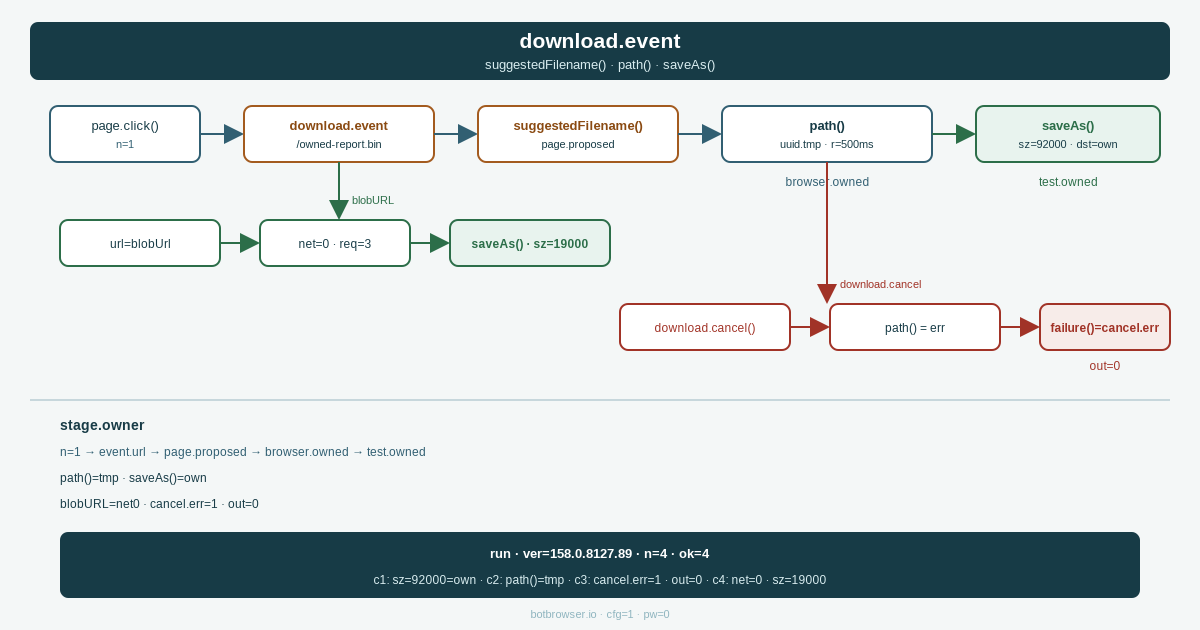
A Playwright download is a sequence, not a single moment. The download event fires when the browser starts the transfer, suggestedFilename() names the file the page asked for, and the bytes only become a stable file on disk when the test calls saveAs() or reads the completed artifact. Treating those stages as one thing produces the two classic mistakes: asserting on a path that does not hold the final bytes yet, and reading a network response into a download that never had one.
The distinction decides what an assertion means. A test that checks the suggested filename has checked what the page requested. A test that checks saveAs() output has checked what arrived on disk. A test that checks a path() value has checked a temporary location whose lifetime the test does not own. The fixture below walks one owned same-origin page through all four stages and records what each stage can and cannot prove. BotBrowser documents an explicit Chromium executable for Playwright launches so the four stages repeat on the same browser surface, but it does not add download APIs or change where in-flight downloads are stored.
TL;DR
- The
downloadevent marks the start of the transfer.suggestedFilename()is the page-proposed name; it is not the name your test saves under unless you use it yourself. download.path()resolved inside the owned run's half-second window and returned a temporary file inside the browser's own storage. The reference documentspath()as waiting for the transfer to complete when necessary, and a small localhost transfer completes almost instantly. That path is not a stable destination and its lifetime is not yours.- The completed-bytes guarantee comes from
saveAs()to a test-owned destination. In the owned run the saved file matched the served body byte for byte. download.cancel()makespath()reject withdownload.path: canceledandfailure()resolve tocanceled. A canceled download never produces a completed file.- A blob-URL download carries no network response: the
downloadevent URL starts withblob:, and the owned run recorded zero additional file requests to the origin while the bytes still saved. - BotBrowser documents an explicit Chromium executable for Playwright launches; it does not add download APIs or change where in-flight downloads are stored.
Table of contents
- Read the four stages of one download
- What the owned run measured
- Choose between the event, the filename, the path and saveAs
- Keep the fixture and the evidence safe
- BotBrowser capability and limitation
- Practical conclusion
The download and upload test hygiene article owns the broader decision of what a download test should assert across suites. The Playwright browser setup page owns the context and executable choices around such a test. What follows covers the four stages inside one download.
Read the four stages of one download
The Playwright Download class reference documents the sequence: the page download event emits a Download object when the browser starts saving; suggestedFilename() returns the name the page proposed; path() returns the path to a successful download; saveAs() copies the download to a path you own; failure() resolves to a string when the transfer failed and null when it succeeded; cancel() stops an in-flight transfer.
Each stage answers a different question, and only one of them guarantees completed bytes in a location your test controls:
| Stage | What you observe | What it proves | What it does not prove |
|---|---|---|---|
download event | The transfer started | The page produced a download at that URL | That the bytes are complete or final |
suggestedFilename() | The page-proposed name | What name the response or the download attribute proposed | The name on disk or the file's contents |
path() | A temporary location inside the browser's storage | The transfer reached a real file on this machine | That the bytes are complete, or that the path persists |
saveAs(target) | A copy at your own destination | The completed bytes exist at a path the test owns | Nothing about the browser's internal storage |
The stage that fails most quietly is the third. A path() value that exists when you check it can disappear when the context closes, and a test that asserts on the bytes at that path is asserting on storage the browser may reclaim.
What the owned run measured
The owned fixture serves one same-origin page on 127.0.0.1 with an anchor to /owned-report.bin carrying Content-Disposition: attachment, plus an anchor whose href is a blob: URL and whose download attribute names owned-blob.txt. The run executed four cases one after another with the context's acceptDownloads enabled, using an installed stock Chrome build. No third-party request was made.
The context is created with acceptDownloads: true, which is also Playwright's default in current builds; the fixture sets it explicitly so the record does not depend on defaults. The fixture also counts requests at the page level with page.on('request') rather than inferring activity from the download object, which is how the blob case records zero additional origin file requests while the bytes still arrive.
The measured record from docs/evidence/playwright-download-file-event-and-save-path-run-20261125.json is:
| Case | Measured observation | Final state |
|---|---|---|
Event and saveAs() | Event URL /owned-report.bin, suggested owned-report.bin; saved 92000 bytes | Saved bytes equal the served body |
path() race window | path() resolved inside a half-second race window to a UUID-named temporary file; the localhost transfer completed almost instantly; failure() was null after saveAs() | Temporary path, not a destination |
cancel() | path() rejected with download.path: canceled; failure() resolved to canceled | No completed file |
| Blob URL | Event URL started with blob:; suggested owned-blob.txt; zero additional origin file requests; saved 19000 bytes | Bytes saved without a network response |
The run's browser build was Chrome 158.0.8127.89. All four cases reported passed. The evidence file retains the event URLs, the suggested filenames, the saved byte counts against the served body size, the origin request counts around the blob case, and the rejection text from the canceled path() call.
const [download] = await Promise.all([page.waitForEvent('download'), page.click('#file-link')]);

// The page-proposed name; useful in a report, not a destination.
const suggested = download.suggestedFilename();

// A test-owned destination; the only completed-bytes guarantee.
await download.saveAs('/tmp/owned-report.bin');
const saved = fs.statSync('/tmp/owned-report.bin');
if (saved.size !== expectedBytes) throw new Error('Incomplete download');
Register the waitForEvent('download') promise before the click, as the snippet does. The event fires between the click and the navigation response, and a listener registered after the click can miss it.
The Promise.all shape exists because the listener and the click must race, not queue. waitForEvent('download') returns a promise that resolves when the event fires; page.click('#file-link') returns a promise that resolves when the click completes. Wrapping both in Promise.all registers the listener first and keeps the two promises alive together, so the event cannot slip between the two statements. The destructured const [download] takes the first element of the results array, which is the Download object the listener captured. A bare await page.click(...) followed by await page.waitForEvent('download') inverts that order and turns a passing test into a timeout that looks like a missing download.
path() before saveAs(): the temporary answer
The owned run called path() while the transfer was still running and it resolved inside a half-second race window. That observation sits inside the documented contract, not outside it: the Download class reference documents path() as the path to a successful download and states that it waits if necessary, and the fixture's localhost transfer of a small file completes almost instantly, so a prompt resolution is what the documented behavior predicts. The value was a UUID-named file inside the browser's own download storage. That answers a narrow question, where the in-flight bytes live, and it answers nothing about durability: the name is the browser's, the directory is the browser's, and the lifetime is the context's. The run does not separate an in-flight resolution from an at-completion resolution, and a reader who needs that distinction should race path() against a transfer slow enough to tell them apart.
A test that wants the bytes must still call saveAs() and assert against its own destination. A test that wants only to know a download started can stop at the event and the suggested filename.
Cancellation through the API
download.cancel() stopped the in-flight transfer, and the observable aftermath was exact: path() rejected with download.path: canceled, and failure() resolved to the string canceled. The contract expects cancellation to be shown with an owned timer rather than a browser dialog, which is what the fixture does. A canceled download produces no completed file, so an assertion suite that shares a destination directory with a cancellation test must treat the canceled case as "no file" rather than "zero bytes". A leftover file from a previous successful run at the same destination would otherwise read as a pass for the canceled case, which is why the fixture gives each case's file its own name.
Choose between the event, the filename, the path and saveAs
The question "playwright download file" collapses into four different assertions once the stages are named. The failure surfaces differ too:
| Failure surface | Where the decision lives | Safe next observation |
|---|---|---|
| The event never fires after a click | The click target, the response headers or the download attribute | The request the browser sent and the Content-Disposition header |
| The saved file is smaller than the served body | The transfer was incomplete or interrupted | failure() after saveAs() and the saved byte count |
| The path read mid-flight disappeared later | Browser-owned temporary storage | The context lifetime and a saveAs() destination |
| A blob download expected a network response | Blob URLs never hit the network | The event URL scheme and the origin request counter |
| The suggested filename differs from the saved name | Two different layers propose two different names | suggestedFilename() and the destination you passed to saveAs() |
The last row is the common surprise. The owned run's first case saved under the suggested name only because the test chose it; saveAs('/tmp/owned-report.bin') would have created that name regardless of what the page proposed. A report that prints the suggested filename and a receipt that hashes the saved file are two different artifacts, and the hygiene article linked above owns how to keep them apart.
Blob downloads skip the network response
The fourth case is the one that breaks naive network assertions. The bytes came from a Blob created in the page, the download event URL started with blob:, and the origin's file-request counter did not move between the click and the completed saveAs(). A test that waits for a response to prove a download happened will wait forever on this path. The network mocking for owned tests article owns the general response-shape decision; this page only records that a completed download is observable without any network exchange at all.
Keep the fixture and the evidence safe
The owned fixture binds the server to 127.0.0.1, serves a deterministic ASCII body, and saves downloads into a temporary directory that the fixture removes at the end. It makes no request to a third-party service, and the evidence report stores byte counts, event URLs and rejection text rather than file contents. A reviewer can rerun the fixture and compare counters without trusting the prose.
For large transfers, read the saved file as a stream instead of loading it whole. fs.createReadStream(target) pipes the bytes through a hashing step without holding the entire file in memory, and the test can compare a digest of the saved file against a digest of the served body computed on the server side of the fixture. A byte count proves length; a digest proves content. The owned run asserts both: statSync reports 92000 bytes for the saved report and the fixture server knows it served the same number, so a partial transfer with a matching name would still fail the assertion.
The staged observations should stay in one record: the event URL, the suggested filename, the path() result inside the race window, and the saved byte count after saveAs(). A report that keeps only the final file cannot distinguish a canceled transfer from a short body, and a report that keeps only the event cannot distinguish a completed download from a started one. The next run must repeat the same body size and the same destinations; a different body size is a different experiment.
BotBrowser capability and limitation
BotBrowser's Playwright setup documents an explicit Chromium executable and profile for Playwright launches, so the download stages behave like a headed Chromium run with a real user data surface. The BotBrowser browser overview describes the profile-backed surfaces the test can hold fixed; the Download class reference documents where the download stages live.
The limitation sits in the same paragraph: BotBrowser does not add download APIs and does not change where Chromium stores in-flight downloads. Destinations come from the test code, and the four stages above are Chromium and Playwright behavior, not profile behavior. A profile can make the browser environment repeatable; it cannot turn a temporary path() into a durable destination or give a blob download a network response.
FAQ
Does download.path() return the final destination?
No. In the owned run it resolved inside the half-second race window to a UUID-named temporary file inside the browser's storage. Treat it as an observation about a near-complete transfer, and use saveAs() for a destination the test owns.
Is suggestedFilename() the name on disk?
Only if your test chooses it. The name comes from the Content-Disposition header or the page's download attribute, and saveAs() writes wherever you point it. The owned run's blob case saved owned-blob.txt because the page proposed it and the test honored it.
How do I cancel a download in a test?
Call download.cancel(). In the owned run, path() then rejected with download.path: canceled and failure() resolved to canceled. The contract expects an owned timer rather than a browser dialog, which is what the owned fixture uses.
Why does my blob download never show a network response?
Blob URLs are created in the page and never hit the network. The owned run recorded zero additional origin file requests around a completed blob download. Assert on the download event and the saved bytes instead.
Can I assert on the bytes at the path() location?
You can read them, but you do not own that location. The context can reclaim it, and a canceled transfer makes path() reject. Assert on the bytes at your saveAs() destination.
Sources
- Playwright Download class
- Playwright page download event
- Playwright BrowserContext
- BotBrowser Playwright setup
Practical conclusion
One click raises a download event with a page-proposed filename, the in-flight bytes live at a temporary path the browser owns, and only saveAs() puts the completed bytes at a destination the test controls. A blob download completes the whole sequence without any network response. Read the event to know a download started, the suggested filename to know what the page proposed, and the saved byte count to know what arrived. BotBrowser keeps the browser and profile inputs explicit; it does not move any of those stages. Preserve all four observations in one record, then assert on the stage that actually owns the question.
This article is part of the guide: Browser Automation Getting Started: A First Run Map
Related Articles
Browser Automation Download and Upload Test Hygiene
Getting StartedPlaywright Sharding: Balance CI and Merge Reports
Getting StartedPlaywright executablePath: Which Browser Actually Runs
Getting StartedPlaywright Wait for Response After Click: Fix the Race
Getting StartedPlaywright HAR Replay: What It Cannot Reproduce
PlatformOPFS: Origin Private File System Handles, Workers, and Privacy
Run the same check in BotBrowser
Load a profile, keep the signals you just read about consistent inside the browser, and confirm the result on your own machine before a rollout.