Visual Regression Testing: Baseline Drift or a Bug?
Diagnose visual regression testing failures with controlled font, viewport and scale changes. Separate pixel thresholds from difference budgets before updating baselines.
BotBrowser Team
Want the structured docs for Documentation?
This article lives in the editorial library. For step-by-step setup, reference material, and ongoing updates, jump into the docs section.
A visual regression testing failure says that a comparison failed under its configured rules. It does not identify the cause. A changed font file, browser build, viewport or rendering backend can move pixels even when application code has not changed. BotBrowser provides profile-backed font inventories and rendering controls that support cross-platform consistency, but it does not guarantee identical glyph pixels across rendering backends, judge application CSS correctness or choose screenshot tolerances.
TL;DR
- Compare image dimensions and rendering inputs before calculating or accepting a pixel difference.
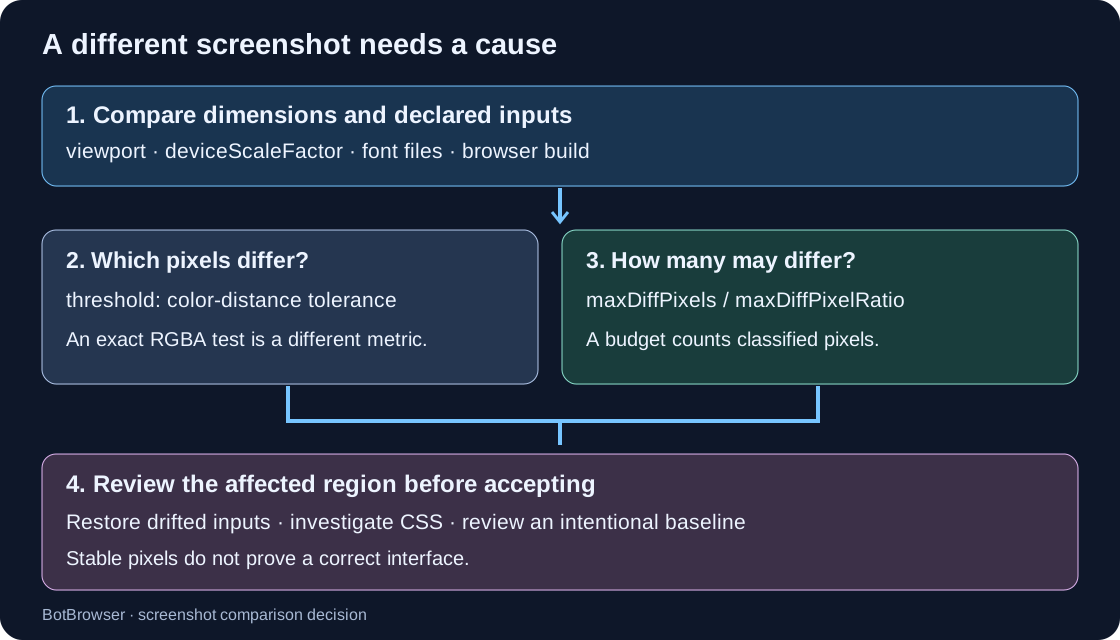
- A color tolerance decides which pixels count as different. A changed-pixel count or ratio decides how much classified difference is allowed.
- A controlled stock Chrome run separated font, viewport, scale and CSS changes. A generous count budget and a generous color tolerance each accepted a deliberately changed CSS color.
- Repeated agreement establishes repeatability under the recorded inputs. It does not establish that the interface, font choice or baseline is correct.
Contents
- Separate a failed comparison from its cause
- Check four sources of baseline drift
- Reproduce one changed input at a time
- Read the controlled screenshot results
- Choose a color tolerance and a difference budget separately
- Decide whether to restore, investigate or update
- Visual regression testing FAQ
Separate a failed comparison from its cause
Start with the dimensions of both decoded images. A screenshot that is twice as wide and twice as tall contains four times as many pixel positions. Comparing it directly against the smaller image does not produce an ordinary count of changed pixels at corresponding positions. Scaling it down introduces a resampling operation and a new source of differences. Record the dimension mismatch first; choose an explicit normalization policy only if normalization is part of the test's intended contract.
Next compare the capture manifest: browser executable version, operating system, rendering mode, viewport in CSS pixels, deviceScaleFactor, available fonts and application revision. A container tag is a useful reference, but a mutable tag alone does not establish that these inputs stayed unchanged. Keep the resolved browser version and the font-file identities alongside the baseline. A failed comparison with different inputs requires a different investigation from a failed comparison with the same inputs.
Then inspect where the difference occurs. Text-shaped changes suggest a font or text-layout question; a single rectangular region suggests a local style or content change; widespread changes may involve layout, scale or another shared rendering input. These shapes are clues, not diagnoses. A product label change can also produce text-shaped pixels, and a font substitution can alter layout far beyond the glyphs themselves.
The screenshot capture checks already cover readiness and capture metadata. Keep those inputs explicit rather than treating the screenshot assertion as an application-readiness detector. Playwright's screenshot assertion waits for two consecutive screenshots to agree before comparing the final image with the reference. Two stable frames can still show an empty table, a fallback font or a loading error. The application's own readiness condition must name the state that the test is supposed to capture.
Separate three questions in the failure record: were comparable inputs used, which image regions changed, and is the changed interface acceptable? The first two are measurements. The third requires the application contract or a human design review. Automatically updating a baseline answers none of them; it simply changes the future reference.
Check four sources of baseline drift
Browser build and capture mode
Pin the browser executable used to generate the reference, not just the automation-library version. A framework upgrade can select a different bundled browser, while a system browser can change independently. Record the actual runtime version at capture time. If the baseline was generated with another build, repeat the old application revision with the new browser before assigning the difference to application code.
Keep headless or headed mode part of the manifest as well. Playwright's visual-comparison documentation names host OS, version, settings, hardware, power source and headless mode among rendering influences. That warning supports environment control; it does not establish that a particular screenshot failure was caused by any one of those factors. A paired old-build/new-build experiment is needed to investigate a browser upgrade. The controlled run below does not change browser builds.
Font files and loading state
A CSS family name is a request, not evidence of the font file used to draw every glyph. The requested face may be absent, still loading or unable to supply one character. A different fallback can change glyph shapes, widths and line breaks. Record the files supplied to the test and inspect representative text after the relevant font-loading promises resolve. Waiting for a font does not make a missing glyph appear.
document.fonts.ready concerns the document's font-loading and layout work. It is not a promise that all future content or font requests have already been made. If the application inserts another region afterward, await that region's own readiness before capturing it. When a test deliberately changes a font, allow layout to run again before taking the next image. Comparing the old image with a capture taken before the new face has been applied confuses timing with font choice.
BotBrowser's font controls describe profile-backed inventory and rendering behavior without promising identical output for every glyph. Host font availability remains relevant when the selected mode permits host fallback or uses real system fonts. A declared inventory and an image-comparison policy therefore solve different problems; neither makes the other unnecessary.
Viewport and device scale factor
Viewport width changes responsive layout and text wrapping. Device scale factor changes the relationship between CSS coordinates and image pixels. Record both rather than using screenshot width as a substitute for the viewport. A full-page capture can also grow because the document grew, even when its viewport did not change.
Check the observed values inside the page as well as the requested automation options. A baseline generated at one CSS width and a current image generated at another should first be classified as a geometry mismatch. Adjusting the changed-pixel allowance cannot restore the layout conditions under which the original reference was created. If multiple viewport projects are intentional, keep separate references and project identities for them.
Graphics backend and host rendering
A declared GPU value does not establish that the same rasterizer drew the image. Software rasterizers and host graphics paths can produce different pixel output for equivalent drawing operations. BotBrowser's Linux graphics-backend documentation explicitly distinguishes software rendering backends and their pixel results. A renderer string alone is insufficient provenance for an exact screenshot baseline.
Preserve backend configuration where the environment exposes it, and avoid mixing reference images from unrelated runner types. If a driver or backend change is suspected, run a paired experiment with the application, fonts and capture geometry held fixed. The input-isolation fixture below does not change a driver or prove a GPU cause. Its purpose is to demonstrate how a known input change is classified before a tolerance is relaxed.
Reproduce one changed input at a time
Use an owned page with fixed content, two locally supplied font files and no external requests. Capture a baseline, then create separate groups that change only the selected font, viewport width, device scale factor or a known CSS color. Repeat each group in fresh browser launches. The CSS change is a positive control: it confirms that the comparison can expose a deliberately introduced application change.
The run used five groups with three independent launches each, giving 15 tasks. A single global pool had a requested limit of 20 and an effective limit of 15 because only 15 tasks existed. The Ubuntu host had 32 CPU cores and sufficient available memory before launch; the display was the existing :88 service. The pool reached 15 active browser lanes. This is one bounded experiment, not a recommendation to start 15 browsers on every machine.
Download the standalone reproduction script and the recorded run JSON. The script requires Linux, Node 20 or newer, stock Chrome, Playwright Core, Python with Pillow, two local TTF files and the existing xvfb-88.service. It installs nothing. Set the four path variables to those dependencies, then run:
DISPLAY=:88 node visual-regression-baseline-drift.mjs \
  --browser "$CHROME_BIN" --playwright-root "$PLAYWRIGHT_ROOT" \
  --font-a "$FONT_A" --font-b "$FONT_B" \
  --workers 20 --out /tmp/visual-regression-result.json
The script serves the fixed page and font files on loopback, records every group and verifies browser-process cleanup. It retains the images and temporary data directories for inspection. Use its --self-test mode to verify the comparison boundary cases before launching browsers. The recorded counts below belong to the supplied run; different font files can produce different counts without invalidating the method.
The capture pattern keeps page readiness separate from screenshot comparison. Replace the application selector with a state that the owned fixture actually implements:
import { chromium } from 'playwright';
import { writeFile } from 'node:fs/promises';

const browser = await chromium.launch({ headless: false });
try {
  const context = await browser.newContext({
    viewport: { width: 1280, height: 900 },
    deviceScaleFactor: 1,
  });
  const page = await context.newPage();
  await page.goto('http://127.0.0.1:4173/fixture');
  await page.locator('[data-ready="true"]').waitFor();
  await page.evaluate(async () => {
    await document.fonts.ready;
    await new Promise(resolve =>
      requestAnimationFrame(() => {
        requestAnimationFrame(resolve);
      })
    );
  });
  const manifest = await page.evaluate(() => ({
    viewport: [innerWidth, innerHeight],
    devicePixelRatio,
    fontStatus: document.fonts.status,
  }));
  manifest.browserVersion = browser.version();
  await page.screenshot({ path: 'capture.png', animations: 'disabled' });
  await writeFile('capture.json', JSON.stringify(manifest, null, 2));
} finally {
  await browser.close();
}
The example captures evidence; it does not compare images or define the fixture server. A screenshot alone cannot recover the browser version, supplied font files or the page's business-ready condition. Add those inputs to the baseline record rather than inferring them from the pixels. Disabling animations removes a named source of motion, but it does not freeze live data, a changing clock or application timers.
For a font experiment, keep the text, widths and browser fixed while changing the selected supplied face. For a geometry experiment, keep fonts and content fixed while changing the viewport or scale option. For the CSS control, change only the known color declaration. If several inputs change together, preserve that fact and classify the observation as a configuration comparison; do not present it as an isolated causal effect.
Read the controlled screenshot results
Stock Chrome reported runtime version 154.0.8037.57 in all 15 tasks. The baseline image was 1280 × 900; every group repeated consistently across its three launches. The comparison decoded PNGs to RGBA bytes. A pixel counted as changed when its maximum absolute channel difference exceeded the selected integer tolerance. This exact byte rule is an illustrative metric, not Playwright's perceptual pixelmatch rule.
| Group | Image dimensions | Changed pixels at exact comparison | Interpretation |
|---|---|---|---|
| Baseline repeats | 1280 × 900 | 0 | The controlled input repeated in this run. |
| Selected font changed | 1280 × 900 | 26,962, about 2.34% | Differences were confined to the text-related region. |
| Viewport width changed | 1024 × 900 | Not calculated | Dimension mismatch was classified first. |
| Device scale factor changed | 2560 × 1800 | Not calculated | Image sampling dimensions differed. |
| Known CSS color changed | 1280 × 900 | 9,600, about 0.83% | Differences were confined to the intended color block. |
The CSS block occupied 120 × 80 pixels, so its area was 9,600 pixels. Its deliberately changed channel value differed by 8. With an exact channel tolerance of 0, those pixels counted as different. A budget of 10,000 accepted the image despite the known CSS change. Raising the illustrative channel tolerance to 16 made the changed-pixel count zero. These numbers demonstrate two distinct ways to accept a known change; they are not proposed production settings.
The font group changed 26,962 pixels within the recorded text region, with no changes outside that region. That supports attribution within this deliberately restricted page. A real application can respond to font substitution with wider layout changes, so a text-region restriction is not a general font detector. Likewise, the CSS control was intentionally simple; a changed layout property could affect most of a page rather than one rectangle.
All tasks loaded only their owned page and local font resource. The run retained observed geometry, font readiness, browser provenance and comparison outcomes. Cleanup verification found no remaining task browsers or workers. This establishes the bounded run's completion, not the availability of the same fonts or graphics environment on a reader's machine. The reproducible fixture and its recorded output are retained with the experiment evidence.
Choose a color tolerance and a difference budget separately
Playwright's documented image-comparison options separate acceptable perceived color difference between corresponding pixels from total difference allowances. maxDiffPixels is an acceptable count of pixels classified as different, while maxDiffPixelRatio expresses an allowance relative to the image's total area. These settings act on different parts of the comparison. Changing one is not equivalent to changing another, and values from a different comparison algorithm are not interchangeable.
| Setting or action | Question it answers | A failure it can conceal |
|---|---|---|
| Per-pixel color tolerance | Is the color difference at this pixel large enough to count? | A small but intentional color change across an important component. |
| Maximum changed-pixel count | How many classified differences may this image contain? | A compact missing icon or changed control whose area stays under the budget. |
| Maximum changed-pixel ratio | What fraction of this image may differ? | A fixed defect becoming a smaller fraction of a longer full-page image. |
| New baseline image | What reference should future comparisons use? | Any unintended change accepted without examining the image. |
A ratio depends on image area. The same missing control occupies a smaller fraction of a tall full-page screenshot than of a component crop. A count budget does not have that denominator, but it still ignores the meaning of the changed region. Neither metric knows whether the pixels belong to a decorative shadow, a price or a disabled payment button. Choose the region of interest as part of the test, not after a failure merely to make the assertion pass.
Build a tolerance policy from recorded repeat runs under the intended environment, plus known application changes that must remain detectable. Keep both kinds of examples. If a proposed setting accepts the known CSS defect, its ability to quiet harmless noise does not make it suitable for that assertion. Inspect the diff and decide whether the test should compare a smaller stable component, stabilize another input or retain the stricter setting.
Do not transfer the fixture's integer channel tolerance of 16 into Playwright's color-distance option. They have different scales and semantics. Do not treat the fixture's 10,000-pixel budget as a sample configuration either: it was selected before the run to demonstrate how an allowance can swallow the known 9,600-pixel control. A defensible production budget must be tied to the image dimensions, region and specific changes the test must reject.
Decide whether to restore, investigate or update
When image dimensions differ unexpectedly, restore the intended viewport, deviceScaleFactor and capture area first. When font or browser inputs differ, decide whether the environment change was intentional. Restore accidental drift; for an intentional upgrade, compare the old application revision in both environments before reviewing the new reference. Keep the environment migration separate from an application feature change wherever practical.
If the inputs agree and a stable region still differs, investigate the application revision and captured state. Check changed styles, text, data and loading outcomes. The Grid configuration and pixel-divergence decision handles attribution across distributed nodes; a local screenshot test should preserve the same distinction between configuration evidence and image evidence without pretending that a matching manifest proves a matching render.
Update a baseline after the changed region has been accepted and the generating environment is recorded. Preserve the previous image in version history, the current diff, the reason for acceptance and the inputs used to generate the replacement. A baseline-update command is an output-writing operation, not a reviewer. Keeping it out of unattended failure recovery prevents a persistent defect from becoming tomorrow's accepted reference.
For an intentional browser upgrade, review representative text, controls and layout in addition to the aggregate diff. A low changed-pixel percentage can hide a meaningful local defect, while a high percentage can reflect harmless font-edge changes. The purpose of a tolerance is to express a chosen test policy after those distinctions are understood. It cannot determine whether the change belongs in the product.
Visual regression testing FAQ
Does the same screenshot hash prove there is no bug?
No. Identical bytes establish equality for that capture. Both images may contain the same wrong font, missing content or outdated data. Pair the visual assertion with the relevant semantic checks, such as the expected control state or the application's loaded-data condition.
Should every runner share one baseline?
Only when that is the intended rendering contract and the relevant inputs are controlled. Different browser projects, platform rendering paths or viewport sizes can require separate references. Giving each accidental difference its own baseline would hide drift, so classify the difference before adding a new reference family.
Can a declared browser profile replace font and GPU records?
No. Profile-backed controls describe selected browser surfaces, while screenshot output also depends on the actual text and rendering path. Record the selected font mode and backend assumptions; do not interpret a profile name as a guarantee of cross-host pixel identity.
Sources
- Playwright: Visual comparisons, environment dependence and comparison options.
- Playwright: SnapshotAssertions, color tolerance, pixel count and pixel ratio semantics.
- Playwright: PageAssertions.toHaveScreenshot, consecutive captures and animation handling.
- MDN: Document.fonts, document font loading and readiness.
- BotBrowser: Cross-platform profiles, declared surface controls and host boundaries.
- BotBrowser: Font controls, inventory, modes and rendering limitations.
- BotBrowser: Linux GPU backend, software rendering paths and pixel differences.
Practical conclusion
A screenshot failure needs comparable dimensions, recorded inputs and an inspected diff before it needs a looser tolerance. Separate the pixel-classification tolerance from the total difference budget, and verify both against a known change that the assertion must reject. Accept a new baseline only after the interface change and its generating environment have been reviewed.
Related Articles
Reliable Screenshot Capture in Headless Browsers
Getting StartedHow to Write a Reproducible Browser Bug Report
FingerprintBrowser Privacy Validation Across Rendering Backends
ComparisonWhat Does an Anti-Detect Browser Change?
Getting StartedBrowser Update Regression Triage for Web Teams
FingerprintScreen and Viewport Properties for Responsive Design
Run the same check in BotBrowser
Load a profile, keep the signals you just read about consistent inside the browser, and confirm the result on your own machine before a rollout.