Headless vs Headed Browser Signals: A Comparison Method
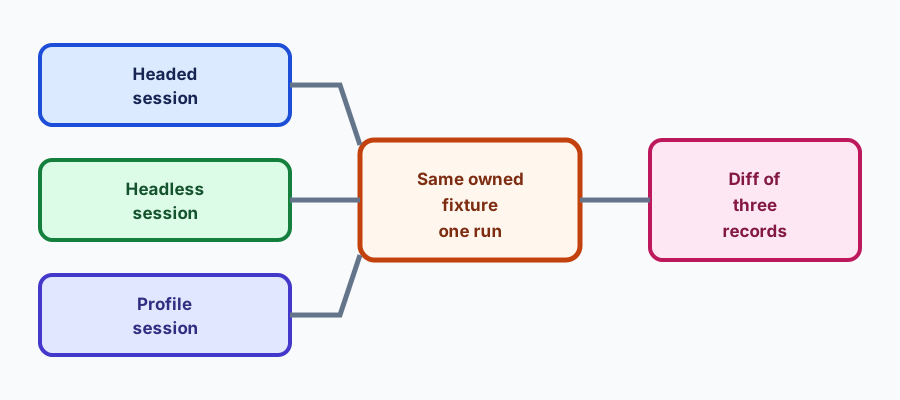
Run the same owned fixture in headed, headless, and profile-backed sessions, then diff the three records instead of guessing which mode the page saw.
BotBrowser Team
Want the structured docs for Deployment?
This article lives in the editorial library. For step-by-step setup, reference material, and ongoing updates, jump into the docs section.
Teams ask whether a page "sees" a headless browser, and the honest answer is that it sees a set of values, some of which differ between modes and some of which do not. This article gives a method for finding out which is which, and it sits next to the browser fingerprint protection for data collection guide: that article covers what an authorized collection session should keep consistent, while this one covers how to measure the difference between modes before you trust either.
BotBrowser supports running a declared profile in headed and headless modes and keeps browser-visible values aligned with that profile, which makes a three-way comparison possible on an owned fixture; it cannot make a headless browser identical to a headed one on every surface, cannot predict a third-party site's decision, and does not replace testing the real pages your workflow visits.
TL;DR
- Compare three sessions, not two: headed, headless, and profile-backed in the mode you deploy.
- Run the same fixture version and record the same fields in each.
- Diff the records field by field and classify each difference as expected or unexplained.
- Treat an unexplained difference as a finding to explain, not a defect to mask.
Contents
- Start from an owned fixture
- Record the same fields three times
- Classify each difference
- Keep the comparison runnable
- Keep the comparison honest
- Compare the deployment, not only the modes
- Conclusion
Start from an owned fixture
The comparison is only meaningful on a page you control, with a version you pin, that reports the same fields in every mode. A third-party page that changes its own scripts can produce a difference that has nothing to do with headless mode, and you cannot tell from the outside which cause you are looking at.
Write the fixture so it reports values rather than verdicts. A page that prints "headless detected" is a page whose logic you would have to audit before trusting it. A page that reports navigator.userAgent, navigator.platform, screen.width, screen.height, devicePixelRatio, navigator.hardwareConcurrency, Intl.DateTimeFormat().resolvedOptions().timeZone, and the presence of a few construction APIs gives you values you can diff without believing any of them.
Keep the fixture version in the record. A fixture that changes between two runs turns a real difference into a fixture difference, and the diff will blame the browser. Increment the version when the reported fields change, and rerun the baseline when you do.
Include at least one field that you expect to differ. A comparison where everything matches may mean the modes agree, or may mean the fixture stopped reporting something. An expected difference acts as a control: if it disappears, the fixture changed.
Record the same fields three times
The first session is headed, with no profile. It is the reference a reader will recognize: a normal browser window on a normal display. The second is headless, also without a profile, so the only changed input is the mode. The third is the deployment configuration: the profile you actually ship, in the mode you actually run.
Every session uses the same browser package version, the same fixture version, and the same request sequence. Changing more than one input between sessions makes the diff unreadable, which is exactly the mistake the comparison is meant to prevent.
Record the fields as a flat object so a diff tool can compare them without knowing the structure. Nested objects are fine inside a field, but the top level should be a list of names and values that a simple line diff can show. A record with twenty flat fields is easier to compare than one with four nested ones.
Keep the output of each session separate and named by mode. headed.json, headless.json, and profile.json make the three-way diff obvious, and they make it possible to rerun one session without rerunning all three.
Classify each difference
A difference between headed and headless is not automatically a problem. Some are expected because the mode changes what the browser does, and some are expected because your deployment profile declares a value that neither default session had.
The user agent (navigator.userAgent) is the clearest expected difference. A headless browser often reports a headless token, and a profile may declare a different one. That is a declaration, not a leak, and the record should say which session declared it.
Screen dimensions (screen.width and screen.height) can differ because the virtual display of a headless session is not the physical display of the headed one. A profile that declares a screen size changes it again. The interesting question is not whether they differ, but whether the deployment's declared size is consistent with the other values that depend on it, such as the window size and the viewport.
Device pixel ratio (devicePixelRatio) often differs for the same reason. A headless session with a default virtual display can report one ratio while a headed session reports the physical display's ratio, and a profile can declare a third. Record the ratio and the viewport that results from it together, because a ratio without the viewport does not describe what a page measured.
Timing and rendering surfaces are the ones most likely to differ for real reasons. A headless session may not have a GPU, may composite differently, and may produce different canvas output. Those differences are the ones worth investigating, because they are the ones a page could use to tell the modes apart even when every declared value matches.
A difference that appears only in the profile session is usually a declaration taking effect. Compare it to the profile file rather than to the headed session, and record whether the declared value and the observed value agree. That check is the point of running the third session at all.
A difference that appears only in one run of one mode is neither expected nor a mode difference. It is a run-to-run variation, and comparing it against the other two sessions will mislead. Run the same session twice before classifying it, and treat a difference that only appears once as noise until it repeats.
Keep the comparison runnable
A comparison that lives in a one-off script is a comparison nobody reruns. Put the three sessions behind one command such as npm run compare:modes, write the three records to a fixed directory, and let the diff be a command rather than a judgment. When a browser update changes something, the three-way diff shows it in one line per field.
Keep the fixture and the records in version control, with the fixture version in the file name. A later reader can then see which fields were compared at which point in time, and the history of a field that keeps changing is visible without asking anyone.
Rerun the comparison after a browser update, a profile format change, and a driver upgrade. Those three events are the ones most likely to change a field without changing your code, and the comparison is cheap enough to run on each.
Do not turn the comparison into a pass-or-fail gate for the modes matching. Modes are allowed to differ; what the gate should catch is a field that silently stopped being recorded, or a declared value that stopped appearing. A gate that fails whenever headed and headless disagree will be ignored within a month.
Keep the comparison honest
Decide what it is allowed to conclude
A three-way comparison answers a narrow question: for these fields, on this fixture, in this browser package, what differs between modes and what differs after a profile is applied. It does not answer whether a site will accept a headless session, whether a headless session is detectable in general, or whether a headed session is safer. Those questions involve the site's own logic, its account policy, and its risk rules, none of which the fixture can observe.
Write the conclusion in that narrow form. "On fixture@v4 with package 155, the user agent and screen size differ between headed and headless before a profile is applied, and match the profile's declared values after" is a conclusion the record supports. "Headless is fine" is not, and it invites a decision the data cannot carry.
Keep the comparison independent of any target site. The moment a session also visits a third-party page, the record mixes your browser's behavior with that page's response, and a difference could come from either. If you need to check a real page, do it as a separate run with its own record, and keep the fixture comparison clean.
Share the diff, not the conclusion. A colleague reviewing a changed field can decide what it means for their workflow; a colleague receiving a verdict has to take it on trust. The three records and the one-line diff are the artifact worth keeping.
Refresh the conclusion when the package or the profile format changes. A conclusion written for one package version describes that version, and a later reader who finds it attached to a different version will apply it incorrectly. Date the conclusion and name the inputs it applies to.
Handle the fields that are easy to get wrong
Some fields look like browser signals but are really request or environment values, and comparing them across modes without knowing that wastes the comparison. The HTTP headers a session sends are built from several sources, and the user agent header can differ from navigator.userAgent in ways that depend on the driver and the launch options.
Record both the page-visible value and the request header when the two are supposed to agree. A mismatch between them is a real finding, and it is invisible if the fixture only reports the page value. Capture the request header at the same moment as the page value so the two describe the same navigation.
Locale and timezone deserve the same treatment. Intl.DateTimeFormat().resolvedOptions().locale, Intl.DateTimeFormat().resolvedOptions().timeZone, and navigator.language are separate values that can disagree, and a headless session on a server with a different system locale can produce a combination the headed session never shows. Record all three rather than one.
Canvas and font measurements need care because they depend on rendering, which is exactly where a headless session can legitimately differ. Record the measurement and the rendering path together, and treat a difference as expected when the path differs and as worth investigating when it does not. The canvas rendering path guide covers why two software paths can produce different output on the same host.
Make the diff readable
A diff of two JSON records is readable when the records share a flat shape and the values are short. Format the records with sorted keys, one field per line, and no pretty-printed nesting beyond one level. A tool that prints <field>: <headed> -> <headless> for every changed field is enough; a custom report format is not.
Include a field for the session mode and the profile in each record, so a record copied out of context still says what produced it. A record without those two fields cannot be compared later, and the comparison depends on knowing which session is which.
Keep a small changelog of the fields next to the fixture. When a field is added, note the date and why; when a field is removed, note that too, because a removed field looks identical to a field that stopped reporting. The changelog is what distinguishes an intentional change from a silent one.
Run the diff in continuous integration and fail only when a field disappears or a declared value no longer matches the profile. A diff that fails on every mode difference will be turned off, and a comparison that is off is worse than one that reports and lets a human read.
Review it before a release
A release review asks whether the deployment still reports what it declared. The three-way comparison answers that directly: the profile session's values against the profile file, and the two default sessions against their own baseline. Run it as part of the release review rather than after an incident, and store the result next to profile.json.
Keep the previous comparison for the supported window. A difference between this release's records and the last one's is more informative than either alone, and it is the only way to see a field that changed gradually across two updates.
Retire a comparison when the fixture version it used is no longer in service, and keep the note that says which release it described. A stale comparison that looks current is the most expensive kind of document, because it is trusted.
Compare the deployment, not only the modes
The three-way comparison tells you what differs between modes. It does not tell you whether the deployment is internally consistent, which is a separate question with a separate record. A profile session can match its declared user agent and still declare a screen size that does not match its window size, and neither the diff nor a single field check catches that.
Add a consistency pass that compares the profile session's fields against each other rather than against the other sessions. The viewport (window.innerWidth and window.innerHeight) should fit inside the declared screen; the time zone, locale, and language should describe the same region; the platform should be compatible with the user agent. Each of those is a rule you can state in one line and check in the same fixture run.
Keep the rules next to the fixture and give each one a name. When a rule fails, the record says which rule, not merely which field changed, and a reader does not have to rediscover the relationship. Rules also survive a field rename, while a hard-coded comparison does not.
Run the consistency pass on every session type, not only the profile one. A headed session with no profile can still violate a rule if the host's locale and time zone disagree, and knowing that the baseline itself is inconsistent changes how you read every other difference.
Report rule failures separately from mode differences. A mode difference is expected and informational; a rule failure is a configuration problem that the deployment owns. Mixing them in one list makes the expected differences noisy and the configuration problems easy to miss.
Use the comparison when a report arrives
A report that a site "detects the automation" arrives as a sentence, not as a record. The comparison is what turns the sentence into a question: which field changed since the last known-good comparison, and did it change in the mode the workflow uses.
Ask for the run identifier (runId) and the comparison from the same deployment first. Without them, the first hour goes to establishing what was running, which is the information the comparison already holds. With them, the reviewer can move directly to the changed field.
Compare against the last good record for the same fixture version. A diff against an older fixture version mixes a browser difference with a fixture difference, and the resulting list is longer than it needs to be. When no record exists for the current fixture, generate one before investigating.
Treat a missing field as a finding of its own. A field that was recorded last week and is absent this week may mean the fixture stopped reporting it, the page failed before reaching it, or the value became unavailable. Each of those has a different next step, and none of them is "the site started detecting us".
Keep the comparison cheap enough to run on request. A comparison that takes an afternoon of setup will be run after the incident, not during it, and the incident will be over before the records exist.
Conclusion
Headless and headed browsers differ in ways that are expected, ways that are declared by a profile, and ways that are worth investigating. Run three sessions on one owned fixture, record the same flat fields, classify each difference, and keep the comparison runnable. Use it alongside the data collection guide and the headless server setup guide.
Sources
This article is part of the guide: Browser Deployment and Release: Operations Map
Related Articles
Headless and Headed Browser Profile Consistency
DeploymentBrowser Automation Signals and Consistency in Playwright
DeploymentBrowser Fingerprint Protection for Web Data Collection
FingerprintBrowser Permission Fingerprinting: Privacy and Consistency
DeploymentBrowser Deployment Logging and Privacy Minimization
DeploymentBrowserContext Capacity Planning for Memory and Long-Running Sessions
Take BotBrowser from research to production
The guides cover the model first, then move into cross-platform validation, isolated contexts, and scale-ready browser deployment.