Browser Core vs JavaScript Overrides for Fingerprint Consistency
Compare browser extensions, injected scripts, and browser-level changes by the layer each controls, and learn how to verify fingerprint consistency yourself.
Want the structured docs for Documentation?
This article lives in the editorial library. For step-by-step setup, reference material, and ongoing updates, jump into the docs section.
Which layer a protection tool controls
Fingerprint protection tools differ less in what they promise than in where they run. A browser has several layers: the network code that sends the first request, the rendering and audio pipelines that produce pixels and samples, the JavaScript API surface that pages read, and the separate execution contexts (frames, dedicated workers, shared workers, and service workers) that each receive their own copy of that surface. A tool can only make consistent what sits at or below the layer it controls.
Three architectures are common today:
- Browser extensions that run a content script in the page and override JavaScript properties after the page starts loading
- Injected scripts, often shipped as plugins for automation frameworks such as Puppeteer or Playwright, that run before page scripts in every new document
- Changes inside the browser's own compiled code, where a loaded profile sets values before any page script exists
These are not three versions of the same idea. Each one has a different reach, and the reach decides three practical outcomes: whether values agree across the main frame, iframes, and workers; whether rendering output and request headers agree with the JavaScript values; and how much maintenance each new browser release or new fingerprinting technique creates for you.
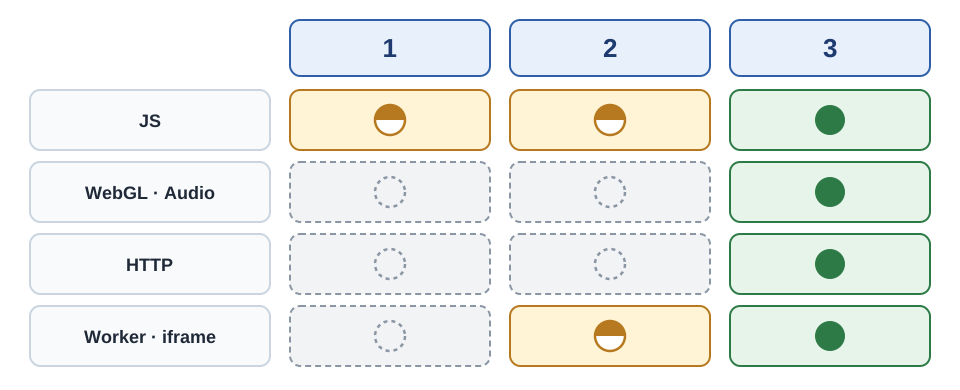
Columns 1 to 3 follow the numbered list above. A filled green circle means the value comes from the profile, a half-filled amber circle means a script changes the value, and a dashed ring means the real device value stays unless something else changes it. In the last row, the half circle for injected scripts means frames are covered while workers vary. A dashed ring does not mean the approach is useless, and the sections below explain why each row matters.
A concrete case makes the difference easier to see. Suppose a page reads the platform value in the main frame, then opens an iframe and a dedicated worker and reads the same value there, while the server also records the platform hint from the first request. Four readings of one fact now exist. A tool that controls only the JavaScript layer can make some of them agree, but it can only make all four agree if every one of those paths happens to receive its override. A tool that sets the value once, from one profile, before any of those paths exist, removes the need for each path to be patched separately.
Why partial protection becomes its own signal
Protection that is incomplete can leave a visitor easier to single out than no protection at all. When some values are changed and others are not, the result contains contradictions. A browser that reports one operating system in its platform string while its fonts and text rendering match another operating system is more unusual than an unmodified browser, because very few real devices show that combination.
The same applies to the traces left by the tool itself. A property that was replaced with a script-defined getter prints a different function body than the browser's built-in getter when its source text is read. A wrapped prototype method can show the same difference.
The W3C guidance on mitigating fingerprinting in web specifications describes why a fingerprint is hard to clear or reset, and that is exactly why consistency matters more than the number of values you change. For a privacy engineer or an automation engineer the practical question is not whether a tool changes a value. It is whether every place that value can be read agrees afterward, including places the tool may never see.
Where extensions and injected scripts reach
Both script-based approaches work through the JavaScript layer, so their strengths and limits come from the same source. The points below describe what that layer can and cannot change.
Browser extensions. An extension uses the WebExtensions API, which lets a content script run in the page at document start. A typical fingerprint extension replaces the definitions of properties such as hardwareConcurrency and screen dimensions, and wraps the methods that read Canvas and audio data so that their results change.
Property descriptors. Replacing a built-in property with a script-defined getter changes its property descriptor. Printing the getter's source text shows ordinary JavaScript instead of [native code], and any script running in the page can perform that check.
Prototype chain. Wrapped prototype methods are ordinary functions too. They can be told apart from built-in browser code by the same kind of source-text comparison, so wrapping hides the original function only as well as the wrapper imitates it.
Fresh contexts. An extension may not run its overrides in every execution context. Iframes created by the page, dedicated workers, shared workers, and service workers each have their own global object, which MDN documents as separate scopes. If an override reaches the main frame but not a worker, the same property returns two different values in the same session, and that mismatch is visible to the page.
Rendering output. An extension can wrap the methods that read Canvas pixels or audio samples, but the pixels and samples are produced by the browser's graphics and audio pipelines. Any code that reads real output through a path the wrapper does not cover sees the device values, and a wrapper that only adds noise to API results leaves the underlying output unchanged.
Network layer. Extension scripts run after the first request has been sent. Client Hints headers, such as the platform hint, are attached to requests before a content script can act, and TLS parameters are outside what any page script can change.
Injected scripts. Plugins for automation frameworks improved on extensions. The framework registers a script that runs in every new document before page scripts, which closes the timing gap and covers frames the page creates. These plugins also override more values and patch toString() so that replaced functions print as built-in code.
What remains. The limits that remain are structural. Workers depend on whether the framework injects into worker scopes at all. The rendering and network layers are untouched. Every value is its own patch, so keeping them consistent with each other, for example a claimed GPU against the actual raster output, depends on the author's manual care. A patched toString() is also just another override that can be inspected.
Service workers add a further wrinkle. They persist across page loads and can outlive the page that registered them, so an override that was installed for one navigation may not be present when a service worker starts later. A script approach has to find and patch each of these scopes as they appear, and a missed scope shows up as two values for one property.
Better scripts narrow these limits but cannot remove them, because scripts run above the layers in question. That is an architectural property, not a gap that careful coding closes. It also means maintenance grows with the number of values you patch: every new browser release or fingerprinting technique can need a new patch, and every patch is one more function that has to look built in.
What changes when the profile is applied inside the browser
When values are set in the browser's own code instead of being patched over a finished page, there is no override to find. BotBrowser loads a profile captured from a real browser session and applies it before page scripts run. Its navigator documentation describes the result: navigator values stay consistent across JavaScript, HTTP headers, and Worker contexts.
Native getters. Reading a property goes through the browser's normal code path, so no script-defined getter sits in front of the value. The descriptor check in the next section is expected to show built-in code.
Rendering output. For Canvas 2D, WebGL, and audio, BotBrowser applies deterministic noise in the rendering pipeline rather than through JavaScript injection. Reading the Canvas article shows how that noise stays stable per seed.
Request headers. The documentation describes Client Hints values and the matching request headers as generated from the same profile, so they stay aligned with the JavaScript values and with workers.
Worker inheritance. Dedicated workers, shared workers, and service workers created inside a context inherit that context's fingerprint (see the per-context fingerprint documentation), so there is no injection step that could run late or miss a context.
The table summarizes how the three approaches differ on the dimensions that matter for consistency. It compares architectures, not specific products.
| Dimension | Browser extension | Injected script | Profile applied inside the browser |
|---|---|---|---|
| JavaScript property values | Script override | Script override with earlier timing | Profile value through the normal getter |
| Property descriptor check | Script getter visible | Script getter visible, toString() patched | Built-in getter expected |
| Canvas, WebGL, and audio output | Wrapped read methods only | Wrapped read methods only | Profile-driven noise in the rendering path |
| Font availability | Not controlled | Not controlled | Font list from the profile |
| Request headers | Sent before the content script runs | Not changed by page scripts | Matching values from the profile |
| Client Hints | Not reached | Not reached | Kept consistent with the profile |
| iframes and workers | Can be missed | Frames covered, workers vary | Same profile values |
| Consistency across signals | Independent patches | Independent patches | One profile defines all values |
A profile contains the device signals captured from a real browser session: navigator values, screen dimensions, GPU information, fonts, and rendering and audio characteristics. Loading it configures them together, which is how the signals stay consistent with each other. The launch command is short:
chromium-browser \
  --bot-profile="path/to/profile.enc" \
  --bot-noise-seed=42
Deterministic noise seed. For regression tests and controlled experiments, the noise seed makes output repeatable. The documentation states that the same profile and the same seed produce the same Canvas, WebGL, and audio output across sessions, and that changing the seed produces a different but equally stable result. The --bot-noise-seed flag is documented as an ENT Tier2 feature, so confirm that your plan includes it before relying on it in the launch command above.
Per-context fingerprints. Per-context fingerprinting, documented as an ENT Tier3 feature, lets each browser context carry its own profile and noise seed inside one browser instance. BotBrowser's own benchmark reports lower memory use and fewer operating system processes than separate browser instances at scale. Those are BotBrowser's measurements on its own hardware, so measure your own workload before planning capacity.
Cross-platform output. The Canvas documentation states that a Windows profile running on a Linux host produces the same Canvas output it would on Windows hardware. The cross-platform profiles article covers what to check when host and profile operating systems differ.
Performance. In BotBrowser's own headless Speedometer 3.0 run, BotBrowser scored 42.7 and stock Chrome scored 42.8. The benchmark documentation treats that as within run-to-run variance. There is no per-page script to inject, so there is no per-page injection cost, but results on your hardware can differ.
Checking consistency yourself
Verification applies to any approach, and it checks only whether the values a browser exposes agree with each other. A passing result is evidence of internal consistency. It does not show how any third-party site will classify a session.
Check 1, property descriptors and workers. Open the developer console on a page in the browser you are testing and run the following. The first line reads the getter for one property and prints its source text. The remaining lines start a worker and compare its value with the main frame.
const d = Object.getOwnPropertyDescriptor(Navigator.prototype, 'hardwareConcurrency');
console.log(Function.prototype.toString.call(d.get));
const w = new Worker(URL.createObjectURL(new Blob(['postMessage(navigator.hardwareConcurrency)'])));
w.onmessage = e => console.log('worker:', e.data, 'main:', navigator.hardwareConcurrency);
A built-in getter prints a function body containing [native code]. A getter defined by a script prints JavaScript source. The worker value and the main frame value should match. If they differ, an override has reached one context but not the other.
Check 2, other contexts. Repeat the comparison for a same-origin iframe and, if your workflow uses one, a service worker. Matching values are consistency evidence. A mismatch points to a layer or context the tool does not reach.
Check 3, headers against scripts. Compare the platform and brand values that scripts report with the User-Agent and Client Hints headers a server receives. A request echo page that you control is enough for this. The two sources should describe the same device.
Check 4, rendering stability. Reload the page and restart the browser with the same profile and seed, then compare Canvas output. Change the seed and confirm that the output changes in a stable way. Output that changes on every read, with no seed involved, is more unusual than output that repeats, because real devices return the same result for the same drawing.
Public inspection pages can offer a second look, and the verification article explains how to read them. Treat their warnings as hints about internal inconsistency, not as scores that any site uses.
When a check fails, the failure points at a layer. A script-defined getter in Check 1 means the value is overridden above the browser's own code. A worker that disagrees with the main frame means the override did not reach that scope. A header that disagrees with a script value means the request was built before the script ran. A rendering result that changes on every read means noise is applied per call instead of per seed. Each of these findings tells you what to fix or which architecture to reconsider, which is more useful than a single pass or fail.
Write down the setup next to each result: the BotBrowser version, the profile file, the seed, the host operating system, and whether the run was headless or headful. Without that record, a difference between two runs cannot be traced to a cause.
Choosing an approach and its limits
Choose by the failure you cannot accept. An extension can be reasonable for casual protection against simple trackers, as long as you accept that fresh contexts and rendering output may keep real values. Injected scripts suit tests where you control the automation framework and need only a few values changed. A profile applied inside the browser fits cases where agreement across contexts and layers is the requirement.
Whichever approach you pick, decide in advance which signals matter for your scenario and test those. A privacy review of a single browser may only need descriptor and worker agreement. A test suite that runs many sessions also needs the seed and profile recorded with each run, so that a difference can be reproduced later. A team that compares host operating systems needs the cross-platform checks as well.
Do I still need injected scripts when I use BotBrowser? A profile already covers the values those scripts patch. Layering script overrides on top can reintroduce script-defined getters and mismatches, so start with the profile alone and add only what a documented check shows you still need.
What about extensions that randomize Canvas output? Random noise that changes on every read is itself unusual, because a real device returns the same output for the same drawing. Seeded noise stays stable per seed, which is the property that makes it usable for repeatable testing.
Is setup harder than adding a plugin? Usually it is shorter. You point your automation framework at the BotBrowser binary and select a profile. The Playwright guide shows the connection step by step.
BotBrowser can keep navigator values consistent across JavaScript, HTTP headers, and Worker contexts by applying a loaded profile inside the browser, which lets you check cross-context agreement yourself instead of relying on injected overrides. BotBrowser cannot guarantee how any third-party site or detector classifies a session, and it does not replace proxy quality, behavioral realism, or your own verification of the final setup.
Public sources
Related Articles
Take BotBrowser from research to production
The guides cover the model first, then move into cross-platform validation, isolated contexts, and scale-ready browser deployment.