Headless Browser Selenium: Chrome Options and What Differs
Selenium headless Chrome differs from headed in ways a page can read. The ChromeOptions that matter, the default window size, and why headless is easier to single out.
BotBrowser Team
Want the structured docs for Getting Started?
This article lives in the editorial library. For step-by-step setup, reference material, and ongoing updates, jump into the docs section.
Running Selenium headless is one argument in ChromeOptions and a different browser underneath, and the gap between those two facts is where most of the confusion lives. BotBrowser provides a declared profile that keeps the surfaces a page can read consistent across each other at launch, and it does not change what Selenium asked Chrome to do; the options you pass decide the mode, and the profile decides what the mode reports. One local run of three sessions shows which fields move when the mode changes and which ones do not.
Summary
--headless=newis what the current Selenium documentation shows for Chrome, and it runs the full browser without a window.- The older implementation is a separate binary,
chrome-headless-shell, not a flag value. - ChromeOptions is where the mode lives: the same
--headless=newstring reaches each binding through that binding’s own argument method, shown in the block below. - Headless and headed agreed on viewport, device pixel ratio and hardware concurrency in the run recorded here.
- They differed in the user agent token, the plugin count on the shell, and the
chromeobject on the shell. - A headless session is easier to single out than a headed one when those fields contradict each other.
- Record the binary, the token and the plugin count on every run; the flag alone does not say which browser ran.
Contents
- Where the mode is set
- The ChromeOptions that change behaviour
- What a page reads differently
- The default window and screen values
- Why headless is easier to single out
- Practical conclusion
Where the mode is set
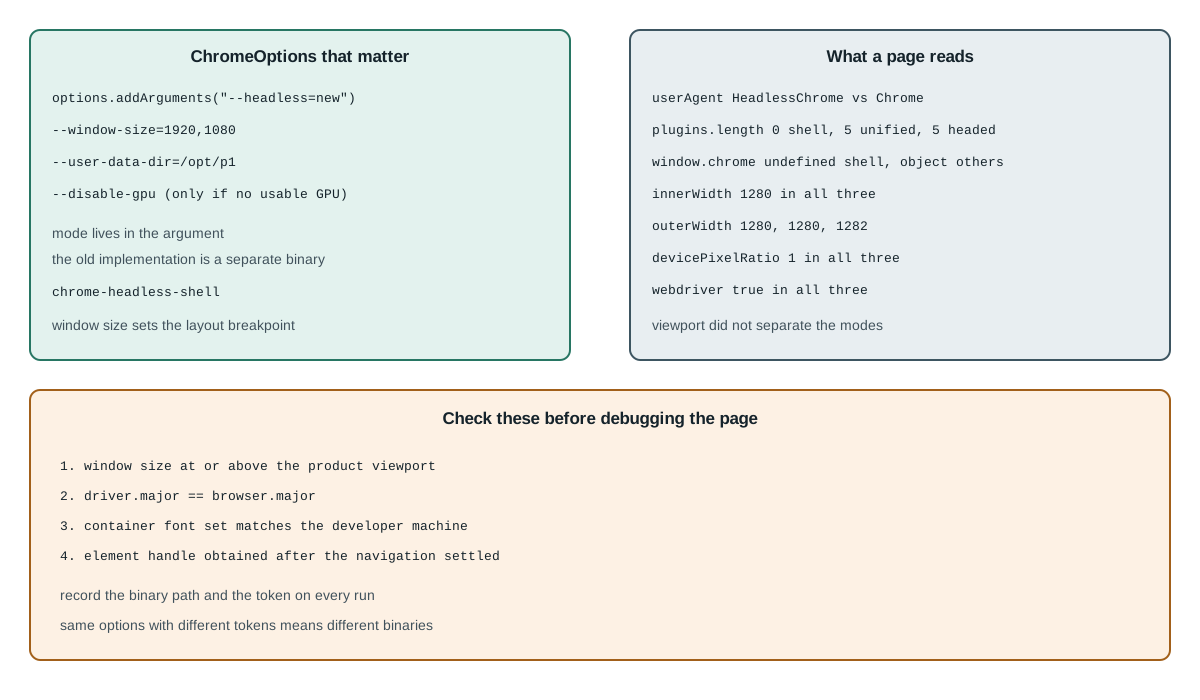
Selenium never chooses a headless mode itself; it hands arguments to Chrome. The current Selenium documentation shows --headless=new in its Chrome example, and the same string appears in every language binding because the argument is passed through unchanged.
Java        options.addArguments("--headless=new");
Python      options.add_argument("--headless=new")
C#          options.AddArgument("--headless=new");
JS          options.addArguments('--headless=new')
The older implementation is not a different value of that flag. It is a different executable, chrome-headless-shell, which Chrome for Testing publishes separately, and Selenium reaches it by pointing the browser binary at that path rather than by changing the argument. That distinction explains a class of report where two teams pass identical options and observe different browsers.
The full comparison of the two implementations, including what each reports for plugins and the chrome object, is in Chrome headless new versus old mode; the Selenium-specific part is only how the binary gets selected.
same options + chrome binary            -> unified headless
same options + chrome-headless-shell    -> old implementation
Selenium 4 requires the ChromeDriver major version to match the Chrome major version, and the documentation states it directly. A mismatch fails at session creation, which is the good failure; the bad one is a driver that matches but a binary that does not, because then the session starts and reports whatever that binary reports.
Where that binary and its profile come from is a separate decision with its own checklist, and Selenium browser profile integration covers the session ownership questions that a headless flag does not touch.
The ChromeOptions that change behaviour
Three options beyond the mode itself change what the page sees, and each one has a failure it prevents.
--headless=new                 full browser, no window
--window-size=1920,1080        without it, the window is 800x600 or the driver default
--disable-gpu                  older advice; check whether the target needs GPU paths
The window size is the one that most often explains a visual difference between a local run and CI. A headless session without an explicit window size starts at a small default, and a page that lays out differently below a breakpoint will render a different document rather than the same document in a smaller frame. Setting the size explicitly makes the comparison meaningful.
--disable-gpu is inherited advice from the era when headless used a software rasteriser by default. On a machine with a usable GPU it can change which rendering path runs, so copying it into a new suite without checking is a way to introduce a difference rather than remove one.
option                     what it changes                     check before adopting
--headless=new             window visibility, not the engine   yes, it is the mode
--window-size              layout breakpoints                  set it to the product viewport
--disable-gpu              rendering path                      only if the host has no GPU
Two more options appear in almost every copied snippet and neither is required for headless. --no-sandbox disables a security boundary and is a container workaround rather than a headless setting; --disable-dev-shm-usage works around a small /dev/shm in some containers. Both change the environment the page runs in, and both belong in the host configuration rather than in a test file that also runs locally.
A fourth option is worth naming because it is not a Chrome argument at all: the profile directory. Selenium passes --user-data-dir like any other argument, and when it is absent the driver creates a temporary profile that is discarded when the session ends. That is fine for a test that starts from a clean state and wrong for a test that expects a login or an extension to survive, and the failure is silent because a fresh profile looks like a working browser until the first assertion that depends on stored state.
options.addArguments("--user-data-dir=/tmp/profile-42")   -> state survives the session
no --user-data-dir                                        -> temporary profile, discarded
The order of arguments does not matter to Chrome, but the order of configuration does matter to a reader. Set the binary, then the mode, then the window, then the profile, then the host workarounds. A snippet that mixes them in a different order is not wrong, and it is much harder to review when a session behaves unexpectedly.
Running the same test locally and in CI
The most common Selenium headless problem is not a headless problem at all; it is a difference between the machine that wrote the test and the machine that runs it. Three host properties change the document a page renders, and none of them is set by ChromeOptions.
property        local value              CI value                 effect
fonts           full system set          minimal or none          glyphs render as boxes
GPU             hardware path            software rasteriser      subtle anti-aliasing change
display         real screen              none, or a virtual one   window metrics differ
Fonts are the first one to check when a headless run produces an image that looks almost right. A container that ships no CJK fonts renders those characters as notdef boxes, and the failure is identical in headed mode on the same container, which is the clue: if headed fails the same way, the mode is not the variable.
The GPU path is the second. A headless session on a machine with no usable GPU reaches a software rasteriser, and the composed output can differ from a headed session on the same machine by a few subpixel values. A comparison limit tuned on the developer's laptop will therefore report differences that come from the host rather than from the code under test.
The display is the third, and it is the one Selenium users hit first on a server. A headed Chrome needs a display server; a headless one does not. That asymmetry is the whole reason headless is used in CI, and it also means a suite that passes headless and fails headed is usually a suite with a display problem rather than a rendering problem.
A fourth host property is time. A container starts with the clock and time zone of its host, and a page that formats a date will render a different string in a session whose time zone is UTC from one whose time zone is the developer's. That difference appears in a visual diff as a changed text region and looks like a font problem until the string is read.
host property     how it shows up in a diff
fonts             boxes, wrong glyph shapes, changed text width
GPU               subpixel differences across the whole image
display           window metrics, outerWidth
time zone         a different date or time string in one region
The time zone case is worth a sentence in the run report because it is cheap to eliminate: print Intl.DateTimeFormat().resolvedOptions().timeZone and navigator.language in both sessions, and a mismatch explains itself.
passes headless, fails headed  -> check the display server first
fails both the same way        -> host property (fonts, GPU, libraries)
fails only headless            -> mode or binary
Recording those three properties in the run report is what makes the table above usable after the fact. A screenshot with no font list and no GPU description is a picture of an unknown machine.
When the HTML itself differs
A headless session that returns different markup from a headed one is a different problem from a session that returns different pixels, and the diagnosis is shorter. The page either executed different JavaScript or received different values, and both are visible in the DOM.
1. dump document.documentElement.outerHTML in both modes
2. diff the two files, ignoring timestamps and generated ids
3. for each difference, check whether a page script branches on a value you record
The third step is where most cases end. A page that branches on navigator.userAgent will produce different markup because the token differs, and that is expected rather than a defect. A page that branches on navigator.plugins.length will produce different markup only when the binary changed, which is a different conclusion with a different fix.
branch on userAgent       -> differs between headless and headed, expected
branch on plugins.length  -> differs only when the binary is the shell
branch on innerWidth      -> differs only when the window option is missing
That mapping turns a diff into a decision. It also explains why a suite that passes locally and fails in CI can fail on a value nobody wrote down: the branch exists in the page, and the recorded fields are what tell you which branch it took.
The failure modes worth naming
Four failures account for most of the Selenium headless reports that turn out not to be about headless at all, and each has a signature that is visible before any debugging.
symptom                                  actual cause
element not visible, headed works        window size below the breakpoint
session creation fails immediately       driver and browser major mismatch
blank screenshot, text renders as boxes  missing fonts in the container
stale element after navigation           the element handle was captured before the load
The first is the window-size case already described: the element exists, the page laid it out outside the visible area, and a headless session with a small default window reports it as not visible. The second is a version mismatch and has nothing to do with mode, but it appears in the same searches because both failures show up on the first run in a new environment.
The third is the font case, and it is the one that produces a screenshot that looks broken rather than empty. The fourth is a waiting problem rather than a rendering problem, and Selenium waits and stable tests is where the conditions for a stable wait are set out.
check before debugging the page:
  1. window size at or above the product viewport
  2. driver major equals browser major
  3. container font set matches the developer machine
  4. the element handle was obtained after the navigation settled
Working that list in order costs a few minutes and removes the four most common explanations. A failure that survives all four is worth debugging at the page level, and at that point the recorded fields from the previous sections say which mode and binary produced it.
What a page reads differently
One local run recorded the same fields in three sessions on the same host, using stock Chromium builds and a throwaway profile per session. The values are what that run printed, not a claim about every build.
unified headless  HeadlessChrome/131.0.0.0      plugins=5  chrome=object
headless shell    HeadlessChrome/131.0.6778.33  plugins=0  chrome=undefined
headed            Chrome/131.0.0.0              plugins=5  chrome=object

webdriver=true in all three (Selenium sets it)
The token is the field a page reads first, and it is the one that most obviously separates the modes: both headless variants report HeadlessChrome and headed reports Chrome. That is a deliberate, documented signal rather than an accident, and it is why a suite that asserts on the token has to decide what it is asserting.
navigator.userAgent    HeadlessChrome in headless, Chrome in headed
navigator.plugins      0 on the shell, 5 on unified and headed
window.chrome          undefined on the shell, object on the others
The plugin count and the chrome object are the two fields that separate the shell from the other two rather than headless from headed. That matters for a reader who is debugging a difference between a local run and CI: if the plugin count moved, the binary changed, not the mode.
The default window and screen values
The measurements that surprised the recorded run are the ones that did not move. Viewport, screen size and device pixel ratio were identical in all three sessions, and only outerWidth differed, by two pixels in the headed session because of the window frame.
field              unified   shell   headed
innerWidth         1280      1280    1280
innerHeight        720       720     720
screen.width       1280      1280    1280
outerWidth         1280      1280    1282
devicePixelRatio   1         1       1
The practical consequence is that a screenshot comparison across these modes is not testing the window size. If two headless runs of the same page produce different images, the difference is animation, lazy loading or a font, and changing the mode will not fix it.
same mode, two runs differ  -> animation, timing or fonts
different modes, same size  -> mode or binary, not the viewport
That distinction is worth writing into the test report, because a visual diff with no cause attached invites the wrong fix. Recording the four viewport fields next to the image turns "the screenshot changed" into "the screenshot changed while the viewport did not".
Why headless is easier to single out
A headless session is not automatically suspicious, but it is easier to single out when its fields contradict each other. The recorded run is a clean case: the token said headless and the rest of the browser looked ordinary. A patched session can be the opposite, where the token says one thing and the plugin list or the chrome object says another.
coherent headless    -> token says headless, everything else consistent
patched headless     -> token rewritten, plugin list or chrome object not
That is why the useful comparison is between fields rather than against a single expected value. A page that reads navigator.userAgent alone can be satisfied by a rewrite; a page that reads the token, the plugin count and the chrome object together is checking whether the browser is internally consistent. What a browser core changes compared with injected overrides is the same argument from the other direction.
Selenium adds one signal of its own: navigator.webdriver is true because the driver sets it, and that is true in headed mode as well. It is therefore not evidence of headless, and a test that treats it as such will produce a finding about the driver rather than about the mode.
The same logic applies to the automation banner. Chrome shows an "automated test software" infobar in some versions when the driver starts it, and that banner is a UI element rather than a page-visible value, so a headless session does not show it and a headed one may. A screenshot comparison that includes the browser chrome will therefore differ between the two modes for a reason that has nothing to do with the page.
page-level fields     token, plugins, chrome object, viewport, time zone
window-level chrome   infobar, window frame, tab strip
Capturing the page rather than the window is what removes the second row from the comparison. Selenium's own screenshot API captures the viewport, which is the right default for this reason, and a full-window capture from the desktop rather than the driver reintroduces the problem.
There is one more field worth recording for a reader who runs the same suite against more than one browser build. The HeadlessChrome token carries a version, and the version in that token is the build that produced the session. A suite that upgrades Chrome between runs and records only "headless" has thrown away the field that would have explained a rendering change, and the fix is one more line in the report rather than a change in the test itself.
recorded token:  HeadlessChrome/131.0.0.0    -> build 131, headless
recorded token:  HeadlessChrome/131.0.6778.33 -> shell build, patch differs
That line is also the fastest way to answer the question that started this comparison. Two runs with the same options and different tokens are running different binaries, and no amount of option tuning will make them agree.
Two runs with the same token and different behaviour are the harder case, and they are almost always a host difference rather than a mode difference. The token says the build; the fonts, the GPU path and the time zone say the machine; and the four checks above are the ones that separate the two.
Practical conclusion
Set the mode with --headless=new, set the window size to the product viewport, and record the binary path alongside the user agent token. Those three facts separate the shell from unified headless and either from headed, and they do it from the page side, where a test can assert them without reading the launch code.
When a headless run differs from a headed one, check the fields in this order: token, plugin count, chrome object, viewport, device pixel ratio. The first three are mode and binary properties; the last two belong to the host and the options. A difference in the first group is a launch decision; a difference in the second is a configuration one.
The claim to avoid is that headless leaves nothing to read. It does not hold, and the recorded run shows exactly where the mode is visible. What holds is narrower and more useful: a coherent headless session is a full browser without a window, and the fields that describe it can be read and recorded like any others.
Sources
This article is part of the guide: Browser Automation Getting Started: A First Run Map
Related Articles
Chrome Headless New vs Old: Shell, Mode and What Differs
Getting StartedHeadless Browser Scraping: What Actually Changes
Getting StartedSelenium Browser Profile Integration and Session Ownership
DeploymentHeadless vs Headed Browser Signals: A Comparison Method
Getting StartedUndetected Chromedriver: Browser-Layer Alternatives
Getting StartedScraping with Puppeteer: Options and Observable Differences
Run the same check in BotBrowser
Load a profile, keep the signals you just read about consistent inside the browser, and confirm the result on your own machine before a rollout.