Undetected Chromedriver: Browser-Layer Alternatives
Compare undetected-chromedriver with browser-layer configuration by ownership, update surface, and the evidence an authorized fixture can record.
BotBrowser Team
Want the structured docs for Getting Started?
This article lives in the editorial library. For step-by-step setup, reference material, and ongoing updates, jump into the docs section.
The phrase “undetected browser” describes an outcome claimed by a detector, not a stable property of a browser binary. The public undetected-chromedriver project describes itself as a patched ChromeDriver, while a browser-layer profile is a different way to provide browser configuration. Those approaches have different owners, update surfaces, and evidence requirements. A team comparing them should first ask which layer changes a value and then measure only an authorized page it owns. BotBrowser documents browser-level profile configuration and automation-consistency boundaries; it does not patch undetected-chromedriver, maintain compatibility with that package, or promise a site or detector verdict.
TL;DR
- The
undetected-chromedriverREADME describes an automatically downloaded and patched driver. That is the project's description of its implementation, not an independently verified result for every release or target. - A browser package, a WebDriver driver, and the browser core are separate owners. A change at one layer does not establish that another layer changed or that a site accepted the session.
- Record the exact package and browser versions, requested options, returned capabilities, fixture origin, observed API, and expected-value comparison. Label sample records as illustrative unless they come from an actual run.
- Use only an owned or explicitly authorized fixture. This comparison does not provide instructions for evading a detector or interacting with a third-party challenge.
- A browser-visible value such as
navigator.webdriveris evidence about that browser session, not proof of identity, authorization, or a detector's decision.
Contents
- The public project description has a scope
- Three layers have different owners
- Version changes create different maintenance work
- Measure an owned fixture without making a verdict
- Read the record by failure layer
- Where browser-layer configuration fits
- Practical conclusion
The public project description has a scope
The repository README describes undetected-chromedriver as a ChromeDriver patching project. It says that the package automatically downloads the driver binary and patches it; its example constructs a Python driver with headless=True and use_subprocess=False. These statements establish what the project publicly presents and what its example invokes. They do not establish a current compatibility matrix, prove that every patch is active in a particular installation, or show what a separate website will decide.
That distinction matters when a README uses strong outcome language. The repository's introduction names anti-bot services and says the project does not trigger them. A reader can accurately report that this claim appears in the README, but the claim is not a universal measurement: it does not specify every service version, browser build, account, network, profile, or date. No tests against those services are performed here, so the introduction is not treated as a result. A detector's result belongs to the detector configuration and the conditions under which its check ran.
The project page and an installed package also represent different moments in time. A repository's default branch can change after a release has been installed. The Python package version, the source commit, the downloaded driver, the Chrome version, and the session options therefore belong in separate fields in a reproducible record. A package name on its own is not enough to reproduce a browser configuration or interpret a failure.
Selenium documents Chrome-specific driver behavior and browser options separately from an application's site response. The Chrome documentation explains the browser-specific driver integration; the broader WebDriver documentation describes session creation and capabilities. Those sources support the boundary between requesting configuration and observing a negotiated session. They do not validate a third-party patch or determine what a remote site considers acceptable.
The observable surface should be described just as narrowly. MDN documents navigator.webdriver as a read-only property indicating whether the user agent is controlled by automation. It is one signal exposed through the browser API. It is not a browser identity, a permission token, or a public description of every signal a remote service may collect. A page that reads it can report its value; the page cannot infer every part of the driver or package implementation from that value alone.
This source boundary prevents two common category errors. First, source code can establish that a project contains a code path; it cannot by itself establish that the path executed in a particular process. Second, a local fixture can establish what that fixture read; it cannot establish that an unrelated website sampled the same fields or applied the same interpretation. Keep each statement attached to its source and its measurement conditions.
Three layers have different owners
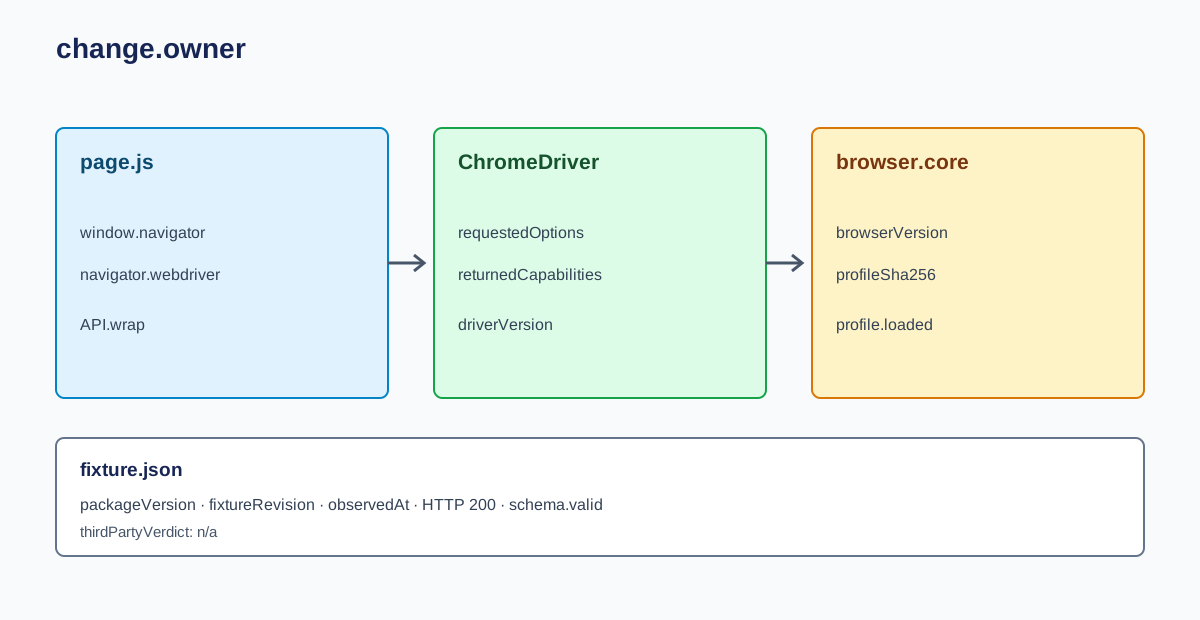
The phrase “browser patch” is too broad to identify what changed. A comparison becomes useful when it distinguishes page JavaScript, WebDriver or driver-package code, and browser-core behavior. These layers have different inputs and update responsibilities. A maintenance issue in one layer should not be attributed automatically to another; the detector-facing signal inventory and Selenium profile integration reference cover the adjacent browser-visible surfaces.
| Layer | Typical owner | What its artifact can establish | Update surface | What it cannot establish by itself |
|---|---|---|---|---|
| Page script | Application or injected script | Which JavaScript code was loaded into a page and which APIs that code attempted to wrap | Site bundles, extension or preload script, browser execution order | That native browser behavior or a remote verdict changed |
| Driver or package | WebDriver implementation and its package | The requested session options, driver code, and possibly a downloaded executable version | Package release, driver download, Selenium and browser compatibility | That a browser-core value changed or that a site accepted the session |
| Browser core | Browser build and its supported configuration | Values and behavior produced by that browser build under recorded startup conditions | Browser release, build flags, profile configuration, platform | That every page reads those values or assigns them the same meaning |
A page-level wrapper runs in a JavaScript execution context. It may affect reads made through the objects it touches, but the page can still have other contexts, native paths, or browser-controlled values that the wrapper does not own. Whether those paths matter is a question for an authorized, bounded fixture. A list of APIs in a patch file is not proof that every consumer sees a changed result.
A driver package owns session setup and the driver artifacts it distributes or modifies. The Selenium options object describes requests sent during session creation. The returned capabilities describe the session the remote end negotiated. A requested option and a returned capability are therefore different evidence. Neither one is a complete inventory of page-visible behavior: that requires a page-level measurement under a specified browser build and run configuration.
The browser core is another boundary. A browser-level profile can provide supported values or settings at startup rather than relying on a page script to replace an API after a document begins running. That statement describes where configuration is supplied, not a claim that every property is supported, that every platform behaves identically, or that a remote detector accepts the result. The profile documentation is the source of truth for supported fields and inputs; undocumented behavior should not be inferred from the word “profile.”
These layers can coexist in one run. Selenium may create a session, the browser may load a configured profile, and the page may execute its own scripts. A useful inventory records each owner separately. For example, requestedOptions belongs to the WebDriver request, returnedCapabilities belongs to the negotiated session, profileInput belongs to browser startup, and pageReads belongs to the owned fixture. Combining those values into one label such as “undetected state” hides the boundaries a diagnosis needs.
The update surface follows the owner. A page bundle can change without a browser upgrade; a driver package can change while a browser binary stays fixed; and a browser release can change APIs or defaults while the Python wrapper stays fixed. When a result changes, compare the versioned artifacts first. Otherwise, an apparent regression can be blamed on a component that did not change while the actual input remains unknown.
Version changes create different maintenance work
An automatically managed driver is convenient, but automation has to know which artifact it selected. The README says the package downloads and patches a driver. That makes the resolved package version, download decision, resulting driver path, and browser version important evidence. Do not infer the downloaded executable from an import statement or the browser executable from the driver package's version string.
At minimum, preserve a run manifest with fields like these:
| Field | Example meaning | Why it matters |
|---|---|---|
packageVersion | Installed Python distribution version | Identifies package code, not necessarily the selected Chrome binary |
sourceRevision | Release tag or commit when installed from source | Makes a moving branch distinguishable from a released package |
driverVersion | Version reported by the selected WebDriver executable | Helps diagnose session startup and driver/browser compatibility |
browserVersion | Version returned by the browser session | Identifies the page execution environment |
requestedOptions | Explicitly configured options, with secrets removed | Shows what the client asked the driver to create |
returnedCapabilities | Selected public session fields | Shows what the session negotiation returned |
fixtureRevision | Commit of the owned test page or fixture | Keeps the observation target stable |
observedAt | Timestamp and environment identifier | Allows comparisons across controlled runs |
The exact compatibility policy belongs to the project and its release documentation. Do not turn “tested until current Chrome beta versions” in a README into a promise for a particular Chrome release, operating system, driver, or CI image. If a combination is important, record it and test that combination in a controlled environment. If the project has not documented a compatibility table for it, mark the field unknown instead of filling the gap with inference.
Package-managed download behavior also affects reproducibility. A clean CI agent may download a different artifact from a long-lived workstation if the package version, cache, or selected browser changes. Record the resolved file path and the binary version, but avoid publishing machine-specific secrets or private filesystem details. A stable artifact hash can distinguish binaries when policy permits sharing that value; it still does not tell a reader what the binary did on a remote service.
Version changes can produce at least four distinct failure classes:
- Resolution changed: the package selected or downloaded a different driver. Compare package version, resolved path, and driver version before inspecting page behavior.
- Session negotiation changed: Selenium could not create the requested session or the returned capabilities differ. Preserve the sanitized request and response, then check the documented browser options and driver compatibility for that release.
- Browser execution changed: the session starts, but a value read on the fixture differs. Compare browser version, platform, profile input, and fixture revision one variable at a time.
- Application result changed: the fixture reads the expected values, while the application-level test fails for another reason. Separate navigation, authorization, and application acceptance from browser configuration.
Those categories are operationally different. Reinstalling a package will not explain a broken fixture selector; changing a profile does not fix a WebDriver handshake; and a 403 response is not evidence that a particular fingerprint signal caused it. The record should identify the first failing boundary and preserve the data needed by its owner.
A package change deserves review even when the browser version does not move. The package can change how a driver is resolved or how a session is constructed. Conversely, a browser update can change the result while the package code stays pinned. Record both sides so the comparison identifies the component that changed rather than merely the final outcome.
Measure an owned fixture without making a verdict
An owned fixture can check whether a test harness observes the values it expects. It should not send traffic to a detector or attempt to classify a commercial protection service. The fixture can be a local application or an internal test domain where the team controls the markup, API calls, and expected result. Keep the test read-only when possible and use synthetic values rather than real account or customer data.
The first run should be a baseline with one declared browser configuration. The second run should change one variable, such as the browser build or a documented profile input. Do not change the package, browser, profile, page bundle, viewport, and operating system together. A multi-variable change may produce a difference, but the observation will not identify which input caused it.
The following JSON is a proposed receipt schema, not a measured result. Values in angle brackets are placeholders; no BotBrowser or undetected-chromedriver execution is claimed here.
{
  "fixtureOrigin": "https://owned-fixture.example.test",
  "fixtureRevision": "<commit-sha>",
  "package": {
    "name": "<package-name>",
    "version": "<resolved-version>",
    "sourceRevision": "<release-tag-or-commit>"
  },
  "browser": {
    "driverVersion": "<reported-driver-version>",
    "browserVersion": "<reported-browser-version>",
    "platformName": "<reported-platform>"
  },
  "requestedOptions": ["<sanitized-option-name>"],
  "observations": [
    {
      "surface": "navigator.webdriver",
      "expected": "<fixture-specific-expectation>",
      "observed": "<actual-fixture-value>",
      "match": false
    }
  ],
  "applicationResult": {
    "httpStatus": 200,
    "fixtureSchemaValid": true
  },
  "observedAt": "<UTC-timestamp>"
}
Replace every placeholder from a real run before treating the receipt as evidence. Keep the expected value specific to the fixture; a Boolean expectation is not a policy for unrelated browser sessions. If a field was not available, use null and explain why. Do not label a sample as “passed,” add a fabricated timestamp, or turn example JSON into a claimed observation.
The fixture should expose a small, explicit response rather than collect a broad browser fingerprint. For example, one endpoint can return the fixture revision and the requested navigator.webdriver observation. A separate server-side log can record that the page loaded. It is not necessary to gather canvas output, fonts, local addresses, account identifiers, or unrelated device attributes to compare package and browser ownership. Data minimization keeps the test tied to its acceptance case.
A useful comparison table has one row per controlled run:
| Run | Changed input | Package and browser identifiers | Page observation | Fixture outcome | Interpretation |
|---|---|---|---|---|---|
| A | Baseline | Recorded package, driver, and browser versions | Exact value returned by the owned page | Schema and status | Describes the baseline only |
| B | One documented input | Same versions unless that is the variable | Exact value returned by the owned page | Schema and status | Difference is associated with the changed input, not a third-party verdict |
Repeat only when the result could be caused by nondeterministic test conditions, and record each attempt. A repeat is not permission to keep probing a remote target. If the controlled fixture responds with an error, the receipt should state the HTTP status and whether the fixture contract was satisfied. The status and schema are separate fields because a successful HTTP response can contain invalid data, while a rejected status can correctly indicate that the fixture blocked an unauthorized request.
Read the record by failure layer
Start with the earliest boundary that failed. If the browser process did not start, page observations do not exist. If session creation failed, do not interpret a stale page value as output from the new session. If the fixture loaded but its schema check failed, report the extraction problem separately from the browser version. This prevents a test report from collapsing several unrelated facts into a single red or green label.
| Evidence | What it supports | What remains unknown |
|---|---|---|
| Package lock and source revision | Which package release or source snapshot was installed | Whether every package branch executed in this run |
| Driver startup log and reported version | Which driver started and whether session creation progressed | How a remote site interpreted the session |
| Returned WebDriver capabilities | Which session fields the remote end returned | Whether every option changed page-visible output |
| Owned fixture observation | What the fixture read under the recorded conditions | What an unrelated service sampled or decided |
| Fixture HTTP status and schema result | Whether the controlled application returned an accepted record | Whether access to a third-party site is authorized or permitted |
If the package and browser versions are known but the requested and returned capabilities differ, investigate session setup. If the session exists but the fixture value differs, compare the recorded browser, profile, operating system, and fixture revision. If the fixture result is correct while an external site returns a block page, stop there and follow that site's published access policy. The external response does not identify the responsible signal without evidence from that service.
Keep log excerpts short and redact cookies, authorization headers, account data, profile contents, and machine-specific secrets. A run manifest can be useful without containing a full driver log. Retain the source revision, sanitized options, outcome categories, and enough timestamps to connect the receipt to the CI job. The point is reproducibility, not collecting every possible datum.
When comparing two packages, normalize the controlled inputs first. Use the same owned fixture revision and application data. If the packages require different supported driver setup, document those differences as part of the comparison instead of pretending they are identical. Do not mix a package comparison with a browser upgrade. The conclusion should state exactly which combinations were observed and leave other combinations untested.
Where browser-layer configuration fits
Browser-layer configuration answers a different maintenance question from patching a WebDriver package. It places documented settings at browser startup or in the browser profile rather than relying only on a page-level wrapper or a package-managed driver modification. Whether that is the right choice depends on the supported configuration, the required automation interface, operating-system coverage, and the team's update policy.
BotBrowser's profile configuration documentation describes the supported profile input. Its automation-consistency documentation describes product boundaries around browser automation. Those references can support statements about documented setup and scope. They do not establish that Selenium, a particular Grid, or undetected-chromedriver is supported unless the relevant integration is explicitly documented. A browser executable that starts is not equivalent to a validated WebDriver integration.
The comparison is therefore not “one tool wins.” Ask three narrower questions: Which component owns the change? Which release must be tracked? What evidence confirms the value on a controlled page? A team whose application needs a driver-specific capability may choose a documented WebDriver workflow. A team that needs configuration at the browser layer should evaluate supported profile inputs and the exact browser integration. A team maintaining page scripts must test the contexts those scripts actually affect. These are engineering choices, not universal detection outcomes.
Keep product claims within the published boundary. BotBrowser supplies documented browser-level values through profile configuration; it does not patch a third-party driver or follow that project's release cycle. It cannot guarantee a detector verdict, a site's response, identity, authorization, or access. A profile's existence is not proof that it loaded; use the product's documented loading evidence for that claim. The reader's fixture remains the evidence for the values that fixture observed.
This scope is intentionally narrower than a circumvention tutorial. It does not give a sequence for reaching a protected page, alter a detector result, or recommend changing signals until a target accepts a session. The output is a maintenance comparison and a record design for owned tests. When a site denies access, respect its policy and use an approved integration or permission path.
FAQ
Does the README prove a current release works everywhere?
No. It documents the project's stated goal and implementation summary. It does not provide a complete dated matrix of service versions, accounts, browser builds, and environments that would support a universal result.
Does a returned WebDriver capability prove that a profile loaded?
No. A capability is session information returned through WebDriver. Profile loading is a separate browser-startup fact and needs the product's supported evidence.
Is navigator.webdriver a detector score?
No. MDN describes it as a browser property indicating automation control. A page can observe the property, but the value does not encode a vendor's model or decision.
Can a local fixture tell what a commercial protection service will decide?
No. It can only verify the fixture's own contract under recorded conditions. An external service controls its inputs, policy, and outcome.
What belongs in a version comparison?
Record package and source revision, driver version, browser version, sanitized options, fixture revision, the observed API value, and the separate HTTP and schema outcomes. Change one input per comparison.
Next reading
For page-level JavaScript patch boundaries, see where browser patches stop; for profile inputs, see the Selenium profile integration reference.
Sources
- undetected-chromedriver public repository and README
- Selenium: Chrome-specific functionality
- Selenium: browser options
- BotBrowser automation consistency
- BotBrowser profile configuration
- MDN: Navigator.webdriver
Practical conclusion
Compare ownership before comparing claims. The repository README describes a package that downloads and patches a driver; Selenium records session negotiation; browser-layer profiles configure documented startup values; and an owned page reports only what it reads. Track those versions separately, change one controlled input at a time, and preserve a receipt that distinguishes browser startup, session negotiation, page observations, and application outcomes. None of those records proves identity or predicts a third-party verdict. Use the comparison to choose a maintainable, documented integration for an authorized workload, and stop at the site's access boundary.
This article is part of the guide: Browser Automation Getting Started: A First Run Map
Related Articles
Undetected Browser: What a Detector Actually Reads
Getting StartedSelenium Scraping: Capabilities and Records
Getting StartedHeadless Browser Selenium: Chrome Options and What Differs
Getting StartedBrowser Automation Release Pinning and Updates
Getting StartedBrowser Automation Getting Started: A First Run Map
Getting StartedSelenium Browser Profile Integration and Session Ownership
Run the same check in BotBrowser
Load a profile, keep the signals you just read about consistent inside the browser, and confirm the result on your own machine before a rollout.