Proxy, DNS, and WebRTC Consistency for a Coherent Browser Identity
A practical guide to keeping proxy routing, DNS resolution, timezone, and WebRTC network information aligned throughout a browser workflow.
Want the structured docs for Network?
This article lives in the editorial library. For step-by-step setup, reference material, and ongoing updates, jump into the docs section.
A browser identity is more than an IP address
People often describe a browser session by its visible public address. That description is useful, but it is incomplete. A website can observe the route used for ordinary page requests, the resolver that answers a domain lookup, the timezone and locale presented by the browser, and the network information associated with WebRTC. These surfaces do not need to expose the same raw value, yet they should support one coherent interpretation of the session.
Consistency is a privacy and reliability concern for legitimate work. A support team may operate a regional account, a research group may review a localized experience, and a testing team may compare the same browser profile across environments. In each case, a mismatch can create confusion. A page may appear to come from one region while a resolver or communication feature suggests another. The result can be an unexpected sign-in prompt, a location correction, or a user experience that is difficult to reproduce.
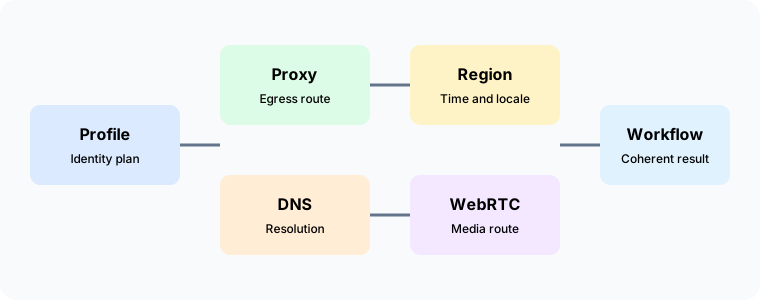
The goal is not to make every observation identical. The goal is to choose a documented identity and keep related surfaces compatible with it. A managed proxy route, a matching DNS policy, a timezone that reflects the selected region, and an intentional WebRTC posture form a practical identity model. Teams can then review the model as a whole instead of treating each browser setting as an isolated switch.
For an introduction to profile planning, see the cross-platform browser profiles guide. For a closer look at WebRTC decisions, read WebRTC network identity and privacy.
Start with a written identity decision
Before choosing settings, write down what the session is meant to represent. A regional customer workspace may need a route in a particular market. A quality review may need a stable desktop or mobile profile. A private reading context may need a narrow set of capabilities and no communication features. The statement should be understandable to a support engineer and a privacy owner, not only to the person who created the browser context.
The identity decision should name the purpose, the selected region, the route owner, and the capabilities that are required. It should also say what is not part of the decision. For example, a profile may represent a region for page content without being authorized for account administration. Keeping the purpose narrow makes later reviews easier and reduces the temptation to reuse a context for unrelated work.
A useful decision records whether ordinary browsing needs a proxy, whether DNS should follow the same network boundary, whether the browser timezone and locale should match the region, and whether WebRTC is required. It can also record an approved fallback for a temporary outage. The fallback should be a documented new context, not a silent change to a long-lived session.
Write the decision near the workflow instructions. A setting that exists only in a private note will be lost when a team member changes roles. A short profile label, a route description, and a review date give people enough context to use the browser consistently without storing unnecessary network detail.
Proxy routing is the visible starting point
A proxy controls how ordinary browser requests reach a destination. The route may be selected for regional content, organizational separation, or a specific privacy boundary. The important operational property is repeatability. A workflow should know which route it expects, who maintains it, and what happens when the route is unavailable.
Use one route description for the entire browser context. If different tabs require different regional identities, use separate contexts with separate ownership. Mixing routes in one context makes cookies, local storage, and account history harder to interpret. It also makes a later review unclear because a page may have been visited under more than one network identity.
Authentication belongs in a controlled configuration process. Credentials should be stored according to the organization policy, with access limited to people who maintain the route. Avoid copying route details into article text, screenshots, or support tickets. Operators usually need a route label and a health status, not a permanent record of the complete connection string.
Route changes should be treated as a new identity decision. A replacement route can have a different region, ownership model, or availability profile even when it uses the same protocol. Record the change, decide whether existing sessions must be closed, and start a fresh context when continuity would be confusing. This practice protects both privacy and reproducibility.
DNS is part of the network identity
Domain resolution is often overlooked because it happens before a page is visible. A resolver can be operated by a local network, an organization, or a service associated with the selected route. Its region and policy may influence which destination address a domain returns. The resolver does not need to be identical to the proxy provider, but it should be compatible with the identity decision.
When a browser uses a regional route but asks an unrelated resolver, services may receive mixed signals. A content platform can see a request from one area while name resolution follows another policy. That can produce different content, an additional consent step, or a connection that is difficult to reproduce. Teams should choose a resolver policy deliberately and document why it belongs with the route.
Review DNS behavior at the context level. Check whether the browser, operating system, and route use the intended resolver path. Look for unexpected changes after network handoff, sleep and wake, or a route replacement. The review can remain high level: record the policy that was intended and whether the observed behavior stayed compatible, without retaining more address information than necessary.
DNS reliability matters as much as privacy. A resolver that is slow or unavailable can make a healthy proxy appear broken. Use a documented fallback with a clear ownership boundary. When the fallback has a different regional meaning, create a new context or mark the session as operating under a temporary identity. Do not let a temporary resolver become an invisible permanent setting.
Timezone and locale make the identity understandable
Browser timezone, language, and locale are user experience settings, yet they also help a website interpret a session. A regional account may show dates, currency, and support hours based on these values. When they disagree with the selected route, the user may receive an unexpected language or a verification request.
The right policy is not to imitate a particular person. It is to make the profile internally coherent and appropriate for the declared purpose. Choose a timezone that belongs with the selected region, a language that the workflow supports, and a locale that produces the expected formatting. Record the choice in the profile documentation so another operator can reproduce it.
Locale changes should be made before account activity begins. Changing them after cookies and preferences have accumulated can create a mixed history that is difficult to explain. If a workflow must serve more than one region, separate contexts are usually clearer than changing settings between visits.
Time should also be considered in scheduling. A route may represent a region while the host machine uses a different clock. Browser-level timezone can present the intended local time, but job scheduling and audit records still belong to the host or service that runs the workflow. Document both so support teams can distinguish a displayed time from an execution time.
WebRTC needs an explicit posture
WebRTC supports calls, collaboration, and browser media. It has its own view of network paths, so a page proxy does not automatically describe every communication route. A context that needs WebRTC should choose a posture that is compatible with the selected identity. A context that does not need WebRTC can disable the capability when that choice is acceptable to users.
The profile posture coordinates WebRTC information with the selected profile route. It is useful when communication is required and the organization wants one understandable network boundary. The real posture uses the host network identity intentionally, which can be correct for local development or an internal workflow. The disabled posture removes the capability and should be used only when the communication cost is understood.
Document the posture beside the route and DNS policy. A user starting a call should know whether the session uses a managed profile route, the host route, or no WebRTC capability. This explanation prevents a common misunderstanding: a successful page request is not proof that a media connection has the same path.
Review the relationship between candidate information and statistics as a privacy property. The desired result is not a specific address. The desired result is that both views remain compatible with the chosen posture. Keep detailed records short lived and limited to people who need them for an approved operational purpose.
Consistency across a browser context
A browser context is the practical unit of identity. It contains the profile settings, storage, permissions, route choice, and user experience that a workflow accumulates over time. Keep those elements together. Starting with one route and later changing only the proxy leaves the context with history from more than one identity.
Separate contexts can share a machine without sharing a network identity. Give each context a clear label, owner, purpose, and lifecycle. A customer support context may need managed communication, while a local research context may use the host route. The distinction is easier to maintain when it is visible at launch rather than inferred from a page after it loads.
When a route or regional policy changes, decide whether to close the context. Closing is often the clearest option when cookies, account history, or communication records should not cross the boundary. If continuity is required, record the change and explain how the workflow will interpret older observations.
Profile copies deserve the same care. A copied profile can carry language, timezone, permissions, and storage into a new route. Before reuse, review every identity surface and remove data that does not belong to the new purpose. A cleanly documented copy is more reliable than an informal adjustment made after a mismatch appears.
A practical review sequence
Start with a human-readable identity statement. Name the workflow, region, route owner, and capabilities. Then review the proxy configuration and confirm that the route is available for the intended duration. A route health check should answer whether the connection works and who is responsible for it.
Next, review DNS policy. Confirm that the resolver choice belongs with the identity and that a fallback has been documented. Do not turn a temporary outage into a permanent policy without recording the change. The review should focus on the relationship between route and resolver, not on collecting a large history of network values.
Review timezone, language, and locale before signing in. Check that date, number, and currency formats are expected for the workflow. Verify that the displayed region is understandable to the user who will operate the account. If the purpose has changed, start with a new context rather than editing a context that already contains account history.
Review WebRTC last, because its posture depends on the earlier identity choice. Confirm that communication is required, choose profile, real, or disabled, and document the user impact. Make sure support staff can explain why a call works through one context and is unavailable in another.
Record the outcome in a small checklist. The checklist can include route status, DNS policy, regional settings, WebRTC posture, and the owner who approved the identity. A compact record creates a repeatable handoff without exposing sensitive address detail in every ticket.
Common signs of a mismatch
Unexpected language or currency can indicate that route and locale tell different stories. It can also be a normal preference, so treat it as a question for review rather than proof of a problem. Compare the written identity decision with the current profile before changing settings.
An additional sign-in or consent page may appear after a route change. A service may treat the new route as a different region or network. Close the old context when continuity is not required, and explain the reason to the account owner. Repeatedly retrying in the same mixed context usually makes the history harder to understand.
Communication that works in one context but not another may reflect a WebRTC posture difference. Check whether one context is disabled or intentionally using the host route. A clear profile label helps support staff answer this question without asking a user to change a privacy setting blindly.
Slow page loads can reflect DNS or route health rather than a browser profile problem. Review resolver availability, route ownership, and recent network changes in that order. Keep the troubleshooting record focused on the approved workflow and remove temporary details when the service concern is closed.
Designing for mobile and desktop together
The same identity model applies when a workflow moves between desktop and mobile environments. The screen size and operating system may change, but the route, regional settings, and communication policy still need a coherent relationship. See the mobile browser fingerprint consistency guide for device-specific planning.
Do not copy desktop assumptions into a mobile context without review. Mobile networks can change more often, and the operating system may manage permissions differently. Define which properties must remain stable for the workflow and which properties can follow the device. This distinction helps a team preserve privacy without pretending that every environment is identical.
When a user moves between devices, close or retire the old context when its stored history should not follow. Start a new context with the same documented purpose and an explicitly reviewed route. A consistent policy can span devices without sharing every piece of local state.
Governance, access, and retention
Network identity decisions should have an owner. The owner approves the route, regional settings, and WebRTC posture, and decides when a change requires a new context. Support teams can operate the workflow without receiving unnecessary access to stored communication records or route credentials.
Keep operational records proportional to the purpose. Store the selected policy, review date, and outcome. Store detailed network information only when an approved maintenance task needs it, and remove it when that task ends. Privacy improves when the organization can explain a decision without retaining a permanent map of every connection.
Access should follow roles. A person who edits a profile may not need access to account data. A person who manages a route may not need access to browser storage. Separating these responsibilities limits the effect of mistakes and makes a later review more precise.
Retirement is part of the lifecycle. When a route, account, or profile is no longer needed, close the context, remove its assignment, and apply the organization retention policy. Do not leave an old context available for convenience. Reuse is safe only after the new purpose and identity surfaces have been reviewed.
Questions teams ask
Does a proxy make every browser surface regional?
No. A proxy describes ordinary page traffic. DNS, timezone, locale, and WebRTC can follow related but separate policies. The correct approach is to choose a coherent identity and review each surface that matters for the workflow.
Should DNS always use the same provider as the proxy?
Not necessarily. The resolver and route can have different operational owners, provided their policies are compatible with the selected identity. Document the relationship and review changes together when regional meaning or privacy boundaries change.
Is matching every value the goal?
No. Some values naturally vary by platform or user preference. Consistency means that the values make sense together for the purpose, not that they are identical. A mobile device can remain a mobile device while using the same approved region and privacy policy as a desktop context.
When should a new context be created?
Create one when the route, region, account purpose, or communication requirement changes enough to make stored history ambiguous. A fresh context gives the new decision a clear starting point and makes support records easier to interpret.
Does disabling WebRTC solve every privacy concern?
No. It removes one communication capability. Other browser surfaces still need a documented policy. Disable it only when the workflow does not need calls or media and users understand the resulting experience.
What should a review retain?
Retain the purpose, selected policy, owner, review date, and decision outcome. Retain detailed network values only for an approved operational need and only for the required period. A short record is easier to protect and easier to explain.
Closing perspective
Proxy routing, DNS resolution, timezone, locale, and WebRTC are parts of one browser identity conversation. They do not need to expose the same raw value, but they should be compatible with the purpose a team has documented. A profile route with a matching resolver policy, understandable regional settings, and an intentional WebRTC posture gives operators a clear baseline.
Review the network features for the controls available to a workflow, and keep the decision alongside the profile documentation. When a route or purpose changes, make a new decision and use a new context when continuity would be unclear. This small discipline improves privacy, user experience, and the ability to reproduce a legitimate browser journey.
Related Articles
Take BotBrowser from research to production
The guides cover the model first, then move into cross-platform validation, isolated contexts, and scale-ready browser deployment.