BrowserLeaks Canvas Report: Signals and Limits
Trace BrowserLeaks Canvas from its support checks to its PNG digest and signature lookup, then separate those observations from identity or bot verdicts.
BotBrowser Team
Want the structured docs for Fingerprint?
This article lives in the editorial library. For step-by-step setup, reference material, and ongoing updates, jump into the docs section.
BotBrowser can keep a declared browser profile consistent for an authorized Canvas review, but it cannot explain what a third-party report means or turn that report into a site's bot verdict. BrowserLeaks' Canvas page exposes several different evidence types together: API support, a digest from one fixed drawing, a lookup against its own signature data, and details of the PNG file. Treating every row as one fingerprint score hides which operation produced the result and what the page actually established.
TL;DR
- BrowserLeaks checks Canvas 2D, text drawing, and PNG data-URL support as separate capabilities before it shows the signature section.
- Its public script paints a fixed
220×30pattern, encodes a PNG, calculates an MD5 digest from the decoded bytes, and requests a matching/api/canvas/<digest>record. - The displayed
Uniquenesspercentage is calculated from responsecountandtotal; the public page does not identify a population sampling frame or collection period. - The PNG panel's byte length, color count, chunks, and CRC values describe the same generated image. They are not four additional independent browser identities.
- A missing lookup, a shared digest, a capability failure, or a changed digest each has different possible causes. None alone says that a browser is a bot or identifies a person.
Contents
- Separate the report into evidence layers
- Trace the signature calculation
- Interpret the displayed Uniqueness percentage
- Read the PNG details separately
- Use a controlled comparison record
- Practical conclusion
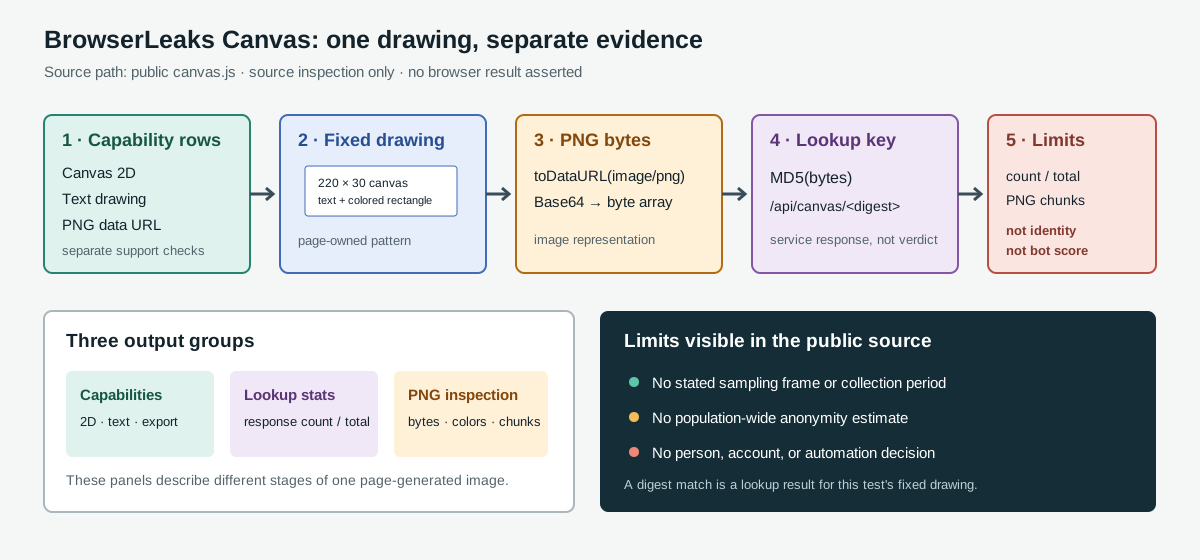
Separate the report into evidence layers
The public page groups output that comes from different operations. The distinction matters: a support check asks whether an operation is available, while a signature lookup asks whether one rendered output matches a key in the service's response data. The existing Canvas fingerprinting overview explains how drawing and pixel readback can produce a browser signal; BrowserLeaks places support checks, signature statistics, and PNG inspection beside that signal, each produced by a different source-code path.
| Report area | Operation visible in the page | Narrow conclusion it supports | What it does not establish |
|---|---|---|---|
| Support rows | Canvas 2D context, text drawing, and PNG toDataURL() checks | Whether those particular operations passed their checks | That every Canvas feature works, or that a browser is human or automated |
| Signature | A fixed drawing is encoded and its bytes are reduced to an MD5 value | The key used for this page's signature lookup | A person's identity, a site's account match, or a universal browser identifier |
| Signature statistics | A response supplies count, total, browser, and OS labels | How the current service response describes a matching key | The source population, collection period, or a measured bot probability |
| Image details | Pixel colors and PNG chunks are parsed from the generated image | Properties of the file produced by this drawing | Independent fingerprints unrelated to the signature above |
The top-level page markup gives the rows distinct identifiers: canvas-support-2d, canvas-support-text, and canvas-support-todataurl. The signature and same-signature text have separate elements, as do file size, color count, and the PNG chunk table. The source code therefore gives readers a concrete boundary between feature availability and a dataset response; a single green or red interpretation would erase that boundary.
The canvas-support-todataurl row is not a complete failure diagnosis. The Canvas export-state comparison separates data:,, synchronous SecurityError and a successful PNG fallback before an image digest is interpreted.
That same boundary is useful when comparing public test suites. What public detector suites actually test distinguishes page-side checks from connection-side checks by reading the suites' own sections. BrowserLeaks' Canvas page is a page-side observation: a test of its own JavaScript drawing and image export, not a measurement of TLS, a proxy route, or an application's account decision.
Trace the signature calculation
The published canvas.js sets the canvas width to 220 and its height to 30. It draws a colored rectangle, then writes the literal string BrowserLeaks,com <canvas> 1.0 at two nearby positions with different fill styles. The drawing code also changes text baseline and font settings. Those values define this test's input; they are not a universal Canvas benchmark. A different text, font availability, rendering stack, or drawing size would define a different input.
The script next requests a PNG data URL with toDataURL('image/png'). It checks that the return value begins with the PNG data-URL prefix, decodes the Base64 section into bytes, computes MD5 over those bytes, and displays the digest. It then fetches /api/canvas/<digest> and uses the returned fields to populate the signature statistics. These steps are visible in the public page source; they are not a claim that a BotBrowser session was opened or that a measured digest was observed.
This chain has several boundaries. First, the key covers the bytes from one specific drawing and encoding path. It does not summarize every Canvas operation available to a page. Second, MD5 is used here as a compact lookup key; seeing it in a report does not make it encryption or a privacy guarantee. Third, a response keyed by that digest describes the service's data, not an external site's matching logic. A site may use other drawings, combine other signals, or not use Canvas at all.
The source-derived sequence can be recorded without storing the image itself:
| Stage | Record | Keep the interpretation narrow |
|---|---|---|
| Page and script | URL and retrieval date | The implementation can change; do not transfer findings to an unpinned version |
| Drawing input | 220×30, text, font, baseline, fills, and positions | A changed input is not evidence that the renderer changed |
| Export | PNG data URL accepted or rejected | Export support is separate from whether another Canvas API works |
| Digest | Whether a digest was rendered, not the raw image | A digest is an output key, not a user identifier |
| Lookup | Response present, unmatched, or unavailable | A missing row is not a negative automation classification |
Other projects also use generated pixels but implement their own recipe. The CreepJS canvas seed-cycle analysis follows a source-defined sequence of drawing values; its seed and round count cannot be substituted for BrowserLeaks' fixed drawing.
Interpret the displayed Uniqueness percentage
When the API response contains a matching entry, the script reads count and total. It displays a percentage calculated as floor(100 × (100 − 100 × count / total)) / 100 and formats the raw counts as “count of total user agents have the same signature.” That arithmetic is a complement of the matching-share ratio in the response. It is not a probability that the current visitor is unique, nor a calibrated measure of how a bot detector will score the session.
The source does not name how the response's user agents were sampled, which browser versions are represented, whether entries were deduplicated, or when the counts were collected. Without those fields, a reader cannot infer how representative the denominator is. The responsible statement is “the current response reports this fraction for its recorded user-agent set,” not “this browser is unique among all users.” If the lookup does not return an entry, the page marks the signature as not listed; absence from that data is not proof that the rendering is rare or novel.
The displayed browser and operating-system labels are also response values. The code assigns response[digest].browser[0][0] and response[digest].os[0][0] to the page. Those labels describe the lookup record associated with the key, not a direct reading of a physical computer. They can be useful as a clue about how the service groups a signature, but they do not verify the machine, profile, user, or application behind the current request.
For a privacy review, the request path itself deserves attention. The page sends the digest to its own /api/canvas/ route to retrieve statistics. A digest in a URL is still request data: it may appear in server logs or intermediary telemetry. Reducing the image to a short value does not make the request anonymous, and a public diagnostic page should not be given a sensitive application image or customer data. The output is based on BrowserLeaks' fixed test drawing, so keep that test separate from private canvases belonging to an application.
Read the PNG details separately
The image panel is an inspection of the same PNG generated for the signature step. The script sets the rendered image preview, reports the encoded file's byte length, and calls getImageData(0, 0, 220, 30) to count distinct pixel values in that rectangle. It also passes the PNG bytes to a parser that enumerates chunk names, lengths, CRC values, and selected content. The page markup names these rows “File Size,” “Number of Colors,” and “PNG Headers.”
These details can help diagnose an export or image-encoding difference. If two files have different byte lengths, a reader can inspect the chunk table before assuming the canvas pixels differ. If the colors differ, the fixed drawing and returned pixel data may have changed. But metadata is not independent evidence of a second device trait: the file size, color count, chunk structure, and MD5 all descend from the same generated image. Counting each as an unrelated match would multiply one observation into several apparent signals.
The API standard describes toDataURL() as returning a data URL for the canvas image and documents conditions that can affect that result, including origin cleanliness. BrowserLeaks' visible support row is limited to its own PNG export check. It does not report every reason an export could fail, and it does not test every origin, image, context, or browser policy. Keep “this page's export check did not return the expected PNG data URL” separate from a broader claim such as “Canvas is disabled.”
Use a controlled comparison record
A repeatable comparison needs the input and page version, not only a screenshot of the result. Capture the BrowserLeaks URL, retrieval date, browser build, operating-system profile, whether each of the three support checks passed, and whether the signature lookup returned a record. If the page is used more than once, keep the test conditions fixed before comparing digests. Do not change profile, browser build, font set, viewport, or graphics path in the same comparison and then attribute a changed result to one of them.
| Observation | Record next | Do not conclude |
|---|---|---|
| 2D support is absent | Browser build, page error, and whether a 2D context was returned | That all drawing or all fingerprinting is unavailable |
| Text support differs | The exact support row and the build/profile used | That the difference is an automation signal by itself |
| PNG export is not accepted | Whether toDataURL('image/png') returned the expected prefix and any page-visible error | That the browser has no Canvas implementation |
| Digest has a statistics row | The reported count and total, with the source date | That the percentage represents the whole Internet or a bot probability |
| Digest has no statistics row | “No matching response entry” and the page version | That the digest is new, unique, or suspicious |
| PNG details differ | The file size, color count, and changed chunk rows | That every changed field is an independent fingerprint |
This record is intentionally smaller than a full fingerprint profile. It helps an authorized team reproduce one public test without retaining raw pixels or converting an isolated result into a verdict. A stable digest under fixed conditions means that the output key remained the same; proving identical encoded bytes requires a byte-for-byte comparison. It does not prove that every page-visible surface is stable. A changed digest says only that the output key changed; the table above identifies what to compare before assigning a cause.
FAQ
Does a shared digest mean two people are the same?
No. It means the fixed drawing produced the same key for the observations being compared. Common renderings can share an output, and one person can produce different output after a browser, font, operating-system, or rendering change. The page's service lookup cannot establish who generated a request.
Does the percentage measure anonymity?
No. The formula is derived from the service response's count and total. The public page does not describe the denominator's sampling frame or period, so it cannot support a population-wide anonymity estimate.
Does BrowserLeaks return a bot decision?
The Canvas page displays support, signature, and lookup information. Its public markup does not expose a bot verdict. A separate service may combine different evidence, but that is not established by this report.
When the lookup cannot complete
The public script has separate branches for a missing entry and a failed request. If the response has no entry at the digest key, or that entry equals not_listed, the script does not populate the same-signature statistics. A rejected fetch or response parse enters a catch branch that displays “Data retrieval error” and offers a retry link. The retry listener prevents the link's default navigation, shows the loading state, and runs the page's check again. These are service and request states, not new Canvas capability tests.
The support check itself also has bounded logic. The page first tests for a 2D context, then for fillText, and then whether toDataURL('image/png') returns a string with the expected prefix. When the test drawing throws, the script creates another canvas and attempts the draw again; a second failure marks the local check as unsuccessful. The visible rows do not say which exception occurred, so a False result narrows the failure only to this code path. It does not identify whether origin policy, a page error, browser configuration, or an implementation issue caused it.
That distinction changes the next diagnostic step. For not_listed, preserve the fact that the lookup returned no record and compare the same fixed input only if the question concerns repeatability. For “Data retrieval error,” check request availability and the public service response before drawing conclusions about the browser. For a failed support row, record which of the three checks failed and the exact browser build; do not substitute another test page and call its result a reproduction of the BrowserLeaks path. A retry that later succeeds is evidence that the earlier lookup attempt did not complete, not evidence that the Canvas output changed.
The page also requests the API using the digest in the path. A privacy review should consider that request separately from local pixel drawing: the server receives a stable key for this particular pattern when the lookup runs. The public source reveals the route shape but does not document retention, logging, or server-side access controls. Do not assume either that the value remains only in the browser or that it is used for cross-site matching; those claims require information beyond the visible code.
Public Sources
- BrowserLeaks Canvas test page
- BrowserLeaks Canvas page script
- MDN:
HTMLCanvasElement.toDataURL() - WHATWG HTML Canvas section
- BotBrowser Canvas documentation
- BotBrowser automation consistency reference
Practical conclusion
Treat BrowserLeaks' Canvas page as one documented probe with separate capability, rendered-image, signature-lookup, and PNG-inspection outputs. Preserve the denominator and source date when discussing its percentage, and describe an absent lookup as absent rather than as a result. A digest is a reproducibility key for the page's fixed drawing; the service's labels are not identity verification or an automated-access verdict.
This article is part of the guide: What Is a Browser Fingerprint?
Related Articles
BrowserLeaks WebGL Report: Collection and Missing States
FingerprintCanvas Fingerprint Test: Empty Exports and Errors
FingerprintCreepJS WebGL Report: Contexts and Capability Signals
FingerprintEFF Cover Your Tracks Results: How to Read Them
FingerprintWhat Public Detector Suites Actually Test
FingerprintCreepJS Headless Detection: Three Separate Verdicts
Take BotBrowser from research to production
The guides cover the model first, then move into cross-platform validation, isolated contexts, and scale-ready browser deployment.