Web Crawling: Crawl Budget and Politeness Basics
Size an authorized web crawl with request spacing, concurrency, pauses and retries. Calculate a finite budget and explain why partial results remain partial.
BotBrowser Team
Want the structured docs for Getting Started?
This article lives in the editorial library. For step-by-step setup, reference material, and ongoing updates, jump into the docs section.
Web crawling capacity is the amount of authorized work a crawler can attempt within a defined window. The site's permitted traffic and the crawler's sustainable resources constrain that amount together. Adding workers cannot increase the permission a site owner granted, and a request that started is not necessarily a page successfully collected.
BotBrowser documents shared browser contexts, concurrent-page limits and memory monitoring for authorized browser automation. It does not grant a site's crawl budget, identify an undisclosed request limit or make partial results complete. Its deployment options can help manage the browser side of a crawl; the operator still owns permission, request accounting and the decision to stop.
TL;DR
- Agree on the permitted origin, time window, counting unit and traffic ceiling before sizing the job. A robots allowance is not authorization or a numeric quota.
- Concurrency measures simultaneous work; spacing determines when requests may begin. Both constraints must hold across all workers sharing the approved budget.
- Treat capacity arithmetic as an admission bound. Latency variation, failures and application readiness can reduce the useful results below it.
- Pauses and retries consume the available window or request allocation. Preserve the URLs that remain instead of describing an exhausted budget as completion.
- Count browser subrequests in the owner's applicable traffic scope. One navigation can generate several requests.
Contents
- Two different meanings of crawl budget
- Calculate a finite request budget
- Account for pauses, retries and browser requests
- Explain a partial crawl
- Size and record a first authorized run
- Practical conclusion
Two different meanings of crawl budget
Google uses crawl budget to describe how much Googlebot can and wants to crawl. Its large-site crawl-budget guidance distinguishes crawl capacity limit from crawl demand. That is a Google Search explanation, including Google's own resource and scheduling decisions. It is not a standard quota that every website assigns to every crawler, nor a promise that a crawled page will be indexed.
For a reader-operated crawler, start with two separate inputs: what traffic the site owner permits, and what traffic the collection system can sustain. The first can include approved paths, hours, request spacing, concurrent requests, transfer limits and prohibited operations. The second depends on worker occupancy, CPU, memory, bandwidth and downstream processing. Both may change during the run, so neither belongs in an undocumented constant called “safe speed.”
Permission should describe the counting scope. An allowance might apply to one origin across all project workers, one authenticated account or a specified API resource. RFC 6585 section 4 deliberately does not define how a server identifies the user or counts requests for a 429 response. A client cannot infer a universal scope from the status code. Ask the owner which traffic shares the approved allocation.
Robots rules are another input, not a substitute for that agreement. RFC 9309 explicitly says the rules are not a form of access authorization. A permitted path says nothing by itself about one request per second, ten simultaneous pages or overnight collection. The absence of a 429 response also does not establish that the current rate is authorized or sustainable.
Politeness therefore has an operational meaning: stay inside the agreed boundary, respect the applicable robots policy, share the allowance across workers and respond conservatively to overload or withdrawal of permission. A crawler that silently spreads the same job across more identities has changed the traffic source, not enlarged its authorization. If the owner withdraws access, stop the affected work rather than looking for another route to continue it.
Calculate a finite request budget
Consider a hypothetical reader-owned catalogue with a known list of 900 unique HTML URLs. The owner explicitly approves at most 1 request start per second across the job, with no more than 2 simultaneous requests. Assume a 900-second collection window and a local request-slot occupancy of 0.5 seconds. These are example inputs, not measured performance or limits inferred from a live server.
For a simple steady-work approximation, local throughput cannot exceed the number of available slots divided by the occupancy of one slot. With 2 slots and 0.5 seconds per slot, that approximation gives 4 request starts per second. The owner's 1-per-second rule is tighter. Keeping more browser workers ready would not let the job start requests more frequently than the agreement permits.
| Input or calculation | Hypothetical value | Meaning |
|---|---|---|
| Known target set | 900 unique URLs | Coverage denominator supplied by the owner |
| Owner-approved spacing | 1 request/s | Shared request-start ceiling for this example |
| Concurrent request ceiling | 2 requests | Maximum simultaneous authorized requests |
| Local slot occupancy | 0.5 s | Assumed occupancy, not a benchmark |
| Local approximation | 2 / 0.5 = 4 requests/s | Resource-side ceiling under the stated assumptions |
| Binding request rate | min(1, 4) = 1 request/s | Both constraints must hold |
This approximation is useful for identifying the binding constraint, not predicting a completion time. It assumes continuously available work and stable occupancy. A real latency distribution has slow responses, timeouts and connection overhead. Browser tasks can also hold a page slot while waiting for application state. Use observed occupancy from a small authorized run when planning subsequent work, and keep that observation separate from the permitted ceiling.
Define the example's schedule precisely: one planned start at each integer second from 0 through 899, inside the half-open window from 0 inclusive to 900 exclusive. That gives 900 planned start opportunities. No bursts are allowed, and an unused opportunity expires instead of becoming credit for a later burst. This convention makes the count reproducible; other approved scheduling conventions require their own arithmetic.
Even without interruptions, 900 start opportunities do not guarantee 900 completed pages by the deadline. The final request can finish after its start window, and some responses can fail. Specify whether the deadline prohibits new starts, requires all traffic to cease or allows already-running requests to drain. If the owner requires complete silence at the end, reserve enough time to stop or cancel in-flight work instead of scheduling a final start immediately before the boundary.
The distinction between rate and concurrency becomes important when responses slow down. At 1 start per second and 0.5-second occupancy, the 2-request ceiling is not binding. If each request instead occupies a slot for 3 seconds, 2 slots cannot sustain that schedule. The local approximation becomes 2 / 3 requests per second, before other overhead. The scheduler must skip or defer starts when no slot is available; it cannot ignore the concurrency limit to preserve its original plan.
Account for pauses, retries and browser requests
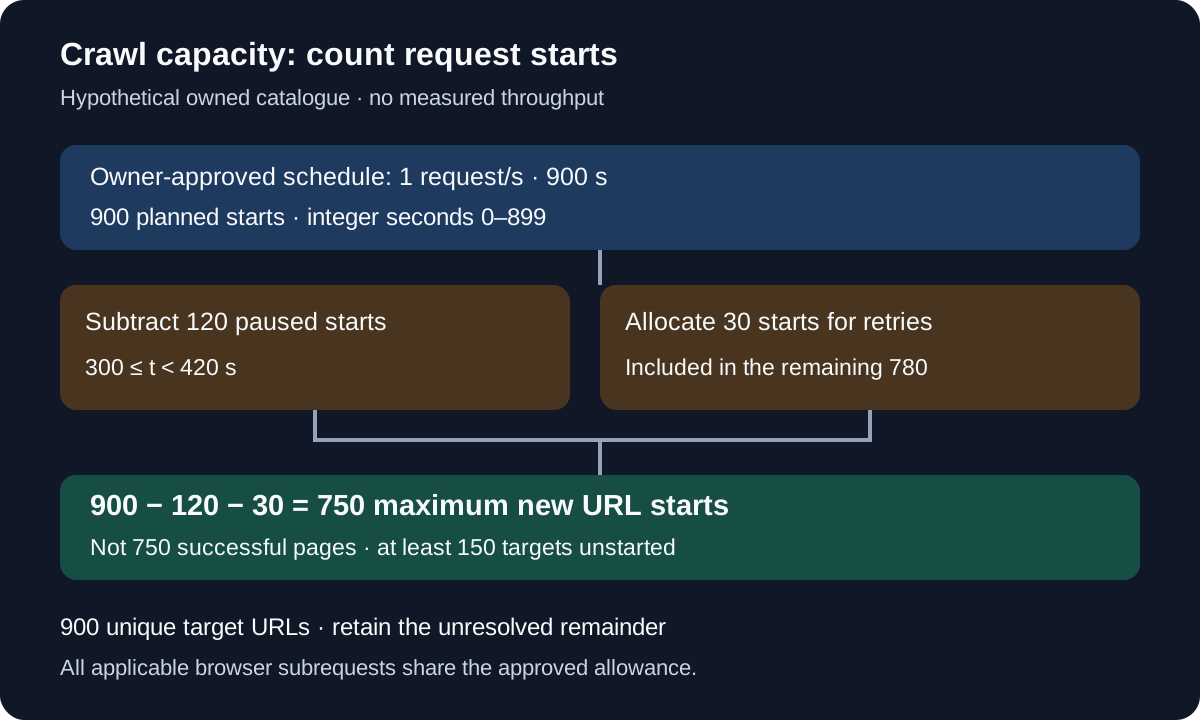
Now suppose the same hypothetical run pauses all starts from second 300 inclusive to second 420 exclusive. The interval removes 120 of the original planned opportunities. The remaining admission ceiling is 900 minus 120, or 780 request attempts. Suppose the operator additionally reserves 30 of those remaining opportunities for retries. At most 750 opportunities then remain for first attempts at new URLs. These are allocations, not reported outcomes from an executed crawler.
| Worksheet step | Remaining opportunities | What the count does not establish |
|---|---|---|
| Original integer-second schedule | 900 | Completed responses by the deadline |
| Remove 120 paused starts | 780 | Successful catalogue pages |
| Allocate 30 retry starts | 750 for new URLs | Successful coverage of 750 unique URLs |
| Compare with 900 target URLs | At least 150 without a first attempt under this allocation | Final success rate or an actual run result |
The 30 retry opportunities are reserved within the 780 total, not added on top. If only 10 retries are ultimately needed, the other 20 can be released to new work only while eligible time remains and the operator's scheduling policy permits it. Keeping the reservation rigid leaves the 750 ceiling unchanged. State which policy applies; do not silently switch between a reserved budget and actual retry consumption when comparing two runs.
An HTTP 429 means the server considers the client to have sent too many requests in a given time. The MDN status reference notes that a response may include Retry-After. Its presence is not guaranteed. The header reference describes either a non-negative integer delay in seconds or an HTTP date. Preserve the received value and the time used to interpret it.
When an applicable response requests a later retry, the job must not schedule affected work earlier than that time. A local policy can wait longer or stop the job. A missing or invalid header does not mean an immediate retry is appropriate; follow the owner's agreement and a conservative bounded recovery policy. Repeatedly probing faster to discover an invisible ceiling is not capacity planning. Detailed pacing diagnosis belongs in rate limiting and concurrency; the capacity worksheet needs the narrower fact that the pause removes usable admission opportunities.
Browser traffic requires another counting decision. A navigation can request HTML, scripts, styles, images and application data, while redirects and retries add more requests. A page-level worker limit does not directly enforce an origin-level request-start ceiling. If the owner's allowance covers every request to that origin, all applicable subrequests share it. Ordinary page automation must not claim compliance merely because it spaces top-level navigations.
For a second hypothetical calculation, assume each page needs exactly 5 requests in the approved counting scope. A 750-request allocation can then cover at most 150 such page loads before failures or retries. This is not a generally valid conversion: caching, variable page resources and background polling can change the count. Traffic to another origin needs its own authorization and accounting decision. If the workflow cannot control or reliably bound the relevant requests, agree a different approved retrieval plan rather than asserting that a navigation limiter is sufficient.
Explain a partial crawl
A capacity-limited crawl can be useful without being complete. The important requirement is an honest denominator and a retained remainder. For the 900-URL catalogue, keep each target URL in a ledger with its current state and its attempt history. The crawler stage walkthrough explains how queued, running, deferred and terminal work differ. Exhausting the time window is a stop reason, not a terminal success for every URL left in the queue.
Keep the request ledger separate from the URL ledger. A request attempt records a dispatch and outcome; a URL can have several attempts. A successful retry should not count as a second covered URL. A failed attempt should not erase the fact that its URL remains unresolved. If a redirect consumes another request under the agreement, account for that traffic without pretending it discovered another successfully collected catalogue item.
| Proposed URL state | Meaning at the stopping point | Reporting consequence |
|---|---|---|
| Never started | No first attempt was admitted | Uncovered within the known target set |
| Deferred | An admitted URL awaits a permitted time or condition | Pending work, not a successful page |
| Running | An attempt has not reached a recorded outcome | Completion remains unknown |
| Terminal failure | The configured recovery policy ended without usable content | Failed coverage under that policy |
| Usable result | The response met the project's content requirement | Covered URL, subject to the stated requirement |
These states are a suggested application model, not HTTP terminology. Define what makes a result usable before the run. HTTP 200 alone can be a login screen, an error wrapper or a page missing the catalogue content. A response may be downloaded yet fail parsing; a parsed page may still lack fields required by a downstream scraper. The coverage report should identify its own success criterion instead of treating all these stages as interchangeable.
The worksheet's 750 figure is a maximum number of new URL starts under its assumptions. It supplies no observed successful-page numerator. A defensible planning statement is “at least 150 of the 900 known URLs cannot receive a first attempt under this fixed allocation.” It is not “the crawler collected 83 percent.” Actual coverage requires the recorded usable results, and deadlines or resource limits may leave more than 150 URLs unstarted.
Discovery-based crawls have an additional limitation: the complete URL set may be unknown. In that case, report coverage of the admitted or owner-supplied set and state how it was obtained. An empty immediate queue cannot prove the absence of undiscovered pages. Nor can a high request count repair that missing denominator. Preserve seeds, scope, exclusions and discovery limits so a later run can explain why its target set differs.
Size and record a first authorized run
Start with a bounded subset the owner approves, chosen to include the page types that matter to the task. Keep the request allowance separate from the local worker setting. Record response occupancy, request fan-out and memory use without presenting a small sample as the site's permanent capacity. A quiet test window and a cached page can look very different from a later run with uncached application data.
The BotBrowser performance documentation describes multiple BrowserContexts sharing a browser, closing unused pages, limiting concurrent pages and monitoring memory. These are relevant resource-management options when the approved collection needs a browser. They do not implement the site's request agreement for the crawler. Independent contexts can still create traffic against one shared origin allowance, and more contexts can increase pressure on that allowance.
Use the resulting observation to choose a conservative local occupancy estimate and a finite work slice. If resources cannot keep up with the approved rate, reduce the planned admissions or extend the window with the owner's approval. If the site allowance is tighter, leave local capacity idle. Both outcomes are normal. Optimizing utilization is secondary to the permission boundary and to retaining correct results.
| Record | Why it matters |
|---|---|
| Permission reference, origin and approved paths | Establishes the actual authorized target |
| Counting scope, spacing and concurrent-request ceiling | Defines which traffic shares the budget |
| Window convention and end-of-window behavior | Makes start and drain assumptions explicit |
| Pause intervals and retry allocation policy | Explains deductions from the original plan |
| Attempt counts, usable URL set and remaining URL set | Separates traffic consumption from coverage |
| Stop reason and next eligible condition | Makes continuation deliberate instead of automatic |
A resumed job needs a fresh eligibility check. Carrying a deferred queue into tomorrow does not carry yesterday's permission, site health or time window with it. Verify the current agreement, preserve earlier attempt history and avoid collecting already-usable URLs again unless refresh is part of the approved task. Multiple workers should acquire admission from one shared budget rather than each applying the full allowance independently.
FAQ
Does increasing concurrency increase crawl budget?
It can raise a local resource ceiling when occupancy is the bottleneck. It cannot enlarge the owner's allowance, eliminate request spacing or guarantee useful responses. Use the lower applicable constraint and account for all workers together.
Can robots.txt specify the request rate for every crawler?
RFC 9309 does not define a universal request-rate allowance or grant authorization. Some tools support additional conventions, but a crawler must not treat an unsupported directive or an allowed path as permission for an assumed traffic rate.
Is a paused crawl a failed crawl?
Not necessarily. A planned or server-requested pause can be the correct behavior. Report the actual usable results and the deferred remainder. Restart only when the relevant permission, timing and resource conditions allow it.
Sources
- Google Search Central: Managing crawl budget for large sites
- MDN: 429 Too Many Requests
- MDN: Retry-After
- RFC 6585: Additional HTTP Status Codes
- RFC 9309: Robots Exclusion Protocol
- BotBrowser: Performance optimization
- BotBrowser: Responsible use
Practical conclusion
For an authorized finite crawl, write down the owner's request agreement, choose a window convention and calculate an admission ceiling before selecting worker count. Deduct pauses and retry allocations, then report successful URLs separately from attempts and remaining work. The hypothetical 900-start plan leaves at most 750 new URL starts after its stated deductions; it never establishes 750 usable pages. A smaller, explainable crawl with a preserved remainder is a sound basis for the next authorized run.
This article is part of the guide: Browser Automation Getting Started: A First Run Map
Related Articles
What Is a Web Crawler? Five Stages of a Crawl
Getting StartedWeb Crawler vs Web Scraper: Outputs and Failure Boundaries
NetworkScraping Rate Limits: 429, Retry-After and Concurrency
Deploymentrobots.txt Scraping: Rules, Blocks, and Fetch Failures
Getting StartedBest Browser for Web Scraping: Six Criteria
NetworkProxy Pool Management: Size Routes for the Workload
Run the same check in BotBrowser
Load a profile, keep the signals you just read about consistent inside the browser, and confirm the result on your own machine before a rollout.