robots.txt Scraping: Rules, Blocks, and Fetch Failures
Check robots.txt scraping rules before a browser task: select the crawler group, resolve Allow and Disallow, and distinguish policy from HTTP access.
BotBrowser Team
Want the structured docs for Deployment?
This article lives in the editorial library. For step-by-step setup, reference material, and ongoing updates, jump into the docs section.
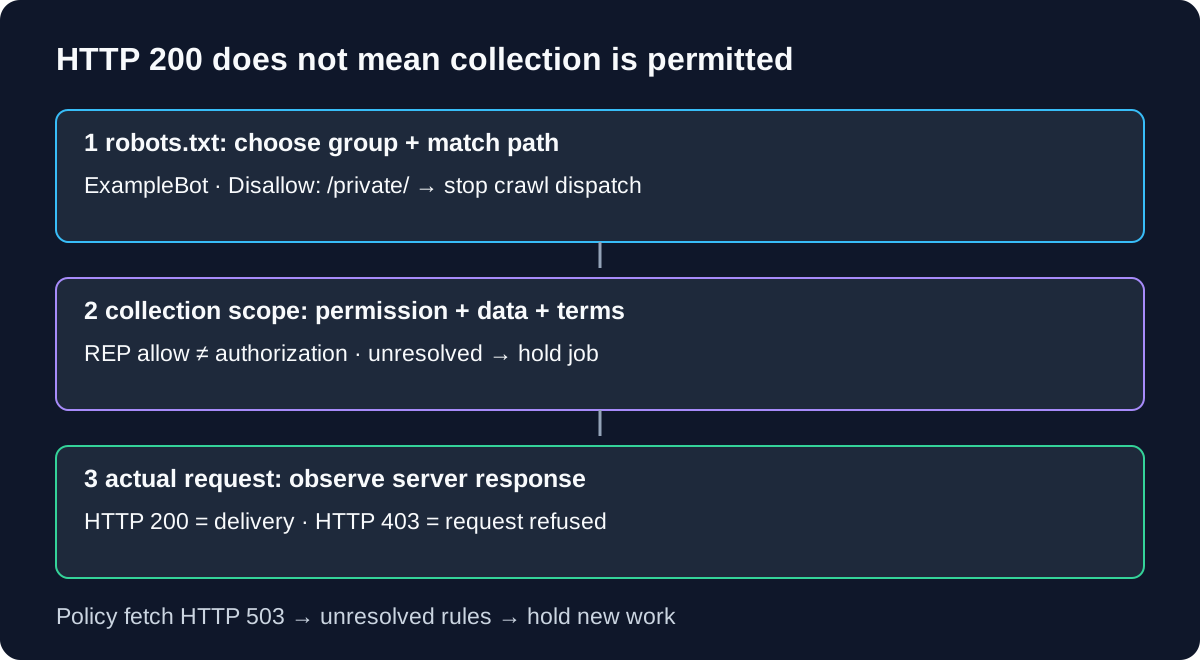
A page returning HTTP 200 does not settle a robots.txt scraping decision. The server can deliver a document that its published crawler rules disallow. BotBrowser supports browser automation integrations, but it does not replace the application's robots.txt evaluator or grant permission to collect a page.
TL;DR
- Evaluate the rules for the crawler's declared product token before dispatching the target request.
- Combine matching named groups; use
User-agent: *only when no named group matches. - Resolve matching paths by specificity, rather than the position of the first rule.
- Treat a robots rule, permission to collect, and the actual HTTP response as separate decisions.
- Stop new dispatch when a policy fetch is unresolved; an HTTP error is not an invitation to change identity.
Contents
- Separate policy, permission, and delivery
- Choose the crawler group before the URL
- Run a bounded rule-matching example
- Handle the robots fetch before the page fetch
- Put the decision in the request queue
- Practical conclusion
Separate policy, permission, and delivery
The Robots Exclusion Protocol, RFC 9309, defines a way for service owners to publish crawler rules. It is a coordination mechanism: a participating crawler retrieves /robots.txt, chooses the applicable rules, and uses them when deciding what to request. The server does not need to consult that file every time it receives a request. A disallowed document can therefore still return HTTP 200 to a browser. That is compatible with the protocol's design, rather than evidence that the rule stopped applying.
Three different questions belong in an incident record. First, does the applicable robots rule allow this URL for this declared crawler? Second, has the team established an appropriate basis to perform the collection, considering the service's terms, authorization, data scope, and applicable obligations? Third, what did the server actually return? A rule evaluation cannot answer the second question, and a successful response cannot answer either of the first two.
| Observation | What it establishes | What it does not establish | Safe next action |
|---|---|---|---|
Matching Disallow: /private/ | The applicable REP rule disallows matching paths | That the server will reject a manual request | Remove those paths from crawl dispatch |
| No matching path rule | REP does not disallow that URL under the selected group | Permission, a collection license, or a rate allowance | Apply the separately approved collection policy |
| Target HTTP 200 | The target returned a successful HTTP response | Robots compliance, data completeness, or legal permission | Keep policy and content validation results separate |
| Target HTTP 403 | The server refused that request | Which robots rule, identity signal, or security product caused refusal | Stop and diagnose using authorized evidence |
The last row belongs to scraper blocked diagnosis by layer: it separates a DNS or connection failure from an HTTP response and from a page-data problem. Robots evaluation happens before that request, while incident diagnosis explains an outcome after it. Mixing those stages produces misleading statements such as “robots blocked the browser” when the evidence is only HTTP 403.
RFC 9309 also warns that listing paths makes them publicly discoverable. A service owner must protect confidential resources with appropriate access controls; Disallow is not authentication. Conversely, the visibility of a path does not invite a crawler to retrieve it. For an authorized storefront workflow, Shopify collection boundaries distinguish an observed page from the data and access scope the collection actually requires. That scope still matters after the rule check passes.
Choose the crawler group before the URL
A User-agent record identifies a crawler product token, not a complete fingerprint and not automatically the entire browser User-Agent header. RFC 9309 requires case-insensitive matching for the product token. The token should occur in the crawler's identification string, which should describe its purpose. Choose an honest, stable token for the collection application; do not switch to a named search-engine group because its rules happen to differ.
Consider this synthetic file on an owned example service:
User-agent: *
Disallow: /catalog/

User-agent: ExampleBot
Disallow: /catalog/private/
Allow: /catalog/private/help/

User-agent: examplebot
Disallow: /exports/
Allow: /exports/public/
For ExampleBot, the two named groups match without regard to token case, so their rules are combined. The wildcard group is not added to those named groups. For a different declared crawler with no matching named group, User-agent: * supplies the applicable rules. If neither a named group nor a wildcard group applies, no group rules apply. None of these outcomes establishes collection permission beyond REP.
The distinction changes /catalog/item: the wildcard group disallows it, while the combined ExampleBot rules do not match it. For that same named crawler, /catalog/private/item matches a disallow rule and /catalog/private/help/start matches both a disallow and a longer allow rule. A parser that simply merges every group would produce a different decision for /catalog/item. A parser that stops after the first matching named group would miss /exports/ entirely.
Do not equate the product token with whichever browser string a testing tool happens to send. A browser process can load a URL without acting as a full crawler scheduler. The application that owns URL discovery, policy fetches, rule interpretation, and dispatch must keep those responsibilities explicit. The BotBrowser automation reference documents the browser integration layer; it does not establish that a library has implemented REP evaluation on your behalf.
Match a service, not an entire organization
The rules file is /robots.txt at the service's top-level path. Record the scheme and authority alongside its URL: https://example.test/robots.txt is not a policy fetch for every hostname, port, and protocol associated with that organization. Do not copy an allow decision from one origin into a queue for another. Relative navigation, subdomains, and redirects can change the service context even when the visible branding remains identical.
RFC 9309 says crawlers should follow at least five consecutive robots redirects, including across authorities. When the file is reached within that chain, its rules apply in the context of the initial authority. Record both the requested policy URL and the final response URL. Otherwise, a cache keyed only by the final hosting location can accidentally attach one site's rules to another site's target queue.
Run a bounded rule-matching example
Path matching starts at the beginning of the target path. RFC 9309 uses the most specific matching rule, measured in octets; path matching should be case-sensitive. When equivalent allow and disallow rules tie, the allow rule should be used. The order of these lines is therefore not a dependable decision procedure. The protocol also defines *, terminal $, comments, and percent-encoding behavior, which a production implementation must handle.
The following Node.js example isolates only group selection and literal ASCII prefix matching. The groups are already parsed records from the synthetic file above. The program deliberately rejects wildcard, terminal-marker, encoded, and non-ASCII paths instead of pretending to implement the rest of RFC 9309. It makes no network requests and tests no live site's policy. Paste it into a local .mjs file and run node on that file.
import assert from 'node:assert/strict';

const groups = [
  { agent: '*', rules: [['disallow', '/catalog/']] },
  {
    agent: 'ExampleBot',
    rules: [
      ['disallow', '/catalog/private/'],
      ['allow', '/catalog/private/help/'],
    ],
  },
  {
    agent: 'examplebot',
    rules: [
      ['disallow', '/exports/'],
      ['allow', '/exports/public/'],
    ],
  },
];

function literalDecision(agent, path) {
  const named = groups.filter(g => g.agent.toLowerCase() === agent.toLowerCase());
  const selected = named.length ? named : groups.filter(g => g.agent === '*');
  const rules = selected.flatMap(g => g.rules);
  for (const value of [path, ...rules.map(r => r[1])]) {
    if (!value.startsWith('/') || /[^\x20-\x7e]|[%*$?#]/.test(value)) {
      throw new Error('literal ASCII paths only');
    }
  }
  const matches = rules.filter(([, prefix]) => path.startsWith(prefix));
  matches.sort((a, b) => b[1].length - a[1].length || Number(b[0] === 'allow') - Number(a[0] === 'allow'));
  return !matches.length || matches[0][0] === 'allow';
}

const cases = [
  ['ExampleBot', '/catalog/item', true],
  ['OtherBot', '/catalog/item', false],
  ['ExampleBot', '/catalog/private/item', false],
  ['ExampleBot', '/catalog/private/help/start', true],
  ['ExampleBot', '/exports/file', false],
  ['EXAMPLEBOT', '/exports/public/file', true],
  ['ExampleBot', '/Catalog/private/item', true],
];
for (const [agent, path, allowed] of cases) {
  const actual = literalDecision(agent, path);
  assert.equal(actual, allowed, `${agent} ${path}`);
  console.log(`${agent} ${path} repAllowed=${actual}`);
}
The output calls the result repAllowed so that the label cannot silently become “authorized.” The first two cases expose named-group versus wildcard selection. The two private-catalog cases expose longest-prefix selection. The exports cases expose merging and case-insensitive token matching. The final case changes the case of the URL path; it does not change the crawler token. A URL normalization step that lowercases all paths would erase this distinction and could change which resources the crawler requests.
The bounded example does not parse a downloaded text file, combine multiple product-token records inside one group, normalize URI octets, follow redirects, validate a MIME type, manage cache age, or choose a network retry policy. It is a reasoning aid for the shown inputs. For production, select a maintained REP implementation, inspect its supported syntax, and test these cases alongside percent-encoding and */$ cases. Passing seven ASCII cases is not evidence of protocol conformance.
An empty Disallow value is another production-parser case, not a blanket rule against /. Under RFC 9309 the path-pattern field can be empty; it does not create a meaningful disallowed prefix covering the site. Do not convert an empty line into / during configuration normalization. Similarly, an unknown directive must not terminate a valid group or erase the parseable allow/disallow records surrounding it.
Handle the robots fetch before the page fetch
A target request and a robots request are different events. Write policyStatus and targetStatus as separate fields. If /robots.txt returns HTTP 503, the crawler has an unresolved policy fetch even if yesterday's target page returned HTTP 200. A dashboard that stores only the latest HTTP code per hostname can hide that distinction and restart work for the wrong reason.
| Policy fetch outcome | RFC 9309 baseline | Collection application decision |
|---|---|---|
| Successful robots download | Follow the parseable rules | Evaluate the declared token and target URL |
| HTTP 404, an unavailable file | REP may permit access to resources | Apply the separate permission and collection-policy checks |
| HTTP 401 or 403, also in the 4xx range | The RFC unavailable category is not authorization | Pause for an explicit policy decision; do not infer consent |
| HTTP 429 | Do not assume every crawler treats it as an ordinary missing file | Stop dispatch and honor the service's throttling guidance |
| HTTP 5xx or network failure | Assume complete disallow while unreachable | Hold new work and use a bounded recovery policy |
| Some malformed records in an otherwise usable file | Use parseable rules | Preserve parser diagnostics rather than discarding the whole file |
The RFC's unavailable category covers HTTP 400-499, whereas its unreachable category includes HTTP 500-599 and network errors. That distinction is about crawler protocol behavior. The stricter stop decisions for HTTP 401, 403, and 429 in the right-hand column are application policy, not invented RFC requirements. Google's documented robots handling also treats HTTP 429 differently from most other 4xx responses. Googlebot's behavior is useful vendor documentation; it is not a universal retry algorithm for your collector.
Caching also requires a time record. RFC 9309 says a crawler should not use a cached copy for more than 24 hours unless the file is unreachable. Its unreachable guidance allows additional choices after a reasonably long period, with 30 days given as an example. Those qualifications do not justify an indefinite “last known allowed” flag without its fetch timestamp, response history, or review decision. If a batch resumes after a policy outage, reevaluate the remaining URLs against the applicable current rules before reopening dispatch.
Crawl-delay is not one of RFC 9309's defined allow/disallow rules. Some implementations interpret extra records; others do not. The absence of a supported delay directive does not supply a request budget. Keep the application's concurrency and rate decisions separate from the path matcher, and reduce or stop dispatch when the service signals throttling. A permissive path rule cannot guarantee that a workload's frequency is acceptable.
Put the decision in the request queue
The useful integration point is the component that can prevent a URL from entering browser work. Evaluating robots only after navigation is too late for that request. Store a decision with the origin, crawler product token, policy fetch timestamp, selected group, relevant matching rule, and the separately approved collection scope. Keep the policy text or a content digest where retention rules allow it, so a later incident can identify which version produced the decision.
A small dispatch record can use origin, productToken, policyFetchedAt, policyStatus, matchedRule, repDecision, and collectionDecision. repDecision=allow with collectionDecision=unresolved still holds the job. repDecision=disallow removes the job from the eligible set even if browser access previously worked. A network failure produces repDecision=unresolved, not a fabricated empty robots file. These states make the stop condition explicit without treating every unsuccessful fetch as the same event.
Queue enforcement must also consider browser-generated requests. Opening an allowed document can load images, scripts, frames, or background API requests. A top-level URL check does not by itself establish that all automatic subrequests meet the collection policy. Inventory the required resource origins and define the authorized scope before dispatch; if the workflow cannot respect that scope, stop and choose an approved interface or a smaller collection task. Do not use the allowed page as a pretext for requesting disallowed data endpoints.
For multi-worker collection, publish one policy decision per origin and declared token through the scheduler rather than letting every worker invent its own result. Invalidate queued decisions when the relevant policy version changes. If the current file now disallows a path that was previously queued, remove unstarted jobs; do not let yesterday's decision survive merely because the browser session is still open. This is an application consistency requirement, not a property of a browser profile.
BotBrowser's documented automation integrations provide a browser target for an authorized task. They do not turn REP into an access control, choose which crawler name your application should claim, establish collection permission, or guarantee acceptance by a destination. The responsible-use policy and the legal disclaimer remain relevant boundaries. Browser settings and a successful launch cannot replace an unresolved policy decision upstream.
FAQ
Does a robots.txt Allow rule mean I can collect personal data?
No. An Allow rule resolves a protocol path decision for the applicable crawler. Data category, purpose, permitted access, retention, and applicable obligations remain separate questions for the responsible team. REP does not provide a data-use license, and this technical distinction is not legal advice.
Does Disallow prevent a URL from appearing in search?
Not necessarily. Google's robots introduction distinguishes crawling from indexing: a disallowed URL may still be discovered through links. Keeping a confidential document private requires access protection. A crawler prohibition is not a reliable substitute for authentication or a universal deindexing instruction.
Can the same robots decision be reused after a redirect?
Record the source and destination contexts separately. A robots-file redirect has the initial-authority rule described by RFC 9309; a target-page redirect can introduce another service whose policy and authorization scope still require evaluation. Do not infer that a redirect transfers an allow decision or collection permission to an unrelated host.
Why can an ordinary browser open a disallowed path?
REP is implemented by participating crawler applications, not by an automatic requirement that every browser navigation be rejected. The HTTP server may still serve the path. That response proves delivery to that request, while the crawler's duty to follow its applicable rules remains a distinct decision.
Sources
- RFC 9309: Robots Exclusion Protocol, especially sections 2.2-2.5 and 3
- Google Search Central: robots.txt introduction
- Google Search Central: robots.txt interpretation and HTTP handling
- BotBrowser automation consistency reference
- BotBrowser responsible use
- BotBrowser legal disclaimer
Practical conclusion
Start the next robots.txt scraping decision with one declared crawler token, one service origin, and one target path. Resolve the applicable rules, keep collection permission separate, and prevent unresolved or disallowed work from entering the browser queue. A successful HTTP response answers whether the server delivered a document; it cannot replace those earlier decisions.
This article is part of the guide: Browser Deployment and Release: Operations Map
Related Articles
Scraping Shopify: Storefront API, Ajax or Browser?
NetworkScraper Blocked? Diagnose DNS, TLS, HTTP and Page Errors
DeploymentJob Board Scraping: Browser Boundaries
NetworkFetch Metadata Headers: CSRF Context and Privacy Boundaries
DeploymentCompetitor Price Monitoring: Browser Pipeline Design
PlatformSpeculation Rules: Prefetch and Prerender Boundaries
Run the same check in BotBrowser
Load a profile, keep the signals you just read about consistent inside the browser, and confirm the result on your own machine before a rollout.