CAPTCHA Types: What a Checkbox Actually Tells You
CAPTCHA types mix visible tasks, background checks and site decisions. Classify what you can observe without guessing a hidden score or proof mechanism.
BotBrowser Team
Want the structured docs for Network?
This article lives in the editorial library. For step-by-step setup, reference material, and ongoing updates, jump into the docs section.
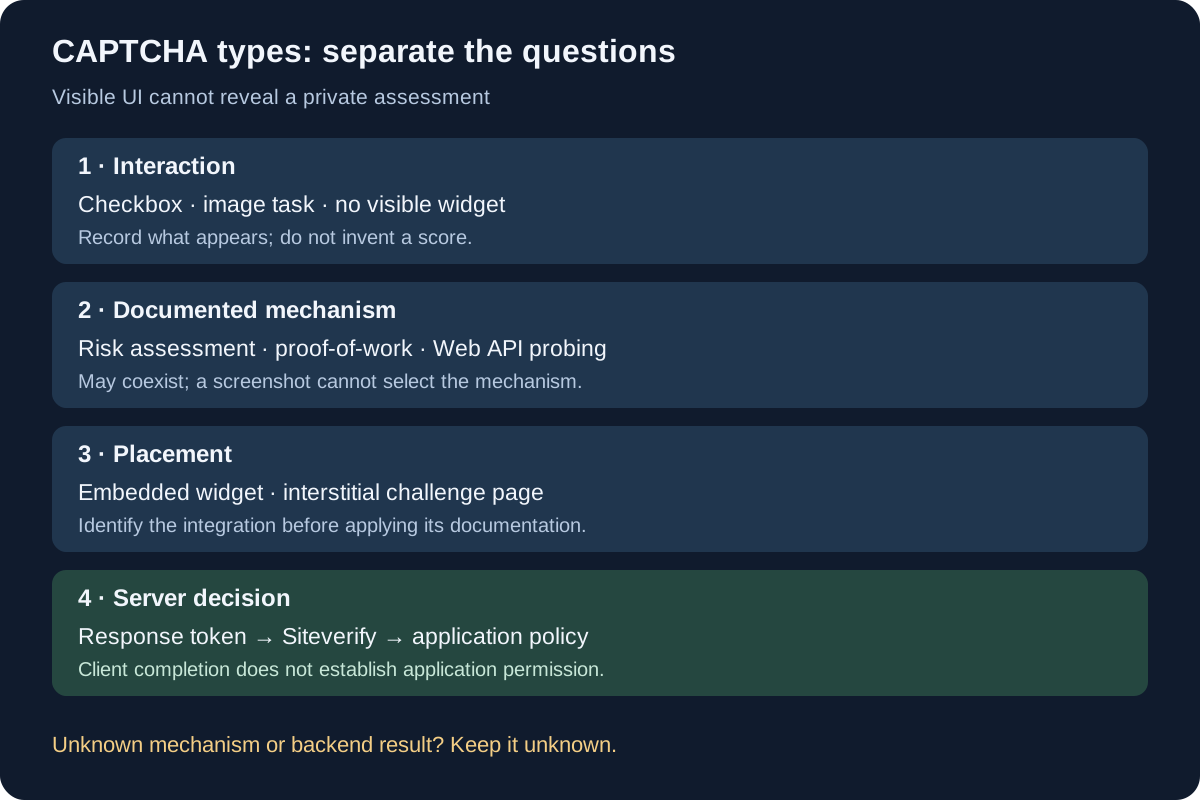
CAPTCHA types cannot be identified reliably from a checkbox, an image grid or an invisible widget alone. Those describe how a check appears; they do not reveal every mechanism behind it or the site's acceptance rule. Classify the interaction, the documented check, its placement and the server decision separately. BotBrowser provides profile-backed browser controls and proxy configuration, but it does not solve a challenge, expose a provider's private score or guarantee that a site accepts a session.
TL;DR
- A checkbox, an image task and no visible widget are interaction descriptions; none is a complete account of the verification system.
- Risk scoring, proof-of-work and attestation describe different mechanisms or evidence. They can coexist with visible or invisible interactions.
- A browser-produced response token still needs the provider's required server-side validation. Application authorization remains a separate decision.
- Identify a deployed product from its documented integration and owner configuration, not from a screenshot that merely resembles another vendor's challenge.
- Record unknown mechanisms as unknown. For an authorized automated job, pause dependent work when a challenge replaces the expected application result.
Contents
- Classify CAPTCHA types on four separate axes
- What visible tasks establish
- What background checks can measure
- Follow a token to the server decision
- Write an observation without inventing a score
- Choose the next action by your role
- Practical conclusion
Classify CAPTCHA types on four separate axes
A list that puts “checkbox,” “invisible,” “risk score” and “proof-of-work” in four competing rows mixes different questions. A checkbox describes an interface. Invisible describes the absence of a visible widget. A score describes an assessment returned by a particular service. Proof-of-work describes a computational task. Choosing one label does not rule out the others.
Use four fields instead of trying to identify one universal type. The values below are classification choices, not measurements of a live provider. Fill a mechanism field only when an official product description or the deployment owner establishes it.
| Axis | Question | Examples of values | What the field cannot establish |
|---|---|---|---|
| Interaction | What does the person see or do? | Checkbox, image task, text task, no visible widget | Which private inputs were evaluated |
| Mechanism | What evidence or check is documented? | Risk assessment, computational proof, an attestation mechanism | Its undisclosed weights or the result for this request |
| Placement | Where is the check integrated? | Embedded application widget, interstitial challenge page | Whether the rest of the application authorized the operation |
| Decision | Which component accepts what? | Provider verifies a token; site applies its own policy | Whether a browser-side success means business success |
These axes also explain why a challenge can change appearance during one visit. Google documents that a reCAPTCHA v2 checkbox may pass immediately or present a challenge. That is a supported branch within one integration, not proof that the site switched to a different CAPTCHA provider. An incident timeline needs the actual transition, not a new category inferred from each screen.
The neighboring CAPTCHA mid-run diagnosis owns the route, browser-session and workload investigation once a challenge appears. Classification answers an earlier question: which facts does the screen establish, and which require provider documentation or site-owner evidence? It does not replace that incident investigation with a vendor label.
The scope of a claim matters as much as the label. “This product documents a background computational check” concerns a product family. “This request failed that check” concerns one execution and needs corresponding evidence. The first statement does not establish the second. Keep product capabilities and request observations in separate columns in any support record.
What visible tasks establish
The familiar checkbox asks for a visible interaction, but its position on the page says little about the complete verification process. In Google's reCAPTCHA version comparison, the v2 checkbox flow can accept the interaction without another task or require an additional challenge. Clicking the checkbox is therefore not a measurement of a public numeric score, nor does it establish that no background evaluation occurred.
An image task is similarly an interaction format. Its appearance establishes that an image-based task was presented. It does not tell a client observer why that task was selected, whether the same visitor would see another format later, or whether successful completion will satisfy a separate account restriction. Describe the displayed task without inventing the selection rule.
Text-entry and other visible tasks fit the same classification approach. They differ in the required interaction, accessibility needs and possible input errors. Those practical differences matter when an application owner tests the supported user flow. They are not a basis for ranking the security quality of entire products, and they do not disclose the background evidence used to select a task.
“Invisible” also needs a precise subject. Google describes invisible reCAPTCHA v2 as an integration that does not require clicking a checkbox; it can be invoked through a button or an API call, and suspicious traffic may still receive a challenge. Absence of an initial checkbox therefore does not promise that no visible task will ever appear.
Cloudflare documents Managed, Non-Interactive and Invisible Turnstile widget modes. Managed can choose a non-interactive check or ask for a checkbox interaction. Non-Interactive displays a widget without requiring interaction; Invisible runs without displaying the widget. A visible box and a required click are distinct facts even within the same product.
hCaptcha's invisible and passive guidance makes another useful distinction. Invisible removes the initial checkbox, whereas passive behavior concerns whether an interactive challenge is presented. The documentation describes combining invisible and passive modes in the applicable Enterprise offering. Do not generalize an option from one offering into a promise for every account or integration.
| Visible observation | Supported description | Unsupported inference |
|---|---|---|
| A checkbox is displayed | The integration exposes a checkbox interaction | A public risk score must be available |
| An image task is displayed | The flow presented an image-based task | A particular browser signal caused it |
| A widget is visible but no click is requested | The interface is currently non-interactive | No browser checks are running |
| No widget is visible | No widget was observed in that state | No challenge integration or verification exists |
For accessibility and application testing, record the interaction actually required, the documented configuration and the relevant page state. A screenshot can support the first fact. Owner configuration may establish the second. Neither supplies the hidden mechanism or a provider verdict that the observer cannot access. Avoid treating a polished screen capture as evidence about an undocumented scoring model.
What background checks can measure
A risk assessment is not the same artifact as a puzzle answer. Google's reCAPTCHA v3 documentation describes a score for each request without user friction and leaves the site to decide which action follows. It also describes actions that provide context for interpreting results. That documented response model does not make a numeric score available to an arbitrary browser client.
The existence of a score must not be projected onto every widget. A product can issue a verification token without exposing a numeric risk score through its standard integration. Conversely, a score-based product can feed a site policy that asks for another form of verification. The provider result, the site's chosen response and the interaction shown to a visitor are separate records.
Proof-of-work describes a computational check, not a visible presentation. The Turnstile overview lists proof-of-work, proof-of-space and web API probing among its checks. Multiple mechanisms can participate in the same system. It would be inaccurate to turn that list into mutually exclusive CAPTCHA products or to conclude that an invisible widget uses only one of them.
An attestation mechanism concerns evidence issued or checked under a particular trust arrangement. Its exact claim, issuer, prerequisites and verifier depend on the documented scheme. It is not another word for invisible. If a provider's public documentation does not establish which attestation mechanism applies to the deployed flow, leave that mechanism unspecified instead of filling the field from visual appearance.
The word “measures” needs restraint here. An official page may name a category of checks without revealing their weights, thresholds, composition or use on a specific request. A client can observe that a script executed or that a widget changed state. Those observations cannot recover the complete server-side decision procedure. No browser console expression turns an undisclosed provider assessment into a reliable local diagnostic value.
Browser characteristics are potential inputs, not universal explanations. A profile-backed browser control can change a documented browser-level value; a proxy changes a network route. Neither change proves what a provider evaluated, and neither establishes that a failed application request was caused by those inputs. Keep a browser configuration record for reproducibility, but do not rename configuration differences as measured CAPTCHA causes.
This is also why a generic “human or bot” label is too coarse for a support incident. A result might concern token verification, a contextual assessment or a separate application rule. The useful question is which component returned which documented field. A broad label loses that distinction and can send both the operator and the application team toward a fix unsupported by the evidence.
Follow a token to the server decision
A browser-side completion callback is one event in a longer flow. For the integrations discussed here, the site must perform the provider's required server-side verification before relying on the response token. The application then decides whether to permit the requested operation under its own rules. A token is not a general authorization credential for every route on the site.
Use this ordered model when reading an integration: the browser runs the configured client flow; a response token is delivered to the application; the backend validates it with the provider; the backend checks the returned fields relevant to its integration; the application applies its policy. These are logical responsibilities, not a packet trace captured from a real customer deployment.
Google's server-side verification documentation requires a backend request with the secret and response token. It states that each response token is valid for two minutes and can be verified once. The secret belongs on the server. A browser log that contains a token is not proof that a later verification request succeeded, and the token itself should not be pasted into a public incident report.
For v3, the official guide tells the site to verify the action and assess the score in context. This is an owner-side integration responsibility. A visitor who sees a failed form submission cannot infer the returned score, the configured policy or the result of those checks merely by inspecting the form's error text. Request an operator correlation rather than treating a locally guessed score as evidence.
Cloudflare's Turnstile server-side validation guide likewise requires Siteverify; the client widget alone is insufficient. Tokens expire 300 seconds after generation and are intended for single use. Reuse detection is eventually consistent: closely spaced validations may succeed before redemption state propagates. This is not a reusable-token contract. Do not implement a reusable-token cache or treat a widget completion event as equivalent to successful backend validation.
| Stage | Evidence available to the responsible component | What success still does not prove |
|---|---|---|
| Client interaction | Widget state, callback or documented client error | Backend token validation succeeded |
| Provider verification | The actual Siteverify response | The application permits the business operation |
| Application policy | Owner's configured checks and request logs | Every future operation will be accepted |
| Application result | The expected authenticated or transactional result | Another session has the same assessment |
An embedded widget and an edge challenge page also occupy different places in a request path. Turnstile can be embedded without requiring site traffic to pass through Cloudflare's CDN. Cloudflare Challenge Pages can instead replace an expected resource response with HTML. The existing layer-by-layer blocked-scraper diagnosis distinguishes request, transport and application observations; use that investigation when the response body itself changes, rather than assuming every Cloudflare-related check is the same integration.
Write an observation without inventing a score
A useful observation record states how each field was established. Separate visible evidence from an official product capability and from owner-only facts. The following text is a copyable blank template, not output from a provider test. Replace each bracketed item with a verified value or leave it unknown.
interaction_observed: [checkbox / image task / no visible widget / unknown]
product_identification: [documented integration or owner confirmation / unknown]
mechanism_documented: [official source and applicable mode / unknown]
placement_observed: [embedded / interstitial / unknown]
client_completion_observed: [yes / no / unknown]
backend_verification: [owner-confirmed result / unknown]
application_result: [expected result / refused / unknown]
correlation_reference: [redacted request reference / unavailable]
For a concrete reasoning example, suppose an authorized tester sees a checkbox embedded in a login form and later sees a generic form error. This is a hypothetical scenario. The interaction field can say checkbox; the placement can say embedded. Without the integration details, the product and mechanism remain unknown. Without backend evidence, verification remains unknown. The form error establishes a failed application result, not a specific score or a proof failure.
Now suppose the site owner confirms the product and supplies a redacted failed verification response for that exact request. The backend field can be updated from unknown using that evidence. It still does not establish why the provider produced the result beyond the documented response fields, and it does not establish that changing the browser would fix it. Each additional claim needs its own source.
Record an observation's scope as well as its content. A production request, an official test key and a local mocked callback serve different purposes. A mock can test an application's handling of a callback but cannot establish provider behavior. A vendor's test facility can exercise the documented integration path under its stated conditions but is not a measurement of ordinary production risk assessment. Label those environments explicitly.
Keep secrets, full response tokens, cookies and personal data out of a shared record. A minimal correlation reference and a redacted documented error are usually more useful than a complete browser dump. The owner can retain any necessary detailed evidence under the application's own access and retention rules. More collected data does not automatically produce a more accurate explanation.
Choose the next action by your role
A site owner can inspect configuration and backend verification records. An authorized automation operator usually cannot. Choose the next step from that access boundary, rather than from a promise that a particular CAPTCHA “type” has a universal remedy. Classification is useful when it directs the request to the right component owner and prevents unsupported local experimentation.
| Your role and observed situation | Next bounded action | Avoid concluding |
|---|---|---|
| Site owner; client flow completes but application refuses | Correlate the exact backend validation and application-policy records | A completed widget guarantees permission |
| Integration tester; no widget is visible | Confirm configured product and mode using official integration guidance | The check is absent or exclusively attestation-based |
| Authorized operator; expected data becomes a challenge | Pause dependent extraction and preserve a minimal transition record | The provider identified a particular browser value |
| Support reviewer; only a screenshot is available | Classify interaction and request the missing owner-side evidence | The hidden score or exact proof mechanism is known |
BotBrowser's automation consistency reference documents profile-backed browser-level controls, including specified automation-related surfaces. Its proxy configuration reference covers supported routing configuration. These controls help describe a reproducible environment; they do not validate provider tokens, change an application's authorization policy or establish a challenge-free outcome. Neither reference documents a general-purpose CAPTCHA solution.
For an existing integration, finish with one answerable question: which component owns the first unverified step? If the backend result is unavailable, more interpretation of the checkbox will not supply it. If token validation succeeded but the application refused the action, investigate the application decision through its approved owner. If a third-party site requires a challenge, use its supported human or operator recovery path rather than treating the classification table as permission to continue extraction.
FAQ
Is an invisible CAPTCHA the same as reCAPTCHA v3?
No. Invisible reCAPTCHA v2, reCAPTCHA v3, Turnstile Invisible and hCaptcha invisible modes have different documented integration models. “Invisible” describes presentation, not a common scoring interface. Identify the actual product and mode before applying its verification documentation.
Does a checkbox mean the service measured a risk score?
A checkbox alone does not establish the existence of a numeric score exposed to the site. Read the deployed product's response contract. Even where a service returns a score, the visible interaction does not reveal the value for the particular request.
Can the same system use proof-of-work and a visible widget?
Yes, mechanisms and interaction modes need not be exclusive. Turnstile documents computational checks alongside multiple widget modes. That product-level statement is not proof that a particular request used every documented mechanism; the exact execution remains unknown unless applicable evidence establishes it.
Sources
- Google: reCAPTCHA versions
- Google: reCAPTCHA v3
- Google: verifying the user's response
- Cloudflare: Turnstile
- Cloudflare: widget modes
- Cloudflare: server-side validation
- hCaptcha: invisible and passive modes
- BotBrowser: automation consistency
- BotBrowser: proxy configuration
Practical conclusion
Describe the interaction you actually observed, add only documented mechanisms, locate the integration and leave the backend decision unknown until its owner confirms it. A checkbox is not a score, invisible is not attestation, and a token is not application authorization. Start with the four-field classification, then ask the owner of the first unverified step for the evidence needed to proceed.
This article is part of the guide: Proxy Configuration Overview: A Browser Network Decision Map
Related Articles
Scraping CAPTCHA: Diagnose a Challenge Mid-Run
NetworkCloudflare and DataDome: Scraping Response Signals
NetworkScraper Blocked? Diagnose DNS, TLS, HTTP and Page Errors
NetworkScraping Rate Limits: 429, Retry-After and Concurrency
NetworkBrowser Proxy Configuration: SOCKS5, HTTP, and HTTPS Guide
NetworkScraping Cookies: Keep State Across Browser Runs
Run the same check in BotBrowser
Load a profile, keep the signals you just read about consistent inside the browser, and confirm the result on your own machine before a rollout.