VirtualKeyboard API: Viewport and Inset Boundaries
Coordinate VirtualKeyboard geometrychange, visualViewport measurements, and keyboard insets so fixed actions stay reachable without confusing overlay and resize modes.
BotBrowser Team
Want the structured docs for Platform?
This article lives in the editorial library. For step-by-step setup, reference material, and ongoing updates, jump into the docs section.
BotBrowser can repeat an authorized mobile form fixture with a declared keyboard policy, profile, and viewport, but it cannot reproduce every native keyboard animation or certify a physical device. The useful question is narrower: when a trusted editable field opens the software keyboard, which surface changes, which inset is available, and which action remains reachable? This guide separates the VirtualKeyboard API from generic resize handling and from the device-profile choices in Device profile testing and the viewport measurement guide.
TL;DR
navigator.virtualKeyboard.overlaysContentis an opt-in policy: the keyboard can overlay content instead of resizing the layout viewport.geometrychangereports aDOMRectfor the current keyboard geometry; coalesce it withvisualViewportchanges before writing layout.env(keyboard-inset-*)exposes CSS insets only when the browser and policy provide them. Keep a normal0pxpadding fallback.- A layout viewport, visual viewport, and keyboard rectangle answer different questions. Never substitute
innerHeightfor all three. - Test focus, scroll, rotation, zoom, and keyboard dismissal as transitions. An open-state screenshot is not a complete form check.
Contents
- Coordinate surfaces and policy
- Fixture and inset implementation
- Event ordering and scroll ownership
- Boundary matrix and BotBrowser capability
Coordinate surfaces and policy
The layout viewport is the coordinate space used to lay out the document. The visual viewport is the portion currently visible after browser chrome, pinch zoom, or a software keyboard takes space. The VirtualKeyboard API adds a keyboard rectangle when the page opts into overlay behavior. These surfaces can move independently, so a single window.innerHeight value cannot describe the state of a focused form.
| Surface | Question answered | Example field |
|---|---|---|
| Layout viewport | How large is the document's layout area? | window.innerHeight |
| Visual viewport | What can the user see right now? | visualViewport.height |
| Keyboard rectangle | Which pixels are covered by the virtual keyboard? | virtualKeyboard.boundingRect |
When the keyboard resizes the page, the layout viewport may shrink and the keyboard rectangle can be zero-sized or absent from the page's usable area. When the page opts into overlay mode, the layout viewport can stay stable while the keyboard covers its lower edge. The viewport resize guide explains related event ordering; this article adds the explicit keyboard policy and CSS inset contract.
Do not derive a keyboard height from innerHeight - visualViewport.height without recording browser chrome and zoom. That difference is an estimate, not an API guarantee. Prefer virtualKeyboard.boundingRect for overlay mode, and use visualViewport.height, offsetTop, and scale for what is actually visible.
navigator.virtualKeyboard.overlaysContent = true tells a supporting browser that the page will handle the keyboard-covered area. The browser does not automatically move every fixed footer out of the way. The page must use the reported geometry or CSS environment variables, and it must keep a usable dismissal and focus path. The policy is per document, so assign it before the form journey opens the keyboard instead of toggling it on every focus event.
Record API presence, the result of the overlaysContent assignment, the active profile label, and the CSS path used by the fixture. A desktop profile may ignore the option; that is a capability boundary, not a reason to infer a user category. The result should describe a rendering condition, never a person.
Fixture and inset implementation
The fixture below keeps the submit action fixed, gives the form a scroll region, and writes a redacted geometry record. It does not collect text, account identifiers, raw key events, or keyboard contents. Keep the markup stable while changing one matrix row at a time.
<main class="screen">
  <form class="card" id="checkout">
    <label>Email <input name="email" type="email" autocomplete="email" /></label>
    <label>Address <input name="address" autocomplete="street-address" /></label>
    <p class="status" role="status" aria-live="polite"></p>
    <button class="submit" type="submit">Continue</button>
  </form>
</main>
<script>
  const vk = navigator.virtualKeyboard;
  if (vk) {
    vk.overlaysContent = true;
    vk.addEventListener('geometrychange', () => {
      const r = vk.boundingRect;
      document.documentElement.style.setProperty('--vk-bottom', `${r.height}px`);
      console.log(JSON.stringify({ type: 'keyboard', height: r.height, top: r.top }));
    });
  }
</script>
:root {
  --vk-bottom: 0px;
}
.screen {
  min-block-size: 100dvh;
  padding: 1rem;
}
.card {
  min-block-size: 140vh;
  padding-block-end: calc(5rem + var(--vk-bottom));
}
.submit {
  position: fixed;
  inset-inline: 1rem;
  inset-block-end: calc(1rem + var(--vk-bottom) + env(safe-area-inset-bottom, 0px));
}
@supports (padding: env(keyboard-inset-bottom)) {
  .card {
    padding-block-end: calc(5rem + env(keyboard-inset-bottom));
  }
  .submit {
    inset-block-end: calc(1rem + env(keyboard-inset-bottom) + env(safe-area-inset-bottom, 0px));
  }
}
The JavaScript custom property is a compatibility path for engines that expose geometry but not the CSS environment variable. The @supports block proves only that the syntax parses; it does not prove that keyboard-inset-bottom is non-zero. Inspect computed padding after focus and again after dismissal. A 0px value is valid when the keyboard is hidden, overlay mode is disabled, or the browser does not expose the feature.
The keyboard environment variables describe the occluded edge: keyboard-inset-top, keyboard-inset-right, keyboard-inset-bottom, and keyboard-inset-left, plus width and height variants. They are useful for padding a fixed action or reserving space in a scroll container, but they do not replace safe-area-inset-*. A device can have both a keyboard and a home-indicator safe area. Use max() or calc() to combine the constraints, and prefer logical properties in right-to-left or vertical writing modes.
If a fallback reserves too much space after dismissal, clear the custom property on the next geometry event rather than hiding the action with a negative offset. Keep the ordinary flow usable while JavaScript starts, after navigation restoration, and when a profile does not support navigator.virtualKeyboard.
Event ordering and scroll ownership
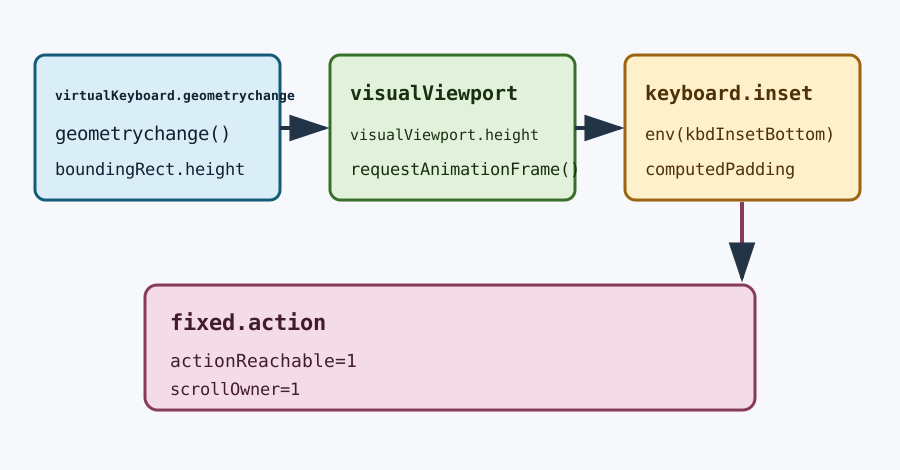
geometrychange can arrive near visualViewport.resize and visualViewport.scroll. These events describe related transitions but are not a guaranteed sequence. Put one scheduler around all three and read current values once per animation frame:
let pending = false;
function scheduleLayout() {
  if (pending) return;
  pending = true;
  requestAnimationFrame(() => {
    pending = false;
    const vv = window.visualViewport;
    const k = navigator.virtualKeyboard?.boundingRect;
    document.documentElement.dataset.keyboard = k && k.height > 0 ? 'open' : 'closed';
    console.log(
      JSON.stringify({
        layoutHeight: window.innerHeight,
        visualHeight: vv?.height ?? null,
        visualOffsetTop: vv?.offsetTop ?? null,
        keyboardHeight: k?.height ?? 0,
      })
    );
  });
}
window.visualViewport?.addEventListener('resize', scheduleLayout);
window.visualViewport?.addEventListener('scroll', scheduleLayout);
navigator.virtualKeyboard?.addEventListener('geometrychange', scheduleLayout);
The record distinguishes a keyboard transition from browser chrome or pinch zoom. A row with keyboardHeight: 0 and a smaller visualHeight is not evidence that the keyboard closed; it may be a toolbar or zoom change. Keep scale, offsetTop, and the focused element's rectangle beside the values. A single animation-frame record prevents competing handlers from applying stale padding.
When focus lands on an input below the visible area, the browser may scroll the document or an inner overflow: auto container. A fixed submit button can remain visible while the focused field is hidden, or the field can be visible while the button is covered. Assert both rectangles after scrolling settles. Choose one scroll owner. If the form owns an inner container, do not call scrollIntoView() on every geometry event; wait for focus adjustment and correct only when the field bottom exceeds the visible keyboard top.
Rotation and zoom are separate transitions. Rotation can change the layout viewport, visual viewport, and safe-area insets before the keyboard event arrives. Pinch zoom changes visual coordinates without changing CSS layout dimensions in the same way. Keep scale, offsetTop, and safe-area values in separate matrix rows so an inset regression is not reported as a keyboard regression.
Record an acceptance result
An acceptance record identifies the transition that failed, not merely that the keyboard was visible. Store the row identifier, focused control, policy assignment result, window.innerHeight, visualViewport.height, visualViewport.offsetTop, visualViewport.scale, the keyboard rectangle, computed bottom padding, and final action rectangle.
{
  "row": "D",
  "focused": "address",
  "overlaysContent": true,
  "layoutHeight": 844,
  "visualHeight": 512,
  "visualOffsetTop": 0,
  "keyboardTop": 512,
  "keyboardHeight": 332,
  "actionBottom": 496,
  "keyboardTopMinusActionBottom": 16,
  "actionReachable": true
}
If keyboardHeight is positive and actionBottom exceeds keyboardTop, the fixed action is covered. If the action clears the keyboard but the focused field remains below keyboardTop, the scroll owner is wrong. If both rectangles are safe while visualHeight is unexpectedly small, investigate browser chrome or zoom before changing CSS. Keep the record free of field values, account identifiers, raw key events, and device serial data.
Repeat the same row after dismissal. A valid cleanup result has zero keyboard height, default custom-property or CSS-inset values, preserved form state, and a reachable action without a negative offset. Repeat after rotation as a separate row because safe-area values and visual coordinates may change before the next geometrychange callback. Capture the dismissal timestamp only as a fixture event; it does not need a user identifier or a raw key sequence.
Diagnose the first divergent surface
If navigator.virtualKeyboard is missing, classify the row as unsupported and keep the normal viewport path. If the property exists but overlaysContent remains false, the browser is using managed or resize behavior; do not claim that a zero rectangle proves the keyboard is closed. If geometrychange fires but computed keyboard-inset-bottom stays zero, use the JavaScript rectangle path and record that CSS insets were unavailable. If the rectangle is correct but the action is covered, inspect its containing block and safe-area calculation. If the action clears the inset but the input remains hidden, inspect the single scroll owner and focus timing.
This sequence prevents a common misdiagnosis: treating every small visual viewport as a keyboard event. Browser chrome can reduce visualViewport.height while keyboardHeight remains zero; pinch zoom can change scale and offsets without changing the layout viewport; an inner scroller can hide a focused field while the page-level fixed action is visible. Compare all values in one animation-frame record before changing the policy or adding a device-specific constant.
Keep fallback behavior testable
Render the same form when navigator.virtualKeyboard is absent, when assignment to overlaysContent is ignored, and when CSS environment variables parse but remain zero. The action should remain reachable through ordinary document flow, and the user should be able to dismiss the keyboard or continue with an alternative input path. Use a feature flag for the overlay policy so a release can compare managed and explicit paths without changing form markup. Keep that flag in the fixture record, not in fingerprinting data.
The fallback check should also cover a delayed geometry event. Start with --vk-bottom: 0px, focus the email control, and record the first frame before geometrychange runs. The fixed action must not jump by an arbitrary phone height during that gap. After the callback, compare the computed inset-block-end with keyboardTopMinusActionBottom from the JSON row. When the callback reports height: 0, verify that the old value is cleared even if visualViewport.resize does not fire.
A second useful probe changes only the scroll owner. Run one variant with document scrolling and one with an inner overflow: auto element, keeping clientHeight, scrollTop, and the focused element rectangle in the record. If both owners move, the field can oscillate between two corrections and the fixed action can be judged against the wrong coordinate space. The fixture should expose that mistake as a row-specific failure, not hide it behind a larger bottom padding.
Treat unsupported behavior as a result, not as a broken test. A missing API, a read-only overlaysContent property, a zero CSS inset, and a managed resize are four different observations. Preserve those observations beside the profile label and browser build. This distinction lets a release compare a changed engine without turning a legitimate capability boundary into a layout regression.
When a test fails after a profile update, first replay row A, then row B, and finally row C. Row A establishes the browser-managed baseline; row B checks that the explicit policy produces the expected rectangle; row C checks cleanup. Only after those three rows agree should you investigate rotation, zoom, or an inner scroller. This order keeps the diagnosis tied to the first changed surface.
Boundary matrix and BotBrowser capability
Run the same fixture with one fresh profile per row. Keep text, font loading, zoom, and device scale factor constant unless the row names the change. A useful failure names the row and first divergent surface, for example “row D action rectangle ended 18px below keyboard top after inner scroll,” rather than “mobile keyboard broken.”
| Row | Change | Expected observation | Meaning |
|---|---|---|---|
| A | Keyboard policy off | Normal resize or browser-managed behavior | Baseline compatibility |
| B | Overlay policy on, field focused | geometrychange, positive height, fixed action clears inset | Explicit keyboard contract |
| C | Keyboard dismissed | Height returns to 0, action returns without stale padding | Cleanup transition |
| D | Inner scroll container | Focused field and action both remain reachable | Scroll ownership |
| E | Rotation or 200% zoom | Viewport and safe-area fields change independently | Non-keyboard transition |
| F | Unsupported or desktop profile | API absent or option ignored | Capability fallback |
Save browserVersion, profile label, policy assignment, focused control, layout and visual viewport values, keyboard rectangle, safe-area values, and the final action rectangle. Do not save form text or raw keyboard data. Repeat row C after every open transition to catch stale --vk-bottom state.
For a reproducible report, keep the coordinate origin explicit. visualViewport.offsetTop is relative to the layout viewport, while getBoundingClientRect() uses the current visual coordinate space. A field at top: 760 with visualHeight: 512 is not automatically covered: its rectangle may have moved after focus scrolling. Record the field's top and bottom after the frame that follows geometrychange, then compare those values with keyboardTop and actionBottom. This makes a failed row actionable without recording the field value.
The matrix also benefits from a stable timing budget. Give focus adjustment one animation frame, geometry coalescing one subsequent frame, and the assertion a third frame only when the browser reports a second visualViewport.resize. Do not sleep for a fixed wall-clock interval because keyboard animation duration differs by engine and profile. A timeout should fail with the last observed layoutHeight, visualHeight, offsetTop, scale, keyboardHeight, and computed inset-block-end. Those six values show whether the first divergence came from the browser, the policy, CSS, or the scroll owner.
If a browser exposes geometrychange but returns a rectangle outside the visual viewport, preserve the raw rectangle and classify the row before applying a clamp. Clamping first can hide a coordinate-space bug. Likewise, a negative offsetTop during pinch zoom is evidence to keep in the zoom row, not a reason to add keyboard padding. The fixture is most useful when every correction can be traced to one named surface and one measured value.
BotBrowser capability boundary
BotBrowser can run matching mobile profiles with profile-defined touch support and the documented --bot-mobile-keyboard option. In a supported profile, trusted focus on an editable field can reduce visualViewport.height while the layout viewport stays stable, allowing the fixture to repeat keyboard-visible and touch checkpoints. Desktop profiles can ignore that option. BotBrowser cannot replace physical devices, native operating-system keyboards, keyboard animations, or every application layout, and it cannot guarantee that every browser exposes non-zero keyboard insets. For profile selection and escalation, see Mobile browser profile quality review.
FAQ
Does overlaysContent resize the layout viewport?
It is intended to let the keyboard overlay content, so a supporting browser can keep the layout viewport stable. The visual viewport and keyboard rectangle still change. Verify innerHeight, visualViewport.height, and boundingRect.height instead of assuming one mode for every browser.
Are keyboard insets the same as safe-area insets?
No. Keyboard insets describe transient occlusion; safe-area insets describe a device or browser edge that needs permanent padding. Combine them with calc() or max() and test dismissal so stale keyboard padding does not remain.
Should every geometrychange call scrollIntoView()?
No. Let the browser complete focus scrolling, then inspect the focused control and action in one animation frame. Scroll only when the control remains behind the visible keyboard boundary, and keep one owner responsible for the scroll container.
Release checklist.
Before shipping a form that uses this API, verify the policy at the document boundary rather than inside each input component. Confirm that a supported context exposes navigator.virtualKeyboard, that the assignment to overlaysContent is made once, and that the first geometry record is emitted only after a real focus action. Check the computed padding in the closed state, the open state, and the first frame after dismissal. The three values catch different bugs: a missing fallback, a stale inset, and a race between focus scrolling and the geometry event.
Keep browser chrome, zoom, rotation, and keyboard rows separate in the acceptance log. For example, a row with visualHeight: 512, keyboardHeight: 0, and scale: 1 should be investigated as chrome or an unsupported keyboard surface, not labelled a successful open event. A row with keyboardHeight: 332, actionReachable: false, and a correct focused-field rectangle points to the fixed action calculation. A row where both rectangles fail after an inner scroll points to scroll ownership. These distinctions make a regression actionable for a web team without collecting personal text or hardware identifiers.
When the page is restored from the back-forward cache, re-read the current rectangle and computed inset instead of trusting the previous data-keyboard value. When a form navigates between steps, clear the custom property before the next focus event so a short form does not inherit the previous step's bottom padding. When a modal owns focus, record its containing block and its dismissal control as well as the page action. The same fixture then covers a checkout, a sign-in dialog, and an embedded form without changing the privacy boundary.
Sources
- VirtualKeyboard API (W3C)
- MDN: VirtualKeyboard API
- MDN:
geometrychange - CSS
env()function (MDN) - BotBrowser device emulation documentation
Practical conclusion
Treat the VirtualKeyboard API as a policy and geometry contract. Keep layout, visual viewport, keyboard rectangle, safe-area, and scroll ownership in separate fields; coalesce their events; and test opening, dismissal, rotation, zoom, and unsupported profiles. BotBrowser can repeat the declared mobile condition and capture redacted geometry, while physical-device and native-keyboard behavior remain outside that evidence.
This article is part of the guide: Web Platform Surfaces: A Consistency Review Map
Related Articles
Mobile Viewport Resize Events: Order, Debounce, and Layout
PlatformCSS Anchor Positioning: Layout and Overlay Boundaries
PlatformMobile Browser Profile Quality Review
PlatformDevice Profile Testing for Mobile, Tablet, and Desktop
PlatformAndroid Browser Profile Testing on Desktop and Server
FingerprintKeyboard Layout API, Locale Choices, and Privacy
Take BotBrowser from research to production
The guides cover the model first, then move into cross-platform validation, isolated contexts, and scale-ready browser deployment.