Custom HTTP Headers in BotBrowser: Flag, Profile or CDP
Add application-specific request headers with --bot-custom-headers, profile configs or CDP commands, and keep profile-managed headers such as User-Agent and Sec-CH-UA consistent.
BotBrowser Team
Prefer the maintained product doc?
This article has a matching page in the docs center. Use the docs for the canonical setup flow, current flags, and long-term reference.
Custom HTTP headers let a BotBrowser session send application values such as a token or build marker beside the profile-managed standard headers. BotBrowser delivers the headers you define, but it cannot make a server accept them, answer a CORS preflight for you, or replace the standard headers a profile manages.
TL;DR
Give each header one owner: the --bot-custom-headers flag for a static set, configs.customHeaders for a set that travels with a profile, or the browser-level CDP commands for values that change at runtime. Then confirm on an echo endpoint that your headers arrive and that User-Agent and Sec-CH-UA still match the profile.
Contents
- Standard Headers and Custom Headers
- Choosing Between the Flag, Profile Config and CDP Commands
- Launching With a Static Header Set
- Changing Headers at Runtime and Per Browser Context
- Verifying Headers and Handling CORS Preflight
- Reproducible Header Check
- Where BotBrowser Fits and Where It Stops
Standard Headers and Custom Headers
Every HTTP request a browser sends carries a set of header fields. Some of them describe the browser itself: User-Agent names the browser and its version, Sec-CH-UA and its siblings describe the brand and platform in a structured form, and Accept-Language lists language preferences. Others describe the application: an authorization token, a build identifier, a tenant name, or a routing hint that a gateway reads before the request reaches the application. The first group should stay consistent with the browser identity you chose. The second group is entirely yours to define.
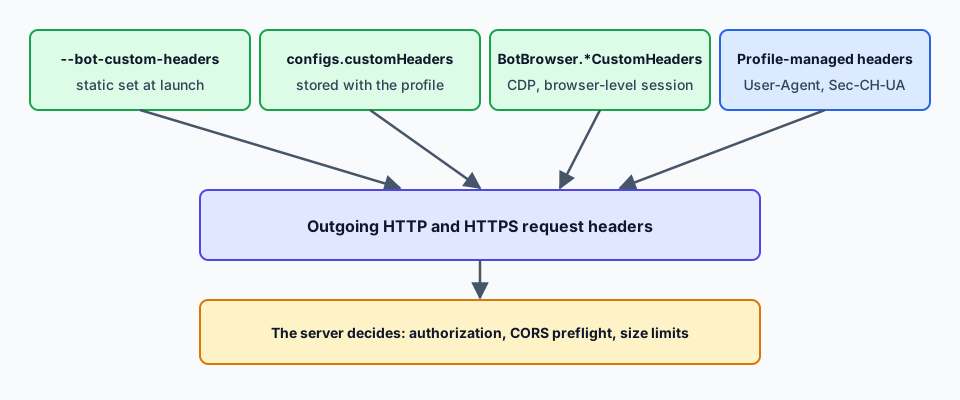
That split is the reason custom headers are a separate feature. When a profile is loaded, BotBrowser keeps the profile-managed standard headers, such as User-Agent and Sec-CH-UA, aligned with the browser identity in that profile. Custom headers sit beside them. They are meant for application-specific values. A custom header with the same name as an existing header can override it, so keep profile-managed names such as User-Agent and Sec-CH-UA out of the custom set. If a page is meant to look like one browser, a stray header that contradicts it creates exactly the kind of mismatch that is hard to explain later, so the clean rule is simple: standard headers come from the profile, application headers come from you.
The field semantics themselves are defined in RFC 9110. Field names are case-insensitive, so X-App-Version and x-app-version name the same field. A field value is a string, and when the same field name appears more than once, a recipient may treat the lines as a single comma-separated list. These details matter in practice because a header set that looks fine in a JSON object can still be read differently by a gateway that normalizes names, folds duplicates, or rejects unusual characters.
Typical uses for custom headers fall into a few groups:
- Authentication and authorization hints, such as an API key or a bearer token that a gateway expects on every call.
- Application markers, such as a build number, a tenant identifier, or a feature flag name that the backend uses for routing.
- Test and staging switches, such as a header that selects a canary deployment or enables verbose responses on a test environment you own.
- Mobile web view conventions, such as an
X-Requested-Withvalue that a site expects from an app container.
What custom headers are not meant for is describing the network path. Headers such as X-Forwarded-For and X-Real-IP belong to proxy and load balancer infrastructure, and a value set by the browser operator carries no weight with a correctly configured server. Setting them from the browser only creates confusion, so use application-specific names instead.
Header values are the operator's responsibility. A header that carries a credential should be handled like any other secret: keep it out of shared logs, rotate it on the schedule your backend defines, and send it only to origins that are meant to receive it. BotBrowser sends the headers you configure to HTTP and HTTPS requests, so the scope of what you configure is the scope of what is exposed.
Choosing Between the Flag, Profile Config and CDP Commands
BotBrowser documents three ways to define custom headers, and the right choice depends on how often the set changes and who owns it. All three require a PRO license.
The first is the --bot-custom-headers launch flag. It takes a JSON object whose keys are header names and whose values are strings. It is the simplest option for a static set: the headers are fixed when the browser starts, they apply from the very first request, and the launch command is the single place to read them. It suits a scheduled job, a CI run, or a service that always calls the same backend with the same application marker.
The second is the profile field configs.customHeaders. Here the headers are stored in the profile configuration instead of the launch command. This is useful when the header set belongs to the profile rather than to the run, for example when one profile always represents one application container and should carry the same marker everywhere it is used. The headers travel with the profile file, so any launcher that loads it gets the same behavior without extra arguments.
The third is the browser-level CDP commands: BotBrowser.setCustomHeaders, BotBrowser.getCustomHeaders, BotBrowser.addCustomHeader, BotBrowser.removeCustomHeader and BotBrowser.clearCustomHeaders. They change the header set while the browser is running, without a restart. The documentation lists CDP commands as the most flexible of the three methods, which makes them the natural choice for a token that rotates during a session or for a header that should change between two navigations.
A short decision guide:
- The set never changes during a run: use the flag.
- The set belongs to a specific profile and should travel with it: use
configs.customHeaders. - The set changes while the browser is open: use the CDP commands on the browser-level session.
- Different browser contexts need different sets: pass the flag through per-context flags, as shown later.
The three methods can coexist, so it is worth deciding up front which one owns a given header. The documentation lists them by priority, with CDP commands first, then the CLI flag, then the profile field. Even so, if the same name is defined in two places you want to confirm which value is sent before a server complains about it. A practical convention is to keep stable markers in the profile or the flag and reserve CDP commands for values that really are dynamic.
One more point of vocabulary helps when reading the docs. A header set replaced by setCustomHeaders replaces the previous custom set, not the profile-managed standard headers. addCustomHeader and removeCustomHeader touch a single custom entry, and clearCustomHeaders empties the custom set. Do not use them to delete or rewrite User-Agent or Sec-CH-UA; leave those names to the profile.
For cookies, do not use a Cookie header at all. BotBrowser has a dedicated --bot-cookies flag with context-scoped import, and that is the supported route for cookie state. Treating cookies as a custom header would skip the scoping and expiry handling that cookies are designed to have.
Launching With a Static Header Set
For a static header set, pass the JSON object to the launch flag. In a shell, single quotes around the value keep the JSON intact:
chrome --bot-profile="path/to/profile.enc" \
       --bot-custom-headers='{"X-App-Version":"2.1.0","X-Tenant":"acme-test"}'
When you launch from code, the quoting rule changes. The single quotes in the shell example exist only for the shell. In JavaScript the argument goes straight to the process, so the value must be the bare JSON string. Adding quotes around it turns them into part of the value, and the browser then receives text that is not valid JSON.
const headers = { 'X-App-Version': '2.1.0', 'X-Tenant': 'acme-test' };

// Correct: the argument is the flag, an equals sign and the JSON text
args.push('--bot-custom-headers=' + JSON.stringify(headers));

// Wrong: the single quotes become part of the value
args.push(`--bot-custom-headers='${JSON.stringify(headers)}'`);
A complete Playwright launch looks like this:
const { chromium } = require('playwright-core');

(async () => {
  const headers = { 'X-Auth': 'token123', 'X-Client': 'webapp' };

  const browser = await chromium.launch({
    executablePath: 'path/to/botbrowser/chrome',
    headless: true,
    args: ['--bot-profile=path/to/profile.enc', '--bot-custom-headers=' + JSON.stringify(headers)],
  });

  const page = await browser.newPage();
  await page.goto('https://example.com');
  await browser.close();
})();
The Puppeteer version differs only in the launch call:
const puppeteer = require('puppeteer-core');

(async () => {
  const headers = { 'X-Auth': 'token123' };

  const browser = await puppeteer.launch({
    executablePath: 'path/to/botbrowser/chrome',
    headless: true,
    args: ['--bot-profile=path/to/profile.enc', '--bot-custom-headers=' + JSON.stringify(headers)],
  });

  const page = await browser.newPage();
  await page.goto('https://example.com');
  await browser.close();
})();
If you prefer to keep the headers with the profile, put the same object under configs.customHeaders in the profile configuration. The value is a plain object of string pairs, exactly like the flag, and an empty object is the default. When both a profile value and a flag exist, check the result on an echo endpoint before relying on either one, as described in the verification section.
Some details are worth settling before the first launch:
- Use string values only. Numbers and booleans should be written as strings, because header values are text.
- Keep names to ordinary token characters. Spaces and punctuation in a name are rejected by many servers and by intermediaries along the way.
- Keep the total size reasonable. The documentation sets no specific limit, but every header is sent with every request, and servers and gateways apply their own limits on header size.
- Do not include secrets in a launch command that is stored in shared scripts or process listings. Read them from the environment or a secret store at launch time.
On Android web view style setups, the documentation shows the same flag used to reproduce an X-Requested-With value that an app container would send. The pattern is identical: a single JSON object passed through the flag, applied to HTTP and HTTPS requests.
Changing Headers at Runtime and Per Browser Context
A static flag is not enough when a value changes during a session, for example a short-lived token that is refreshed, or a header that should differ between two stages of a workflow. For that, BotBrowser provides CDP commands. They must be sent to the browser-level session, not to a page-level session.
With Playwright, open a browser-level session and send the command:
const cdpSession = await browser.newBrowserCDPSession();

// Replace the whole custom set
await cdpSession.send('BotBrowser.setCustomHeaders', {
  headers: { 'X-Requested-With': 'com.example.app', 'X-Session': 'first' },
});

// Read the current custom set
const current = await cdpSession.send('BotBrowser.getCustomHeaders');
console.log(current.headers);

// Add or update one entry
await cdpSession.send('BotBrowser.addCustomHeader', {
  name: 'X-Session',
  value: 'refreshed',
});

// Remove one entry, or clear the custom set
await cdpSession.send('BotBrowser.removeCustomHeader', { name: 'X-Session' });
await cdpSession.send('BotBrowser.clearCustomHeaders');
With Puppeteer, the browser-level session comes from the browser target:
const cdpSession = await browser.target().createCDPSession();

await cdpSession.send('BotBrowser.setCustomHeaders', {
  headers: { 'X-Requested-With': 'com.example.app' },
});

await cdpSession.send('BotBrowser.addCustomHeader', {
  name: 'X-Token',
  value: 'my-token',
});
If you send one of these commands to a page-level session, the call fails with ProtocolError: 'BotBrowser.setCustomHeaders' wasn't found. That error is the usual sign that the session was created from a page instead of from the browser. Switch to the browser-level session and the command is found.
The five commands cover the full lifecycle of a custom set:
setCustomHeadersreplaces all custom headers with the object you pass.getCustomHeadersreturns the current custom set, which is useful for logging what you are about to rely on.addCustomHeaderadds or updates a single entry by name.removeCustomHeaderremoves a single entry by name.clearCustomHeadersremoves every custom header.
A reliable pattern is to apply the new set, then start the navigation that depends on it, and to read the set back with getCustomHeaders when you need to be sure of the current state.
Different tasks sometimes need different headers in the same browser. BotBrowser supports this by assigning headers per browser context. Per-context flags are passed through BotBrowser.setBrowserContextFlags, and the custom headers flag is among the flags a context can carry:
const client = await browser.target().createCDPSession();

const contextA = await browser.createBrowserContext();
await client.send('BotBrowser.setBrowserContextFlags', {
  browserContextId: contextA._contextId,
  botbrowserFlags: ['--bot-profile=path/to/profile.enc', '--bot-custom-headers={"X-Requested-With":"com.app.one"}'],
});

const contextB = await browser.createBrowserContext();
await client.send('BotBrowser.setBrowserContextFlags', {
  browserContextId: contextB._contextId,
  botbrowserFlags: ['--bot-profile=path/to/profile.enc', '--bot-custom-headers={"X-Requested-With":"com.app.two"}'],
});
Here each context carries its own header set, so two pages open at the same time send different application markers. Keep the same quoting rule in mind: inside the array each entry is one argument, so the JSON text is written without extra shell quotes.
Verifying Headers and Handling CORS Preflight
Always verify a header configuration against an endpoint that reports back what it received. A public echo service such as httpbin works for a quick check, and a staging endpoint you control works even better because it also shows what your own gateway does with the values.
const page = await context.newPage();
await page.goto('https://httpbin.org/headers');
const headersText = await page.textContent('body');
console.log('Received headers:', headersText);
A good verification has three parts:
- Confirm that every custom header you configured appears in the response, with the exact value you set.
- Confirm that
User-AgentandSec-CH-UAstill match the loaded profile, which shows that the standard set was left alone. - Open the browser developer tools Network panel and check that the headers appear on the different kinds of requests the page makes, such as the document, scripts, images and fetch calls.
If a header does not appear, the cause is usually one of three things. The JSON may be invalid, most often because of the quoting mistake described earlier. The command may have gone to a page-level session instead of the browser-level one. Or an intermediary between the browser and the echo endpoint may have removed or renamed the field, which is why a direct comparison against a service you control is valuable.
The second behavior to understand is CORS. A browser treats a cross-origin request differently from a same-origin one. For many cross-origin requests the browser first sends a preflight request using the OPTIONS method. It carries Access-Control-Request-Method and Access-Control-Request-Headers, which list the method and the non-safelisted headers the real request intends to use. The server answers with Access-Control-Allow-Origin, Access-Control-Allow-Methods and Access-Control-Allow-Headers, and only if the answer covers the request does the browser go ahead. The MDN CORS guide describes the full exchange, including Access-Control-Max-Age, which lets the browser reuse a preflight answer for a period.
Non-standard headers are the usual trigger. A small group of headers, such as Accept, Accept-Language and Content-Language, is safelisted and does not cause a preflight on its own. A header such as X-Auth-Token or X-Tenant is not in that group. When the browser adds such a header to a cross-origin request, a preflight can be triggered. If the target server does not list the header name in Access-Control-Allow-Headers, the request can fail. The BotBrowser documentation says the same: adding non-standard headers may trigger a preflight on some sites, and the target server must allow them.
This has a few practical consequences:
- If you own the target server, add the header names to its
Access-Control-Allow-Headersresponse and decide how long a preflight answer may be cached. - If you do not own the server, you cannot change how it answers. Pick a different header or a different approach, such as carrying the value in a place the server already accepts.
- Same-origin requests do not need a preflight, so a test against your own origin can pass while the same header fails against a different origin. Test against the origin you will really use.
- A preflight answer that allows the header does not authorize the request. Authentication and authorization remain separate server decisions.
Size matters too. Servers, gateways and CDNs enforce limits on the total size of request headers. A large set of custom headers, or one oversized value, can produce a rejection that has nothing to do with CORS and no connection to BotBrowser. If requests start failing after a header set grows, shrink the set before looking elsewhere.
Where BotBrowser Fits and Where It Stops
BotBrowser supports adding custom HTTP request headers through --bot-custom-headers, through the profile field configs.customHeaders, and through the browser-level BotBrowser.*CustomHeaders CDP commands. The headers are applied to HTTP and HTTPS requests and can be assigned per browser context, so a team can send a documented application header set while the profile keeps standard headers such as User-Agent and Sec-CH-UA consistent. Header control requires a PRO license. BotBrowser cannot make a server accept, authorize or trust the added headers, cannot skip a CORS preflight or the header and size limits that a server enforces, and does not replace your own header and authentication design. The value of a header is decided by the application that reads it, so the server side stays your responsibility.
In practice that means treating the feature as a transport for a header design you have already made. Decide which names your backend expects, which origins may receive them, how a token is issued and rotated, and what a rejected request should look like. Then use the flag, the profile field or the CDP commands to deliver that design from the browser. If the design is sound, the delivery is simple. If the design is unclear, no choice of flag will fix it.
A few boundaries are worth keeping in mind:
- Use custom headers to add application values. Leave the standard headers that the profile manages, such as
User-AgentandSec-CH-UA, out of the custom set. - Proxy infrastructure headers such as
X-Forwarded-Forare outside the scope of what this guide recommends, because they describe a network path that the browser does not control. - Cookies belong to the cookie flag, not to a custom
Cookieheader. - Every header you add is visible to the server it is sent to, and to any intermediary on the path, so treat the set as public to those parties.
For the surrounding configuration, the Proxy Configuration guide explains how network routing is set up, User Agent Control and Client Hints explains how the standard identity headers follow the profile, and Multi-Account Browser Isolation covers keeping contexts apart when each one needs its own header set.
Reproducible Header Check
The following run uses a loopback HTTP fixture so the observation is repeatable without sending a credential or a test value to a third-party service. The fixture exposes /echo, returns a 302 from /redirect, and answers an OPTIONS request with the requested allow-list. The command is deliberately smaller than a browser launch: it tests the protocol and the failure diagnosis, while the BotBrowser flag and CDP calls remain the delivery mechanisms documented above.
echo custom=custom-http-headers-20261017 ua=fixture-UA/1.0 sec=\"Fixture\";v=\"1\"
redirect status=200 custom=custom-http-headers-20261017
preflight status=204 allow=x-test-run
The first line proves that the application value, the user-agent field, and the client-hints-shaped field reached the controlled receiver together. The second line matters because a redirect can move a request to another origin or remove a header according to browser and server policy; this fixture kept the custom value while following a same-host redirect. The third line is a server response, not a browser permission: allow=x-test-run says the receiver accepted that name in the preflight allow-list, but it does not authenticate the eventual request.
Use the output as a troubleshooting decision tree. If the echo line lacks custom, inspect JSON quoting and the scope of the flag. If echo succeeds but a real cross-origin request stops before its application request, inspect Access-Control-Allow-Headers and the origin policy. If the first request works but the redirect line differs, compare the redirect target, context flags, and any gateway that rewrites fields. The fixture records User-Agent and Sec-CH-UA-shaped values only to show which fields the receiver saw; it is not a detector score and does not claim that Node.js is the BotBrowser engine. The evidence file records the Node binary digest and stable profile digest; compare both values before treating a later fixture run as equivalent.
Beyond the reference page
The reference page documents configuration choices. The added comparison checks a profile value, a launch value, and a context-scoped CDP value across the initial request, a CORS preflight, and a redirect. A mismatch at only one hop points to request scope or server policy, not automatically to the browser.
Sources
Public references used for the header, CORS and BotBrowser statements above:
- RFC 9110: HTTP Semantics
- MDN: Cross-Origin Resource Sharing (CORS)
- BotBrowser custom HTTP headers documentation
Practical conclusion
Choose the delivery method from how often the set changes, keep cookies in --bot-cookies, and leave proxy headers such as X-Forwarded-For out of the custom set. Count a header as working only when an endpoint you control echoes it with the exact value, on a same-origin request and on the cross-origin request that triggers a preflight. If it is missing, check the JSON quoting and the session level before blaming the server.
This article is part of the guide: Proxy Configuration Overview: A Browser Network Decision Map
Related Articles
User-Agent and Client Hints: One Consistent Identity
NetworkFetch Metadata Headers: CSRF Context and Privacy Boundaries
FingerprintClient Hints Fingerprinting: HTTP Headers as Identity
PlatformCORS Browser Boundaries: Headers, Preflights, Credentials, and Cache
NetworkNetwork-Layer Browser Consistency for Privacy Protection
NetworkPAC Request Policy for Consistent Browser Routing
Take BotBrowser from research to production
The guides cover the model first, then move into cross-platform validation, isolated contexts, and scale-ready browser deployment.